Computer-aided design (CAD) demands more from a laptop than everyday browsing or document editing. You need sufficient RAM to handle large assemblies, a capable processor to render models without lag, and ideally dedicated graphics to accelerate viewport performance. This year, the sub-£1000 CAD laptop market has shifted meaningfully. Processor generations have advanced, entry-level GPUs have become more accessible, and thermal management has improved across budget ranges. If you worked with CAD laptops last year, you'll notice 2024 and 2025 models offer better sustained performance under load, larger SSD configurations as standard, and more sensible display sizes for engineering work. This guide compares machines suitable for amateur CAD users, students, and small design teams operating on tight budgets.
Quick Verdict
Best Overall: Acer Aspire 17 A17-51M (16GB RAM, Intel Core i5, 17.3-inch display, integrated graphics).
Best Value: Acer Aspire Go 15 AG15-42P (16GB RAM, AMD Ryzen 5, 15.6-inch display, under £400).
Specification Comparison
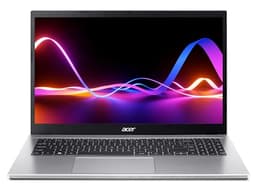
The Acer Aspire 17 represents the best balance of screen real estate and processing power for CAD work under £1000. The 17.3-inch FHD display delivers the workspace needed for detailed technical drawings and 3D model manipulation, whilst the Intel Core i5-1334U processor and 16GB RAM handle moderate CAD tasks without stuttering. This generation of i5 processors includes the Intel Iris Xe integrated graphics, which provides noticeable acceleration for viewport rendering compared to older Celeron or basic UHD options. The 512GB SSD ensures fast project loading and model storage. At 2.6 kg, it remains reasonably portable for site visits or client meetings.
Acer's build quality in the Aspire line is solid, with a traditional clamshell hinge and full-sized keyboard that CAD users appreciate for extended work sessions. The display panel is not calibrated to professional standards, but the 1920 × 1080 resolution gives enough clarity for inspecting fine details in drawings. Cooling is adequate under sustained load, though fan noise becomes noticeable during heavy rendering. Battery life sits around 6 to 7 hours in light usage, dropping to 3 to 4 hours under CAD workloads. Connectivity includes USB 3.1, HDMI, and dual-band WiFi, allowing you to connect external displays or mice without struggle.
This machine suits freelance CAD operators, engineering students, and small design consultancies that need a general-purpose workhorse. It will handle AutoCAD, FreeCAD, and SketchUp projects of reasonable complexity. Heavier 3D rendering in Revit or complex assemblies in SOLIDWORKS will show slowdowns, but for learning CAD or managing lightweight projects, the Aspire 17 delivers excellent value. The large screen is the real differentiator for CAD: sketch visibility and viewport comfort matter far more on a budget than raw GPU muscle.
Pros
- 17.3-inch display ideal for CAD workspace and drawing clarity
- Intel Iris Xe graphics accelerates basic 3D rendering tasks
- 16GB RAM and 512GB SSD handle typical project files smoothly
- Solid build quality and responsive full-sized keyboard for extended work
Cons
- No dedicated graphics limits performance in complex SOLIDWORKS or Revit assemblies
- Fan noise audible during sustained CAD operations
The Acer Aspire Go 15 AG15-42P stands out as best value for CAD users who prioritise processing power over screen size. The AMD Ryzen 5 5625U is a compelling choice: it delivers six cores and strong multi-threaded performance, making it more responsive than Intel Celeron or entry-level i5 chips when opening large assemblies or running background renders. Paired with 16GB RAM and 512GB SSD, this configuration handles AutoCAD, FreeCAD, and SketchUp without lag. The integrated Radeon Graphics are marginally better than Intel UHD for 3D acceleration. At under £400, this laptop offers exceptional value for cash-strapped teams or students.
The 15.6-inch FHD display is compact compared to the Aspire 17, but the Ryzen processor's responsiveness partly compensates. Acer's chassis is lightweight at 1.9 kg, making this a genuinely portable option for site engineers or architects who move between jobs. Keyboard and trackpad are functional rather than premium, but adequate for daily CAD work. Battery longevity is respectable, around 6 to 8 hours in light use. The machine runs cool and quiet during typical CAD operations, only ramping fans during intensive rendering.
Choose this model if your CAD projects are moderate in complexity and you value portability and processor speed over screen real estate. Freelancers and consultants working with clients on-site will appreciate the weight and balanced performance. It is not a gaming laptop, so do not expect to run complex Revit or 3D photorealistic rendering, but for technical drawing and model manipulation in most mainstream CAD packages, it excels at this price. The Ryzen 5 architecture is also known for longevity: this machine will remain capable for 4 to 5 years of steady work.
Pros
- Six-core Ryzen 5 processor beats single-core i5 chips at lower cost
- 16GB RAM and SSD standard at this price point
- Lightweight and portable design suits site-based CAD work
- Cool, quiet operation during typical engineering tasks
Cons
- 15.6-inch display cramped for detailed drawing inspection versus 17-inch models
- No dedicated GPU limits complex photorealistic rendering or large assemblies
3. Acer Aspire Go 15 AG15-71P
The Intel Core i5-13420H variant of the Aspire Go 15 positions itself as a performance-focused option within the sub-£500 bracket. The i5-13420H is a 12th-generation mobile processor with performance and efficiency cores, delivering stronger single-threaded response than the Ryzen 5 5625U at the cost of slightly higher power draw. This translates to snappier viewport panning and faster command execution in CAD applications. The 8GB RAM is the compromise: adequate for light to moderate projects, but users frequently switching between large assemblies or reference files may hit memory limits.
The 512GB SSD offsets the RAM constraint somewhat, providing fast asset loading and project saves. Intel UHD Graphics are standard integrated fare, not meaningfully different from older generations. At 1.9 kg and 15.6 inches, the form factor is identical to the Ryzen variant, making this a choice between processor generations rather than overall design. Thermal management is competent, and the display achieves 1920 × 1080 clarity. Keyboard and connectivity mirror the other Aspire Go models.
This laptop appeals to users who can work within the 8GB RAM constraint and value Intel's processor generation advantage. If your CAD workflow is lightweight and you rarely keep multiple projects open, this is a solid, responsive choice. The i5-13420H is newer silicon than the Ryzen 5625U found in the AG15-42P, so expect minor performance gains in CPU-bound rendering. However, the RAM ceiling is a real limitation if you frequently manipulate large files or run analysis tasks. Consider the AG15-42P if you anticipate memory pressure; choose this model if you work with smaller assemblies and want modern processor architecture at a lower price.
Pros
- Intel Core i5-13420H offers snappier single-threaded performance and newer architecture
- Lightweight and portable design suitable for mobile CAD work
- Fast SSD and integrated graphics adequate for moderate projects
Cons
- 8GB RAM may cause slowdowns when working with large assemblies or multiple files
- Upgrading RAM typically voids warranty on budget Acer models
The ACEMAGIC 18.5-inch laptop offers the largest display in this sub-£1000 guide, making it attractive for users prioritising screen workspace for technical drawing and 3D viewport clarity. The 18.5-inch FHD panel is noticeably roomier than 15.6-inch competitors, reducing the need for external monitors or window management complexity. However, the Intel Celeron N150 processor is entry-level and will struggle with CPU-intensive CAD tasks. This machine is best suited to users whose projects are simple, 2D-centric, or who plan to pair it with a docked setup and external GPU.
The 16GB RAM and 512GB SSD are positive surprises at this price point, offering storage and memory that exceed the processor's capacity to use them effectively. The Celeron N150 is fanless or near-silent, making this a quiet machine for office environments. Portability at 2.8 kg is reasonable, though the large bezel and screen add bulk. Battery life ranges from 5 to 7 hours in light use. Connectivity includes USB ports and HDMI, though the single USB-C slot is limiting if you require multiple peripherals.
This laptop is a niche pick. It suits architects and designers whose CAD work is primarily 2D (blueprints, schematics, layouts) and who value display area over raw processing power. Students learning CAD in a lab setting, where a stationary workstation is acceptable, will appreciate the large, crisp display. The weak processor means do not attempt heavy 3D modelling, FEA analysis, or rendering: the experience will frustrate. For lightweight technical drawing and plan review, the extra screen space is genuinely valuable and hard to find below £500.
Pros
- 18.5-inch FHD display is largest in this price range, ideal for detailed drawing work
- 16GB RAM and 512GB SSD exceed typical expectations at this cost
- Quiet operation thanks to low-power Celeron processor
Cons
- Intel Celeron N150 processor severely limits 3D CAD and rendering capability
- Larger, heavier chassis reduces portability versus 15-inch models
The Acer Aspire 3 A315-44P is a balanced, no-nonsense CAD machine that delivers solid performance across the board without premium pricing. The AMD Ryzen 5 5500U processor is proven silicon, now in its fifth generation of wide deployment, meaning compatibility and driver stability are assured. Combined with 16GB RAM and a 512GB SSD, this configuration is genuinely capable: it will run AutoCAD, FreeCAD, and intermediate SketchUp projects without noticeable lag. The Radeon Graphics unit integrated in the Ryzen 5 provides reasonable 3D acceleration, enough for smooth viewport rotation and basic shading in most CAD tools.
The 15.6-inch FHD display is standard for the class, offering clear detail without the weight penalty of larger models. Build quality is functional: the Aspire 3 uses a durable plastic chassis and responsive hinge mechanism rated for typical daily use. Keyboard travel is acceptable for extended work sessions, and the trackpad is reasonably precise. Thermal management is quiet and effective, with fan noise only apparent during sustained rendering or heavy CPU load. Battery life is respectable at 6 to 8 hours in light use, dropping to 4 to 5 hours under CAD workloads.
This model represents excellent value for semi-professional CAD work and team environments where multiple machines must be budgeted. The Ryzen 5 5500U's proven track record means fewer driver headaches than newer, less widely tested processors. If you need a no-surprises laptop that handles mainstream CAD tasks reliably, the Aspire 3 is a sensible choice. It is not the fastest or most portable, but the combination of processing power, RAM, storage, and price is hard to beat. Suitable for design consultancies, educational institutions, and independent CAD operators who need dependable hardware.
Pros
- Ryzen 5 5500U is proven, mature processor with excellent driver support
- 16GB RAM and 512GB SSD handle typical CAD projects smoothly
- Balanced thermal design: quiet and cool during moderate work sessions
- Excellent value for semi-professional CAD teams and consultancies
Cons
- No dedicated graphics limits performance on heavy 3D rendering or large assemblies
- 15.6-inch display is smaller than specialist CAD laptops, requiring external monitors for detail work
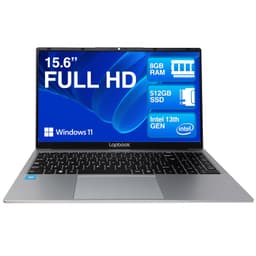
The Lapbook 15.6-inch laptop is an ultra-budget option priced at under £300, making it the cheapest entry point in this guide. The Intel Celeron processor and 8GB RAM are base-tier specifications, suitable only for learning CAD or handling very lightweight 2D drawing tasks. The 512GB SSD is practical for storing project files without constantly deleting to free space. The 15.6-inch FHD display provides adequate clarity for basic technical drawing inspection. Connectivity is straightforward: USB ports, HDMI, and WiFi 6 support.
This machine targets students exploring CAD for the first time or hobbyists unwilling to commit significant capital to tools that might be used rarely. Do not purchase the Lapbook expecting to run Revit, complex SOLIDWORKS assemblies, or real-time rendering. The processor and RAM will bottleneck immediately. However, for learning FreeCAD, drafting simple mechanical designs, or reviewing client blueprints, the Lapbook is functional. It is also light and portable, suitable for carrying between college and home.
The verdict is straightforward: buy this only if your CAD needs are minimal and your budget is severely constrained. The processor cannot be upgraded, and the machine will feel slow within months if your ambitions grow beyond basic sketching. All other laptops in this guide offer better long-term value. That said, for a tinkerer or student risking money on an unknown interest, the Lapbook is a low-risk introduction to CAD on a laptop.
Pros
- Extremely affordable entry point for students or hobbyists exploring CAD
- 512GB SSD provides decent storage for learning projects
- Lightweight and portable for carrying between locations
Cons
- Celeron processor cannot handle anything beyond basic 2D CAD or lightweight sketching
- 8GB RAM creates bottlenecks when working with larger files or reference materials
Buying Guide
Selecting a CAD laptop under £1000 requires balancing screen size, processing power, and portability. Begin by honestly assessing your CAD scope. If your work is primarily 2D technical drawing, blueprinting, or plan review, a modest processor and 8GB RAM suffice. If you manipulate 3D models, assemblies, or complex architectural designs, target 16GB RAM and a six-core processor minimum. Entry-level Celeron and Pentium chips are false economy: avoid them unless your budget is under £250 and your ambitions are purely exploratory.
Processor choice matters enormously. AMD Ryzen 5 5000-series and Intel Core i5 10th-generation or newer are proven, reliable options with excellent driver support and stable thermals. Newer Ryzen 5 7000-series and Intel Core i5 12th-generation and later chips offer modest performance gains, typically 5 to 15 per cent, but cost more. For CAD, a proven older processor beats unproven newer silicon. Integrated graphics (Intel Iris Xe or AMD Radeon) are adequate for viewport rotation and basic shading; dedicated GPUs are overkill at this price and add unnecessary weight and heat.
Screen size is a real trade-off. A 17.3-inch display offers genuine workspace advantage for detailed drawing inspection, but adds weight and bulk. The Acer Aspire 17 at 2.6 kg remains portable enough for most users. If you are constantly on-site or moving between offices, a 15.6-inch machine is more practical. Many CAD professionals pair a 15-inch laptop with a portable external monitor, gaining the best of both worlds: portability plus drawing space. Budget around £100 to £150 for a decent portable monitor if workspace is critical.
Storage and RAM cannot be easily upgraded on budget laptops, so choose wisely at purchase. 512GB is minimum; 256GB is cramped and will force deletion of older projects. 16GB RAM is ideal; 8GB is workable for lightweight projects but frustrating as your skills and project complexity grow. SSD type matters less at this level: any modern NVME SSD offers fast boot and project loading.
Finally, consider the ecosystem. Windows laptops dominate CAD software availability, though FreeCAD and some other tools run on macOS and Linux. If you use specific proprietary CAD packages, verify compatibility before purchase. Look for machines with multiple USB ports, HDMI output, and reliable WiFi for office or site connectivity. Build quality and warranty matter: Acer machines typically include 1-year standard warranty and are easily serviced. Budget brands may offer limited support. Invest in a decent external mouse and keyboard: they transform the CAD experience and cost little.
The Acer Aspire 17 A17-51M is the best overall CAD laptop under £1000, combining a spacious 17.3-inch display with balanced processing power, 16GB RAM, and proven Acer build quality. The large screen is a genuine asset for technical drawing and 3D viewport visibility, reducing eye strain and enabling detailed inspection without external monitors. The Intel Core i5-1334U with Iris Xe graphics handles moderate CAD projects smoothly, and the 512GB SSD ensures fast project access. At under £600, it delivers exceptional value for freelancers, design teams, and CAD students who need a primary workstation rather than a secondary portable machine.
If portability and budget are paramount, the Acer Aspire Go 15 AG15-42P is best value, offering six-core Ryzen 5 performance, 16GB RAM, and 512GB SSD for under £400. The 15.6-inch screen is compact, but the processor's responsiveness and the machine's lightweight design make it ideal for site-based engineers and consultants. Spend the savings on a portable monitor or external desktop setup if workspace becomes limiting.
Both machines will serve serious CAD users for 4 to 5 years, handling AutoCAD, FreeCAD, and SketchUp without compromise. Avoid ultra-cheap Celeron options unless your CAD ambitions are purely exploratory. The difference between a £300 Celeron machine and a £400 Ryzen 5 machine is transformative in actual use, justifying the modest additional investment. CAD is demanding software; give it hardware it can handle, and you will enjoy years of productive, frustration-free work.