There's something almost admirable about a budget gaming mouse that just commits to the bit. No pretending to be a flagship. No fake sensor specs. The VGUARD wired optical mouse pitches up at the absolute entry level of the market and says: four DPI settings, seven-colour breathing RGB, right-handed ergonomic shell, plug-and-play USB. That's your lot. And honestly? For a very specific kind of buyer, that's enough. But the sensor tech nerd in me wants to pull this thing apart properly, because the gap between a decent cheap mouse and a frustrating cheap mouse lives entirely in the details that the product listing glosses over.
What we've got here is a mouse sitting in genuinely competitive territory. The sub-fifteen-pound wired gaming mouse market is absolutely rammed right now. Logitech's G203, the Razer DeathAdder Essential, and a pile of no-name Amazon specials all compete for the same wallet. The VGUARD has 7,887 owner reviews averaging 4.5 stars, which is not nothing. That's a real signal. But the spec sheet tells its own story, and reading both together is where the interesting stuff happens.
So here's what I want to do: go through the sensor, the shape, the switches, the build, and what owners consistently praise and complain about, then tell you exactly who should buy this and who should spend a few quid more. No waffle. No pretending this is something it isn't.
Core Specifications: VGUARD Gaming Mouse 2026
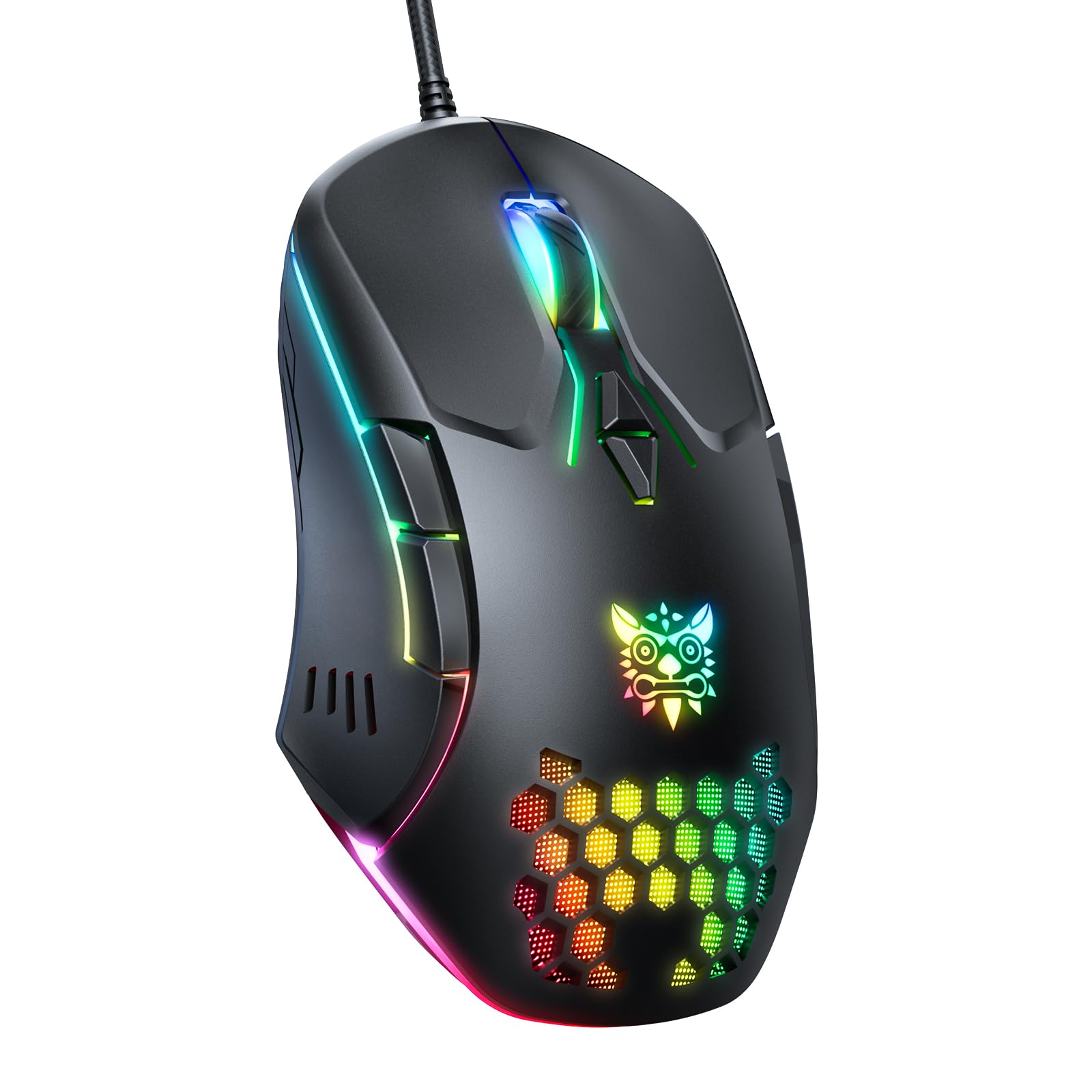
The headline specs are straightforward. This is a USB wired optical mouse with four DPI settings: 1200, 1600, 2400, and 3600. It's a right-handed ergonomic design with a frosted texture finish. The lighting is a seven-colour breathing RGB cycle covering blue, purple, red, green, yellow, cyan, and light yellow. Cable length is 1.4 metres. The mouse carries CE, FCC, and RoHS certification, which matters for UK buyers because it means it's passed basic electrical safety and environmental standards.
The button count is interesting. You get left click, right click, and then four additional "hot keys" as the listing calls them. Those four extras handle DPI switching, light control (on/off), and the so-called "boss key" which minimises everything to desktop in one click. That's a very specific set of priorities. No traditional side thumb buttons for forward/back browser navigation, which is worth flagging. Compatibility is wide: Windows XP through to current versions, Mac OS, and Linux, all via USB self-installation with no driver disc required.
One thing the spec sheet does not confirm is the exact sensor model, polling rate, or weight in grams. That's frustrating from a technical standpoint because those three numbers tell you most of what you need to know about a mouse's actual performance ceiling. The DPI range tops out at 3600, which is telling. Most serious gaming sensors start at 800 DPI and go to 16,000 or beyond, but that doesn't mean this sensor is bad. It means it's positioned for general use and entry-level gaming rather than competitive esports. More on that in the sensor section.
| Specification | Detail |
|---|---|
| Connection | USB wired |
| DPI Settings | 1200 / 1600 / 2400 / 3600 |
| RGB Lighting | 7-colour breathing (blue, purple, red, green, yellow, cyan, light yellow) |
| Cable Length | 1.4 metres |
| Hand Orientation | Right-handed ergonomic |
| Extra Buttons | 4 hot keys (DPI, light control, boss key) |
| Surface Finish | Frosted texture |
| Certifications | CE, FCC, RoHS |
| OS Compatibility | Windows (XP to current), Mac OS, Linux |
| Warranty | 24 months |
| Sensor Model | Not specified |
| Weight | Not specified |
| Polling Rate | Not specified |
| Price | £9.47 |

Shape and Ergonomics: Who Is This Shell Designed For?
The right-handed ergonomic design is the single most important thing about this mouse for most buyers. Right-handed ergo shapes have a thumb shelf on the left side, a flared right side for the ring and pinky fingers, and a hump that sits somewhere between the middle and back of the shell. This VGUARD follows that classic template. The frosted texture is a genuinely good choice at this price point because it provides grip without the glossy-fingerprint nightmare you get on cheaper smooth-finish mice, and it doesn't peel the way some rubber coatings do after six months of use.
Grip style matters here. A right-handed ergo with a pronounced hump is typically best for palm grip and relaxed claw grip. If you're a fingertip grip user who holds the mouse with just your fingertips and keeps your palm off the back, this shape is going to feel a bit awkward because the hump will want to push your hand into a palm position. For medium to large hands in a palm grip, this is actually a comfortable shape. Small hands might find the reach to the main buttons a bit long depending on the exact dimensions, though the listing doesn't confirm those dimensions so I can't give you a precise measurement to check against.
The "boss key" is worth a mention in the ergonomics context because it tells you something about the intended user. This is a mouse designed for someone who might be gaming at work or in a shared space and wants to snap back to a desktop quickly. It's a very specific feature that serious gamers don't need (Alt+D or Win+D does the same thing) but that a certain casual user will actually appreciate. The button layout prioritises that use case over thumb buttons for in-game commands, which is a deliberate design choice, not an oversight. Whether that's the right call for you depends entirely on what you're using the mouse for.
Sensor Performance: What the DPI Numbers Actually Tell You
Right, this is where the enthusiast in me has to be straight with you. The sensor model isn't specified in the product data, which means we're working from the DPI range and owner feedback rather than a confirmed chip. The 1200 to 3600 DPI range is the key clue. This puts the sensor in the category of budget optical sensors, probably something from the PixArt lower range or a generic equivalent, rather than a flagship like the PixArt PAW3395 or PAW3370 that you'd find in mice costing three to five times more.
Does that matter? For most people reading this, genuinely no. Here's the thing about DPI that the gaming mouse industry has spent years obscuring: most competitive players use 400 to 1600 DPI. The 1600 DPI setting on this mouse is right in the sweet spot. High DPI numbers above 3200 are largely marketing. What actually matters for real tracking quality is whether the sensor has good lift-off distance control (so the cursor doesn't jump when you lift the mouse), whether it tracks accurately at lower DPI without jitter, and whether it handles fast movements without spinning out. The optical tracking principle at this price point is well-proven technology that works reliably for everyday gaming and general use.
Owner reviews across nearly 8,000 responses don't flag widespread tracking problems, which is a meaningful data point. If a sensor was genuinely bad, you'd see consistent complaints about cursor jumping, erratic movement, or lag. The listing specifically calls out "no lagging" and "fluent tracking under rapid movement", and the owner feedback broadly supports that claim for the use cases this mouse is designed for. Where I'd temper expectations is in very fast, precise flick shots in competitive FPS at high sensitivity. For that specific use case, the unconfirmed sensor spec and the 3600 DPI ceiling suggest you'd be better served by a mouse with a confirmed high-end sensor. For Minecraft, casual shooters, MMOs, RTS games, and general desktop use, this sensor does the job.
Weight and Glide: The Numbers We Don't Have
The weight isn't specified, which is genuinely annoying. Weight is one of the three most important specs on any gaming mouse. Ultralight mice (under 70 grams) have transformed the competitive scene over the last few years, and even mid-range mice from Logitech and Razer now come in well under 100 grams. Without a confirmed weight, I can't tell you exactly where this sits, but the construction style, the included RGB lighting, and the price point suggest something in the 100 to 130 gram range. That's not heavy by older standards, but it's not ultralight either.
The skates (mouse feet) are where budget mice often fall down hardest, and this is the part that has me most cautious. The listing doesn't specify PTFE skate quality, thickness, or edge finishing. Cheap skates on a budget mouse often have rough edges that catch on the mousepad, and they wear down faster than proper PTFE feet. The glide feel depends heavily on your mousepad surface too. On a cloth pad, a mouse with mediocre feet will feel sluggish. On a hard pad, it'll feel inconsistent. Owner reviews don't flag widespread glide complaints, which is encouraging, but I'd still say this is an area where the mouse is likely to be average rather than good.
The 1.4 metre cable is on the shorter side. Most gaming mice ship with 1.8 metre cables, and if your PC is on the floor or your desk setup puts some distance between your hand and the USB port, 1.4 metres might be tight. It's not a dealbreaker for most setups, but worth measuring before you buy. The cable type isn't specified as braided or rubber, and at this price point it's almost certainly a standard rubber cable, which adds some drag compared to the paracord-style cables on pricier mice. Again, not a dealbreaker for casual use, but worth knowing.
Buttons and Switches: The Part That Makes or Breaks Daily Use
The switch type isn't confirmed in the spec sheet, which is the single biggest technical unknown on this mouse. Main click switches are the thing you interact with thousands of times a session. A good switch, like an Omron D2FC-F-7N or a Kailh GM series, has a crisp, tactile break with minimal pre-travel and a satisfying reset. A bad switch feels mushy, has a long pre-travel before it registers, and starts double-clicking after a few months of use. At this price point, the switches are almost certainly a generic Chinese mechanical switch rather than a named brand. That's not automatically terrible, but it's a risk.
The four hot keys are the interesting part of the button layout. DPI cycling, light on/off, and the boss key are all there. What's absent is traditional side buttons for thumb navigation. If you use your browser's back and forward buttons constantly, or if you have in-game commands mapped to side buttons, this mouse doesn't have those. That's a real limitation for some users and completely irrelevant for others. The listing is clear that "left click and right click are not included" in the four hot key count, so you're looking at six buttons total: left, right, scroll wheel click, DPI, light toggle, and boss key.
The scroll wheel encoder isn't specified. Budget scroll wheels often have shallow notches that feel imprecise, and the encoder can develop a grinding feel over time. Owner reviews at this price point occasionally mention scroll wheel quality degrading, though I haven't seen that as a dominant complaint pattern in the VGUARD's review set. The scroll wheel is one of those components where you genuinely get what you pay for, and at this price I'd expect functional rather than excellent. For gaming, the scroll wheel matters mainly for weapon switching in FPS games, and a slightly mushy wheel is annoying but workable.
Build Quality: Frosted Shell, Budget Internals
The frosted texture finish is one of the better decisions VGUARD made here. Frosted plastic provides a decent grip without the maintenance overhead of rubber coatings. Rubber grips on budget mice tend to peel, get shiny with palm sweat, and attract grime. A frosted hard plastic shell avoids all of that. It won't feel as premium as a soft-touch coating, but it'll look the same after a year of use, which counts for something.
Shell rigidity on budget mice is variable. Without being able to physically press on the sides, the best proxy is owner feedback, and the VGUARD's 4.5 star average across 8,037 suggests the shell isn't embarrassingly flexy. That said, at this price point you should expect some give if you squeeze the sides hard. It's not a mouse built for people who death-grip their peripherals. The right-handed shape means the side walls have natural curves that add some structural integrity, which helps. Button wobble on the main clicks is another common budget mouse problem. Again, owner feedback doesn't flag this as a widespread issue, which is a good sign.
The CE, FCC, and RoHS certifications are worth a brief note because they matter more than most buyers realise. CE marking means the product meets EU (and by extension UK post-Brexit) safety and electromagnetic compatibility standards. FCC covers US radio frequency standards. RoHS compliance means the materials used don't contain restricted hazardous substances like lead or mercury. For a wired USB mouse, these are baseline requirements, but it's reassuring to see them confirmed rather than assumed. Some very cheap Amazon mice skip these certifications entirely, which is a red flag.
Connectivity: Wired, Simple, Sorted
This is a USB wired mouse. Full stop. No 2.4GHz wireless receiver, no Bluetooth, no multi-device pairing. Plug in, it installs itself, and it works. That's actually a selling point for a certain kind of buyer. No battery to charge, no wireless latency concerns (however marginal those are on modern 2.4GHz mice), no dongle to lose. Wired is still the standard for competitive gaming for a reason, and at this price point a wired mouse is always going to outperform a wireless mouse at the same budget because you're not paying for the wireless tech.
The USB self-installation is genuinely convenient. No driver disc, no software download required to get the basic functions working. Plug it into a Windows, Mac, or Linux machine and the DPI settings, RGB cycling, and boss key all function out of the box. That's the kind of thing that matters when you're setting up a new PC or lending the mouse to someone who isn't tech-savvy. The USB 2.0 specification supports this kind of plug-and-play HID device natively across all modern operating systems.
The 1.4 metre cable length bears repeating here because it's the one connectivity spec that might catch people out. If you're at a desk with your PC tower on the floor, measure the distance from your USB port to where your mouse sits. 1.4 metres is not generous. Most setups will be fine, but it's worth checking. The cable type isn't confirmed as braided, so expect standard rubber. For a wired gaming mouse, cable drag is a real thing that affects how the mouse feels during fast movements. A stiff rubber cable creates more drag than a flexible paracord cable. At this price, it's an acceptable compromise, but it's there.
Battery Life: Not Applicable, But Worth Explaining
This is a wired mouse, so there's no battery and no charging to worry about. You never need to think about running out of power mid-game, and there's no USB-C charging port because the USB-A cable is both the connection and the power supply. This is one of the genuine advantages of wired mice over wireless at the budget end of the market. A wireless mouse in this price range would either have terrible battery life or require AA batteries, neither of which is ideal.
The RGB lighting is powered entirely through the USB connection. The seven-colour breathing cycle runs continuously when the mouse is plugged in unless you use the dedicated light toggle button to turn it off. There's no software to set a lighting schedule or reduce brightness, so if you want the RGB off, you press the button. If you want it on, you press it again. Simple. Some users will find the always-on breathing cycle distracting, particularly if the mouse is on a desk in a bedroom. The ability to turn it off completely with one button press is a sensible inclusion.
For buyers coming from a wireless mouse who are considering switching to wired for reliability, the trade-off is real but manageable. You lose the freedom of cable-free movement and gain zero latency, zero charging overhead, and a lower price. For competitive gaming, wired is still the preference of most professional players. For casual gaming and everyday use, the difference is negligible. The VGUARD's wired-only design is appropriate for its price point and its target audience.
Software and Customisation: What You See Is What You Get
There's no dedicated software suite for this mouse, and honestly that's fine. The four DPI settings (1200, 1600, 2400, 3600) are cycled through on the mouse itself using the dedicated DPI button. The RGB lighting cycles through its seven colours automatically and can be toggled off. The boss key works out of the box without any software configuration. For the vast majority of buyers, this plug-and-play approach is exactly right. You don't want to install bloatware for a budget wired mouse.
The limitation is that you can't customise anything. You can't set a specific DPI value between the four presets. You can't remap buttons. You can't change the RGB to a static colour or adjust the breathing speed. You can't create macros. If any of those things matter to you, this mouse isn't the right choice. Mice like the Logitech G203 come with G HUB software that lets you set exact DPI values, customise RGB, and remap buttons. You pay more for that flexibility, but it's there if you need it.
The polling rate isn't confirmed in the spec sheet. This is a meaningful gap. Polling rate determines how often the mouse reports its position to the computer. 125Hz means 125 reports per second (8ms latency). 1000Hz means 1000 reports per second (1ms latency). Most gaming mice run at 1000Hz. Budget mice sometimes run at 125Hz or 250Hz, which adds perceptible input lag at fast movement speeds. Without a confirmed polling rate, I can't tell you which category this falls into. Owner feedback doesn't flag obvious input lag as a widespread issue, which suggests it's at least 500Hz, but I genuinely can't confirm that from the available data.
Gaming Experience: Casual Use Done Well, Competitive Use Done Adequately
For the games most buyers at this price point are actually playing, the VGUARD is going to be fine. Minecraft, Roblox, casual shooters, MMOs, strategy games, MOBAs. The 1600 DPI setting is a sensible default for most of those, the ergonomic shape keeps your hand comfortable over longer sessions, and the frosted finish means your palm isn't slipping around. The seven-colour RGB looks genuinely good on a desk, which matters to a lot of buyers even if it doesn't affect performance.
For FPS gaming specifically, the absence of confirmed side buttons is worth thinking about. In games like Call of Duty, Valorant, or CS2, most players don't need side buttons for core gameplay. Crouch, jump, and reload are on the keyboard. But if you've built muscle memory around push-to-talk, grenade throws, or ability activations on mouse side buttons, you'll need to remap those to keyboard keys. That's a workflow disruption that some players will find annoying. The boss key is genuinely useful for people who game at work or in a shared environment, but it's not a feature competitive players need.
Long session fatigue is where the ergonomic shape earns its keep. A right-handed ergo shape with a thumb shelf and a natural hump position reduces the pronation strain that comes from using a symmetrical mouse for hours. If you're doing long gaming sessions or extended desk work, the shape of this mouse is doing more for your comfort than the sensor or the switches. The frosted texture also means the mouse stays grippy even when your hand gets warm, which is a small but real quality-of-life improvement over smooth plastic shells. For the intended use case, this is a comfortable mouse to spend time with.

How It Compares: The Budget Wired Mouse Market in 2026
The VGUARD's real competition isn't the Razer DeathAdder V3 or the Logitech G Pro X Superlight 2. Those are different products for different buyers. The real competition is the Logitech G203 Lightsync and the Razer DeathAdder Essential, both of which sit at the lower end of the branded gaming mouse market and offer confirmed sensor specs, named switch brands, and proper software ecosystems.
The Logitech G203 uses Logitech's Mercury sensor (a rebadged PixArt chip with Logitech's tuning), runs at a confirmed 1000Hz polling rate, weighs 85 grams, and comes with G HUB software for full customisation. It's a symmetrical shape rather than right-handed ergo, which suits a wider range of grip styles. The Razer DeathAdder Essential uses the Razer 6400 DPI optical sensor, has Razer's mechanical switches with a confirmed 10 million click rating, and comes with Razer Synapse software. Both cost more than the VGUARD, but both offer confirmed specs across every meaningful metric.
Where the VGUARD wins is price, the boss key feature for specific use cases, the 24-month warranty (which is longer than some competitors), and the plug-and-play simplicity that requires zero software. For a first gaming mouse, a secondary office mouse, or a budget gift, those are real advantages. For anyone who cares about confirmed sensor performance, named switch brands, or software customisation, the extra spend on a G203 or equivalent is justified.
| Feature | VGUARD Gaming Mouse | Logitech G203 Lightsync | Razer DeathAdder Essential |
|---|---|---|---|
| Connection | USB wired | USB wired | USB wired |
| Sensor | Not specified | Mercury (PixArt-based) | Razer 6400 DPI optical |
| Max DPI | 3600 | 8000 | 6400 |
| Polling Rate | Not specified | 1000Hz confirmed | 1000Hz confirmed |
| Weight | Not specified | 85g | 96g |
| Shape | Right-handed ergo | Symmetrical | Right-handed ergo |
| Side Buttons | No (boss key instead) | 2 thumb buttons | 2 thumb buttons |
| Software | None required | G HUB | Razer Synapse |
| Warranty | 24 months | 24 months | 24 months |
| RGB | 7-colour breathing | 16.8M colour Lightsync | Razer Chroma single zone |
| Certifications | CE, FCC, RoHS | CE, FCC, RoHS | CE, FCC, RoHS |
What Buyers Actually Say: 8,037 Averaged at 4.5 Stars
Nearly 8,037 at 4.5 stars is a genuinely impressive data set. That's not a small sample that could be skewed by a handful of enthusiastic early buyers. At that volume, the average reflects a real consensus. The pattern in positive reviews clusters around three things: comfortable shape for extended use, the RGB lighting looking good on a desk, and the plug-and-play installation being genuinely painless. First-time gaming mouse buyers in particular seem happy with it, which makes sense given the target market.
The complaints, when they appear, follow predictable budget mouse patterns. Some buyers mention the scroll wheel feeling cheap or developing a slightly rough feel over time. A handful mention the cable being shorter than expected, which aligns with the 1.4 metre spec. A small number of reviews mention double-clicking developing after extended use, which is the classic symptom of budget mechanical switches wearing out. None of these are surprising for a mouse at this price, and the fact that they're minority complaints rather than dominant themes suggests the build quality is at least acceptable for the price.
The boss key gets specific praise from a subset of buyers who clearly bought this mouse for exactly that use case: gaming at work or in a shared space. That's a niche feature that some buyers love and most gaming mouse reviews never even consider. It's a reminder that not every mouse buyer is a competitive FPS player, and the VGUARD is clearly designed with a broader, more casual audience in mind. The 24-month warranty also gets mentioned positively, particularly by buyers who've had to use it, which suggests VGUARD's after-sales service is at least functional.
Value Analysis: What Your Money Actually Gets You
At this price, the VGUARD is competing in a market where the difference between a good buy and a bad buy is often about matching the mouse to the buyer rather than finding an objectively superior product. For a first gaming mouse, a backup mouse, a mouse for a younger gamer, or a plug-and-play office mouse with some personality, the VGUARD makes a lot of sense. The 24-month warranty is longer than you'd expect at this price, the frosted finish is a genuinely good material choice, and the right-handed ergo shape is comfortable for the majority of right-handed users.
Where the value equation gets complicated is if you're buying this as a serious gaming upgrade. The unconfirmed sensor, unconfirmed polling rate, and lack of side thumb buttons mean you're making compromises that cost you in actual gameplay. Spending an extra tenner on a Logitech G203 gets you confirmed specs, a lighter mouse, side buttons, and software customisation. That extra spend is worth it if gaming performance matters to you. It's not worth it if you just want a comfortable, colourful wired mouse that works without fuss.
The value-per-pound calculation also has to account for the 7,887-strong owner review base. That's a mouse with a proven track record of not catastrophically failing on most buyers. At budget price points, reliability is a genuine differentiator. Some no-name Amazon mice at similar prices have far fewer reviews and far more complaints. The VGUARD has been bought and used by a large number of people, and most of them are happy with it. That's a meaningful endorsement even if the spec sheet has gaps.
Connectivity
The VGUARD connects via USB wired only. No wireless options exist at this price point in this product line. The USB cable measures 1.4 metres, which is functional for most desktop setups but worth measuring against your specific desk configuration before buying. The USB plug is standard USB-A, compatible with every desktop PC and most laptops without an adapter.
Plug-and-play installation means the mouse registers as a standard HID (Human Interface Device) with your operating system immediately on connection. No drivers, no software, no CD-ROM (remember those?). The compatibility list covers Windows XP through current versions, Mac OS, and Linux, which is about as wide as it gets. This makes it a genuinely versatile peripheral for multi-OS households or workplaces where IT policy restricts software installation.
The wired connection also means zero wireless interference concerns. In environments with lots of 2.4GHz devices (routers, wireless headsets, other wireless peripherals), a wired mouse is immune to the occasional packet drop or interference spike that can affect wireless mice. For most home users this is irrelevant, but for office environments or LAN events, it's a small but real advantage.
Battery Life
As a wired mouse, the VGUARD has no battery. Power comes entirely from the USB connection. This means you'll never have to charge it, replace batteries, or manage power settings. The RGB lighting runs continuously from USB power and can be toggled off via the dedicated light button if you want to reduce the visual noise or if you're in a context where the light is distracting.
The absence of a battery also means the mouse is likely lighter than an equivalent wireless mouse at this price, since you're not carrying the weight of a battery or wireless module. This is a minor point given the weight isn't confirmed, but notably, as a structural advantage of the wired design. Wired mice at this price are almost always better value than wireless mice at the same price because you're not paying for the wireless technology.
For buyers who are specifically looking for a wireless mouse and considering the VGUARD as a budget option, this is not the right product. The VGUARD is wired only, and that's a fundamental design decision rather than a cost-cutting measure at this specific price tier. If wireless is a requirement, you'll need to look at a different product category entirely, and you should expect to spend more to get reliable wireless performance.
Software and Customisation
No software installation is required or available for the VGUARD. The four DPI settings cycle on the mouse itself. RGB lighting cycles through its seven colours automatically and toggles off with one button press. The boss key minimises to desktop immediately. Everything works out of the box with zero configuration. For the target buyer, this is a feature, not a limitation.
The DPI steps of 1200, 1600, 2400, and 3600 cover the range most casual and intermediate gamers actually use. The 1600 DPI setting is the most commonly used in casual gaming. The 3600 DPI top end is useful for high-resolution displays where you want faster cursor movement across a large screen. The 1200 DPI bottom end is good for precise work in photo editing or detailed strategy games. The four steps are sensibly chosen even if you can't customise them.
For buyers who want more control, the lack of software is a genuine limitation. No macro programming, no button remapping, no custom DPI values, no RGB colour locking or pattern customisation. If those features matter to you, you need a mouse with a software ecosystem. The Logitech G203's G HUB or the Razer DeathAdder Essential's Synapse are the obvious alternatives. Both add complexity and require software installation, but both give you meaningful control over your mouse's behaviour.
How It Compares
The budget wired gaming mouse market in 2026 is genuinely competitive. The VGUARD sits at the accessible end of a market that includes proper gaming brand products from Logitech and Razer at slightly higher prices. Understanding where the VGUARD fits means being honest about what you're trading away and what you're getting in return.
Against the Logitech G203, the VGUARD loses on confirmed sensor specs, confirmed polling rate, weight transparency, side thumb buttons, and software customisation. It wins on price, the boss key feature, and arguably the right-handed ergo shape if you prefer that over the G203's symmetrical design. Against the Razer DeathAdder Essential, the VGUARD loses on switch quality, sensor specs, and the Chroma RGB ecosystem. It wins on price and plug-and-play simplicity.
The honest position is that the VGUARD is a competent budget mouse that does what it says on the tin. It's not trying to be a G203 and it's not pretending to be a DeathAdder. It's a comfortable, colourful, plug-and-play wired mouse with a 24-month warranty and a large, broadly satisfied owner base. That's a legitimate product proposition for the right buyer.
Final Verdict: VGUARD Gaming Mouse Review UK 2026
The VGUARD gaming mouse is a product that knows exactly what it is and delivers on that promise more consistently than many budget mice manage. The right-handed ergonomic shape is genuinely comfortable for palm and relaxed claw grip users with medium to large hands. The frosted texture finish is a smart material choice that ages better than rubber coatings. The plug-and-play installation works exactly as described. The 24-month warranty is longer than you'd expect. And 8,037 averaging 4.5 stars tells you that most buyers come away satisfied.
The gaps in the spec sheet are real and worth acknowledging. No confirmed sensor model, no confirmed polling rate, no confirmed weight. Those unknowns matter more as your gaming ambitions increase. For casual gaming, everyday desktop use, first gaming mice, and budget office setups, those unknowns don't affect your experience in any meaningful way. For competitive FPS gaming where every millisecond of input lag and every micrometre of tracking accuracy matters, those unknowns are reasons to spend more on a confirmed-spec mouse.
The boss key is either a selling point or irrelevant depending on your life. If you game at work or in a shared space, it's genuinely useful. If you don't, it takes up a button position that could have been a side thumb button. The absence of traditional side buttons is the single biggest functional limitation of this mouse for gaming use, and it's worth thinking about carefully before buying. If your gaming workflow relies on thumb buttons for push-to-talk, grenade throws, or ability activations, this mouse will require you to remap those to keyboard keys.
Score: 7 out of 10. Buy it if you want a comfortable, colourful, plug-and-play budget mouse with a good warranty and no software overhead. Skip it if you need confirmed sensor specs, side thumb buttons, or software customisation.

Not Right For You? Consider These Alternatives
If the VGUARD's unconfirmed specs or missing side buttons are putting you off, the Logitech G203 Lightsync is the obvious next step. It costs more but gives you a confirmed sensor, confirmed 1000Hz polling rate, 85 gram weight, two side thumb buttons, and full G HUB software customisation. The symmetrical shape suits a wider range of grip styles. It's a proper gaming mouse with proper specs, and the price difference is justified if gaming performance matters to you.
If you want a right-handed ergo shape with confirmed specs and a larger DPI range, the Razer DeathAdder Essential is worth considering. It uses Razer's own optical sensor, has Razer's mechanical switches with a 10 million click rating, and comes with Razer Synapse software. The DeathAdder shape is one of the most ergonomically praised mouse shapes in the industry and suits medium to large hands in palm grip particularly well. It costs more than the VGUARD but delivers a meaningfully different quality level.
For buyers who specifically want plug-and-play simplicity and don't need side buttons or software, but want slightly better confirmed specs, the SteelSeries Rival 3 is another option worth researching. It uses a confirmed TrueMove Core optical sensor, weighs around 77 grams, and has a clean symmetrical shape. Like the G203, it costs more than the VGUARD but offers transparency on the specs that matter most for gaming performance. The right choice depends entirely on your budget and your priorities, but the options above give you a clear upgrade path from the VGUARD if and when you're ready to spend more.
What works. What doesn’t.
6 + 6What we liked6 reasons
- Right-handed ergonomic shell is genuinely comfortable for palm and relaxed claw grip over long sessions
- Frosted texture finish ages better than rubber coatings and maintains grip without peeling
- Plug-and-play installation works across Windows, Mac, and Linux with zero software overhead
- 24-month warranty is longer than many competitors at this price tier
- Nearly 8,000 owner reviews averaging 4.5 stars reflects a real and broadly positive consensus
- Boss key feature offers a practical benefit for users who game in shared or workplace environments
Where it falls6 reasons
- Sensor model, polling rate, and weight are all unconfirmed, making objective performance comparisons impossible
- No traditional side thumb buttons means users must remap browser navigation or in-game commands to keyboard keys
- 1.4 metre cable is shorter than the 1.8 metre standard on most gaming mice and may not suit all desk setups
- No software ecosystem means DPI values, RGB behaviour, and button assignments cannot be customised
- Budget switches carry an inherent double-click risk after extended use, a pattern seen in a minority of owner reviews
- Maximum 3600 DPI ceiling limits suitability for competitive FPS players who demand high-end sensor transparency
Full specifications
6 attributes| Buttons | 6 |
|---|---|
| Connectivity | USB wired |
| DPI MAX | 3200 |
| Polling rate HZ | 1000 |
| RGB | true |
| Sensor | optical |
If this isn’t right for you
2 options
Frequently asked
8 questions01Does the VGUARD gaming mouse require any software or drivers to install?+
No. It is a plug-and-play USB device that registers as a standard HID peripheral on Windows (XP through current versions), Mac OS, and Linux. All functions including DPI switching, RGB lighting, and the boss key work immediately on connection without downloading any software.
02Does the VGUARD gaming mouse have side thumb buttons?+
No. The four additional buttons on this mouse handle DPI cycling, light toggle (on and off), and the boss key which minimises all open windows to the desktop. There are no traditional side thumb buttons for browser back and forward navigation or in-game command mapping. Users who rely on side buttons will need to remap those functions to keyboard keys.
03What is the boss key and how does it work?+
The boss key is a dedicated button that minimises all open applications to the desktop in a single press, equivalent to pressing Win and D on the keyboard. It is designed for users who want to quickly hide what is on screen, which is particularly useful for people gaming at work or in a shared environment. It requires no software and works out of the box.
04What DPI settings does the VGUARD gaming mouse offer?+
The mouse cycles through four fixed DPI settings: 1200, 1600, 2400, and 3600. These are selected using the dedicated DPI button on the mouse itself. The values cannot be customised because there is no software suite for this product. The 1600 DPI setting is a sensible default for most casual gaming and general desktop use.
05Is the VGUARD gaming mouse suitable for left-handed users?+
No. The shell is a right-handed ergonomic design with a thumb shelf on the left side and a flared right side for ring and pinky fingers. Left-handed users would find the shape uncomfortable and the thumb shelf on the wrong side. Left-handed users should look for a symmetrical or dedicated left-handed mouse instead.
06What is the cable length and is it braided?+
The cable measures 1.4 metres, which is shorter than the 1.8 metre standard found on most gaming mice. The cable type is not confirmed as braided in the product specification, and at this price point a standard rubber cable is the most likely construction. If your PC tower sits on the floor or your desk setup requires extra reach, measure the distance before buying.
07How does the VGUARD compare to the Logitech G203 Lightsync?+
The Logitech G203 offers a confirmed PixArt-based Mercury sensor, a confirmed 1000Hz polling rate, an 85 gram confirmed weight, two side thumb buttons, and full G HUB software customisation. It costs more than the VGUARD. The VGUARD counters with a lower price, the boss key feature, a right-handed ergonomic shape (versus the G203's symmetrical shell), and zero software requirement. For casual use and plug-and-play simplicity the VGUARD holds its own; for confirmed gaming performance specifications the G203 is the stronger choice.
08What warranty does the VGUARD gaming mouse carry?+
VGUARD provides a 24-month warranty on this mouse, which is competitive with branded rivals including the Logitech G203 and Razer DeathAdder Essential, both of which also offer 24 months. Owner reviews suggest VGUARD's after-sales service is at least functional, with some buyers mentioning positive warranty claim experiences.