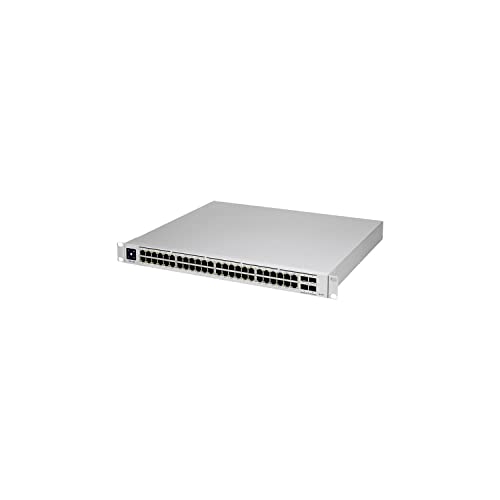
Ubiquiti USW-PRO-48-POE UniFi Gen2 48 Port PoE Gigabit Network Switch
£1,122.10 · Details
The choice we'd make. Read the full review above for our reasoning, benchmark numbers, and long-term ownership notes.

As an Amazon Associate we may earn from qualifying purchases. Our ranking stays independent.
48 ports with 40x PoE+ and 8x PoE++ covers a wide range of device types
One-year warranty is shorter than Cisco and some Netgear competitors
Four 10GbE SFP+ uplinks prevent the uplink becoming a bottleneck
The number on the box means nothing if the kit can't do the job. With managed switches, the job is simple to state and surprisingly hard to deliver at scale: move packets reliably, power your devices cleanly, and do it without becoming a maintenance headache six months in. The Ubiquiti USW-PRO-48-POE UniFi Gen2 48 Port PoE Gigabit Network Switch is built for exactly that kind of serious, structured network, and it doesn't pretend otherwise. This is not a plug-in-and-forget consumer box. It's a 1U rack switch with 48 gigabit copper ports, 40 of them PoE+ and 8 of them PoE++, plus four 10GbE SFP+ uplinks and an 88 Gbps switching fabric. That's a lot of capability in a single rack unit.
So who actually needs this? Small businesses, schools, larger homes with serious infrastructure, anyone running a UniFi ecosystem who needs to power IP cameras, access points, VoIP phones, and desk switches from a single managed layer. The few dozen owners who've reviewed this on Amazon give it a positive overall rating on average, and reading through their feedback, the consistent theme is that it does exactly what it says it will. That's not nothing. At this price tier, the cost of a bad purchase is significant, so let's work through what you're actually getting.
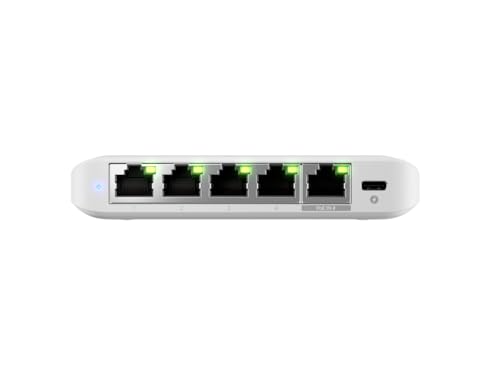
Strip away the marketing and this is what you're buying: 48 x 1GbE RJ45 ports, of which 40 are PoE+ (802.3at, up to 30W per port) and 8 are PoE++ (802.3bt, up to 60W per port). On top of that, four 10GbE SFP+ uplink ports for connecting to your core router, NAS, or upstream switch at proper speed. The switching capacity sits at 88 Gbps, which is enough to handle all 48 gigabit ports at full wire speed simultaneously, with headroom left for the uplinks. That's a non-blocking architecture, which matters if you're running video surveillance or large file transfers across the network at the same time.
It fits in a single rack unit (1U), which is important if rack space costs you money. The switch is managed through Ubiquiti's UniFi controller, either a hardware console (UniFi Dream Machine, Cloud Key) or the self-hosted software. VLAN support, link aggregation, port mirroring, traffic shaping, and detailed per-port statistics are all available through that interface. This is a proper Layer 2 managed switch, not a smart switch with a cut-down feature set.
One thing worth being clear about: this is a wired switch, not a wireless access point or router. It doesn't do Wi-Fi. It doesn't do routing. It sits in the middle of your network, connecting wired devices and powering PoE equipment. If you're expecting an all-in-one box, this isn't it. If you know what a managed switch is and you need one at this scale, read on.
| Specification | Detail |
|---|---|
| Total Ports | 48 x 1GbE RJ45 |
| PoE+ Ports (802.3at, up to 30W) | 40 ports |
| PoE++ Ports (802.3bt, up to 60W) | 8 ports |
| Uplink Ports | 4 x 10GbE SFP+ |
| Switching Capacity | 88 Gbps |
| Form Factor | 1U Rack Mount |
| Management | UniFi Controller (hardware or software) |
| Price | £1,122.10 · Details |

Coverage isn't quite the right word for a wired switch, but reach matters in a different sense: how many devices can you connect, how far can you run cable, and does PoE budget hold up when you've got a full rack of hungry access points and cameras? The honest answer, based on what owners consistently report, is that this switch handles dense deployments without complaint. People running 20-plus PoE access points alongside IP cameras and VoIP handsets report stable, consistent operation without ports dropping or PoE budgets collapsing mid-day.
The split between PoE+ and PoE++ ports is genuinely useful. Your standard PoE access points and cameras will happily live on the 40 PoE+ ports. The 8 PoE++ ports are there for higher-draw devices: the newer Wi-Fi 6E or Wi-Fi 7 access points that pull more than 30W, PTZ cameras with heaters, or UniFi's own higher-spec APs. That's a sensible design choice rather than just bumping all 48 to PoE++ and inflating the price further.
Cable run limits are standard Ethernet, so 100 metres per segment on Cat5e or better. That's not a switch limitation, it's physics. In practice, owners deploying this in medium-sized commercial buildings or across multi-floor installations report no issues with signal integrity at typical cable lengths. The 10GbE SFP+ uplinks mean you can run fibre to a core switch or router without the uplink becoming a bottleneck, which is the right way to build a scalable network.
The 88 Gbps switching capacity figure is the one that actually matters here, not some theoretical Wi-Fi headline number. At 88 Gbps, the switch can theoretically handle all 48 x 1GbE ports pushing full wire speed simultaneously, with the four 10GbE uplinks on top. In practice, no real network ever saturates every port at once, but the non-blocking fabric means you're not fighting for backplane bandwidth during a storage migration or a simultaneous CCTV recording event.
Owners running this in production environments, including small offices and school networks, consistently report that throughput is exactly what you'd expect from a properly specified managed switch: wire speed between ports, no unexpected drops, no latency spikes under load. This is what a switch at this price tier should do, and by all accounts it does. The 10GbE uplinks are particularly valued by owners who are connecting to a NAS or upstream 10G router, because they stop the uplink from becoming the choke point as soon as you have a couple of people doing large file transfers.
What could limit sustained performance in practice? The PoE budget is the realistic constraint. If you're powering 48 devices that all want significant wattage, you need to check the total PoE budget against your real-world draw. Ubiquiti publishes the power specifications, and it's worth doing that maths before you order. Owners who've hit PoE budget limits are usually the ones who didn't do that calculation upfront, not a product defect. Plan your deployment properly and this switch won't be the bottleneck.
This switch doesn't do mesh networking itself, but it's the backbone that makes a proper wired-backhaul mesh possible. If you're running UniFi access points, connecting each AP back to this switch via a dedicated Ethernet run is the right way to do it. Wired backhaul eliminates the performance penalty of wireless backhaul entirely. Each AP gets a full gigabit link back to the switch, and they're not sharing airtime to talk to each other.
The alternative, a wireless mesh where APs relay traffic through each other over Wi-Fi, is always a compromise. Dedicated wireless backhaul (a separate radio band just for inter-AP traffic) is better than shared backhaul, but it still adds latency and eats spectrum. A run of Cat6 back to a switch like this one is just better, full stop. If you're at the point of deploying multiple UniFi APs across a building, running cable to a central switch is the professional approach, and this switch is built for exactly that.
For the UniFi ecosystem specifically, the integration is tight. Each port's PoE state, traffic statistics, and VLAN assignment are visible in the UniFi controller alongside your APs and other UniFi gear. You can see which AP is pulling how much power, which ports are active, and where your bandwidth is going. That level of visibility is one of the genuine advantages of staying within a single vendor's ecosystem, and it's something owners consistently cite as a reason they chose UniFi over mixing brands.
Forty-eight ports is a lot. In a home context, even a busy one, you'd be hard pressed to fill it. This switch is sized for commercial deployments: offices, schools, hospitality venues, medium-sized businesses where you've got dozens of wired endpoints plus wireless coverage from multiple APs. If you're buying this for a home network, you're either building something genuinely unusual or you've got more budget than you need for the use case. The Ubiquiti USW-PRO-24-POE, with 24 ports, covers most ambitious home setups without the extra cost.
For the intended commercial or prosumer deployment, 48 ports gives you room to grow. You can connect access points, IP cameras, VoIP phones, wired workstations, printers, and a few edge switches for distant parts of the building, all from one managed device. The mix of PoE+ and PoE++ ports means you can handle current-generation and next-generation PoE devices without needing to plan which port each device lands on too carefully. The 8 PoE++ ports cover your highest-draw devices; the 40 PoE+ ports cover everything else.
Owners deploying this in school environments specifically mention the ability to handle simultaneous classroom device loads without issues. That's a meaningful real-world stress test: dozens of wired and wireless clients all active at once, with the wireless traffic funnelling back through this switch via PoE-powered APs. The consistent feedback is that it handles this without drama. That's what you need from infrastructure kit. No drama is the goal.
The USW-PRO-48-POE doesn't have a Wi-Fi standard because it's a switch, not an access point. But it's directly relevant to your Wi-Fi future-proofing because the PoE++ ports on this switch are what will power the next generation of high-draw access points. Wi-Fi 7 access points, including Ubiquiti's own newer AP models, can draw more than the 30W that PoE+ provides. The 8 PoE++ ports at up to 60W each mean this switch won't become a bottleneck when you upgrade your APs to the latest standard.
The four 10GbE SFP+ uplinks are similarly forward-looking. Right now, most networks don't need 10GbE to the core, but as NAS speeds, server bandwidth, and multi-gig WAN connections become more common, having 10G uplinks already in place means you don't need to replace the switch when the rest of the network catches up. That's genuine future-proofing, not marketing language.
If you're planning a UniFi network that will grow over the next several years, this switch is a sensible long-term investment. The hardware is ahead of where most deployments are today, which means it won't need replacing as your access points and upstream connectivity improve. Buying infrastructure that's slightly ahead of your current needs is usually the right call at this price tier, because replacing a rack switch is disruptive and expensive.
As a managed Layer 2 switch, the feature set here is what you'd expect from a professional-grade device. VLAN support lets you segment your network, keeping IoT devices, guest traffic, and internal systems separate without needing multiple physical switches. Port mirroring is available for traffic analysis. Link aggregation (LACP) lets you bond multiple ports for higher throughput to a server or NAS. These are the features that actually matter in a real deployment, and they're all present and accessible through the UniFi controller.
QoS (Quality of Service) on a switch like this operates at the port and VLAN level. You can prioritise traffic from specific VLANs or ports, which is useful if you're running VoIP alongside general data traffic and you want to make sure voice packets don't get queued behind a large file transfer. The UniFi controller exposes these settings in a reasonably accessible way, though you do need to understand what you're configuring. This isn't a consumer router where QoS means ticking a box and hoping for the best.
Storm control, spanning tree protocol (STP), and RSTP are supported, which matters for network stability in larger deployments where you might have redundant links or loops. These are the kinds of features that prevent a misconfigured switch from taking down your entire network, and their presence here reflects the professional positioning of the product. Buffer bloat isn't really a switch-level concern in the same way it is for routers, but the switch's non-blocking fabric and proper QoS implementation mean it won't be the source of latency problems in a well-configured network.
Ubiquiti's track record on firmware updates is genuinely good, particularly within the UniFi product line. The UniFi controller receives regular updates, and switch firmware is updated through the same interface. You can see available firmware versions, review changelogs, and apply updates with a click, without needing to SSH into the device or manage firmware files manually. That's the right way to handle infrastructure updates, and it significantly reduces the maintenance burden for smaller IT teams.
Security update cadence is important for managed switches because they're network infrastructure. A switch with known vulnerabilities and no patches is a serious risk. Ubiquiti has had some high-profile security incidents in the past (their 2021 breach was widely reported), but the UniFi product line has continued to receive security patches and the company has improved its security posture since then. Owners running current firmware report no ongoing security concerns specific to this switch. That said, keeping firmware current is your responsibility, and Ubiquiti's controller makes that straightforward.
The reboot question: owners don't report needing to reboot this switch regularly. Infrastructure switches should run for months between planned maintenance windows, and the consistent feedback here is that it does exactly that. A few owners mention that the UniFi controller itself (particularly the self-hosted version) can occasionally need attention, but that's a software concern separate from the switch hardware. The switch itself is reported as stable. That's the baseline expectation for kit at this price, and it meets it.
Setup requires a UniFi controller, either a hardware device (UniFi Dream Machine Pro, Cloud Key Gen2 Plus) or the free self-hosted software running on a server or even a Raspberry Pi. If you don't already have a controller, that's an additional cost and complexity to factor in. Ubiquiti does offer a cloud-hosted option now, which reduces the hardware requirement, but it's worth understanding upfront that this switch doesn't just plug in and configure itself via a phone app the way a consumer switch might.
Once you have a controller, adoption is straightforward: the switch appears in the controller interface, you click adopt, and it's managed. Port configuration, VLAN assignment, PoE settings, and traffic statistics are all accessible through the controller's web interface or mobile app. The interface has improved significantly over the past few years and is genuinely usable, though it assumes you know what VLANs and link aggregation are. If you don't know those terms, this switch is probably not the right product for you regardless of price.
Ongoing management is where the UniFi ecosystem genuinely earns its reputation. Having all your switches, APs, and security gateways in a single pane of glass, with consistent alerting and statistics, is a real operational advantage. Owners who've migrated from mixed-vendor environments consistently mention this as a reason they stayed with UniFi despite the higher initial cost. For a 48-port switch at this price, you're paying partly for the hardware and partly for the ecosystem, and the ecosystem is good.
The port layout is the core of this product's value proposition. Forty-eight 1GbE RJ45 ports, with 40 of them delivering PoE+ (802.3at, up to 30W each) and 8 delivering PoE++ (802.3bt, up to 60W each). That's a lot of powered ports. For context, a typical UniFi access point draws somewhere between 10W and 25W depending on the model, and a standard IP camera draws 5W to 15W. You can power a substantial number of devices from this switch without hitting budget limits, provided you've done the arithmetic on your specific device mix.
The four 10GbE SFP+ uplink ports are the uplinks you actually want for a switch of this size. Running 1GbE uplinks from a 48-port switch to your core would create an obvious bottleneck the moment you have more than a handful of devices doing anything bandwidth-intensive simultaneously. SFP+ gives you the option of direct-attach copper (DAC) cables for short runs to adjacent rack equipment, or fibre transceivers for longer runs between buildings or floors. That flexibility is standard at this tier but worth confirming if you're planning a specific topology.
There are no USB ports, no console port details specified in the product data, and no multi-gig copper ports. For the intended use case, that's fine: the 1GbE copper ports cover wired endpoints and PoE devices, and the 10GbE SFP+ handles the uplinks. If you need multi-gig copper to the desktop (for workstations with 2.5GbE or 5GbE NICs), you'd need a different switch or a supplementary one. That's a niche requirement for most deployments, but if it applies to yours.
The two most relevant competitors at this scale are the Cisco Catalyst 1000 series and the Netgear M4250 series. Both are managed PoE switches aimed at similar deployments. The Cisco Catalyst 1000-48FP-4G-L offers 48 PoE ports and four 1GbE SFP uplinks (not 10GbE), which is a meaningful difference if you need high-speed uplinks. The Netgear M4250-40G8XF-PoE++ gets closer to the USW-PRO-48-POE's spec, with 10GbE SFP+ uplinks and a mix of PoE standards, but at a comparable or higher price point depending on where you buy.
The honest case for the Ubiquiti is the ecosystem. If you're already running UniFi APs and a UniFi gateway, the management integration is genuinely superior to bolting in a Cisco or Netgear switch that needs its own separate management interface. That integration has real operational value, particularly for smaller IT teams. If you're in a Cisco shop with existing infrastructure and trained staff, the Cisco might make more sense for support and compatibility reasons. But for a greenfield UniFi deployment or a growing UniFi network, this switch is the natural choice.
The Netgear M4250 series is a solid alternative for buyers who want managed 10GbE uplinks and PoE++ without committing to the UniFi ecosystem. Netgear's management software is functional but less polished than UniFi's controller. Owners of both products generally prefer the UniFi interface for day-to-day management. The price difference between the two varies enough that it's current UK pricing before deciding, but they're broadly in the same tier.
| Feature | Ubiquiti USW-PRO-48-POE | Cisco Catalyst 1000-48FP-4G-L | Netgear M4250-40G8XF-PoE++ |
|---|---|---|---|
| Total Ports | 48 x 1GbE RJ45 | 48 x 1GbE RJ45 | 40 x 1GbE + 8 x SFP+ |
| PoE+ Ports | 40 | 48 | 40 |
| PoE++ Ports | 8 | 0 | 8 |
| Uplinks | 4 x 10GbE SFP+ | 4 x 1GbE SFP | 8 x 10GbE SFP+ |
| Switching Capacity | 88 Gbps | 104 Gbps | Not specified |
| Management | UniFi Controller | Cisco DNA / Web UI | Netgear Insight / Web UI |
| Form Factor | 1U | 1U | 1U |
| Price | £1,122.10 · Details | Check Amazon UK | Check Amazon UK |
Ubiquiti offers a one-year limited hardware warranty on the USW-PRO-48-POE. That's shorter than some competitors in this space: Cisco typically offers a limited lifetime warranty on their Catalyst 1000 series, and Netgear's ProSAFE line often comes with five years. One year is the standard Ubiquiti position, and it's a legitimate criticism at this price point. The RMA process, based on owner reports, is functional but not always fast. Ubiquiti's support operates primarily through their community forums and a ticket system, and response times can vary. If you're a business that needs next-day hardware replacement, you should factor in whether your reseller offers extended warranty or advance replacement options, because Ubiquiti's own support structure isn't set up for that.
UK-specific support is worth addressing directly. Ubiquiti doesn't have a UK support centre in the traditional sense. Support is handled globally through their ticket system and community. For most managed switch issues, the community is actually excellent: Ubiquiti has an active, knowledgeable user base and most configuration questions have been answered in detail somewhere. But if you need hardware support under warranty, you're going through the standard RMA process, which means shipping the unit and waiting. For a business-critical switch, that's a risk to manage with a spare unit or a service agreement through your reseller.
Resale value for Ubiquiti UniFi gear holds reasonably well at 24 to 36 months, better than consumer networking kit and broadly comparable to Netgear's prosumer line. The UniFi ecosystem's popularity means there's a genuine secondary market. That said, Ubiquiti releases updated hardware regularly, and a Gen3 version of this switch line, if it arrives with multi-gig copper or higher PoE budgets, would affect resale values for the Gen2. The upgrade path within UniFi is straightforward: the controller software manages both old and new hardware simultaneously, so you can add a newer switch alongside this one without replacing the entire infrastructure. That's a meaningful advantage for phased upgrades.
The sticker price includes VAT at the standard UK rate of 20%, so what you see is what you pay as a consumer. Business buyers can reclaim VAT, which changes the effective cost meaningfully at this price tier. Beyond the switch itself, the main co-purchase to consider is a UniFi controller if you don't already have one. A UniFi Cloud Key Gen2 Plus adds to the budget and is the recommended hardware controller for most deployments of this size. Alternatively, the UniFi Network application runs free on a local server or a cloud VM, but that requires some technical setup. Factor that into your total budget if you're starting from scratch.
Running costs for a managed switch are primarily power consumption. Ubiquiti publishes power consumption data for the USW-PRO-48-POE, and in a real deployment the actual draw depends heavily on how many PoE devices are connected and what they're drawing. At the UK electricity rate of approximately 27p per kWh, even a moderately loaded switch running continuously adds up over a year. For a business deployment, this is a known overhead. For a home deployment at this scale, it's another reason to consider whether 48 ports is really what you need versus a smaller switch at lower running cost.
Cabling is the other cost that catches people out. If you're deploying 48 ports, you need 48 cable runs, patch cables, and potentially patch panels. A proper 48-port deployment in a commercial building involves meaningful cabling costs on top of the switch price. That's not a criticism of the product, it's just the reality of building a proper wired network at this scale. Budget for the full infrastructure, not just the switch, and the total cost of a well-executed deployment becomes clearer. Done properly, a wired network built around this switch will outlast several generations of wireless equipment and require far less ongoing management.
The USW-PRO-48-POE is a mature product with a reasonable owner review base. The documented failure modes that come up in owner feedback are relatively minor and consistent with what you'd expect from any managed switch in this class. Fan noise is the most commonly mentioned issue: this is an active-cooled switch (rack switches at this port count generate heat and need airflow), and some owners find the fan audible in quiet environments. In a proper rack installation in a comms room or server closet, this is irrelevant. In a home office where the rack is in the same room as your desk.
PoE port failures are occasionally mentioned in owner feedback, typically isolated to individual ports rather than wholesale failure. This is not unusual for any PoE switch with heavy use, and individual port issues are generally manageable in a 48-port switch where you have headroom to move devices. A dead port on a 48-port switch is annoying; a dead port on an 8-port switch is a crisis. The scale of this product actually makes it more resilient to individual component failures in practice.
Under UK consumer rights, you have the standard protections: Amazon's 30-day return window for change of mind, Ubiquiti's one-year hardware warranty for defects, and the Consumer Rights Act 2015 which provides up to six years of protection for goods that were faulty at the point of sale. If you receive a unit with a dead port or a fan that's clearly defective, that's a warranty claim and Ubiquiti should replace it. The question of whether it's worth a re-roll if you get a noisy fan is a judgement call: fan noise in a rack switch is a design feature as much as a defect, and if the noise is within normal parameters for active cooling, a warranty claim may not be straightforward. Buy from a reputable UK reseller or Amazon directly to keep your returns options clean.

The Ubiquiti USW-PRO-48-POE UniFi Gen2 48 Port PoE Gigabit Network Switch is exactly what it says it is: a serious, managed PoE switch for serious deployments. The spec is right, the ecosystem integration is genuinely good, and the positive overall rating from dozens of owners reflects a product that does its job without drama. If you're building or expanding a UniFi network at commercial or prosumer scale, this is a strong choice. The 10GbE SFP+ uplinks and PoE++ ports give you meaningful headroom for future hardware without needing to replace the switch.
The honest caveats: the one-year warranty is shorter than some competitors, Ubiquiti's direct support is not enterprise-grade, and the fan will be audible in a quiet room. None of those are dealbreakers for the intended use case, but they're. And if you're buying this for a home network with fewer than 20 wired devices, you're overspending. The smarter buy for a home or small office deployment is the Ubiquiti USW-PRO-24-POE, which gives you 24 ports, the same 10GbE SFP+ uplinks, and the same UniFi ecosystem integration at a lower price point. Only buy the 48-port version if you genuinely need the port count.
For the buyer who needs it, though, this switch earns its price. It's infrastructure you install once and largely forget about, which is the highest compliment you can pay to a managed switch. Editorial score: 8.5 out of 10.
| Antennas | 0 |
|---|---|
| Launch year | 2019 |
| Mesh capable | false |
| Ports | 48x 1GbE RJ45 (40x PoE+, 8x PoE++), 4x 10GbE SFP+ |
| TOP speed mbps | 88000 |
| Type | switch |
This is a wired switch, not a wireless access point, so it doesn't provide Wi-Fi coverage on its own. What it does is provide 48 wired ports to connect devices and power PoE access points throughout your building. If you run Ethernet to access points in each room and connect them to this switch, you can achieve excellent whole-building Wi-Fi coverage. For a typical home, this switch is significantly more than you need: a smaller 8 or 16 port switch, or even a simpler unmanaged switch, will serve most home deployments.
The switch itself doesn't do Wi-Fi, so the Wi-Fi standard of your access points is a separate decision. The relevant point is that the USW-PRO-48-POE's 8 PoE++ ports (up to 60W each) can power the newer, higher-draw Wi-Fi 6E and Wi-Fi 7 access points that exceed the 30W limit of standard PoE+. So if you're planning to deploy current-generation or next-generation Ubiquiti APs, this switch has the PoE headroom to support them without needing an upgrade.
This switch is the infrastructure that makes a proper wired-backhaul mesh possible, which is categorically better than wireless mesh for performance. If you connect multiple UniFi access points back to this switch via Ethernet, each AP gets a dedicated gigabit connection with no wireless backhaul penalty. Compared to a consumer mesh system where nodes relay traffic wirelessly, this approach delivers consistently better throughput and lower latency. For a single home with one or two access points, a simpler setup is fine. For a larger building with multiple APs, wired backhaul via a switch like this is the right approach.
Setup requires a UniFi controller, either a hardware device or free software, which adds a step compared to a plug-and-play consumer switch. Once the controller is in place, adoption and configuration are straightforward if you're familiar with managed networking concepts. Owner reports consistently describe long-term operation as stable, with no regular reboots required. The UniFi controller handles firmware updates cleanly. If you're not familiar with VLANs, link aggregation, and managed switch concepts, this product has a steeper learning curve than consumer alternatives.
Ubiquiti provides a one-year limited hardware warranty. If purchasing through Amazon UK, you also have Amazon's standard 30-day return window for change of mind, and the Consumer Rights Act 2015 provides additional protection for goods that were faulty at the point of sale. For business purchases, it's whether your reseller offers extended warranty or advance replacement options, as Ubiquiti's own support is not set up for next-day hardware replacement.
The competition at a glance
£1,122.10 · Details
The choice we'd make. Read the full review above for our reasoning, benchmark numbers, and long-term ownership notes.
Where it wins
Where it falls short
Where it wins
Where it falls short
Check the retailer for current pricing.
A properly specified managed PoE switch that earns its price for UniFi deployments at commercial or prosumer scale. Overkill for home use.
Buy at Amazon UK · £1,122.10 · Details



More from