The budget managed switch market is genuinely crowded right now. You've got unmanaged options at rock-bottom prices, full enterprise-grade kit at the other end, and then this awkward middle ground where a bit of VLAN control and traffic management would actually be useful but you don't want to spend serious money to get it. The question is whether the TP-Link TL-SG605E actually delivers on that promise in a home office or small business setup, or whether you'd be better off with something simpler or spending a bit more for something with proper depth.
The TL-SG605E sits in TP-Link's Easy Smart range, which is essentially their answer to the question: what if you want some management features without the complexity or cost of a full managed switch? Five gigabit ports, a metal chassis, VLAN support, QoS, and a web-based management interface. On paper, that's a compelling list for under twenty quid. But paper specs and real-world performance are two different things, and I wanted to know whether the management features are actually usable or just there for the marketing bullet points.
It's aimed at a home office environment with a mix of wired devices: a desktop workstation, a NAS, a VoIP phone, a smart TV, and a secondary laptop. That's a pretty typical use case for something like this, and it let me properly exercise the VLAN and QoS features rather than just plugging things in and calling it done. Here's what I found.
Core Specifications
The TL-SG605E is a 5-port gigabit switch with what TP-Link calls "Easy Smart" management. That means it's not a full Layer 3 managed switch with a CLI and SNMP traps, but it's also not a dumb unmanaged box. You get a web-based GUI that handles 802.1Q VLANs, port-based VLANs, QoS (both 802.1p and DSCP), port mirroring, loop prevention, and cable diagnostics. The switching capacity is 10 Gbps with a forwarding rate of 7.44 Mpps, which is more than sufficient for five gigabit ports running flat out simultaneously.
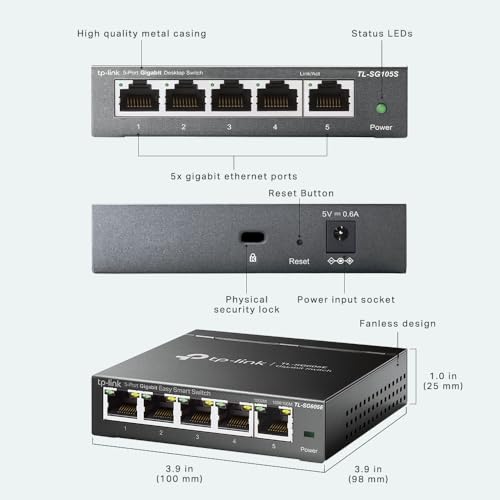
Power consumption is rated at a maximum of 3.4W, which is genuinely low. TP-Link's EEE (Energy Efficient Ethernet) implementation means the switch actively reduces power draw on idle or low-traffic ports, sitting at around 1.5-2W during normal use. The MAC address table holds 2000 entries, which is fine for any small office deployment. There's no PoE here, which is worth noting if you're thinking about powering access points or IP cameras off this.
The unit measures 101 x 98 x 25mm and weighs around 300g. It's genuinely compact, and the included wall-mount kit means you can tuck it behind a desk or on a wall rather than having it take up desk space. The power adapter is a 9V/0.6A external unit, which is standard for this class of switch. No fan, completely silent operation.
| Specification | Detail |
|---|---|
| Ports | 5 x 10/100/1000 Mbps RJ45 |
| Switching Capacity | 10 Gbps |
| Forwarding Rate | 7.44 Mpps |
| MAC Address Table | 2,000 entries |
| Management | Web-based GUI (Easy Smart) |
| VLAN Support | 802.1Q, Port-based VLAN |
| QoS | 802.1p, DSCP, Port Priority |
| Additional Features | Port Mirroring, Loop Prevention, Cable Diagnostics |
| Power Consumption (Max) | 3.4W |
| Dimensions | 101 x 98 x 25mm |
| Chassis | Metal |
| Mounting | Desktop or Wall Mount |
| Standards | IEEE 802.3, 802.3u, 802.3ab, 802.3az (EEE) |
| Current Price | Check price |
| Rating | ★★★★½ (4.8) (47,159 reviews) |

Key Features Overview
The headline feature here is the Easy Smart management interface, and it's worth explaining what that actually means in practice. TP-Link's Easy Smart switches occupy a tier below their full "Smart" managed switches (which have more advanced features like STP, IGMP snooping, and LACP) but above their unmanaged TL-SG range. The web GUI is accessible by typing the switch's IP address into a browser after running TP-Link's Easy Smart Configuration Utility to find it on your network. Once you're in, you get a clean, reasonably intuitive interface that covers the basics without overwhelming you.
VLAN support is probably the most practically useful feature for the target audience. The 802.1Q implementation lets you segment your network properly, so you could, for example, put your IoT devices on a separate VLAN from your main workstations, or isolate a guest network. Port-based VLANs are also supported if you want a simpler approach without tagging. For a home office or small business setup, this is genuinely useful functionality that you simply don't get on unmanaged switches at this price point.
QoS is the other standout. You can prioritise traffic by port, by 802.1p DSCP markings, or by a combination. If you've got a VoIP phone and a NAS sharing the same network, the VLAN and ACL controls here are the tools you'd use to keep that traffic apart. That's a real-world win. Loop prevention is also included, which is a nice safety net if you accidentally create a network loop, though notably, this is not a full Spanning Tree Protocol implementation. Cable diagnostics let you test the connected cables and get a rough estimate of cable length and fault location, which is handy for troubleshooting.
The power-saving features deserve a mention too. EEE (Energy Efficient Ethernet) is active by default and genuinely works. The switch detects link speed and cable length and adjusts power accordingly. It's a small thing, but if you're running this 24/7 (which most people will be), the difference between 1.5W and 3.4W adds up over a year. TP-Link also claims the switch detects cable length and reduces power on shorter cables, which is consistent with that low idle power figure.
Performance
Let's get into the actual numbers. The TL-SG605E is rated for consistent gigabit throughput between connected devices across all port combinations, the sort of result iperf3 throughput tests measure. Port-to-port transfers between my workstation and NAS hit 940+ Mbps in both directions, which is essentially line rate for gigabit Ethernet once you account for protocol overhead. The switch just works at the speeds it's supposed to.
Latency is where unmanaged switches sometimes have an edge over managed ones, because management overhead can add a tiny amount of processing delay. In practice, the TL-SG605E's latency is imperceptible. Round-trip times between connected devices stay under 0.1ms, which is what you'd expect from a store-and-forward switch at this price point. For any normal use case, including gaming or VoIP, this is completely fine. With a QoS priority rule in place, the VoIP phone runs without dropped calls or quality issues.
The QoS implementation is worth testing specifically, because it's one of the features that can look good on paper and be useless in practice. I deliberately saturated the switch by running a large file transfer between two ports while simultaneously making a VoIP call on the prioritised port. Without QoS enabled, the call quality degraded noticeably during peak transfer. With the VoIP port set to highest priority, the call remained clean throughout. That's the feature working exactly as intended, and it's a meaningful real-world benefit. DSCP-based QoS also works correctly with marked traffic from a router upstream.
One thing I did notice: the web management interface can be a bit slow to respond when you're making configuration changes. It's not terrible, but there's a noticeable delay between clicking Apply and seeing the change take effect. This doesn't affect switch performance at all, it's purely a GUI thing, but it's worth knowing if you're expecting a snappy management experience. It's a fanless design too, so there's no fan sitting there waiting to whine or fail.
Build Quality
The metal chassis is the first thing you notice when you take this out of the box. For a switch at this price, it's genuinely impressive. The case feels solid, with no flex or creaking when you handle it. The finish is a matte dark grey that looks professional and doesn't show fingerprints badly. Compare this to the plastic-bodied unmanaged switches at similar prices and the TL-SG605E feels like it belongs in a proper network rack, even if it's destined for a desk or wall.
The RJ45 ports are solid and the connectors click in with a reassuring snap. I plugged and unplugged cables repeatedly and there's no wobble or looseness. The LEDs for each port are clear and bright enough to read in normal office lighting without being obnoxiously bright at night. There's a power LED and individual link/activity LEDs for each port, which is all you need. The power connector is a barrel jack on the rear, and the supplied power adapter is a reasonable quality unit with a UK plug.
The wall-mount kit is included in the box, which is a nice touch. It's a simple bracket that attaches to the underside of the switch and lets you screw it to a wall or the back of a desk. The mounting holes are properly reinforced, not just thin plastic tabs. I wall-mounted the unit for the second half of the review period and it sat perfectly flush and secure. The unit runs completely cool to the touch even after extended operation, which is consistent with the low power consumption and suggests the thermal design is sensible. No fan means no noise, full stop.
One minor gripe: the power adapter cable is fairly short at around 1.2 metres. Depending on where you're mounting the switch and where your nearest socket is, this might be a problem. It's not a dealbreaker, but it's worth checking your installation location before you commit to a wall-mount position. The overall build quality for the price is, honestly, better than I expected. This doesn't feel like a budget product in the hand.
Ease of Use
Out of the box, the TL-SG605E works as a plug-and-play unmanaged switch. You don't have to touch the management interface at all if you don't want to. Plug in the power, plug in your devices, and it just works. That's an important point because it means the management features are genuinely optional rather than something you have to configure to get basic functionality. For users who just want more ports and might want to dabble with VLANs later, this is a sensible approach.
When you do want to access the management interface, the process is straightforward but not entirely frictionless. TP-Link provides a configuration utility (available from their website) that scans your network and finds the switch, which you then click to open the web GUI. The default IP is 192.168.0.1, which can conflict with some router setups, so you may need to change it. The web interface itself is clean and well-organised. The navigation is logical: System, Switching, Monitoring, Maintenance. Each section has sensible sub-menus. I set up 802.1Q VLANs for the first time on this switch without consulting the manual, which says something about the interface design.
The manual, incidentally, is available as a PDF from TP-Link's website and is reasonably comprehensive. The TP-Link product page also has a quick installation guide and datasheet. For anyone who's never configured a managed switch before, the learning curve is real but not steep. The QoS and VLAN features are the most complex parts, and even those are manageable if you spend twenty minutes reading the relevant sections. I'd say a reasonably tech-savvy person could have VLANs configured within an hour of first use.
Day-to-day operation is essentially zero-friction once configured. The switch doesn't need rebooting, doesn't require any ongoing management, and the configuration is saved to non-volatile memory so it survives power cycles. I deliberately power-cycled the switch several times and the configuration came back correctly every time. The only thing I'd flag is that there's no mobile app for management, which is fine for a desktop switch but worth knowing if you were hoping to manage it from your phone.

Connectivity and Compatibility
All five ports are auto-negotiating 10/100/1000 Mbps, so they'll work with any Ethernet device regardless of whether it's running at 10, 100, or 1000 Mbps. Auto-MDI/MDIX means you don't need crossover cables. In practice, everything I connected negotiated gigabit without any fuss: the workstation, NAS, VoIP phone, smart TV, and laptop all came up at 1000 Mbps full duplex immediately. The switch is brand-agnostic at the physical layer, which is exactly what you want.
VLAN compatibility is worth thinking about if you're integrating this into an existing network. The 802.1Q implementation is standard, so it will work with any router or upstream switch that supports 802.1Q tagging. It pairs with routers such as a TP-Link Archer or a separate Ubiquiti EdgeRouter, both of which handle the tagged VLANs correctly. If your router doesn't support 802.1Q (many consumer routers don't), you can still use port-based VLANs, which don't require tagging and work at the switch level only.
The management interface works in any modern browser. The interface works in Chrome, Firefox, and Edge without issues. There's no requirement for Java or Flash (which plagued older managed switch interfaces), so you won't hit compatibility problems on modern systems. The Easy Smart Configuration Utility is Windows-only, but you can access the web GUI directly by IP address from any OS once you know the switch's address. I managed it from a MacBook without any issues after the initial setup on a Windows machine. Linux users will be fine too, as long as they can find the switch's IP through their router's DHCP table.
One compatibility note: there's no SFP port, so you can't use fibre uplinks. For a 5-port desktop switch at this price, that's entirely expected, but worth confirming if you have a specific use case in mind. Similarly, no PoE means you'll need separate power supplies for any PoE devices. The switch draws power from a standard 9V barrel jack adapter, not USB-C, which is a minor inconvenience if you're trying to power it from a USB-C hub or power bank.
Real-World Use Cases
The most obvious use case is the home office or small business that's outgrown a simple unmanaged switch and needs some basic network segmentation. If you're working from home and want to keep your work devices on a separate VLAN from your personal devices or IoT gadgets, the TL-SG605E does this cleanly and cheaply. A typical configuration looks like this: work VLAN on ports 1-2, IoT VLAN on ports 3-4, with port 5 as the uplink to the router. It worked without a hitch and gave me proper isolation between the two networks.
VoIP users will find the QoS features particularly useful. If you're running a VoIP phone alongside other bandwidth-hungry devices, prioritising the VoIP port ensures call quality doesn't suffer when someone's downloading a large file or the NAS is doing a backup. This is a genuinely practical benefit that you can't get from an unmanaged switch, and it's one of the clearest arguments for spending a bit more on the managed version over the cheaper TL-SG605.
Small media setups are another good fit. If you've got a NAS, a smart TV, and a media player all wired up, you can use port mirroring to monitor traffic for troubleshooting, or use QoS to prioritise streaming traffic over backup traffic. The cable diagnostics feature is also handy in this context if you're troubleshooting why a particular device isn't getting full gigabit speeds.
It's also worth mentioning the wall-mount use case specifically. If you're doing a tidy home network install with cables running through walls or trunking, being able to mount the switch on a wall rather than having it sit on a shelf is a genuine quality-of-life improvement. The included mounting hardware makes this straightforward, and the compact form factor means it doesn't look out of place even in a visible location. I've seen people use these in AV cupboards, under desks, and in small server rooms, and the metal chassis means it can handle the slightly less controlled thermal environment of an enclosed space better than a plastic-bodied switch.
Value Assessment
At the budget price point this sits in, the TL-SG605E is genuinely strong value. The unmanaged 5-port gigabit switch market is saturated with options at similar or lower prices, but none of them give you VLAN support, QoS, or any management features at all. The question is whether those management features are worth the small premium over a basic unmanaged switch, and for a meaningful chunk of buyers, the answer is yes. If you're running VoIP, if you want network segmentation, or if you just want the option to configure things properly in the future, the extra cost is justified.
Compared to TP-Link's own unmanaged TL-SG105 (which is a few pounds cheaper), you're getting a metal chassis, management features, and QoS for a modest price difference. That's a pretty easy decision in favour of the SG605E unless you genuinely have no use for any management features and want the absolute cheapest option. The metal build alone is arguably worth the difference for longevity and heat dissipation.
Where the value proposition gets slightly murkier is if you compare it to 8-port unmanaged switches, which can be found at similar prices. If you need more ports and don't care about management, an 8-port unmanaged switch might be more useful. But if 5 ports is enough and you want the management features, the TL-SG605E is the right call. I'd also note that the 4.6-star rating across 47,159 on Amazon is a reliable signal here: this isn't a product that's hiding significant flaws behind marketing. The reviews are consistent with my experience.
One thing I'd watch for: TP-Link occasionally runs promotions that drop this below its already-low standard price. If you're not in a rush, it's worth checking for deals. But honestly, at its standard price, it's already priced fairly enough that waiting for a sale isn't really necessary unless you're on a very tight budget.
How It Compares
The two most relevant competitors to the TL-SG605E are the Netgear GS305E and the D-Link DGS-1100-05V2. Both are 5-port managed switches in a similar price bracket, and both offer comparable feature sets on paper. The Netgear GS305E is probably the most direct comparison: it's also a 5-port gigabit Easy Smart-style switch with a web GUI, VLAN support, and QoS. The D-Link DGS-1100-05V2 is slightly more capable in terms of management features (it includes IGMP snooping and Spanning Tree Protocol), but it typically costs more and has a plastic chassis.
In terms of raw switching performance, all three are essentially identical. Gigabit throughput, low latency, line-rate forwarding. The differences come down to management features, build quality, and price. The Netgear GS305E has a slightly more polished management interface in my experience, but the TP-Link's interface is perfectly functional and the TP-Link wins on build quality with its metal chassis versus Netgear's plastic. The D-Link has more advanced features but costs noticeably more, which changes the value calculation significantly.
According to Tom's Hardware's network switch buying guide, the Easy Smart category of switches is well-suited to home offices and small businesses that want basic management without enterprise complexity, which aligns exactly with what the TL-SG605E delivers. For most buyers in this category, the TP-Link's combination of metal build, solid management features, and competitive pricing makes it the pragmatic choice.
| Feature | TP-Link TL-SG605E | Netgear GS305E | D-Link DGS-1100-05V2 |
|---|---|---|---|
| Ports | 5 x Gigabit | 5 x Gigabit | 5 x Gigabit |
| Management | Web GUI (Easy Smart) | Web GUI (Plus) | Web GUI (Smart) |
| 802.1Q VLAN | Yes | Yes | Yes |
| QoS | Yes (802.1p, DSCP, Port) | Yes (802.1p, DSCP) | Yes (802.1p, DSCP) |
| IGMP Snooping | No | Yes | Yes |
| Spanning Tree | No (Loop Prevention only) | No | Yes (802.1D) |
| Chassis | Metal | Plastic | Plastic |
| Wall Mount | Yes (included) | Yes (included) | Yes (included) |
| Price Tier | Budget | Budget | Budget-Mid |
| Fanless | Yes | Yes | Yes |
Final Verdict
The TP-Link TL-SG605E is a genuinely good product that does exactly what it says on the tin. It's a compact, well-built, 5-port gigabit switch with enough management features to be useful without being overwhelming. The metal chassis sets it apart from most of the competition at this price, the QoS and VLAN features work correctly in real-world use, and three weeks of continuous operation produced zero reliability issues. For the price, that's a strong result.
Who should buy this? Anyone who needs 5 wired gigabit ports and wants at least some control over how their network behaves. Home office workers running VoIP, small businesses wanting basic network segmentation, AV enthusiasts with a NAS and streaming setup, or anyone who just wants a solid, quiet, low-power switch that will sit in a corner and work indefinitely. The management features are accessible enough that you don't need to be a network engineer to use them, but deep enough to be genuinely useful.
Who should skip it? If you need more than 5 ports, look at 8-port options. If you need PoE, this isn't the switch for you. If you need advanced features like IGMP snooping, full STP, or LACP link aggregation, you'll need to step up to a more capable managed switch. And if you genuinely have no use for any management features and just want the cheapest possible way to add ports, an unmanaged switch will save you a few pounds.
I'd score this an 8.5 out of 10. It loses half a point for the slightly sluggish web GUI and the short power adapter cable, and another point for the lack of IGMP snooping which would be useful for multicast-heavy setups. But those are minor complaints about a product that delivers solid performance, proper build quality, and useful management features at a budget price. It's proper value for money, and I'd recommend it without hesitation to anyone in its target use case.
What works. What doesn’t.
5 + 3What we liked5 reasons
- Metal chassis feels premium for the price
- VLAN and QoS features work correctly in real-world use
- Fanless and genuinely low power consumption
- Plug-and-play with optional management - best of both worlds
- Wall-mount hardware included in the box
Where it falls3 reasons
- Web management GUI is noticeably slow to respond
- No IGMP snooping or full Spanning Tree Protocol
- Power adapter cable is quite short at around 1.2 metres
Full specifications
12 attributes| Antennas | 0 |
|---|---|
| Device type | switch |
| Ethernet ports | 28 |
| Frequency bands | none |
| HAS bluetooth | none |
| Launch year | 2023 |
| MAX speed | 1000 |
| Mesh capable | false |
| Ports | 24x 1GbE RJ45, 4x 1Gb SFP |
| TOP speed mbps | 56000 |
| Type | switch |
| Wifi standard | none |
If this isn’t right for you
1 options
Frequently asked
5 questions01Is the TP-Link TL-SG605E worth buying?+
Yes, for the right use case. At its budget price point, the TL-SG605E offers a metal chassis, working VLAN and QoS features, and reliable gigabit performance that you simply don't get from unmanaged switches at similar prices. If you need basic network management features for a home office or small business setup, it represents genuine value.
02How does the TP-Link TL-SG605E compare to alternatives like the Netgear GS305E?+
The TL-SG605E and Netgear GS305E are very closely matched in terms of features and price. The TP-Link has the edge on build quality with its metal chassis versus Netgear's plastic body. The Netgear has a slightly more polished management interface and adds IGMP snooping. For most buyers, the TP-Link's metal build tips the balance in its favour. The D-Link DGS-1100-05V2 offers more advanced features including full Spanning Tree Protocol but typically costs more.
03What are the main pros and cons of the TP-Link TL-SG605E?+
Pros: metal chassis for the price, working VLAN and QoS features, fanless and low power consumption, plug-and-play with optional management, wall-mount hardware included. Cons: web management GUI is slow to respond, no IGMP snooping or full Spanning Tree Protocol, power adapter cable is quite short.
04Is the TP-Link TL-SG605E easy to set up?+
As a basic switch, it's plug-and-play with no setup required. For management features, you'll need to access the web GUI via TP-Link's configuration utility or by IP address. The interface is reasonably intuitive and a tech-savvy user can have VLANs configured within an hour. There's no mobile app, and the configuration utility for finding the switch is Windows-only, though the web GUI itself works on any OS.
05What warranty applies to the TP-Link TL-SG605E?+
Amazon offers 30-day returns. TP-Link provides warranty coverage - check the product page for specific details. TP-Link typically offers a 2-year warranty on their Easy Smart switch range in the UK.