
Bad mouse shape doesn't just feel uncomfortable. It tightens your forearm, cramps your fingers, and eventually costs you reactions you didn't know you were losing. The shape is the thing. Everything else is secondary. So when a mouse like the Razer DeathAdder Essential has been around in various forms since 2006 and still sells in serious numbers, that tells you something real: the shape works for a lot of people, and Razer hasn't broken it.
This Mercury White version of the Razer DeathAdder Essential Gaming Mouse with 6400 DPI Optical Sensor, 5 Programmable Buttons, Mechanical Switches, and Rubber Side Grips is the wired, budget-tier entry point into the DeathAdder family. No wireless, no optical switches, no fancy PixArt flagship sensor. What you do get is that proven ergonomic shell, a competent optical sensor, and mechanical switches at a price that sits well below the V3 Pro and its ilk. With thousands of owner reviews and a positive overall rating, this isn't a mouse people are tolerating. They're actually happy with it.
The question isn't whether it's a good mouse in isolation. It's whether it's the right mouse for you at this price, compared to what else you can buy. That's what we're here to sort out.
Core Specifications
The DeathAdder Essential runs a 6400 DPI optical sensor, which Razer brands as their own but is widely understood to be a PixArt unit operating at moderate performance levels. It's not the PAW3395 or PAW3370 you'd find in higher-end mice. It's a capable mid-tier sensor, and we'll get into what that means practically in the sensor section. The polling rate is 1000Hz, which is the standard for wired gaming mice at this price and is perfectly adequate for the vast majority of players. You're not losing anything meaningful there.
Weight comes in at around 96 grams. That puts it firmly in the medium-to-heavy category by today's standards, where ultralight mice like the Logitech G Pro X Superlight 2 sit around 60 grams. It's not a boat anchor, but if you've been using a honeycomb-shell mouse recently, you'll notice the difference. The shell is solid plastic with rubber side grips, and the five programmable buttons are arranged in the standard layout: two main clicks, two side buttons on the left, and a clickable scroll wheel. Connection is wired via a 2.1m braided cable with a USB-A plug.
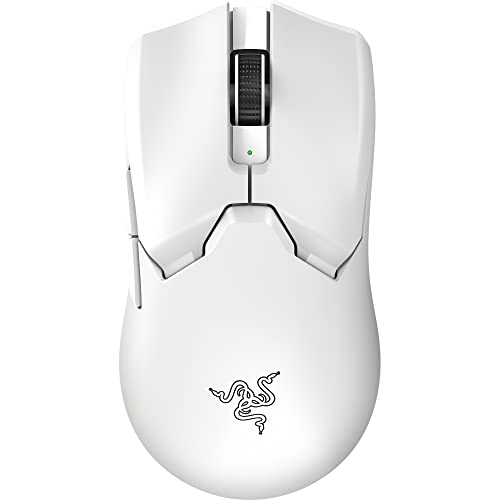
The Mercury White colourway is a clean, matte white finish that looks decent on a desk and doesn't show fingerprints as aggressively as you might fear. There's no RGB lighting on this model, which is either a disappointment or irrelevant depending on how you feel about that sort of thing. Practically speaking, the absence of RGB means one less thing to fiddle with in software and marginally simpler internals.
| Specification | Detail |
|---|---|
| Sensor | Razer 6400 DPI optical sensor |
| Max DPI | 6400 DPI |
| Polling Rate | 1000Hz |
| Buttons | 5 programmable |
| Switches | Razer mechanical switches |
| Weight | Approx. 96g |
| Cable | 2.1m braided USB-A |
| Side Grips | Rubber |
| Dimensions | 127.6mm x 61.7mm x 42.7mm |
| Compatibility | Windows, Mac |
| Software | Razer Synapse 3 |
| Colour | Mercury White |
Shape and Ergonomics
The DeathAdder shape is a right-handed ergonomic design with a pronounced hump that sits towards the back-centre of the shell. That hump placement is specifically good for palm grip users with medium to large hands. If your hand is roughly 18cm to 20cm from wrist to middle fingertip, this mouse was essentially designed for you. Smaller hands can make it work in a claw grip, but you'll notice the hump is a bit far back, which means your palm is doing more resting than gripping. Fingertip grip on this shape is genuinely awkward; the body is too wide and the hump too tall for that style to feel natural.
The left side of the mouse has a concave thumb rest that curves inward, and the rubber grip panels on both sides give you something to actually hold onto rather than just hoping friction does the job. The right side has a smaller rubber panel where your ring finger sits. In practice, owners consistently report that the grip feels secure even during long sessions, and the rubber doesn't seem to degrade quickly based on the pattern of long-term reviews. The shape hasn't changed dramatically from the original DeathAdder, and that's a compliment. Razer found something that worked and largely left it alone.
One thing worth flagging: the DeathAdder Essential is a right-handed mouse. If you're left-handed, this is a non-starter and you'd be looking at something like the Razer DeathAdder V3 range for a more symmetrical option, or a dedicated left-handed design. For right-handers with medium-to-large hands who palm grip, though, the shape is genuinely one of the better options at this price. That's not marketing talk; it's why the shape has survived this long in a market that churns through designs constantly.
Sensor Performance
The 6400 DPI figure on the box is largely irrelevant to how well this mouse actually tracks. Most players, including professionals, operate between 400 and 1600 DPI. The number that matters is whether the sensor tracks accurately, handles fast movements without spinning out, and has a sensible lift-off distance. On those counts, the DeathAdder Essential's sensor performs adequately for its price tier. It's not a flagship PixArt PAW3395 or PAW3370, and you won't find Razer publishing the actual sensor model for this budget line. What owners report is consistent tracking on cloth pads, no spin-outs during normal play, and acceptable lift-off distance. Nobody in the review base is complaining about the sensor misbehaving.
Where the sensor does show its budget nature is in maximum tracking speed and acceleration handling at the extremes. If you're doing very fast, sweeping flick shots in something like Valorant or CS2, a higher-end sensor will give you marginally cleaner data at the edges of movement. For the vast majority of players, including most competitive ones, this difference is genuinely not noticeable in actual gameplay. The sensor is good enough. That's not damning with faint praise; "good enough" at this price point is exactly what you want to hear, because plenty of mice at similar prices have sensors that aren't even that.
The 1000Hz polling rate means the mouse reports its position to your PC 1000 times per second. Some higher-end mice now offer 4000Hz or 8000Hz polling, but those require specific software support and have diminishing real-world returns for most players. At 1000Hz, you're covered for everything from casual gaming to serious competitive play. The optical tracking technology itself means no ball to clean, no mechanical wear on the tracking mechanism, and consistent performance across different lighting conditions on your desk. The sensor is not the reason to buy or skip this mouse. The shape is.
Weight and Glide
At approximately 96 grams, the DeathAdder Essential is noticeably heavier than the current wave of ultralight mice. The Logitech G Pro X Superlight 2 is around 60 grams. The Razer DeathAdder V3 HyperSpeed sits around 75 grams. So you're carrying roughly 20 to 35 grams more than the competition's premium options. Whether that matters depends entirely on how you play. For low-sensitivity players doing large sweeping movements, extra weight adds fatigue over long sessions. For higher-sensitivity players making smaller movements, 96 grams is perfectly manageable and some people actually prefer a bit of heft for stability.
The weight distribution feels front-heavy to slightly balanced, which suits palm grip users well. The feet are PTFE skates, which is the right material for smooth gliding. The quality of the stock feet on budget mice is often where corners get cut, and some owners have noted the skates are on the thinner side. They work fine out of the box and tracking on cloth pads is smooth, but if you're the type who swaps feet for aftermarket options, this mouse is compatible with third-party DeathAdder replacement skates. The edges of the stock feet are reportedly smooth enough not to catch on cloth surfaces, which is the minimum bar you'd expect.
Glide feel on hard pads versus cloth pads does vary, as it does with any mouse. Owners using cloth pads report smooth, consistent movement. Hard pad users occasionally note slightly faster glide than expected, which some like and some don't. There's no weight adjustment system here, which isn't surprising at this price, but notably, if you're someone who likes to tune the feel precisely. What you get is what you get, and what you get is a medium-weight mouse that slides well enough on most surfaces without feeling like it's skating away from you or dragging like it's stuck in treacle.
Buttons and Switches
The main switches are Razer's own mechanical switches, rated to 10 million clicks. These are not Omron switches, which Razer used in older DeathAdder generations and which built a strong reputation. Razer moved to their own branded switches across most of their line-up. Owner feedback on the switches in this model is broadly positive; the clicks feel crisp rather than mushy, with a clear tactile response and audible click that most people find satisfying. Pre-travel is minimal. There's no significant wobble or slop in the main buttons, and the actuation feels consistent across both left and right clicks.
The two side buttons sit on the left side of the mouse, positioned for thumb access. They're well-placed for medium to large hands in a palm grip, which is consistent with the overall shape philosophy. Smaller hands may find the rear side button slightly harder to hit reliably without shifting grip. The buttons have a firm, positive click feel rather than the vague, spongy response you sometimes get on budget mice. Scroll wheel click is similarly positive, and the scroll wheel itself has defined notches rather than a free-spinning encoder, which is fine for gaming and practical for general use.
One thing owners occasionally flag is button wobble on the main clicks, with some units showing slight lateral movement in the buttons before actuation. This isn't universal and doesn't seem to affect click feel or accuracy for most people, but it's worth knowing about if you're particular about build consistency. The absence of optical switches (which eliminate debounce delay entirely) is a genuine difference versus higher-end mice, but the practical impact in gameplay is minimal for most players. Mechanical switches at this price with this level of reported feel are a solid result. You're not getting shortchanged here.
Build Quality
The shell is solid ABS plastic with a matte finish on the Mercury White version. It doesn't flex noticeably under normal grip pressure, which is a good sign. Some budget mice creak when you squeeze them, which is both annoying and a sign of poor shell construction. Owner reports on the DeathAdder Essential don't flag creaking as a common issue, and the general consensus is that the build feels more solid than the price suggests. The matte white finish resists minor scuffs reasonably well, though white mice do show dirt accumulation over time in a way that black versions don't.
The rubber side grips are a genuine functional addition rather than decoration. They're textured and provide meaningful grip even when your hands are warm. Long-term durability of rubber grips is always a question, and some owners with extended use report the rubber starting to feel slightly tacky after a year or more of heavy use. That's not unusual for rubber grip material on any mouse, and it's not a dealbreaker. The grips are glued rather than removable, so you can't swap them out if they degrade, but that's standard practice at this price tier.
The braided cable is 2.1 metres long, which is generous. Braided cables are stiffer than bare rubber cables and can introduce drag if you're moving the mouse a lot. Some owners note the cable is slightly stiff and benefits from a cable bungee to reduce drag. It's not the flexible paracord-style cable you'd find on a premium mouse, but it's better than a basic rubber cable and doesn't tangle easily. The USB-A connector feels secure in the port. Overall, the build quality is appropriate for the price. It's not a premium product and it doesn't pretend to be, but it's not flimsy either.
Connectivity
The DeathAdder Essential is a wired mouse. Full stop. There's no wireless option, no 2.4GHz dongle, no Bluetooth. The connection is USB-A via the 2.1m braided cable. For competitive gaming, wired is still the zero-compromise option. There's no battery to charge, no receiver to lose, and no wireless latency to worry about, even though modern 2.4GHz gaming mice from Razer, Logitech, and others have effectively solved the latency problem at the premium end of the market.
At this price point, the absence of wireless isn't a compromise, it's expected. Wireless gaming mice that perform well start at significantly higher prices. If you need wireless at a budget, you're looking at older generation hardware with older sensors, which is a different set of trade-offs. The wired connection here is clean and reliable. Plug it in, it works. The 1000Hz polling rate is delivered over USB without issue, and the cable length is long enough to accommodate most desk setups without extension.
The USB-A plug is standard and compatible with any desktop or laptop that has a USB port. No USB-C, no adaptor needed for most setups. If your PC only has USB-C ports (increasingly common on modern laptops), you'll need a USB-A to USB-C adaptor, which is a minor inconvenience rather than a real problem. The cable itself doesn't have any in-line controls or pass-through ports, which is fine. It's a cable. It does cable things. The braiding does add some stiffness compared to bare rubber, and a cable bungee is worth considering if you find it pulling at the mouse during play.
Battery Life
This is a wired mouse. There is no battery. You plug it in, it runs indefinitely from USB power. There's nothing to charge, no battery percentage to monitor, and no risk of it dying mid-game. If you're coming from a wireless mouse and worrying about this, don't. The trade-off is the cable, which we've covered above. The power draw from the USB port is negligible and well within the USB specification for standard peripherals.
For completeness: the mouse draws power directly from your USB port via the USB-IF standard, which means it works on any USB-A port without needing a powered hub or special configuration. There's no charging port on the mouse, no charging dock in the box, and no software battery indicator in Razer Synapse. These are all non-features that are entirely appropriate for a wired mouse and worth stating clearly so there's no confusion when the box arrives.
If you're specifically looking for a wireless option in the DeathAdder family, Razer does offer wireless versions at higher price points, including the DeathAdder V3 HyperSpeed and the DeathAdder V3 Pro. Those use Razer's HyperSpeed 2.4GHz wireless technology, which performs well. But they cost considerably more, and you're getting a different sensor and updated switches alongside the wireless capability. For the price of the Essential, wired is the right call, and the execution here is solid.
Software and Customisation
The DeathAdder Essential is compatible with Razer Synapse 3, which is Razer's cloud-based configuration software. Through Synapse you can adjust DPI stages (the mouse supports five DPI stages between 200 and 6400 DPI), remap the five programmable buttons, and set up macros. The software also handles firmware updates when they're available. Synapse 3 requires an account and an internet connection for initial setup, which some people find annoying. It's a legitimate criticism. You shouldn't need to create an account to configure a mouse you've just bought.
On-board memory is limited on this model. Some sources suggest basic profile storage is available, but the Essential is not known for robust on-board memory like higher-end Razer mice. In practice, if you're using this mouse on a single PC with Synapse installed, that's irrelevant. If you're taking it to a LAN event or plugging it into multiple machines, you may need to reconfigure settings each time. That's a real limitation worth knowing about before you buy, particularly if you move between machines regularly.
The polling rate is fixed at 1000Hz on this model; there's no option to drop it to 500Hz or 125Hz for compatibility reasons, though 1000Hz works fine on every modern operating system. DPI switching is handled by the button on the underside of the mouse, cycling through your configured stages. There's no dedicated DPI indicator on the mouse itself, so you'll need to either remember your stages or check Synapse to confirm your current setting. That's a minor annoyance but not a serious problem. The software does what it needs to do, even if the account requirement is unnecessary friction.
Gaming Experience
For FPS gaming, the DeathAdder Essential shape is genuinely well-suited to the low-sensitivity, large-movement style that most serious players use. The palm grip support means your hand is relaxed during tracking shots, and the secure rubber side grips give you confident control during flick shots without the mouse slipping. The mechanical switches respond cleanly under rapid fire, and owners don't report issues with double-clicking or missed inputs. The sensor handles tracking movements without obvious acceleration artefacts, which is what you need for consistent crosshair placement.
For MMO or MOBA gaming, five buttons is on the lower end of what dedicated MMO mice offer, but it's enough for most players who aren't running extensive ability bars. The two side buttons are well-placed for quick access without repositioning your thumb. If you need six or more side buttons, this isn't your mouse. But for action RPGs, MOBAs, or games where you need a couple of extra binds beyond the main clicks and scroll wheel, the layout works well. The scroll wheel click adds a sixth input if you're willing to use it.
Long session comfort is where the shape really earns its reputation. Palm grip users consistently report low fatigue over extended play, which makes sense given the ergonomic design. The 96-gram weight is manageable for most play styles, though players who use very low sensitivity and make large arm movements across a big pad will notice it more over time than players using higher sensitivity with smaller movements. The rubber side grips do their job during intense moments where your grip naturally tightens. This is a mouse you can use for hours without your hand staging a protest, and that matters more than most spec sheet numbers.
How It Compares
At this price, the DeathAdder Essential is competing primarily with the Logitech G203 and the SteelSeries Rival 3. The G203 is lighter (around 85g), uses Logitech's HERO sensor in its current iteration (which is genuinely excellent), and has a more symmetrical shape that suits a wider range of hand sizes and grip styles. The Rival 3 is similarly lightweight at around 77g and uses SteelSeries' TrueMove Core sensor, which performs well. Both are legitimate alternatives.
Where the DeathAdder Essential wins is on ergonomic shape for right-handed palm grip users with medium-to-large hands. Neither the G203 nor the Rival 3 offers the same level of ergonomic support for that specific use case. The G203 is a better all-rounder for smaller hands or claw grip users. The Rival 3 is better if weight is your primary concern. But if you know you palm grip, you have medium-to-large hands, and you want a proven shape with solid build quality, the DeathAdder Essential makes a strong case.
The positive overall rating across thousands of reviews is also worth putting in context. That's not a small sample that could be gamed by early reviewers. That's a large, distributed population of real owners, and the satisfaction rate is high. Complaints in the review base cluster around cable stiffness, the Synapse account requirement, and occasional button wobble on some units. None of those are deal-breakers. The praise clusters around comfort, shape, and switch feel, which are the things that actually matter.
| Feature | Razer DeathAdder Essential | Logitech G203 | SteelSeries Rival 3 |
|---|---|---|---|
| Sensor | Razer optical (6400 DPI max) | HERO (8200 DPI max) | TrueMove Core (8500 DPI max) |
| Weight | Approx. 96g | Approx. 85g | Approx. 77g |
| Shape | Right-handed ergonomic | Ambidextrous/symmetrical | Ambidextrous/symmetrical |
| Switches | Razer mechanical | Omron mechanical | SteelSeries mechanical |
| Polling Rate | 1000Hz | 1000Hz | 1000Hz |
| Cable | 2.1m braided | 2.1m rubber | 1.5m rubber |
| Side Grips | Rubber | Textured plastic | Textured plastic |
| Wireless Option | No | No | No |
| RGB | No (this colourway) | Yes | Yes |
| Software | Razer Synapse 3 | Logitech G HUB | SteelSeries GG |
What Buyers Say
Across thousands of reviews with a positive overall rating, the feedback is consistent enough to draw real conclusions rather than just averaging noise. The most common praise is for the shape and comfort. Buyers repeatedly describe it as the first mouse that hasn't caused wrist or forearm discomfort after extended sessions. That's not a coincidence; the ergonomic design genuinely works for the demographic it's aimed at. Palm grip users with medium-to-large hands are the core audience, and they're happy.
Switch feel gets positive mentions too. Buyers coming from cheaper mice with mushy, vague main clicks notice the improvement immediately. The crisp, tactile response of the mechanical switches is consistently described as satisfying, and the click sound is mentioned positively rather than negatively, which suggests the actuation force and noise level are well-judged. Side button placement gets good marks from most owners, with the caveat that smaller hands occasionally struggle with the rear side button reach.
The complaints that come up repeatedly are worth taking seriously. Cable stiffness is the most common one; the braided cable is stiffer than a bare rubber cable and some owners find it pulls at the mouse during play. A cable bungee solves this, but it's an extra purchase. The Razer Synapse account requirement frustrates people who just want to plug in a mouse and use it. And a small but consistent minority of owners report button wobble or slight rattling on the main clicks, which suggests some unit-to-unit variation in manufacturing consistency. None of these issues are appearing in the majority of reviews, but they're real enough to flag.
Value Analysis
The DeathAdder Essential sits at the budget end of the gaming mouse market, and at that price it delivers more than most of its competitors on the specific criteria that matter for right-handed palm grip users. You're getting a proven ergonomic shape, mechanical switches with decent feel, a competent optical sensor, and rubber side grips in a package that's built solidly enough to last. The positive overall rating across thousands of reviews suggests the value proposition is landing well with real buyers.
The main thing you're giving up compared to spending more is weight and sensor performance. Spending more gets you into ultralight territory (under 70g) with flagship sensors like the PAW3395 and optical switches that eliminate debounce delay. Those are real improvements that competitive players at a high level will notice. But for the vast majority of players, including people who play seriously but aren't grinding ranked queues at the top 1%, the DeathAdder Essential's performance ceiling is more than adequate.
Compared to the Logitech G203 specifically, the value question comes down to shape versus sensor. The G203's HERO sensor is technically superior to the DeathAdder Essential's optical sensor. But if the G203's symmetrical shape doesn't fit your hand as well as the DeathAdder's ergonomic design, the better sensor is irrelevant. You'll perform better with a mouse that fits your hand, full stop. That's the DeathAdder Essential's value argument in one sentence, and it's a good one.
Pros and Cons
- Proven ergonomic shape that genuinely suits right-handed palm grip users with medium to large hands
- Mechanical switches with crisp, tactile feel and 10 million click rating
- Rubber side grips that provide real grip rather than just texture
- Solid build quality for the price, no notable flex or creak
- 1000Hz polling rate and competent optical sensor for the price tier
- Long cable at 2.1m with braided protection
- Thousands of reviews with a positive overall rating is genuine owner satisfaction at scale
- 96 grams is noticeably heavier than ultralight competition
- Sensor is mid-tier, not a flagship PixArt unit
- Razer Synapse requires an account for full configuration
- Braided cable is stiff and may benefit from a bungee
- Right-handed only, no left-handed option in this design
- Some unit variation in button wobble reported by a minority of owners
- No wireless option at this price point (expected, but worth stating)
Final Verdict
The Razer DeathAdder Essential Gaming Mouse with 6400 DPI Optical Sensor, 5 Programmable Buttons, Mechanical Switches, and Rubber Side Grips in Mercury White is a straightforward recommendation for a specific type of buyer: right-handed, medium-to-large hands, palm grip preferred, budget-conscious. If that's you, this mouse is probably the best shape you can buy at this price. The ergonomics are proven, the switches feel good, the build is solid, and thousands of owners are happy with it. That's not nothing.
If you're left-handed, have small hands, prefer claw or fingertip grip, or want an ultralight mouse, look elsewhere. The Logitech G203 is a better all-rounder for mixed grip styles and has a technically superior sensor. The SteelSeries Rival 3 is lighter. The Razer DeathAdder V3 HyperSpeed is wireless and lighter if you can stretch the budget. But none of those have quite the same ergonomic fit for the specific use case the DeathAdder Essential is designed for.
Score: 8 out of 10. It's not trying to be a flagship mouse and it doesn't need to be. It does what it does very well, for the people it's designed for, at a price that makes sense. The shape is the product, and the shape is good.
Not Right For You?
If the DeathAdder Essential doesn't fit your needs, here are the honest alternatives worth considering. For left-handed players or those who prefer a symmetrical shape, the Logitech G203 is the obvious next stop. It's lighter, has a better sensor, and works for both hands and most grip styles. The trade-off is less ergonomic support for right-handed palm grip users specifically.
If weight is your primary concern and you can stretch the budget, the SteelSeries Rival 3 at around 77 grams gives you a noticeably lighter feel with a solid sensor. It's not ergonomic in the DeathAdder sense, but it's a capable mouse for players who move a lot. For players who want to stay in the Razer ecosystem but need wireless, the Razer DeathAdder V3 HyperSpeed is the step up, bringing wireless connectivity, a lighter shell, and updated internals at a higher price. And if you want the absolute best Razer ergonomic mouse without budget constraints, the DeathAdder V3 Pro with its Focus Pro 30K sensor and optical switches is where the DeathAdder line peaks.
For players coming from a console background who are new to PC gaming mice and want something reliable and comfortable without overthinking it, the DeathAdder Essential remains a sensible starting point. The shape works, the price is fair, and the owner satisfaction rate is high enough that you're unlikely to regret it if you fit the target profile. Just know what you're buying: a well-shaped, mid-spec wired mouse that prioritises ergonomics over raw performance metrics. For many players, that's exactly the right priority.
Full Specifications
| Specification | Detail |
|---|---|
| Model | Razer DeathAdder Essential (Mercury White) |
| ASIN | B07Y693ND1 |
| Sensor Type | Optical |
| Max DPI | 6400 |
| DPI Stages | 5 (200 to 6400, configurable) |
| Polling Rate | 1000Hz |
| Programmable Buttons | 5 |
| Main Switch Type | Razer mechanical (10M click rating) |
| Weight | Approx. 96g |
| Length | 127.6mm |
| Width | 61.7mm |
| Height | 42.7mm |
| Cable Length | 2.1m |
| Cable Type | Braided USB-A |
| Side Grips | Rubber |
| Shell Material | ABS plastic |
| RGB | No (Mercury White version) |
| Wireless | No |
| Software | Razer Synapse 3 |
| OS Compatibility | Windows 8.1 or later, macOS 10.13 or later |
| Handedness | Right-handed |
| Warranty | 2 years (Razer standard) |
| Reviews | 18,735 (★★★★½ (4.5) stars) |
What works. What doesn’t.
6 + 6What we liked6 reasons
- Proven ergonomic shell that genuinely suits right-handed palm grip users with medium to large hands, reducing forearm and wrist fatigue during long sessions
- Mechanical switches deliver a crisp, tactile click feel with minimal pre-travel and a 10 million click rating, a clear step above mushy budget alternatives
- Rubber side grips on both flanks provide real, functional grip rather than decorative texture, and hold up well over extended use
- Solid ABS plastic construction with no notable flex or creaking, feeling more substantial than the price typically suggests
- Generous 2.1m braided cable and a standard 1000Hz polling rate that covers everything from casual to serious competitive play
- High owner satisfaction across thousands of reviews with a positive overall rating reflects genuine long-term approval rather than launch-period enthusiasm
Where it falls6 reasons
- At approximately 96 grams, the mouse is noticeably heavier than ultralight competition such as the Logitech G Pro X Superlight 2 at around 60 grams, which adds fatigue for low-sensitivity players over long sessions
- The optical sensor is a mid-tier unit rather than a flagship PixArt model, meaning tracking at the extreme edges of very fast movements is less precise than on higher-end mice
- Razer Synapse 3 requires account creation and an internet connection for initial setup, which is unnecessary friction for a peripheral that should work out of the box
- The braided cable is stiffer than a bare rubber cable and can pull at the mouse during play, making a cable bungee a practical but additional expense
- Strictly right-handed design with no left-handed or ambidextrous variant at this price, excluding left-handed players entirely
- A minority of owners report slight lateral button wobble on the main clicks, suggesting some unit-to-unit manufacturing variation
Full specifications
6 attributes| Buttons | 5 |
|---|---|
| Connectivity | USB wired |
| DPI MAX | 6400 |
| RGB | false |
| Sensor | PixArt PAW3328 |
| Switches | Mechanical |
Frequently asked
7 questions01What grip style is the Razer DeathAdder Essential designed for?+
The DeathAdder Essential is designed primarily for right-handed palm grip users. The pronounced hump sits towards the rear-centre of the shell, which suits medium to large hands resting fully on the mouse. Claw grip is possible but the hump placement is not ideal for it, and fingertip grip is awkward given the width and height of the shell.
02Does the Razer DeathAdder Essential work for left-handed players?+
No. The DeathAdder Essential is a right-handed asymmetric design with a thumb rest and side buttons on the left side only. Left-handed players would need to look at an ambidextrous mouse such as the Logitech G203, or a dedicated left-handed design.
03Is Razer Synapse required to use the DeathAdder Essential?+
The mouse works as a plug-and-play device without Synapse for basic use. However, adjusting DPI stages, remapping buttons, and setting macros requires Razer Synapse 3, which needs an account and an internet connection for initial setup. On-board memory on this model is limited, so settings may not persist across machines without the software.
04How does the DeathAdder Essential compare to the Logitech G203?+
The Logitech G203 is lighter at around 85 grams, uses Logitech's HERO sensor which is technically superior to the DeathAdder Essential's optical unit, and has an ambidextrous symmetrical shape that suits a wider range of grip styles and hand sizes. The DeathAdder Essential wins on ergonomic support specifically for right-handed palm grip users with medium to large hands. If that description fits you, the DeathAdder shape is likely a better fit. If you have smaller hands or use claw grip, the G203 is the more versatile option.
05Is the braided cable a problem for everyday use?+
The 2.1m braided cable is durable and resists tangling, but it is stiffer than a bare rubber cable and can introduce some drag when moving the mouse across a large pad. A number of owners recommend pairing it with a cable bungee to keep the cable elevated and reduce pull. It is a minor inconvenience rather than a serious flaw, and the extra length is useful for most desk setups.
06What is the actual sensor in the Razer DeathAdder Essential?+
Razer does not publish the specific sensor model for the Essential line. It is branded as a Razer 6400 DPI optical sensor and is understood to be a mid-tier PixArt unit rather than the flagship PAW3370 or PAW3395 found in higher-end gaming mice. It performs competently at this price tier with consistent tracking on cloth pads and no reported spin-out issues under normal play conditions.
07Does the Mercury White version have RGB lighting?+
No. The Mercury White colourway of the DeathAdder Essential does not include RGB lighting. The matte white finish is clean and resists fingerprints reasonably well, but if RGB is important to you, other DeathAdder variants or competing mice such as the Logitech G203 offer lighting options.