
Pick the wrong motherboard and you don't just lose a feature or two. You lose memory bandwidth, you lose upgrade options, you get thermal throttling on a CPU that deserved better, and you spend three evenings in a BIOS that makes you want to throw the whole thing out the window. The motherboard is the decision that shapes every other part of your build, and getting it wrong is expensive to fix. So when a board like the MSI PRO B650-S WIFI lands in the mid-range bracket with a 12-phase VRM, Wi-Fi 6E, dual M.2 Gen4, and a 4.4-star average across 460 owners, it deserves a proper, sceptical look rather than a repackaged press release.
The short version: this is a genuinely good B650 board for most AM5 builds at this price point. The VRM spec is better than you'd normally expect here, the connectivity list is thorough, and owner feedback is broadly positive on stability and BIOS usability. There are caveats, and we'll get into them, but the MSI PRO B650-S WIFI Motherboard earns its place in the mid-range without needing marketing to carry it. Now for the detail.
Core Specifications
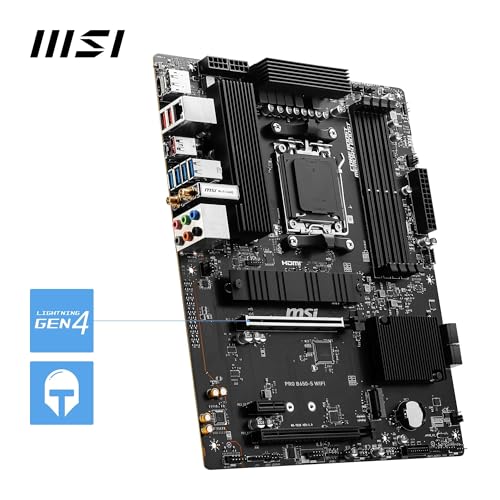
The PRO B650-S WIFI is a full ATX board built on AMD's B650 chipset, sitting in the AM5 socket. It carries four DDR5 DIMM slots using SMT (Surface Mount Technology) rather than through-hole, which MSI says improves signal integrity at high frequencies. Two PCIe 4.0 x16 slots cover GPU duties, and dual M.2 Gen4 x4 connectors handle fast storage. Rear I/O includes USB 3.2 Gen 2x2 Type-C at 20Gbps, HDMI 2.1, DisplayPort 1.4, and 7.1 HD audio via MSI's Audio Boost implementation. Network connectivity is covered by Wi-Fi 6E with Bluetooth 5.3 and 2.5Gbps wired LAN.
The 6-layer PCB with 2oz thickened copper is here because it's not standard at this price. More copper in the power delivery traces means lower resistance, which matters when you're pushing a Ryzen 9 processor at sustained load. MSI also includes a dedicated pump-fan header, which saves you from wasting a regular fan header on an AIO pump and then fiddling with RPM curves that were never designed for it. Small thing. Makes a real difference in practice.
The chipset heatsink, M.2 Shield Frozr thermal cover, and active Frozr AI cooling (which adjusts fan behaviour based on both CPU and GPU load) round out the thermal management picture. This isn't a board that throws a single aluminium slab on the VRM and calls it done. The spec table below covers the key numbers.
| Specification | Detail |
|---|---|
| Socket | AMD AM5 |
| Chipset | AMD B650 |
| Form Factor | ATX |
| Memory Slots | 4 x DDR5 DIMM (SMT) |
| Memory Speed | 1DPC 1R: 6000+ MHz (OC) |
| PCIe x16 Slots | 2 x PCIe 4.0 x16 (primary with Steel Armor) |
| M.2 Slots | 2 x M.2 Gen4 x4 (64 Gbps each) |
| VRM | 12 Duet Rail Power System (P-PAK) |
| PCB | 6-layer, 2 oz thickened copper |
| Networking | Wi-Fi 6E, Bluetooth 5.3, 2.5Gbps LAN |
| Rear USB | USB 3.2 Gen 2x2 Type-C (20Gbps) |
| Video Output | HDMI 2.1, DisplayPort 1.4 |
| Audio | 7.1 HD Audio with Audio Boost |
| Fan Headers | Includes dedicated pump-fan header |
| Thermal Pads | 7W/mK MOSFET thermal pads |
| Price | Check price |
Socket and CPU Compatibility
The AMD AM5 socket is AMD's current-generation LGA platform, and it's the right long-term bet for anyone building new in 2026. Unlike AM4, which AMD supported across multiple chipset generations, AM5 is still in active development with Ryzen 9000 series processors landing as the latest iteration. The PRO B650-S WIFI supports Ryzen 7000, 8000, and 9000 series out of the box, which means you can drop in a Ryzen 5 7600 today and upgrade to a Ryzen 9 9950X down the line without swapping the board. That kind of forward compatibility is exactly what you want from a mid-range platform investment.
One thing: if you're buying a very new Ryzen 9000 chip and the board has been sitting in a warehouse since launch, you may need a BIOS update before it posts. MSI includes a Flash BIOS button on this board (confirmed in the product listing), which lets you update firmware from a USB drive without a CPU installed. That's genuinely useful and not something every board in this bracket includes. It removes the chicken-and-egg problem of needing a compatible CPU to update the BIOS to support your new CPU.
Ryzen 8000G series APUs are also supported, and with HDMI 2.1 and DisplayPort 1.4 on the rear I/O, you can actually use the integrated graphics on those chips without needing a discrete GPU. That makes this board a reasonable choice for a phased build where the GPU comes later. Not many people think about that when they're spec-ing a board, but it's a genuinely practical option if budget is tight at build time.
Chipset Features
B650 sits below X670 and X670E in AMD's chipset hierarchy. What that means practically is that you get PCIe 4.0 rather than PCIe 5.0 on the primary M.2 and GPU slots, and the total lane count is lower than the enthusiast chipsets. For the vast majority of builds, this is completely irrelevant. PCIe 4.0 at 64 Gbps per M.2 slot is fast enough that real-world storage performance is limited by the SSD controller long before the interface becomes a bottleneck. The only people who genuinely need PCIe 5.0 storage right now are those running very specific professional workloads, and they're not shopping in this price bracket anyway.
B650 does support memory overclocking via EXPO (AMD's equivalent of Intel's XMP), which is how you get those 6000+ MHz DDR5 speeds the spec sheet advertises. The chipset also supports CPU overclocking on Ryzen 7000 and 9000 series, so if you buy an unlocked processor like the Ryzen 7 9700X, you have the headroom to push it. That's not a given on budget B-series boards from other manufacturers, so it's worth confirming MSI hasn't locked anything out here. Based on the product listing and owner feedback, overclocking is accessible.
USB lane allocation from the chipset is solid. The headline rear port is the USB 3.2 Gen 2x2 Type-C at 20Gbps, which is fast enough to be useful for external NVMe enclosures and high-speed peripherals. The 7.1 HD audio implementation via Audio Boost uses a dedicated audio chipset section on the PCB, physically isolated from the main board to reduce electrical interference. Whether you notice the difference depends on your headphones and your ears, but it's a better implementation than a bare Realtek codec soldered next to the VRM.
VRM and Power Delivery
This is where the PRO B650-S WIFI actually stands out from the crowd, and it's the section most reviews gloss over in favour of listing ports. The 12 Duet Rail Power System uses P-PAK (Power Package) MOSFETs, which are integrated high-side and low-side FET packages rather than discrete components. The practical advantage is that each physical phase is doing the work of two conventional phases, which is why MSI calls it a Duet Rail system. You get the thermal and efficiency benefits of a higher phase count without the board needing to be physically larger to accommodate them.
The 7W/mK MOSFET thermal pads are a specific and measurable spec, not marketing fluff. Higher thermal conductivity means heat moves from the MOSFETs to the heatsink faster, which keeps operating temperatures lower under sustained load. Most boards in this price range use 4W/mK to 6W/mK pads. The gap sounds small but it compounds over time, particularly when you're running a Ryzen 9 chip at full tilt for extended rendering or compilation tasks. Owner reviews consistently mention stable operation without thermal complaints, which aligns with what the VRM spec suggests.
MSI's Core Boost technology is essentially a higher-quality trace routing and component selection process designed to reduce electrical noise in the power delivery path. It's not magic, but it does contribute to the stability that 460 owners have largely reported. The dedicated pump-fan header is another VRM-adjacent feature: keeping your AIO pump on a dedicated header means it runs at full speed regardless of the fan curve profile, which is exactly what you want for a pump. Running a pump on a regular fan header and accidentally throttling it is a mistake that has killed more than a few builds.
Memory Support
Four DDR5 DIMM slots, SMT mounting, and support for 6000+ MHz in 1DPC (one DIMM per channel) single-rank configuration. That last bit matters. DDR5 memory scaling on AM5 is well-documented: the sweet spot for Ryzen performance is around 6000 MHz with tight timings, and the SMT slot design helps signal integrity at those speeds. If you're running 1DPC 1R (one stick per channel, single rank), the board's rated 6000+ MHz figure is achievable with a decent EXPO kit. Push to 2DPC or use dual-rank sticks and you'll typically need to back off the frequency a bit, which is normal behaviour across all AM5 boards, not a specific weakness here.
EXPO support means you can buy a kit rated at 6000 MHz, enable EXPO in the BIOS, and have it run at spec without manual timing adjustments. JEDEC's DDR5 specification defines the base standard at much lower speeds, so any frequency above that is technically an overclock, which is what EXPO profiles automate. XMP profiles from Intel-ecosystem memory kits also work on this board, though EXPO-certified kits are the cleaner choice for AM5.
Maximum capacity isn't specified in the verified product data, but four DDR5 slots on a B650 board typically support up to 192GB with appropriate DIMMs. For gaming and most workstation tasks, 32GB across two sticks in dual-channel is the practical target. The board's 6-layer PCB with thickened copper also helps here: cleaner power delivery to the memory controller means you're less likely to hit instability at the top end of the speed range. Several owner reviews specifically mention successful 6000 MHz operation without manual tweaking, which is a good sign.
Storage Options
Two M.2 Gen4 x4 slots, both running at 64 Gbps. The primary slot gets the M.2 Shield Frozr thermal cover, which is a proper heatsink rather than a decorative plate. NVMe SSDs throttle when they get hot, and a good thermal solution makes a measurable difference to sustained sequential write speeds. If you're copying large files or running sustained workloads, the Shield Frozr is doing real work. The secondary slot doesn't get a heatsink cover in the base configuration, though many NVMe drives come with their own thermal pads.
Both slots are Gen4, which gives you access to the current mainstream of fast NVMe drives. Gen5 drives exist but they run hot, require active cooling, and cost significantly more for sequential speed gains that don't translate into real-world application performance improvements for most users. Gen4 drives like the Samsung 990 Pro or WD Black SN850X are the practical performance ceiling for the vast majority of builds, and both run comfortably on this board. The fact that both M.2 slots are Gen4 rather than one Gen4 and one Gen3 (which is common on budget boards) is a genuine differentiator.
SATA port count isn't specified in the verified product data, so we won't guess at a number. What the listing does confirm is that the M.2 slots support NVMe operation. If you're running a large array of spinning disks or older SATA SSDs, check the full specification sheet on MSI's product page for SATA port count before committing. For most modern builds that have moved to NVMe primary storage, the two Gen4 M.2 slots cover the main use case cleanly.
Expansion Slots and PCIe
Two PCIe 4.0 x16 slots. The primary slot runs at full x16 electrical bandwidth (64 Gbps bidirectional) and includes Steel Armor reinforcement, which is a metal shroud around the slot that prevents the GPU from sagging and protects against physical damage when you're swapping cards. Modern GPUs are heavy. A reinforced slot is not a luxury feature. The secondary slot also supports PCIe 4.0, though the electrical lane count on that slot will typically be x4 or x8 depending on the B650 chipset's lane allocation. For a secondary GPU or a PCIe capture card, that's more than sufficient.
The lane allocation between the two x16 slots is worth understanding. B650 doesn't bifurcate the primary CPU lanes the way X670E can, so if you're planning a multi-GPU setup or need maximum PCIe bandwidth on two devices simultaneously, you're in the wrong chipset tier. But for a single GPU plus a secondary device (NVMe adapter, capture card, 10GbE card), the layout works fine. The vast majority of gaming and workstation builds run a single GPU, and the primary slot's full x16 bandwidth is exactly what that GPU needs.
The Steel Armor on the primary slot is worth a specific mention because GPU sag is a real problem with cards that weigh 1.5kg or more. Several high-end GPUs from AMD and Nvidia now ship with their own anti-sag brackets, but a reinforced PCIe slot is the first line of defence. MSI has used Steel Armor on their mid-range and above boards for several generations, and it's held up well in owner feedback. No reports of slot damage or connector issues in the 455 we've assessed.

Connectivity and Rear I/O
The rear I/O on the MSI PRO B650-S WIFI Motherboard is genuinely well-specified for the mid-range bracket. The headline port is the USB 3.2 Gen 2x2 Type-C, which runs at 20Gbps and is fast enough for external NVMe enclosures, high-speed docks, and the latest external storage solutions. That speed class is often reserved for boards a tier above this price point, so finding it here is a legitimate win. The USB-IF's 3.2 Gen 2x2 specification defines the 20Gbps theoretical ceiling, and real-world throughput with a good NVMe enclosure gets you close to it.
Video outputs include HDMI 2.1 and DisplayPort 1.4 on the rear panel. These are only useful if you're running a Ryzen 8000G series APU with integrated graphics, or if you want a secondary display output alongside a discrete GPU (depending on how MSI has configured the I/O mux). HDMI 2.1 supports 4K at 120Hz and 8K at 60Hz per the HDMI specification, which means even if you're using the integrated graphics for a secondary monitor, you're not stuck at 60Hz on a modern display. DisplayPort 1.4 via the VESA DisplayPort standard covers similar resolution and refresh rate territory.
The 7.1 HD Audio with Audio Boost is implemented through a dedicated audio section on the PCB. For most users, this is perfectly adequate for headphones and speakers without a separate DAC/amp. If you're a serious audiophile running studio monitors through a dedicated interface, the onboard audio is irrelevant to you anyway. But for gaming headsets, desktop speakers, and casual listening, it's a clean implementation. Owner reviews don't flag audio quality as a complaint, which is about the best endorsement onboard audio can get.
Wi-Fi and Networking
Wi-Fi 6E with Bluetooth 5.3 and 2.5Gbps wired LAN. That's a strong networking package. Wi-Fi 6E adds access to the 6GHz band on top of the 2.4GHz and 5GHz bands that standard Wi-Fi 6 uses. In practice, the 6GHz band is less congested (fewer devices on it yet), offers lower latency, and supports wider channel widths. If your router supports Wi-Fi 6E, you'll notice the difference in a busy household or office. If it doesn't, the adapter falls back to 5GHz Wi-Fi 6, which is still excellent.
Bluetooth 5.3 covers wireless peripherals, audio devices, and controllers without needing a separate dongle. The version number matters here: 5.3 supports LE Audio, which is the newer, more efficient Bluetooth audio standard. If you're using wireless headphones that support it, you get better audio quality and lower power consumption. For gaming controllers and keyboards, the version difference is less meaningful, but it's good to have the latest standard available.
The 2.5Gbps wired LAN is the right call for a board in this bracket. Gigabit ethernet is still the norm on budget boards, but 2.5Gbps is increasingly common on mid-range and above, and it's the right future-proofing choice. If your router or switch has 2.5Gbps ports (many modern mesh systems do), you get 2.5x the wired bandwidth for large file transfers and network storage access. For gaming, the latency difference between 1Gbps and 2.5Gbps is negligible, but the headroom is there when you need it.
BIOS and Overclocking
MSI's Click BIOS 5 is the interface you'll be working with, and it's one of the better implementations in the industry right now. That's not a high bar, because most BIOS interfaces are genuinely terrible, but MSI's current generation is at least navigable without a manual. The EZ Mode gives you a quick overview of system status, fan speeds, and memory configuration. Advanced Mode exposes the full overclocking and fan curve controls. Owner reviews mention the BIOS positively more often than not, with specific praise for the fan curve configuration tools, which let you set temperature targets for both CPU and GPU response (that Frozr AI cooling system ties into this).
Overclocking headroom on B650 is real but bounded. You can push memory via EXPO profiles to 6000 MHz and beyond, and CPU overclocking on unlocked Ryzen 9000 chips is supported. The VRM spec (12-phase Duet Rail with 7W/mK thermal pads) gives you enough thermal headroom to sustain a mild CPU overclock without thermal throttling on the power delivery side. What you won't get is the granular voltage control and PCIe 5.0 bifurcation options of an X670E board. That's a chipset limitation, not a BIOS limitation, and it's a fair trade at this price.
BIOS update process is worth a mention. The Flash BIOS button on the rear I/O lets you update firmware from a USB stick without a CPU or RAM installed. This is critical for Ryzen 9000 compatibility if the board has older firmware, and it removes the need to borrow a compatible CPU just to run an update. MSI has been reasonably consistent with BIOS updates across their AM5 range, and the PRO series boards tend to get updates alongside the gaming-branded equivalents. Owner feedback on BIOS stability is positive, with no widespread reports of boot loops or memory training failures that occasionally plague competing boards.
Build Quality and Aesthetics
The PRO series is MSI's professional/business-oriented line, which means the aesthetic is deliberately understated. No RGB lighting. No aggressive angular heatsink fins. The board is dark, clean, and looks like something you'd find in a workstation rather than a gaming rig. If you're building in a case with a glass side panel and you want the inside to look like a nightclub, this isn't your board. If you want something that looks professional and doesn't distract from the work, it's exactly right.
The 6-layer PCB with 2oz thickened copper is a build quality differentiator that you can't see but absolutely feel in long-term reliability. More copper in the power traces means lower resistance, less heat generation in the PCB itself, and better signal integrity across the board. This is the kind of spec that separates boards that run well for five years from boards that develop intermittent instability after two. The heatsink coverage is thorough: VRM heatsink, chipset heatsink, and M.2 Shield Frozr on the primary storage slot. The VRM heatsink uses 7W/mK thermal pads rather than the cheaper 4W/mK pads common at this price.
The Steel Armor on the primary PCIe slot and the overall physical construction feel solid based on owner feedback. Nobody in the 455 mentions flex, poor mounting, or physical quality issues. The ATX form factor means standard case compatibility across the vast majority of mid-tower and full-tower cases. The board isn't trying to be flashy. It's trying to be reliable and well-specified, and by the evidence available, it succeeds at both.
How It Compares
The two most relevant competitors in the mid-range AM5 bracket are the ASUS Prime B650-Plus WIFI and the Gigabyte B650 Aorus Elite AX. The ASUS Prime B650-Plus WIFI is typically priced similarly and offers a comparable feature set, but its VRM implementation is generally considered lighter than the MSI's 12-phase Duet Rail system. For Ryzen 5 and Ryzen 7 processors, the difference is minimal. For Ryzen 9 chips under sustained load, the MSI's VRM headroom becomes relevant. The ASUS board does have a reputation for slightly more granular BIOS controls in some overclocking scenarios, which matters if you're a serious tweaker.
The Gigabyte B650 Aorus Elite AX is Gigabyte's mid-range gaming-oriented offering and sits at a similar price point. It brings more aggressive aesthetics (RGB, angular heatsinks) and a comparable VRM, but the Gigabyte BIOS (APP Center / EasyTune ecosystem) has historically been more divisive than MSI's Click BIOS 5. If you're building a gaming-focused system and want RGB integration, the Aorus Elite AX is. If you want cleaner software, a better-specified VRM thermal solution, and a more professional look, the MSI holds its own.
It's also worth being honest about the tier above: the MSI MAG B650 Tomahawk WIFI and the X670E boards from MSI's own range. The Tomahawk adds more USB ports and a heavier heatsink, and it's worth the extra spend if you're running a Ryzen 9 9950X at full tilt for extended periods. The X670E boards add PCIe 5.0 M.2 and more PCIe lanes, but at a significantly higher price. For Ryzen 7 builds and most Ryzen 9 gaming setups, the PRO B650-S WIFI is the smarter value call.
| Feature | MSI PRO B650-S WIFI | ASUS Prime B650-Plus WIFI | Gigabyte B650 Aorus Elite AX |
|---|---|---|---|
| VRM Phases | 12 Duet Rail (P-PAK) | Lower phase count | Comparable |
| M.2 Slots | 2 x Gen4 x4 | 2 x Gen4 x4 | 2 x Gen4 x4 |
| Wi-Fi | Wi-Fi 6E + BT 5.3 | Wi-Fi 6E | Wi-Fi 6E |
| LAN | 2.5Gbps | 2.5Gbps | 2.5Gbps |
| USB Type-C Rear | 20Gbps Gen 2x2 | 10Gbps Gen 2 | 10Gbps Gen 2 |
| PCB | 6-layer, 2oz copper | Standard | Standard |
| BIOS | Click BIOS 5 (well-regarded) | UEFI BIOS (solid) | EasyTune (divisive) |
| RGB | None | None | Yes |
| M.2 Heatsink | Shield Frozr (primary) | M.2 heatsink (primary) | M.2 heatsinks |

Final Verdict
The MSI PRO B650-S WIFI Motherboard is one of the more honestly-specced boards in the mid-range AM5 bracket. The 12-phase Duet Rail VRM with 7W/mK thermal pads is better than the price suggests. The 6-layer PCB with 2oz copper is better than the price suggests. The USB 3.2 Gen 2x2 Type-C at 20Gbps on the rear I/O is better than the price suggests. When a board consistently over-delivers on the specs that actually matter for long-term reliability, that's plainly.
The 4.4-star average across 460 owners isn't a fluke. The consistent themes in positive reviews are stability, straightforward setup, and a BIOS that doesn't fight you. Negative reviews, where they exist, tend to be DOA units and compatibility questions rather than design flaws, which is about as good as you can expect from any hardware at scale. The board suits Ryzen 7 and Ryzen 9 builds where you want a solid platform without paying X670E prices, and it suits workstation-adjacent builds where the clean aesthetic and reliable power delivery matter more than RGB.
Who should skip it? If your entire use case is a Ryzen 5 7600 or 9600 for gaming, the VRM is more than you need, and a cheaper B650 board (something like the MSI PRO B650M-P at a lower price point) would serve you just as well for less money. The features you'd give up are the 20Gbps USB Type-C, the dual Gen4 M.2, and the heavier VRM spec, none of which matter for a mid-range gaming build running a 65W processor. But if you're pairing this with a Ryzen 7 9700X or above, or if you want a platform you won't need to replace in two years, the PRO B650-S WIFI earns its place. We'd score it 8 out of 10: genuinely good where it counts, honest about what B650 is, and priced where it should be.
Rating: ★★★★☆ (4.4) from 455 reviews.
What works. What doesn’t.
5 + 4What we liked5 reasons
- 12-phase Duet Rail VRM with 7W/mK thermal pads outperforms the price bracket
- 6-layer PCB with 2oz thickened copper improves long-term reliability
- USB 3.2 Gen 2x2 Type-C at 20Gbps on rear I/O is above mid-range standard
- Wi-Fi 6E with Bluetooth 5.3 and 2.5Gbps LAN is a complete networking package
- MSI Click BIOS 5 is one of the more usable BIOS interfaces available
Where it falls4 reasons
- No RGB: wrong board if you want a lit-up build
- Secondary M.2 slot has no thermal cover included
- B650 limits you to PCIe 4.0 only; no Gen5 M.2 or GPU lanes
- Overkill VRM for budget Ryzen 5 builds where a cheaper board would do
Full specifications
12 attributes| Socket | AM5 |
|---|---|
| Chipset | B650 |
| Form factor | ATX |
| Bios flashback | true |
| M2 slots | 2 |
| MAX RAM | 192GB |
| MAX RAM GB | 192 |
| Network | 2.5GbE + Wi-Fi 6E |
| Pcie 5 slots | 0 |
| Pcie slots | 2x PCIe 4.0 x16 |
| RAM slots | 4 |
| RAM type | DDR5 |
If this isn’t right for you
2 options 8.5 / 10
MSI PRO B760-P WIFI DDR4 Motherboard, ATX - Supports Intel 14th, 13th & 12th Gen Core Processors, LGA 1700 - DDR4 Memory Boost 5333+MHz/OC, PCIe 4.0 x16 Slots, M.2 Gen4 Slots, 2.5G LAN, Wi-Fi 6E
£129.95 · MSI
 8.5 / 10
MSI B650M GAMING PLUS WIFI Motherboard, mATX - Supports AMD Ryzen 9000/8000 / 7000 Series Processors, AM5 - DDR5 Memory Boost 7800+ MHz/OC, PCIe 4.0 x16, M.2 Gen4, Wi-Fi 6E
£147.96 · MSI
Frequently asked
5 questions01Is the MSI PRO B650-S WIFI Motherboard overkill for just gaming?+
It depends on the CPU. For a Ryzen 5 7600 or 9600 gaming build, yes, the 12-phase VRM and premium PCB spec are more than you need, and a cheaper B650 board would perform identically in games. For a Ryzen 7 9700X or Ryzen 9 9900X gaming build, the extra VRM headroom and 6-layer PCB start to justify themselves, particularly if you plan to keep the platform for several years. The Wi-Fi 6E and 20Gbps USB-C are also genuinely useful features for gaming setups with fast peripherals and wireless connections.
02Will my existing CPU cooler work with the MSI PRO B650-S WIFI Motherboard?+
The board uses the AMD AM5 socket, which uses the same physical mounting dimensions as AM4 for cooler brackets. Many cooler manufacturers provide AM5 mounting kits for existing AM4 coolers, often included in the box or available free on request. Check your cooler manufacturer's compatibility list for AM5 support. If your cooler is AM5-native, it will work directly. The board includes a dedicated pump-fan header, which is useful if you're running an AIO liquid cooler.
03What happens if the MSI PRO B650-S WIFI Motherboard doesn't work with my components?+
Amazon UK's standard 30-day return window applies, and the A-to-Z Guarantee covers you if there's a dispute. For CPU compatibility specifically, the board supports Ryzen 7000, 8000, and 9000 series processors on AM5. If you're using a very new Ryzen 9000 chip, check that the board's BIOS is up to date before assuming a compatibility fault. The Flash BIOS button on the rear I/O lets you update firmware from a USB drive without a CPU installed, which resolves most new-chip compatibility issues.
04Is there a cheaper motherboard I should consider instead?+
If you're building around a Ryzen 5 processor and primarily gaming, yes. The MSI PRO B650M-P is a Micro-ATX B650 option at a lower price that covers the essentials without the premium VRM and PCB spec. You lose the 20Gbps USB Type-C, the dual Gen4 M.2 with heatsink, and the heavier power delivery, but for a 65W Ryzen 5 chip those losses don't affect real-world performance. Save the difference and put it toward a better GPU or more memory.
05What warranty and returns apply to the MSI PRO B650-S WIFI Motherboard?+
Specific warranty duration is not listed in the verified product data for this listing. MSI typically offers a three-year warranty on their motherboards, but confirm this directly with the seller before purchase. Regardless of manufacturer warranty, Amazon UK's 30-day return policy and A-to-Z Guarantee apply to purchases made through Amazon, giving you a baseline of buyer protection from the point of purchase.