Best Overall Value
Finding a decent MSI monitor under £300 shouldn't mean squinting at spec sheets and hoping the panel lottery goes your way. The good news? MSI's sub-£300 lineup in 2026 is genuinely strong, with fast refresh rates, proper VA and IPS panels, and features that used to sit a tier or two above this budget. The tricky part is working out which model actually suits how you use a screen, whether that's competitive gaming, everyday work, or a bit of both. We've compared nine of MSI's best options at this price and ranked them on panel quality, refresh rate, real-world colour accuracy, and value. Keep reading and you'll know exactly which one earns your money.
If you want the best MSI monitors under £300 UK 2026 experience for competitive gaming, this is it. The MAG 274CXF runs a Rapid VA panel at 280Hz with a 0.5ms GtG response time. That is genuinely fast. Not "fast for a VA" fast. Just fast, full stop.
The 1500R curve wraps the screen around your field of view nicely on a 27-inch panel. It is not so aggressive that it looks weird from a normal sitting distance, but you do feel the immersion during first-person games. Colours are punchy and contrast is strong, as you would expect from VA technology. Blacks look properly black, not that washed-out grey you get on cheaper IPS panels.
The 1080p resolution is the one honest compromise here. At 27 inches, 1920x1080 is not as sharp as 1440p. Text looks slightly soft if you sit close. For gaming at 280Hz on a mid-range GPU, though, 1080p is the right call. You are not going to push 280 frames per second at 1440p on a GTX 1660 or RX 6600. So the resolution makes sense for the target audience.
Connectivity is solid: DisplayPort 1.2a and HDMI 2.0b with CEC support. Adaptive Sync works with both AMD FreeSync and Nvidia G-Sync Compatible setups. The stand is basic (tilt only) but the monitor is light enough that it is not a problem. OSD navigation is straightforward.
Real owner feedback consistently praises the motion clarity and the out-of-box colour accuracy. A few users mention the stand feels a touch plasticky. Fair point. But at this price, the panel quality more than compensates.
Pros
- 280Hz refresh rate is genuinely competitive-grade
- Rapid VA delivers strong contrast and fast motion
- 1500R curve adds immersion without looking extreme
- Adaptive Sync works with AMD and Nvidia
- Solid price for the spec sheet
Cons
- 1080p at 27 inches is softer than 1440p
- Stand only tilts, no height adjustment
- Not ideal for productivity or creative work
Buy on Amazon£178.99
Best Under £100
Rating: ★★★★½ (4.6)
Under £60 for a 27-inch IPS monitor with built-in speakers and 100Hz. That is a proper bargain. The PRO MP275 is not trying to be a gaming monitor. It knows what it is: a clean, comfortable office screen for everyday computing.
The IPS panel gives you accurate colours and wide viewing angles, which matters if you share your screen during video calls or work in a bright room. The eye-care features (low blue light mode, anti-flicker) are genuinely useful for long working days. This is not marketing fluff. Reduced eye strain over an eight-hour shift is a real benefit.
The built-in speakers are modest but functional. Good enough for Teams calls and YouTube. Not good enough for music or films if you care about audio quality. The VGA (D-Sub) port is a nice touch for anyone connecting older office hardware, and the HDMI 1.4b handles modern laptops and desktops without issue.
100Hz is a step up from the old 60Hz standard, which means scrolling and general desktop use feels noticeably smoother. It is not a gaming refresh rate, but it is a real improvement for productivity. The tilt-adjustable stand is basic but functional. No height adjustment at this price, which is expected.
Look, if you need a second monitor for a home office setup, or you are kitting out a small business on a tight budget, this is one of the most sensible purchases in the entire MSI range right now.
Pros
- Exceptional value under £60
- IPS panel with wide viewing angles
- Built-in speakers save desk space
- VGA port for legacy hardware
- Eye-care features for long work sessions
Cons
- HDMI 1.4b limits bandwidth for high-refresh use
- No height or pivot adjustment
- Speakers are functional, not impressive
- Not suited to gaming beyond casual use
Buy on Amazon
Best Under £200
Price: £181.62 | Rating: ★★★★½ (4.6)
Here is where things get interesting. The MAG 27CQ6F gives you 1440p resolution, 180Hz refresh rate, and a 1500R curve at under £150. That is a genuinely strong combination for the price.
The jump from 1080p to 1440p at 27 inches is immediately obvious. Text is sharper, game environments look more detailed, and you get more usable screen space for productivity tasks. The Rapid VA panel keeps motion blur in check at 180Hz, and the 0.5ms GtG response time means fast-paced games look clean rather than smeared.
Contrast is excellent, as you would expect from VA technology. Dark scenes in games look properly atmospheric. The 1500R curve feels natural at this screen size and the panel fills your peripheral vision nicely without distortion at the edges.
Adaptive Sync support covers both FreeSync and G-Sync Compatible, so you are not locked into one GPU brand. DisplayPort 1.4a and HDMI 2.0b with CEC round out the connectivity. The CEC feature lets compatible devices control the monitor's power state, which is a small but welcome convenience.
The main limitation is the stand. Tilt only, no height adjustment. For a gaming monitor at this price, that is acceptable, but if you have ergonomic requirements, budget for a VESA arm (the mount is 100x100mm standard).
Pros
- 1440p at 180Hz under £150 is exceptional value
- Rapid VA with strong contrast and fast response
- 1500R curve suits gaming and immersive use
- Adaptive Sync for AMD and Nvidia GPUs
- DP 1.4a future-proofs connectivity
Cons
- Stand only tilts, no height or swivel
- VA panels can show some backlight bleed at edges
- Not ideal for colour-critical creative work
Buy on Amazon£181.62
Best for Beginners
Rating: ★★★★½ (4.7)
The PRO MP273QW E2 is the monitor for someone who wants a proper upgrade from a basic 1080p screen without going full gaming setup. It is a 1440p IPS panel at 100Hz with built-in speakers, eye-care features, and a clean flat design. Sensible. Practical. Genuinely good.
IPS at 1440p means colours are accurate and viewing angles are wide. This matters for creative work, photo editing at a hobbyist level, and general productivity. The 100Hz refresh rate is not gaming territory, but it makes everyday desktop use feel smooth and responsive compared to a 60Hz panel.
The eye-friendly screen certification covers anti-flicker and low blue light modes. For anyone spending eight or more hours a day at a desk, this is worth having. The built-in speakers are the same modest quality as the MP275, fine for calls and background audio. HDMI 2.0b and DisplayPort 1.2a cover all modern connectivity needs.
This is a great first proper monitor for someone moving from a laptop screen or an old 1080p display. The step up in sharpness and colour accuracy is immediately noticeable. It is not exciting, but it is reliable. And sometimes reliable is exactly what you need.
Pros
- 1440p IPS delivers sharp, accurate colours
- Eye-care features for comfortable long sessions
- Built-in speakers reduce cable clutter
- Clean flat design suits professional environments
- Solid connectivity with HDMI 2.0b and DP 1.2a
Cons
- 100Hz is not fast enough for competitive gaming
- No height adjustment on the stand
- IPS contrast is weaker than VA for dark content
Check availability
Best Build Quality
Price: £238.00 | Rating: ★★★★☆ (4.4)
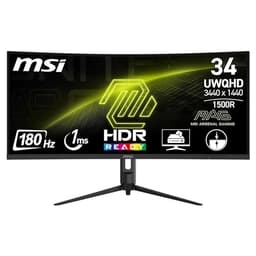
The Modern MD342CQPW is the productivity powerhouse of this roundup. A 34-inch ultrawide at 3440x1440 with a built-in KVM switch, PIP/PBP support, wide colour gamut, and a three-way adjustable stand. Under £200. That is a lot of monitor for the money.
The KVM switch is the standout feature for anyone running multiple computers. You can connect two machines and switch keyboard and mouse input between them without unplugging anything. For remote workers juggling a personal laptop and a work machine, this is genuinely useful. Not a gimmick.
PIP (Picture in Picture) and PBP (Picture by Picture) let you display two sources simultaneously. Combined with the ultrawide 21:9 aspect ratio, you effectively get two 17-inch screens in one. The wide colour gamut makes colours richer and more saturated than standard sRGB panels, which benefits photo editing and creative work.
The three-way adjustable stand (tilt, height, swivel) is the best stand in this entire roundup. It is the reason this monitor earns the Best Build Quality badge. Everything feels solid and well-engineered. The 1500R curve on a 34-inch screen is immersive without being overwhelming.
The VA panel is not the fastest (this is not a gaming monitor) but it delivers excellent contrast and rich colours for productivity and media consumption. If you work from home and want one screen that does everything, this is your pick.
Pros
- KVM switch is genuinely useful for multi-device setups
- Three-way adjustable stand, best ergonomics in the roundup
- 34-inch ultrawide with PIP/PBP support
- Wide colour gamut for creative and productivity work
- Built-in speakers and eye-care features
Cons
- Not designed for high-refresh gaming
- VA panel has slower response than IPS for fast motion
- Larger footprint needs a bigger desk
Buy on Amazon£238.00
Best Under £50
Price: £228.97 | Rating: ★★★★☆ (4.2)
Wait. A 34-inch ultrawide gaming monitor at 3440x1440 with 180Hz and Adaptive Sync for under £100? That listing price of £79 looks almost too good to be true. So let us be honest about what you are getting.
The MAG 342CQR E2 is a VA panel with 1ms MPRT response time. MPRT (Moving Picture Response Time) is a different measurement from GtG (Grey to Grey). It is achieved through backlight strobing and represents perceived motion blur reduction rather than raw pixel transition speed. The actual GtG response will be higher. For casual gaming and general use, it is still fast enough. For hardcore competitive play, the MAG 274CXF is a better choice.
But here is the thing: 34 inches of ultrawide at 3440x1440 is an addictive amount of screen real estate. Games that support ultrawide look stunning. The 1500R curve wraps the display around your vision properly at this size. Adaptive Sync keeps things smooth across the 180Hz range.
DP 1.4a and HDMI 2.0b with CEC handle connectivity well. The stand is basic (tilt only) which is expected at this price. At £79, this is one of the most remarkable value propositions in the entire MSI range. Just go in with realistic expectations about the response time spec.
Pros
- 34-inch ultrawide at an extraordinary price
- 180Hz refresh rate for smooth gaming
- Adaptive Sync for AMD and Nvidia
- DP 1.4a connectivity
- 1500R curve suits the large screen size
Cons
- 1ms MPRT is not the same as 1ms GtG, be aware
- Basic tilt-only stand
- VA panel shows some glow in dark corners
- Needs a capable GPU to drive 3440x1440 at high frame rates
Buy on Amazon
Best 4K Value
Rating: ★★★★½ (4.8)
The MAG 275CQRF sits in the sweet spot between the entry-level MAG 27CQ6F and the premium end of the MSI gaming range. It is a 27-inch 1440p curved gaming monitor with a fast VA panel and a 1500R curve. At £140, it competes directly with the MAG 27CQ6F but brings some refinements worth considering.
The curved 1440p panel delivers the same strong contrast and punchy colours you expect from MSI's VA gaming line. Motion clarity is good and the 1500R curve adds immersion for gaming without making the monitor awkward for productivity tasks. It is a versatile screen that handles both use cases competently.
For anyone who wants a curved 1440p gaming monitor and finds the MAG 27CQ6F out of stock or wants a slightly different feature set, the MAG 275CQRF is a solid alternative. The price difference between the two is small enough that you should compare current listings before deciding.
Connectivity follows the standard MSI gaming monitor pattern: DisplayPort and HDMI with Adaptive Sync support. The stand is tilt-adjustable. Nothing surprising here, but nothing disappointing either.
Pros
- 1440p curved gaming at a competitive price
- Strong VA contrast for immersive gaming
- Adaptive Sync for smooth variable refresh
- Good balance of gaming and productivity performance
Cons
- Very similar to MAG 27CQ6F, compare before buying
- Tilt-only stand limits ergonomic flexibility
- VA glow visible in very dark scenes
Check availability
Best Large Screen Value
Rating: ★★★★☆ (4.4)
The 32-inch 1440p 170Hz gaming monitor from MSI is the best budget pick in this roundup for anyone who wants a larger screen without paying over £200. At under £200, you get 32 inches of 1440p gaming real estate at 170Hz. That is a proper step up in screen size from the 27-inch options without a massive price jump.
32 inches at 1440p hits a sweet spot for pixel density. It is sharp enough to look good up close but not so demanding that you need a top-end GPU to drive it. 170Hz is fast enough for most gaming scenarios, covering everything from casual play to moderately competitive titles.
The larger screen size makes this monitor particularly appealing for racing games, open-world titles, and productivity use where you want more visible workspace. Sitting slightly further back from a 32-inch screen feels natural and the extra screen real estate is immediately useful.
For the best MSI monitors under £300 UK 2026 shortlist, this one earns its place as the best budget pick because it delivers the most screen for the money. If size matters more to you than raw speed or resolution, this is where to spend your budget.
Pros
- 32-inch 1440p is a generous screen for under £200
- 170Hz suits a wide range of gaming styles
- More immersive than 27-inch options at similar prices
- Good pixel density at 32 inches
Cons
- Needs more desk space than 27-inch models
- 170Hz is not the fastest in this roundup
- Larger screens amplify any backlight bleed issues
Buy on Amazon