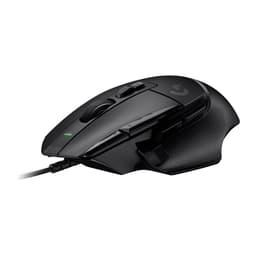
Two weeks of daily use tells you things a quick unboxing never will. I've been running the Logitech G502 Lightspeed Wireless Gaming Mouse through everything from late-night ranked sessions to full working days of document editing, and by now I know exactly which claims hold up and which ones are marketing padding. The short version: this is a genuinely capable wireless gaming mouse with a sensor that punches well above its price bracket. But it's not without trade-offs, and if you're expecting something featherlight, you're going to be disappointed the moment you pick it up.
The G502 has been around in wired form for years. Logitech took the original, stripped the cable, fitted their HERO 25K sensor, and called it the Lightspeed. On paper that sounds straightforward. In practice, the wireless version costs considerably more than the wired G502, and that gap needs justifying. I've been trying to work out whether it does. The answer is mostly yes, with a few caveats worth knowing before you spend your money.
This review covers everything that actually matters for day-to-day use: sensor accuracy, button feel, battery life in real conditions, software, and how the mouse handles across different game types. I'm not going to spend three paragraphs describing the RGB. You're here to find out if it's worth buying. So let's get into it.
Core Specifications
The G502 Lightspeed is a right-handed ergonomic mouse built around Logitech's own HERO 25K optical sensor, which is capable of tracking up to 25,600 DPI. That's the headline number, though in practice almost nobody runs anywhere near that figure. More relevant is the sensor's accuracy at sensible DPI settings, which I'll cover in the gaming section. The mouse connects via Logitech's Lightspeed 2.4GHz wireless using a USB-A nano receiver, and it's also compatible with the PowerPlay wireless charging mat if you want to run it perpetually charged.
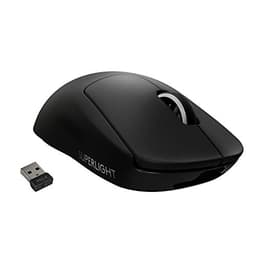
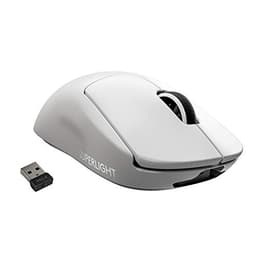
Weight is the number that will either sell or lose you this mouse immediately. It comes in at 114g without any of the included weights fitted. Add the weights and you can push that up to around 130g depending on configuration. That puts it firmly in the heavier end of the gaming mouse market at a time when ultralight mice under 60g are increasingly common. Logitech markets it as "ultra-light" which is, frankly, a stretch. It's not heavy by the standards of older gaming mice, but calling it ultra-light next to something like the Logitech G Pro X Superlight is misleading.
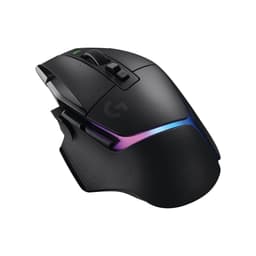
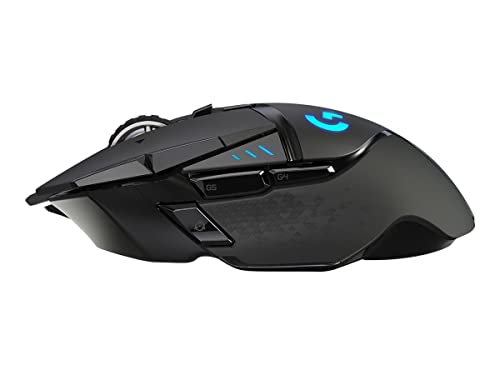
The mouse features 11 programmable buttons, a dual-mode scroll wheel (which is genuinely one of its best features), and onboard memory for up to five profiles. The main buttons use Logitech's mechanical button tensioning system rather than traditional microswitches, which affects click feel in ways I'll get into shortly. Build materials are a mix of hard matte plastic on the main body with a textured rubber grip on the left side. It's a full-size mouse with a pronounced hump that suits palm and claw grip users.
| Specification | Detail |
|---|---|
| Sensor | HERO 25K optical |
| Max DPI | 25,600 (100 DPI minimum) |
| Polling Rate | 1000Hz (1ms report rate) |
| Connectivity | Lightspeed 2.4GHz wireless / USB-A nano receiver |
| Battery Life (rated) | 60 hours (RGB off) |
| Weight | 114g (without weights), up to ~130g with weights |
| Programmable Buttons | 11 |
| Onboard Memory | 5 profiles |
| PowerPlay Compatible | Yes |
| RGB | Yes (2 zones) |
| Software | Logitech G HUB |
| Colour | Black |
| Current Price | £79.99 |
| Customer Rating | ★★★★½ (4.6) (6,611 reviews) |

Switch Type and Button Feel
The G502 Lightspeed doesn't use traditional Omron or Kailh microswitches in the conventional sense. Logitech's mechanical button tensioning system keeps the primary buttons in constant contact with the switch mechanism, which is meant to eliminate pre-travel and deliver a more consistent click. In practice, left and right click feel crisp and immediate. There's very little wobble in the buttons, and the actuation point is well-defined. After two weeks of heavy use across FPS and strategy games, I haven't noticed any double-clicking or inconsistency, which is the main thing you're worried about with gaming mice.
The side buttons are where things get slightly less impressive. The two thumb buttons on the left side are well-positioned for most hand sizes, but they have a slightly mushier feel compared to the main clicks. They're perfectly functional, but if you're coming from a mouse with snappier side buttons, you'll notice the difference. The DPI shift button just below the scroll wheel is easy to reach mid-game, which is useful if you're the type to drop DPI for precise shots. The sniper button, as Logitech calls it, works exactly as advertised.
The scroll wheel deserves its own mention because it's genuinely one of the better implementations I've used. It has two modes: a standard notched scroll with tactile steps, and a free-spinning mode that lets the wheel spin freely for fast document or web page scrolling. You switch between them with a button just behind the wheel. For gaming, the notched mode gives you reliable weapon switching. For productivity work, the free-spin mode is actually useful rather than just a gimmick. The horizontal scroll wheel (a small secondary wheel on the left side) is less impressive. It works, but it's stiff and I rarely found myself reaching for it.
Button Layout and Ergonomics
The G502 Lightspeed is unambiguously a right-handed mouse. There's no left-handed version, so if you're a southpaw, this isn't the product for you. The shape is a classic asymmetric ergonomic design with a high hump that sits well under a palm grip. Claw grip users will also find it comfortable. Fingertip grip is possible but the mouse is large enough that it starts to feel awkward at smaller hand sizes.
Button placement is generally well thought out. The two main thumb buttons sit at a natural resting position for most hand sizes, and the DPI cycle button on top is reachable without shifting your grip. The G-shift button on the underside of the left thumb area is a bit of an odd one. It functions as a modifier that doubles your button count by giving every other button a secondary function when held. It's a clever idea, but in practice I found it hard to use reliably during fast-paced gaming because the activation requires a deliberate press that interrupts your grip. For productivity macros it's more useful.
The textured rubber grip on the left side does its job. After extended sessions, my hand didn't slip, and the surface didn't feel unpleasant. The right side of the mouse is smooth hard plastic, which is less grippy but fine for most users. One thing worth noting: the mouse has a slight forward lean in its resting position, which some people find more natural and others find slightly odd. I got used to it quickly, but it's noticeable if you're switching from a flatter mouse.
Build Quality
The G502 Lightspeed feels solid. There's no flex in the main body, no creaking when you squeeze it, and the buttons don't rattle. For a wireless mouse at this price point, that's not guaranteed, so it's worth saying clearly. The hard matte plastic on the top shell resists fingerprints reasonably well, though after two weeks of use there's some visible wear around the main click areas where the finish sees the most contact. Nothing alarming, but it's not invisible either.
The weight system is a set of small metal weights that slot into a compartment on the underside. You can add or remove them to adjust the overall feel. Honestly, for most gaming I preferred it without the extra weights, but the system is well-engineered and the compartment door closes securely without any rattling. The PTFE feet on the bottom are decent size and the mouse glides smoothly on both hard and soft surfaces. After two weeks they show minimal wear, which is a good sign for longevity.
The USB-A nano receiver is tiny, which is both good and bad. Good because it sits almost flush in a USB port and you can leave it plugged in permanently. Bad because if you lose it, you're in trouble. Logitech does sell replacement receivers, but it's an extra cost you shouldn't have to think about. There's a small storage slot for the receiver on the underside of the mouse, which is a sensible inclusion. The charging cable is a braided micro-USB, which in 2024 feels like a missed opportunity for USB-C. It works fine, but USB-C would have been better.
RGB and Lighting
There are two RGB zones on the G502 Lightspeed: the Logitech G logo on the top and a small strip on the scroll wheel. That's it. If you're buying this mouse specifically for lighting effects, you're going to be underwhelmed. The logo illumination is bright enough to be visible in a dark room and the colours are accurate, but it's not the kind of multi-zone spectacle you'd get from a mouse designed with RGB as a priority.
From a practical standpoint, the limited RGB is actually a positive. More lighting zones mean more power draw, and the G502 Lightspeed's battery life is one of its selling points. Turning RGB off entirely extends battery life significantly, and most serious gamers I know run their mice with lighting disabled anyway. The lighting doesn't affect performance in any way, and it doesn't create any visual distraction during use.
Control over the lighting is handled through Logitech G HUB software, which I'll cover in more detail in the software section. You can set static colours, breathing effects, or sync it with other Logitech peripherals. The onboard memory stores lighting profiles so the settings persist without the software running. It all works as expected. There's nothing here that will impress anyone who cares deeply about RGB, but there's also nothing broken or frustrating about it.
Software and Customisation
Logitech G HUB is the software you'll use to configure the G502 Lightspeed. It's a significant improvement over the old Logitech Gaming Software, but it's still not without issues. The interface is clean and the main functions are easy to find: DPI settings, button remapping, macro creation, lighting control, and profile management. Setting up custom DPI stages takes about two minutes, and the button remapping is flexible enough to cover most use cases.
The macro editor is functional but not particularly sophisticated. You can record keystrokes, mouse clicks, and delays, then assign them to any of the 11 programmable buttons. For MMO players or anyone who relies heavily on macros, it does the job. The G-shift modifier effectively doubles your macro capacity, which is useful if you're the type to set up elaborate button configurations. Profile switching is quick and the onboard memory means your settings travel with the mouse to any PC without needing to install software.
My main complaint with G HUB is stability. It crashed twice and on one occasion failed to recognise the mouse until I unplugged and replugged the receiver. These aren't catastrophic failures, but for software that's been around this long, it's not a great look. The DPI and button settings are stored onboard, so a software crash doesn't affect your mouse's function mid-game, but it's annoying when you want to make adjustments. Logitech has been iterating on G HUB for years and it's better than it used to be, but it still trails behind Razer Synapse in terms of reliability in my experience.
Connectivity
The Lightspeed wireless connection is the technical highlight of this mouse. Logitech's 2.4GHz Lightspeed technology operates at a 1ms report rate, which matches wired performance in practical terms. Over two weeks of gaming, I experienced zero noticeable latency and no dropouts. The connection range is rated at 10 metres and I had no issues at normal desk distances. The nano receiver is small enough to leave plugged in permanently without getting in the way.
There's no Bluetooth option on the G502 Lightspeed, which is worth knowing if you want to use it across multiple devices without swapping the receiver. The Lightspeed connection is single-device only. If you want wireless multi-device support, you'd need to look at Logitech's MX series instead. For a dedicated gaming mouse this isn't a significant limitation, but it's worth being aware of if your use case involves switching between a desktop and a laptop regularly.
PowerPlay compatibility is a genuine differentiator if you're willing to invest in the charging mat. The Logitech PowerPlay mat charges the mouse continuously while you use it, which means you never have to think about battery life at all. It's an additional cost on top of an already premium mouse, but for people who find battery management genuinely annoying, it's a real solution rather than a marketing gimmick. The battery life figures here reflect normal wireless use without the mat.
Battery Life
Logitech rates the G502 Lightspeed at 60 hours with RGB disabled. With RGB enabled, that figure drops considerably. With RGB off and at moderate DPI settings, it runs roughly five to six days of mixed gaming and productivity use before needing to charge. That works out to somewhere between 40 and 50 hours of actual use, which is slightly below the rated figure but still very practical. You're not going to be hunting for a cable every other day.
Charging is via the included braided micro-USB cable. The micro-USB connector is the one aspect of this mouse that feels genuinely dated. USB-C has been standard on most premium peripherals for a couple of years now, and there's no good reason for Logitech to still be shipping micro-USB on a mouse at this price. It charges fine and the cable is decent quality, but it's an irritation. Charge time from flat to full is around three hours, and you can use the mouse while charging via the cable, which at least means a dead battery doesn't take the mouse out of action.
The battery indicator in G HUB shows percentage remaining, and the mouse itself has an LED indicator on the underside that changes colour as the battery depletes. Low battery warnings appear in the software before you hit critical levels, so you shouldn't be caught out mid-session if you're paying any attention. In practice, the battery life is good enough that I only thought about it twice, which is about the right level of non-intrusiveness for a wireless peripheral.
Gaming Performance
This is where the G502 Lightspeed earns its price. The HERO 25K sensor is one of the best optical sensors available, and at the DPI ranges most gamers actually use (400 to 1600 DPI for most FPS players), it's exceptionally accurate. Tracking stays consistent across a range of games including fast-paced FPS titles, real-time strategy, and MMO play. No acceleration, no jitter, no unexpected cursor drift. The sensor performs identically on hard and soft mouse mats, which isn't always the case with optical sensors.
The 1000Hz polling rate delivers 1ms input latency, and the Lightspeed wireless connection adds no perceptible delay on top of that. In competitive FPS play, I couldn't distinguish this from a wired mouse. That's the honest answer. If you're sceptical about wireless for gaming, the G502 Lightspeed is one of the products that should change your mind. The click latency on the main buttons is also very low, and the mechanical tensioning system means there's no pre-travel before actuation. Clicks register immediately.
The weight is the one performance consideration that divides opinion. At 114g without added weights, it's noticeably heavier than modern ultralight mice. In fast-paced FPS games where you're making large, rapid arm movements, that weight is something you feel over long sessions. My wrist was more tired after two hours of FPS gaming with the G502 Lightspeed than it would be with a lighter mouse. For strategy games, MMOs, or any genre where precision matters more than speed, the weight is a non-issue. But if you play a lot of fast FPS and you're used to a sub-80g mouse, the G502 Lightspeed will feel sluggish by comparison.
Compatibility
The G502 Lightspeed works on Windows 10 and 11 without any issues. The basic functions, left click, right click, scroll, and DPI cycling, work immediately without any software installation. G HUB is required for remapping buttons, adjusting DPI beyond the default stages, and configuring macros. G HUB is Windows and macOS compatible. Linux users can use the mouse but won't have access to the full software feature set, which is a common limitation across gaming peripherals.
macOS compatibility is functional but not smooth. The mouse works fine as a pointing device, and G HUB has a macOS version that covers the main configuration options. Some features behave slightly differently on macOS due to system-level input handling, and the free-spinning scroll wheel mode can feel inconsistent with macOS's own scroll acceleration. For Mac users who primarily want a capable wireless mouse for productivity with occasional gaming, it works. For Mac-first users, there are probably better-optimised options.
Console compatibility is limited. The mouse will work as a USB HID device on some consoles with keyboard and mouse adapters, but Logitech doesn't officially support console use and the Lightspeed receiver requires a USB-A port. The onboard profiles and DPI settings will function, but you won't have software control. This is a PC gaming mouse first and foremost, and that's how it should be evaluated.
How It Compares
The G502 Lightspeed sits in a competitive part of the wireless gaming mouse market. Its two most direct competitors are the Razer DeathAdder V3 HyperSpeed and the SteelSeries Rival 650 Wireless. Both offer wireless connectivity at similar price points, and both have their own strengths worth understanding before you commit.
The Razer DeathAdder V3 HyperSpeed is significantly lighter at around 81g, uses Razer's HyperSpeed wireless technology, and has a simpler button layout. It's a better choice if weight is your primary concern and you don't need the G502's extensive button count. The sensor is excellent but doesn't quite match the HERO 25K at the top end of the DPI range, though for most users that distinction is academic. Battery life on the DeathAdder V3 HyperSpeed is rated at 300 hours, which makes the G502's 60 hours look modest by comparison.
The SteelSeries Rival 650 Wireless takes a different approach with a dual-sensor system and a weight customisation system similar to the G502. It's heavier still than the G502 and the software (SteelSeries GG) is arguably more stable than G HUB. The Rival 650 has better side button feel in my experience, but the primary sensor doesn't match the HERO 25K for raw accuracy. It's also harder to find at retail now, which is a practical consideration.
| Feature | Logitech G502 Lightspeed | Razer DeathAdder V3 HyperSpeed | SteelSeries Rival 650 Wireless |
|---|---|---|---|
| Sensor | HERO 25K | Razer Focus X | TrueMove3+ dual sensor |
| Max DPI | 25,600 | 14,000 | 12,000 |
| Weight | 114g (no weights) | ~81g | ~121g (no weights) |
| Battery Life | 60 hours (RGB off) | 300 hours | 24 hours |
| Polling Rate | 1000Hz | 1000Hz | 1000Hz |
| Programmable Buttons | 11 | 6 | 7 |
| PowerPlay / Wireless Charging | Yes (PowerPlay) | No | No |
| Charging Port | Micro-USB | USB-C | Micro-USB |
Looking at the comparison honestly, the G502 Lightspeed wins on sensor quality, button count, and PowerPlay compatibility. It loses on weight and battery life compared to the DeathAdder V3 HyperSpeed, and the micro-USB charging is a genuine step behind. If you need 11 programmable buttons and want the best sensor in this price range, the G502 Lightspeed is the right choice. If you want something lighter for fast FPS play, the DeathAdder V3 HyperSpeed is worth serious consideration.
Final Verdict
The Logitech G502 Lightspeed Wireless Gaming Mouse is a well-engineered product that delivers on its core promise: a high-performance wireless mouse with a top-tier sensor and enough buttons to satisfy power users. The HERO 25K sensor is genuinely excellent, the Lightspeed wireless connection is as good as wired in practice, and the dual-mode scroll wheel is one of those features you don't know you want until you've used it. After two weeks of daily use, I have no complaints about its core gaming performance.
The weight is the honest sticking point. At 114g it's not a heavy mouse by historical standards, but the market has moved. If you're used to modern ultralight mice, the G502 Lightspeed will feel substantial. Logitech's own G Pro X Superlight 2 is around 60g and uses a similarly capable sensor. The G502 Lightspeed's weight customisation system is a nice feature, but adding weights to an already 114g mouse is a niche preference. Most people will run it without them.
The micro-USB charging is a genuine annoyance on a premium product. The software could be more stable. And the "ultra-light" marketing claim is misleading enough to be worth flagging. But none of these are reasons to avoid the mouse if it fits your use case. For MMO players, strategy gamers, or anyone who needs a high button count and wants wireless reliability without compromising on sensor quality, the G502 Lightspeed is a strong choice. I'd give it an 8 out of 10. It's not perfect, but it does what it does very well.

Not Right For You?
If the G502 Lightspeed doesn't fit your needs, there are a few alternatives worth considering. For lighter wireless gaming mice, the Logitech G Pro X Superlight 2 is the obvious step up within the Logitech range. It's lighter, uses a similarly excellent sensor, and is purpose-built for competitive FPS play. It costs more and has fewer buttons, but if weight is your priority, it's the better tool.
If you want more buttons at a lower price point, the wired Logitech G502 Hero delivers almost the same experience without the wireless premium. The sensor is slightly older but still excellent, and the wired connection removes battery management from the equation entirely. For users who don't need wireless, it's a more straightforward value proposition.
For those who want wireless but prefer a more ambidextrous shape, the Razer Viper V2 Pro is worth a look. It's lighter than the G502 Lightspeed, has an ambidextrous design, and uses Razer's Focus Pro 30K sensor. It has fewer programmable buttons, but the shape works for a wider range of grip styles and hand sizes.
What works. What doesn’t.
5 + 4What we liked5 reasons
- HERO 25K sensor is genuinely excellent with no jitter or acceleration at normal DPI ranges
- Lightspeed wireless matches wired latency in practical gaming use
- Dual-mode scroll wheel is one of the best implementations available
- 11 programmable buttons with G-shift doubles effective macro capacity
- PowerPlay compatibility removes battery management entirely if you invest in the mat
Where it falls4 reasons
- 114g is not ultra-light by modern standards despite the marketing claim
- Micro-USB charging feels dated on a premium wireless mouse
- G HUB software crashed twice during two weeks of testing
- No Bluetooth, single-device wireless only
Full specifications
4 attributes| Connectivity | 2.4GHz wireless, USB wired |
|---|---|
| Backlighting | RGB |
| Battery life H | 60 |
| Polling rate HZ | 1000 |
Frequently asked
5 questions01What sensor does the Logitech G502 Lightspeed use?+
The G502 Lightspeed uses Logitech's HERO 25K optical sensor, capable of tracking from 100 to 25,600 DPI. It delivers accurate, jitter-free tracking at normal gaming DPI ranges (400-1600 DPI) with no hardware acceleration.
02Is the Logitech G502 Lightspeed good for gaming?+
Yes. The HERO 25K sensor is one of the best available, and the Lightspeed 2.4GHz wireless connection operates at 1000Hz (1ms report rate), matching wired performance in practice. It performed without dropouts or noticeable latency across two weeks of FPS, strategy, and MMO testing.
03Is the Logitech G502 Lightspeed actually ultra-light?+
No, not by modern standards. It weighs 114g without the included weights, which is reasonable for a full-featured gaming mouse but well above the sub-80g ultralight category. The 'ultra-light' marketing claim is misleading compared to dedicated ultralight mice like the G Pro X Superlight 2.
04How long does the Logitech G502 Lightspeed battery last?+
Logitech rates it at 60 hours with RGB disabled. In mixed gaming and productivity use, it runs roughly 40-50 hours before needing to charge. With RGB enabled, expect significantly less. It charges via micro-USB and can be used while charging.
05What warranty and returns apply to the Logitech G502 Lightspeed?+
Amazon offers 30-day returns on most items. Logitech G typically provides a 2-year warranty on gaming mice. You're also covered by Amazon's A-to-Z guarantee for additional purchase protection.