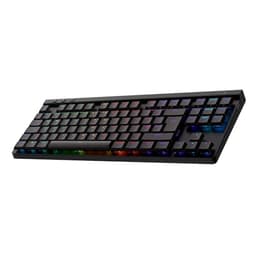
Here's the honest take on the Logitech G413 TKL SE: it's one of the better-value mechanical keyboards in the mid-range bracket right now, and the 4.6-star average across 377 owners backs that up. If you want a tenkeyless board with a proper aluminium top case, PBT keycaps, and tactile switches without paying premium prices, this one deserves a serious look. But it's not without compromises, and at this price point there's real competition about before you click buy.
The G413 TKL SE sits in a sweet spot where the build quality punches above what you'd normally expect, while the feature set stays deliberately stripped back. No RGB rainbow show, no software macro engine, no wireless. What you get instead is a keyboard that feels solid, types well, and won't embarrass you in a gaming session. Whether that trade-off works for you depends entirely on what you actually need from a board at this price.
Core Specifications: Logitech G413 TKL SE Mechanical Gaming Keyboard
The G413 TKL SE is a tenkeyless layout, which means you lose the numpad on the right and gain a good chunk of desk space for your mouse. For most gamers that's a straightforward win, particularly if you play anything that needs wide mouse sweeps. The full-size sibling, the Logitech G413 SE, exists if you genuinely need that numpad, but the TKL is the one most people should be looking at.
Connection is wired USB, full stop. There's no wireless option here and no Bluetooth, which will rule it out for some setups but keeps the price down and the latency predictable. The switches are Logitech's own tactile mechanical switches, the top case is brushed aluminium-magnesium alloy, and the keycaps are PBT rather than the cheaper ABS plastic you'll find on boards costing similar money from less careful manufacturers. Lighting is white LED only, no per-key RGB. Anti-ghosting covers six-key rollover, which handles the vast majority of real gaming scenarios comfortably.
The layout is UK QWERTY in this version, which matters if you're buying from a UK retailer and don't want to faff around with key remapping. The FN layer covers twelve function shortcuts including volume, playback controls, mute, lighting toggle, and Windows lock. That's a reasonable set of secondary functions for a board with no dedicated media keys.
| Specification | Detail |
|---|---|
| Layout | Tenkeyless (TKL), UK QWERTY |
| Switch Type | Logitech tactile mechanical switches |
| Keycaps | PBT |
| Top Case | Brushed aluminium-magnesium alloy |
| Lighting | White LED backlight |
| Anti-Ghosting | 6-key rollover |
| Connectivity | Wired USB |
| FN Key Functions | 12 (volume, playback, mute, lighting, Windows lock) |
| OS Compatibility | Windows, macOS |
| Full-size Option | Logitech G413 SE (104-key) |
| Price | £55.50 (Price checked 05:01, 3 Oct 2026, UK time) |
Switch Type and Feel on the Logitech G413 TKL SE Mechanical Gaming Keyboard
Logitech uses their own proprietary tactile mechanical switches here rather than going with Cherry MX or Gateron. That's worth understanding before you buy, because it changes the servicing picture slightly. You can't just swap in a spare Cherry switch if one dies, though in practice switch failure on a board like this is pretty rare. The switches are described as tactile, meaning you get a physical bump partway through the keystroke that tells your finger the input has registered, without the audible click of a clicky switch like Cherry MX Blue.
Tactile switches are generally the sensible middle ground for gaming. You get feedback without the noise that drives your flatmates or streaming audience mad, and the bump gives you a clearer sense of actuation than a linear switch where the travel is smooth all the way down. Owner reviews consistently describe the G413 TKL SE's switches as satisfying without being too stiff, with a number of people noting they're comfortable for long typing sessions as well as gaming. That tracks with what you'd expect from a well-tuned tactile switch aimed at the mid-range market.
Logitech doesn't publish detailed actuation force or travel figures for these switches in the standard product listing, which is mildly annoying if you're the sort of person who likes to compare specs on a spreadsheet. What the owner review pattern does tell you is that the switches feel consistent across the board, with no reports of mushy or rattly outliers that sometimes plague cheaper keyboards. For context, mechanical keyboard switches in this category typically actuate somewhere around 45g to 55g of force, and the G413's feel sits comfortably in that range based on owner descriptions. Hot-swap support is not a feature here, so if you're someone who likes to experiment with different switch feels, this isn't the board for that.
Keycap Quality and Layout
PBT keycaps are genuinely one of the G413 TKL SE's strongest selling points at this price. Most keyboards in the mid-range bracket, and plenty above it, still ship with ABS keycaps. ABS is cheaper to produce and starts to develop that greasy shine within a few months of regular use. PBT is denser, more heat-resistant, and holds its texture far longer. The fact that Logitech has fitted PBT as standard here rather than charging extra for it is clearly.
The legends (that's the lettering on the keys, for anyone new to this) look clean and should resist wear well. PBT keycaps are typically either double-shot moulded or dye-sublimated for their legends. Logitech doesn't specify the exact production method in the listing, but the owner review consensus is that the legends stay readable over extended use, which is what actually matters day-to-day. The white LED backlighting shines through the legends cleanly, so you get good visibility in a dim room without needing to squint.
The TKL layout itself removes the numpad but keeps the full function row, arrow keys, and the navigation cluster (Insert, Delete, Home, End, Page Up, Page Down). That's important if you use those keys regularly in productivity work or certain games. Some compact layouts sacrifice the navigation cluster entirely to save space, which can be genuinely annoying. The G413 TKL SE avoids that compromise, giving you a board that's noticeably smaller than a full-size without cutting anything most people actually use. The UK QWERTY layout is correct for British users, with the proper placement of the pound sign and the enter key shape you'd expect.
Build Quality
The aluminium-magnesium alloy top case is the headline build feature and it genuinely sets this keyboard apart from plastic-bodied competitors at similar prices. Aluminium top plates make a real difference to how a keyboard feels under your hands. There's a solidity and a cool-to-the-touch quality that plastic simply can't replicate, and it means the board doesn't flex or creak when you're typing hard. Owner reviews repeatedly mention how solid the G413 TKL SE feels, with several people noting it's the most well-built keyboard they've owned at this price.
Logitech describes the design as having minimal flex, which aligns with what the aluminium-magnesium construction would suggest. A rigid top plate also benefits acoustics slightly, since a flexy plastic case can amplify switch noise in an unpleasant way. The brushed finish looks smart without being flashy, and the all-black colourway means it'll fit most desk setups without clashing. It's not a keyboard that screams for attention, which is either a pro or a con depending on your taste.
One thing to be aware of: the build quality praise in owner reviews is consistent, but a few people mention the cable isn't braided. That's a fairly minor point for most users, but if cable management is something you care about. The overall construction feels premium for the price bracket, and the combination of the alloy case with PBT keycaps means this keyboard should hold up to years of daily use without looking tired. That's a genuine durability argument, not just marketing copy.
RGB and Lighting
White LED only. No RGB. If you want a keyboard that cycles through every colour of the visible spectrum and syncs with your RAM and GPU lighting, the G413 TKL SE is not that keyboard. Logitech has made a deliberate choice here, and it's one that splits opinion. Some people genuinely prefer white backlighting because it's cleaner, easier to read in the dark, and doesn't look like a disco floor at 2am. Others will see the lack of RGB as a dealbreaker in 2026.
The white LED lighting does what it needs to do. It illuminates the legends clearly, it's controllable via the FN key shortcuts, and it won't distract you during a gaming session with colour shifts you didn't ask for. The toggle function means you can switch it off entirely when you don't need it, which is useful if you're in a room with other people who don't share your enthusiasm for glowing peripherals. Brightness levels are adjustable through the FN layer.
Where this becomes a genuine limitation is if you're building a themed setup and want everything to match. Logitech's own G Hub software supports RGB on other boards in the G range, but the G413 TKL SE's white-only lighting means there's nothing to configure beyond on and off. If you're coming from a board with per-key RGB and Synapse or iCUE profiles, this will feel like a step back in that specific area. But if the lighting is secondary to build quality and switch feel for you, it's a perfectly acceptable trade-off at this price point.
Software and Customisation
The G413 TKL SE is a no-frills keyboard when it comes to software, and that's not necessarily a criticism. Logitech's G Hub software is available for other products in the G range, but the G413 TKL SE's customisation options are largely handled through the FN key layer rather than through a software interface. There's no macro programming, no on-board profile storage for custom key assignments, and no per-key lighting configuration because there's only white LED to work with anyway.
The twelve FN key shortcuts cover the most commonly needed functions: volume up and down, play/pause, skip track, mute, lighting toggle, and Windows lock. That's a sensible selection that handles the day-to-day stuff without needing you to install anything. For most gamers, that's genuinely enough. The Windows lock key is separately because it prevents accidental presses of the Windows key during gaming sessions, which is one of those small but genuinely useful features that you appreciate the moment you've been kicked out of a full-screen game at a critical moment.
If you're someone who relies on complex macro setups, multiple on-board profiles, or deep per-key customisation, this keyboard won't give you that. The G413 TKL SE is aimed at people who want a great-feeling board that works straight out of the box without a software installation ritual. That's a legitimate design philosophy, and it keeps things simple. But it does mean that power users who want to remap keys or create game-specific profiles will need to look at something with dedicated software support, like the Logitech G Pro series or competing boards from Corsair or SteelSeries.
Connectivity
Wired USB. That's the full connectivity story for the G413 TKL SE. Plug it in, it works. There's no 2.4GHz wireless dongle, no Bluetooth pairing, no multi-device switching. For a gaming keyboard this is entirely sensible. Wired connections eliminate the latency variables and battery management concerns that come with wireless, and for a keyboard that lives on your desk in front of your PC, the cable is rarely an inconvenience.
The USB connection type isn't specified as USB-C or USB-A in the product listing, and the verified data doesn't detail the cable connector. Owner reviews suggest a standard USB-A connection to the PC side, which is what you'd expect at this price point. The cable length is sufficient for most desk setups based on owner reports, though a few people with unusual desk configurations mention it being on the shorter side. Worth measuring your setup before you buy if you have a tower that lives on the floor.
Compatibility is listed as Windows and macOS, which covers the vast majority of users. The FN key functions include a Windows lock, confirming the Windows-first design, but macOS users report it working fine for basic use. Linux compatibility isn't explicitly stated, but as a standard USB HID device it should work for basic input on Linux without any special drivers. If you need certified multi-platform support with software features on each OS, the spec sheet doesn't confirm that and you should factor it in.
Battery Life
The G413 TKL SE is a wired keyboard, so battery life is not applicable here. There's no battery to charge, no battery indicator to watch, and no risk of running out of power mid-game. You plug it in and it works for as long as your PC is on. This is worth stating plainly because some buyers, particularly those switching from a wireless keyboard, occasionally overlook the wired-only nature of this board when browsing listings.
The flip side of having no battery is that you have no battery to degrade over time. Wireless keyboards, even good ones, eventually see their battery capacity reduce after a few years of charge cycles. The G413 TKL SE doesn't have that problem. The cable is the only power-related thing to think about, and cables are easy to replace if they ever become damaged.
If wireless is genuinely important to your setup, perhaps because your PC is across the room, or you use a keyboard-video-mouse switch, or you just hate cables, then this keyboard isn't the right choice and that's fine. Logitech makes wireless mechanical keyboards higher up the range. But for the majority of desktop gaming setups where the keyboard sits a metre from the PC, the wired connection is a non-issue and arguably a feature rather than a limitation.
Typing and Gaming Experience
The owner review picture for the G413 TKL SE is genuinely positive when it comes to daily use. People buying this keyboard seem to use it for both gaming and general productivity, and the feedback on both fronts is consistently good. The tactile switches get mentioned a lot in positive terms, with owners describing them as satisfying without being fatiguing over long sessions. That's the hallmark of a well-tuned tactile switch, and it suggests Logitech has got the balance right here rather than just slapping a generic switch in and calling it done.
For gaming specifically, the six-key rollover anti-ghosting is the relevant spec. Six-key rollover means the keyboard can register up to six simultaneous key presses reliably, which handles pretty much every real gaming scenario you'll encounter. Truly demanding simultaneous input situations are rare in actual gameplay, and six-key rollover is the standard for gaming-grade keyboards in this category. Some enthusiast boards offer N-key rollover (every key simultaneously), but in practice the difference is academic for most games. The wired USB connection keeps input lag out of the equation entirely.
Sound profile is because it affects where you can use this keyboard. Tactile switches without a click mechanism are quieter than clicky alternatives, but they're not silent. Owner reviews describe the G413 TKL SE as moderately loud, noticeably mechanical but not obnoxious. The aluminium top plate does add some resonance compared to a foam-dampened board, so if you're in a very noise-sensitive environment like a shared office or streaming with an open microphone nearby. For home gaming setups, most people find the sound level perfectly acceptable and some actively enjoy the tactile feedback it provides.
Compatibility
Windows and macOS compatibility is confirmed in the product listing. The keyboard works as a standard USB HID device, which means the core typing and gaming functions work on both platforms without needing to install drivers. The FN key shortcuts for media controls and lighting should work on both operating systems, though some function-key behaviours can differ slightly between Windows and macOS depending on how the OS handles media keys.
The Windows lock key is clearly a Windows-specific feature, but macOS users won't miss it since macOS doesn't have an equivalent system key to accidentally press. The QWERTY UK layout is correct for British users on both platforms. If you're running macOS and want to swap the Command and Option modifier key positions to match Mac conventions, that's typically handled at the OS level rather than in the keyboard's firmware, and the G413 TKL SE doesn't have onboard remapping to do it in hardware.
Console compatibility isn't mentioned in the verified product data. Many wired USB keyboards work on PlayStation and Xbox consoles for text input in menus and browsers, but gaming use on consoles with a keyboard and mouse setup depends on the specific game and console firmware. If console use is your primary reason for buying, it's compatibility with your specific console before purchasing. For PC gaming on Windows or macOS, this keyboard is a straightforward plug-and-play experience with no compatibility headaches to worry about.
How It Compares
The G413 TKL SE's main competition in the mid-range wired TKL bracket comes from a couple of obvious directions. The HyperX Alloy Origins Core is a frequent comparison point. It also features an aluminium body and HyperX's own mechanical switches in linear and tactile options. The Origins Core typically offers per-key RGB where the G413 TKL SE only has white LED, and HyperX includes their NGenuity software for key remapping and lighting profiles. If RGB customisation matters to you, the Origins Core has a clear edge. The G413 TKL SE counters with PBT keycaps as standard (the Origins Core ships with ABS), which is a meaningful durability advantage in daily use.
The Corsair K65 RGB Mini is another board that competes in this space, though it's a 60 percent layout rather than TKL. The K65 offers full RGB and Corsair's iCUE software ecosystem, which is genuinely powerful if you're already in the Corsair world. But the 60 percent layout removes the function row, arrow keys, and navigation cluster, which is a significant trade-off for anyone who uses those keys. The G413 TKL SE's TKL layout is more practical for most users who need a smaller footprint without sacrificing useful keys. The Corsair also tends to ship with ABS keycaps at this price tier, putting the G413's PBT caps ahead again on that specific metric.
Where the G413 TKL SE genuinely wins is the combination of aluminium build, PBT keycaps, and competitive pricing in a single package. You can find boards with better RGB, boards with more software features, and boards with hot-swap switch support. But finding all three of the G413's strengths together at this price is harder than it looks. The 4.6-star average from 377 owners isn't a fluke. It reflects a keyboard that does the fundamentals well without charging a premium for features that many users don't actually need.
| Feature | Logitech G413 TKL SE | HyperX Alloy Origins Core | Corsair K65 RGB Mini |
|---|---|---|---|
| Layout | TKL (no numpad) | TKL (no numpad) | 60% (no function row or nav cluster) |
| Switch Type | Logitech tactile proprietary | HyperX mechanical (linear/tactile options) | Cherry MX Speed/Red/Brown options |
| Keycaps | PBT | ABS | ABS |
| Top Case | Aluminium-magnesium alloy | Aluminium | Aluminium |
| Lighting | White LED only | Per-key RGB | Per-key RGB |
| Software | FN layer only | HyperX NGenuity | Corsair iCUE |
| Anti-Ghosting | 6-key rollover | N-key rollover | Full key rollover |
| Connectivity | Wired USB | Wired USB | Wired USB |
| Hot-Swap | No | No | No |
Final Verdict: Logitech G413 TKL SE Mechanical Gaming Keyboard
The Logitech G413 TKL SE is a genuinely good keyboard for the money. Not perfect, but good in the ways that matter most for day-to-day gaming and typing. The aluminium-magnesium top case gives it a solidity that most competitors at this price can't match, the PBT keycaps are a proper long-term investment compared to the ABS alternatives you'll find elsewhere, and the tactile switches have earned consistently positive feedback from a meaningful number of real owners. A 4.6-star rating from 377 people isn't something you achieve by being mediocre.
The compromises are real though. White LED only means no RGB customisation, and if a colourful setup matters to you, this keyboard will feel like a step backwards. The FN-layer-only approach to media controls and features is fine for most people but will frustrate anyone who wants deeper software control or macro programming. Six-key rollover is adequate for gaming but falls short of the N-key rollover you'll find on some competitors. And the proprietary switches mean you're locked into Logitech's ecosystem if you ever need switch replacements, though in practice that's rarely an issue with a well-made board.
Who should buy this? Gamers and general users who want a compact, durable, great-feeling keyboard without paying for RGB features they don't care about. People who've had enough of ABS keycaps going shiny within six months. Anyone who values build quality and typing feel over software bells and whistles. The TKL layout is ideal for anyone who wants more mouse room without going so compact that they lose the arrow keys and navigation cluster.
Who should skip it? If RGB lighting and per-key customisation are important to you, look at the HyperX Alloy Origins Core instead. It'll cost similar money and gives you the full colour show with NGenuity software. If you want the most compact footprint possible and don't mind losing the function row, the 60 percent market has options. And if you're on a tighter budget and can live with a plastic case and ABS keycaps, there are perfectly functional keyboards in the sub-fifty-pound bracket that will get the job done without the premium build materials.
The honest don't-overspend line: if you're primarily a casual gamer who types occasionally and doesn't care about build longevity, the full-size Logitech G413 SE is available at a similar price and gives you the numpad back if that's useful. But for anyone who spends serious time at their keyboard and wants it to still feel good in three years, the TKL SE's PBT keycaps and alloy case make it the smarter long-term buy in this price bracket. It's the kind of keyboard you buy once and forget about, which is exactly what a good keyboard should be.
What works. What doesn’t.
5 + 4What we liked5 reasons
- Aluminium-magnesium alloy top case feels genuinely premium for the price
- PBT keycaps resist shine and wear far better than ABS alternatives at this price
- Tactile switches earn consistent praise from owners for feel and comfort
- TKL layout keeps arrow keys and navigation cluster intact
- 4.6-star average from 377 owners reflects real-world satisfaction
Where it falls4 reasons
- White LED only, no RGB customisation whatsoever
- No software macro support or on-board profile storage
- Six-key rollover rather than full N-key rollover
- Proprietary switches limit replacement options
Full specifications
8 attributes| Switch type | Logitech proprietary tactile mechanical switches |
|---|---|
| Layout | TKL |
| Connectivity | wired USB |
| Backlighting | White |
| HOT swappable | false |
| Keycaps | PBT |
| Polling rate HZ | 1000 |
| Switch actuation | tactile |
If this isn’t right for you
2 options 8.5 / 10
EPOMAKER Ajazz AK820 Pro 75% Wireless Mechanical Keyboard with TFT Smart Display&Knob, Gasket-Mounted Gaming Keyboard, BT/2.4GHz/USB-C Wired (Purple, Flying Fish Switch)
£68.99 · EPOMAKER
 8.0 / 10
YUNZII B75 PRO MAX QMK/VIA Wireless Mechanical Keyboard,75% Layout whit Screen and Knob, Custom Hot Swap Gasket Structure, Creamy Pre-lubed Switches, RGB Backlit (Black, Candy Linear Switch)
£62.63 · YUNZII
Frequently asked
5 questions01What switches does the Logitech G G413 TKL SE Mechanical Gaming Keyboard use?+
The G413 TKL SE uses Logitech's own proprietary tactile mechanical switches. Tactile switches provide a physical bump partway through the keystroke to confirm actuation without an audible click, making them a good middle ground between noisy clicky switches and completely silent linear switches. Owner feedback consistently describes them as satisfying and comfortable for both gaming and extended typing sessions.
02Is the Logitech G G413 TKL SE Mechanical Gaming Keyboard good for gaming?+
Yes, it performs well for gaming. The six-key rollover anti-ghosting handles the vast majority of real gaming scenarios reliably, and the wired USB connection eliminates any wireless latency concerns. The tactile switches give clear actuation feedback which suits fast-paced gaming. The TKL layout also frees up desk space for wider mouse movements, which is a genuine advantage in games that need low sensitivity settings.
03Is the Logitech G G413 TKL SE Mechanical Gaming Keyboard good for typing?+
Owner reviews suggest it's genuinely comfortable for extended typing. The tactile switches provide clear feedback without fatigue, and the PBT keycaps maintain their texture over time rather than developing the greasy shine that ABS keycaps get within months. The TKL layout retains the full function row and navigation cluster, so productivity use is not compromised by the compact form factor.
04Is the Logitech G G413 TKL SE Mechanical Gaming Keyboard loud?+
It's moderately loud, as you'd expect from a tactile mechanical keyboard. The tactile switches don't have an audible click mechanism, so they're quieter than clicky switches like Cherry MX Blue, but the aluminium top plate adds some resonance that makes keystrokes noticeably mechanical. It's fine for home gaming setups but may be disruptive in a quiet shared office or when streaming with an open microphone close by.
05What warranty and returns apply to the Logitech G G413 TKL SE Mechanical Gaming Keyboard?+
Warranty details are not specified in the verified product data for this listing. Amazon's standard 30-day return window applies to purchases made through Amazon UK, backed by the Amazon A-to-Z Guarantee for marketplace purchases. For manufacturer warranty information, it is Logitech's official support pages directly before purchasing.