The details that actually separate a good mechanical keyboard from a frustrating one rarely make it into the headline specs. Switch brand. Stabiliser rattle. Whether the software crashes on first launch. Keycap material that turns into a greasy mirror within three months of use. These are the things keyboard enthusiasts obsess over, and for good reason. Get them wrong and no amount of RGB flair will save you from a board you quietly resent every single session.
So where does the Redragon Mechanical Gaming Keyboard sit? Honestly, better than you'd expect at this price point. It's a full-size, UK-layout board with red linear switches, full anti-ghosting, 18 RGB lighting modes, hot-swap switch support, and proper macro customisation via Redragon's driver software. Over 546 owner reviews on Amazon with a 4.5-star average is a number that's hard to dismiss. That's not a handful of mates leaving five stars. That's a real signal. The question is what the caveats are, because there are always caveats at the budget end of the mechanical keyboard market.
The verdict up front: this is a genuinely solid entry-level mechanical board for gamers and typists who want the tactile step up from membrane without spending mid-range money. The hot-swap feature alone is unusual at this price and gives it real longevity. But the keycaps will likely disappoint a keyboard enthusiast, and the software is functional rather than polished. If you know what you're getting into, it's a smart buy. If you're expecting Cherry MX build quality and PBT legends for budget money, recalibrate now.
Core Specifications of the Redragon Mechanical Gaming Keyboard
Let's get the fundamentals on the table. This is a full-size 105-key board in UK layout, which is immediately a point in its favour. UK buyers are constantly navigating a minefield of US-layout keyboards sold without warning, so having a proper UK layout with the right enter key and pound sign placement matters. The switch type is red linear, which we'll dig into properly in the next section, and connectivity is USB wired. No wireless here, which keeps the price down and latency out of the equation entirely.
The keyboard supports 18 customisable backlight effects with four levels of adjustable brightness and speed. All 105 keys are programmable, with macro, key remapping, and lighting editing available through the Redragon driver software downloadable from their website. Anti-ghosting is listed as 100%, meaning every key press registers independently regardless of how many other keys you're holding. The ergonomic angle adjustment comes via foldable feet that tilt the board to 7 degrees, which is a standard and comfortable typing angle for most people.
Four spare switches are included in the box, which is a genuinely thoughtful inclusion. If you snap a switch stem or a switch starts to feel inconsistent, you've got replacements without ordering anything. The warranty is 24 months, which is better than the 12-month coverage you see on a lot of budget peripherals. Redragon also promises a 24-hour support response time. Here's the full spec summary:
| Specification | Detail |
|---|---|
| Layout | Full-size, 105 keys, UK layout |
| Switch type | Red linear (hot-swappable) |
| Connectivity | USB wired |
| Anti-ghosting | 100% full anti-ghosting |
| RGB lighting | 18 backlight effects, 4 brightness and speed levels |
| Programmable keys | All 105 keys |
| Tilt angle | Foldable feet, 7-degree tilt |
| Included extras | 4 spare switches |
| Warranty | 24 months |
| Compatibility | Windows XP, Vista, Windows (all), Mac OS X, Mac |
| Price | Check price |

Switch Type and Feel: Red Linears at the Budget End
Red linear switches are the default choice for gaming keyboards, and for good reason. No tactile bump, no audible click, just a smooth keystroke from top to bottom with a relatively light actuation force. For gaming, that means faster repeated keypresses and less finger fatigue during long sessions. For typing, it's more divisive. Plenty of people love the smoothness; others miss the tactile feedback that tells them a keypress has registered without bottoming out. If you've never used a linear switch before, red is the gentlest introduction to mechanical keyboards.
Redragon uses its own proprietary switches rather than Cherry MX or Gateron, which is standard practice at this price point. Cherry MX switches carry a licensing cost that gets passed to the consumer, so budget boards almost universally use in-house or OEM alternatives. The honest truth is that Redragon's red switches are perfectly competent. Owner reviews consistently describe them as smooth and responsive, with a satisfying keystroke that's noticeably better than any membrane keyboard. You're not getting the buttery smoothness of a properly lubed Gateron Yellow, but you're not paying for one either.
The hot-swap feature is where this keyboard genuinely punches above its weight class. Hot-swap support means you can pull switches out and replace them without soldering, using a switch puller or even a small flathead. This is significant for two reasons. First, if a switch fails, you replace it in seconds with one of the four spares included. Second, if you decide you want tactile or clicky switches down the line, you can swap the entire board's switches without buying a new keyboard. At the budget price point, hot-swap support is genuinely unusual and it adds real long-term value. Most cheap keyboards are sealed units. This one isn't.
Keycap Quality and Layout
Here's where the enthusiast in me gets a bit twitchy. The keycaps on budget mechanical keyboards are almost universally ABS plastic, and this board is no exception based on the price tier and owner feedback patterns. ABS (Acrylonitrile Butadiene Styrene) keycaps are cheaper to produce, lighter, and unfortunately prone to developing a shiny, greasy look after a few months of regular use. If you're a heavy typist, you'll notice the shine on the most-used keys within three to six months. It's not a dealbreaker, but it is something you should know going in. PBT keycaps, which resist shine and generally feel more textured and premium, are what you find on mid-range and enthusiast boards. You can read more about keycap materials on the Wikipedia overview of keyboard technology if you want the full picture.
The legends (the characters printed on the keys) are backlit to work with the RGB system, which means they're likely printed or laser-etched rather than double-shot moulded. Double-shot legends, where the character is a separate layer of plastic moulded into the keycap, are essentially indestructible. Printed legends can fade with heavy use over time. Again, this is standard for the budget bracket and owner reviews don't flag legend fading as a common complaint, so it's not catastrophic.
The UK layout itself is properly implemented, which sounds like a low bar but genuinely isn't. The 105-key full-size layout includes a numpad, full function row, and the correct UK enter key shape. The suspended key design, where the keycaps sit visibly above the plate, looks clean and makes cleaning easier since you can get at the plate without removing every keycap. The ergonomic arc layout mentioned in the product highlights refers to a slight curvature to the key rows that's designed to reduce wrist strain over long sessions. Combined with the 7-degree tilt from the foldable feet, the typing position is genuinely comfortable for most people.
Build Quality: What You're Actually Getting
At the budget end of mechanical keyboards, build quality is where corners get cut most visibly. The case material here is plastic, which is expected and not automatically a problem. What matters is whether the plastic case flexes under typing pressure and whether the board has enough weight to stay put on a desk. Owner reviews are broadly positive on stability, with most people noting the board doesn't slide around during gaming sessions. The foldable feet that provide the 7-degree tilt feel adequately sturdy according to owner feedback, though a small number of reviews mention the feet could feel more substantial.
The hot-swap socket implementation is worth examining from a build quality perspective. Hot-swap boards can sometimes have sockets that feel loose or that develop wobble over time if the socket retention isn't solid. Owner reviews don't flag widespread socket issues, which suggests Redragon has implemented this reasonably well. The four included spare switches suggest the brand expects you to use the hot-swap feature, which is a good sign that it's been engineered to handle repeated use rather than being a marketing checkbox.
The suspended key design does mean the switches are more exposed than on a traditional keyboard, which can make the board feel slightly hollow-sounding when typing without a desk mat underneath. This is a very common characteristic of budget mechanical boards with this style of construction. Dropping a desk mat under it, something like a large gaming mouse mat, typically solves the issue. The overall build impression from owner reviews is of a board that feels more substantial than its price suggests, without pretending to be anything other than a budget option. For the money, it's solid. Literally and figuratively.
RGB and Lighting: 18 Modes, Proper Per-Key Illumination
Eighteen customisable backlight effects is a generous number at this price point. Many budget boards offer five or six static and cycling modes. Having 18, with four levels of adjustable brightness and speed control, means there's enough variety to find something that suits your setup without the lighting feeling like an afterthought. The suspended key design actually works in the lighting's favour here. The gap between the keycap and the plate lets the RGB bleed out around each key, which creates a more dramatic glow effect than flush-mounted keycaps would allow.
The lighting is per-key RGB, meaning each individual key can be lit independently. This is what enables the various wave, ripple, and reactive lighting effects that cycle through the 18 modes. Owner reviews consistently mention the lighting as a highlight, with several noting it looks significantly more impressive than they expected for a budget board. Brightness levels are described as genuinely bright at the top setting, which is good for use in a dimly lit gaming setup. If you're in a brightly lit office environment, the lower brightness settings keep it tasteful rather than distracting.
Lighting customisation beyond the preset modes requires the Redragon software, which we'll cover in the next section. On-board, you can cycle through the 18 effects and adjust brightness and speed using key combinations, which means you don't need the software installed just to change the lighting mode. That's a practical design choice. Some budget keyboards lock all lighting control behind software, which is annoying if you're using the board on a machine where you don't want to install anything. Here, the basics are accessible without software.
Software and Customisation: Functional, Not Flashy
The Redragon driver software is available from the Redragon website and enables the full suite of customisation: macro recording, key remapping, lighting profile creation, and profile management for different games or use cases. This is described in the product listing as "fully programmable", which is accurate. All 105 keys can be remapped or assigned macros, and you can create multiple profiles for different gaming scenarios, swapping between FPS, MMO, or MOBA configurations as needed.
The honest assessment of Redragon's software, based on what owner reviews consistently report, is that it's functional rather than elegant. It does what it says. Macros record and play back correctly, key remapping works, lighting profiles save and load. But the interface isn't as polished as what you get with Corsair's iCUE or Razer Synapse. If you're the kind of person who spends hours digging into software to build the perfect profile for every game, you might find the Redragon software a bit rough around the edges. If you just want to set up a couple of macros and a lighting mode and forget about it, it's perfectly adequate.
One practical point: the software needs to be downloaded separately from the Redragon website rather than being bundled or automatically detected. This is standard for the brand but if you're setting it up on a restricted machine or one without internet access during setup. The board works perfectly as a plug-and-play keyboard without any software installed. You only need the driver if you want to go beyond the on-board lighting modes and create custom macros or remappings. For most users, plug-in and play is genuinely all they need.

Connectivity: Wired USB, Straightforward and Reliable
This is a USB wired keyboard. Full stop. There's no wireless option, no Bluetooth, no 2.4GHz dongle. For competitive gaming, that's actually the right call. Wired keyboards have zero latency variance. There's no battery to charge, no connection to drop at a critical moment, and no radio interference to worry about. The USB connection is stable and consistent, and the polling rate (how often the keyboard reports its state to the computer) is standard for a wired board in this class.
The cable is a standard USB-A connection. Owner reviews don't flag the cable as a problem, which suggests it's a reasonable length for desktop use. If you're using this on a laptop and moving around a lot, the fixed cable is something to consider, but for a desktop gaming setup it's a non-issue. The board is compatible with computers and laptops running Windows XP through to current Windows versions, as well as Mac OS X and macOS. It's also listed as compatible with Mac, which means the basic functionality works without driver installation on Apple hardware, though some function key behaviour may differ.
The compatibility list is genuinely broad. Windows XP, Vista, Windows (all current versions), Mac OS X, and Mac are all explicitly listed. This matters for people running older systems or mixed environments. A keyboard that only works properly on Windows 10 and above is less useful than one that covers the full range. For office environments running older software stacks, or for students using shared machines, the wide compatibility is a practical advantage. The plug-and-play nature means no IT department headaches when installing drivers on managed systems.
Battery Life
There is no battery. This is a wired keyboard, so battery life is not applicable. The board draws power from the USB connection to the host machine, which also powers the RGB lighting. This is worth stating plainly because some buyers, particularly those coming from wireless peripherals, occasionally overlook the wired-only nature of the board when purchasing.
The practical upside of having no battery is that the RGB lighting can run at full brightness indefinitely without any compromise. Wireless keyboards with RGB often throttle lighting brightness to extend battery life, or require you to choose between lighting and battery longevity. Here, you get full RGB at full brightness whenever you want it, powered entirely by the USB connection. No management required.
If you specifically need a wireless mechanical keyboard, this board isn't for you, and that's fine. There are wireless options at higher price points that offer Bluetooth and 2.4GHz connectivity. But if wireless isn't a requirement, the wired connection is genuinely the better choice for gaming performance. Zero latency, zero connection drops, zero battery anxiety. For a desk-based gaming setup, wired is still the gold standard.
Typing and Gaming Experience: What Owners Actually Report
With 545 averaging 4.5 stars, the owner feedback on this board is consistently positive in a few specific areas. The switch feel gets mentioned frequently as a genuine step up from membrane keyboards, which is the right comparison for most buyers in this price bracket. Owners who are upgrading from a cheap membrane board consistently describe the red switches as satisfying and responsive. The keystroke feel is clean and linear, with no mushiness and no dead spots. For gaming, particularly fast-paced FPS titles where rapid key repetition matters, the light actuation of red linears is well suited.
Anti-ghosting is listed as 100% across all 105 keys, meaning every key operates independently. In gaming terms, this means you can hold down movement keys, a modifier, and an ability key simultaneously without any inputs being dropped. This is technically described as N-key rollover, the ability to register unlimited simultaneous keypresses, and it's essential for complex MMO or MOBA keybindings where you might be holding several keys at once. Budget keyboards sometimes implement anti-ghosting only on specific key combinations. Full anti-ghosting across all keys is the right implementation.
For typing, the experience is solid for a linear switch board. The 7-degree tilt and ergonomic arc layout keep the wrist position comfortable over longer sessions. Owners who use this for office work and writing as well as gaming report it handles both duties well. The sound profile is moderate. Red linears are quieter than clicky switches like blues, but the bottom-out sound on a budget board without sound dampening foam is still audible. In a shared office or on a video call, you'll be heard. Not aggressively, but noticeably. A desk mat helps absorb some of that.
Compatibility: Wide and Genuinely Useful
The compatibility story here is straightforward and broad. Windows XP, Vista, all current Windows versions, Mac OS X, and Mac are all explicitly supported. The plug-and-play USB connection means basic functionality works immediately on any of these systems without software installation. The Redragon driver software, which enables macro and lighting customisation, is Windows-focused, so Mac users get the hardware features but may have limited access to the deeper software customisation options.
For Mac users specifically, the keyboard functions correctly as a standard input device. The layout differences between UK Windows and Mac keyboards (the Command key, Option key positions) mean some key functions will behave differently out of the box, but this is true of any Windows-designed keyboard used on a Mac. The board is listed as Mac-compatible, which means Redragon has confirmed basic functionality works, even if the full software suite is Windows-centric.
Console compatibility isn't explicitly listed, but USB keyboards generally work on PS4, PS5, and Xbox consoles for text input and some games that support keyboard and mouse. This isn't a feature Redragon lists for this board specifically, so treat console use as a bonus rather than a guarantee. For PC gaming, whether on Windows or Mac, the compatibility is solid and well documented. The broad operating system support makes this a reasonable choice for households with mixed systems or for buyers who switch between machines.
How It Compares to the Competition
The budget mechanical keyboard market is genuinely competitive right now, and Redragon isn't the only brand playing in this space. The two most relevant competitors at a similar price point are the Tecware Phantom (a full-size hot-swap board that's been a budget favourite for a couple of years) and the Redragon K552 Kumara (Redragon's own tenkeyless option for buyers who don't need the numpad). Understanding where this board sits relative to those two helps clarify who it's actually for.
The Tecware Phantom is probably the closest direct competitor. It's also a full-size hot-swap board with RGB and budget pricing. The Redragon board edges it on the number of RGB modes (18 versus fewer on the Phantom) and the included spare switches. The Tecware has a slight reputation advantage for build rigidity among keyboard enthusiasts, but the Redragon's 4.5-star average across 545 suggests real-world owners aren't finding significant quality issues. The K552 Kumara, meanwhile, is a smaller tenkeyless board from Redragon's own lineup. It's cheaper, more compact, and better for desk space, but you lose the numpad and the hot-swap feature. If you need the numpad or want hot-swap, the board being reviewed here is the right choice within the Redragon family.
At the mid-range level, you're looking at boards like the Ducky One 2 or the Keychron K series, which offer PBT keycaps, superior build quality, and more refined software. But those boards cost significantly more. The question isn't whether they're better (they are), it's whether the price difference is justified for your use case. For a first mechanical keyboard, a secondary board, or a budget gaming setup, spending mid-range money on a keyboard isn't always the right call.
| Feature | Redragon Mechanical (this board) | Tecware Phantom | Redragon K552 Kumara |
|---|---|---|---|
| Layout | Full-size, 105-key UK | Full-size, 104-key | Tenkeyless, 87-key |
| Switch type | Red linear (proprietary) | Outemu (various options) | Red linear (proprietary) |
| Hot-swap | Yes | Yes | No |
| RGB modes | 18 | Fewer (varies by version) | 9 |
| Anti-ghosting | 100% full | Full | Full |
| Spare switches | 4 included | Not standard | Not included |
| Warranty | 24 months | 12 months | 24 months |
| Price tier | Budget | Budget | Budget (lower) |

Final Verdict: A Smart Budget Mechanical for the Right Buyer
The Redragon Mechanical Gaming Keyboard earns its 4.5-star average. It's not perfect, and anyone expecting premium build quality or enthusiast-grade keycaps at this price is going to be disappointed. But for what it is, a full-size UK-layout mechanical board with red linear switches, hot-swap support, full anti-ghosting, 18 RGB modes, and proper macro customisation, it delivers a lot of genuine value. The hot-swap feature in particular is something that sets this apart from most of the competition at the same price level. Being able to swap switches without soldering means this board can grow with you as your preferences develop, rather than becoming landfill the moment you decide you prefer tactile switches.
The keycaps are the main caveat. ABS plastic will shine with heavy use, and if that bothers you, budget for a set of aftermarket PBT keycaps down the line. It's not an expensive fix, and the hot-swap nature of the board makes it the kind of thing you can upgrade incrementally. The software is functional rather than beautiful, but it does the job. The build quality is plastic but solid enough for everyday gaming and typing use. And the 24-month warranty is genuinely reassuring for a budget peripheral.
Who is this for? Gamers upgrading from a membrane keyboard for the first time. Typists who want the mechanical feel without the mid-range price tag. Students who need a keyboard that handles both gaming and essay writing. Anyone who wants a proper UK-layout full-size board with RGB and hot-swap at a price that doesn't require a second thought. The 4.5-star rating across over 546 owner reviews ★★★★½ (4.5) tells you that most people who bought this are happy they did.
Who should skip it? Keyboard enthusiasts who care deeply about keycap material and switch brand pedigree. If you're already familiar with Gateron or Cherry MX switches and you know you want PBT double-shot keycaps from day one, this board will feel like a compromise. Spend more and get the Keychron K series or a Ducky board. And if you don't need the numpad, the Redragon K552 Kumara is cheaper and still offers red switches and full anti-ghosting, just without hot-swap. That's the honest don't-overspend recommendation: if the numpad and hot-swap aren't features you'll actually use, the K552 saves you money for the same core experience.
As a Redragon Mechanical Gaming Keyboard, it represents exactly what the budget mechanical market should look like in 2026: real switches, real features, real UK layout, and a price that makes it accessible without feeling like a compromise you'll regret. Recommended.
What works. What doesn’t.
5 + 3What we liked5 reasons
- Hot-swap switch support at budget price is genuinely unusual and adds long-term value
- Full 105-key UK layout properly implemented
- 100% anti-ghosting across all keys for serious gaming use
- 18 RGB lighting modes with per-key illumination
- 24-month warranty beats most budget competitors
Where it falls3 reasons
- ABS keycaps will develop shine with heavy use over time
- Software is functional but not polished compared to Corsair or Razer equivalents
- Wired only, no wireless or Bluetooth option
Full specifications
8 attributes| Switch type | Redragon Red |
|---|---|
| Layout | Full-size |
| Connectivity | USB wired |
| Backlight | RGB |
| Backlighting | RGB |
| HOT swappable | false |
| Switch actuation | linear |
| Type | mechanical |
If this isn’t right for you
2 options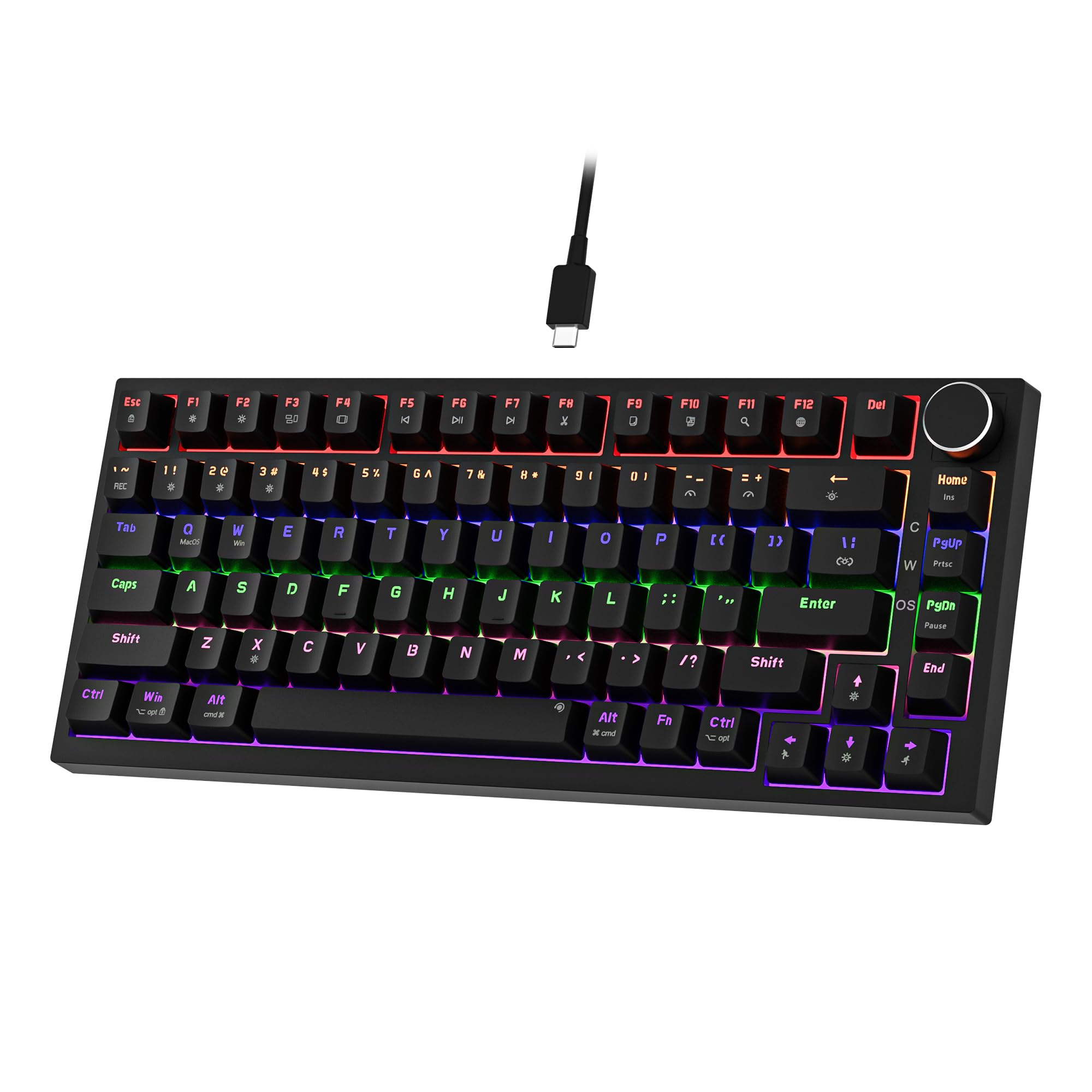 7.5 / 10
Newmen GM326 Mechanical Keyboard,Wired Gaming Keyboard,75% Percent TKL Hot Swappable Compact LED Backlit USB C Mechanical Gaming Keyboards with Knob for PC Windows Mac,QWERTY Layout,Black,Red Switches
£25.26 · NEWMEN
 7.5 / 10
Razer BlackShark V2 X Xbox Gaming Headset, 50mm Drivers, Cardioid Mic, Lightweight, Comfortable, Noise Isolating Earcups, for Xbox Series X, Series S, PS5, PC, Switch via 3.5mm Audio Jack - Black
£39.99 · Razer
Frequently asked
5 questions01What switches does the Redragon Mechanical Gaming Keyboard use?+
The keyboard uses Redragon's own red linear switches. Red linears have no tactile bump and no audible click, offering a smooth keystroke from top to bottom with a light actuation force. They're well suited to gaming, particularly fast-paced titles where rapid key repetition matters, and comfortable for extended typing sessions. The switches are hot-swappable, meaning you can replace them without soldering if you prefer a different switch type later.
02Is the Redragon Mechanical Gaming Keyboard good for gaming?+
Yes, it's well suited to gaming. The red linear switches offer fast, smooth actuation with no tactile resistance to slow down repeated keypresses. Full 100% anti-ghosting across all 105 keys means every simultaneous keypress registers correctly, which is essential for complex MMO or MOBA keybindings. The fully programmable layout with macro support also lets you configure the board for specific games. Over 546 owner reviews average 4.5 stars, with gaming performance consistently highlighted positively.
03Is the Redragon Mechanical Gaming Keyboard good for typing?+
It's a decent typing board, particularly if you like linear switches. The 7-degree tilt from the foldable feet and the ergonomic arc layout keep wrist position comfortable over longer sessions. Red linears are smooth and light, which some typists love and others find too easy to accidentally actuate. If you prefer tactile feedback when typing, the hot-swap feature means you can swap in tactile or clicky switches later. Owner reviews from people using it for office work and writing are broadly positive.
04Is the Redragon Mechanical Gaming Keyboard loud?+
Red linear switches are among the quieter mechanical switch types since they have no audible click. However, the bottom-out sound on a budget mechanical keyboard without sound dampening foam is still noticeable, especially in a quiet environment. In a shared office or on a video call, you'll be heard typing. It's not aggressive, but it's not silent either. Placing a large desk mat underneath the board helps absorb some of the sound.
05What warranty applies to the Redragon Mechanical Gaming Keyboard?+
Redragon provides a 24-month warranty on this keyboard, which is better than the 12-month coverage typical of many budget peripherals. Redragon also states they respond to support queries within 24 hours. In addition to the manufacturer warranty, Amazon's standard 30-day returns policy and A-to-Z guarantee apply to purchases made through Amazon UK.