The details that actually make or break a keyboard are almost never the ones that end up in the product title. Nobody puts "rattly stabilisers" or "ABS keycaps that'll look like a greasy crisp packet in six months" on the box. You have to dig for that stuff. And when you're shopping in the budget bracket, those details matter even more, because there's less margin for error when the price is already tight.
So here's the straight answer on the RedThunder K84 wireless keyboard and mouse combo (ASIN B0D4DJ66JN): it's a decent budget pick for someone who wants a tidy, compact wireless setup without spending proper money, but you need to go in with realistic expectations about what "mechanical feel" actually means and what the keycaps are going to look like in a year. Over 774 owners have reviewed this thing and averaged 4.1 stars, which is genuinely good for the budget bracket. That number doesn't lie. But it doesn't tell the whole story either.
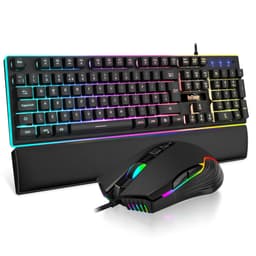
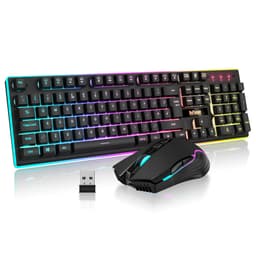
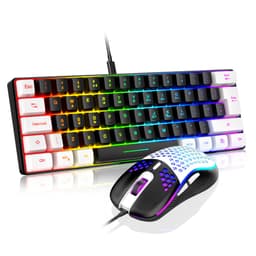
This is a 75% layout wireless keyboard bundled with a lightweight honeycomb mouse, all running off a single 2.4GHz USB receiver. At the budget price point it occupies, it's competing with a surprisingly crowded field. Whether it's the right choice for you depends entirely on what you actually need from a keyboard and how much the finer details matter to you.
Core Specifications: B0D4DJ66JN at a Glance
The K84 is an 85-key, 75% layout keyboard in UK format. That's the sweet spot for a lot of people: you keep your arrow keys and a column of function shortcuts on the right, but you lose the numpad and the navigation cluster, saving serious desk space. It's a more practical layout than 60% boards for anyone who uses arrow keys regularly, which is basically everyone who doesn't exclusively game in FPS titles.
Connectivity is 2.4GHz wireless via a USB receiver, which the listing notes is stored in the bottom of the mouse when not in use. That's a nice touch for travel. The keyboard battery is rated at 1,850mAh and the mouse at 500mAh, with a combined runtime claim of 30-plus hours. The switch type is described as "fast membrane keys with mechanical feel" rather than actual mechanical switches, which is an important distinction we'll get into properly in the next section.
The mouse side of the combo is the other headline: a honeycomb shell design weighing in at 81 grams (plus or minus 5g), symmetrical for both hands, running a high-precision optical sensor. The keyboard comes in a black-and-white colourway and features per-key RGB backlighting with multiple lighting modes and adjustable brightness.
| Specification | Detail |
|---|---|
| Model | RedThunder K84 (B0D4DJ66JN) |
| Layout | 75% (85 keys, UK layout) |
| Switch Type | Membrane (mechanical feel) |
| Connectivity | 2.4GHz wireless (single USB receiver) |
| Keyboard Battery | 1,850mAh |
| Mouse Battery | 500mAh |
| Battery Life | 30+ hours combined |
| Mouse Weight | 81g (plus or minus 5g) |
| Mouse Shell | Honeycomb perforated design |
| Mouse Grip | Symmetrical (ambidextrous) |
| RGB | Yes, per-key with multiple modes |
| Keycap Profile | Stepped (scientific keycap design) |
| Compatibility | PC, Mac, PS5 |
| Rating | ★★★★☆ (4.1) (778 reviews) |

Switch Type and Feel: B0D4DJ66JN's "Mechanical Feel" Explained
Right, this is the bit that needs the most honest treatment. The K84 uses what RedThunder calls "fast membrane keys with mechanical feel" and an "ultra-low response time". That's not the same as mechanical switches. Not even close. Real mechanical switches, whether that's Cherry MX Reds, Gateron Yellows, or any of the dozens of alternatives, use individual spring-and-stem mechanisms under each key. Membrane keyboards use a rubber dome or similar layer beneath the keycaps, which collapses when pressed. They feel different, they sound different, and they age differently.
That said, "mechanical feel" membrane boards have come a long way. The K84 uses a stepped keycap design that the listing describes as "scientific", which is marketing speak for a sculpted profile that angles each row slightly differently. This genuinely does help with comfort and can make typing feel more natural than flat-profile boards. Owner reviews consistently mention that the typing experience is pleasant and quiet, with a soft sound on each keypress. If you're coming from a proper clicky mechanical board, you'll notice the difference immediately. If you're coming from a standard membrane keyboard, you'll probably be pleasantly surprised.
The key thing to understand here is what "ultra-low response time" means in practice for a membrane board. Without a published polling rate figure in the spec sheet, it's not something we can pin down precisely. What the 774-owner review pool does suggest is that for casual gaming and everyday typing, the response feels snappy enough that it's not a complaint that comes up repeatedly. Hardcore competitive gamers who care about polling rates of 1,000Hz or above and are comparing this to dedicated gaming keyboards with N-key rollover will want to look elsewhere. For everyone else, it's fine.
Keycap Quality and Layout
The 75% layout is genuinely one of the better choices for a combined gaming and productivity board. You keep the F-row across the top, you keep your dedicated arrow keys, and you get a small column of navigation shortcuts on the right side. Compared to a 60% board, you're not constantly hunting through function layers to find Home or Page Down. That matters if you do any writing, coding, or spreadsheet work alongside your gaming.
The keycaps themselves are where things get a bit more complicated. The listing doesn't specify ABS versus PBT material, which is notable. In the budget bracket, the overwhelming default is ABS plastic, and based on the price point and the product category, that's almost certainly what these are. ABS keycaps are fine when new. The problem is that they develop a shine over time, particularly on the most-used keys like WASD and the spacebar. Within a few months of daily use, those keys will look noticeably glossier than the rest of the board. It's not a dealbreaker. ABS is cheaper to produce and easier to backlight through, which is why budget RGB boards almost universally use it.
The UK layout is a genuine plus for UK buyers, and specifically because so many budget boards default to US layout and then get sold into the UK market without adjustment. Having a proper UK enter key and the correct placement for the pound sign matters for everyday use. The stepped keycap profile the listing mentions should help with long typing sessions by keeping your fingers in a more natural position across the rows. Owner feedback on comfort during extended use is generally positive, which suggests the profile is doing its job.
Build Quality
The listing doesn't specify plate material or case construction in detail, so we're working from what owner reviews tell us and what's typical for this price point. At budget pricing, you're typically looking at a plastic case, which is standard and not a criticism in itself. What matters is whether the case flexes noticeably under typing pressure, and whether the stabilisers on the larger keys (spacebar, shift, backspace) are rattly or decently dampened.
Owner reviews are mixed on the build feel. The majority are positive about the overall sturdiness for the price, but a subset of reviews mention that the board feels lighter than expected. That's not surprising for a wireless board in this category. The wireless design means no cable weight, and the battery adds some mass but not as much as a metal plate would. For desk use, this is fine. For travel, lighter is actually better. The receiver-in-mouse storage is a genuinely smart design decision that reduces the chance of losing the tiny USB dongle, which is the single most annoying thing that can happen to a wireless peripheral owner.
The mouse side of the combo punches above its weight on build. An 81-gram honeycomb mouse at this price point is legitimately impressive. Lightweight mice with perforated shells were commanding serious premium prices not long ago, and seeing that design filter down to the budget bracket is good news for buyers. The symmetrical shape means it works for both left and right-handed users, and the ergonomics get positive mentions in owner reviews. The optical sensor is described as high-precision in the listing, though specific DPI figures aren't published in the verified spec data, so we won't invent a number.
RGB and Lighting
The K84 has per-key RGB backlighting with multiple colour modes and patterns, including breathing and static (what the listing calls "permanent") modes. You can adjust both brightness and breathing rate. For a budget board, that's a solid feature set. Per-key RGB rather than zone lighting means you can get proper wave effects and reactive lighting patterns where each key lights up individually, which looks significantly better than a board where the whole thing just pulses one colour.
The lighting is clearly a selling point based on how prominently it features in owner photos and reviews. People seem genuinely pleased with how it looks, particularly in darker rooms. The black-and-white colourway of this specific variant means the RGB pops nicely against the white keycaps. One thing: RGB backlighting has a direct impact on battery life. The 30-plus hour claim presumably applies with lighting in some configuration, but running the RGB at full brightness will drain the battery faster than using the board with lighting off or dimmed. More on that in the battery section.
There's no mention of software-controlled lighting profiles in the listing, which suggests the lighting modes are cycled through on-board using key combinations rather than a companion app. That's actually fine for most people. Software adds complexity, requires installation, and often causes more problems than it solves. On-board lighting control via function key shortcuts is simpler and works without drivers. The downside is you can't create fully custom per-key colour maps, but at this price point, that's not a realistic expectation anyway.
Software and Customisation
The K84 doesn't appear to ship with dedicated software, based on the product listing and owner feedback patterns. This is pretty common in the budget wireless segment. What you get instead is on-board control: function key combinations to cycle lighting modes, adjust brightness, change breathing speed, and handle media controls. The keyboard's 75% layout retains shortcut keys, so the function layer should give you access to media playback, volume, and similar controls without needing a separate app.
For macro support and deep remapping, the answer is almost certainly no. Budget membrane boards at this price point don't typically offer reprogrammable keys or on-board profile storage beyond the lighting presets. If macro functionality is important to your workflow or gaming setup, you'll want to look at a dedicated gaming keyboard with software support. But for the target audience here, which is people who want a clean wireless setup for gaming and general use without complexity, the absence of software is arguably a feature rather than a limitation.
Firmware updates are not mentioned in the listing. Again, typical for this category. The board is what it is out of the box, and that's fine as long as you go in knowing it. The lack of a companion app also means no cloud profile sync, no per-game profile switching, and no DPI configuration for the mouse beyond whatever on-board controls the mouse itself has. If you're the kind of person who wants to tune every parameter of your peripherals, this combo isn't built for you. If you want something that works immediately without setup faff, it absolutely is.

Connectivity
The K84 uses 2.4GHz wireless, specifically described as using "the latest 2.4GHz receiver" for high-speed and stable transmission. Both the keyboard and mouse share a single USB receiver, which is a real practical advantage. One USB port taken up, not two. The receiver stores inside the mouse when not in use, which is a detail that sounds minor but genuinely matters when you're travelling with the combo or just keeping things tidy in a drawer.
2.4GHz wireless for gaming peripherals is the right choice over Bluetooth for latency-sensitive use. 2.4GHz wireless connections typically offer lower and more consistent latency than Bluetooth, which is why dedicated gaming wireless peripherals almost always use proprietary 2.4GHz dongles rather than standard Bluetooth. The listing claims the connection handles "even the most intense battles with ease", which is marketing language, but the underlying technology choice is sound.
There's no Bluetooth option mentioned, which means you're tied to the USB receiver. That's a limitation if you want to pair to a phone or tablet, or if you want to switch between multiple devices without unplugging and replugging the dongle. For a single-device desktop setup, it's not an issue at all. The receiver range isn't specified in the listing, but 2.4GHz peripherals in this category typically work reliably up to around 10 metres in an unobstructed environment, which covers any normal desk setup with room to spare.
Battery Life
The K84 keyboard packs a 1,850mAh battery and the mouse a 500mAh battery. The combined claim is 30-plus hours of use. That's a respectable figure, though the real-world number will depend heavily on whether you're running the RGB lighting and at what brightness. A 1,850mAh keyboard battery is on the larger side for a wireless board in this class, which is encouraging. By comparison, some budget wireless keyboards ship with 1,000mAh or less.
Owner reviews don't flag battery life as a consistent complaint, which is a reasonable signal that the 30-hour claim isn't wildly optimistic. For most people's usage patterns, 30 hours means charging roughly once a week with moderate daily use. The mouse's 500mAh battery is smaller, and gaming mice with polling rates and optical sensors tend to drain faster than keyboards, so the mouse may need charging more frequently than the keyboard depending on your usage. It's worth keeping track of both separately rather than assuming they'll die at the same time.
Charging details aren't fully specified in the listing. The method of charging (USB-C, Micro-USB, or proprietary) isn't confirmed in the verified product data, so we won't speculate. Owner reviews and the product listing photos would be the place to check that detail before buying if it matters to you. What is clear is that both devices are rechargeable rather than using disposable batteries, which is the right call for a modern wireless peripheral combo and saves ongoing cost over time.
Typing and Gaming Experience
The typing experience on the K84 is consistently described in owner reviews as pleasant and quiet. The membrane construction means there's no sharp tactile bump like you'd get from a Gateron Brown or a Cherry MX Tactile Grey, and no loud click like a Blue switch. What you get instead is a soft, cushioned keystroke with a gentle bottom-out. For shared spaces, open-plan offices, or late-night gaming sessions where you don't want to wake people up, that's actually a selling point. The listing specifically mentions "a soft sound" on each keypress, and owner feedback backs that up.
The stepped keycap profile helps with comfort during long typing sessions. The idea is that each row sits at a slightly different angle, keeping your fingers in a more natural arc across the keyboard. Whether this makes a dramatic difference depends on how sensitive you are to keyboard ergonomics, but it's a better design choice than a completely flat profile. Owners who use this for work alongside gaming report it holds up well over extended sessions, which is a good sign for the ergonomic claims.
For gaming specifically, the membrane construction means you're not getting the crisp, precise actuation point of a good linear mechanical switch. The pre-travel on membrane keys is harder to define because there's no distinct actuation point in the same way. For most gaming genres, this doesn't matter much. Strategy games, RPGs, MMOs, casual shooters: the K84 will handle all of these without complaint. Where it might frustrate is in highly competitive FPS gaming where players are used to the precise, consistent feel of a quality mechanical switch and need to register keypresses at exact moments. The 4.1-star average across 778 suggests most buyers are happy with the gaming performance, but it's worth being honest that this isn't a board built for professional-level competitive play.
Compatibility
The K84 is listed as compatible with PC, Mac, and PS5. The 2.4GHz USB receiver means it'll work with any device that has a USB-A port, which covers the vast majority of desktop PCs and gaming consoles. Mac compatibility is a nice inclusion, though the UK layout and the function key shortcuts will be mapped to Windows conventions by default, so Mac users may find some key combinations behave differently than expected. This is common across non-Apple keyboards and is generally manageable.
PS5 compatibility is listed, which is useful for console gamers who want a keyboard and mouse setup for certain game types. First-person shooters and strategy games on console benefit significantly from mouse and keyboard input, and having a wireless combo that works with PS5 out of the box without needing adapters is a genuine plus. The single-receiver design means you get both keyboard and mouse connected via one USB port on the console.
Linux compatibility isn't specifically mentioned, but 2.4GHz USB HID devices (which is what this is) are generally plug-and-play on Linux without needing proprietary drivers. Since there's no software component to install, there's nothing that would prevent it working on Linux in basic keyboard and mouse mode. Advanced features like lighting mode changes via function keys should work regardless of OS since they're handled on-board. For Windows and macOS users, no driver installation should be required for basic functionality.
How It Compares
The K84's main competition in the budget wireless combo bracket comes from two directions. First, there are other budget wireless keyboard-and-mouse combos from brands like Logitech (the MK270 and similar) and Rapoo. Second, there are slightly pricier options that offer actual mechanical switches in a wireless package, like the Royal Kludge RK84 or the Redragon K530. Understanding where the K84 sits relative to these helps clarify whether it's the right buy for you.
Against the Logitech MK270, the K84 wins on layout (75% compact versus full-size), RGB lighting (Logitech's budget combos typically have no backlighting), and mouse weight (the honeycomb design is genuinely lighter than Logitech's budget mice). The Logitech has the brand trust and the long-proven wireless reliability, but it's a much more basic proposition overall. For buyers who care about RGB and desk space, the K84 is the better pick.
Against something like the Royal Kludge RK84, which is a true mechanical wireless keyboard in a similar 75% layout, the K84 loses on switch quality but wins on the bundled mouse and the overall combo price. If you already have a mouse you're happy with and you want real mechanical switches, the RK84 is worth the extra spend. If you need both keyboard and mouse and you're on a tight budget, the K84 combo makes more financial sense. That's the honest trade-off.
| Feature | RedThunder K84 (B0D4DJ66JN) | Logitech MK270 | Royal Kludge RK84 |
|---|---|---|---|
| Layout | 75% (85 keys) | Full-size | 75% (84 keys) |
| Switch Type | Membrane (mechanical feel) | Membrane | True mechanical |
| Wireless | 2.4GHz | 2.4GHz | 2.4GHz / Bluetooth |
| RGB | Yes, per-key | No | Yes, per-key |
| Mouse Included | Yes (81g honeycomb) | Yes (standard) | No |
| Battery (keyboard) | 1,850mAh / 30+ hours | Not specified (AA batteries) | Varies by model |
| Price Tier | Budget | Budget | Budget-Mid |

Final Verdict
The RedThunder K84 (B0D4DJ66JN) is a genuinely solid budget wireless combo that gets the fundamentals right. The 75% UK layout is the right call for anyone who wants a compact board without losing arrow keys. The 2.4GHz wireless is the correct technology choice for gaming. The honeycomb mouse at 81 grams is a legitimately impressive inclusion at this price point. And over 774 owners averaging 4.1 stars is real-world validation that this thing works as advertised for most people.
The honest caveats are these: the switches are membrane, not mechanical, so if you care about that distinction you need to factor it in. The keycaps are almost certainly ABS, which means shine over time. There's no software, no macro support, and no Bluetooth. If any of those are dealbreakers for your use case, they're dealbreakers. But if you want a clean, wireless, RGB-lit compact setup with a decent lightweight mouse bundled in, and you don't want to spend mid-range money to get it, the K84 makes a strong case for itself.
Who should buy this? Anyone setting up a first gaming desk on a budget, students who want a portable wireless setup that works for both gaming and typing, and office workers who want something tidier than a full-size board without the complexity of a premium keyboard. The PS5 compatibility is a bonus for console players who want to keyboard-and-mouse certain titles.
Who should skip it? Competitive FPS players who need precise mechanical actuation and a high polling rate. Anyone who's already invested in a good mouse and just needs the keyboard, in which case spending a bit more on a board like the Royal Kludge RK84 gets you actual mechanical switches for a reasonable premium. And anyone who needs Bluetooth multi-device pairing, because this doesn't do that.
The smarter buy if you don't need the mouse? Save the combo premium and put that money toward a budget mechanical keyboard with real switches. You'll notice the difference in feel immediately, and your fingers will thank you for it over long sessions. But if you need both keyboard and mouse and the budget bracket is where you live, the K84 combo is one of the better options in it. Solid 7 out of 10.
What works. What doesn’t.
5 + 4What we liked5 reasons
- 75% UK layout keeps arrow keys without the numpad bulk
- Single 2.4GHz receiver covers both keyboard and mouse
- 81g honeycomb mouse is impressively light for the price
- 1,850mAh keyboard battery with 30+ hour runtime claim
- Per-key RGB at budget pricing is genuinely good value
Where it falls4 reasons
- Membrane switches, not mechanical, despite the 'mechanical feel' marketing
- Keycaps almost certainly ABS and will shine with regular use
- No Bluetooth, no multi-device pairing
- No software, no macro support, no deep customisation
Full specifications
5 attributes| Layout | 75% |
|---|---|
| Connectivity | wireless |
| Backlight | RGB |
| Backlighting | Single-zone RGB |
| HOT swappable | false |
If this isn’t right for you
2 options
Frequently asked
5 questions01What switches does the RedThunder K84 75% Wireless Gaming Keyboard and Mouse Rainbow Backlight UK Layout 85 Keys TKL Ultra Compact Mini Design Lightweight Honeycomb Gaming Mouse for PC Mac PS5 Office Gamers (Black-White) use?+
The K84 uses membrane switches designed to mimic the feel of mechanical keys, described by RedThunder as 'fast membrane keys with mechanical feel'. These are not true mechanical switches with individual spring-and-stem mechanisms. Each keypress produces a soft sound and a cushioned feel. The stepped keycap profile helps with comfort, but buyers expecting the crisp tactile feedback of Cherry MX or Gateron switches should be aware this is a membrane board.
02Is the RedThunder K84 75% Wireless Gaming Keyboard and Mouse Rainbow Backlight UK Layout 85 Keys TKL Ultra Compact Mini Design Lightweight Honeycomb Gaming Mouse for PC Mac PS5 Office Gamers (Black-White) good for gaming?+
For casual to moderate gaming across most genres, yes. The 2.4GHz wireless connection is the right technology choice for low-latency gaming, and the 75% layout keeps all the keys you need without the bulk of a full-size board. For highly competitive FPS gaming where precise mechanical actuation and verified high polling rates matter, the membrane construction puts it at a disadvantage compared to dedicated mechanical gaming keyboards.
03Is the RedThunder K84 75% Wireless Gaming Keyboard and Mouse Rainbow Backlight UK Layout 85 Keys TKL Ultra Compact Mini Design Lightweight Honeycomb Gaming Mouse for PC Mac PS5 Office Gamers (Black-White) good for typing?+
Owner reviews are consistently positive about the typing experience. The membrane keys produce a soft, quiet sound on each press, and the stepped keycap profile is designed to keep hands in a natural position across the rows. For long typing sessions in shared spaces or offices, the quiet keystroke is a genuine advantage. It won't satisfy enthusiasts who prefer the tactile feedback of a quality mechanical switch, but for everyday typing it performs well above expectations for the price.
04Is the RedThunder K84 75% Wireless Gaming Keyboard and Mouse Rainbow Backlight UK Layout 85 Keys TKL Ultra Compact Mini Design Lightweight Honeycomb Gaming Mouse for PC Mac PS5 Office Gamers (Black-White) loud?+
No. The membrane construction produces a soft sound on each keypress, which the product listing specifically highlights. This makes it suitable for open-plan offices, shared living spaces, and late-night gaming sessions where noise is a concern. It is significantly quieter than clicky mechanical switches and also quieter than most tactile mechanical switches. Streamers and content creators who are sensitive to keyboard noise in recordings should find it acceptably quiet.
05What warranty and returns apply to the RedThunder K84 75% Wireless Gaming Keyboard and Mouse Rainbow Backlight UK Layout 85 Keys TKL Ultra Compact Mini Design Lightweight Honeycomb Gaming Mouse for PC Mac PS5 Office Gamers (Black-White)?+
No specific manufacturer warranty period is stated in the verified product data for this listing. Purchases made through Amazon UK are covered by Amazon's standard 30-day return policy and the Amazon A-to-Z Guarantee, which provides protection if the item is not as described or develops a fault. For warranty queries beyond Amazon's standard terms, we recommend checking the product listing directly or contacting the seller before purchasing.