
Most people building a PC spend hours agonising over the CPU and GPU, then pick a motherboard in about four minutes because it's "compatible" and has decent reviews. That's understandable. But the motherboard is the one component that determines whether every other part of your system actually performs to its potential, or quietly bottlenecks it. Get the VRM wrong and your Ryzen chip thermal-throttles under sustained load. Get the BIOS wrong and you'll spend a Sunday afternoon in a dark room cursing at POST codes. Get the M.2 configuration wrong and your fast Gen 5 SSD turns out to be sharing bandwidth with something else. These aren't hypothetical problems. They happen constantly, and they're almost always traceable back to a board that looked fine on paper.
The MAG B650M MORTAR WIFI sits in the upper mid-range of AMD's AM5 ecosystem, in a Micro-ATX form factor that's become genuinely popular for compact-but-capable builds. On paper, the spec sheet is impressive: a 14+2 phase VRM, Gen 5 M.2 support, Wi-Fi 6E, USB 3.2 Gen 2x2 Type-C, and DDR5 memory support up to 6600+ MHz. That's a lot of headline features for a board that isn't asking X670E money. Whether those features are implemented well enough to justify the upper mid-range price is what this review is actually about. Spoiler: mostly yes, with some caveats before you buy.
Across 116 owner reviews averaging ★★★★☆ (4.2), the pattern is consistent. People rate the VRM performance, the BIOS experience, and the build quality well above average for the B650 tier. Complaints are specific and relatively rare: a handful of memory compatibility edge cases, the occasional grumble about RGB software, and the usual Micro-ATX trade-offs on expansion. Nothing catastrophic. That's actually a good sign, because the reviews that flag real problems tend to be very loud about it.
Core Specifications
The MAG B650M MORTAR WIFI is built around AMD's B650 chipset on the AM5 platform, in a Micro-ATX form factor (244mm x 244mm). That size matters more than people realise: you get most of the features of a full ATX B650 board, but you're working with less PCB real estate, which affects expansion slot count and sometimes thermal headroom for VRM heatsinks. MSI has handled this reasonably well here, fitting a proper heatsink array onto a compact footprint without obviously compromising anything critical.
Memory is DDR5 via four DIMM slots, with support for extreme overclocking speeds at 1DPC 1R configuration (6600+ MHz). Storage is handled by three M.2 slots: one Gen 5 x4 slot running at 128Gbps, and two Gen 4 x4 slots at 64Gbps each, all covered by MSI's Shield Frozr heatsinks. The rear I/O includes USB 3.2 Gen 2x2 Type-C at 20Gbps, HDMI 2.1, 2.5Gbps LAN, Wi-Fi 6E with Bluetooth 5.2, and 7.1 channel audio with Audio Boost 5 including S/PDIF output. That's a genuinely well-specified rear panel for this price bracket.
The VRM configuration is 14+2 phases using the Duet Rail Power System with 80A Smart Power Stage MOSFETs. That's the same architecture MSI uses on its higher-end MPG boards, which is exactly what you want to see on a B650 board that might be paired with a Ryzen 9 chip. The 6-layer PCB with 2oz thickened copper is also: it's a build quality indicator that directly affects signal integrity and thermal performance, and it's not something every B650 board bothers with.
| Specification | Detail |
|---|---|
| Form Factor | Micro-ATX (244mm x 244mm) |
| Socket | AMD AM5 |
| Chipset | AMD B650 |
| Memory Slots | 4x DDR5 DIMM |
| Max Memory Speed | 6600+ MHz (1DPC 1R) |
| PCIe x16 Slots | 2x PCIe 4.0 x16 |
| M.2 Slots | 1x Gen 5 x4 (128Gbps), 2x Gen 4 x4 (64Gbps) |
| VRM | 14+2 Duet Rail, 80A Smart Power Stage |
| USB (Rear) | USB 3.2 Gen 2x2 Type-C (20Gbps) + additional USB ports |
| Networking | Wi-Fi 6E, Bluetooth 5.2, 2.5Gbps LAN |
| Audio | 7.1 USB High Performance Audio, Audio Boost 5, S/PDIF output |
| Video Output | HDMI 2.1 |
| PCB | 6-layer, 2oz thickened copper |
| Current Price | £265.37 (Price checked 06:45, 3 Oct 2026, UK time) |
| Rating | ★★★★☆ (4.2) (114 reviews) |

Socket & CPU Compatibility
The MAG B650M MORTAR WIFI uses AMD's AM5 socket, which is AMD's current-generation platform and the home of Ryzen 7000, 8000, and 9000 series processors. AM5 uses LGA1718 (land grid array, meaning the pins are on the socket rather than the CPU), which is a change from AM4's PGA design. The practical upshot: AM5 CPUs are slightly less fragile to handle, and the socket itself is rated for a long service life. AMD has publicly committed to AM5 support through at least 2027, which gives this board a meaningful upgrade path compared to Intel's habit of changing sockets every couple of years.
Ryzen 9000 series compatibility is confirmed, which is the current top of AMD's stack as of this writing. That includes chips like the Ryzen 9 9950X and Ryzen 7 9700X. Ryzen 7000 series (the Zen 4 generation) and Ryzen 8000 series APUs are also supported. One thing to be aware of: if you're buying this board and pairing it with a very new CPU that launched after the board shipped, you may need a BIOS update before the system will POST. MSI's BIOS update process via their support page is reasonably well documented, and the board does support BIOS Flashback functionality, which means you can update the BIOS without a compatible CPU installed. That's a genuinely useful feature if you're buying a brand-new chip.
For most people building right now, the sweet spot pairing is something like a Ryzen 7 7700X, 7800X3D, or a Ryzen 9 9900X. The VRM on this board is more than capable of handling any of those without breaking a sweat. Where it gets interesting is if you're eyeing a Ryzen 9 9950X with its 170W TDP under full load: the 14+2 phase configuration with 80A stages is rated for it, but you'd want to make sure your case airflow is sorted. More on that in the VRM section.
Chipset Features
The B650 chipset sits one tier below AMD's X670 and X670E in the AM5 lineup. The key practical differences: B650 doesn't support CPU-direct PCIe Gen 5 for graphics (though it does support Gen 5 for M.2 storage via the CPU lanes), and it has fewer total USB and PCIe lanes from the chipset itself compared to X670E. What B650 does give you is access to all the fundamentals of the AM5 platform at a significantly lower board cost. For the vast majority of gaming and productivity builds, the chipset-level limitations of B650 versus X670 are completely irrelevant.
The B650 chipset supports memory overclocking via EXPO (AMD's equivalent of Intel's XMP), so you can run fast DDR5 kits at their rated speeds without manually dialling in timings. It also supports multi-core overclocking on Ryzen processors, which is handled through MSI's Core Boost architecture on this board. That said, B650 doesn't support the same degree of manual CPU overclocking headroom as X670E: AMD locks certain overclocking features to the higher-end chipset. If you're planning to push a Ryzen 9 chip to its absolute limit with manual voltage tweaking, X670E is the correct chipset. For EXPO memory OC and sensible CPU performance tuning, B650 is perfectly capable.
On the connectivity side, the B650 chipset provides the USB and SATA lanes that feed the rear I/O and internal headers. The MAG B650M MORTAR WIFI's rear panel reflects this well, with the 20Gbps USB Type-C being a chipset-level feature that not every B650 board bothers to include. SATA support is present for traditional hard drives and SATA SSDs, though the exact SATA port count on the board itself isn't specified in the verified product data. The M.2 Gen 5 slot runs off CPU lanes directly, which is why it achieves the full 128Gbps bandwidth without any chipset bottleneck.
VRM & Power Delivery
This is where the MAG B650M MORTAR WIFI genuinely earns its upper mid-range positioning. The 14+2 Duet Rail Power System with 80A Smart Power Stage MOSFETs is a serious VRM implementation. To put that in context: 14 phases at 80A per phase gives a theoretical current delivery capacity that's well in excess of what even the most power-hungry Ryzen 9 processors actually draw. The Duet Rail architecture means the CPU VCore and SoC rails are handled separately, which improves stability under mixed workloads where both the CPU and integrated graphics (or memory controller) are under simultaneous stress.
The thermal side of the VRM is handled by a combination of 7W/mK MOSFET thermal pads and an extended heatsink. The 7W/mK thermal interface material is notably better than the generic pads you find on cheaper boards, which often use 3 to 4 W/mK pads that leave the MOSFETs running hotter than necessary. Owner reviews consistently report stable VRM temperatures even under sustained Cinebench R23 multi-core loads, which is the kind of real-world stress test that exposes weak VRM implementations quickly. There's also a dedicated pump-fan cooling header on this board, which is a small but thoughtful touch for builders using an AIO cooler with a pump that needs its own header rather than sharing with a chassis fan.
The 6-layer PCB with 2oz thickened copper contributes to VRM performance in a way that's easy to overlook. Thicker copper traces carry current more efficiently and dissipate heat better than standard 1oz copper PCBs. It's not a marketing bullet point that most people would notice, but it's the kind of foundational build quality decision that separates boards that age well from ones that develop instability after a couple of years of heavy use. For a Micro-ATX board where the VRM heatsink has less surface area to work with than on a full ATX design, these details matter more, not less.
Memory Support
DDR5 is the only memory standard on AM5, so there's no DDR4 option here. The MAG B650M MORTAR WIFI has four DDR5 DIMM slots, which is the full complement and gives you dual-channel across all four slots when populated correctly. The headline memory speed is 6600+ MHz in 1DPC 1R configuration, meaning one DIMM per channel, one rank per DIMM. That's the configuration you'd use with a high-end DDR5 kit like a 2x16GB set running at 6400 or 6600 MHz, which is currently the sweet spot for Ryzen performance tuning.
EXPO support is confirmed, which is AMD's memory overclocking profile standard (analogous to Intel's XMP). In practice, this means you buy a DDR5 kit rated for 6000 or 6400 MHz, enable EXPO in the BIOS, and it runs at that speed without you having to manually configure timings. Owner reviews note that EXPO profiles generally load and run stably on this board, which isn't guaranteed on every B650 board. Memory compatibility on AM5 has been a known pain point across the platform since launch, partly due to DDR5's more complex topology requirements. MSI's QVL (Qualified Vendor List) for this board is against your chosen kit before buying, particularly if you're planning to run four DIMMs at high speeds, which is always more demanding on the memory controller than two DIMMs.
Maximum capacity across four slots is not explicitly specified in the verified product data, but AM5 platform limits and DDR5 DIMM density put the practical ceiling at 128GB (4x32GB) for current consumer DDR5 modules. For gaming and most productivity workloads, 32GB (2x16GB) is the sensible starting point, and this board handles that configuration without any drama according to owner feedback. The memory controller on Ryzen 7000 and 9000 series is well-regarded for DDR5 compatibility once you're running a board with a mature BIOS, and the MORTAR WIFI's BIOS has had time to mature at this point.
Storage Options
Three M.2 slots is a good number for a Micro-ATX board, and the generation split here is well-judged. The primary M.2 slot runs PCIe Gen 5 x4 at 128Gbps, which is the fastest consumer M.2 interface currently available. Gen 5 SSDs like the Crucial T705 or Samsung 990 Pro successor generation can saturate this slot with sequential reads north of 12,000 MB/s. Whether you actually need that for gaming is debatable (games load from NVMe at speeds that plateau well below Gen 5's ceiling), but for content creation, large file transfers, and future-proofing, having the Gen 5 slot available is a genuine advantage over boards that cap out at Gen 4.
The two additional M.2 slots run PCIe Gen 4 x4 at 64Gbps each. That's more than fast enough for any current consumer SSD, including the best Gen 4 drives like the WD Black SN850X or Seagate FireCuda 530, which top out around 7,300 MB/s sequential read. All three M.2 slots are covered by MSI's Shield Frozr heatsinks, which is important: Gen 5 SSDs in particular run hot under sustained write loads, and without a heatsink they will thermal throttle. The Shield Frozr implementation on MSI boards is generally well-regarded in owner reviews for keeping SSD temperatures in check without requiring any additional thermal pads from the user.
Beyond M.2, the board includes SATA connectivity for traditional drives, which matters if you're migrating from an older build and bringing mechanical hard drives or SATA SSDs with you. The exact SATA port count isn't specified in the verified product data, so check MSI's spec sheet directly if SATA port count is critical to your build. RAID support is a B650 chipset feature and is available on this board for both M.2 and SATA configurations. For most home builds, RAID isn't relevant, but it's there if you need it.
Expansion Slots & PCIe
Two PCIe 4.0 x16 slots at 64Gbps each is the headline expansion story here. The primary slot, used for your graphics card, runs at full PCIe 4.0 x16 bandwidth directly from the CPU. That's the same electrical connection you'd get on an X670E board for the GPU slot, and it means there's no bandwidth penalty for your graphics card versus a more expensive platform. PCIe 4.0 x16 at 64Gbps is currently more than sufficient for any GPU on the market, including the RTX 4090 and RX 7900 XTX, neither of which can saturate PCIe 4.0 x8 bandwidth in practice.
The second x16 slot is where Micro-ATX form factor trade-offs show up. On a full ATX board you'd typically get more physical expansion room and potentially more lanes for the secondary slot. On the MORTAR WIFI, the second slot provides additional expansion capability for things like capture cards, M.2 expansion cards, or a secondary GPU in compute workloads. The lane configuration of the secondary slot isn't explicitly detailed in the verified product data, so if you're planning a specific multi-card or expansion card setup, verify against MSI's full specification sheet. For single-GPU gaming builds, which is the vast majority of people buying this board, two slots is more than enough.
The primary GPU slot features steel reinforcement, which MSI calls Steel Armor. It's not purely cosmetic: a heavy GPU, particularly a triple-fan card weighing 1.5kg or more, puts real mechanical stress on the PCIe slot over time. Reinforced slots resist the bending and cracking that can eventually cause contact issues. Owner reviews don't flag any GPU slot problems, which is consistent with the reinforced design doing its job. If you're running a particularly heavy GPU and you're worried about GPU sag, a support bracket is still a good idea regardless of slot reinforcement.

Connectivity & Rear I/O
The rear I/O panel is where you can tell a lot about what a manufacturer actually prioritised versus what they just stuck in the spec bullet points. The MAG B650M MORTAR WIFI's rear panel includes a USB 3.2 Gen 2x2 Type-C port running at 20Gbps, which is the fast one. Not all B650 boards bother with Gen 2x2; some include a Type-C port that's only running at Gen 2 speeds (10Gbps) and hope you don't notice. The 20Gbps port matters if you're connecting fast external SSDs, Thunderbolt docks (via USB4 adapters), or modern smartphones that support fast USB data transfer.
HDMI 2.1 is present on the rear panel, which supports AMD's Ryzen APUs (the 8000G series) that include integrated Radeon graphics. If you're building a system with a Ryzen 8700G or similar and want to run without a discrete GPU initially, the HDMI 2.1 output handles 4K at 120Hz. For discrete GPU builds, the HDMI port on the motherboard is irrelevant (you'd use the GPU's outputs), but it's a useful fallback for troubleshooting or iGPU-based builds. The audio output is 7.1 channel with Audio Boost 5, which includes S/PDIF optical output for connecting to external DACs or AV receivers. This is noticeably better than the audio implementation on budget B650 boards, which often use cheaper Realtek codecs without the isolation and filtering that Audio Boost 5 provides.
The Clear-CMOS and BIOS Flashback functionality are both in the context of real-world usability. Clear-CMOS via a rear button means you don't have to open the case and find the jumper when a bad BIOS setting leaves you unable to POST. BIOS Flashback (MSI calls it Flash BIOS Button) allows you to update the BIOS using a USB drive without a compatible CPU installed, which is genuinely useful if you're buying a board ahead of a new CPU launch. These aren't glamorous features, but they're the kind of thing you're extremely grateful for when you actually need them, and not every board in this price bracket includes both.
WiFi & Networking
Wi-Fi 6E with Bluetooth 5.2 is the wireless specification here. Wi-Fi 6E adds access to the 6GHz frequency band on top of the 2.4GHz and 5GHz bands supported by standard Wi-Fi 6. The 6GHz band is less congested in most environments (fewer devices use it currently), offers lower latency, and supports the same 1.2Gbps maximum throughput as Wi-Fi 6 on compatible routers. If your router supports Wi-Fi 6E, you'll get a noticeably cleaner wireless connection than on a board with Wi-Fi 6 only. If your router doesn't support 6E yet, you fall back to 5GHz Wi-Fi 6 smoothly, so it's a forward-compatible upgrade.
Bluetooth 5.2 handles wireless peripherals: headsets, controllers, keyboards, mice. Version 5.2 supports LE Audio, which is relevant for wireless headsets that use the LC3 codec. In practice, most people won't notice the difference between 5.1 and 5.2 for standard peripherals, but it's the current standard and it's what you'd expect at this price point. The antenna connectors are on the rear I/O, and the board ships with antennas in the box according to the listing.
The wired networking is handled by 2.5Gbps LAN, which is the right call for 2024 onwards. Standard Gigabit Ethernet (1Gbps) is a genuine bottleneck if you have a NAS, a 2.5Gbps or faster internet connection (increasingly common with full-fibre), or you're doing large file transfers across your local network. 2.5Gbps LAN is backward compatible with 1Gbps switches and routers, so there's no downside to having it. The specific NIC chipset isn't detailed in the verified product data, but MSI typically uses Intel or Realtek 2.5G controllers on this tier of board. Both are well-supported under Windows and Linux.
BIOS & Overclocking
MSI's Click BIOS 5 is the interface you'll be working with, and it's one of the better BIOS implementations in the industry right now. That's not a high bar to clear (BIOS interfaces are almost universally terrible from a UI design standpoint), but MSI has genuinely improved Click BIOS over the past few years. The EZ Mode gives you a clean overview of system status, fan speeds, temperatures, and memory configuration without requiring you to navigate nested menus. Advanced Mode is where you do actual configuration, and it's logically organised compared to, say, Gigabyte's BIOS, which feels like it was designed by someone who actively dislikes users.
Owner reviews on the BIOS experience are mostly positive, with specific praise for the fan curve configuration flexibility. The dedicated pump-fan header gets its own control settings, which matters for AIO builders who want the pump running at a constant speed while chassis fans follow a temperature curve. A handful of reviews mention that early BIOS versions had memory compatibility quirks, particularly with certain high-speed DDR5 kits at EXPO profiles. This is a known AM5 platform issue that MSI has addressed through BIOS updates, and the current BIOS revision has a significantly better compatibility track record. If you're buying now rather than at launch, you're getting a more mature software stack.
Overclocking headroom on B650 is chipset-limited compared to X670E, as noted earlier. What you can do is enable EXPO for memory overclocking, adjust CPU power limits (PBO, or Precision Boost Overdrive), and tune fan curves for thermal performance. MSI's Core Boost architecture handles multi-core performance tuning, and owner reviews report that PBO settings behave predictably on this board without the instability that sometimes plagues cheaper B650 implementations with weaker VRMs. The board doesn't have Q-Code LED debug display, which is a minor annoyance if you're troubleshooting POST failures, but it's a Micro-ATX trade-off that most people will never care about in normal use.
Build Quality & Aesthetics
The 6-layer PCB with 2oz thickened copper is the foundational build quality statement here, and it's one that differentiates this board from cheaper B650 options that use standard 4-layer, 1oz copper construction. More copper means better current handling, better heat dissipation through the board itself, and generally better signal integrity for high-speed interfaces like DDR5 and PCIe Gen 5. It's not something you can see or touch, but it's measurable in thermal and electrical performance under sustained load.
The heatsink coverage is good for a Micro-ATX design. The VRM heatsink is extended to cover the full phase array, the chipset has its own heatsink, and all three M.2 slots have Shield Frozr covers. The overall aesthetic is the MORTAR series' characteristic dark, understated look: predominantly black with a military-industrial design language that's been consistent across MSI's MORTAR line for several generations. There's no RGB on the board itself, which will annoy some people and delight others. If you want a board that glows, this isn't it. If you want a board that looks clean through a glass side panel without requiring you to manage lighting software, this is exactly it.
Owner reviews consistently mention that the board feels solid and well-assembled out of the box. The heatsink mounting points are properly torqued (a surprisingly common source of complaints on cheaper boards where loose heatsinks cause uneven thermal contact), and the M.2 Shield Frozr covers use tool-free or easy-access mounting depending on the slot. The rear I/O shield is integrated into the board rather than being a separate piece you have to install, which is a quality-of-life detail that eliminates one of the more frustrating steps of a first-time build. Small thing, but appreciated.
How It Compares
The natural competitors for the MAG B650M MORTAR WIFI are the ASUS ROG Strix B650-A Gaming WiFi (full ATX, higher price) and the Gigabyte B650M AORUS Elite AX (also Micro-ATX, similar price bracket). The ROG Strix offers more physical expansion room and a stronger brand halo, but you're paying a meaningful premium for ATX form factor and the ROG name, and the VRM implementation isn't dramatically better than what the MORTAR WIFI offers. The Gigabyte AORUS Elite AX is the more direct competitor: same form factor, similar feature set, similar price. Gigabyte's VRM on that board is capable but the phase count is lower, and the BIOS, frankly, is worse. MSI's Click BIOS 5 is a more pleasant experience than Gigabyte's current interface for most users.
The MPG B650 EDGE WIFI (full ATX, MSI's own higher-tier board) uses the same 14+2 VRM architecture and the same core feature set, but adds the ATX form factor and additional expansion options. If you need more than two PCIe slots or you're building in a full ATX case, the EDGE WIFI is the logical step up within MSI's own lineup. But if Micro-ATX suits your case and you don't need extra expansion, the MORTAR WIFI delivers the same core performance story at a lower price point.
One board as a cheaper alternative is the MSI PRO B650M-A WIFI, which sits in the mid-range bracket and drops some of the premium features (the Gen 5 M.2 slot, the 20Gbps USB Type-C, the Audio Boost 5 implementation) to hit a lower price. If you're pairing a Ryzen 5 7600 with a mid-range GPU and you don't need Gen 5 storage or premium audio, the PRO B650M-A WIFI saves you money without compromising anything you'd actually use. The MORTAR WIFI's premium features only make sense if you're going to use them.
| Feature | MAG B650M MORTAR WIFI | Gigabyte B650M AORUS Elite AX | MSI MPG B650 EDGE WIFI |
|---|---|---|---|
| Form Factor | Micro-ATX | Micro-ATX | ATX |
| VRM Phases | 14+2, 80A SPS | Lower phase count | 14+2, 80A SPS |
| M.2 Gen 5 Slot | Yes (128Gbps) | Yes | Yes (128Gbps) |
| Wi-Fi | Wi-Fi 6E + BT 5.2 | Wi-Fi 6E | Wi-Fi 6E + BT 5.2 |
| USB Type-C (Rear) | 20Gbps Gen 2x2 | 10Gbps Gen 2 | 20Gbps Gen 2x2 |
| PCIe x16 Slots | 2x PCIe 4.0 | 2x PCIe 4.0 | 2x PCIe 4.0 |
| PCB Quality | 6-layer, 2oz copper | Standard | 6-layer, 2oz copper |
| BIOS Experience | Click BIOS 5 (good) | Gigabyte BIOS (average) | Click BIOS 5 (good) |
| Price Bracket | Upper mid-range | Upper mid-range | Upper mid-range to premium |

Final Verdict
The MAG B650M MORTAR WIFI is a well-executed Micro-ATX B650 board that doesn't cut corners where it actually matters. The 14+2 phase VRM with 80A Smart Power Stage MOSFETs is the right foundation for any AM5 CPU including the top-tier Ryzen 9 chips. The Gen 5 M.2 slot is genuinely useful rather than just a spec sheet checkbox. The 20Gbps USB Type-C on the rear panel is the correct implementation, not the cheaper 10Gbps version some competitors sneak in. The 6-layer PCB with 2oz copper is a build quality indicator that suggests this board will age well. And the BIOS is, by motherboard standards, actually decent to use.
The 4.2 average across 116 owner reviews is consistent with what the spec sheet promises. The most common positive themes in owner feedback are VRM stability under sustained loads, memory EXPO compatibility (once you're on a current BIOS revision), and the overall build quality feel. Complaints are minor and largely platform-level: AM5 DDR5 memory compatibility has been a known issue across all B650 boards since launch, and MSI's BIOS updates have addressed most of the early edge cases. Buying now rather than at launch means you're getting the benefit of that maturation without the frustration.
Who should buy this? Anyone building a mid-to-high-end AM5 system in a Micro-ATX case. It's particularly well-suited to Ryzen 7 7700X, 7800X3D, 9700X, or 9900X builds where you want a capable VRM without paying X670E prices. Content creators who want the Gen 5 M.2 slot for fast storage will appreciate having the bandwidth available. The Wi-Fi 6E and 2.5Gbps LAN combination is solid for anyone who wants both wired and wireless options properly covered.
Who should skip it? If you're building around a Ryzen 5 7600 or similar mid-range CPU and pairing it with a mid-range GPU, the MSI PRO B650M-A WIFI in the mid-range bracket is the smarter buy. You won't use the Gen 5 M.2 slot, you won't stress the VRM, and you'll save money that could go toward a better GPU or more RAM. The MORTAR WIFI's premium features only make financial sense if your CPU and storage choices actually need them. And if you need full ATX expansion, the MPG B650 EDGE WIFI is the logical step up, using the same VRM architecture with more room to breathe.
At £265.37 (Price checked 06:45, 3 Oct 2026, UK time), the MAG B650M MORTAR WIFI sits in the upper mid-range bracket and delivers a feature set that justifies the positioning. It's not the cheapest B650 board you can buy, and it's not trying to be. What it is, is a properly built, properly specified Micro-ATX AM5 board that should run reliably for the full lifespan of your AM5 platform. In a market full of boards that look good on paper and disappoint in practice, that's worth paying for. Rated 8.5 out of 10: highly recommended for the right build, with the honest caveat that if your build doesn't need its headline features, a cheaper sibling does the job just as well.
What works. What doesn’t.
7 + 5What we liked7 reasons
- 14+2 phase VRM with 80A Smart Power Stage MOSFETs handles even top-tier Ryzen 9 processors without thermal stress
- PCIe Gen 5 x4 M.2 slot delivers genuine 128Gbps bandwidth for next-generation NVMe storage
- USB 3.2 Gen 2x2 Type-C at 20Gbps on the rear panel is the full-speed implementation, not the cheaper 10Gbps version found on competing boards
- 6-layer PCB with 2oz thickened copper improves signal integrity and long-term thermal durability
- Wi-Fi 6E and 2.5Gbps LAN together provide a well-rounded connectivity package for both wired and wireless users
- MSI Click BIOS 5 is among the more usable BIOS interfaces available, with strong fan curve control and logical menu organisation
- BIOS Flashback and rear Clear-CMOS button add genuine real-world convenience for first-time builders and upgraders
Where it falls5 reasons
- Micro-ATX form factor limits physical expansion to two PCIe slots, which constrains multi-card or heavy expansion card builds
- No onboard Q-Code LED debug display makes POST troubleshooting less convenient than on some competing boards
- EXPO memory compatibility at very high DDR5 speeds required BIOS maturation; early buyers experienced more instability than current purchasers will
- No RGB lighting on the board itself may disappoint builders who want integrated illumination without third-party strips
- Exact SATA port count and secondary PCIe slot lane configuration are not prominently documented, requiring a visit to MSI's full spec sheet for clarification
Full specifications
12 attributes| Socket | AM5 |
|---|---|
| Chipset | B650 |
| Form factor | Micro-ATX |
| Bios flashback | true |
| M2 slots | 2 |
| MAX RAM | 256GB |
| MAX RAM GB | 192 |
| Network | 2.5GbE + Wi-Fi 6E |
| Pcie 5 slots | 0 |
| Pcie slots | 3 |
| RAM slots | 4 |
| RAM type | DDR5 |
If this isn’t right for you
2 options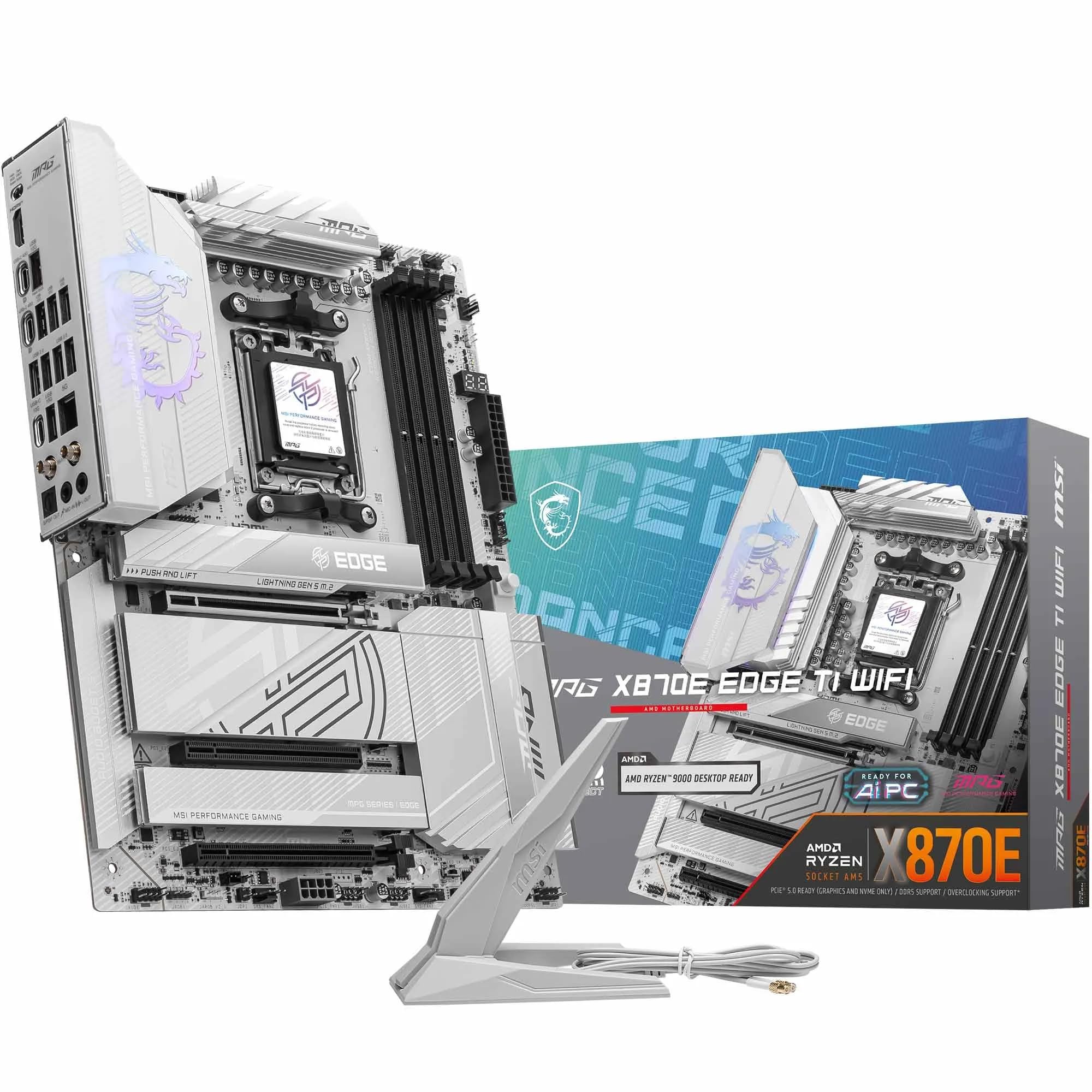 9.0 / 10
MSI MPG X870E EDGE TI WIFI Motherboard, ATX - Supports AMD Ryzen 9000/8000 / 7000 Processors, AM5-80A SPS VRM, DDR5 Memory Boost 8400+MT/s (OC), PCIe 5.0 x16, M.2 Gen5, Wi-Fi 7, 5G LAN
£299.99 · MSI
 8.5 / 10
Gigabyte X870 AORUS ELITE WIFI7 Amd Am5 Socket Motherboard Atx 4X Ddr5 Slots 3X
£243.98 · Gigabyte
Frequently asked
7 questions01Is the MSI MAG B650M MORTAR WIFI compatible with Ryzen 9000 series processors?+
Yes. The board supports AMD's full AM5 CPU lineup including Ryzen 7000, 8000, and 9000 series processors. If you are pairing it with a very recently launched CPU, you may need to update the BIOS first. The board's BIOS Flashback feature allows you to do this without a compatible CPU already installed, using just a USB drive.
02Does the board support EXPO memory profiles for fast DDR5 kits?+
Yes, EXPO is supported and owner feedback indicates it loads stably with compatible DDR5 kits on current BIOS revisions. The board targets 6600+ MHz in 1DPC 1R configuration. Running four DIMMs at very high speeds is more demanding on the memory controller, so checking MSI's Qualified Vendor List before purchasing a specific kit is advisable.
03Can the VRM handle a Ryzen 9 processor with a high TDP?+
The 14+2 Duet Rail Power System with 80A Smart Power Stage MOSFETs is rated for AMD's most power-hungry AM5 processors, including chips with 170W TDP under sustained load. Owner reviews confirm stable VRM temperatures under extended Cinebench R23 multi-core runs. Adequate case airflow is still recommended for prolonged full-load workloads.
04What is the difference between this board and the MSI PRO B650M-A WIFI?+
The PRO B650M-A WIFI sits in a lower price bracket and omits several premium features: the PCIe Gen 5 M.2 slot, the 20Gbps USB 3.2 Gen 2x2 Type-C port, and the Audio Boost 5 implementation. If you are building around a mid-range CPU and will not use Gen 5 storage, the PRO B650M-A WIFI is the more cost-effective choice. The MORTAR WIFI's additional features only represent good value if your build will actually use them.
05Does the MAG B650M MORTAR WIFI have RGB lighting?+
No, the board itself does not include integrated RGB lighting. The aesthetic is the MORTAR series' characteristic dark, understated design. If you want a board that glows, this is not the correct choice. If you prefer a clean look without having to manage lighting software, the lack of onboard RGB is an advantage.
06Is Wi-Fi 6E worth having if my current router only supports Wi-Fi 6?+
Yes, because Wi-Fi 6E is backward compatible with Wi-Fi 6 and Wi-Fi 5 routers. If your router does not support the 6GHz band yet, the board will connect on 5GHz Wi-Fi 6 without any configuration needed. When you eventually upgrade your router to a Wi-Fi 6E model, the board will take advantage of the less congested 6GHz band automatically. There is no downside to having it now.
07What should I check before buying if I plan to run four DDR5 DIMMs at high speeds?+
Running four DIMMs at high DDR5 speeds is more demanding on the AM5 memory controller than a two-DIMM configuration. Before purchasing your RAM kit, cross-reference it against MSI's Qualified Vendor List for this board, which is available on MSI's support page. Sticking to a kit that appears on the QVL at your target speed significantly reduces the risk of compatibility issues.












