Game development in Unity and Unreal Engine places demands on a monitor that are quite different from pure gaming or office work. You need enough screen real estate to keep the Scene view, Game view, Inspector, and Project panel visible simultaneously without constant tab-switching. Colour accuracy matters too, because textures, lighting rigs, and post-processing effects all need to look consistent between your editor and the final build. Since last year, QD-OLED panels have dropped significantly in price, ultrawide formats have become far more accessible under £400, and several manufacturers have added USB-C connectivity that simplifies single-cable setups for laptop-based developers. This guide targets indie developers, junior studio artists, and technical artists working on Windows or Mac machines who want a monitor that serves both the long coding sessions and the visually intensive shading and lighting work that comes with modern game engines. Whether your budget is tight or you can stretch to something premium, there is a solid pick here for you.
Quick Verdict
Best Overall: MSI MAG 272QP QD-OLED X50. The QD-OLED panel delivers exceptional colour volume and contrast that makes lighting and material work in Unreal Engine genuinely more accurate, and the 27-inch 1440p format is the sweet spot for dev work at a sensible desk distance.
Best Value: AOC Gaming CU34G2XPD. A 34-inch ultrawide at a price that undercuts most 27-inch QHD rivals gives game developers an enormous canvas for multi-panel editor layouts without breaking the budget.
The LG 34BA75QE takes a different approach to the ultrawide game development monitor category. Rather than chasing high refresh rates or gaming-specific features, it prioritises connectivity, colour accuracy, and productivity features that suit a professional development environment. The IPS panel at 3440x1440 delivers the wide colour coverage and viewing angle consistency that VA panels cannot match, making it a better choice for developers who also handle texture creation, concept art review, or UI design work within their workflow.
The connectivity list on this monitor is exceptional for the price. USB-C with enough bandwidth to drive the display and carry data simultaneously, an RJ45 Ethernet port for a wired network connection without a separate adapter, HDMI, DisplayPort 1.4, a USB hub, and built-in speakers all feature. For a developer working from a laptop, this is close to a docking station in a monitor chassis. A single USB-C cable from a MacBook Pro or a modern Windows laptop can deliver video, data, and network connectivity in one connection, which is a genuinely useful feature for those who move between a desk and other locations.
The 60 Hz refresh rate is the obvious limitation. For pure editor work, 60 Hz is entirely adequate since you are not moving a camera rapidly through a scene most of the time. However, when you enter Play mode to test your game, 60 Hz caps the visual feedback you get from the running simulation. Developers making fast-action games will feel this limitation. Those making strategy games, narrative adventures, turn-based RPGs, or slower-paced experiences will find 60 Hz perfectly acceptable.
The IPS panel's colour accuracy is a genuine strength. Texture artists and UI designers who need to evaluate colours against reference images or brand guidelines will appreciate the more consistent gamut. The 34-inch ultrawide format provides the same layout advantages as the AOC above, with the added benefit of a flatter panel (the LG has a gentler curve than the AOC) which some developers prefer for working with straight-line UI grids.
Pros
- USB-C, RJ45, USB hub, and built-in speakers make this a near-complete docking solution for laptop-based developers
- IPS panel provides better colour accuracy and viewing angle consistency than VA alternatives at this screen size
- 34-inch 3440x1440 format gives the same multi-panel editor layout advantages as any other ultrawide in this category
Cons
- 60 Hz refresh rate limits useful feedback when testing fast-paced game mechanics in Play mode
- No HDR capability worth noting at 60 Hz, which reduces its usefulness for evaluating HDR rendering pipelines
The Alienware AW2725DM is a 27-inch QHD monitor with a Fast IPS panel running at 180 Hz, and it sits in an interesting position for game developers who want a premium 16:9 display without committing to an ultrawide footprint or the burn-in considerations of OLED technology. Alienware's monitor division has a strong reputation for out-of-box colour calibration, and the AW2725DM continues that tradition with a panel that covers a wide colour gamut and ships with a factory calibration report.
For Unity developers in particular, the 27-inch 2560x1440 format is well suited to the engine's default editor layout. Unity's dockable panel system works well at 1440p, and the pixel density is high enough that text in the Inspector and Console panels is comfortable to read without scaling. The Fast IPS panel technology reduces the pixel response time compared to standard IPS, which means less trailing on moving objects when you are testing physics simulations or character animations in the viewport.
The three USB ports on the monitor are a practical addition for keeping peripherals connected and switching them between machines without unplugging from the PC. The dual HDMI ports allow connection of a second machine or a games console for reference testing. The Alienware branding does carry a price premium over some technically comparable alternatives, but it also brings a five-year warranty in many regions and a well-regarded after-sales support experience.
At 180 Hz, this monitor handles both the slow, deliberate work of scene construction and the fast visual feedback of running a game at high frame rates. The IPS panel's colour accuracy is a step below QD-OLED but comfortably ahead of VA, making it a solid all-rounder for developers who need reliable colour without the complexity of managing an OLED panel. The main argument against it is that at its price point, the MSI QD-OLED above offers a substantially better panel technology for a similar or lower outlay.
Pros
- Fast IPS panel with factory calibration delivers reliable colour accuracy suitable for texture and UI work without post-purchase calibration
- Five-year warranty and Alienware's established support infrastructure reduce long-term ownership risk
- 180 Hz refresh rate combined with 1440p resolution covers both editor productivity and high-frame-rate game testing equally well
Cons
- Price premium over the MSI QD-OLED is hard to justify given the inferior panel technology at a similar spend
- No USB-C port, which is a notable omission for developers using USB-C-primary laptops as their development machine
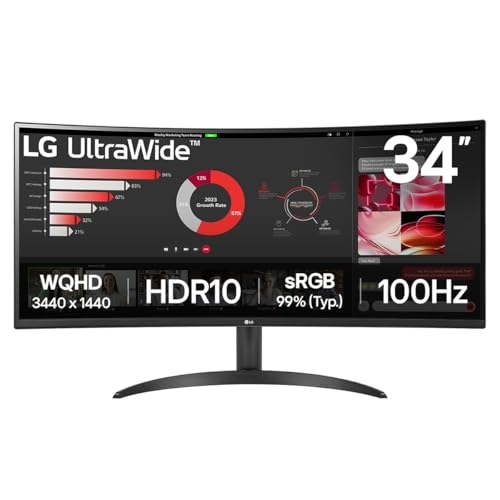
The LG 34WR50QK is the entry point to 34-inch ultrawide game development monitors from a brand with a strong track record in this category. At 3440x1440 and 100 Hz, it offers the core benefits of the ultrawide format, namely the ability to keep multiple editor panels visible simultaneously, without the price of the more connectivity-rich 34BA75QE or the higher refresh rates of the AOC CU34G2XPD. This makes it a sensible option for developers on a tighter budget who still want the productivity gains of an ultrawide screen.
The VA panel on the 34WR50QK delivers the same strong contrast ratio characteristics as the AOC above, which is useful for evaluating dark scene lighting and shadow detail in your game's rendering. The 100 Hz refresh rate is a meaningful step up from 60 Hz for Play mode testing, providing noticeably smoother visual feedback for character movement and camera work without reaching the diminishing returns territory of 144 Hz and above.
The connectivity is more restrained than the LG 34BA75QE: two HDMI 2.0 ports and a single DisplayPort 1.4 cover the basics without the USB-C, Ethernet, or USB hub of its sibling. For a desktop developer with a dedicated GPU, this is perfectly adequate. For a laptop-first developer, the absence of USB-C is a more significant inconvenience.
LG's build quality at this price tier is generally good, with a stable stand that offers height, tilt, and pivot adjustment. The 34-inch 21:9 canvas provides the same fundamental layout advantages as any other ultrawide in this roundup, and for developers who spend most of their time in the editor rather than testing at high frame rates, the 100 Hz ceiling is rarely a practical constraint. This is the pick for developers who want the ultrawide advantage without spending on features they will not use daily.
Pros
- 34-inch 3440x1440 ultrawide format provides the full multi-panel editor layout benefit at a more accessible price than premium ultrawides
- 100 Hz is a meaningful improvement over 60 Hz for Play mode testing of movement and animation without overpaying for higher refresh rates
- VA panel contrast ratio is beneficial for evaluating dark scene lighting and shadow behaviour in both Unity and Unreal
Cons
- No USB-C port limits single-cable connectivity for developers using modern laptops as their primary machine
- VA panel colour accuracy and viewing angle performance fall short of IPS alternatives, which is a consideration for texture and UI work
Buying Guide
Resolution and Screen Size
For game development, resolution and screen size work together to determine how much of your editor you can see at once. A 27-inch monitor at 1920x1080 is too low a pixel density for comfortable extended use and does not provide enough vertical space to keep all of Unity's or Unreal's panels visible. The minimum recommended resolution for a primary development monitor is 2560x1440 at 27 inches, which gives you enough vertical space for a full editor layout and enough pixel density that text in the Inspector and Console is comfortable to read without display scaling. If you can stretch to an ultrawide, 3440x1440 at 34 inches is transformative for editor productivity because the extra horizontal space means you can keep the Scene view, Game view, and all your docked panels visible simultaneously without any overlap or tab-switching.
Panel Type
IPS panels are the default recommendation for development work because they offer the best balance of colour accuracy, viewing angle consistency, and response time. They are well suited to texture creation, UI design, and lighting work where you need to evaluate colours reliably. VA panels offer higher native contrast ratios, which is useful for dark scene work, but they exhibit more colour shift at wide angles and typically have less accurate out-of-box calibration. QD-OLED panels represent the current peak of display technology for colour work, with per-pixel contrast and exceptional colour volume, but they carry a small burn-in risk from the static UI elements common in game editors. Running a QD-OLED at reduced brightness for editor work and using the manufacturer's pixel refresh cycle largely addresses this.
Refresh Rate
For the editor itself, 60 Hz is sufficient. Where refresh rate matters for game developers is in Play mode testing: a higher refresh rate gives you more accurate visual feedback about how your game's movement, animation, and camera work actually feel. 100 Hz is a meaningful minimum for this purpose. 144 Hz and above is genuinely useful if you are making fast-paced action games. Anything above 180 Hz is largely irrelevant for development work.
Connectivity
Consider how many machines you need to connect. A developer who switches between a desktop and a laptop benefits greatly from a monitor with multiple inputs and a USB hub, so peripherals stay connected to the monitor rather than the PC. USB-C with DisplayPort Alt Mode is particularly valuable for laptop developers, as it allows a single cable to carry video, data, and power. An Ethernet port on the monitor is a useful addition for those who need a wired network connection without a separate adapter.
Colour Accuracy and Calibration
For developers who also handle texture creation, UI design, or any colour-critical work, a monitor that covers at least 95% of the sRGB colour space accurately is important. Most IPS and QD-OLED panels at the prices in this guide meet this standard. If you work with HDR content or need to evaluate HDR rendering pipelines, look for a monitor with genuine HDR capability rather than just an HDR badge, which typically means a minimum peak brightness of 600 nits with local dimming or a self-emissive panel technology.
The MSI MAG 272QP QD-OLED X50 is the overall winner for game development use. Its QD-OLED panel provides the most accurate visual feedback of any monitor in this selection when evaluating lighting, materials, and HDR rendering in Unreal Engine or Unity's High Definition Render Pipeline. The 2560x1440 resolution at 27 inches is the optimal format for a primary development monitor, the 280 Hz refresh rate covers high-frame-rate testing comprehensively, and the connectivity suite handles multi-device setups without a separate hub. For developers on a tighter budget who prioritise screen real estate over panel technology, the AOC CU34G2XPD's 34-inch ultrawide at its price point is the best value in the category, delivering more usable editor space per pound than any alternative in this roundup.