Senior CAD professionals spend eight or more hours a day staring at precise technical drawings, assembly models and engineering schematics, so the monitor they choose matters far more than it does for general office work. The priorities are clear: high resolution to render fine linework without aliasing, a large enough panel to keep multiple viewports open simultaneously, accurate colour reproduction for material visualisation, and a stand with proper ergonomic adjustment to reduce neck and eye strain over a long career. Since last year, QD-OLED panels have become more accessible at the 27-inch tier, ultrawide curved displays have dropped noticeably in price, and 4K VA panels now appear on smart monitors with built-in speakers that suit professionals who hot-desk between a workstation and a laptop. This guide covers five monitors from the current catalogue that genuinely serve senior CAD users, ranked by overall suitability, with honest assessments of where each one excels and where it falls short.
Quick Verdict
Best Overall: Samsung LS32FM703UUXXU 32" 4K Smart Monitor. The combination of 4K resolution, a 32-inch VA panel, HDR10 support and built-in speakers makes it the most complete package for a senior CAD professional who needs pixel-dense detail and a tidy desk setup.
Best Value: LG UltraWide 34WR50QK. At its price point, the 34-inch 3440x1440 ultrawide curved panel gives an exceptional amount of horizontal workspace for multi-viewport CAD layouts, and the 100Hz refresh rate is more than adequate for technical drawing applications.
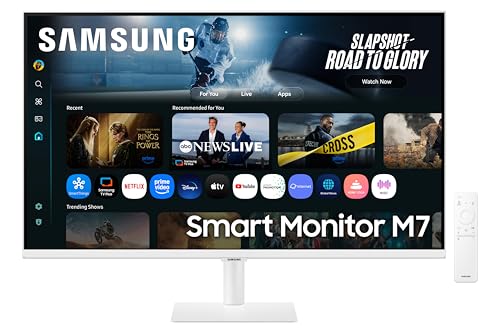
The Samsung LS32FM703UUXXU sits at the top of this list because it addresses the most common pain points for senior CAD professionals in a single, well-considered package. The 32-inch VA panel running at native 4K (3840x2160) resolution delivers a pixel density that renders fine linework, dimension text and hatching patterns with exceptional clarity. At this size and resolution, you are looking at roughly 138 pixels per inch, which means that even the smallest annotation in a complex assembly drawing remains legible without zooming in constantly. That is a meaningful quality-of-life improvement for professionals who have spent years squinting at 1080p panels.
The HDR10 support is a genuine benefit for CAD users working in visualisation workflows, particularly those using rendering engines such as Enscape, V-Ray or Lumion alongside their primary modelling software. HDR10 allows the monitor to display a wider dynamic range of luminance, which makes rendered material previews and lighting simulations far more representative of the final output. The VA panel technology brings strong contrast ratios, which helps differentiate between layers and object types in complex drawings where colour coding is used extensively.
The built-in speakers are a practical consideration that many professional monitors overlook. Senior professionals who hot-desk, move between meeting rooms, or connect a laptop for a video call benefit from not needing a separate audio solution. The Smart Monitor functionality, which allows the display to operate as a standalone device with access to streaming services and productivity apps, is a bonus rather than a core CAD feature, but it does mean the monitor doubles as a useful secondary screen during breaks or for reference material without needing a PC to be switched on.
Ergonomically, the 32-inch size requires a desk with reasonable depth to position the panel at a comfortable viewing distance, typically 70 to 90 centimetres for a 4K screen of this size. The white finish is distinctive and suits modern studio or office environments, though it may attract more visible dust than a matte black alternative. The VA panel does exhibit some colour shift at extreme viewing angles, which is worth noting if the monitor is shared or if colleagues frequently view work from the side.
Verdict: The best all-round choice for a senior CAD professional who wants maximum pixel density, HDR support and a tidy desk setup in one premium package.
Pros
- 4K resolution at 32 inches gives 138 PPI, ideal for rendering fine CAD linework and small dimension text
- HDR10 support benefits rendering and visualisation workflows alongside primary CAD modelling
- Built-in speakers and Smart Monitor functionality reduce desk clutter for hot-desking professionals
Cons
- VA panel exhibits colour shift at wide viewing angles, which can be an issue in collaborative review sessions
- Requires a deep desk for comfortable 4K viewing distance at 32 inches
The AOC CU34G2XPD is a 34-inch ultrawide curved monitor running at 3440x1440 resolution, and it makes a compelling case for senior CAD professionals who work with multiple viewports, reference documents and toolbars simultaneously. The ultrawide 21:9 aspect ratio effectively replaces a dual-monitor setup without the bezel gap in the centre of the screen, which is a significant advantage when working on large assembly drawings or when comparing two versions of a model side by side. The 3440x1440 resolution provides a substantial amount of horizontal screen real estate while maintaining a pixel density that keeps text and linework sharp.
The 180Hz refresh rate is, frankly, overkill for CAD work, but it does mean the monitor is exceptionally responsive when navigating large 3D models, panning across detailed drawings or rotating assemblies in real time. Senior professionals working in mechanical CAD, architectural design or civil engineering will notice that the cursor tracking and model rotation feel fluid in a way that lower-refresh panels do not always achieve. The 1ms response time eliminates any ghosting during rapid model navigation.
The port selection is genuinely impressive for a monitor at this price point. Two HDMI 2.0 ports, two DisplayPort 1.4 connections, a USB-B upstream port and four USB-A downstream ports mean this monitor can serve as a USB hub for peripherals such as a 3D mouse, a graphics tablet, a keyboard and a USB drive simultaneously. For senior professionals who use a SpaceMouse or similar 6-DOF device alongside a standard mouse and keyboard, this built-in hub removes the need for a separate USB dock.
The 1500R curvature of the panel is a matter of personal preference. Some CAD users find that curved ultrawide panels create a more immersive working environment that reduces the need to move their head when working across the full width of the screen. Others, particularly those who need to produce printed drawings or check dimensional accuracy against a physical reference, prefer a flat panel to avoid any perceived distortion at the edges. The VA panel delivers good contrast, which helps distinguish between layers in complex drawings.
At its price, the AOC CU34G2XPD represents exceptional value for the screen size and feature set it delivers. Senior professionals who want an ultrawide workspace without spending on a premium brand will find this monitor difficult to fault.
Verdict: An excellent ultrawide choice for senior CAD professionals who need a wide workspace for multi-viewport layouts and want a generous USB hub built in.
Pros
- 3440x1440 ultrawide resolution replaces a dual-monitor setup without a central bezel gap
- Four USB-A downstream ports plus USB-B upstream create a built-in hub for 3D mouse, tablet and peripherals
- Two HDMI 2.0 and two DisplayPort 1.4 connections support flexible multi-source switching
Cons
- 1500R curvature may introduce perceived edge distortion when checking dimensional accuracy against physical references
- VA panel shows colour shift at wide viewing angles, limiting suitability for collaborative side-by-side reviews
The LG 34WR50QK is the best-value entry in this list for senior CAD professionals who want the productivity benefits of an ultrawide panel without paying a premium price. At 34 inches and 3440x1440 resolution, it delivers the same fundamental workspace advantage as the AOC CU34G2XPD, allowing multiple viewports, toolbars and reference documents to coexist on a single screen without the compromise of a bezel running through the middle of the display. LG's UltraWide range has a long track record in professional environments, and this model continues that tradition with a sensible, productivity-focused feature set.
The 100Hz refresh rate is entirely appropriate for CAD work. Unlike gaming, where every additional hertz of refresh rate has a perceptible impact on competitive performance, CAD applications benefit from smooth model navigation and cursor tracking rather than extreme frame rates. At 100Hz, the LG 34WR50QK provides fluid rotation and panning of 3D models in software such as AutoCAD, SolidWorks, Revit and Rhino without any of the judder that can appear on 60Hz panels when navigating large assemblies. The 5ms response time is acceptable for professional use, though it is slower than the AOC alternative.
The port selection is straightforward: two HDMI 2.0 ports and one DisplayPort 1.4. This is sufficient for most professional workstations, which typically connect via DisplayPort from a dedicated GPU. Senior professionals who need to switch between a desktop workstation and a laptop will appreciate having both HDMI and DisplayPort available simultaneously. However, there are no USB downstream ports on this monitor, so those who rely on a monitor-based USB hub for peripherals will need to use a separate dock or connect directly to their workstation.
LG's VA panel on this monitor delivers good contrast and a wide viewing angle relative to other VA implementations, which is helpful in open-plan offices where colleagues may view work from oblique angles. The curved design follows a gentle radius that suits the 34-inch width without creating the pronounced distortion that tighter curvatures can introduce. The overall build quality is solid, with a clean aesthetic that fits professional office environments.
For senior CAD professionals on a tighter budget who still want the productivity advantages of an ultrawide 34-inch panel, the LG 34WR50QK is the most sensible choice in the catalogue. It does not have the USB hub of the AOC or the 4K resolution of the Samsung, but it delivers the core ultrawide workspace at a price that is genuinely accessible.
Verdict: The best-value ultrawide for senior CAD professionals, offering a 34-inch 3440x1440 workspace at a price that makes the ultrawide format accessible without major compromises.
Pros
- 34-inch 3440x1440 ultrawide panel provides a wide multi-viewport workspace at a competitive price
- 100Hz refresh rate delivers smooth 3D model navigation in SolidWorks, AutoCAD and Revit
- Both HDMI 2.0 and DisplayPort 1.4 allow simultaneous connection of a workstation and a laptop
Cons
- No USB downstream ports, so peripheral connectivity requires a separate hub or dock
- 5ms response time is slower than competing ultrawide options at similar price points
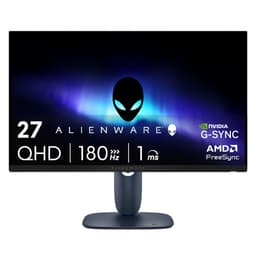
The Alienware AW2725DM rounds out this list as a well-built 27-inch QHD Fast IPS monitor that suits senior CAD professionals who want reliable colour accuracy, a sharp 2560x1440 resolution and the peace of mind that comes with Alienware's build quality and warranty support. Fast IPS technology delivers wider viewing angles than VA panels and better colour consistency across the screen surface, which is important for professionals who need to accurately assess colours in rendered material previews or check that layer colours in a drawing are clearly distinguishable.
The 2560x1440 QHD resolution at 27 inches is a well-established sweet spot for professional monitor use. It provides meaningfully more screen real estate than 1080p without requiring the GPU horsepower that 4K demands. Senior CAD professionals running demanding software such as SolidWorks, CATIA or Revit on a mid-range workstation GPU will find that QHD strikes a practical balance between visual clarity and rendering performance. The 180Hz refresh rate ensures smooth model navigation, and the 1ms response time eliminates ghosting during rapid viewport changes.
The port selection includes two HDMI connections, one DisplayPort and three USB ports. The USB downstream ports are a practical addition for connecting a 3D mouse, a USB drive or a keyboard dongle directly to the monitor, reducing cable clutter on the desk. Alienware monitors are known for their solid build quality and ergonomic stands, and the AW2725DM follows this tradition with height, tilt and swivel adjustment that allows senior professionals to set up an ergonomically correct viewing position that reduces neck and shoulder strain over long working sessions.
The Alienware branding and aesthetic are more gaming-oriented than some senior professionals may prefer in a formal office environment, though the actual panel performance is entirely appropriate for professional use. The monitor lacks the ultrawide workspace of the LG and AOC options and the colour gamut advantage of the QD-OLED MSI, but it delivers a dependable, well-rounded performance that suits professionals who value consistency and reliability above all else.
For senior CAD professionals who want a trusted brand, solid ergonomics and a sharp QHD IPS panel without the complexity of OLED management or the desk footprint of an ultrawide, the Alienware AW2725DM is a sensible and well-executed choice.
Verdict: A reliable, ergonomically sound QHD Fast IPS monitor for senior CAD professionals who value consistent colour accuracy, solid build quality and practical USB connectivity.
Pros
- Fast IPS panel delivers consistent colour accuracy and wide viewing angles for collaborative drawing reviews
- Three USB downstream ports support a 3D mouse, USB drive and keyboard dongle without a separate hub
- Solid ergonomic stand with height, tilt and swivel adjustment reduces neck and shoulder strain over long sessions
Cons
- 27-inch size and standard QHD resolution offer less total workspace than the 34-inch ultrawide options in this list
- Gaming-oriented aesthetic may feel out of place in formal architectural or engineering office environments
Buying Guide
Resolution: Why 4K or QHD Matters for CAD
Resolution is arguably the single most important specification for a senior CAD professional. Fine linework, dimension annotations, hatching patterns and small text in complex drawings all benefit from higher pixel density. At 27 inches, 2560x1440 (QHD) delivers approximately 109 pixels per inch, which is sufficient for clear rendering of most CAD content. At 32 inches, 4K (3840x2160) delivers 138 PPI, which is noticeably sharper and allows smaller text to remain legible without display scaling. Ultrawide panels at 3440x1440 provide a wider workspace than standard 16:9 panels at the same vertical resolution, which suits multi-viewport layouts in software such as AutoCAD, SolidWorks and Revit. Avoid 1080p panels for primary CAD use: at 27 inches, 1080p delivers only 82 PPI, which makes fine linework appear jagged and forces users to zoom in more frequently.
Panel Type: VA, IPS or QD-OLED
VA panels offer strong contrast ratios, which helps distinguish between layers and object types in complex drawings. They are the most common panel type at larger screen sizes and tend to be more affordable than IPS alternatives. However, VA panels exhibit more pronounced colour shift at wide viewing angles, which can be a concern in collaborative environments where colleagues view work from the side. IPS and Fast IPS panels deliver more consistent colour accuracy and wider viewing angles, making them preferable for professionals who work in colour-critical rendering or who frequently share their screen with colleagues. QD-OLED panels, as found on the MSI MAG 272QP, offer the best of both worlds in terms of colour accuracy and contrast, but carry a small risk of image retention with static UI elements that must be managed actively.
Screen Size and Aspect Ratio
For senior CAD professionals, a 27-inch panel is the practical minimum for comfortable full-day use. A 32-inch panel at 4K provides more screen area and allows multiple toolbars, palettes and drawing views to coexist without feeling cramped. Ultrawide 34-inch panels at 21:9 aspect ratio are particularly effective for multi-viewport CAD layouts, effectively replacing a dual-monitor setup without the bezel gap that interrupts the centre of the workspace. The choice between a standard 16:9 panel and an ultrawide 21:9 panel often comes down to workflow: professionals who work primarily in a single large viewport may prefer the 4K 32-inch option, while those who habitually work with multiple views open simultaneously will benefit from the horizontal space of an ultrawide.
Ergonomics and Eye Comfort
Senior professionals who spend long days at a workstation should prioritise monitors with full ergonomic adjustment: height, tilt, swivel and ideally pivot. A monitor that cannot be raised to eye level forces the user to tilt their head down, which accumulates significant neck and shoulder strain over months and years. Flicker-free backlighting and low blue light modes are worth enabling during long sessions, particularly in the afternoon when eye fatigue is most pronounced. Anti-glare coatings on the panel surface reduce reflections from office lighting and windows, which is a practical consideration in bright studio environments.
Connectivity for Professional Workflows
Senior CAD professionals typically connect a dedicated workstation GPU via DisplayPort, which delivers the highest bandwidth for 4K or ultrawide resolutions. Having at least one HDMI port alongside DisplayPort allows a laptop to be connected as a secondary source without unplugging cables. USB downstream ports on the monitor are a significant convenience for connecting a 3D mouse, a graphics tablet, a USB drive and other peripherals, reducing the number of cables that run directly to the workstation. USB-C with power delivery is increasingly valuable for professionals who use a laptop as a secondary device, enabling a single-cable connection for video, data and charging.
For most senior CAD professionals, the Samsung LS32FM703UUXXU 32" 4K Smart Monitor is the overall winner. Its 4K resolution at 32 inches delivers the pixel density that makes fine linework and small annotation text genuinely sharp, the HDR10 support adds value for rendering and visualisation workflows, and the built-in speakers and Smart Monitor functionality reduce desk clutter for professionals who hot-desk or use the display with a laptop. Those who prioritise a wide multi-viewport workspace over maximum pixel density should look at the LG UltraWide 34WR50QK as the best-value ultrawide, or the AOC CU34G2XPD for a more feature-rich ultrawide with a built-in USB hub. Professionals working in colour-critical rendering or client presentation will find the MSI MAG 272QP QD-OLED the most visually impressive option, provided they are comfortable managing OLED panel health. The Alienware AW2725DM rounds out the list as a dependable, ergonomically sound QHD IPS monitor for those who value consistency and build quality above all else.