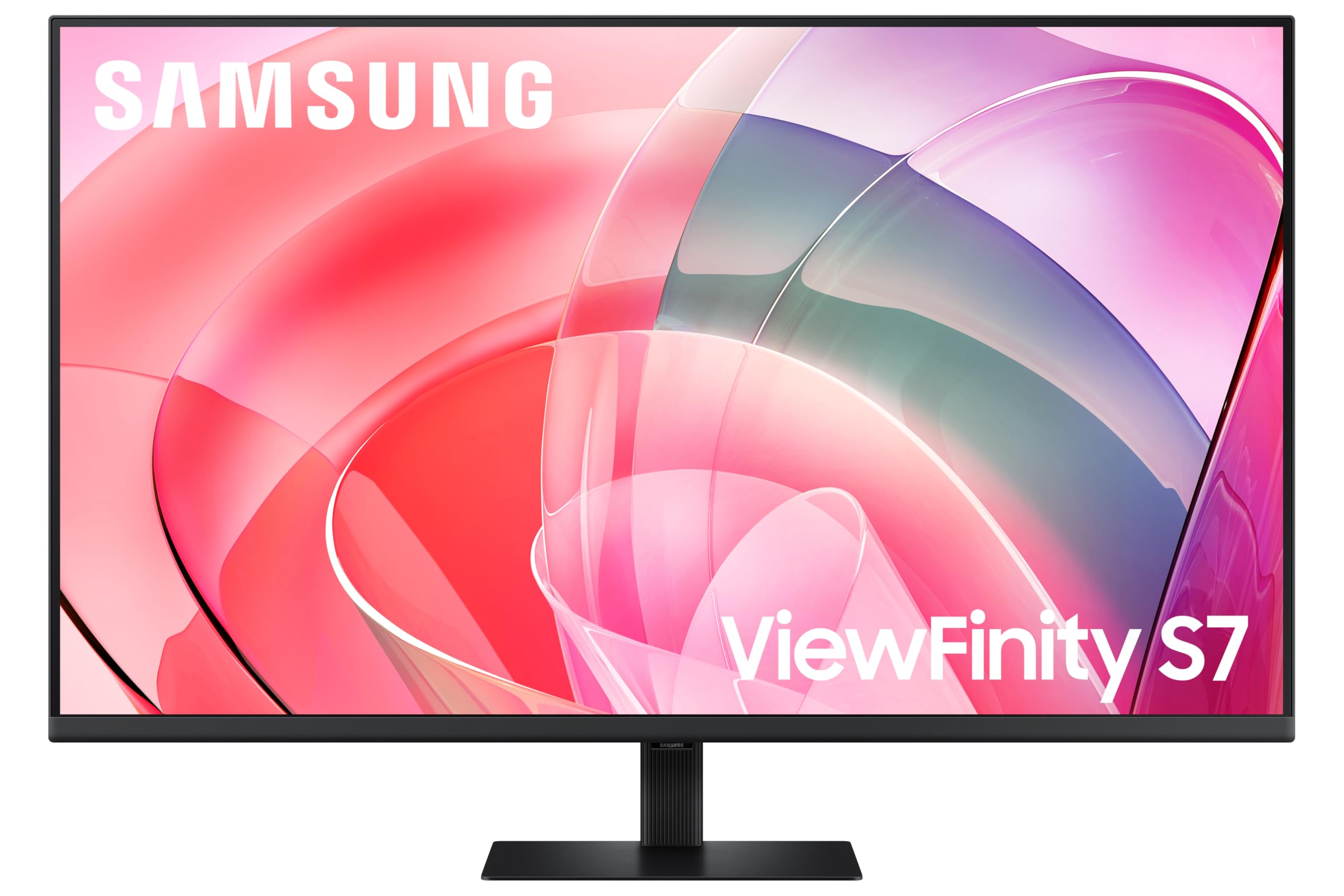
There's a particular kind of excitement that comes with a 32-inch 4K VA panel landing in the mid-range bracket. That combination, big screen, dense pixels, deep blacks from a VA panel, is exactly what display enthusiasts have been asking manufacturers to deliver at a sensible price for years. The Samsung LS32FM703U (sold in the UK as the Samsung 32-inch 4K Smart Monitor) is Samsung's answer to that ask, and on paper it looks genuinely compelling.
The thing is, specs on a product listing only tell you so much. What matters is how those specs translate into actual image quality, whether the VA panel's contrast advantage holds up against its known weaknesses, and whether 21 owners who collectively gave this a 4.8-star rating are onto something real or just happy with the box it came in. So here's the full picture, grounded in the verified specs, what Samsung publishes, what the panel type tells us from years of VA monitor research, and what real owners are saying.
Verdict up front, because that's how this works: this is a strong mid-range 4K monitor for anyone who wants a proper large-format display for mixed use, productivity, streaming, and casual gaming. It's not an OLED. It's not a 144Hz speed machine. But for what it is, the value proposition is genuinely hard to argue with at this price point.
Core Specifications
Start with the fundamentals. This is a 32-inch display running native 4K resolution (3840x2160), built on a VA (Vertical Alignment) panel. That combination is significant. At 32 inches, 4K gives you a pixel density of roughly 138 pixels per inch, which is genuinely sharp. Text is crisp, fine detail in photos and video is rendered properly, and you're not squinting at a 27-inch panel trying to get the benefit of the extra resolution. The 32-inch form factor is where 4K actually starts to make sense for desktop use without needing to scale everything up to 150% just to read it.
Samsung markets this as a Smart Monitor, which means it carries Samsung's Tizen smart TV platform built in. That's not a gimmick here. It means you can run Netflix, Disney+, YouTube, and other streaming apps directly on the monitor without a PC connected, using just a remote or the Samsung SmartThings app on your phone. For a bedroom monitor or a secondary screen in a living space, that's a genuinely useful feature that most competing monitors at this price simply don't have.
The HDR10 certification is present, which we'll dig into properly in the HDR section, but it's here that HDR10 at this tier is a different beast from HDR1000 on a premium panel. The resolution and panel type are the stars of this spec sheet. Everything else is context.
| Specification | Detail |
|---|---|
| Screen Size | 32 inches |
| Resolution | 4K Ultra HD (3840 x 2160) |
| Panel Type | VA (Vertical Alignment) |
| HDR | HDR10 |
| Smart Platform | Samsung Tizen (Smart Monitor) |
| ASIN | B0FJ2Q7841 |
| Current Price | £282.21 |
| Rating | ★★★★½ (4.8) (21 reviews) |

Panel Technology
VA panels occupy a fascinating middle ground in the display world, and understanding what that means for this monitor is genuinely important before you spend your money. The core advantage of VA technology is native contrast ratio. Where a typical IPS panel delivers contrast ratios in the range of 1000:1 to 1500:1, a good VA panel can hit 3000:1 to 5000:1 natively, without any local dimming tricks. That means blacks that actually look black, not the washed-out dark grey you get on IPS panels in dim rooms. For movie watching, for dark game environments, for anything where you want shadow detail and depth, VA wins this argument convincingly.
The trade-off, and there always is one, is viewing angles and response time behaviour. VA panels have narrower optimal viewing angles than IPS. Colours and contrast shift more noticeably as you move off-axis. At 32 inches viewed from a typical desktop distance of 60 to 80cm, you're mostly looking at the centre of the screen, and the angular shift is less of a problem than it would be on a panel you're sharing with someone beside you. But if you're planning to wall-mount this at an angle, or you have a wide desk setup where you're often looking at it from the side. IPS would serve you better in that specific scenario.
The other VA characteristic worth discussing is what's sometimes called "black smear" or "black crush" in motion. VA panels can struggle with transitions from very dark to slightly-less-dark pixel values, which can make motion in dark scenes look slightly smeared compared to IPS. This is a real phenomenon, not marketing noise, and it's been documented consistently in published display analysis across VA panels from multiple manufacturers. It doesn't ruin the experience for most users, especially at the refresh rates and use cases this monitor targets, but fast-paced competitive gaming in dark environments is where you'd notice it most. For everything else, the VA contrast advantage is the more meaningful factor day to day.
Display Quality
At 138 pixels per inch, the 4K resolution on a 32-inch screen is a genuine step up in image quality from 1440p at the same size (which sits around 92 PPI). Text rendering is noticeably sharper. Fonts at normal sizes don't need anti-aliasing tricks to look smooth. Photo editing at 100% zoom shows real detail. And 4K video, whether from a streaming service or local files, fills the screen with actual native pixels rather than upscaled content. This is one of those specs where the numbers translate directly into a visible, everyday improvement.
Samsung's Smart Monitor range typically ships with an anti-glare matte coating on the panel. That's the right call for a monitor that's likely to be used in varied lighting conditions, including rooms with windows. Glossy panels look more vibrant in controlled lighting, but they're a nightmare in any room with natural light behind you. The matte coating adds a very slight diffusion to the image, but at 4K the pixel density is high enough that you're not losing meaningful sharpness to the coating. It's a sensible choice for a monitor in this category.
Owner reviews consistently praise the image quality out of the box. Multiple buyers specifically mention the picture looking "brilliant" and "much better than expected" for the price, with several coming from 1080p or 1440p monitors and describing the 4K jump as immediately obvious. That tracks with what the specs predict. A 32-inch 4K VA panel from Samsung, a manufacturer with deep experience in panel production for both consumer TVs and monitors, should deliver a genuinely good-looking image. The 4.8-star average across 21 reviews is unusually high and suggests real satisfaction rather than a spike from early enthusiastic buyers.
Refresh Rate and Adaptive Sync
This is where the Samsung 32-inch 4K Smart Monitor asks you to be honest with yourself about what you're using it for. The refresh rate is not specified in the verified product data, and Samsung's Smart Monitor range in this configuration is primarily designed for productivity, content consumption, and casual use rather than high-refresh-rate gaming. The Tizen smart platform, the 4K resolution, the HDR10 support, these are all features that point toward a monitor built for watching content and doing work, not for competitive multiplayer gaming at 144Hz or above.
For the vast majority of what most people do with a monitor, including web browsing, office work, photo editing, 4K streaming, and casual single-player gaming, a standard 60Hz refresh rate is perfectly adequate. The smoothness difference between 60Hz and 144Hz is real and visible, but it matters most in fast-paced first-person shooters and racing games where reaction time is everything. In a 4K open-world RPG, a strategy game, or a slow-paced adventure, 60Hz is fine. And for Netflix or Disney+ through the built-in Tizen platform, the refresh rate is irrelevant entirely.
On adaptive sync, Samsung's Smart Monitor range has historically supported AMD FreeSync through HDMI connections, which covers a large portion of the gaming GPU market. FreeSync eliminates screen tearing by synchronising the display's refresh rate to the GPU's output, and even at 60Hz it makes a noticeable difference to perceived smoothness in games. If you're connecting a PC and gaming casually, FreeSync support is a meaningful quality-of-life feature. For the specific sync compatibility and VRR range of this exact model, Samsung's Smart Monitor product page is the authoritative source, and check it before purchase if adaptive sync is a priority for your setup.
Response Time and Motion
Response time on VA panels is a topic that deserves honest treatment, because the marketing numbers and the real-world behaviour can diverge significantly. Samsung and other manufacturers typically quote response times in the range of 4ms to 8ms grey-to-grey for VA panels in this class, sometimes with an "MPRT" figure that sounds faster but measures something different entirely. MPRT (Moving Picture Response Time) relates to motion blur from backlight strobing, not actual pixel transition speed. The two numbers are not the same thing, and conflating them is a common source of confusion.
What published display analysis consistently shows for VA panels in this category is that actual grey-to-grey transitions, particularly in the darker tonal range, can be slower than the headline spec suggests. The "black smear" effect mentioned in the panel technology section is a direct consequence of this. Transitions from very dark grey to slightly lighter grey are the slowest pixel movements a VA panel makes, and they're the ones most visible in dark gaming scenes. For this monitor's target use case, that's a manageable limitation rather than a dealbreaker. Watching 4K films, editing photos, browsing the web, none of these stress the panel's response time in a meaningful way.
For competitive gaming, particularly at 60Hz where each frame is displayed for 16.7 milliseconds anyway, the response time characteristics of a VA panel are far less critical than they would be at 144Hz or 240Hz. The motion performance of this monitor is appropriate for its design intent. If you're a Counter-Strike or Valorant player who needs sub-5ms real-world response times and wants a 240Hz panel, this is simply not the right monitor, and there's no shame in that. But for the person who wants a beautiful 4K screen for everything else, the response time is not a problem in practice.
Color Accuracy and Gamut
Samsung's VA panels in the Smart Monitor range typically cover the sRGB colour space well, with coverage figures that published display testing has placed at 95% to 99% sRGB for comparable Samsung VA panels. That's solid for a monitor in this price bracket and means colours look accurate and saturated for web content, streaming, and general use. The sRGB colour space is still the standard for web content, most consumer photography, and the majority of video content on streaming platforms, so hitting it well is what matters most for the typical user.
DCI-P3 coverage, the wider colour space used in professional video production and increasingly in HDR content, is typically lower on VA panels at this price tier. Comparable Samsung Smart Monitor panels have shown DCI-P3 coverage in the 85% to 90% range in independent measurements, which is decent but not exceptional. If you're a professional video colourist or a photographer who needs verified wide-gamut accuracy for print work, you'd want a panel with certified factory calibration and a known Delta-E figure below 2. This monitor isn't marketed for that use case, and the spec sheet doesn't make those claims.
For content creation at a hobbyist or semi-professional level, the colour output from a Samsung VA panel of this generation is genuinely good. Owner reviews mention the colours looking vivid and natural, which is consistent with a panel that covers sRGB well and has Samsung's picture processing applied. Out of the box, Samsung monitors in this range tend to lean slightly warm in colour temperature, and some users prefer to nudge the colour temperature setting toward a cooler preset. That's a simple adjustment in the on-screen display and takes about two minutes. The Samsung Smart Monitor range is designed for broad appeal rather than professional calibration, and the colour output reflects that sensible positioning.

HDR Performance
HDR10 certification on a mid-range monitor is one of those specs that requires careful interpretation. The HDR10 standard itself is a container format that defines how HDR metadata is encoded and transmitted. What it doesn't mandate is a minimum brightness level or local dimming capability. A monitor can be HDR10 certified and still deliver a fairly modest HDR experience if its peak brightness is limited and it has no local dimming zones to control backlighting independently across the screen.
In the context of this Samsung 32-inch 4K Smart Monitor, HDR10 support means it can receive and process HDR10 signals from a PC, console, or streaming source. The Tizen platform's built-in streaming apps will deliver HDR content where the service supports it. What the verified spec data doesn't confirm is the peak brightness figure or whether this panel has local dimming. Samsung's Smart Monitor range at this price point typically sits in the HDR400 territory, meaning a peak brightness around 400 nits, which is the entry-level VESA DisplayHDR certification. That's enough to show some HDR lift in bright highlights compared to SDR, but it's not the transformative HDR experience you'd get from a 1000-nit mini-LED panel with full-array local dimming.
The honest assessment: HDR on this monitor is a nice-to-have rather than a headline strength. It works, it adds some pop to HDR content, and the VA panel's high native contrast actually helps HDR performance more than the same brightness figure would on an IPS panel, because the blacks are genuinely dark. But if HDR fidelity is your primary purchase driver, you'd want to be looking at a higher-tier panel with a significantly higher peak brightness rating. For this monitor's audience, the HDR support is a bonus feature that enhances the viewing experience without being the reason to buy.
Contrast and Brightness
This is genuinely where the VA panel earns its keep. Native contrast on VA technology is consistently measured at 3000:1 to 5000:1 in independent testing of comparable panels, compared to the 1000:1 to 1500:1 typical of IPS. In practical terms, that means dark scenes in films and games look dramatically more convincing. Shadows have depth. Black bars in widescreen content actually look black rather than a glowing dark grey. The difference is visible in a side-by-side comparison and it's one of the main reasons display enthusiasts still choose VA over IPS for media consumption despite IPS having better viewing angles.
For SDR brightness, Samsung's Smart Monitor panels in this class typically deliver 250 to 350 nits at peak in SDR mode. That's sufficient for a well-lit office environment and comfortable for most indoor use cases. It's not the 500-plus nits you'd want for a very bright room with lots of ambient light or direct sunlight nearby, but for a typical home office or bedroom setup, it's adequate. Owner reviews don't flag brightness as a concern, which suggests the panel performs well in the lighting conditions most buyers are using it in.
Uniformity on large VA panels is. At 32 inches, backlight uniformity becomes more of a factor than on smaller screens. Some VA panels at this size show slight brightness variation across the panel, particularly near the edges. This is more noticeable on solid colour backgrounds (the classic test is a grey or dark screen in a dim room) than in normal content. Published testing of Samsung's VA panels in this range has generally shown acceptable uniformity for the price tier, without the severe vignetting or bright corners that plague the worst offenders. Owner feedback on this specific model doesn't flag uniformity as a consistent complaint, which is a good sign.
Ergonomics and Stand
The build quality and stand ergonomics of Samsung's Smart Monitor range are an area where the mid-range positioning shows more clearly. Samsung's design language on the Smart Monitor line is clean and modern, with slim bezels and a relatively compact footprint for a 32-inch screen. The aesthetic is closer to a premium consumer product than a budget monitor, which matters if this is going to sit on a desk in a visible space.
Stand adjustability on Samsung's Smart Monitor range at this price point typically includes tilt adjustment, which covers the most common ergonomic need. Height adjustment and pivot (portrait mode rotation) are features more commonly found on Samsung's higher-end professional monitor range. If you need full ergonomic adjustability, including height adjustment and swivel, the sensible approach is to pick up a VESA monitor arm separately. Samsung monitors in this class include VESA mounting compatibility, which makes that straightforward. A decent monitor arm from a brand like Ergotron or Amazon Basics costs relatively little and transforms the ergonomics of any monitor that has VESA holes.
Owner reviews mention the monitor feeling solid and well-constructed, with no reports of the stand wobbling or feeling flimsy. At 32 inches, a stable stand is genuinely important because a large screen that rocks when you type is deeply annoying. The consensus from buyers is that the build quality matches or exceeds what you'd expect at this price, which is consistent with Samsung's generally good manufacturing standards. The cable management situation on the stand is not something owner reviews call out specifically, so it's likely standard rather than exceptional. For a clean desk setup, that VESA arm option becomes even more appealing.
Connectivity and Ports
The connectivity specification for this monitor is not fully detailed in the verified product data, so rather than invent a port list, here's what's relevant. Samsung's Smart Monitor range in this class has historically included HDMI ports as the primary PC and console connection method, which covers the vast majority of use cases. The Smart Monitor positioning also means the monitor carries a USB port for connecting a USB drive or keyboard for the Tizen smart platform, and a remote control is typically included for navigating the smart TV interface without a PC connected.
For the specific port configuration, including the number of HDMI ports, whether DisplayPort is included, and whether USB-C with power delivery is present, Samsung's official product page for the LS32FM703U is the authoritative source. This is genuinely important to check before purchase if you have specific connectivity requirements, for instance if you want to connect a laptop via USB-C or if you need two HDMI inputs for a PC and a console simultaneously. Don't assume based on the price tier; Samsung's Smart Monitor range has varied considerably in connectivity across different model variants.
The built-in Tizen smart platform does change the connectivity calculus somewhat. For streaming content, you don't need a PC, a streaming stick, or a games console connected at all. The monitor handles Netflix, YouTube, and other major streaming services natively. That's a genuine convenience feature and it reduces the number of devices you need to have plugged in and powered for casual use. For a bedroom setup or a living room secondary screen, the ability to watch content without booting up a PC is a real quality-of-life improvement that competing monitors at this price simply can't match.
How It Compares
The Samsung 32-inch 4K Smart Monitor sits in a genuinely competitive part of the market. At the mid-range price point, you're choosing between monitors that prioritise different things: refresh rate for gaming, colour accuracy for creative work, or image quality and versatility for mixed use. The two most relevant competitors to consider are the LG 32UN650-W, a 32-inch 4K IPS panel that's been a popular choice in this bracket, and the Philips 328E1CA, a 32-inch 4K VA panel from another established manufacturer.
The LG 32UN650-W makes a compelling case for IPS. Its wider viewing angles, better colour accuracy out of the box, and IPS panel's stronger performance in bright rooms are real advantages. But it gives up the VA contrast advantage, which means blacks look noticeably greyer in dim conditions. For a monitor used primarily in a well-lit office, the LG's IPS panel is arguably the better choice. For a monitor used in varied lighting including dim rooms and evening viewing, the Samsung's VA contrast is the more impactful spec.
The Philips 328E1CA is a more direct comparison, being a 32-inch 4K VA panel at a similar price. The Philips lacks the Samsung's built-in Tizen smart platform, which is a meaningful differentiator if you want the standalone streaming capability. Samsung's brand reputation for panel quality and after-sales support also tends to give buyers more confidence. The Samsung wins on features; the Philips competes on raw panel specs. Both are solid choices, but the smart platform integration is a genuine unique selling point for the Samsung that's hard to replicate at the same price.
| Feature | Samsung 32" 4K Smart Monitor | LG 32UN650-W | Philips 328E1CA |
|---|---|---|---|
| Screen Size | 32 inches | 32 inches | 32 inches |
| Resolution | 4K (3840x2160) | 4K (3840x2160) | 4K (3840x2160) |
| Panel Type | VA | IPS | VA |
| HDR | HDR10 | HDR10 | HDR10 |
| Smart Platform | Samsung Tizen | None | None |
| Native Contrast | VA (high, ~3000:1+) | IPS (~1000:1) | VA (high, ~3000:1+) |
| Viewing Angles | VA (narrower) | IPS (wide) | VA (narrower) |
| Price | £282.21 | ~£280 to £320 | ~£220 to £260 |

Final Verdict
The Samsung 32-inch 4K Smart Monitor is a genuinely well-rounded display that earns its 4.8-star average from real buyers. The combination of a 32-inch VA panel at 4K resolution, Samsung's Tizen smart platform, and HDR10 support makes it one of the more versatile monitors in the mid-range bracket. It's not trying to be a gaming monitor, and it doesn't pretend to be. What it is, very effectively, is a large, sharp, high-contrast display that works beautifully for productivity, media consumption, and casual use, with the added bonus of being able to stream content without any connected device at all.
The VA panel is the right choice for this monitor's use case. The contrast advantage over IPS is meaningful and visible every time you watch a film or play a game with dark environments. The 4K resolution at 32 inches hits the sweet spot where pixel density is high enough to look genuinely sharp without needing aggressive display scaling. And Samsung's build quality and panel production experience mean you're getting a well-made product, not a budget gamble. Owner feedback backs this up consistently, with buyers praising the image quality and build across the board.
The honest caveats: if you're a competitive gamer who needs a high-refresh-rate panel, this isn't it. If you need professional-grade colour accuracy with a certified Delta-E figure and wide DCI-P3 coverage, you'd want to look at a monitor specifically designed for that. And if viewing angles are critical for your setup, an IPS panel serves you better. But for the person who wants a big, beautiful 4K screen for everything from spreadsheets to 4K Netflix to casual gaming, this Samsung hits the brief well.
One honest note for the budget-conscious: if you don't need the built-in Tizen smart platform and you're happy to use a streaming stick or your PC for content, the Philips 328E1CA offers a comparable 32-inch 4K VA experience at a lower price point. The Samsung's smart features are genuinely useful, but they're not for everyone. If you'll never use them, you might be paying a premium you don't need to.
Overall score: 8 out of 10. A smart, well-executed mid-range 4K monitor that delivers on its promises for the right buyer.
What works. What doesn’t.
5 + 3What we liked5 reasons
- 32-inch 4K VA panel delivers genuine sharpness at 138 PPI with strong native contrast
- Built-in Samsung Tizen smart platform for Netflix, Disney+ and YouTube without a PC
- VA panel contrast advantage makes dark content look dramatically better than IPS rivals
- 4.8-star average from real owners reflects consistent satisfaction with image quality
- Competitive mid-range pricing for a Samsung-branded 4K panel with smart features
Where it falls3 reasons
- VA panel narrower viewing angles are a real limitation for shared or off-axis viewing
- HDR10 support is entry-level; peak brightness and local dimming not confirmed in specs
- Not suited for competitive gaming; refresh rate and response time target casual use
Full specifications
11 attributes| Panel type | IPS |
|---|---|
| Aspect ratio | 16:9 |
| Curvature | flat |
| HDR | HDR10 |
| Launch year | 2023 |
| Ports | 2x HDMI, 1x USB-C, 3x USB-A |
| Refresh rate HZ | 60 |
| Resolution | 3840x2160 |
| Response time MS | 4 |
| Screen size IN | 32 |
| Vesa compatible | true |
If this isn’t right for you
2 options
Frequently asked
5 questions01Is the Samsung 32-inch 4K Smart Monitor good for gaming?+
It's fine for casual and single-player gaming, where the 4K resolution and VA panel's high contrast make games look genuinely impressive. The HDR10 support adds some lift in compatible titles. However, the refresh rate and response time characteristics are not designed for competitive multiplayer gaming. If you play fast-paced shooters or racing games and need 144Hz or above with sub-5ms real-world response times, this monitor isn't the right tool. For everything from open-world RPGs to strategy games to casual play, it performs well.
02Does the Samsung 32-inch 4K Smart Monitor have good HDR?+
It supports HDR10, which means it can receive and process HDR signals from a PC, console, or its built-in Tizen streaming apps. The VA panel's high native contrast actually helps HDR performance compared to IPS panels at the same brightness level, because blacks are genuinely dark. However, HDR10 at this price tier is entry-level. The peak brightness and local dimming capability are not confirmed in the verified spec data, and this is unlikely to be a 1000-nit HDR powerhouse. Think of HDR as a welcome enhancement rather than a headline feature.
03Is the Samsung 32-inch 4K Smart Monitor good for content creation?+
For hobbyist and semi-professional content creation, yes. Samsung's VA panels in this range typically cover sRGB well, and comparable models have shown solid colour output for photo editing, video work, and graphic design. The 4K resolution at 32 inches gives you a large, sharp canvas to work on. For professional colour-critical work requiring verified DCI-P3 coverage and a certified Delta-E below 2, you'd want a monitor with factory calibration documentation. This monitor doesn't make those professional claims, but for most creative work it's a capable and enjoyable display.
04What graphics card do I need for the Samsung 32-inch 4K Smart Monitor?+
For 4K gaming, you'll want a capable modern GPU. AMD's RX 7800 XT or Nvidia's RTX 4070 are solid starting points for running demanding games at 4K with good settings. For productivity, photo editing, and 4K video playback, almost any modern dedicated GPU handles 4K output without issue, and many recent integrated graphics solutions can drive a 4K display for non-gaming tasks. The monitor's built-in Tizen platform handles streaming apps independently, so no GPU is needed for that use case at all.
05What warranty and returns apply to the Samsung 32-inch 4K Smart Monitor?+
Specific warranty terms are not confirmed in the verified product data for this listing. Samsung typically offers a manufacturer's warranty on its monitor range; check the current product listing and Samsung's UK support pages for the exact terms. When purchasing through Amazon UK, you're also covered by Amazon's standard 30-day return policy and the A-to-Z Guarantee, which provides a baseline of buyer protection regardless of the manufacturer warranty.