Professional architects spend long hours scrutinising fine line weights, material hatches, and colour-coded layer stacks in AutoCAD, Revit, ArchiCAD, and Adobe Creative Cloud. The wrong monitor costs you accuracy, eye strain, and ultimately client confidence. Since last year, QD-OLED panels have dropped in price to genuinely competitive territory, ultrawide 34-inch displays have become the de-facto standard for multi-viewport BIM workflows, and 4K VA panels have improved their out-of-box colour calibration enough to challenge IPS in professional settings. This guide focuses on monitors that deliver high pixel density for legible annotation text, wide colour gamuts for accurate material rendering, and enough screen real estate to keep your drawing canvas, layer panel, and reference images open simultaneously. Budget-oriented gaming monitors with 1080p resolution have been excluded because 1920x1080 at 27 inches or larger simply cannot render fine architectural linework with the clarity the profession demands.
Quick Verdict
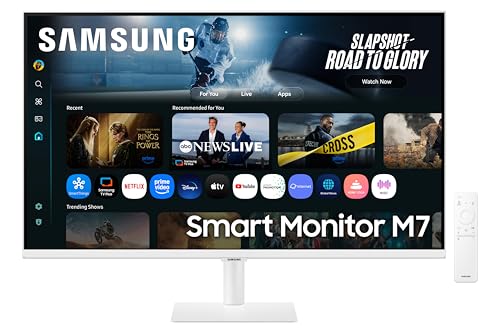
Best Overall: Samsung LS32FM703UUXXU 32" 4K HDR10 Smart Monitor. True 4K resolution on a 32-inch panel gives architects the pixel density needed for precise CAD linework and detailed BIM views, with HDR10 support for realistic material visualisation.
Best Value: LG UltraWide 34WR50QK. At its price point, this 34-inch 3440x1440 ultrawide delivers the wide-format canvas that architects need for multi-viewport workflows without breaking the project budget.
The Samsung LS32FM703UUXXU is the standout choice for architects who prioritise pixel density and colour depth above all else. At 32 inches with a native 4K (3840x2160) resolution, this panel delivers approximately 138 pixels per inch, which is enough to render 0.18mm hairlines in AutoCAD at 1:1 without aliasing artefacts. That level of sharpness matters enormously when you are checking whether a wall thickness annotation is correctly positioned or reviewing a site plan with dense contour lines.
The VA panel technology brings deep blacks and strong contrast ratios, which helps when reviewing rendered elevations or photorealistic visualisations produced in Lumion, Enscape, or V-Ray. HDR10 support means the monitor can display a wider dynamic range, which is increasingly relevant as real-time rendering engines push towards photorealism in client presentations. The built-in Smart Monitor functionality, with Wi-Fi and Bluetooth connectivity, also means architects working in hybrid environments can use the screen as a standalone display without a PC tethered, useful for presentation rooms or site offices.
The white finish is a deliberate aesthetic choice that suits architectural studio environments, where clean, minimal hardware is the norm. At 32 inches, the screen is large enough to comfortably display a full A1 drawing at a readable scale alongside a layer panel, without requiring constant panning. The VA panel's colour accuracy is well-suited to material palette work in Photoshop or Illustrator, though those requiring strict sRGB or DCI-P3 calibration for print-matched output should verify calibration against a hardware colorimeter before relying on it for colour-critical deliverables.
This monitor is best suited to architects running a single-screen setup who want the maximum pixel count available, or those adding a primary high-resolution display to complement a secondary ultrawide reference screen. The HDR10 capability also makes it a practical choice for practices that produce video walkthroughs or animated fly-throughs for planning submissions.
Verdict: The best all-round monitor for architects who need maximum resolution on a single screen, with smart connectivity as a practical bonus for studio and presentation use.
Pros
- True 4K resolution at 32 inches gives ~138 PPI, ideal for fine CAD linework and annotation legibility
- HDR10 support enhances real-time render previews and client presentation visualisations
- Smart Monitor Wi-Fi and Bluetooth connectivity suits hybrid studio and site-office workflows
Cons
- VA panel may require hardware calibration for colour-critical print-matched output
- Refresh rate not specified in verified data, so high-frame-rate animation preview may be limited
The LG 34WR50QK makes a compelling case as the best-value monitor for professional architects, particularly those who work with multi-viewport BIM layouts or need to keep a drawing canvas, properties panel, and reference browser open simultaneously without constantly switching windows. The 34-inch 21:9 ultrawide format at 3440x1440 resolution gives you roughly 34% more horizontal screen real estate than a standard 27-inch 16:9 monitor, which translates directly into fewer mouse clicks and less cognitive load during a working day.
The VA panel delivers a solid contrast ratio, which aids in distinguishing between closely related layer colours in complex Revit models or AutoCAD drawings. The 100Hz refresh rate is more than adequate for architectural software, which rarely pushes frame rates above 60fps even in real-time navigation of large BIM models. The 5ms response time is a non-issue for non-gaming professional use.
The port selection covers the essentials: two HDMI 2.0 ports and one DisplayPort 1.4. This allows connection of a laptop and a desktop workstation simultaneously, or a workstation plus a secondary device such as a tablet or second computer for reference. The curved panel design, while primarily associated with gaming monitors, has a practical benefit for architects: the gentle curve reduces the distance variation between the centre and edges of the screen, which means less refocusing as your eyes scan across a wide drawing.
At its price point, the LG 34WR50QK undercuts many comparable ultrawide monitors while delivering the resolution and screen size that architectural workflows genuinely benefit from. It is the recommended starting point for architects upgrading from a standard 1080p or 1440p 16:9 display who want to experience ultrawide productivity without a premium price tag. Larger practices equipping multiple workstations will find the value proposition particularly strong.
Verdict: The best-value ultrawide for architects, delivering the wide-format canvas that multi-viewport BIM and CAD workflows demand at a price that makes multi-monitor studio setups financially realistic.
Pros
- 34-inch 3440x1440 ultrawide format provides 34% more horizontal workspace than a standard 27-inch 16:9 monitor
- Dual HDMI 2.0 plus DisplayPort 1.4 allows simultaneous connection of laptop and desktop workstation
- Competitive price makes it practical for equipping multiple studio workstations
Cons
- VA panel colour accuracy may not satisfy architects requiring strict DCI-P3 or Adobe RGB coverage for rendered output
- 5ms response time and 100Hz refresh rate are adequate but not class-leading for real-time 3D navigation in large models
The AOC CU34G2XPD shares the same 34-inch 3440x1440 ultrawide format as the LG above but differentiates itself in two meaningful ways for professional architects: a significantly more comprehensive port selection and a higher 180Hz refresh rate. While the refresh rate advantage is largely academic for AutoCAD or Revit, the port array is genuinely useful in a professional studio environment.
The connectivity specification is the most generous in this selection: two HDMI 2.0 ports, two DisplayPort 1.4 outputs, a USB-B upstream port, four USB-A downstream ports, and a 3.5mm audio output. In practical terms, this means the monitor can function as a USB hub, connecting a keyboard, mouse, drawing tablet, and external drive directly, reducing desktop cable clutter significantly. The dual DisplayPort outputs are also useful if you want to daisy-chain a second monitor in certain configurations, or simply have the flexibility to connect multiple high-bandwidth sources.
The VA panel at 3440x1440 delivers the same fundamental resolution benefits as the LG: enough horizontal space to keep multiple application windows open, sufficient pixel density for legible annotation text at standard viewing distances, and a contrast ratio that helps distinguish layer colours in complex drawings. The 1500R curvature is slightly tighter than some ultrawide panels, which some users find more immersive but others find slightly distorting at the edges when working with straight architectural lines. This is worth considering if you work primarily with orthographic plan views where edge distortion could be a concern.
The AOC CU34G2XPD suits architects who need a single monitor to act as both display and connectivity hub, particularly those working with multiple input devices or who regularly connect a laptop alongside a desktop workstation. The four USB-A ports make it especially practical for practices using USB drawing tablets such as Wacom devices, which are common in architectural visualisation workflows.
Verdict: The best-connected ultrawide in this selection, with four USB-A ports and dual DisplayPort inputs making it the most practical choice for architects running a USB-heavy peripheral setup or multiple input devices.
Pros
- Four USB-A downstream ports allow the monitor to serve as a USB hub, reducing desktop cable clutter
- Dual DisplayPort 1.4 inputs provide flexible high-bandwidth connectivity for multi-source workstation setups
- 3440x1440 ultrawide format matches the LG for multi-viewport BIM and CAD productivity
Cons
- 1500R curvature may introduce slight edge distortion when working with orthographic architectural plan views
- VA panel has the same colour gamut limitations as the LG for DCI-P3 critical rendering work
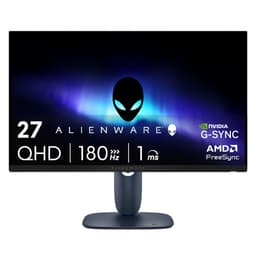
The Alienware AW2725DM is the most compact and portable option in this selection, and its Fast IPS panel technology makes it the most colour-accurate non-OLED display in the group. Fast IPS panels combine the wide viewing angles and colour fidelity of standard IPS with improved response times, making them well-suited to professional creative work where colour consistency across the panel is important. For architects who frequently present work on a monitor that colleagues or clients view from off-axis angles, IPS technology ensures colours do not shift as viewers move around the screen.
At 2560x1440 on a 27-inch screen, the pixel density is the same as the MSI QD-OLED, at around 109 PPI. This is sufficient for most architectural drawing work, though those regularly working with very fine annotation text at small point sizes may notice the difference compared to a 4K panel. The 180Hz refresh rate is well above what any current architectural software requires, but it does mean the monitor handles real-time rendered walkthroughs smoothly, which is increasingly relevant as practices adopt real-time visualisation tools.
The port selection includes two HDMI ports, one DisplayPort, and three USB ports, covering the standard connectivity requirements for a professional workstation. The three USB ports are useful for connecting peripherals directly to the monitor rather than to the PC tower, which is a practical convenience in tidy studio setups.
The Alienware AW2725DM suits architects who work primarily at a fixed desk with a single high-performance workstation, value colour consistency for presentation and visualisation work, and prefer a 27-inch form factor over the wider ultrawide format. It is also a good secondary monitor choice for architects who already have a large primary display and want a secondary screen with accurate colour for reference imagery or material boards.
Verdict: A reliable, colour-accurate Fast IPS option for architects who prefer a compact 27-inch form factor with solid connectivity and consistent colour reproduction for both technical and creative work.
Pros
- Fast IPS panel delivers wide viewing angles and consistent colour reproduction for off-axis client presentations
- Three USB ports allow direct peripheral connection for a tidier studio desk setup
- 180Hz refresh rate handles real-time rendered walkthroughs smoothly alongside standard CAD workflows
Cons
- 2560x1440 resolution is less sharp than 4K at 27 inches for very fine architectural annotation text
- 27-inch 16:9 format offers less horizontal workspace than the 34-inch ultrawide options in this selection
Buying Guide
Resolution: Why 4K or 1440p Matters for Architects
Resolution is the single most important specification for professional architects. AutoCAD, Revit, and ArchiCAD render linework at the native pixel level of your display, which means a higher pixel density directly translates to sharper, more legible drawings. At 27 inches, 1440p (2560x1440) gives you approximately 109 PPI, which is adequate for most professional work. At 32 inches, 4K (3840x2160) gives you approximately 138 PPI, which is noticeably sharper for fine annotation text and hairline weights. For architects who regularly work with dense site plans, detailed section drawings, or complex BIM models with many visible layers, the jump from 1440p to 4K is meaningful rather than marginal.
1080p at 27 inches or larger (approximately 82 PPI) is genuinely insufficient for professional architectural drawing work. Text becomes slightly blurry, fine linework shows visible aliasing, and the overall impression of the drawing on screen does not match what will be plotted. If your current monitor is 1080p and you are upgrading, even moving to 1440p will be a significant improvement.
Panel Technology: VA, IPS, and QD-OLED Compared
VA panels offer the best contrast ratios, which helps when distinguishing between closely related colours in layer-heavy BIM models. Their weakness is colour accuracy at wide viewing angles, which can be a problem if you frequently present work to colleagues or clients from the side of the screen. IPS and Fast IPS panels offer better colour consistency across viewing angles and generally more accurate out-of-box colour reproduction, making them preferable for colour-critical work such as material palette development or rendered imagery. QD-OLED panels, as seen in the MSI MAG 272QP, offer the best of both worlds: per-pixel illumination for true blacks and infinite contrast, combined with wide colour gamut coverage that rivals dedicated professional displays. The caveat with OLED technology is the theoretical risk of burn-in with static UI elements, though modern OLED panels include mitigation features and the risk in normal professional use is low.
Screen Format: Ultrawide vs Standard 16:9
The 34-inch 21:9 ultrawide format has become genuinely popular in architectural practices for good reason. Keeping a drawing canvas, layer panel, properties inspector, and reference image open simultaneously on a single screen reduces context switching and speeds up complex modelling tasks. If your workflow involves frequent reference to external documents, material libraries, or specification sheets alongside your drawing software, ultrawide is worth serious consideration. Standard 16:9 at 27 or 32 inches remains valid for architects who use a dual-monitor setup, with one screen for the drawing and one for reference material.
Connectivity and Ergonomics
Professional architects typically work with at least two devices: a desktop workstation for heavy BIM and rendering tasks, and a laptop for site visits and client meetings. A monitor with dual HDMI or dual DisplayPort inputs allows you to switch between both without unplugging cables. USB hub functionality, as offered by the AOC CU34G2XPD with its four USB-A ports, is a practical convenience for studios where drawing tablets, external drives, and input devices need to be connected. Height adjustment, tilt, and swivel stands are worth checking, as architects often work in shared studio spaces where desk and chair heights vary between users. VESA mount compatibility is useful if you plan to use a monitor arm, which is common in studios where desk space is at a premium.
Budget Considerations
Architectural workstation monitors represent a long-term investment. A display used for eight or more hours daily for three to five years has a low effective cost per hour, which justifies spending more upfront for better resolution and colour accuracy. The LG 34WR50QK represents the value entry point for serious professional use, while the Samsung 4K and MSI QD-OLED represent the upper tier of this selection with genuinely professional-grade specifications.
For professional architects, the Samsung LS32FM703UUXXU 32-inch 4K HDR10 Smart Monitor is the overall winner. True 4K resolution at 32 inches delivers the pixel density that makes a tangible difference to drawing legibility, annotation clarity, and the overall quality of the on-screen representation of your work. HDR10 support adds value for practices producing rendered visualisations, and the Smart Monitor connectivity makes it versatile across studio and presentation environments. Those who prioritise colour accuracy for rendered imagery above all else should look seriously at the MSI MAG 272QP QD-OLED, which offers the most visually accurate panel in this selection. Architects on a tighter budget or those upgrading a multi-monitor studio setup will find the LG 34WR50QK delivers exceptional value, bringing the genuine productivity benefits of the ultrawide format without a premium price.