Choosing a monitor for a home cinema setup is a very different exercise from picking a panel purely for spreadsheets or competitive gaming. You need wide colour coverage, convincing HDR, a screen large enough to feel immersive from sofa distance, and ideally built-in speakers or at least a clean audio output. Since last year, QD-OLED panels have become more accessible at the mid-range, Samsung's Smart Monitor line has expanded to include native streaming apps without a PC, and ultrawide curved screens have dropped noticeably in price. Whether you are building a compact bedroom cinema, a dual-purpose gaming and streaming lounge, or a dedicated media den, the monitors in this list cover every realistic budget. We have focused on panels that deliver genuine HDR performance, strong colour accuracy, and enough screen real estate to make films feel like an event rather than a chore. All prices reflect current UK retail.
Quick Verdict
Best Overall: MSI MAG 272QP QD-OLED X50, its self-emissive QD-OLED panel delivers infinite contrast, wide colour gamut, and genuinely cinematic picture quality at a price that undercuts most OLED televisions.
Best Value: LG UltraWide Monitor 34BA75QE, a 34-inch IPS ultrawide with HDR10, built-in speakers, USB-C, and an RJ45 port for a streaming-friendly all-in-one setup, at a price that makes sense for most buyers.
The Samsung 32-inch 4K Smart Monitor is the most television-like product in this roundup, and that is precisely its appeal. Unlike every other monitor in this list, it does not require a connected PC or streaming stick to play Netflix, Disney+, Prime Video, or YouTube. The Smart Monitor platform runs Samsung's Tizen operating system, which gives you direct access to all major UK streaming services from the monitor's own interface. For a bedroom cinema setup where you do not want a full PC running, or a spare room where you want a single device that does everything, this is a genuinely compelling proposition.
The 4K Ultra HD resolution on a 32-inch screen produces a pixel density high enough that text and fine detail in films look exceptionally sharp. HDR10 support means compatible content from Netflix and Amazon Prime Video will display with expanded brightness and colour range, though the VA panel's peak brightness will determine how impressive that HDR effect actually appears. VA panels generally offer better contrast ratios than IPS equivalents, which benefits dark cinematic scenes, though they can suffer from some colour shift at extreme viewing angles.
The built-in speakers are a key feature for a no-clutter setup. Samsung has put more effort into the audio system here than most monitor manufacturers, and the result is speakers that are genuinely usable for film watching without embarrassment. For more serious audio, you can connect external speakers or a sound bar via the monitor's audio output. The white finish is unusual in the monitor market and suits a living room or bedroom aesthetic far better than the aggressive black-and-red gaming aesthetic of many rivals.
The main limitation is the price. At the top of this roundup's budget range, the Samsung Smart Monitor costs significantly more than the LG ultrawide below it, and the picture quality from its VA panel, while good, does not match the QD-OLED of the MSI. However, for buyers who specifically want a standalone streaming device that doubles as a monitor, no other product in this list comes close to its convenience.
Verdict: The right choice for buyers who want a standalone smart streaming screen without a PC. Its 4K resolution, HDR10, and built-in Tizen apps make it the most television-like monitor in this roundup.
Pros
- Built-in Tizen smart platform streams Netflix, Disney+, and Prime Video without a PC or streaming stick
- 4K resolution on a 32-inch screen delivers sharp, detailed picture quality for film content
- White finish suits bedroom and living room aesthetics better than typical gaming monitors
Cons
- Significantly higher price than rivals with comparable panel specifications
- VA panel can exhibit colour shift for viewers watching from the sides at wider angles
The AOC CU34G2XPD is a 34-inch curved ultrawide monitor that punches well above its price bracket for home cinema use. At its current UK retail price, it offers a 3440x1440 VA panel with a 1500R curvature, which means the screen wraps gently around your field of view for a more immersive watching experience. The curved format works particularly well for cinematic content because it mimics the slight curve of a commercial cinema screen and reduces the sense that you are looking at a flat rectangle rather than a window into a scene.
The VA panel technology means contrast performance is strong. VA panels typically achieve higher static contrast ratios than IPS panels, which translates to deeper blacks in dark film scenes. This is particularly noticeable in night-time sequences or space films where the difference between a true black and a dark grey is visible. The HDR support, combined with the VA panel's contrast advantage, means HDR content from a connected streaming device looks noticeably better than on a budget IPS panel at a similar price.
The port selection is one of the best in this roundup: two HDMI 2.0 ports, two DisplayPort 1.4 outputs, four USB-A ports, and a 3.5mm audio output. For a home cinema setup, having two HDMI ports means you can connect a games console and a streaming device simultaneously, switching between them without unplugging cables. The four USB-A ports are useful for keeping a keyboard, mouse, streaming stick, and USB audio device all connected at once. The 3.5mm audio output allows connection of desktop speakers or headphones directly from the monitor.
The 180 Hz refresh rate is largely irrelevant for film content, but it does mean this monitor is an excellent dual-purpose gaming and cinema display. FreeSync Premium support ensures smooth, tear-free gaming from an AMD GPU. The 1ms response time eliminates motion blur during fast-action sequences in both games and sports content. For buyers who want one monitor that handles both home cinema and gaming duties, the AOC CU34G2XPD is the most cost-effective option in this list.
Verdict: Exceptional value for a dual-purpose gaming and cinema setup. The curved 34-inch VA panel, strong port selection, and low price make this the best budget cinema monitor in the roundup.
Pros
- 1500R curved VA panel provides an immersive, cinema-like viewing experience at a low price
- Four USB-A ports and dual HDMI allow multiple devices to stay connected simultaneously
- 180 Hz refresh rate and FreeSync Premium make it equally capable as a gaming monitor
Cons
- No built-in speakers require a separate audio solution for a clean setup
- HDMI 2.0 rather than 2.1 limits bandwidth for very high-resolution or high-frame-rate sources
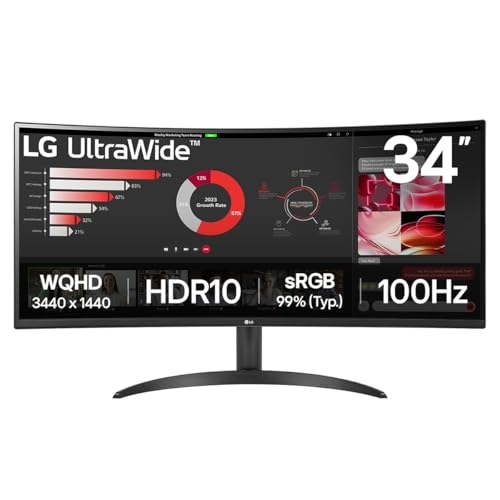
The LG 34WR50QK sits in the middle of this roundup's price range and offers a solid 34-inch curved ultrawide experience for home cinema use. Like the AOC above it, this is a 3440x1440 VA panel with a curved screen, and it shares the same fundamental advantage of filling cinema-aspect-ratio content edge to edge without black bars. The LG brand carries a strong reputation for panel quality, and the 34WR50QK benefits from LG's colour calibration experience, with HDR10 support ensuring compatibility with the widest range of streaming content.
The 100 Hz refresh rate is a modest step up from the 60 Hz of the LG 34BA75QE, which means smoother motion in sports content and slightly more responsive gaming, though it is well below the 180 Hz of the AOC. For pure cinema use, 100 Hz is more than adequate: all film and television content is mastered at 24, 25, or 30 fps, and the monitor's ability to display these frame rates smoothly is what matters rather than the maximum refresh rate. The 5ms response time is acceptable for film content, though it is slower than the AOC's 1ms figure.
The port selection is more limited than the AOC: two HDMI 2.0 ports and one DisplayPort 1.4. This is sufficient for most home cinema setups, allowing a games console on one HDMI and a streaming device or PC on the other, with the DisplayPort available for a second PC or laptop. There is no built-in USB hub, which is a minor inconvenience compared to the LG 34BA75QE's more complete connectivity package. There are also no built-in speakers, so you will need to budget for a desktop speaker system or sound bar.
The 1500R curvature of the screen enhances the sense of immersion during widescreen films, and the VA panel's contrast performance means dark scenes retain depth and detail. At its current price, the 34WR50QK is a reasonable choice for buyers who want a well-known brand, a large curved ultrawide screen, and HDR10 support without paying the premium of the Samsung Smart Monitor or the MSI QD-OLED.
Verdict: A dependable mid-range choice for a curved ultrawide cinema setup. It lacks the bells and whistles of the LG 34BA75QE but delivers a solid, immersive picture at a competitive price.
Pros
- 34-inch 1500R curved VA panel delivers genuine immersion for widescreen film content
- HDR10 support ensures compatibility with all major streaming platforms' HDR libraries
- Dual HDMI 2.0 ports allow simultaneous connection of two source devices
Cons
- No built-in speakers or USB hub compared to the similarly priced LG 34BA75QE
- 5ms response time is adequate but not as sharp as faster panels for sports or action content
Buying Guide
Panel Technology: What Actually Matters for Cinema
The single most important factor for home cinema picture quality is panel technology. QD-OLED panels, as found in the MSI MAG 272QP, offer the best contrast performance because each pixel is self-emissive and can switch off completely. This produces true blacks and an infinite contrast ratio, which makes a dramatic difference in dark film scenes. VA panels, used in the AOC CU34G2XPD, the LG 34WR50QK, and the Samsung Smart Monitor, offer the next best contrast performance among LCD technologies, typically achieving static contrast ratios of 3000:1 or higher. IPS panels, found in the LG 34BA75QE, offer the widest viewing angles and the most accurate colour reproduction but have lower native contrast ratios, meaning dark scenes can look slightly washed out compared to VA or OLED equivalents.
HDR: Real vs. Marketing
Almost every monitor sold today carries some form of HDR badge, but not all HDR implementations are equal. HDR10 is the baseline standard and is supported by all major UK streaming platforms including Netflix, Disney+, and Amazon Prime Video. For HDR to look genuinely impressive rather than just slightly brighter than standard dynamic range, a monitor needs a peak brightness of at least 400 nits and, ideally, local dimming zones that allow bright highlights and dark shadows to coexist in the same frame. OLED panels achieve this through pixel-level control rather than local dimming, which is why the MSI's HDR performance is so strong despite its relatively modest peak brightness figure.
Screen Size and Aspect Ratio
For a desk-based cinema setup at a viewing distance of 60 to 90 centimetres, a 27-inch screen is comfortable and immersive. At distances of 90 centimetres to 1.5 metres, a 34-inch ultrawide screen becomes the better choice. The 21:9 aspect ratio of ultrawide monitors matches the aspect ratio of most cinema releases, meaning widescreen films fill the entire screen without black bars. If you primarily watch 16:9 content from streaming services, a standard 16:9 monitor in the 27 to 32-inch range may be more appropriate, as ultrawide panels will display black bars on the sides for 16:9 content.
Connectivity for a Cinema Setup
Consider how you will connect your sources. If you are using a streaming stick or smart TV box, you need at least one HDMI port. HDMI 2.1 is preferable if you plan to connect a PlayStation 5 or Xbox Series X, as it supports 4K at higher frame rates. Built-in speakers save desk space and reduce cable clutter, but dedicated desktop speakers or a sound bar will always sound better. An RJ45 Ethernet port, as found on the LG 34BA75QE, is a useful feature if your monitor will be used as a standalone streaming hub. USB-C connectivity is valuable for laptop users who want a single-cable connection for both video and power.
Refresh Rate for Cinema Use
For film and television content, a 60 Hz refresh rate is entirely sufficient. All commercial cinema content is mastered at 24 fps, and UK television broadcasts at 25 or 50 fps. Higher refresh rates only benefit gaming or sports content with high frame rate capture. If you want a dual-purpose cinema and gaming monitor, look for 144 Hz or above, but do not pay a premium for a high refresh rate if your primary use is film watching.
The MSI MAG 272QP QD-OLED X50 is the overall winner for home cinema use. Its QD-OLED panel delivers a quality of contrast, black depth, and colour accuracy that no LCD panel in this price range can match. For buyers who want the closest monitor equivalent to a high-end OLED television, this is the product to choose. The dual HDMI 2.1 ports ensure it is future-proofed for 4K streaming devices and next-generation consoles, and the wide colour gamut means HDR content from Netflix and Disney+ looks as the director intended. If budget is a priority, the LG UltraWide Monitor 34BA75QE offers the most complete feature set for the money, with built-in speakers, wired Ethernet, USB-C, and a 34-inch ultrawide IPS panel that suits both solo and shared viewing. For buyers who want a completely standalone streaming screen without any PC involvement, the Samsung 32-inch 4K Smart Monitor is in a category of its own.