Choosing the right monitor for AutoCAD is more nuanced than picking the brightest gaming screen or the cheapest panel on the shelf. CAD professionals and students need accurate colours, sharp resolution for dense technical drawings, enough screen real estate to keep toolbars and viewports open simultaneously, and a panel type that renders fine lines without ghosting or colour drift. The market has shifted noticeably over the past year: ultrawide 34-inch displays have become more affordable, QD-OLED panels have dropped in price, and IPS technology now dominates the mid-range for colour fidelity. Whether you are a professional architect billing hours on complex 3D models, a mechanical engineer working with tight tolerances, or a student just getting started with 2D drafting, the five monitors below cover every budget and workflow. We have focused on resolution, panel type, connectivity and ergonomics rather than raw refresh rate, because smooth panning in AutoCAD matters far less than pixel density and accurate rendering.
Quick Verdict
Best Overall: LG UltraWide Monitor 34BA75QE. Its 34-inch IPS panel, 3440x1440 resolution, USB-C with RJ45, and built-in speakers make it the most complete all-round AutoCAD workstation display on this list.
Best Value: LG UltraWide Curved PC Monitor 34WR50QK. A 34-inch 3440x1440 ultrawide at a competitive price point, offering the screen real estate AutoCAD demands without breaking the budget.
Spec Comparison
The LG 34BA75QE is the monitor this list is built around. It is aimed squarely at professionals who spend long hours in AutoCAD, Revit, or SolidWorks and need a display that handles both the visual demands of CAD work and the practical demands of a modern desk setup. The 34-inch IPS panel running at 3440x1440 resolution gives you roughly 50 per cent more horizontal workspace than a standard 27-inch QHD monitor, which is transformative in AutoCAD: you can keep the ribbon toolbar, the properties panel, and a full drawing viewport open simultaneously without everything feeling cramped.
IPS technology is the right choice for CAD work. It delivers accurate, consistent colours across the entire panel and wide viewing angles, which matters when you are checking colour-coded layers or presenting drawings to a colleague sitting beside you. The 60 Hz refresh rate will feel unremarkable if you are coming from a gaming monitor, but it is entirely sufficient for CAD panning and zooming, and it keeps power consumption sensible during long sessions.
Where the 34BA75QE really separates itself from cheaper ultrawide options is connectivity. The inclusion of USB-C means you can connect a modern laptop with a single cable for both video and power delivery. The RJ45 Ethernet port is a genuine bonus for engineers who need a stable wired connection for large file transfers or cloud collaboration. The built-in USB hub and speakers mean fewer cables on the desk, and the built-in speakers, while not audiophile quality, are perfectly adequate for Teams calls and reference video.
HDR10 support is present, though as with most monitors in this class, the HDR effect is modest rather than transformative. The 5ms response time is fine for CAD work. Ergonomically, LG's stand typically offers tilt, height and pivot adjustments, which is important for reducing fatigue during long drafting sessions. At its price point, this monitor represents the best balance of panel quality, screen size, resolution and connectivity for serious AutoCAD use.
Verdict: The most complete AutoCAD monitor on this list, combining IPS accuracy, ultrawide real estate, and professional connectivity in one package.
Pros
- IPS panel delivers accurate, wide-angle colour rendering ideal for layer-heavy CAD drawings
- USB-C, RJ45, DisplayPort 1.4 and USB hub cover virtually every connectivity scenario
- 34-inch 3440x1440 canvas gives genuine multitasking space for toolbars and viewports
- Built-in speakers and HDR10 reduce the need for additional peripherals
Cons
- 60 Hz refresh rate will disappoint users who also want smooth gaming performance
- No USB-C power delivery spec confirmed beyond video, so laptop charging capability is unclear
The LG 34WR50QK is the best-value ultrawide on this list for AutoCAD users who want the productivity benefits of a 34-inch 3440x1440 display without paying a premium for connectivity features they may not need. It is a strong fit for students, freelancers, and small-studio professionals who primarily work from a desktop PC and do not need USB-C or Ethernet passthrough.
The 34-inch VA panel at 3440x1440 gives you the same expansive canvas as the more expensive LG 34BA75QE. In AutoCAD, this means you can work with a full drawing viewport alongside your properties palette, layer manager, and command line without any panel feeling squeezed. The curved form factor, while more associated with gaming, is genuinely comfortable for CAD work at this screen size: it reduces the need to move your head to track across the full width of the display and can help reduce eye strain during long sessions.
The VA panel type is worth discussing in the context of CAD. VA panels offer higher contrast ratios than IPS, which makes dark backgrounds in AutoCAD's model space look richer and reduces eye strain in dimly lit offices. The trade-off is slightly narrower viewing angles and a tendency for colours to shift when viewed off-axis. For solo working at a desk, this is rarely a problem. The 100 Hz refresh rate is a step up from the 60 Hz of the 34BA75QE, which makes panning and zooming feel noticeably smoother.
Connectivity is straightforward: two HDMI 2.0 ports and one DisplayPort 1.4 cover the essentials for connecting a desktop workstation or a laptop via an adapter. There is no USB hub or USB-C, which is the main compromise versus the 34BA75QE. HDR support is present. The 5ms response time is appropriate for CAD work. LG's build quality at this price tier is reliable, and the stand should offer reasonable ergonomic adjustment.
For anyone whose budget sits below the 34BA75QE and who works primarily from a desktop, the 34WR50QK is a genuinely excellent choice that delivers the most important AutoCAD feature, which is ultrawide 1440p resolution, at a lower outlay.
Verdict: The best-value ultrawide for AutoCAD, delivering a 34-inch 3440x1440 VA panel with solid connectivity at a price that undercuts many rivals.
Pros
- 34-inch 3440x1440 ultrawide resolution provides genuine multitasking space for CAD panels and viewports
- VA panel's high contrast ratio reduces eye strain in darker AutoCAD workspaces
- 100 Hz refresh rate makes panning and zooming noticeably smoother than 60 Hz alternatives
Cons
- No USB-C or Ethernet port limits connectivity for laptop users
- VA panel's off-axis colour shift can be noticeable when presenting drawings to colleagues
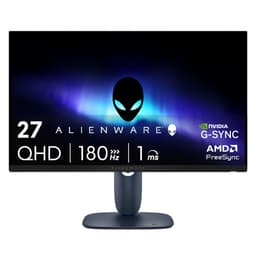
The Alienware AW2725DM is the pick for AutoCAD users who want a compact, high-quality 27-inch QHD IPS display with strong build quality and reliable colour performance. It is particularly well suited to users working in smaller offices or on desks where a 34-inch ultrawide would feel overwhelming, and for those who occasionally use their workstation monitor for gaming or video content outside working hours.
The 2560x1440 Fast IPS panel at 27 inches delivers a pixel density that renders AutoCAD's fine linework, dimension text, and hatch patterns clearly and without the softness you get from a 1080p panel of the same size. IPS technology ensures consistent colours across the panel and at wider viewing angles, which is important for accurate layer colour assessment and for presentations. The 180 Hz refresh rate is higher than any CAD workflow demands, but it makes 3D orbit and pan operations feel exceptionally fluid and adds gaming capability.
Alienware's build quality and ergonomic stand are genuine selling points. The stand offers height, tilt, swivel and pivot adjustments, which is important for long CAD sessions where posture matters. The monitor's premium finish and clean aesthetic suit professional environments better than many gaming-branded alternatives. The connectivity covers the essentials with two HDMI ports, one DisplayPort, and three USB ports for peripherals.
The limitation versus the ultrawide options is screen real estate. At 27 inches with a 16:9 aspect ratio, you will need to be more disciplined about which AutoCAD panels are open simultaneously, and you may find yourself hiding the ribbon or properties palette more often than you would on a 34-inch ultrawide. For users who prefer a focused single-viewport workflow, or who are coming from a 24-inch 1080p monitor and want a meaningful upgrade, the AW2725DM is a well-rounded step up.
At its price point, the Alienware competes with monitors from Dell's UltraSharp range in terms of panel quality, and Alienware's warranty and customer support reputation adds peace of mind for professional users.
Verdict: A premium 27-inch QHD IPS option for AutoCAD users who prioritise build quality, ergonomics and colour accuracy over ultrawide screen real estate.
Pros
- Fast IPS panel delivers accurate, consistent colours for layer and material assessment in AutoCAD
- Comprehensive ergonomic stand with height, tilt, swivel and pivot for long drafting sessions
- Premium build quality and clean aesthetic suit professional office environments
Cons
- 27-inch 16:9 format offers less simultaneous panel visibility than 34-inch ultrawide options
- No USB-C port for single-cable laptop connectivity
Buying Guide
Resolution: Why 1440p or Higher Matters for AutoCAD
Resolution is the single most important specification for an AutoCAD monitor. AutoCAD drawings are dense: they contain fine lines, small dimension text, hatch patterns, and complex geometry that all need to be rendered sharply for accurate working. A 1080p panel at 24 inches is the absolute minimum, and it will feel limiting quickly. The step up to 2560x1440 (QHD) at 27 inches makes a noticeable difference to text legibility and line clarity. The biggest productivity gain, however, comes from moving to 3440x1440 on a 34-inch ultrawide, which not only increases pixel density but dramatically expands horizontal workspace. Avoid 4K on a 27-inch panel unless you plan to run Windows display scaling, as native 4K at 27 inches can make AutoCAD's interface elements uncomfortably small without scaling adjustments.
Panel Type: IPS vs VA vs QD-OLED
IPS panels are the traditional recommendation for CAD work because they offer consistent, accurate colours and wide viewing angles. They are the safest choice for colour-critical work and for offices where colleagues may view the screen from different angles. VA panels offer higher contrast ratios, which can reduce eye strain on dark AutoCAD backgrounds, but their off-axis colour shift is a real limitation when presenting. QD-OLED delivers the best colour accuracy and contrast of any technology here, but the static nature of AutoCAD toolbars raises a theoretical burn-in concern for heavy daily users. If you run AutoCAD for eight or more hours a day, enable the monitor's pixel-shift features and use a screen saver during breaks.
Screen Size and Aspect Ratio
A 34-inch ultrawide with a 21:9 aspect ratio is the most productive format for AutoCAD. The extra horizontal space allows you to keep the ribbon, properties panel, layer manager, and a full drawing viewport open simultaneously without any element feeling cramped. A 27-inch 16:9 monitor is a solid choice if desk space is limited or if you prefer a focused single-viewport workflow. Avoid anything smaller than 24 inches for serious AutoCAD work, as the screen real estate becomes genuinely limiting.
Connectivity for CAD Workstations
Most desktop workstations connect via DisplayPort, so ensure your chosen monitor has at least one DisplayPort input. Laptop users should prioritise USB-C video input, which allows a single cable for both video and power. Ethernet passthrough, as found on the LG 34BA75QE, is a useful bonus for stable file transfers. A built-in USB hub is worth having if you use a drawing tablet, USB dongle, or other peripherals, as it reduces cable clutter on the desk.
Refresh Rate and Response Time
For AutoCAD, refresh rate is a secondary concern. 60 Hz is sufficient for all 2D drafting work. If you also use the monitor for 3D modelling with frequent orbit operations, or for gaming, 100 Hz or above will feel noticeably smoother. Response time matters more for gaming than CAD, but a 5ms or lower figure ensures no visible ghosting during fast panning. Do not pay a significant premium for a 180 Hz or 280 Hz panel purely for AutoCAD use.
Ergonomics and Eye Care
Long CAD sessions make ergonomics important. Look for a stand that offers height, tilt, and swivel adjustment as a minimum. Pivot (portrait rotation) is useful if you work with tall drawings or A-series sheet layouts. Flicker-free backlighting and a low blue light mode are worth having for extended sessions. Anti-glare coating is preferable to glossy panels for office environments with overhead lighting.
The LG UltraWide Monitor 34BA75QE is the overall winner for AutoCAD use. Its combination of a 34-inch IPS panel at 3440x1440, USB-C connectivity, RJ45 Ethernet, a built-in USB hub, and built-in speakers makes it the most complete single-monitor solution for professional CAD work. It handles colour accuracy, screen real estate, and desk connectivity better than any other option on this list. If budget is a constraint, the LG 34WR50QK delivers the same ultrawide resolution at a lower price, with a VA panel that is entirely adequate for solo working. For users who need the best possible colour accuracy and are willing to manage burn-in risk, the MSI MAG 272QP QD-OLED X50 is the most technically impressive panel here. The AOC CU34G2XPD is the pick for multi-device desk setups thanks to its four USB-A ports and dual DisplayPort inputs. The Alienware AW2725DM rounds out the list as the best compact 27-inch option for users who value build quality and ergonomics above screen real estate.