Replacing a dedicated NAS box with a mini desktop is a smart move for anyone who wants more processing power, greater software flexibility, and the ability to run Plex, Docker, or even a full Windows or Linux media server without the constraints of proprietary NAS firmware. The mini desktop market has matured considerably over the past year, with AMD's Ryzen 7 8845HS bringing genuine efficiency gains to compact form factors, and Intel's N100 proving that ultra-low-power chips can handle file serving, transcoding, and lightweight virtualisation without breaking a sweat. Whether you are migrating from a Synology or QNAP box, or simply want a single machine that can handle storage, streaming, and light desktop work, the five picks below cover every budget and use case. We have focused on compact footprint, low idle power draw, expandable storage options, and sufficient RAM for running multiple services simultaneously.
Quick Verdict
Best Overall: GMKtec AMD Ryzen 7 Mini PC K8 Plus. A true mini PC with a powerful, efficient 8-core APU, 32GB DDR5 RAM, and a PCIe 4.0 NVMe drive in a chassis small enough to mount behind a monitor. It is the closest thing to a commercial NAS in terms of footprint, yet vastly more capable when it comes to transcoding, Docker containers, and running TrueNAS SCALE or Unraid.
Best Value: Lenovo IdeaCentre A100. The Intel N100 processor sips power like a proper NAS chip, the all-in-one form factor keeps cables tidy, and the price makes it an easy upgrade from a two-bay Synology without spending a fortune.
The GMKtec K8 Plus is the standout choice for anyone who wants a genuine NAS replacement in a tiny chassis. Measuring roughly the size of a thick paperback book, it packs AMD's Ryzen 7 8845HS, an eight-core, sixteen-thread processor with a maximum boost of 5.1GHz. This is the same chip family found in high-end gaming laptops, but here it operates in a thermally managed desktop enclosure, which means it can sustain higher clock speeds for longer without throttling. For NAS replacement duties, that translates directly into smooth 4K Plex transcoding, fast file hashing, and the ability to run multiple Docker containers, a VPN server, and a Samba share simultaneously without any perceptible slowdown.
The 32GB of DDR5 RAM is a headline differentiator. Most dedicated NAS boxes ship with 2GB to 8GB of soldered memory, which becomes a bottleneck the moment you start running ZFS, multiple VMs, or memory-hungry applications like Nextcloud. With 32GB on board, the K8 Plus can handle TrueNAS SCALE's ZFS ARC cache properly, run a Jellyfin or Plex media server alongside a Home Assistant instance, and still have headroom to spare. The 1TB PCIe 4.0 NVMe drive handles the operating system and application data at blistering speeds, while the machine's multiple USB ports and, crucially, its support for external drives and NAS-attached storage over the network means you are not limited to the internal drive for bulk data.
Power consumption is a key consideration for any always-on server, and the 8845HS is impressively frugal at idle. AMD's efficiency cores keep background tasks ticking over at minimal wattage, and the machine can be configured to wake on LAN, making it easy to keep it in a low-power sleep state when not actively streaming or serving files. The AMD Radeon 780M integrated GPU is capable enough to handle hardware-accelerated video decoding in Plex and Jellyfin, offloading transcoding from the CPU and further reducing power draw during media playback sessions.
For those planning to run Linux or TrueNAS SCALE directly, the hardware has excellent driver support across major distributions. Windows 11 is included if you prefer to run Windows Server features or simply want a familiar interface for managing shares via File Explorer. The compact form factor means it can be tucked into a media cabinet, mounted on a wall bracket, or placed on a shelf next to a router without dominating the space.
Verdict: The GMKtec K8 Plus is the definitive NAS replacement mini desktop for UK buyers in 2025. It combines a powerful, efficient processor, generous DDR5 RAM, and a genuinely compact chassis at a price that undercuts building a comparable system from scratch.
Pros
- 32GB DDR5 RAM is more than enough for ZFS ARC, Docker containers, and multiple simultaneous services
- AMD Ryzen 7 8845HS delivers strong multi-threaded performance with low idle power draw, ideal for 24/7 operation
- Genuinely compact chassis fits in a media cabinet or mounts behind a monitor without occupying desk space
Cons
- Only 512GB of internal NVMe storage for the OS drive means bulk data storage requires external drives or a NAS enclosure attached via USB
- No discrete GPU means GPU-accelerated workloads beyond video decoding are limited to the integrated Radeon 780M
The Lenovo IdeaCentre A100 takes a different approach to compact computing. Rather than a bare-bones mini PC chassis, it is a 24-inch all-in-one that integrates a Full HD display, speakers, webcam, and a complete desktop system into a single unit. For NAS replacement purposes, this might seem counterintuitive, but there is a strong case to be made for it, particularly in households where the server also doubles as a family browsing or media playback machine.
At the heart of the IdeaCentre A100 is Intel's N100 processor. This is a four-core chip built on Intel's Alder Lake-N architecture, designed explicitly for low-power, always-on applications. It draws a fraction of the power of a full desktop CPU, making it genuinely comparable to the processors found in entry-level Synology and QNAP NAS devices. In fact, the N100 outperforms the ARM-based chips in many budget NAS boxes, particularly when it comes to software transcoding and running Docker containers. Paired with 16GB of RAM, it is more than capable of running Plex Media Server with hardware-accelerated transcoding for one or two simultaneous streams, alongside a Samba file share and a lightweight backup service.
The 512GB SSD is adequate for the operating system and a modest media library, but most users will want to supplement it with USB-attached external drives or a network-attached storage enclosure for bulk data. The all-in-one form factor does limit internal expansion compared to a traditional desktop, but for a machine that is primarily serving files and running background services, this is rarely a dealbreaker. The built-in display is genuinely useful for initial setup, troubleshooting, and the occasional browsing session, removing the need for a separate monitor entirely.
Windows 11 Home is pre-installed, which means you can get a Plex or Jellyfin server running within minutes of unboxing. For those who want to run OpenMediaVault or TrueNAS SCALE, the N100 has solid Linux driver support, though you will need to install the OS yourself. Power consumption at idle is exceptionally low, making the running costs over a year of 24/7 operation negligible compared to a full desktop tower.
The IdeaCentre A100 is best suited to users who are stepping up from a two-bay NAS and want something that can also serve as a light family desktop, without the complexity of managing a headless server. It is not the most powerful option here, but it is the most practical for households where simplicity and space-saving matter as much as raw performance.
Verdict: The best value NAS replacement for households that want a light family desktop alongside their server duties. The N100 chip is genuinely frugal, and the all-in-one form factor keeps the setup clean and simple.
Pros
- Intel N100 processor has an extremely low idle power draw, making 24/7 operation cost-effective over the long term
- Built-in 24-inch Full HD display removes the need for a separate monitor, saving desk space and cost
- 16GB RAM is generous for an entry-level all-in-one and handles multiple simultaneous server services comfortably
Cons
- 512GB SSD fills up quickly for bulk media storage, requiring external drives for any serious library
- All-in-one form factor limits internal expansion, so adding extra storage drives internally is not straightforward
The Apple iMac with M4 chip is an unconventional NAS replacement, but for households already embedded in the Apple ecosystem, it is an exceptionally compelling one. The M4 chip's combination of performance and efficiency is genuinely remarkable: Apple's silicon architecture delivers desktop-class processing power at power consumption levels that rival dedicated NAS hardware, particularly at idle. The 10-core CPU and 10-core GPU share a unified memory architecture with 16GB of RAM, which means there is no memory bandwidth bottleneck between the processor and graphics engine, a significant advantage for tasks like video transcoding and thumbnail generation in media server applications.
macOS includes excellent built-in file sharing capabilities via SMB and AFP protocols, meaning you can set up a basic NAS replacement without installing any additional software. For more advanced setups, Plex Media Server has a native macOS client that takes full advantage of the M4's hardware video decode engine, supporting H.264, HEVC, and AV1 decoding with hardware acceleration. This means the iMac can transcode multiple simultaneous 4K streams with minimal CPU load and very low power consumption, something that even dedicated NAS boxes with Intel Celeron processors struggle to match.
The iMac's 512GB internal SSD is fast but limited for bulk storage. Most users will supplement it with USB-C or Thunderbolt-attached external drives, and the iMac's Thunderbolt 4 ports offer the bandwidth needed to connect high-speed external RAID arrays or multi-bay enclosures without any bottleneck. Time Machine backups, iCloud Drive syncing, and shared network volumes can all coexist without any configuration complexity, which is a genuine advantage for less technical users.
The 24-inch Retina display, thin chassis, and clean cable management make the iMac one of the most aesthetically pleasing options in this list. It sits naturally in a living room or home office without looking like server hardware. The limitation, of course, is the macOS ecosystem: if you want to run TrueNAS SCALE, Unraid, or OpenMediaVault natively, you cannot do so without significant workarounds. The iMac is best suited to users who want a macOS-native media and file server that doubles as a primary desktop, rather than a dedicated headless server.
The price is the other consideration. At this level, you are paying a significant premium over the GMKtec or the Lenovo, but you are getting a complete workstation with a stunning display, excellent build quality, and Apple's long software support lifecycle, which matters for a machine you intend to run for five or more years.
Verdict: The premium NAS replacement for Apple households. Exceptional efficiency, native macOS file sharing, and hardware-accelerated transcoding make it a powerful media server that also happens to be a beautiful desktop computer.
Pros
- Apple M4 chip delivers industry-leading performance per watt, keeping electricity costs low for 24/7 server operation
- Native macOS SMB sharing and Plex hardware transcoding support make setup straightforward for Apple ecosystem users
- Thunderbolt 4 ports provide ample bandwidth for connecting high-speed external RAID enclosures or multi-bay drives
Cons
- macOS cannot run TrueNAS SCALE, Unraid, or OpenMediaVault natively, limiting advanced NAS software options
- 512GB internal SSD is insufficient for large media libraries without additional external storage investment
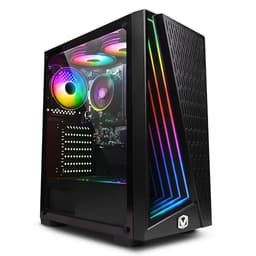
The Vibox I-7 is the most affordable option in this selection, and it occupies a useful niche for users who want a budget NAS replacement that can also handle light gaming or desktop work when not serving files. The AMD Ryzen 3 3200G is a four-core processor with integrated Radeon Vega 8 graphics, making it a capable all-rounder for home server duties. It is not the most power-efficient chip in this list, but it draws significantly less power than a full gaming desktop CPU and is more than adequate for running Plex, Samba shares, and a handful of Docker containers simultaneously.
The 16GB of RAM is a genuine strength at this price point. Many budget NAS boxes ship with 2GB or 4GB of memory, which becomes a bottleneck for ZFS or running multiple services. With 16GB, the Vibox I-7 can handle a Plex Media Server instance, a Nextcloud installation, and a VPN server without any memory pressure. The 1TB storage provides a reasonable starting point for an operating system drive and a modest media library, though users with large collections will want to add external USB drives or a dedicated storage enclosure.
The Ryzen 3 3200G's integrated Vega 8 GPU supports hardware-accelerated video decoding, which means Plex and Jellyfin can offload H.264 and HEVC decoding to the GPU rather than the CPU, reducing power draw during streaming sessions. This is a meaningful advantage over NAS boxes with ARM processors that lack hardware decode support for modern codecs. For a household with one or two simultaneous Plex streams, the 3200G handles the workload comfortably without any dropped frames or buffering.
The traditional desktop form factor is larger than the GMKtec mini PC, but it does offer more internal expansion potential. A standard ATX or micro-ATX case typically provides multiple drive bays and PCIe slots, which means adding a dedicated network card, a SATA expansion card for additional drives, or even a GPU for GPU-accelerated transcoding is straightforward. For users who anticipate growing their storage needs significantly over the next few years, this expandability is a practical advantage over the sealed mini PC form factor.
Windows 11 compatibility means you can run Plex Media Server, Emby, or Jellyfin out of the box, or install Linux and OpenMediaVault for a more NAS-like experience. The Vibox I-7 is best suited to budget-conscious buyers who want a capable home server without spending more than necessary, and who are comfortable managing a slightly larger machine.
Verdict: The best budget NAS replacement for users who want expandability and a familiar desktop form factor without the premium price of the more powerful options in this list.
Pros
- 16GB RAM is generous for the price and handles multiple simultaneous server services without memory pressure
- Traditional desktop form factor allows easy addition of SATA drives, PCIe cards, and other expansion hardware
Cons
- AMD Ryzen 3 3200G is an older architecture with higher idle power draw than the N100 or M4, increasing running costs for 24/7 operation
- Larger physical footprint than a true mini PC, requiring more shelf or cabinet space
- 1TB storage is adequate to start but fills quickly for users with large media libraries
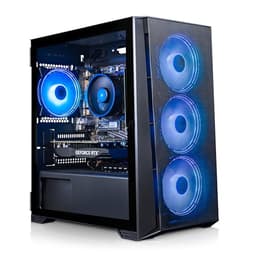
The ADMI Gaming PC with AMD Ryzen 5 5500 and NVIDIA GeForce RTX 3050 is the most capable machine in this list for GPU-accelerated workloads, and it earns its place as a NAS replacement for users who want to combine a powerful media server with a machine that can handle occasional gaming, video editing, or GPU-accelerated AI tasks. The Ryzen 5 5500 is a six-core, twelve-thread processor based on AMD's Zen 3 architecture, delivering strong multi-threaded performance that comfortably handles transcoding, file serving, and running multiple Docker containers simultaneously.
The RTX 3050 6GB GPU is the key differentiator here. NVIDIA's NVENC encoder and NVDEC decoder are widely supported by Plex Media Server, Jellyfin, and Emby, enabling hardware-accelerated transcoding of H.264, HEVC, and AV1 content with minimal CPU involvement. For households with four or more simultaneous Plex streams, or users who want to run AI-powered upscaling in Jellyfin, the RTX 3050 provides a level of GPU compute that no integrated graphics solution can match. It also opens the door to running local AI inference models, stable diffusion, or other GPU-accelerated workloads that are increasingly popular for home server enthusiasts.
The 16GB of DDR4 RAM at 3200MHz is sufficient for most home server use cases, though users planning to run ZFS with a large ARC cache or multiple memory-hungry VMs may want to upgrade. The 1TB NVMe SSD provides fast storage for the operating system and application data, with the traditional desktop form factor allowing easy addition of SATA hard drives for bulk storage. This is a significant practical advantage: you can fill the case with multiple large hard drives for a proper NAS-style storage pool without relying entirely on external enclosures.
Windows 11 is pre-installed, and the machine is ready to run Plex or Jellyfin within minutes of setup. For users who want to install Unraid or TrueNAS SCALE, the hardware is fully compatible with both platforms, and the RTX 3050 is well-supported under Linux for GPU passthrough and hardware transcoding. The ADMI Gaming PC is best suited to enthusiast home server builders who want the most capable transcoding and compute performance in this price bracket, and who do not mind a larger desktop form factor in exchange for that capability.
Verdict: The top pick for GPU-accelerated transcoding and enthusiast home server builds. The RTX 3050 unlocks NVENC hardware encoding that no integrated GPU in this list can match, making it the best choice for households with multiple simultaneous Plex streams.
Pros
- NVIDIA RTX 3050 with NVENC support enables hardware-accelerated transcoding for four or more simultaneous Plex or Jellyfin streams
- Traditional desktop form factor allows multiple internal SATA drives for a proper NAS-style storage pool without external enclosures
- AMD Ryzen 5 5500 six-core CPU handles multi-threaded server workloads, Docker containers, and VMs with ease
Cons
- Discrete GPU increases idle power draw significantly compared to integrated-graphics options, raising 24/7 running costs
- Larger tower form factor requires more physical space than a mini PC or all-in-one solution
Buying Guide
Processor: Efficiency Matters More Than Peak Speed
For a NAS replacement that runs 24/7, the processor's idle power draw is more important than its peak clock speed. Intel's N100 and AMD's Ryzen 7 8845HS both excel here, drawing very little power at idle while still delivering strong burst performance when transcoding or hashing files. Older architectures like the Ryzen 3 3200G are capable but less efficient, and a traditional gaming CPU like the Ryzen 5 5500 will cost noticeably more to run continuously than a purpose-designed low-power chip. Look for processors with a low TDP rating and strong single-core performance, as many NAS tasks are lightly threaded but benefit from fast single-core execution.
RAM: More Is Almost Always Better
NAS operating systems like TrueNAS SCALE use ZFS, which is notoriously memory-hungry. ZFS uses available RAM as an ARC (Adaptive Replacement Cache), dramatically improving read performance for frequently accessed files. The general recommendation is 1GB of RAM per terabyte of managed storage, with a minimum of 8GB for any ZFS installation. For running Docker containers, Plex, and a VPN server simultaneously, 16GB is a comfortable minimum and 32GB gives you genuine headroom. Avoid machines with soldered, non-upgradeable RAM if you plan to expand your setup over time.
Storage Expandability: Think Beyond the Internal Drive
The internal NVMe SSD in most of these machines is ideal for the operating system and application data, but bulk media and backup storage requires additional capacity. Check how many USB ports the machine offers, whether any are USB 3.2 Gen 2 or Thunderbolt for high-speed external drive connections, and whether the case has room for additional internal SATA drives. Traditional desktop form factors have a clear advantage here, as they typically accommodate two to four internal drives. Mini PCs and all-in-ones rely on external enclosures, which add cost but keep the footprint small.
GPU: Integrated or Discrete?
For basic file serving and light transcoding, integrated graphics are sufficient. AMD's Radeon 780M and Apple's M4 GPU both support hardware-accelerated video decoding, which handles one to three simultaneous Plex streams without breaking a sweat. If you have four or more simultaneous users, or want to run AI upscaling, stable diffusion, or other GPU compute workloads, a discrete NVIDIA GPU with NVENC support is a significant upgrade. However, discrete GPUs increase idle power draw considerably, so weigh the transcoding benefit against the ongoing electricity cost.
Operating System Compatibility
All Windows 11 machines in this list can run Plex Media Server, Jellyfin, and Emby natively. For TrueNAS SCALE or Unraid, you will need to install Linux, which is straightforward on any x86 machine but not possible on the Apple iMac. If you want the most NAS-like experience with ZFS, snapshots, and a web-based management interface, TrueNAS SCALE on the GMKtec K8 Plus or the ADMI Gaming PC is an excellent combination. For users who prefer simplicity, Windows 11 with Plex and a mapped network drive is perfectly adequate for most households.
Wake on LAN and Remote Management
A proper NAS replacement should be accessible remotely and able to wake from sleep on demand. Most of the machines here support Wake on LAN (WoL) via their network adapters, which allows you to power the machine on remotely when you need it and let it sleep the rest of the time, dramatically reducing power consumption. Check that the machine's BIOS or UEFI supports WoL and that the network adapter driver supports it under your chosen operating system before committing to a purchase.
The GMKtec AMD Ryzen 7 Mini PC K8 Plus is the clear overall winner for NAS replacement duty in 2025. It combines a genuinely compact chassis with a powerful, efficient eight-core processor, 32GB of DDR5 RAM, and a fast PCIe 4.0 NVMe drive, all at a price that is competitive with a mid-range dedicated NAS box. The 8845HS processor handles everything from ZFS parity calculations to 4K Plex transcoding without breaking a sweat, and the AMD Radeon 780M GPU provides hardware-accelerated video decoding that keeps power consumption low during streaming sessions. For users on a tighter budget, the Lenovo IdeaCentre A100's N100 processor is the most power-efficient option in the list and is genuinely comparable to the chips found in entry-level NAS devices, making it an excellent step up from a two-bay Synology without the complexity of managing a headless server. The ADMI Gaming PC earns its place for enthusiasts who need NVIDIA NVENC hardware transcoding for large households with multiple simultaneous streams, while the Apple iMac M4 is the premium choice for anyone already in the Apple ecosystem who wants a beautiful, efficient media server that doubles as a primary desktop.