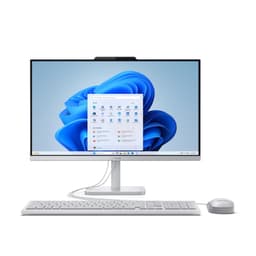
Running a Plex Media Server demands more from a desktop than most people expect. Whether you are streaming a single 4K HDR file to the living room or juggling six simultaneous 1080p transcodes for family members on different devices, the machine doing the heavy lifting needs a capable processor, ideally hardware-accelerated GPU transcoding, enough RAM to keep the Plex database snappy, and storage that can grow with your library. Since last year, Intel Quick Sync and NVIDIA NVENC have become even more central to the Plex conversation, and the arrival of NVIDIA's RTX 50-series cards means that even mid-range builds now offer hardware transcode headroom that was previously reserved for enthusiast rigs. This guide is aimed at UK buyers who want a compact or all-in-one desktop, not a full tower, that can sit quietly in a living room or study and serve media around the clock without sounding like a jet engine or adding noticeably to the electricity bill.
Quick Verdict
Best Overall: Apple iMac with M4 chip (B0DL7M1FJ3). The M4's media engine handles hardware-accelerated H.264, HEVC, AV1 and ProRes decoding with remarkable efficiency, the machine runs near-silently, and the all-in-one form factor is as compact as it gets for a full desktop. Plex's macOS server app is mature and rock-solid.
Best Value: ADMI Gaming PC with Ryzen 5 5500 and RTX 3050 (B0F3JVWCBY). At its price point it delivers NVIDIA NVENC hardware transcoding, a six-core CPU capable of several simultaneous software transcodes, 16 GB of DDR4 RAM and a 1 TB NVMe SSD. It is the most cost-effective route to proper GPU-accelerated Plex serving in this selection.
The Apple iMac with M4 is an unusual recommendation in a Plex server list, but it earns its place at the top through a combination of factors that matter enormously for always-on media serving: near-silent operation, excellent power efficiency, a genuinely compact all-in-one footprint, and one of the most capable hardware media engines available in a consumer desktop today.
The M4 chip features Apple's dedicated media engine, which handles hardware-accelerated decode and encode for H.264, HEVC (H.265), AV1, and ProRes. For Plex users, this is significant. Plex's macOS server application has supported Apple's VideoToolbox hardware acceleration for several years, meaning that when a client requests a transcode, the iMac's media engine handles it with minimal CPU involvement and minimal power draw. In practical terms, a single M4 iMac can handle multiple simultaneous 4K HEVC transcodes without breaking a sweat, and the machine will remain cool and essentially silent throughout.
The 16 GB of unified memory is shared between CPU and GPU tasks, and Apple's memory architecture is considerably more efficient than traditional DRAM setups. The Plex Media Server database, metadata cache, and active transcode buffers all fit comfortably within this allocation. Storage is 512 GB SSD, which is enough for the Plex application, database, and a modest local library, though most Plex users will attach external USB drives or a NAS for the bulk of their media. The iMac's USB-C and Thunderbolt ports make this straightforward.
The all-in-one design means no separate monitor is needed, and the 24-inch Retina display is genuinely excellent if you also want to use the machine for day-to-day tasks. macOS is a stable, low-maintenance operating system that handles long uptimes well, and Plex's macOS server app receives regular updates.
The main caveats are the price, the locked-down ecosystem (you cannot upgrade RAM or storage after purchase), and the fact that Plex's hardware transcode for HEVC on macOS requires a Plex Pass subscription. The 512 GB internal SSD is also modest for a media server, so budget for external storage. That said, for sheer efficiency, silence, and compact elegance, nothing else on this list comes close.
Verdict: The best-rounded compact Plex server for buyers who value silence, efficiency, and a polished all-in-one experience, provided you are comfortable with macOS and the Apple ecosystem.
Pros
- M4 Media Engine delivers hardware-accelerated H.264, HEVC, AV1 and ProRes transcode with very low power draw
- Near-silent operation makes it ideal for living room or bedroom placement
- Compact 24-inch all-in-one design eliminates the need for a separate monitor
Cons
- 512 GB internal SSD is modest for a media library; external storage is essentially mandatory
- RAM and storage are soldered and cannot be upgraded after purchase
- Higher price than Windows alternatives with comparable Plex transcode capability
The Vibox V-196 sits in a sweet spot for Plex enthusiasts who want a dedicated Windows server with genuine GPU transcoding headroom and room to grow. Built around the AMD Ryzen 5 5500 processor and NVIDIA's GeForce RTX 4060, it represents a well-balanced package for a household Plex server that might also double as a gaming rig or general desktop.
The Ryzen 5 5500 is a six-core, twelve-thread processor based on AMD's Zen 3 architecture. For Plex, this means the CPU alone can handle a healthy number of simultaneous software transcodes if needed, though in practice the RTX 4060 will do the heavy lifting via NVIDIA's NVENC encoder. The RTX 4060 uses Ada Lovelace architecture and features NVENC hardware with AV1 encode support, which is particularly relevant as more Plex clients begin requesting AV1 streams. NVIDIA's NVENC is widely regarded as the gold standard for hardware transcoding in Plex, offering high quality at low CPU overhead.
The 16 GB of DDR4 3200 MHz RAM is sufficient for Plex server duties, with plenty of headroom for the operating system and any additional background tasks. The 1 TB NVMe SSD provides fast access for the Plex database, metadata, and thumbnails, which makes library browsing noticeably snappier than on machines using SATA SSDs or mechanical drives. As with most desktop Plex setups, you will likely want to attach additional storage for your actual media library, either via USB or a network share.
Windows 11 is pre-installed, and Plex Media Server's Windows application is mature and well-supported. The tower form factor, while not a true mini PC, is compact enough to tuck away in a media cabinet or on a shelf. Vibox includes a bundle with the V-196 that adds a monitor, keyboard and mouse, making it a complete setup out of the box for buyers who need everything.
Power consumption is higher than the iMac M4, as expected from a discrete GPU system, but the RTX 4060 is one of NVIDIA's more efficient Ada cards. Noise levels will depend on the case fans and GPU cooler under load, but at idle, which is most of the time for a Plex server, the system should be reasonably quiet.
Verdict: A well-rounded mid-range Plex server with excellent GPU transcoding credentials, suitable for households with multiple simultaneous streams and growing libraries.
Pros
- RTX 4060 with Ada NVENC supports AV1 hardware encode, future-proofing the build for next-generation Plex streams
- Ryzen 5 5500 six-core CPU handles software transcode fallback competently
- Bundle includes monitor, keyboard and mouse for a complete out-of-the-box setup
Cons
- Tower form factor is larger than a true mini PC, though still manageable in a media cabinet
- DDR4 platform limits future upgrade paths compared to newer DDR5 builds
- Higher idle power draw than integrated-graphics alternatives
The ADMI Gaming PC with Ryzen 5 5500 and NVIDIA RTX 3050 is the best value entry point for buyers who want genuine NVIDIA NVENC hardware transcoding without spending over a thousand pounds. It shares its CPU platform with the Vibox V-196 but steps down to the RTX 3050, which is a meaningful trade-off worth understanding before you buy.
The NVIDIA RTX 3050 in this build uses the Ampere architecture and carries 6 GB of GDDR6 VRAM. Crucially, it supports NVENC hardware transcoding in Plex, which means you can offload H.264 and HEVC encode tasks from the CPU to the GPU. This allows the Ryzen 5 5500 to remain largely idle during transcodes, keeping power consumption and heat generation low. The RTX 3050 does not support AV1 hardware encode (that arrived with Ada Lovelace, i.e., the RTX 4000 series), but for the vast majority of current Plex libraries, which are predominantly H.264 and HEVC, this is not a practical limitation today.
The Ryzen 5 5500 is the same six-core Zen 3 processor found in the Vibox V-196, so CPU-side performance is identical. The 16 GB of DDR4 3200 MHz RAM is adequate for Plex server duties, and the 1 TB NVMe SSD ensures fast database and metadata access. Windows 11 is pre-installed.
Where the ADMI build distinguishes itself is price. It costs significantly less than the Vibox V-196 while delivering the same CPU performance and NVENC-capable GPU transcoding. The RTX 3050 can handle multiple simultaneous NVENC transcode sessions without difficulty, and for a household with two to four concurrent streams, it is more than sufficient. If you are running a larger household or regularly transcode 4K HDR content to multiple clients simultaneously, the RTX 4060 in the Vibox V-196 offers more headroom, but for most users the RTX 3050 will never feel like a bottleneck.
The ADMI system is a compact tower, not a mini PC, but it is designed to be relatively unobtrusive. Build quality is solid for the price, and ADMI's UK support has generally received positive reviews from buyers. The Windows 11 installation is clean, with Plex Media Server installable in minutes.
One consideration: the RTX 3050 6 GB variant is a lower-spec card than the 8 GB RTX 3050 found in some other builds. For Plex transcoding purposes, VRAM size is less critical than NVENC capability, so this distinction matters less here than it would in a gaming context.
Verdict: The most cost-effective route to NVIDIA NVENC hardware transcoding in this selection, and the clear Best Value pick for budget-conscious Plex users with typical household streaming demands.
Pros
- RTX 3050 NVENC hardware transcoding offloads H.264 and HEVC encode from the CPU, keeping power draw low during streams
- Lowest price in the selection for a discrete NVIDIA GPU build with full Plex hardware transcode support
- Ryzen 5 5500 six-core CPU provides solid software transcode fallback
Cons
- RTX 3050 lacks AV1 hardware encode support, which may become relevant as Plex clients adopt AV1 more widely
- 6 GB VRAM on the RTX 3050 is the lowest in the GPU lineup, though not a practical Plex limitation today
- Tower form factor is not as compact as a true mini PC or all-in-one
Buying Guide
Hardware Transcoding: The Most Important Factor
Plex Media Server can transcode video in two ways: software (using the CPU) and hardware (using a dedicated encode engine on the GPU or CPU). Software transcoding is flexible but CPU-intensive and power-hungry. Hardware transcoding is dramatically more efficient, allowing a modest machine to handle multiple simultaneous streams with minimal CPU load. For a Plex server that will run 24/7, hardware transcoding is essentially mandatory if you have more than one or two users.
NVIDIA NVENC, available on all GeForce RTX cards, is the most widely supported and highest-quality hardware transcode option in Plex on Windows. The RTX 3050 (Ampere) supports H.264 and HEVC NVENC. The RTX 4060 (Ada Lovelace) and RTX 5060 (Blackwell) additionally support AV1 hardware encode. Intel Quick Sync, available on Intel processors with integrated graphics (including the N100), supports H.264 and HEVC and is a solid option for light-duty servers. Apple's VideoToolbox, used by the M4 iMac, supports H.264, HEVC, AV1, and ProRes hardware decode and encode on macOS.
Note that Plex hardware transcoding requires a Plex Pass subscription. Without it, all transcoding falls back to software, which negates much of the advantage of a capable GPU.
How Many Simultaneous Streams Do You Need?
A single NVENC session uses very little GPU resources, so even an RTX 3050 can handle four to six simultaneous NVENC transcode sessions. The CPU becomes the bottleneck only if hardware transcoding is unavailable or if you are running many software transcodes simultaneously. For a household of one to three people, any machine in this selection is adequate. For four to six users, the RTX 3050 and above are appropriate. For larger deployments or 4K HDR transcode demands, the RTX 5060 and above are recommended.
Direct Play vs. Transcode
The most efficient Plex setup is one where clients direct play content, meaning they receive the file exactly as stored without any conversion. Modern smart TVs, Roku devices, Apple TV 4K, and NVIDIA Shield all support direct play for H.264 and HEVC. If your clients can direct play most of your library, even the Lenovo IdeaCentre A100 with its N100 processor is a viable server. If your clients frequently need transcoding (older smart TVs, web browsers, mobile devices on slow connections), invest in a machine with NVENC.
Storage Planning
None of the machines in this selection have enough internal storage for a substantial media library. Plan to attach external USB drives, a NAS, or a network share. Plex works well with network-attached storage, provided the network connection is fast enough (Gigabit Ethernet recommended). The internal SSD is best used for the operating system, Plex application, and the Plex database and metadata cache, which benefits significantly from SSD speeds.
RAM Considerations
16 GB is the practical minimum for a Plex server running Windows 11. Plex itself uses relatively little RAM, but the operating system, background processes, and the Plex database all add up. If you run additional services alongside Plex (Sonarr, Radarr, a VPN, Docker), 32 GB is preferable. All the Windows machines in this selection ship with 16 GB, which is sufficient for dedicated Plex use.
Power Consumption and Running Costs
A Plex server runs 24/7, so power consumption matters. The Lenovo IdeaCentre A100 with its N100 processor draws very little power at idle, perhaps 10 to 15 watts. The discrete GPU machines draw more, typically 30 to 60 watts at idle depending on the GPU and system configuration. Over a year, the difference adds up. If electricity costs are a concern, consider enabling sleep or low-power modes during overnight hours when the server is unlikely to be in use, though this requires configuring Plex's wake-on-LAN or scheduled wake settings.
Operating System
Windows 11 is the most straightforward choice for Plex server, with the broadest hardware support and the most mature Plex Media Server application. macOS, as found on the iMac M4, is equally well-supported and arguably more stable for long-term server use. Both platforms receive regular Plex updates.
For most UK buyers setting up a household Plex server in 2025, the Apple iMac with M4 (B0DL7M1FJ3) is the overall winner. It delivers hardware-accelerated transcoding for H.264, HEVC, AV1, and ProRes via the M4 Media Engine, runs near-silently, draws very little power, and fits neatly into any room as an all-in-one. The macOS Plex server application is stable and well-maintained, and the machine's efficiency means running costs are low over the long term. The 512 GB internal SSD requires supplementary external storage, but this is a minor inconvenience rather than a dealbreaker.
If the Apple ecosystem is not for you, or if your budget is tighter, the ADMI Gaming PC with Ryzen 5 5500 and RTX 3050 (B0F3JVWCBY) is the Best Value pick. It delivers NVIDIA NVENC hardware transcoding at the lowest price in the selection, with a capable six-core CPU and 16 GB of DDR4 RAM. For households with up to four concurrent Plex users and a library predominantly comprising H.264 and HEVC content, it is more than sufficient and represents excellent value for money.
Buyers who want the most future-proof Windows build should look at the CyberPowerPC Wyvern with Ryzen 5 8400F and RTX 5060 (B0FD9YC8VV), which brings Blackwell NVENC and AV1 hardware encode at a mid-range price, or the Ryzen 7 8700F variant (B0FL7MNTW6) if extra CPU cores for media automation are needed. The Lenovo IdeaCentre A100 remains a niche but valid choice for the lightest possible Plex workloads where silence and power efficiency are the top priorities.