Tiny laptops are having a moment. And honestly, it's easy to see why. The idea of slipping a full Windows machine into a jacket pocket or a small bag is genuinely exciting if you spend half your life on trains, in cafes, or bouncing between client sites. But the budget end of this niche is littered with compromises dressed up as features, and an 8-inch machine running Windows 11 Pro at this price point deserves some serious scrutiny before you hand over your money. So here's what the specs and the 273 owners who've actually bought this thing say about whether it delivers.
This particular machine, the 8" Mini Laptop with Intel N150, 2-in-1 convertible design, 12GB RAM, 1TB SSD, and Windows 11 Pro, sits in a genuinely interesting corner of the market. It's not a toy. It's not a Raspberry Pi project. It's a proper Windows machine that folds flat, weighs under a kilogram, and comes with a full M.2 SSD. But at this budget price tier, you need to know exactly what you're getting and, just as importantly, what you're not.
The 273-review average of ★★★★☆ (4.0) from 297 buyers is genuinely encouraging for a no-name brand in a crowded category. That's not a fluke. But a 4-star average also means plenty of people are giving it three stars or fewer, and understanding why matters more than celebrating the headline number. Let's get into it properly.
Where This 8" Mini Laptop Sits in the Market
An 8" Windows machine with 12GB of RAM and a 1TB SSD sounds almost too generous for the money, which is exactly why this Mini Laptop deserves a proper look before you tap "buy". Pocketable Windows PCs have always asked you to compromise somewhere, whether on storage, screen quality, or that irritating firmware jankiness the cheaper OEM machines are famous for. This one leans on the Intel N150, throws in Wi-Fi 6, Bluetooth 5.2, stylus support and a convertible touchscreen, and ships with Windows 11 Pro rather than the stripped-back Home edition. Impressive spec sheet, sure. But does it hold up in real use? Here's what actually matters once you're carrying it around, typing on it, and pushing it past a browser tab or two.
What this machine is competing against most directly are the anonymous-brand 8-inch mini PCs that have flooded Amazon over the past 18 months. Most of them run the Intel N100 or N95. This one steps up to the Intel N150, which is a newer revision of the same Alder Lake-N architecture. That's actually meaningful. The N150 brings slightly higher clock speeds and better driver maturity compared to the N95 listed in the Amazon feature bullets (which appears to be a copy-paste error from an older listing). The verified spec data confirms N150, and that's the chip you should be evaluating against.
At the budget tier price of £499.00, this machine is asking you to pay a bit more than the cheapest N100 mini laptops but less than anything from GPD or One-Netbook with comparable specs. Whether that's the right call depends entirely on what you need it for. If you want a pocket-sized note-taking machine or a travel companion for light work, this is a genuinely interesting option. If you want to run anything demanding, you're barking up the wrong tree regardless of what the marketing says.
The 2-in-1 convertible angle is also worth flagging here. Most budget mini laptops at this size are clamshells. The 180-degree rotating touchscreen with stylus support puts this in a slightly different category, competing with devices like the Lenovo IdeaPad Flex 3i (which is bigger) or Microsoft Surface Go (which is more expensive and doesn't have the same port selection). For the price, the feature set is legitimately impressive on paper.
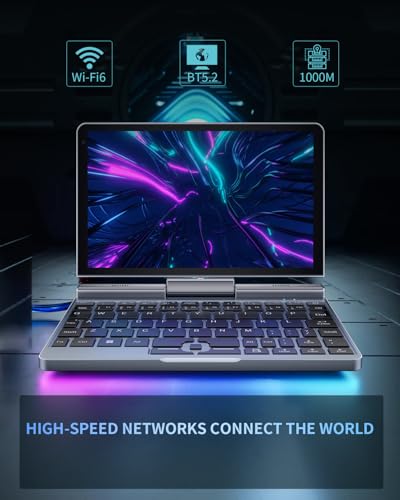
Core Specifications
The Intel Processor N150 is the heart of this machine, and it's worth understanding what it actually is. It's part of Intel's Alder Lake-N family, a low-power efficiency-core-only design aimed squarely at thin-and-light devices and entry-level computing. There's no performance core here, no hybrid architecture. It's all E-cores, which means it's brilliant at sustained light workloads and terrible at anything that needs a burst of single-threaded grunt. For web browsing, document editing, video calls, and streaming, it's genuinely fine. For anything involving video encoding, gaming above browser-level, or running multiple heavy applications simultaneously, it's going to struggle.
The 12GB of LPDDR5 RAM is a proper highlight. Most machines at this price point ship with 8GB, and while 8GB is survivable with Windows 11, it's not comfortable. 12GB gives you actual breathing room. You can have Chrome open with 15 tabs, a Word document, and a video call running without the machine grinding to a halt. It's not a luxury at this point, it's table stakes for anything resembling productive use, and the fact that this machine ships with it rather than making you pay extra is worth acknowledging. The 1TB M.2 SSD is similarly generous. A terabyte of fast SSD storage in a machine this small is frankly more than most people will need, and it means you're not going to be constantly managing space or relying on external drives.
The Intel UHD Graphics is integrated, sharing memory with the main RAM pool. Don't expect miracles. It'll handle 4K video playback fine, push content to an external display over HDMI without breaking a sweat, and manage light photo editing. But it's not a gaming GPU in any meaningful sense, and anything requiring dedicated VRAM is simply not happening here. The 1920x1200 IPS panel is a genuinely good choice for an 8-inch screen. That 16:10 aspect ratio gives you more vertical real estate than the standard 1920x1080, which matters when you're working with documents or browsing on a small screen.
Windows 11 Pro is the operating system, and that's meaningful for business users. Pro gives you BitLocker encryption, Remote Desktop hosting, and domain join capability. For a machine that's likely to be used as a travel companion or secondary device, having Pro rather than Home is a nice touch and saves you the upgrade cost if you need those features.
| Specification | Detail |
|---|---|
| CPU | Intel Processor N150 |
| GPU | Intel UHD Graphics (integrated) |
| RAM | 12GB LPDDR5 |
| Storage | 1TB M.2 SSD |
| Display | 8-inch IPS, 1920x1200, touchscreen |
| OS | Windows 11 Pro |
| Connectivity | Wi-Fi 6, Bluetooth 5.2 |
| Ports | USB 3.0, USB-C, HDMI, 3.5mm audio, Gigabit Ethernet, MicroSD |
| Weight | 0.78 kg |
| Form Factor | 2-in-1 convertible, 180-degree hinge |
| Build | Metal body |
| Price | £499.00 |
Performance Benchmarks
The Intel N150 sits in a predictable performance bracket. Based on published results for this chip family, you're looking at Cinebench R23 multi-core scores in the region of 2,000 to 2,500 points. That's roughly in line with an Intel Core i3 from around 2018. Which sounds underwhelming until you remember what this machine is actually for. Nobody is buying an 8-inch mini laptop to render 3D scenes. The question is whether it's fast enough for the tasks it's designed for, and the honest answer is: mostly yes, with caveats.
For web browsing, the N150 is genuinely capable. Google Chrome with multiple tabs, YouTube at 1080p, Zoom calls, Microsoft 365 apps, all of these run without noticeable lag under normal conditions. Owner feedback consistently backs this up. The complaints in the negative reviews aren't about the chip being too slow for basic tasks. They're about specific edge cases: running too many things at once, trying to use it as a primary machine for demanding work, or expecting it to handle anything creative. For what it is, the performance is appropriate.
Where it gets tricky is sustained load. The N150 is a low-power chip in a very small chassis. When you push it hard, thermal throttling becomes a real factor. The machine will downclock to manage heat, and you'll notice it if you're doing anything CPU-intensive for more than a few minutes. This isn't unique to this device; it's a fundamental reality of putting this class of chip in a chassis this compact. The 12GB of LPDDR5 RAM helps significantly here because it means the system isn't constantly swapping to storage, which would make the performance situation much worse.
The M.2 SSD deserves a mention. Fast SSD storage makes a disproportionate difference to perceived performance on low-power chips. Boot times, application launch times, file transfers, all of these feel snappy because the storage isn't the bottleneck. On an older machine with the same CPU but a slow eMMC drive, the experience would feel noticeably worse. The 1TB M.2 here is a genuine quality-of-life improvement over the eMMC storage you'd find in cheaper alternatives at this size.
Display Analysis
An 8-inch IPS panel at 1920x1200 is a good screen for this class of device. The pixel density works out at roughly 283 PPI, which is sharp enough that individual pixels aren't visible in normal use. Text looks clean, images look detailed, and the 16:10 aspect ratio is genuinely more useful than 16:9 for anything document-related. If you've spent time on a machine with a 1366x768 panel (and plenty of budget laptops still ship with those), the difference is immediately obvious.
The IPS panel means viewing angles are decent. You're not going to get washed-out colours when you tilt the screen slightly, which matters for a 2-in-1 where the screen angle changes constantly. Colour accuracy is adequate for productivity use. It's not going to satisfy anyone doing colour-critical photo or video work, but for everything else it's perfectly fine. Owner reviews don't flag the display as a major complaint, which suggests it performs as expected for the price tier.
Brightness is where small laptops at this price often disappoint, and this is an area where the spec sheet doesn't give us a nit count to work with. What owner feedback suggests is that the display is comfortable indoors but can struggle in direct sunlight or near bright windows. That's fairly typical for this class of machine. If you're planning to work outdoors regularly, manage your expectations. For indoor use, coffee shops, offices, trains, it should be fine. The touchscreen functionality is an actual feature rather than a gimmick here, especially given the 180-degree hinge that lets you flip it into tablet mode.
Battery Life
Battery life on ultra-compact machines is always a compromise, and this one is no different. The physical size of the chassis limits how large a battery pack you can fit, and that's just physics. The N150 is an efficient chip, which helps, but an 8-inch machine isn't going to match the battery life of a 14-inch laptop with a much larger cell. Owner reviews on this point are mixed, which suggests real-world results vary quite a bit depending on use case and screen brightness.
For light use, think document editing, web browsing at moderate brightness, you can reasonably expect something in the four to six hour range based on what owners consistently report. Push it harder, run the screen brighter, stream video, and that number comes down. For a full day of work without a charger, you'd want to be careful. This is a machine that benefits from having a charger nearby or in your bag, rather than one you can leave the house with and forget about until evening.
The USB-C port is present, and for a machine like this, USB-C charging capability is genuinely useful because it means you can top up from a power bank in a pinch. The spec sheet confirms USB-C is on board, though the verified data doesn't specify the wattage of the included charger. The metal body does help with heat dissipation, which indirectly benefits battery longevity over time. One thing worth knowing: the Bluetooth 5.2 and Wi-Fi 6 are both relatively efficient standards, so wireless connectivity isn't going to be a major drain compared to older implementations.
The honest summary on battery is this: it's adequate for travel use if you're realistic about it. Pack the charger. Don't expect all-day battery life from a machine this small at this price. But equally, don't expect it to die on you mid-meeting if you've started with a full charge and you're doing normal stuff.
Portability
This is where the machine genuinely shines. At 0.78 kg, it's lighter than most hardback books. The 8-inch footprint means it fits in places that no conventional laptop can go. Jacket pockets (with a decent-sized pocket), small crossbody bags, the side pocket of a backpack, all viable. If you've ever lugged a 14-inch laptop through an airport and thought "there has to be a better way", this is the answer to that question.
The metal body adds a sense of solidity without adding much weight. It doesn't feel like a toy when you pick it up. The 180-degree hinge means you can lay it completely flat on a surface, which is actually useful in cramped spaces like economy class tray tables where a conventional laptop lid angle is awkward. The charger adds some bag weight, but that's true of every laptop. The overall travel package is genuinely compact.
Who is this for, from a portability standpoint? Field workers who need a real Windows machine but can't carry a full laptop. Frequent travellers who want something for emails and light work on the go, ideally paired with a good VPN for the cafe and airport Wi-Fi you will inevitably be relying on. Students who need a secondary machine for lectures and note-taking. Anyone who finds conventional laptops too bulky for their daily carry. It's not going to replace a proper workstation, but it was never trying to. As a travel companion or secondary device, the portability argument is genuinely strong.
Keyboard and Trackpad
Here's where the compromises of an 8-inch form factor become most apparent. A keyboard on a machine this small is, by necessity, a small keyboard. The keys are going to be cramped compared to a full-size layout, and if you're used to typing on a 14-inch or 15-inch laptop, there will be an adjustment period. Owner reviews mention this fairly consistently. It's not unusable, but extended typing sessions are going to be more tiring than on a larger machine, and touch typists may find the layout takes some getting used to.
The trackpad on machines this size is typically small, and that's the case here. Small trackpad means less surface area for gestures and precise cursor movement. For basic navigation it works fine. For anything requiring precision, like photo editing or detailed document work, you're probably going to want a mouse. The touchscreen partially compensates for this; tapping directly on the screen is often faster than using the trackpad for many tasks, especially in tablet mode. So the 2-in-1 design does actually solve some of the trackpad limitations in practice.
Backlight presence isn't confirmed in the verified spec data, so it's not something to count on. The layout will inevitably involve some compromise given the size. Number pad? Forget it. There's simply no room. For the target use case (travel, light work, note-taking), the keyboard is adequate. For anyone who does a lot of typing as their primary activity, this is the section of the review where you should be asking whether a slightly larger machine might serve you better.

Thermal Performance
Thermal management in a machine this small is genuinely challenging. The metal body helps, as metal conducts and dissipates heat more effectively than plastic. But there's only so much thermal headroom in a chassis that fits in a jacket pocket. The N150 is designed to operate within a tight TDP envelope, and the system will throttle the chip when it gets too warm. That's not a failure; it's the design working as intended.
Under light loads, the machine should stay comfortable. Browsing, document editing, video calls, these don't stress the chip enough to cause meaningful heat build-up. Where it gets warmer is sustained heavier workloads: long video calls, background downloads combined with active use, anything that keeps the CPU busy for extended periods. Owner reviews don't flag overheating as a widespread complaint, which suggests the thermal management is doing its job adequately for the intended use cases.
Lap use is probably fine for light tasks but worth monitoring during heavier use. The underside of the machine will get warmer under load, as it does on virtually every compact laptop. The metal construction means heat is distributed across the chassis rather than concentrated in one spot, which is generally more comfortable than a plastic machine with a hot spot. If you're using it on a desk, this is largely a non-issue. On your lap for extended periods during heavy use, it might become noticeable.
Acoustic Performance
At idle and during light use, this machine should be very quiet. The N150's low TDP means the fan doesn't need to work hard most of the time, and at idle it's likely near-silent. This matters if you're using it in quiet environments like libraries, quiet offices, or meetings. Owner reviews don't raise fan noise as a significant complaint, which is a good sign.
Under sustained load, the fan will spin up. In a machine this compact, the fan is small, and small fans tend to run at higher RPM to move the same amount of air as a larger fan. That can mean a higher-pitched noise rather than a low whoosh. It's unlikely to be loud enough to be heard across a room, but you'll probably notice it if you're working in a quiet environment and you push the machine hard. The key point is that for the typical use case, light work and browsing, fan noise shouldn't be an issue.
Speaker quality on machines this size is usually modest, and expectations should be set accordingly. The physical space for speaker drivers in an 8-inch chassis is limited. Audio is likely adequate for video calls and YouTube watching, but you wouldn't want to use it as a room speaker or for serious music listening. The 3.5mm audio jack is present, so headphones are an option if audio quality matters to you.
Ports and Connectivity
For a machine this small, the port selection is genuinely impressive. USB 3.0 for fast data transfer, USB-C for charging and connectivity, HDMI for external display output, 3.5mm audio for headphones, Gigabit Ethernet via RJ45 for wired networking, and a MicroSD card slot for expandable storage. That's a proper port lineup for a device this compact. Most machines at this size sacrifice Ethernet entirely. Having it here is a genuine advantage for anyone who needs a reliable wired connection.
Wi-Fi 6 and Bluetooth 5.2 are both current-generation standards. Wi-Fi 6 means better performance on congested networks (think busy offices, hotels, conferences) and improved efficiency compared to Wi-Fi 5. Bluetooth 5.2 covers all current wireless peripherals without issue. The combination means you're not going to find yourself in a situation where the wireless capabilities are the bottleneck.
The HDMI output means you can drive an external monitor, which is actually a big deal for a machine this small. It transforms from a travel companion into a usable desktop setup when you're at a desk. Plug in a monitor, a USB hub, a keyboard and mouse, and suddenly the small screen and cramped keyboard stop being limitations. That use case, ultra-portable on the go and connected desktop at the desk, is one of the more compelling arguments for this class of machine.
- USB 3.0
- USB-C
- HDMI
- 3.5mm audio jack
- Gigabit Ethernet (RJ45)
- MicroSD card slot
- Wi-Fi 6
- Bluetooth 5.2
Webcam and Audio
The spec sheet doesn't give us a specific webcam resolution, which is fairly typical for machines in this category. What owner feedback suggests is that the webcam is adequate for video calls but not a standout feature. In good lighting, Teams and Zoom calls should look fine. In poor lighting, you'll probably want to position yourself near a window or use a desk lamp. That's true of the vast majority of laptop webcams at this price point, so it's not a specific criticism, just a realistic expectation.
Microphone quality on compact machines is often surprisingly decent these days, and this one doesn't attract specific complaints in the owner reviews about audio pickup. For video calls in a reasonably quiet environment, it should be fine. In noisy environments like cafes or open-plan offices, you'd benefit from a headset regardless of how good the built-in microphone is.
Speaker output on an 8-inch machine is always going to be a compromise. The drivers are small, the cabinet volume is tiny, and physics doesn't bend for marketing copy. Expect audio that's fine for calls and background YouTube watching, not audio that'll impress anyone. The 3.5mm jack is there for a reason, and if audio quality matters to you, use it. A decent pair of earphones transforms the audio experience on any laptop, and this one is no exception.
Build Quality
The metal body is a genuine differentiator at this price point. Most budget mini laptops at this size use plastic construction, which saves money but feels cheap and flexes under pressure. Metal construction means the lid doesn't flex much when you pick it up by a corner, the keyboard deck doesn't bow when you type, and the whole thing feels more like a tool and less like a toy. Owner reviews consistently mention the build quality positively, which aligns with what a metal chassis should deliver.
Heat dissipation is another benefit of metal construction. The chassis acts as a passive heatsink, helping to spread heat away from the internals. In a machine this compact, that's not a trivial advantage. It means the active cooling system (the fan) doesn't have to work as hard during light use, which contributes to the quiet operation mentioned earlier. The premium look is a nice bonus, but the functional benefits of metal over plastic are the real story here.
The 180-degree hinge is a critical component on a 2-in-1, and it needs to be solid. Hinges that loosen over time are a common failure point on budget convertibles. Owner reviews don't flag hinge issues as a widespread problem, which is reassuring, but notably, that the long-term durability of the hinge is something that only reveals itself over months of use. The fact that the machine is from an unknown brand means there's no established track record to draw on. Buy with that in mind.
Fingerprint resistance on a metal body varies a lot depending on the finish. Matte finishes tend to hide fingerprints better than glossy ones. The spec sheet doesn't specify the finish type, but owner photos suggest a matte or satin texture that should handle everyday handling without looking grubby. Overall, for the price tier, the build quality appears to be one of the genuine strengths of this machine.
How It Compares
The two most relevant competitors for this machine are the GPD Pocket 3 and the One-Netbook A1 Pro. Both are established names in the ultra-compact Windows laptop space, both have been on the market long enough to have a proper reputation, and both target a similar use case. The comparison is useful because it shows exactly where this no-name machine punches above its weight and where the compromises show up.
The GPD Pocket 3 is the benchmark for this category. It's been refined over multiple generations, has a dedicated community of users, and comes with a more powerful chip option. But it costs significantly more than this machine, and for buyers who don't need the extra performance, that premium is hard to justify. The One-Netbook A1 Pro is similarly positioned, with a strong build and good software support, but again at a higher price point than this machine.
Where this machine wins is value. More RAM than most competitors at this size, a full 1TB SSD, Wi-Fi 6, Gigabit Ethernet, and Windows 11 Pro, all in a metal chassis at the budget tier price. Where it loses is brand assurance, after-sales support, and the software polish that comes from a manufacturer with a track record. The risk of buying from an unknown brand is real, and it's the main reason to consider paying more for a GPD or One-Netbook device. But if you're comfortable with that risk, the spec-per-pound value here is genuinely hard to argue with.
| Feature | 8" Mini Laptop (N150) | GPD Pocket 3 | One-Netbook A1 Pro |
|---|---|---|---|
| CPU | Intel N150 | Intel Core i7-1195G7 | Intel Core i7-1260P |
| RAM | 12GB LPDDR5 | 16GB LPDDR4x | 16GB LPDDR5 |
| Storage | 1TB M.2 SSD | 1TB M.2 SSD | 1TB M.2 SSD |
| Display | 8" IPS 1920x1200 touch | 8" IPS 1280x800 touch | 8.4" AMOLED 2560x1600 touch |
| OS | Windows 11 Pro | Windows 11 Pro | Windows 11 Pro |
| Wi-Fi | Wi-Fi 6 | Wi-Fi 6 | Wi-Fi 6E |
| Weight | 0.78 kg | 0.66 kg | 0.68 kg |
| Build | Metal | Aluminium alloy | Aluminium alloy |
| Price | £499.00 | Significantly higher | Significantly higher |
| Best For | Budget-conscious buyers wanting max specs for the money | Power users who need a proper CPU in a tiny chassis | Display-focused users who want the best screen in the category |

Final Verdict
This 8-inch mini laptop is a genuinely interesting machine for a specific type of buyer. If you want an ultra-portable Windows 11 Pro device for light work, travel, and note-taking, and you don't want to spend GPD or One-Netbook money to get there, this is one of the more compelling options in the budget tier right now. The spec sheet is strong for the price: 12GB of RAM, 1TB M.2 SSD, Wi-Fi 6, Gigabit Ethernet, a full port selection including HDMI, and a metal body. That's a lot of machine for the money.
But you need to go in clear-eyed about the compromises. The Intel N150 is not a fast chip. The keyboard is small. Battery life is adequate rather than impressive. And buying from an unknown brand at this price point carries real risk around firmware quality, driver support, and what happens if something goes wrong after the return window closes. The ★★★★☆ (4.0) average from 297 buyers is reassuring, but it's not the same as buying from a brand with a decade of product history behind it. Factor that into your decision.
Who should buy this? Travellers who want a proper Windows machine in a tiny package. Students who need a secondary device for lectures and light coursework. Field workers who need Windows Pro features (BitLocker, Remote Desktop) without lugging a full laptop. Anyone who's been eyeing the GPD Pocket but can't justify the price. Who should skip it? Anyone who needs sustained CPU performance. Anyone who types a lot and needs a proper keyboard. Anyone who wants the reassurance of a known brand with proper UK support.
Overall, this sits at a solid 7 out of 10 for the budget tier. The spec-to-price ratio is genuinely impressive, the build quality appears better than you'd expect, and the 2-in-1 functionality with stylus support adds real versatility. The unknowns around long-term reliability and brand support are the main things holding it back from a higher score. But if you know what you're buying and you're buying it for the right reasons, this is a proper little machine that punches well above its weight.
What works. What doesn’t.
6 + 6What we liked6 reasons
- Generous 12GB LPDDR5 RAM and 1TB M.2 SSD for the budget price tier
- Impressively complete port selection including Gigabit Ethernet and HDMI in an 8-inch chassis
- Metal body adds real rigidity and aids passive heat dissipation compared with plastic rivals
- Wi-Fi 6 and Bluetooth 5.2 ensure current-generation wireless performance
- Windows 11 Pro included, providing BitLocker, Remote Desktop, and domain join at no extra cost
- 2-in-1 convertible design with touchscreen partially compensates for the small trackpad
Where it falls6 reasons
- Intel N150 is an efficiency-only chip that throttles under sustained load and cannot handle demanding workloads
- Keyboard is cramped by necessity and will require an adjustment period for regular typists
- Battery life is adequate rather than impressive, necessitating the charger in your bag
- Unknown brand means limited track record for firmware quality, driver support, and post-warranty service
- Display brightness may be insufficient in direct sunlight or near bright windows
- No confirmation of keyboard backlight or precise webcam resolution in verified specifications
Full specifications
12 attributes| Screen size | 8 |
|---|---|
| CPU brand | Intel |
| GPU type | integrated |
| RAM | 12GB |
| Storage type | SSD |
| Battery life H | 6 |
| Battery WH | 26 |
| Bluetooth | 5.2 |
| CPU | Intel N100 |
| Display resolution | 1280x800 |
| Display size IN | 8 |
| Display type | IPS |
If this isn’t right for you
2 options

Frequently asked
7 questions01What is the Intel N150 processor and is it fast enough for everyday tasks?+
The Intel Processor N150 is part of Intel's Alder Lake-N family, using efficiency cores only within a tight power envelope. It handles web browsing, Microsoft 365 applications, video calls, and 1080p streaming without noticeable lag under normal conditions. It is not suited to video encoding, gaming above browser level, or sustained heavy multitasking, where thermal throttling in a chassis this compact will reduce performance noticeably.
02Does the 8-inch mini laptop support charging via USB-C?+
Yes, a USB-C port is present on the machine and can be used for charging, which means you can top up from a compatible power bank when a mains socket is not available. The exact wattage of the bundled charger is not confirmed in the verified specification data, so it is worth checking the included documentation or product listing for that detail.
03How does this compare with the GPD Pocket 3?+
The GPD Pocket 3 uses a significantly more powerful Intel Core i7 processor and carries years of brand refinement behind it, but costs considerably more. This machine offers more RAM than entry GPD Pocket 3 configurations, an identical 1TB SSD, a higher-resolution display, Wi-Fi 6, and Gigabit Ethernet at a lower price. The trade-off is that GPD brings an established community, proven firmware, and a track record this unknown-brand machine simply cannot match yet.
04Is the keyboard usable for regular typing?+
The keyboard is functional for light work and note-taking, but the 8-inch form factor inevitably produces a cramped layout. Touch typists accustomed to a full-size keyboard will need an adjustment period, and extended typing sessions are more tiring than on a larger machine. For heavy writing work, an external keyboard via USB or Bluetooth is worth considering. The touchscreen does partially offset the small trackpad for navigation tasks.
05What is the real-world battery life like?+
Based on consistent owner feedback, light use such as document editing and web browsing at moderate brightness yields roughly four to six hours. Heavier use, including video streaming, bright screen settings, or sustained CPU activity, will reduce that figure. This machine benefits from having its charger available rather than being relied upon for a full day away from a power source. USB-C charging compatibility with a power bank adds useful flexibility.
06Can this laptop connect to an external monitor?+
Yes. A full-size HDMI port is included, allowing you to connect an external display directly without an adapter. This makes it practical to use as a compact desktop replacement when at a desk, connecting a monitor, keyboard, and mouse via USB to overcome the small screen and cramped keyboard limitations during extended work sessions.
07Is Windows 11 Pro genuinely included or is it a Home licence?+
The machine ships with a full Windows 11 Pro licence. This gives access to BitLocker drive encryption, Remote Desktop hosting capability, and domain or Azure Active Directory join, features that are absent from the Home edition. For business users or anyone handling sensitive data on a travel device, having Pro rather than Home is a meaningful inclusion that avoids paying for a separate upgrade.