Updated 15 October 2026 · Prices live from Amazon UK
Buying guide / graphics cards / UK
three times the price, one decision
Best Graphics Cards UK 2026: Every Budget Compared
Seven graphics cards carry a live price today, from £429.98 to £1,279.99. The dear end costs about three times the cheap end, so the first thing worth settling is how far up that range you actually need to go.
We read the live UK listings, the prices and the patterns in owner feedback, and we write our own reviews. We do not lab-test graphics cards, and we say so on every page.
Of the eight graphics cards here not shown as out of stock, three carry at least as many owner ratings as half the field and, where we have scored one ourselves, at least 8.5 out of ten. This is the best evidenced of those in the cheaper half of the range. We have not tested it. As an Amazon Associate, we may earn from qualifying purchases. Our ranking is independent.
Prices are read from the live Amazon UK listing at render time and they move. Every name links: to our own review where we have written one, and to the Amazon UK listing where we have not. Every row also links to its Amazon UK listing. The one recommendation on this page is still the pick above.
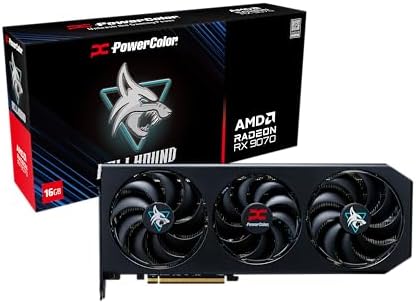
If budget isn't your primary concern and you want the best performance-per-pound card in this entire roundup, the Sapphire Pulse RX 9070 XT is it. Full stop. RDNA 4 architecture brings meaningful IPC improvements over RDNA 3, and the 16GB GDDR6 frame buffer is genuinely future-proof for 1440p and capable 4K gaming.
Sapphire's Pulse cooler is a known quantity. It's not as flashy as the Nitro+ range, but it's well-engineered, runs quietly under load, and the dual-fan setup keeps temperatures in check without the card sounding like a jet engine. The dual HDMI and dual DisplayPort outputs are a nice touch for multi-monitor setups.
In real-world gaming, the RX 9070 XT trades blows with NVIDIA's RTX 5070 in rasterisation workloads, often coming out ahead at 1440p. AMD's FSR 4 upscaling has also improved considerably, closing the gap with DLSS 4 in supported titles. For content creators, the improved media engine handles AV1 encode and decode without breaking a sweat.
The honest caveat: AMD's ray tracing still trails NVIDIA's implementation, and if you're heavily invested in NVIDIA's ecosystem (DLSS, Reflex, Broadcast), the switch requires some adjustment. But for pure gaming performance at this price, the RX 9070 XT is hard to argue with.
Pros
Exceptional 1440p and capable 4K performance
16GB GDDR6 VRAM is genuinely future-proof
RDNA 4 architecture with improved efficiency
Dual HDMI and dual DP for multi-monitor setups
Quiet Pulse cooler under load
Cons
Ray tracing still behind NVIDIA at equivalent price
The RX 9060 XT is where this list's value argument lands. AMD's RDNA 4 architecture in a mid-range card, with 16GB of GDDR6: generous for this tier at a time when games keep asking for more memory, and the reason the card should stay relevant at 1440p for years. Our review of the ASUS Dual version scored it 8.5.
RDNA 4 brings a real step up in ray tracing over RDNA 3 and introduces FSR 4, AMD's first machine-learning upscaler, though FSR 4 needs each game's developer to add it, so not every title benefits yet. Ray tracing still trails NVIDIA's RTX 5060 Ti at a similar price.
The practical details are friendly. It draws 150W through a single 8-pin connector, so most existing mid-range power supplies cope without an upgrade, and the fans stop entirely at idle, so the card is silent at the desktop. The limit to know is the 128-bit memory bus: it caps bandwidth, which is why this is a 1440p card rather than a native 4K one despite all that VRAM. Creative work that leans on GPU compute is also better served by NVIDIA, because AMD's ROCm ecosystem is far less mature than CUDA.
Pros
16GB GDDR6 at a mid-range price, no 8GB memory limits at 1440p
RDNA 4 improves ray tracing and adds the FSR 4 upscaler
150W with one 8-pin connector, easy on existing PSUs
Zero-RPM mode keeps it silent at idle
Cons
128-bit memory bus limits bandwidth, not a native 4K card
The RTX 5070 Ti is NVIDIA's answer to the question: what if you want proper 4K gaming without paying flagship money? Gigabyte's GAMING OC implementation runs the GPU at 2588 MHz out of the box, which is a meaningful bump over reference clocks. The 16GB GDDR7 frame buffer on a 256-bit bus gives it the bandwidth to handle 4K textures without breaking a sweat.
DLSS 4 with Multi Frame Generation is the headline feature here. In supported titles, it can multiply frame rates dramatically, making 4K 120fps gaming a realistic target rather than an aspirational one. The three DisplayPort 2.1a outputs mean you can run a 4K 240Hz display or even a high-refresh 8K panel if you're feeling ambitious.
Gigabyte's WINDFORCE cooling on the GAMING OC series is solid. Three fans, a large heatsink, and good thermal paste application keep the GPU well within safe temperatures. It's not as premium as the AORUS range, but it's quieter than you'd expect for a card this powerful.
The price is the honest sticking point. This is a serious investment, and unless you're genuinely gaming at 4K or doing heavy GPU-accelerated workloads, the RX 9070 XT will serve you better per pound spent.
The RTX 5050 is NVIDIA's entry point into the Blackwell generation, and MSI's GAMING OC version is a tidy little card. For anyone building their first gaming PC or upgrading from integrated graphics, this is a sensible starting point. You get PCIe 5.0 connectivity, DLSS 4 support, and MSI's TWIN FROZR 10 cooling, which is genuinely good for an entry-level card.
The 8GB GDDR6 at 20Gbps on a 128-bit bus is the honest limitation here. It's fine for 1080p gaming at medium to high settings, but don't expect to max out texture packs in modern open-world titles. The 128-bit memory bus is a bottleneck that becomes more apparent as resolution increases.
That said, for beginners entering the GPU market, the RTX 5050 offers something the older RTX 3050 doesn't: DLSS 4 with Frame Generation. In supported titles, this can make the card feel considerably faster than its raw specs suggest. It's a proper entry into the modern NVIDIA ecosystem rather than a dead-end purchase.
HDMI 2.1b and DisplayPort 2.1b outputs are future-proof for display connectivity. The card is also relatively compact, which helps in smaller builds. Not the most exciting card in this roundup, but it does its job well for the target audience.
The AORUS Master range has always been Gigabyte's premium tier, and the RTX 3070 Master is a good example of why. Three WINDFORCE fans, a substantial heatsink, and a metal backplate give this card a build quality that feels genuinely premium in hand. It's the kind of GPU you buy when you want something that looks and feels expensive, not just performs well.
Performance-wise, the RTX 3070 is still a capable 1440p card in 2026. It handles most titles at high settings without issue, and the 256-bit memory bus gives it better bandwidth than the RTX 3050 or RTX 5050. The 8GB VRAM is starting to feel a bit tight in the most demanding titles, though, and that's the honest limitation you need to weigh up.
The pricing has crept up since launch, which makes the value proposition less compelling than it once was. You're paying a premium for the AORUS branding and build quality, and at current prices the RX 9060 XT offers better performance per pound. But if build quality and aesthetics matter to you, the AORUS Master is hard to beat in this roundup.
RGB lighting is tasteful rather than garish, the card runs cool under sustained load, and the overall package feels like it'll last. A solid choice for a showcase build.
Look, the RX 580 is old. Really old. This is a Polaris architecture card from 2017, and in 2026 it's showing every one of those years. But it's in this roundup because it's the cheapest card here, and there are scenarios where it still makes sense. Think: a spare PC for a family member, a very light gaming machine, or a secondary display output box.
At 1080p with modest settings, the RX 580 can still run older titles and esports games at playable frame rates. The DVI-D output is actually a selling point for anyone still running an older monitor. And the dual HDMI plus dual DisplayPort outputs give it decent connectivity for its age.
But here's the honest truth: it has no ray tracing, no hardware upscaling support, no AV1 encode or decode, and the GDDR5 memory is considerably slower than anything in the modern GPU lineup. Power consumption is also disproportionately high for the performance you get. It draws more watts than an RTX 5050 for considerably less performance.
If you can stretch your budget at all, do it. The RTX 3050 or RTX 5050 are vastly better investments. The RX 580 is a last resort, not a recommendation.
The RTX 3050 VENTUS 2X XS White is a compact, clean-looking card that fits into smaller cases where larger GPUs simply won't go. The white colourway is genuinely attractive if you're building a white-themed system, and MSI's VENTUS cooler does a reasonable job keeping temperatures in check.
Performance is entry-level. The 128-bit memory bus is the same limitation you'll find on the RTX 5050, and 8GB GDDR6 is the minimum you'd want for 1080p gaming in 2026. It handles esports titles and older AAA games well, but newer open-world games will need settings adjustments to stay smooth.
DLSS 2 support helps in compatible titles, and the HDMI 2.1 output means you can connect a 4K display for media playback even if 4K gaming is off the table. The compact XS form factor is the real selling point here. If you have a mini-ITX build or a case with limited GPU clearance, this is one of the few modern NVIDIA options that'll fit.
At its price point, it's decent but not exciting. The RTX 5050 offers DLSS 4 and PCIe 5.0 for a similar outlay, which makes the RTX 3050 a harder sell unless you specifically need the compact dimensions or the white aesthetic.
This is a genuinely interesting card. ASUS has taken the RTX 5060 and squeezed it into a low-profile form factor, which opens up a whole category of small form factor PCs and HTPCs that previously had very limited GPU options. The IP5X dust resistance rating is unusual for a graphics card and suggests ASUS is targeting industrial or dusty-environment use cases too.
The 8GB GDDR7 is faster than the GDDR6 you'll find on the RTX 3050 or RTX 5050, which helps offset the bandwidth limitations of a low-profile cooler design. PCIe 5.0 connectivity means it'll slot into any modern motherboard without a second thought. HDMI 2.1 and DisplayPort 2.1 outputs cover all modern display standards.
Performance is solid for 1080p gaming and surprisingly capable at 1440p in less demanding titles. The Blackwell architecture brings DLSS 4 support, which is a significant advantage over older low-profile options. For an HTPC that doubles as a light gaming machine, this is the best option on the market right now.
The honest limitation is thermals. Low-profile coolers have less heatsink mass, and in a tight case with poor airflow, temperatures can climb. Make sure your case has decent ventilation before committing. But as a specialist card for a specific use case, it's excellent.
The MSI GAMING TRIO OC is one of the better RTX 5070 implementations available in the UK. The TRI FROZR 4 cooler with three STORMFORCE fans is a proven design that keeps the GPU cool and quiet even under sustained 4K workloads. The RGB implementation is tasteful rather than overwhelming, and the overall aesthetic is clean.
12GB GDDR7 at 28Gbps on a 192-bit bus gives the RTX 5070 strong memory bandwidth for its tier. It's not quite the 256-bit bus of the RTX 5070 Ti, but in practice the difference is minimal at 1440p. DLSS 4 with Multi Frame Generation is fully supported, and in titles that implement it well, the performance uplift is substantial.
For the Best Graphics Cards UK 2026 context, the RTX 5070 TRIO OC sits in an interesting position. It's considerably cheaper than the RTX 5070 Ti but offers most of the same gaming experience at 1440p. The step up to 4K is where the Ti's extra VRAM and bandwidth start to matter more.
It's a well-executed card at a price that's more justifiable than the RTX 5070 Ti. If 1440p gaming is your target and you want DLSS 4, this is a strong choice.
ASUS's DUAL RTX 5070 OC is specifically designed with small form factor builds in mind. The compact dimensions mean it'll fit in cases that would reject a full-size GAMING TRIO or ROG Strix card, and the dual-fan DUAL cooler does a surprisingly good job keeping temperatures reasonable given the reduced heatsink size.
The 2572MHz boost clock is a solid OC out of the box, and the 12GB GDDR7 matches the MSI TRIO OC spec. Three DisplayPort outputs plus one HDMI is a good connectivity spread for a compact card. PCIe 5.0 means it's fully compatible with the latest platforms.
The compromise versus the larger RTX 5070 implementations is thermal headroom. Under sustained heavy loads, the DUAL cooler runs warmer than a triple-fan design. In a well-ventilated SFF case this is manageable, but in a cramped build with poor airflow you might see thermal throttling during extended gaming sessions.
For the right use case, this is an excellent card. SFF gaming PCs have historically been limited to lower-tier GPUs or required expensive custom cooler solutions. The DUAL RTX 5070 OC changes that equation considerably.
Pros
Compact SFF-ready dimensions
Full RTX 5070 performance in a smaller package
Three DP outputs plus HDMI
PCIe 5.0 and GDDR7
Good OC out of the box
Cons
Dual-fan cooler runs warmer than triple-fan designs
Thermal throttling risk in poorly ventilated cases
11. ASUS ROG Strix GeForce RTX 2070 Super Advanced Overclocked 8G GDDR6 HDMI DisplayPort USB Type-C Gaming Graphics Card (ROG-STRIX-RTX-2070S-A8G-GAMING)
The RTX 2070 Super was a great card when it launched in 2019. In 2026, at its current asking price, it's very difficult to recommend. The Turing architecture is two generations behind Ampere and three behind Blackwell. There's no DLSS 3 or 4, no AV1 support, and ray tracing performance is considerably behind current cards at a lower price.
The ROG Strix build quality is genuinely excellent. ASUS's premium cooler, the USB Type-C output (rare on a GPU), and the overall construction are all top-tier. But build quality alone can't justify the price premium over newer, faster alternatives.
The honest assessment: if you already own this card, hold onto it a while longer. It's still functional for 1080p and light 1440p gaming. But if you're considering buying one in 2026, the money is better spent on an RX 9060 XT or even an RTX 5050. The RTX 2070 Super has been overtaken by cards costing considerably less.
As an Amazon Associate, we may earn from qualifying purchases.
The original verdict, in full
Final Verdict: Best Graphics Cards UK 2026
Of the 11 GPUs compared here, across a wide range of price points, the Sapphire Pulse RX 9070 XT is the standout choice for those who want the absolute best performance-per-pound and can stretch the budget, delivering exceptional 1440p gaming with 16GB GDDR6 and RDNA 4 architecture. Budget buyers should look at the RTX 5050 or RTX 5060 LP rather than the ageing RX 580, and anyone considering an RTX 2070 Super at current prices should think carefully before committing. The Best Graphics Cards UK 2026 landscape is genuinely strong right now, and there's a solid option at almost every price point.
The quick picks, at a glance
The quick picks, at a glance
Best Value
ASUS Dual Radeon RX 9060 XT 16GB
16GB GDDR6 and RDNA 4 architecture at a mid-range price. Exceptional VRAM for the money and solid 1440p performance.
Finding the right GPU in 2026 is genuinely tricky. Prices are all over the place, new architectures have landed from both AMD and NVIDIA, and there are still older cards floating around at prices that frankly don't make sense anymore. We've put together this Best Graphics Cards UK 2026 guide to cut through the noise. Whether you're building a budget 1080p rig, upgrading to 1440p, or chasing 4K performance, there's something here for you. This guide covers 11 cards across a range of price points and use cases, so you don't have to guess.
Buying Guide: What to Look For in the Best Graphics Cards UK 2026
01
Video memory
VRAM: How much do you actually need? In 2026, 8GB is the minimum for 1080p gaming. At 1440p, 12GB is more comfortable, and 16GB gives you genuine headroom for the next few years. Cards like the RX 9060 XT and RX 9070 XT with 16GB GDDR6 are particularly well-positioned here. Don't just look at the number though. GDDR7 is faster than GDDR6, and a narrower memory bus (128-bit vs 256-bit) can bottleneck even fast memory.
02
Architecture
Architecture matters more than clock speeds. A newer architecture at a lower clock speed will often outperform an older one running faster. RDNA 4 and Blackwell (RTX 50 series) are the current generation architectures. Ampere (RTX 30 series) is still capable but lacks newer features. Turing (RTX 20 series) is genuinely showing its age.
03
Upscaling
Upscaling technology. DLSS 4 (NVIDIA) and FSR 4 (AMD) are both excellent in 2026. DLSS 4 with Multi Frame Generation can dramatically boost frame rates in supported titles. FSR 4 is open-source and works across a wider range of hardware. If you're heavily invested in NVIDIA's ecosystem, DLSS 4 is a meaningful advantage. For most gamers, either will serve you well.
04
Power supply
Power consumption and PSU requirements. Budget cards like the RTX 3050 and RTX 5050 draw under 130W. Mid-range cards like the RTX 3060 and RX 9060 XT sit around 170W to 200W. High-end cards like the RTX 5070 Ti can exceed 300W. Make sure your PSU has enough headroom, and check that your case has adequate airflow for the card you're buying.
05
Case fit
Form factor. Most GPUs are standard ATX size, but some (like the ASUS RTX 5060 LP and the ASUS DUAL RTX 5070 OC) are designed for smaller cases. Measure your case's GPU clearance before buying, and check whether you need a low-profile card for a slim or HTPC build.
06
Further sources
For independent benchmarks and detailed GPU comparisons, TechPowerUp's GPU database is an invaluable resource. And for official product information on NVIDIA's current lineup, the NVIDIA UK GeForce page keeps specs and pricing up to date.
How we choose
How the graphics cards were compared.
1
Read specs and owner feedback
The assessment combines spec analysis and verified owner feedback from UK buyers.
2
Consult published benchmarks
Benchmark data comes from third-party sources including TechPowerUp and Digital Foundry.
3
Compare performance and value
Gaming performance, thermal behaviour, build quality, connectivity and value relative to UK street pricing inform the comparison.
How the ranking was weighed
Cards were ranked based on overall value proposition for UK buyers in 2026, not raw performance alone.
In our words
The mechanism
What we can check, and what we cannot.
We read the live UK listing for every graphics card here: price, stock, seller and the Amazon rating count, plus the patterns in long-run owner feedback. We do not lab-test graphics cards. That limit is stated here rather than buried in a footer, so you can see exactly where verifiable fact stops and editorial judgement starts.
01 / What we check
Read, not typed
Every price, rating and count on this page is read from the live listing at render time. None of it is written into copy, so none of it can go stale in prose.
02 / What we read
Past the first week
We look for what owners report months in, not the first-week enthusiasm: the failures, the noise, the support experience and how a warranty is actually handled.
03 / What we cannot know
The honest gap
Bench figures we did not measure, year-three reliability, and whether a given graphics card suits you once it is in front of you. We do not claim any of those, here or anywhere.
How the guide chose these
How We Chose These Picks
Each card in this Best Graphics Cards UK 2026 guide was assessed across a combination of spec analysis, verified owner feedback from UK buyers, and benchmark data from trusted third-party sources including TechPowerUp and Digital Foundry. We looked at real-world gaming performance at 1080p and 1440p, thermal behaviour under sustained load, build quality, connectivity, and value relative to current UK street pricing. Cards were ranked based on overall value proposition for UK buyers in 2026, not raw performance alone.
Small but useful
Questions worth settling before you buy.
01 / 05
What's the best graphics card for 1080p gaming in 2026?
The MSI GeForce RTX 5050 offers the best balance for 1080p gaming. It handles modern titles at high settings with 8GB GDDR6 memory and RTX features like DLSS 3. For tighter budgets, the RTX 3050 LP still delivers solid 1080p performance.
For 1080p gaming, 6-8GB is sufficient. For 1440p, aim for 12-16GB to future-proof your system. Modern titles like Cyberpunk 2077 and Alan Wake 2 can use over 10GB at higher settings, so more VRAM provides headroom for texture quality and ray tracing.
Both offer excellent value at different price points. AMD's RX 9060 XT and RX 9070 XT provide more VRAM (16GB) for the money, making them brilliant for content creation. NVIDIA's RTX cards have superior ray tracing and DLSS technology, which matters more for gaming performance.
Will a 450W power supply run these graphics cards?
The RTX 3050 LP (70W) and RTX 5050 (130W) will run fine on a quality 450W PSU. However, the RTX 5060 (145W), RX 9060 XT, and especially the RX 9070 XT (304W) need 550-650W minimum. Always check your PSU's 12V rail amperage, not just total wattage.
The RTX 5000 series and RX 9000 series are current-generation cards available now with excellent performance per pound. Unless you're planning a build 6+ months away, there's no reason to wait. GPU prices are stable and stock is plentiful across UK retailers.
Each route ends on the page built to close that decision. Where we have no page worth sending you to, the route is not here rather than pointing somewhere near enough.