Price gaps between GPU tiers rarely map cleanly onto performance gaps. The RTX 5070 Ti sits in that awkward bracket where the numbers on paper look compelling, but the real question is whether the premium over the vanilla 5070 is justified, and whether it keeps the 5080 honest enough to matter. The Gigabyte GeForce RTX 5070 Ti WINDFORCE OC SFF 16G Graphics Card sits in a genuinely strong position, and it's rated ★★★★½ (4.8) on Amazon. Not perfect, but strong.
The SFF (Small Form Factor) variant is the interesting wrinkle here. Gigabyte has taken the full RTX 5070 Ti silicon and fitted it within NVIDIA's SFF-ready size limits at 304 mm long, which opens up build options that larger cards simply cannot match. That's a real engineering decision with real consequences for thermals and noise. But the headline is this: if you're building or upgrading into the high-end bracket and you want proper 4K performance with DLSS 4 doing the heavy lifting, this card earns its place.
The card also has the WINDFORCE cooling system and Dual BIOS switching between Performance and Silent modes. The 2497 MHz boost clock out of the box is a modest factory overclock over reference. Whether that translates into meaningful real-world gains is a different conversation, and one worth having properly.
Core Specifications
The Gigabyte GeForce RTX 5070 Ti WINDFORCE OC SFF 16G Graphics Card is built on NVIDIA's Blackwell architecture, the generational successor to Ada Lovelace. The card carries 16GB of GDDR7 memory across a 256-bit bus, which is a meaningful step up in bandwidth efficiency over the GDDR6X used in previous-generation cards. GDDR7 delivers substantially higher data rates per pin, so the effective bandwidth here punches above what the bus width alone would suggest from a GDDR6X comparison.
The core clock is specified at 2497 MHz boost, which is Gigabyte's factory overclock over the reference RTX 5070 Ti specification. The card connects via PCI Express 5.0, and it'll run fine in PCIe 4.0 systems too (with negligible real-world performance difference for gaming workloads). Display outputs are three DisplayPort 2.1b and one HDMI 2.1b, which covers everything from high-refresh 1440p monitors to 4K 144Hz displays and beyond.
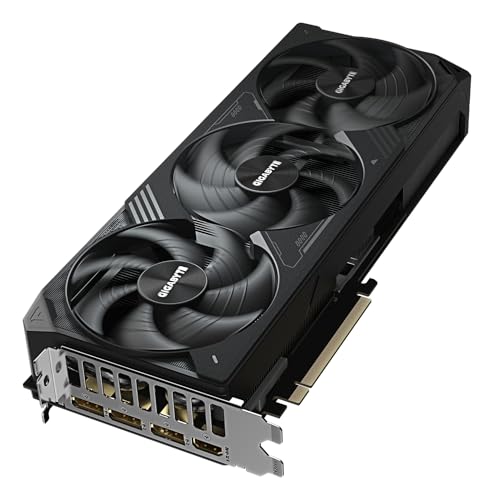
The WINDFORCE cooling system on this SFF variant uses three fans in a compact arrangement. Gigabyte's reinforced structure and the VGA holder in the box address the sag problem that plagues heavier cards, which is a practical detail worth caring about if you're not running a vertical GPU mount. The Dual BIOS switch gives you a hardware toggle between Performance and Silent modes, something that's genuinely useful rather than just a marketing bullet point.
| Specification | Detail |
|---|---|
| GPU Architecture | NVIDIA Blackwell |
| VRAM | 16GB GDDR7 |
| Memory Bus | 256-bit |
| Boost Clock | 2497 MHz |
| Interface | PCI-E 5.0 |
| Display Outputs | 3x DisplayPort 2.1b, 1x HDMI 2.1b |
| Cooling | WINDFORCE (triple-fan SFF) |
| Card Size | 304 x 126 x 50 mm (NVIDIA SFF-ready) |
| BIOS Modes | Dual BIOS (Performance / Silent) |
| Warranty | Check Gigabyte UK (some terms need online registration) |
| Model Number | GV-N507TWF3OC-16GD |
| Current Price | £1,099.99 |

Architecture and Cores
Blackwell's improvements over Ada Lovelace are not just incremental clock bumps. The RTX 5070 Ti uses the GB203 die. You're getting a substantial chunk of Blackwell's shader hardware, fourth-generation RT cores for ray tracing, and fifth-generation Tensor cores that underpin DLSS 4's Multi Frame Generation capability. That last point matters more than it might seem, and we'll cover it properly in the upscaling section.
The shader count on the RTX 5070 Ti sits at 8960 CUDA cores. The Tensor core improvements are arguably the bigger story, because they're what makes DLSS 4 work at the quality levels it does. NVIDIA has been iterating on this hardware seriously, and Blackwell's Tensor cores are a meaningful step forward for AI-accelerated rendering.
The fabrication process for Blackwell is TSMC's 4NP node, an optimised variant of their 4nm process. This delivers better power efficiency per compute unit compared to Ada Lovelace's 4N node, which is part of why Blackwell cards can hit higher performance numbers without proportionally higher power draw. It's not magic, the RTX 5070 Ti still needs a proper power budget, but the efficiency story is genuinely better than the previous generation at equivalent performance levels.
Clock Speeds and Boost
Gigabyte specifies the boost clock at 2497 MHz on this WINDFORCE OC variant. The reference RTX 5070 Ti boost is 2452 MHz, so the factory overclock here is around 45 MHz, which is roughly a 1.8% uplift. Be honest about what that means: a sub-2% clock difference is too small to notice in most games. You're not buying this card for the OC. You're buying it for the Blackwell silicon and the SFF form factor.
Real-world boost behaviour on Blackwell cards is generally good. NVIDIA's GPU Boost algorithm has been refined over multiple generations, and cards tend to sustain their advertised boost clocks under gaming loads rather than bouncing between base and boost. The SFF cooler is the variable here: a smaller thermal solution has to work harder to keep temperatures in the range where boost clocks sustain rather than throttle back.
The Dual BIOS switch is relevant to clock behaviour. In Performance mode, the card runs its full power limit and the fans are more aggressive to match. In Silent mode, the power limit is typically reduced slightly and the fan curve is tuned for quieter operation, which can mean slightly lower sustained clocks under extended heavy loads. For most gaming sessions, the difference is minimal. For long rendering jobs or sustained compute workloads, Performance mode is the one you want. The fact that you can switch this in hardware without software is a proper quality-of-life feature.
VRAM Analysis
Sixteen gigabytes of GDDR7 on a 256-bit bus. This is the VRAM configuration that should keep you comfortable through the rest of this decade for gaming, and it's one of the RTX 5070 Ti's clearest advantages over the previous generation. The RTX 4070 Ti Super had 16GB of GDDR6X, which was already adequate, but GDDR7 delivers meaningfully higher bandwidth. With GDDR7 at 28 Gbps on this 256-bit bus, the card has 896 GB/s of memory bandwidth.
At 1440p, 16GB is more than you'll ever need right now. Even texture-heavy open-world titles with high-resolution texture packs sit comfortably under 12GB at 1440p with everything maxed. At 4K with maximum texture settings in demanding titles like Cyberpunk 2077 or Alan Wake 2, you'll see VRAM usage pushing into the 12 to 14GB range, which means 16GB gives you proper headroom rather than sitting on the edge. This matters for longevity. Cards that are marginal on VRAM today tend to become genuinely problematic in 18 to 24 months as games push harder.
Memory speed is the one area where the RTX 5070 Ti gives ground to the 5080, which uses the same 256-bit bus with faster GDDR7, while the 5090 steps up to 512-bit. But for the performance tier this card occupies, the bandwidth on offer is not a bottleneck in any current gaming scenario. The combination of 16GB capacity and GDDR7 bandwidth is genuinely well-matched to what games actually need at 4K in 2026.
Ray Tracing and Upscaling
This is where Blackwell makes its clearest argument. DLSS 4 with Multi Frame Generation is a genuine step change from DLSS 3, and the RTX 5070 Ti has the Tensor core hardware to run it properly. Multi Frame Generation can generate up to three additional frames for every rendered frame, which means the effective frame rate multiplier is substantially higher than DLSS 3's single generated frame.
Ray tracing performance on Blackwell is improved over Ada Lovelace, but the honest picture is that RT still costs a lot of frames in heavily ray-traced scenes. The upscaling image quality at Quality preset is genuinely good, and the frame generation artefacts that were occasionally visible in DLSS 3 are less pronounced in DLSS 4 thanks to improved motion vector handling.
The RTX 5070 Ti can run FSR on games that don't have DLSS support. For most mainstream titles in 2026, though, DLSS 4 support is increasingly the norm rather than the exception.

Video Encoding
The RTX 5070 Ti carries NVIDIA's ninth-generation NVENC encoder, which supports AV1 hardware encoding alongside H.264 and H.265. AV1 is increasingly the format that matters for streaming, with Twitch and YouTube both supporting it, and hardware AV1 encoding on Blackwell produces output quality that competes with software x264 at much lower CPU overhead. If you're streaming at high bitrates or encoding video for upload, this is a meaningful practical benefit over a card without AV1 hardware support.
For content creators running applications like DaVinci Resolve or Premiere Pro, the NVENC encoder also accelerates export times for supported formats. The RTX 5070 Ti's dual NVENC engines (a feature of the higher-end Blackwell dies) mean you can encode two streams simultaneously, which is useful for workflows that involve proxy generation alongside a primary export. This isn't a workstation card, but it's capable enough to make a real difference for semi-professional video work.
AV1 decode is also hardware-accelerated, which matters for anyone consuming high-bitrate AV1 content from streaming services or YouTube. Hardware decode offloads the CPU and reduces power consumption during playback, which is a small but real quality-of-life benefit for a card that might also serve as a media PC GPU. The decode capability handles up to 8K AV1 content, which is ahead of what most content pipelines currently deliver but good to have for longevity.
Power Consumption
The RTX 5070 Ti has a Total Graphics Power (TGP) of 300W at reference spec. Gigabyte's WINDFORCE OC variant may push this slightly higher in Performance BIOS mode. Transient spikes can briefly exceed the rated power during scene transitions or heavy particle effects, which is why PSU headroom matters.
The practical PSU recommendation for this card is 750W minimum, with 850W being the sensible choice if you're pairing it with a modern high-core-count CPU. An AMD Ryzen 9 9900X or Intel Core Ultra 9 285K can pull 150W or more under heavy load, so the combined system draw can approach 450W in demanding scenarios. A quality 850W unit from a reputable brand gives you comfortable headroom without overspending on capacity you'll never use. Cheap PSUs with poor transient response are a genuine risk with high-performance GPUs, so this isn't the place to cut corners.
The power connector situation on Blackwell cards uses the 16-pin 12V-2x6 connector, a revision of 12VHPWR, which has had a troubled history with some adapters. Gigabyte's implementation on this card should be checked against their specific documentation, and if you're using the supplied adapter from two 8-pin connectors, make sure it's a quality unit and that the connector is fully seated. The PCI-SIG has updated guidance on 12VHPWR connector handling, and following it properly eliminates the risk that generated so much noise in early RTX 336. It's not a problem if you're careful; it becomes one if you're not.
Thermal Performance
The SFF form factor is the thermal wildcard on this card. Gigabyte has fitted the WINDFORCE cooling system within a 304 mm by 50 mm card, which limits how much heatsink surface area it has to work with.
NVIDIA lists a maximum GPU temperature of 88 degrees Celsius for the RTX 5070 Ti. Whether you hit thermal limits in practice depends heavily on your case airflow. A poorly ventilated case, or a small form factor case without proper airflow planning, will push temperatures toward that limit and potentially into throttling territory.
Blackwell cards with zero-RPM fan modes stop their fans entirely until a temperature threshold is reached. This is good for longevity and good for the silence of your setup during lighter workloads.
Acoustic Performance
Zero-RPM mode is active on this card at idle and under light loads, so you'll hear nothing from the GPU during desktop use, video playback, or light gaming. The fans don't spin up until the GPU temperature crosses a threshold (typically around 50 to 55 degrees), which means casual use is genuinely silent. This is standard for modern mid-to-high-end GPU coolers, but it's worth confirming because some cheaper cards skip it.
Under gaming load in Performance BIOS mode, the WINDFORCE SFF fans will spin up to maintain temperatures. Switch to Silent BIOS mode and the fan curve backs off, dropping noise noticeably at the cost of slightly higher temperatures.
Final Verdict
The Gigabyte GeForce RTX 5070 Ti WINDFORCE OC SFF 16G Graphics Card is a well-executed card in a genuinely strong performance tier. The Blackwell architecture delivers real generational improvements over Ada Lovelace, DLSS 4 with Multi Frame Generation is a meaningful capability, and 16GB of GDDR7 is the right VRAM configuration for 4K gaming in 2026 and beyond. The SFF form factor is the defining characteristic of this specific variant, and it's a smart choice for anyone building in a compact case or a system where GPU length is a constraint.
The factory overclock is modest enough that it shouldn't be a purchasing factor.
It's rated ★★★★½ (4.8) on Amazon. For 1440p gaming at high refresh rates or 4K gaming with DLSS 4, this is a proper recommendation. If you're on 1080p, spend less. If you need the absolute fastest, spend more. For everyone in between, this card is sorted.
Editorial Score: 8.5 / 10
What works. What doesn’t.
4 + 1What we liked4 reasons
- 16GB GDDR7 on 256-bit bus: future-proof VRAM for 4K gaming
- DLSS 4 Multi Frame Generation is a genuine performance multiplier
- SFF form factor opens up compact builds without sacrificing full silicon
- Dual BIOS hardware switch for Performance vs Silent modes
Where it falls1 reasons
- Factory overclock (45 MHz over reference) is too small to matter in practice
Full specifications
12 attributes| Vram GB | 16 |
|---|---|
| Boost clock MHZ | 2497 |
| Chipset | RTX 5070 Ti |
| Cooler type | triple-fan |
| Core clock MHZ | 2497 |
| Generation | RTX 50 Series |
| Interface | PCIe 5.0 |
| Length MM | 304 |
| Memory BUS BIT | 256 |
| Memory type | GDDR7 |
| Power connectors | 1x 16-pin 12VHPWR |
| Slot width | 2.5 |
Will it run on what you have?
Free toolIf this isn’t right for you
2 options 9.0 / 10
MSI GeForce RTX 5080 16G GAMING TRIO OC Graphics Card - RTX 5080 GPU, 16GB GDDR7 (30Gbps/256-bit), PCIe 5.0 - TRI FROZR 4 (3 x STORMFORCE Fan), Gaming & Silent mode, RGB - HDMI 2.1b, DisplayPort 2.1b
£1,399.00 · MSI
 9.0 / 10
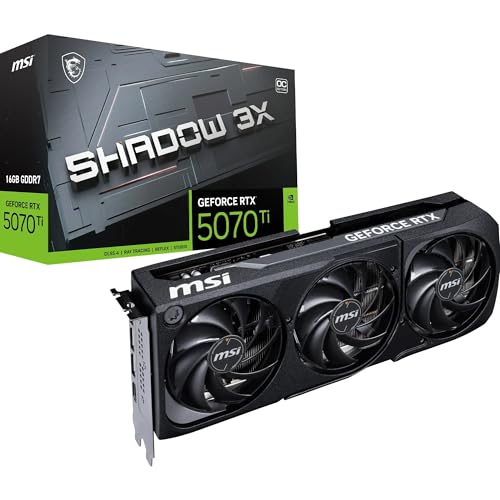
MSI GeForce RTX 5070 Ti 16G Shadow 3X OC Graphics Card, 16GB GDDR7 (28Gbps/256-bit), PCIe 5.0 - Triple Fan Thermal Design (3x Torx Fan 5.0) - HDMI 2.1b, DP 2.1b, 16384 MB
£1,129.99 · MSI
Frequently asked
4 questions01Is the Gigabyte GeForce RTX 5070 Ti WINDFORCE OC SFF 16G good for 1440p gaming?+
Yes. With DLSS 4 enabled, even heavily ray-traced games at 1440p become very comfortable. It's arguably overspecified for 1440p at 60 Hz, but if you're on a 144 Hz or 165 Hz monitor it earns its place properly.
02What PSU do I need for the Gigabyte GeForce RTX 5070 Ti WINDFORCE OC SFF 16G?+
The RTX 5070 Ti has a 300W TGP, and the WINDFORCE OC variant may run slightly higher in Performance BIOS mode. A 750W PSU is the minimum recommendation, but 850W is the sensible choice for a complete system with a modern high-performance CPU. Make sure it's a quality unit from a reputable brand with good transient response. The 16-pin 12V-2x6 connector should be fully and correctly seated before powering on.
03Is 16GB VRAM enough in 2026?+
Yes, comfortably. At 1440p, 16GB is more than any current game needs. At 4K with maximum texture settings in demanding titles, VRAM usage can reach 12 to 14GB in the most demanding scenarios, so 16GB gives you real headroom rather than sitting on the edge. Cards with 8GB are already showing strain in some 4K scenarios, and 12GB is adequate for now but less comfortable for longevity. 16GB GDDR7 is the right configuration for a card in this performance tier.
04What warranty and returns apply to the Gigabyte GeForce RTX 5070 Ti WINDFORCE OC SFF 16G?+
Gigabyte ties some warranty terms to online registration, so check the term on its UK warranty page and register soon after purchase. Amazon offers 30-day returns on most items sold and fulfilled by Amazon, and you're also covered by Amazon's A-to-Z guarantee for additional purchase protection.