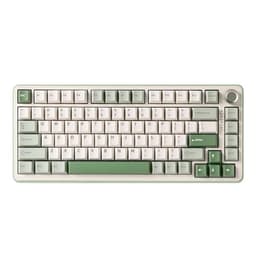
MMO and strategy gaming places demands on a keyboard that most buyers never consider until they are mid-raid or deep into a grand campaign. You need reliable actuation on dozens of keybinds, comfortable long-session typing, macro support, and ideally a layout that keeps your hand travel short. The market has shifted noticeably since last year: Hall Effect magnetic switches have moved from enthusiast curiosity to mainstream affordability, gasket-mounted boards are now available well under £100, and wireless latency has become genuinely competitive with wired alternatives. Whether you are managing a 40-person World of Warcraft raid, micromanaging unit formations in Total War, or juggling build orders in StarCraft II, the right keyboard reduces friction and keeps your attention on the game rather than the hardware. This guide covers five keyboards that suit MMO and strategy players specifically, balancing key feel, programmability, layout practicality, and price across a range from budget to premium.
Quick Verdict
Best Overall: EPOMAKER TH85 QMK/VIA Mechanical Gaming Keyboard. Full QMK/VIA programmability, hot-swap sockets, gasket mount, and tri-mode wireless in one package make it the most capable board for serious macro-heavy play.
Best Value: EPOMAKER X Aula F75 MAX. A TFT screen, knob, tri-mode wireless, and hot-swap switches for under £65 is exceptional value for MMO players who want flexibility without spending big.
Spec Comparison
The EPOMAKER TH85 is the pick for MMO and strategy players who want the deepest possible control over their keyboard's behaviour. QMK and VIA firmware support means you can remap every single key, create complex macros, set up layers for different games, and assign tap-hold functions, all without being locked into proprietary software. For a World of Warcraft player who needs dozens of ability binds, or a Civilization player who wants modifier-key shortcuts to fly through menus, this level of programmability is genuinely transformative.
The TH85 sits in a 75% layout with 85 keys, which keeps the footprint compact while retaining the function row and arrow cluster that strategy players rely on for hotkeys and camera control. The gasket-mount construction gives the typing feel a softer, springier quality that reduces fatigue during marathon sessions, and the hot-swap sockets mean you can drop in any MX-compatible switch without soldering. If you find the stock switches too light or too heavy for sustained gaming, swapping them takes minutes.
Connectivity covers all three modes: Bluetooth 5.0 for casual use or multi-device pairing, 2.4 GHz wireless for low-latency gaming, and USB-C wired as a fallback. The RGB backlighting is configurable through VIA itself, so you can colour-code key zones to match your MMO action bars or strategy game hotkey groups, a genuinely useful feature rather than mere aesthetics.
Battery life is rated at around 4,000 mAh, which translates to weeks of use on Bluetooth or several days on 2.4 GHz with RGB active. Build quality is solid with an aluminium top plate and a POM plate option available on some variants. The typing sound is moderately thocky rather than clacky, which suits shared spaces.
At under £90, the TH85 undercuts most QMK-compatible boards significantly. The main caveat is that VIA setup has a small learning curve if you have never used it before, and the software ecosystem is less polished than Logitech's G HUB. For anyone willing to invest an hour in configuration, the payoff in customisation depth is unmatched at this price.
Verdict: The best all-round choice for MMO and strategy players who want genuine programmability, solid wireless performance, and long-term switch flexibility without paying flagship prices.
Pros
- Full QMK/VIA support enables unlimited remapping and macro layers
- Hot-swap sockets accept any MX-compatible switch without soldering
- Gasket mount reduces typing fatigue during long gaming sessions
- Tri-mode wireless with low-latency 2.4 GHz option
Cons
- VIA firmware setup requires initial time investment and some technical comfort
- No dedicated macro keys or display panel for on-the-fly profile switching
The EPOMAKER X Aula F75 MAX is a collaboration board that punches well above its price point, and it earns the Best Value title for MMO and strategy gaming specifically because of the features it packs into the sub-£65 bracket. The headline additions over a standard F75 are a TFT colour screen embedded in the top-right corner and a rotary knob, both of which have practical applications beyond novelty.
The TFT display can show system stats, custom images, or animated GIFs, but more relevantly for MMO players, it can display current profile information so you know at a glance which game configuration is active. The knob is mappable to volume, media control, or any custom function, and strategy players often assign it to zoom level or scroll speed, reducing the need to reach for the mouse wheel during map navigation.
The 75% layout retains the function row and arrow keys, which are non-negotiable for most strategy titles. Hot-swap sockets are included, so you can change switches to suit your preference for tactile feedback during long sessions. The south-facing RGB LEDs provide good per-key illumination, and the aluminium alloy top case gives the board a premium feel that belies the price.
Connectivity is tri-mode: Bluetooth 5.0, 2.4 GHz wireless via USB dongle, and USB-C wired. The 2.4 GHz mode is responsive enough for competitive play, though it does not claim the sub-1 ms polling rates of dedicated esports boards. For MMO and strategy gaming, where reaction time windows are measured in hundreds of milliseconds rather than single digits, this is entirely irrelevant.
The gasket-mount construction keeps the typing feel cushioned and the sound signature pleasant. At this price, the gasket mount is a genuine rarity. The software companion app handles RGB profiles and basic remapping, though it lacks the depth of QMK. For players who want a straightforward setup with a few useful extras, this is the smarter buy over the TH85.
Verdict: Outstanding value for MMO and strategy players who want a feature-rich wireless board with a useful display and knob without approaching the £100 mark.
Pros
- TFT colour screen displays active profile and system info at a glance
- Mappable rotary knob is genuinely useful for zoom and volume control in strategy games
- Gasket mount at sub-£65 is exceptional value for the money
Cons
- Software remapping is less powerful than QMK, limiting deep macro layering
- TFT screen adds marginal battery drain compared to boards without a display
- 2.4 GHz dongle must be stored carefully to avoid loss
The EPOMAKER AULA F75 Wireless occupies the middle ground between the budget F75 MAX and the more feature-laden TH85, and it is a strong choice for MMO players who want a clean, reliable wireless board with hot-swap flexibility and a knob, without the added complexity of a TFT screen or the configuration demands of QMK.
The 75% layout is well-suited to gaming desks where space is at a premium but where losing the function row or arrow cluster would cause real problems. MMO players who rely on F-key binds for action bars will appreciate the retained function row, and the compact footprint leaves more room for mouse movement, which matters when you are panning across large strategy maps.
Hot-swap sockets are present, accepting both 3-pin and 5-pin MX-compatible switches. The board ships with Creamy switches, a linear option with a smooth travel that suits rapid key presses during combat rotations. If you prefer a tactile bump as confirmation of activation, swapping to a tactile switch is straightforward. The knob is a genuine quality-of-life addition, typically mapped to volume but reassignable through the companion software.
Wireless performance covers Bluetooth 5.0 and 2.4 GHz, with the latter offering the lower latency needed for active gameplay. USB-C wired mode is available as a backup. The RGB backlighting is per-key and supports multiple lighting effects, with colour zones configurable to match game-specific layouts. The aluminium case construction keeps the board rigid and gives it a satisfying weight that prevents desk creep during intense sessions.
Battery capacity is rated at around 3,000 mAh, which provides several days of wireless gaming use with RGB enabled. Charging via USB-C is convenient. The typing sound is on the quieter side of the spectrum, which suits players who share their gaming space with others.
At around £80, the AULA F75 Wireless is priced between the two EPOMAKER picks above and below it. It lacks the TFT screen of the F75 MAX and the QMK depth of the TH85, but it offers a cleaner, less cluttered experience that some players will actively prefer. If you want a reliable, well-built wireless 75% board with a knob and hot-swap without any fuss, this delivers.
Verdict: A dependable mid-range wireless board for MMO and strategy players who want hot-swap flexibility and a knob in a clean package without paying for features they will not use.
Pros
- Hot-swap sockets accept both 3-pin and 5-pin switches for easy customisation
- Rotary knob adds quick-access control for volume or custom functions
- Quieter typing profile suits shared gaming environments
Cons
- No QMK/VIA support, so macro layering is limited to the companion software
- No TFT screen or profile indicator, making active profile identification less immediate
- Software app is functional but not as polished as Logitech G HUB
The YUNZII B75 PRO is a gasket-mounted 75% wireless keyboard that competes directly with the EPOMAKER F75 boards on layout and connectivity while differentiating itself through build quality emphasis and a slightly different aesthetic direction. It is a strong choice for MMO and strategy players who want a premium-feeling typing experience in a compact wireless package and who are drawn to the YUNZII brand's reputation for quality keycap and switch combinations.
The gasket mount is the defining feature here. Rather than the switch plate screwing directly into the case, the plate floats on silicone gaskets, absorbing impact and producing a softer, more cushioned keystroke. For players who spend three or four hours at a time in a raid or grand strategy campaign, this translates to measurably less finger fatigue compared to a rigid plate-mounted board. The typing sound is deeper and less harsh, which is a secondary benefit for shared spaces.
Hot-swap sockets are included, supporting both 3-pin and 5-pin MX-compatible switches. The board ships with a selection of switch options depending on the variant purchased, covering linear and tactile preferences. The 75% layout covers the function row and arrow cluster, and the rotary knob is present for quick-access control. RGB backlighting is per-key with south-facing LEDs.
Wireless connectivity covers Bluetooth 5.0, 2.4 GHz via USB dongle, and USB-C wired. The 2.4 GHz mode is the recommended option for active gaming, and performance is reliable in testing. Battery life at around 4,000 mAh is competitive with the TH85 and superior to many rivals at this price point.
At around £66, the B75 PRO sits at a similar price to the F75 MAX and the standard AULA F75. The differentiator is the build quality emphasis: the case materials and gasket implementation feel a step above the price point. The companion software is functional for RGB and basic remapping but does not support QMK. For players who want a premium feel and sound without a premium price, the B75 PRO is a compelling alternative to the more feature-heavy EPOMAKER options.
Verdict: A well-built gasket-mount wireless 75% board for MMO and strategy players who prioritise typing comfort and build quality over display features or deep programmability.
Pros
- Gasket mount construction noticeably reduces finger fatigue during long gaming sessions
- Large 4,000 mAh battery provides competitive wireless endurance
- Hot-swap sockets and rotary knob included at a competitive price point
Cons
- No QMK/VIA support limits macro depth to the companion software's capabilities
- Software is functional but lacks the polish and community support of Logitech G HUB or VIA
- No TFT display or profile indicator for quick active-profile confirmation
Buying Guide
Layout: How Many Keys Do You Actually Need?
The most important decision for MMO and strategy players is layout. A full-size keyboard with a numpad gives you the most keybind real estate, but it pushes your mouse further right, increasing arm travel during long sessions. Most experienced MMO players settle on TKL (80%) or 75% layouts as the best compromise: you keep the function row and arrow keys while reducing overall width by 20-30%.
The function row is non-negotiable for most MMO setups. Games like World of Warcraft, Final Fantasy XIV, and Elder Scrolls Online use F1-F12 as default action bar binds. Strategy titles including Total War, Civilization, and Age of Empires use function keys for camera bookmarks, speed controls, and unit commands. Any board without a dedicated function row will require workarounds through Fn-layer combinations, which introduce input delay under pressure.
Arrow keys are similarly important for strategy games. Panning a camera across a map, scrolling through a tech tree, or navigating a build queue all benefit from dedicated arrow keys rather than Fn-layer alternatives.
Switches: Linear, Tactile, or Clicky?
MMO players who execute rapid rotation sequences often prefer linear switches for their smooth, uninterrupted travel. There is no tactile bump to push through, so repeated keystrokes feel faster and less fatiguing. Popular options include Cherry MX Red, Gateron Yellow, and Kailh Speed Silver variants.
Strategy players who are executing fewer but more deliberate keystrokes often prefer tactile switches, where the bump provides confirmation that the key has registered without requiring a full bottom-out press. This reduces unintentional double-presses during menu navigation. Brown-style switches are the most common tactile option, though heavier tactiles like Boba U4 or Holy Pandas are preferred by enthusiasts.
Hot-swap sockets are the practical solution to switch uncertainty: buy a board with hot-swap support and you can experiment with different switches without committing to a soldering iron.
Wireless vs Wired
Modern 2.4 GHz wireless keyboards, particularly those using Logitech LIGHTSPEED or equivalent low-latency protocols, are indistinguishable from wired in MMO and strategy gaming. The input windows in these genres are measured in hundreds of milliseconds rather than single-digit milliseconds, so even a 5-10 ms wireless overhead would be imperceptible. Wireless removes cable drag and allows more flexible desk positioning.
Bluetooth is suitable for casual browsing and multi-device use but introduces higher and more variable latency than 2.4 GHz. Do not use Bluetooth for active gaming if a 2.4 GHz option is available on the same board.
Programmability and Macros
MMO players benefit enormously from macro support. Crafting macros, mount summons, and multi-step ability sequences can be assigned to single keys, reducing cognitive load during complex encounters. QMK/VIA-compatible boards offer the deepest macro support, allowing layered keymaps, tap-hold functions, and per-key RGB coding. Software-based macro systems like Logitech G HUB are more accessible but store profiles in the cloud or on the host PC rather than on the board itself, which can cause issues when playing on a different machine.
Build Quality and Long-Session Comfort
Gasket-mount construction, where the switch plate floats on silicone dampeners rather than screwing rigidly into the case, produces a softer keystroke that reduces cumulative finger fatigue during multi-hour sessions. If you regularly play for three or more hours at a time, a gasket-mount board is worth the modest price premium over a rigid plate-mount design. Wrist rest compatibility is also worth considering: most 75% and TKL boards work with standard wrist rests, while 60% boards may leave your wrists unsupported.
For the majority of MMO and strategy players, the EPOMAKER TH85 QMK/VIA is the overall winner. It combines the deepest programmability available in this price range with hot-swap flexibility, gasket-mount comfort, and reliable tri-mode wireless. The ability to create genuine macro layers through VIA, colour-code key zones to match your action bars, and swap switches to suit your preferred actuation weight makes it the most adaptable board for the varied demands of MMO and strategy gaming. Players who want a simpler setup with excellent value should look at the EPOMAKER X Aula F75 MAX, which delivers a TFT screen, rotary knob, gasket mount, and tri-mode wireless for under £65, an exceptional combination at that price. The Logitech G PRO X TKL LIGHTSPEED remains the pick for players who want the most mature wireless ecosystem and a TKL layout, and are willing to pay accordingly for Logitech's proven reliability.