Finding a keyboard that handles both late-night gaming sessions and long coding sprints is harder than it sounds. Programmers need precise, comfortable key travel, reliable actuation, and ideally wireless flexibility so the desk stays tidy. Gamers need fast response times, anti-ghosting, and switches that won't fatigue fingers after hours of play. This year the market has shifted noticeably: Hall Effect magnetic switches have moved from enthusiast curiosity to mainstream option, tri-mode wireless is now expected even at mid-range prices, and compact layouts such as 60% and 75% have overtaken full-size boards among developers who want more mouse room. Whether you are a student writing Python on a budget, a professional developer who also raids at weekends, or someone who simply wants one excellent keyboard that does everything well, the six picks below cover every realistic budget and use case, from under £25 to just under £250.
Quick Verdict
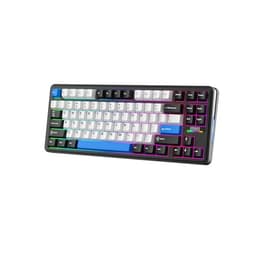
Best Overall: EPOMAKER X Aula F75 MAX, a feature-packed 75% board with a TFT screen, knob, Hall Effect-style hot-swap sockets, and tri-mode wireless at a price that undercuts most rivals.
Best Value: AULA WIN60 HE, which brings genuine Hall Effect switches and wired reliability to under £50, making it the sharpest budget pick for programmers who type all day.
The EPOMAKER X Aula F75 MAX sits at the top of this list because it manages to pack an almost absurd number of features into a 75% layout without pushing the price into premium territory. For programmers, the 75% form factor is close to ideal: you keep the function row for IDE shortcuts, retain dedicated arrow keys for navigating code, and still free up enough desk space for a comfortable mouse position. The hot-swap PCB accepts a wide range of five-pin switches, including Hall Effect magnetic switches, which means you can tune actuation point and travel distance to suit your typing style, a feature that was previously reserved for keyboards costing twice as much.
The headline feature that sets this board apart from its sibling the AULA F75 is the built-in TFT colour screen, which can display system stats, custom animations, or simply the current wireless mode. It sounds gimmicky, but in practice the screen is genuinely useful for confirming at a glance whether you are on Bluetooth, 2.4 GHz, or USB-C wired mode. A dedicated knob sits adjacent to the screen and handles volume, scroll speed, or any macro you assign via the companion software. Connectivity covers all three modes: 2.4 GHz dongle for near-zero-latency gaming, Bluetooth 5.0 for pairing to a second machine such as a laptop, and wired USB-C for charging or maximum reliability during a long coding session.
The gasket-mount construction gives the typing feel a slight bounce that reduces fatigue over long sessions, and the pre-lubed stabilisers mean the spacebar and shift keys are quiet and rattle-free straight out of the box. RGB lighting is per-key and bright enough to be visible in daylight, though programmers who prefer a clean aesthetic can simply turn it off. QMK and VIA firmware support is confirmed, so remapping every key, creating layers for different programming languages, or building complex macros is handled through a well-documented open-source interface rather than a proprietary app.
The only real compromise is that the TFT screen and knob add a small amount of width to the right side, which some users find slightly awkward until they adjust. Battery life is strong but will vary depending on RGB brightness and wireless mode used.
Verdict: The most versatile keyboard on this list, combining Hall Effect compatibility, tri-mode wireless, QMK/VIA support, and a TFT screen at a price that represents exceptional value for programmers who also game.
Pros
- Hot-swap PCB supports Hall Effect switches for adjustable actuation
- TFT screen and knob add practical utility without inflating the price significantly
- Full QMK/VIA support for deep per-key remapping and layer configuration
Cons
- TFT screen adds slight extra width that takes adjustment to get used to
- Companion software for non-QMK configuration is Windows-only
The AULA WIN60 HE is the standout budget pick on this list, and arguably the most technically interesting keyboard under £50 currently available in the UK. It uses genuine Hall Effect magnetic switches, a technology that eliminates the physical contact points found in traditional mechanical switches. This matters for programmers because Hall Effect switches do not wear out in the conventional sense: there is no metal-on-metal contact to corrode or fatigue, so the keyboard should remain consistent years after a traditional switch would have started to feel scratchy or inconsistent.
The adjustable actuation point is the other major draw. Via the software, you can set the actuation anywhere from a light 0.1 mm to a deeper 3.8 mm. Programmers who type for hours often prefer a slightly heavier actuation to reduce accidental keypresses, while gamers might want a hair-trigger setting for rapid inputs. Being able to switch between these profiles without changing switches is a genuine advantage that used to cost significantly more to access.
The 60% layout removes the function row, number pad, and navigation cluster, which keeps the footprint tiny and forces the mouse to sit much closer to the home row. This is excellent for ergonomics during long coding sessions but does require learning function-layer shortcuts for keys like F5 (run in most IDEs) or Delete. Programmers who rely heavily on the function row daily may find this adjustment period frustrating, which is why the EPOMAKER X Aula F75 MAX ranks above it for general use. That said, many developers actively prefer 60% boards once the muscle memory is established.
Build quality for the price is solid: the case has minimal flex, the USB-C connection is secure, and the keycaps feel thicker than the budget price would suggest. RGB lighting covers all keys with a good range of effects. There is no wireless option, which keeps the price down and removes battery anxiety entirely, a trade-off many desk-bound programmers will happily accept.
Anti-ghosting and N-key rollover are both present, so rapid key combinations during gaming or coding shortcuts register accurately every time. The rapid trigger feature, which re-arms the switch the moment the key begins to rise rather than waiting for a full reset point, is particularly useful for gaming but also helps with fast typists who do not fully release keys between strokes.
Verdict: The best value Hall Effect keyboard available in the UK, offering technology that punches well above its price point for programmers who want long-term switch consistency and adjustable actuation without spending a premium.
Pros
- Hall Effect switches with adjustable actuation from 0.1 mm to 3.8 mm
- Rapid trigger support for both gaming precision and fast typing
- No moving contact points means switches maintain consistency over years of use
Cons
- Wired only, no Bluetooth or 2.4 GHz wireless option
- 60% layout removes function row, requiring a learning period for IDE shortcuts
The AULA F75 occupies the middle ground between the budget WIN60 HE and the feature-laden F75 MAX. It shares the same 75% layout and tri-mode wireless connectivity, but drops the TFT screen and knob in favour of a cleaner, more traditional aesthetic. For programmers who find the MAX's extra features unnecessary or distracting, the F75 is a more focused option that still delivers excellent fundamentals at a lower price point.
The hot-swap PCB accepts both three-pin and five-pin switches, giving you the freedom to experiment with different switch types as your preferences evolve. The board ships with a choice of switch options depending on the variant you select, and the pre-installed switches are competent out of the box. The gasket-mount design provides a softer, more cushioned typing experience compared to top-mount boards in the same price range, which is particularly noticeable during long typing sessions where wrist fatigue becomes a factor.
Tri-mode wireless covers 2.4 GHz via a USB dongle, Bluetooth 5.0, and wired USB-C. The 2.4 GHz connection is responsive enough for competitive gaming, with latency that is imperceptible during normal use. Bluetooth allows you to pair to a second device, which is useful if you switch between a desktop and a laptop during the working day. The battery capacity is quoted at up to 4000 mAh, which translates to several days of use with RGB lighting at moderate brightness, or considerably longer with lighting disabled.
The south-facing RGB LEDs provide good lighting uniformity across the keycaps, and the included keycaps are double-shot PBT, meaning the legends will not fade or shine with extended use. The function row is fully present, making this immediately comfortable for programmers who rely on F-keys for debugging, running tests, or navigating their IDE without remapping.
Software support is provided through a Windows companion app that covers macro programming, lighting customisation, and switch polling rate adjustment. The lack of QMK/VIA support is the main limitation compared to the EPOMAKER options on this list, as it means you are dependent on the proprietary app for any advanced configuration.
Verdict: A well-rounded 75% wireless keyboard that suits programmers who want tri-mode connectivity and hot-swap flexibility without paying for features they will not use, though the absence of QMK/VIA is a notable omission at this price.
Pros
- Tri-mode wireless with 4000 mAh battery for multi-day use between charges
- Gasket-mount construction reduces typing fatigue during long coding sessions
- Double-shot PBT keycaps resist shine and legend fading over time
Cons
- No QMK/VIA support, limiting advanced remapping to the proprietary Windows app
- No Hall Effect switches, so actuation point is fixed to whichever switches are installed
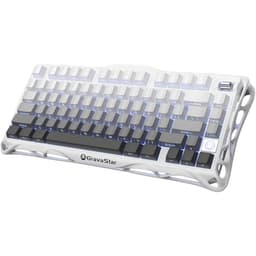
The GravaStar Mercury K1 is the premium build-quality option on this list. Where the AULA boards and EPOMAKER offerings use polycarbonate or ABS cases, the Mercury K1 is built around an aluminium alloy exoskeleton that gives it a weight and solidity that feels genuinely different in use. For programmers who spend eight or more hours a day at a keyboard, the tactile feedback of typing on a heavy, rigid board is something many find preferable to lighter plastic alternatives, and the Mercury K1 delivers that experience at a price that is competitive with other aluminium-case keyboards.
The 75% layout is well executed, with a logical key arrangement that keeps all the keys a programmer needs, including the function row and arrow cluster, without the wasted space of a full-size or tenkeyless board. The hot-swap PCB accepts five-pin switches, and GravaStar's own switches are pre-installed, tuned for a balanced feel between gaming responsiveness and typing comfort. The switches can be swapped without soldering if you prefer a different feel, which is straightforward with the included switch puller.
Tri-mode wireless is present: 2.4 GHz for gaming, Bluetooth 5.0 for secondary device pairing, and wired USB-C for charging or zero-latency wired use. The aluminium case does not appear to impede wireless signal in normal desktop use, and the 2.4 GHz connection is stable across the distances typical of a desk setup. RGB lighting shines through the aluminium exoskeleton design in a way that is distinctive and visually striking, though the lighting patterns are somewhat constrained by the case design compared to fully open-top boards.
The Mercury K1 is heavier than every other keyboard on this list, which is a deliberate design choice. The weight prevents the board from shifting during intense gaming or rapid typing, and the rubber feet keep it firmly in place on smooth desks. However, if you travel with your keyboard or move it between locations regularly, the extra weight becomes a practical inconvenience.
Software support covers the basics: lighting customisation, macro assignment, and polling rate selection. The companion app is functional without being particularly advanced, and there is no QMK/VIA support. For programmers who want deep remapping capability, this is a limitation, but for those who simply want a premium-feeling board that works reliably out of the box, the Mercury K1 is hard to fault.
Verdict: The best option for programmers who prioritise build quality and desk presence above all else, with the aluminium exoskeleton providing a typing experience that plastic-case boards at similar prices cannot match.
Pros
- Aluminium alloy exoskeleton provides exceptional rigidity and premium typing feel
- Heavy footprint prevents any movement during intensive typing or gaming
- Tri-mode wireless with stable 2.4 GHz connection for gaming use
Cons
- Approximately 1100 g weight makes it impractical to carry between locations
- No QMK/VIA support limits advanced key remapping to the proprietary app
- RGB expression is constrained by the exoskeleton design compared to open-top boards
The EPOMAKER TH85 occupies a slightly unusual layout position: it is an 85% board, which means it sits between a standard tenkeyless and a 75%. In practice, this means it retains the function row, arrow keys, and a small navigation cluster including Insert, Delete, Home, End, Page Up, and Page Down, all of which are used constantly by programmers navigating large codebases. For developers who find 75% boards just slightly too cramped but do not want the full width of a tenkeyless, the TH85's layout is a genuinely practical compromise.
QMK and VIA firmware support is the headline feature for the programming audience. QMK is the de facto standard for keyboard firmware customisation: it allows you to remap every key, create multiple layers that activate with a held modifier, build complex macros, and even program tap-dance sequences where a single key performs different actions depending on how many times it is tapped. VIA provides a real-time graphical interface for QMK configuration without needing to compile firmware, which makes the process accessible even if you have never worked with keyboard firmware before. For a programmer, having a keyboard that is itself programmable is a satisfying and practical feature.
The hot-swap PCB accepts five-pin switches, and the board ships with a choice of switch options. The gasket-mount construction provides a comfortable typing feel with good sound dampening. Tri-mode wireless covers 2.4 GHz, Bluetooth 5.0, and wired USB-C, with a 4000 mAh battery that provides extended use between charges. Per-key RGB lighting is present and well-implemented, with smooth animations that can be configured through VIA without any additional software.
The TH85 is slightly larger than a 75% board, which means it takes up more desk space. For programmers with smaller desks or those who prefer to keep the mouse very close to the keyboard, this may be a consideration. However, the extra keys it retains over a 75% board are genuinely useful enough to justify the additional footprint for most developers.
Build quality is good for the price: the case is solid, the stabilisers are pre-lubed, and the included keycaps are double-shot PBT. The overall package represents strong value for a QMK-compatible wireless keyboard, which is a combination that is harder to find than it should be at this price point.
Verdict: The best choice for programmers who want deep firmware customisation through QMK/VIA combined with wireless flexibility, particularly those who need the navigation cluster keys that 75% boards omit.
Pros
- Full QMK/VIA support for unlimited key remapping, layers, and macro programming
- 85% layout retains navigation cluster keys essential for code navigation
- 4000 mAh battery with tri-mode wireless including 2.4 GHz for gaming
Cons
- Slightly larger footprint than 75% boards reduces mouse space on smaller desks
- No Hall Effect switches, so actuation characteristics depend on chosen switch variant
Buying Guide
Layout: Which Size Is Right for Programmers?
Layout choice is the most consequential decision when buying a keyboard for programming. Full-size boards include a number pad, which is useful if you enter numerical data frequently but adds significant width that pushes the mouse further from the home row. Tenkeyless boards remove the number pad while keeping the function row and navigation cluster, which is a popular choice for developers. 75% boards compact the navigation cluster into a tighter arrangement and are currently the most popular layout among programmers, as they retain the function row and arrow keys while freeing up meaningful desk space. 60% boards remove the function row and navigation cluster entirely, which requires learning layer shortcuts but produces the most compact footprint. 85% boards, as seen with the EPOMAKER TH85, split the difference between 75% and tenkeyless, retaining the full navigation cluster without the number pad.
Switch Type: Mechanical, Hall Effect, or Optical?
Traditional mechanical switches use a physical contact mechanism. Linear switches (such as red variants) actuate smoothly without a tactile bump and are popular for gaming. Tactile switches (such as brown variants) provide a bump at the actuation point that many typists find helpful for knowing when a keypress has registered. Clicky switches (such as blue variants) add an audible click, which is satisfying for some but disruptive in shared spaces. Hall Effect magnetic switches eliminate physical contact entirely, using a magnet and sensor to detect key position. This means they do not wear out in the traditional sense and allow software-adjustable actuation points, which is a significant advantage for programmers who want to fine-tune their typing feel without buying new switches.
Wireless Connectivity
For programmers who switch between a desktop and a laptop, or who want a tidy cable-free desk, wireless is a valuable feature. 2.4 GHz wireless via a USB dongle provides near-zero latency suitable for gaming. Bluetooth allows connection to multiple devices and works without a dongle, which is useful for laptops. Many modern keyboards offer both, along with a wired USB-C option for charging and maximum reliability. If you only ever use your keyboard at a single desktop, wired-only boards are simpler and slightly cheaper.
Firmware and Customisation
QMK and VIA firmware support is particularly valuable for programmers because it allows you to remap keys, create layers, and build macros using open-source tools that do not require a proprietary app or an internet connection. If you use multiple programming languages with different shortcut conventions, or if you want to create a dedicated layer for your IDE, QMK/VIA support transforms a keyboard from a fixed input device into a configurable tool.
Build Quality and Typing Feel
Gasket-mount construction, where the PCB is suspended on silicone gaskets rather than screwed directly to the case, provides a softer, more cushioned typing feel that reduces fatigue during long sessions. Aluminium cases add rigidity and weight, preventing movement during use. Double-shot PBT keycaps resist shine and legend fading far better than ABS keycaps, which is worth paying for on a board you intend to use daily for years.
The EPOMAKER X Aula F75 MAX is the overall winner for programmers who also game. It combines Hall Effect switch compatibility, full QMK/VIA firmware support, tri-mode wireless, a TFT status screen, and a practical 75% layout at a price that is genuinely competitive. No other keyboard on this list matches that combination of features at that price point. If budget is the primary concern, the AULA WIN60 HE delivers Hall Effect technology and adjustable actuation for under £50, which is remarkable value and makes it the clear best-buy recommendation for students or those equipping a secondary machine. For those who prioritise build quality above all else, the GravaStar Mercury K1's aluminium exoskeleton is in a class of its own at this price range. Every keyboard on this list has a clear purpose and a clear audience, but the EPOMAKER X Aula F75 MAX is the one that most programmers, regardless of their gaming habits, will find genuinely difficult to improve upon without spending significantly more.