Best Overall Value
Price: £499.95 | Rating: ★★★★★ (5.0)
Here's the thing: most of the machines in this roundup are refurbished. The Vibox I-7 is not. You're getting brand-new components, a proper Windows 11 licence, and a spec sheet that would have seemed generous at twice the price just a few years ago. For office work, that matters more than you might think.
The AMD Ryzen 3 3200G is a quad-core processor with a base clock of 3.6GHz and a boost up to 4.0GHz. It handles Microsoft 365, Teams, Chrome with a dozen tabs, and Zoom calls without breaking a sweat. The integrated Radeon Vega 8 graphics are more than capable for office tasks and will even manage light photo editing or the occasional casual game after hours. That's a genuine bonus if you want one machine to do everything.
16GB of RAM is the sweet spot for office multitasking in 2026. You won't hit a wall running Teams alongside Excel and a browser. The 500GB SSD is plenty for office documents and software, though you'll want an external drive if you keep large photo or video archives. WiFi comes via a supplied USB adapter, so there's no need to run an ethernet cable across the room.
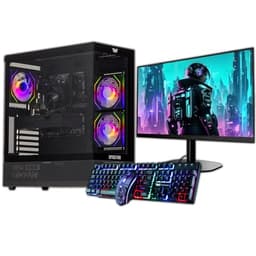
The case is styled for gaming with some RGB touches, which might look a bit out of place in a corporate office. But for a home office or small business, it's fine. And frankly, the spec-to-price ratio here is hard to argue with. This is our top pick among the best desktops for office work under £500 because it's new, it's fast, and it'll still feel current in three or four years.
Pros
- Brand-new hardware, not refurbished
- 16GB RAM handles serious multitasking
- 500GB SSD is plenty for office files
- Radeon Vega 8 good enough for light creative work
- Windows 11 included out of the box
Cons
- Gaming-style case won't suit every office
- No monitor included
- Ryzen 3 3200G is a few generations old now
Buy on Amazon£499.95
Best Build Quality
Price: £267.72 | Rating: ★★★★☆ (4.0)
32GB of RAM in a refurbished machine at this price. That's not a typo. The Dell OptiPlex i7-6700 SFF is a 6th-generation Intel machine, so the CPU is getting on a bit, but Dell's commercial OptiPlex line was built to last. These machines were designed for corporate environments where reliability is non-negotiable, and that shows in the build quality.
For office work, 32GB RAM is overkill for most people, but if you run virtual machines, keep dozens of browser tabs open, or work with large spreadsheets and databases, you'll actually use it. The 1TB SSD keeps everything snappy. Windows 11 Pro is included, which adds BitLocker encryption and Remote Desktop features. Useful if you're connecting to a company network or need to access the machine remotely.
The i7-6700 runs at up to 4.0GHz and handles day-to-day office tasks without complaint. It's not going to win any benchmarks against modern chips, but for email, Teams, Office 365, and browser-based tools, it's more than adequate. The SFF (Small Form Factor) chassis is compact and tidy on a desk.
The main caveat is the age of the platform. 6th-gen Intel is from 2015, and while it's still supported by Windows 11, it won't receive security updates indefinitely. For most office users that's not an immediate concern, but it's worth knowing. As a pure office workhorse with exceptional RAM for the money, this is a strong pick among the best desktops for office work under £500.
Pros
- 32GB RAM is exceptional at this price
- Dell commercial build quality is genuinely solid
- 1TB SSD included
- Windows 11 Pro with BitLocker and Remote Desktop
- Compact SFF form factor
Cons
- 6th-gen CPU is ageing
- No monitor included
- Refurbished, so condition varies by unit
Check availability
Best for Beginners
Price: £190.00 | Rating: ★★★★☆ (4.3)
If you're setting up an office from scratch and don't already own a monitor, this bundle is hard to beat. You get a refurbished Dell OptiPlex SFF machine and a 23-inch monitor together. That's a complete working setup, minus keyboard and mouse, for a price that undercuts buying the components separately.
The Core i7 4th Gen processor is old, no question. But for the tasks most office workers actually do, it's fine. Email, Word, Excel, Teams calls, browser-based tools. None of those need a cutting-edge CPU. The 16GB of RAM keeps multitasking smooth, and the 500GB SSD means boot times are quick and the system feels responsive day to day.
This is a particularly good pick for beginners or first-time desktop buyers because everything arrives together. There's no hunting for a compatible monitor or worrying about cables. Windows 11 Pro is included, so you're not stuck on an older OS. And the Dell OptiPlex platform is well-documented online, so if you ever need to upgrade RAM or storage down the line, guides are easy to find.
The 4th-gen CPU is the honest limitation here. It's from 2013, and while it runs Windows 11 fine today, it's approaching the end of its practical lifespan. For a home office or a small business that needs a cheap, complete setup right now, though, this is genuinely one of the best desktops for office work under £500 in terms of total value delivered.
Pros
- Complete setup with 23-inch monitor included
- 16GB RAM handles multitasking well
- Windows 11 Pro included
- SSD keeps the system feeling snappy
- Great total value for a first office setup
Cons
- 4th-gen Core i7 is very old hardware
- Monitor quality not specified in detail
- Refurbished unit, condition may vary
Check availability
Best for Beginners
Rating: ★★½☆☆ (2.9)
All-in-one PCs divide opinion. Some people love the clean desk setup. Others worry about repairability. For office use, though, the case for an AIO is strong: fewer cables, less clutter, and everything in one box. This 23.8-inch model ticks a lot of the right boxes.
The Intel i5 processor clocks up to 4.4GHz, which is genuinely modern performance. Paired with 16GB of RAM, it handles Office 365, Teams, Chrome, and Zoom without any fuss. The 23.8-inch FHD IPS display is a proper highlight. IPS panels give you better colour accuracy and wider viewing angles than the TN screens you often find bundled with budget setups. For long days staring at spreadsheets, that matters.
A keyboard and mouse are included, so this really is a plug-in-and-go solution. Windows 11 Pro is on board. WiFi, USB ports, and HDMI are all present. The 256GB SSD is the one area where you might feel the pinch over time, especially if you store large files locally. But for cloud-first workers using OneDrive or Google Drive, it's workable.
It's the most expensive option in this roundup that doesn't include a separate tower, and you're paying a premium for the all-in-one convenience. But if a tidy desk and modern hardware are priorities, this is a genuinely compelling pick among the best desktops for office work under £500.
Pros
- Modern Intel i5 up to 4.4GHz
- 23.8-inch FHD IPS display is excellent for office use
- Keyboard and mouse included
- Clean all-in-one design, minimal cables
- Windows 11 Pro included
Cons
- 256GB SSD is on the tight side
- All-in-ones are harder to upgrade or repair
- Pricier than refurb alternatives with similar specs
Buy on Amazon
Best Under £50
Price: £299.00 | Rating: ★★★★☆ (4.0)
A 1TB NVMe SSD in a budget bundle is a pleasant surprise. The Veno Scorp Optiplex bundle pairs a refurbished Dell OptiPlex base unit with a 21.5-inch monitor and some genuinely decent storage. The i5-2400 is the weak link here. It's a Sandy Bridge chip from 2011, and that age shows in CPU-intensive tasks. But for basic office work, it still gets the job done.
The NVMe SSD is the real story. Even on older hardware, an NVMe drive makes the system feel much more responsive than you'd expect from a machine this old. Boot times are quick, apps open fast, and the day-to-day experience of using it for email, documents, and light browsing is actually pretty decent. 16GB of RAM helps too, keeping things from slowing down when you have multiple apps open.
The 21.5-inch monitor is functional for office work, though the panel specs aren't detailed. WiFi is included via USB adapter. Windows 11 is on board, which is reassuring given how old the underlying hardware is. Veno Scorp are a UK-based refurbisher with a reasonable track record, and the bundle pricing makes this a fair deal for anyone who needs a complete setup on a tight budget.
The i5-2400 is genuinely old, and you'll notice it if you try to run Teams video calls alongside other apps. But for lighter office tasks, it's a complete, usable setup at a price that's hard to argue with.
Pros
- 1TB NVMe SSD is excellent for the price
- Complete bundle with 21.5-inch monitor
- 16GB RAM for smooth multitasking
- Windows 11 included
Cons
- i5-2400 is very old and struggles with demanding tasks
- Monitor specs not clearly detailed
- USB WiFi adapter rather than built-in
Buy on Amazon
Best for Beginners
Price: £155.20 | Rating: ★★★★☆ (4.2)
The OptiPlex 7020 is a solid mid-range refurb pick. The i7-4770 is a 4th-generation Haswell chip, which is old but still surprisingly capable for office work. It's a quad-core processor with Hyper-Threading, so it handles multitasking better than its age might suggest. Paired with 16GB of RAM and a 512GB SSD, this is a machine that'll handle a full day of office work without complaint.
For someone new to desktop PCs, the OptiPlex 7020 is a good starting point. The form factor is compact, the setup is straightforward, and Windows 11 Pro is included so you're not dealing with activation headaches. The 300Mbps USB WiFi adapter is a bit inelegant but works fine for video calls and cloud-based work.
At this price point, the 512GB SSD is a reasonable amount of storage for most office users. If you work primarily in the cloud, it's plenty. The i7-4770 handles Teams, Office 365, and browser-based tools without issues, though you might notice it working harder during video calls compared to newer machines.
It's not the most exciting machine in this roundup, but it's honest, reliable, and priced fairly. A good choice if you want a known-quantity refurb from a reputable commercial platform without spending too much.
Pros
- i7-4770 with Hyper-Threading handles multitasking well
- 16GB RAM is generous
- 512GB SSD offers decent storage
- Windows 11 Pro included
- Compact SFF design
Cons
- 4th-gen CPU is ageing
- USB WiFi adapter rather than built-in
- No monitor included
Check availability
Best Under £50
Price: £289.00 | Rating: ★★★☆☆ (3.0)
This one is aimed at budget gamers, but it works for office use too. The GTX 750 4GB dedicated GPU is completely unnecessary for spreadsheets and email, but it doesn't hurt anything either. What matters for office work is the Core i5 processor, 16GB of RAM, and the 22-inch monitor that comes bundled in.
The storage setup is a bit awkward. You get a 120GB SSD and a 500GB HDD. Ideally, Windows and your apps sit on the SSD, and the HDD handles bulk storage. It works, but the 120GB SSD is tight. If you install a few large applications, you'll be managing space carefully. For a cloud-first worker who stores most things in OneDrive or Google Drive, it's manageable.
The ARGB gaming case is very much aimed at a different audience than the typical office worker. It's loud-looking and takes up more desk space than a compact SFF machine. But if you want a machine that can handle office work during the day and some light gaming in the evening, this bundle makes a reasonable case for itself.
Honest assessment: for pure office use, there are better-value options in this roundup. But if the gaming crossover appeals and you want a 22-inch monitor included, it's worth considering.
Pros
- 22-inch monitor included
- 16GB RAM handles office multitasking
- GTX 750 useful if you want light gaming capability
- Windows 11 included
Cons
- 120GB SSD is very tight
- Gaming case is bulky and not office-appropriate for everyone
- GTX 750 is overkill and wasted for pure office use
- HDD and SSD combo is less elegant than a single large SSD
Buy on Amazon
Best Under £100
Price: £79.99 | Rating: ★★★★☆ (4.3)
Under £100 for a working desktop PC with Windows 11 Pro. That's the headline here. The Core i5-4570 is a 4th-generation Haswell quad-core, which is old but functional for light office tasks. Email, Word, basic spreadsheets, and web browsing are all within its comfort zone.
The limitations are real, though. 8GB of RAM is the minimum you'd want for office work in 2026. It'll handle one or two apps at a time, but if you're running Teams alongside a browser and Office, you'll notice the system slowing down. The 120GB SSD is genuinely tight. Windows 11 alone takes a significant chunk of that, leaving limited room for applications and files. If you go for this machine, budget for an external drive or rely heavily on cloud storage.
For what it is, though, this is a remarkable price. If you need a secondary machine, a spare PC for a spare room, or a very basic office computer for someone who only does light tasks, this delivers. Windows 11 Pro is a genuine bonus at this price, and the SFF form factor keeps it tidy.
Don't expect miracles. But as the most affordable functional option among the best desktops for office work under £500, it earns its place in this roundup.
Pros
- Exceptional price for a working Windows 11 Pro machine
- Quad-core i5 handles basic office tasks
- SFF form factor is compact
- Good option as a secondary or spare machine
Cons
- 8GB RAM is limiting for modern multitasking
- 120GB SSD is very tight
- 4th-gen CPU is ageing
- No monitor, keyboard, or mouse included
Check availability
Best Under £50
Rating: ★★★★½ (4.8)
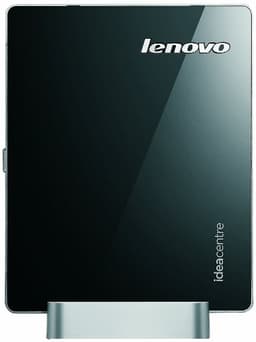
Look, we have to be honest about this one. The Lenovo Q190 is a machine from 2014 running Windows 8.1, which Microsoft stopped supporting in January 2023. That means no security updates. For any machine connected to the internet and used for office work, that's a serious concern.
The hardware is equally dated. The Intel Celeron 1017U runs at 1.6GHz with no boost clock. It's a dual-core chip designed for ultra-low-power laptops, not desktop performance. 4GB of RAM in 2026 is genuinely painful. Modern browsers alone can eat through that, and running any Office application alongside a browser will have you watching the spinning wheel regularly. The 500GB HDD is the only spec that looks reasonable on paper, but without an SSD, even basic tasks feel sluggish.
So why is it in this roundup? Because it's listed and it has a price, and some buyers might consider it as a very cheap option. But we'd strongly advise against it for actual office work. You'd need to factor in the cost of a Windows 10 or 11 licence upgrade, and even then the hardware is too weak to run modern software comfortably.
If you genuinely need something this cheap, the refurbished OptiPlex i5 at under £100 is a far better choice. The Q190 is a curiosity, not a recommendation.
Pros
- Very compact form factor
- Built-in WiFi
- 500GB HDD provides storage space
Cons
- Windows 8.1 is end-of-life and unsupported
- Celeron 1017U is far too slow for modern office software
- 4GB RAM is inadequate for 2026
- HDD only, no SSD
- Not suitable for internet-connected office use without OS upgrade
Check availability