UK tech experts · info@vividrepairs.co.uk
Vivid Repairs
VIVID·REPAIRS/THE FIELD GUIDE/DESKTOPPublished 16 September 2026Prices live from Amazon UK

Best of · UK · Field of 5

Best Desktop PCs for Small Businesses: £1,500 to £2,200 (UK)

As an Amazon Associate we may earn from qualifying purchases. We have not handled these products. Everything below is judged on published specifications, the owner ratings on the UK listings and our own product reviews, and the ranking stays independent of what any of them pay.

As an Amazon Associate, we may earn from qualifying purchases. Our ranking is independent.
FIG. 01
Best Desktop PCs for Small Businesses: £1,500 to £2,200 (UK): hero illustration

Illustration · Vivid RepairsDesktop / 2026

Field5 ranked
Cheapest£620.06
Owner ratings read339
VIVID·REPAIRSThe verdict · desktop pcs for small businesses: £1,500 to £2,200 (uk) · UK · Desktop PCs

Our pick

Apple iMac All-in-One Desktop Computer with M4 chip with

Apple iMac All-in-One Desktop Computer with M4 chip with 10-core CPU and 10-core GPU: Built for Apple Intelligence, 24-inch Retina Display, 16GB Unified Memory, 512GB SSD storage; Silver

  • Editorial score8.5 / 10
  • Owners4.7 from 63 ratings
Live price · checked today
Buy on Amazon

Amazon confirms the live price, seller, stock and delivery. Prices here are read from the live listing daily and dead stock is dropped overnight.

Read the full review of this pick →

vividrepairs.co.uk / best-desktop-pcs-for-small-businesses-1-500-to-2-200-ukPublished 16 September 2026 · Prices from the live Amazon UK listing
Not sure yet?The shortlist, argued pick by pick, starts here
§ Shortlist

The three worth arguing about

01

01 / Our pick

Apple iMac All-in-One Desktop Computer with M4 chip with

  • The M4 chip delivers genuinely fast performance for productivity and creative workloads, with thermal throttling essentially a non-issue in normal use
  • The 24-inch 4.5K Retina display is outstanding, with 500 nits of brightness and one billion colour support that rivals dedicated professional monitors
  • The 12MP Center Stage camera and six-speaker audio system set a standard that competing all-in-ones cannot match, making it exceptional for video calls

Where it gives up

Zero upgrade potential: the unified memory and SSD are soldered permanently, so the configuration you buy is the configuration you keep forever. The 512GB base storage fills up quickly for users working with large video or photo libraries, making external storage essential from day one.

Rated 4.7 by 63 owners. Our review scores it 8.5.

★★★★½ 4.7 · 63 ratingsBuy on Amazon

Amazon confirms the live price, seller, stock and delivery. · Read the full Apple iMac All-in-One Desktop Computer with M4 chip with review

02

02 / Best Build Quality

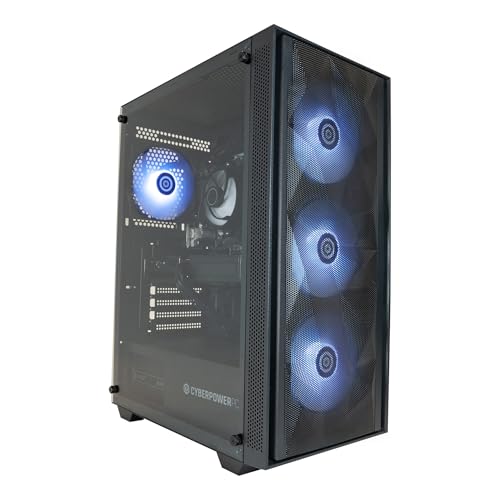
Vibox VIII-75 Gaming PC • Intel Core i9 12900KF 5.2GHz •

  • RTX 5090 delivers class-leading 4K gaming performance
  • 32GB DDR5 and 2TB NVMe are appropriate for the price tier
  • Ready to use out of the box with Windows 11 pre-installed

Where it gives up

i9-12900KF is previous-gen and creates a CPU bottleneck in CPU-sensitive titles. PSU and motherboard brands unspecified, raising reliability concerns.

Rated 4.1 by 198 owners. Our review scores it 6.5.

★★★★☆ 4.1 · 198 ratingsBuy on Amazon

Amazon confirms the live price, seller, stock and delivery.

03

03 / Best Value

Vibox V-196 Gaming PC Bundle • AMD Ryzen 5 5500 4.2GHz •

  • CPU: AMD Ryzen 5 5500
  • GPU: NVIDIA GeForce RTX 4060 8GB
  • RAM: 16GB DDR4 3200MHz

Rated 5.0 by 1 owner, which is thin. No editorial score for this one yet.

★★★★★ 5.0 · 1 ratingsBuy on Amazon

Amazon confirms the live price, seller, stock and delivery.

§ The rest

Shorter entries, simpler decisions

Every one of these still earns a place. Shorter entries because the decision is simpler: they do one job well and they tell you what they can’t do.

Lenovo IdeaCentre AIO 3 27ALC6 AMD Ryzen™ 7 7730U 68.6 cm04

Lenovo IdeaCentre AIO 3 27ALC6 AMD Ryzen™ 7 7730U 68.6 cm

Best PremiumCPU: AMD Ryzen 7 7730U · GPU: integrated. ★★★★½ 4.7 from 56 ratings.

£749.00Live priceBuy on Amazon
Lenovo ThinkCentre M720 Tiny M720q Desktop Intel Core05

Lenovo ThinkCentre M720 Tiny M720q Desktop Intel Core

Best Budget · Under £650CPU: Intel Core i5-8400T · GPU: integrated. ★★★★½ 4.8 from 21 ratings.

£620.06Live priceBuy on Amazon
§ Method

How we chose

The rules this ranking ran under, in plain sight: what we read, what we weighed and what no merchant can move.

How we picked

Our editors evaluated 5 Desktop options against the criteria readers actually weigh up: price, real-world performance, build quality, warranty, and UK availability. Picks lean toward what we'd recommend to a friend buying today, not specs-on-paper winners.

  • Editorial contextEditor notes from individual reviews, not press releases.
  • Live UK pricingRefreshed from Amazon UK twice daily.
  • No paid placementsAffiliate commission doesn't change what wins.
The full guideEverything behind the shortlist above: the spec sheet, the write-ups in full, our method and the verdict.

§ Editorial · The full guide · three proofs, nothing hidden

The Doubt Index.

The shortlist told you what we picked; this zone shows the working. Come in through whichever doubt you’re carrying, or read straight down; we’d rather you checked us than trusted us.

Proof A · What the numbers mean

↑ All doubts

I can read a spec sheet myself.

What the numbers mean

You can, and you should. What follows is the part a sheet can’t do: the working between what these products have and what your desk actually needs, kept word for word.

Small businesses shopping for desktop PCs in the £1,500 to £2,200 range face a genuinely interesting market in 2025. The arrival of Nvidia's RTX 50-series cards has pushed capable machines into this bracket, while Apple's M4 iMac continues to attract creative studios and professional service firms that live inside macOS. Since last year, the biggest shift has been the RTX 5060 Ti and RTX 5090 becoming available in pre-built towers at prices that were previously unthinkable, meaning raw compute power is no longer a luxury. This guide is aimed at business owners, office managers and IT buyers who need machines that can handle demanding productivity workloads, light creative work, data processing or even some GPU-accelerated tasks, without paying enterprise prices. We have selected five picks from the catalogue that best represent the price band, covering all-in-ones, towers and refurbished options, and ranked them by overall business suitability.

Quick Verdict

Best Overall: Apple iMac (M4, 2024), the combination of the M4 chip, a stunning 24-inch Retina display and macOS reliability makes it the most complete all-in-one for professional small business use in this price range.

Best Value: Vibox VIII-75 Gaming PC, an RTX 5090 and Core i9 12900KF at under £1,900 is extraordinary value for businesses that need serious GPU compute or video rendering capability.

Product Price CPU GPU RAM / Storage OS Form Factor
Apple iMac (M4) Check price Apple M4 10-core M4 10-core GPU 16 GB / 512 GB SSD macOS All-in-One
Vibox VIII-75 Check price Intel Core i9 12900KF Nvidia RTX 5090 32 GB 32 GB / 2 TB NVMe SSD Windows 11 Tower
Vibox V-196 Bundle Check price AMD Ryzen 5 5500 Nvidia RTX 4060 8 GB 16 GB DDR4 / 1 TB NVMe SSD Windows 11 Tower
Lenovo IdeaCentre AIO 3 27 £749.00 AMD Ryzen 7 7730U Integrated 16 GB / 1 TB NVMe SSD Windows 11 Home All-in-One
Lenovo ThinkCentre M720 Tiny £620.06 Intel Core i5-8400T Integrated 16 GB / 512 GB NVMe + HDD Windows 10 Pro Mini PC

1. Apple iMac All-in-One Desktop Computer (M4)

The Apple iMac with M4 chip is the standout all-in-one for small businesses that operate primarily within the Apple ecosystem or that need a polished, reliable machine for creative, legal, financial or client-facing work. It ships with a 10-core M4 CPU paired with a 10-core integrated GPU, 16 GB of unified memory and a 512 GB SSD. The unified memory architecture means that RAM and GPU memory are shared, giving the M4 exceptional efficiency for tasks like spreadsheet modelling, PDF handling, video conferencing, photo editing and even light video production.

What makes the iMac particularly compelling for small businesses is what you do not have to buy separately. The 24-inch Retina display is factory-calibrated and produces colours accurate enough for design and marketing work. The included Magic Keyboard, Magic Mouse and the built-in 1080p webcam mean the machine is genuinely ready to use out of the box, which reduces setup time and the risk of compatibility headaches. The macOS operating system is well-regarded for security, with Apple's own silicon making it considerably harder for malware to take hold compared with a generic Windows tower.

For businesses that use Microsoft 365, Google Workspace or industry-specific software with macOS support, the iMac handles daily workloads with ease. The M4 chip's performance-per-watt ratio is outstanding, meaning lower electricity bills over a multi-year ownership period, which matters when you are running five or ten machines in an office. The machine runs near-silently under typical office loads, which is a genuine quality-of-life benefit in open-plan environments.

The main limitations are the fixed 512 GB storage, which may require external drives or cloud storage for media-heavy businesses, and the integrated GPU, which rules out GPU-accelerated machine learning workloads or 3D rendering at scale. The price sits at the upper end of the guide's bracket, but the display, keyboard and mouse are included, which changes the effective cost comparison against a Windows tower that needs peripherals.

For professional services firms, creative agencies, accountancy practices and any business that values longevity and low maintenance overhead, the M4 iMac is the most complete single purchase in this price range.

Pros

  • M4 chip delivers exceptional performance per watt, reducing energy costs over multi-year use
  • Factory-calibrated 24-inch Retina display, Magic Keyboard and Magic Mouse included in the box
  • macOS offers strong built-in security and near-silent operation under typical office loads

Cons

  • Fixed 512 GB SSD storage cannot be upgraded after purchase, requiring external drives for large file libraries
  • Integrated GPU rules out GPU-accelerated rendering or machine learning workloads

2. Vibox VIII-75 Gaming PC (Core i9 12900KF, RTX 5090)

The Vibox VIII-75 is a tower PC built around the Intel Core i9 12900KF processor running at up to 5.2 GHz and, remarkably for a machine priced under £1,900, an Nvidia GeForce RTX 5090 with 32 GB of VRAM. It ships with 32 GB of RAM and a 2 TB NVMe SSD, running Windows 11. For small businesses that have GPU-intensive workloads, this machine is in a class of its own at this price point.

The RTX 5090 is Nvidia's flagship consumer GPU and carries 32 GB of GDDR7 memory. For businesses working in 3D visualisation, architectural rendering, video production, AI-assisted design tools or machine learning inference, the RTX 5090 provides capabilities that would cost considerably more in a workstation-class machine from a major OEM. The Core i9 12900KF's hybrid architecture, with performance and efficiency cores, handles multi-threaded workloads such as compiling, encoding and data processing with genuine speed.

The 2 TB NVMe SSD is a practical benefit for businesses handling large project files, raw video footage or extensive datasets. The 32 GB of DDR4 RAM is sufficient for most demanding professional applications, including Adobe Creative Suite, AutoCAD, DaVinci Resolve and similar tools. Windows 11 is pre-installed, meaning the machine is ready for business use without additional OS costs.

As a Vibox pre-built, the machine is assembled in the UK and comes with a standard warranty. The tower form factor means it is less desk-friendly than an all-in-one, and businesses will need to budget for a monitor, keyboard and mouse separately. The Core i9 12900KF is a 12th-generation Intel chip, which is not the very latest architecture, but it remains a highly capable processor for professional workloads and is unlikely to become a bottleneck for several years.

For video production studios, architectural visualisation firms, 3D product design businesses or any operation that needs serious GPU compute power without paying workstation prices, the Vibox VIII-75 is an exceptional machine at this price point. It earns the Best Value designation for the sheer specification it delivers per pound spent.

Pros

  • RTX 5090 32 GB VRAM delivers workstation-class GPU performance for rendering, AI tools and video production
  • 2 TB NVMe SSD provides ample fast storage for large project files and datasets
  • 32 GB RAM handles demanding multi-application workloads without bottlenecks

Cons

  • Tower form factor requires separate monitor, keyboard and mouse, adding to the total cost
  • Core i9 12900KF is 12th-generation Intel, not the latest architecture available in 2025

3. Vibox V-196 Gaming PC Bundle (Ryzen 5 5500, RTX 4060)

The Vibox V-196 is a complete bundle built around the AMD Ryzen 5 5500 processor running at up to 4.2 GHz, paired with an Nvidia GeForce RTX 4060 8 GB graphics card. It ships with 16 GB of DDR4 3200 MHz RAM and a 1 TB NVMe SSD, running Windows 11. At just under £2,000, this bundle is aimed at small businesses that want a capable, modern Windows 11 machine with a discrete GPU for mixed workloads, without the complexity of specifying individual components.

The RTX 4060 is a capable mid-range GPU that handles light 3D work, CAD visualisation, video editing at 1080p and 1440p, and GPU-accelerated creative applications with ease. For businesses that use software such as Adobe Premiere Pro, Blender for product visualisation, or AutoCAD with hardware acceleration enabled, the RTX 4060 provides a meaningful performance advantage over integrated graphics machines. The Ryzen 5 5500 is a six-core, twelve-thread processor that handles multi-tasking, spreadsheet computation and general productivity workloads competently.

The bundle nature of the V-196 is a practical consideration for small business buyers. Vibox includes peripherals with bundle configurations, reducing the number of separate purchases required to get the office up and running. The 1 TB NVMe SSD is fast and sufficient for most business applications, though businesses with large media libraries may want to add external storage.

The Ryzen 5 5500 is based on AMD's Zen 3 architecture, which, while not the very latest, remains a solid and well-supported platform. The 16 GB of DDR4 RAM is adequate for most business applications, though memory-intensive workloads such as large database operations or complex video timelines may benefit from an upgrade. The RTX 4060's 8 GB VRAM is sufficient for most professional creative tasks but is less future-proof than the RTX 5060 Ti or RTX 5090 options available in this guide.

For small businesses that need a capable, complete Windows 11 desktop with a discrete GPU for creative or technical work, and that want a bundle rather than piecing together peripherals separately, the Vibox V-196 is a sensible and well-rounded choice.

Pros

  • RTX 4060 provides genuine GPU acceleration for creative and CAD applications at 1080p and 1440p
  • Bundle configuration reduces the number of separate peripheral purchases required
  • 1 TB NVMe SSD delivers fast load times for applications and project files

Cons

  • Ryzen 5 5500 and RTX 4060 are mid-generation components, less future-proof than newer alternatives at similar prices
  • 8 GB VRAM on the RTX 4060 may become limiting for AI-assisted creative tools and high-resolution 3D work

4. Lenovo IdeaCentre AIO 3 27 (Ryzen 7 7730U)

The Lenovo IdeaCentre AIO 3 is a 27-inch all-in-one desktop built around the AMD Ryzen 7 7730U processor, 16 GB of RAM and a 1 TB NVMe SSD, running Windows 11 Home. The 27-inch 1920x1080 display is significantly larger than the Apple iMac's 24-inch panel, making it well-suited to businesses where screen real estate matters, such as multi-window financial analysis, customer service dashboards or design review work.

The Ryzen 7 7730U is an eight-core mobile processor that balances performance and efficiency well. For typical small business workloads, including Microsoft 365, accounting software, CRM applications, video conferencing and web-based tools, it provides smooth and responsive performance. The integrated graphics handle standard office tasks, light image editing and video playback without issue, though it is not suited to GPU-intensive rendering or 3D modelling.

As an all-in-one, the IdeaCentre AIO 3 keeps desk clutter to a minimum. The single-cable setup is appealing for businesses where aesthetics matter, such as reception areas, client-facing offices or co-working spaces. The 1 TB NVMe SSD provides fast application loading and ample storage for documents, spreadsheets and business data. The 16 GB of RAM is sufficient for multi-tasking across typical business applications.

The Ryzen 7 7730U is a mobile-class processor rather than a desktop chip, which means peak performance is lower than a tower with a full-power desktop CPU. For businesses that need to run computationally demanding software, this is a consideration. The 1920x1080 resolution on a 27-inch panel produces a lower pixel density than the iMac's Retina display, which is noticeable in text clarity and image sharpness for design-critical work.

For businesses that prioritise a large, tidy all-in-one setup for general productivity, the IdeaCentre AIO 3 27 is a practical and cost-effective choice that fits neatly into the lower end of this guide's price range, leaving budget for additional peripherals or software licences.

Pros

  • 27-inch display provides generous screen real estate for multi-window productivity and dashboard work
  • All-in-one form factor minimises desk clutter and simplifies cable management in client-facing spaces
  • 1 TB NVMe SSD delivers fast storage performance for business applications and data

Cons

  • Ryzen 7 7730U is a mobile-class chip, limiting peak performance compared with desktop-CPU towers
  • 1920x1080 resolution on a 27-inch panel produces lower pixel density than premium all-in-one alternatives

5. Lenovo ThinkCentre M720 Tiny (Core i5-8400T)

The Lenovo ThinkCentre M720 Tiny is a compact mini PC built around the Intel Core i5-8400T processor, 16 GB of RAM, a 512 GB NVMe SSD and an additional HDD, running Windows 10 Pro 64-bit. It sits at the lower end of the price range and represents a different proposition from the other picks in this guide: a business-grade, enterprise-heritage machine from Lenovo's ThinkCentre line, prioritising reliability, manageability and a tiny physical footprint over raw performance.

The ThinkCentre M720 Tiny is built to business standards rather than consumer or gaming specifications. Lenovo's ThinkCentre line has a long track record in corporate environments, and the M720 series was designed with IT manageability in mind, supporting Intel vPro for remote management in compatible configurations. The Windows 10 Pro operating system is relevant for businesses that use domain join, BitLocker encryption, Remote Desktop or Group Policy management, all of which are absent from Windows 10 Home.

The Core i5-8400T is an 8th-generation Intel processor, which is older than the other CPUs in this guide. For standard office workloads, including email, web browsing, Microsoft 365 applications and video conferencing, it remains adequate. The 16 GB of RAM ensures smooth multi-tasking, and the combination of a 512 GB NVMe SSD for the operating system and applications, plus an additional HDD for data storage, is a practical dual-drive configuration for business use.

The tiny form factor is a genuine advantage for businesses with limited desk space, crowded offices or hot-desking environments. The M720 Tiny can be mounted behind a monitor using a VESA bracket, keeping the desk completely clear. For businesses deploying multiple workstations, the small size simplifies logistics and reduces the physical footprint of the IT estate.

The main limitation is the age of the platform. The Core i5-8400T and the overall M720 architecture are several generations behind current hardware, and Windows 10 Pro will reach end of support in October 2025, meaning businesses will need to plan an upgrade to Windows 11. For buyers who need a proven, manageable, compact business machine at a modest price and can manage the OS transition, the M720 Tiny remains a solid choice.

Pros

  • ThinkCentre business-grade build quality with enterprise manageability heritage and Windows 10 Pro included
  • Ultra-compact form factor supports VESA monitor mounting, freeing desk space entirely
  • Dual-drive configuration (NVMe SSD plus HDD) provides fast OS performance and additional data storage

Cons

  • Core i5-8400T is an 8th-generation chip, significantly older than competing options in this price range
  • Windows 10 Pro reaches end of support in October 2025, requiring a planned OS upgrade

Buying Guide

Processor: the foundation of daily performance

For small business desktops, the processor determines how quickly the machine handles everyday tasks: opening large spreadsheets, running multiple browser tabs, processing data in accounting software, or encoding video for marketing content. In 2025, any machine with a modern six-core or eight-core processor, whether from Intel or AMD, will handle standard office workloads without difficulty. Where the choice matters more is in demanding workloads: if your business uses CAD software, video editing, data analysis tools or AI-assisted applications, a higher-core-count processor with a higher base clock speed will make a measurable difference to productivity. For purely administrative businesses, even a capable mobile processor such as the Ryzen 7 7730U in the IdeaCentre AIO 3 is sufficient.

RAM: how much is enough?

For small business use in 2025, 16 GB of RAM is the practical minimum for a machine that will run Microsoft 365, a browser with multiple tabs, a video conferencing application and a CRM simultaneously. Machines with 32 GB are better suited to power users, those running virtual machines, or businesses using memory-intensive applications such as large Adobe Premiere Pro timelines, complex AutoCAD drawings or database management tools. It is worth checking whether the machine you are considering allows RAM upgrades after purchase, as some all-in-ones and mini PCs have soldered or limited-slot configurations.

Storage: SSD versus HDD, and how much capacity

An NVMe SSD is the standard for any business machine purchased in 2025. The difference in application load times and system responsiveness between an NVMe SSD and a traditional HDD is significant enough to affect daily productivity. For storage capacity, 512 GB is workable for businesses that store most files in the cloud, while 1 TB or 2 TB is preferable for businesses handling local media files, large datasets or offline project archives. A dual-drive configuration, as found in the ThinkCentre M720 Tiny, can offer the best of both: fast NVMe for the OS and applications, with a larger HDD for bulk data.

GPU: integrated versus discrete

For most small business workloads, integrated graphics are entirely sufficient. Email, web browsing, spreadsheets, video conferencing and standard office applications do not require a discrete GPU. However, if your business involves video editing, 3D visualisation, architectural rendering, product photography editing or AI-assisted design tools, a discrete GPU makes a substantial difference to render times and application responsiveness. The RTX 4060 and RTX 5060 Ti are practical mid-range options for creative businesses, while the RTX 5090 in the Vibox VIII-75 is relevant for studios with genuinely demanding GPU workloads.

Operating system: Windows versus macOS

Windows 11 Pro is the preferred OS for businesses that need domain join, BitLocker encryption, Remote Desktop access or Group Policy management. Windows 11 Home, which ships with several machines in this guide, lacks some of these enterprise features. macOS, as found on the Apple iMac, is a strong choice for businesses already invested in the Apple ecosystem or that use macOS-native software. It is worth auditing your critical business software for compatibility before committing to either platform.

Form factor: tower, all-in-one or mini PC

Towers offer the best upgradeability and the highest peak performance but require more desk space and separate peripherals. All-in-ones keep the desk tidy and include a display, but are harder to upgrade and typically use mobile-class processors. Mini PCs offer the smallest footprint and can be VESA-mounted behind a monitor, but have limited upgrade paths. Consider your office layout, the number of machines you are deploying and your expected upgrade cycle when choosing between these form factors.

The Apple iMac with M4 chip is the overall winner for small business buyers in the £1,500 to £2,200 bracket. It combines a genuinely capable processor, a factory-calibrated display, included peripherals and the long-term reliability of macOS into a single, elegant package that requires minimal setup and ongoing maintenance. For businesses that live in macOS or that value the total cost of ownership over the raw specification sheet, no other machine in this guide matches its combination of quality and practicality.

For businesses that need Windows and serious GPU compute power, the Vibox VIII-75 with its RTX 5090 and Core i9 12900KF is an extraordinary value proposition at under £1,900. It is the pick for video studios, 3D visualisation firms and any business that needs workstation-class GPU performance without workstation-class pricing. The Vibox V-196 bundle slots in as the practical choice for businesses that want a capable Windows 11 machine with a discrete GPU and a complete bundle, while the Lenovo IdeaCentre AIO 3 27 suits offices that prioritise a large, tidy all-in-one setup for general productivity. The ThinkCentre M720 Tiny remains relevant for IT-managed deployments where the compact form factor and business-grade heritage outweigh the older hardware generation.

Proof B · Method & disclosure

↑ All doubts

You’re paid to say this.

Method & disclosure

This page carries affiliate links; they never set the order. We don’t lab-test: rankings come from published specifications, the owner ratings on the UK listings and our own reviews.

How We Picked

Every product in this guide was selected from a verified catalogue of UK-available desktop PCs. We focused exclusively on machines that are genuinely relevant to small business buyers operating with a budget of £1,500 to £2,200. Products were evaluated on five criteria: processing power relative to typical business workloads, RAM and storage adequacy for multi-user or multi-application environments, operating system suitability for business use, form factor practicality for office deployment, and overall value for money within the price band. We excluded machines with specifications clearly mismatched to business use, such as entry-level gaming PCs with no business-relevant features. Verified manufacturer specifications were used throughout; no specs were assumed or estimated. Pricing was taken from live catalogue data and is subject to change.

Motives inspected? Settled.Next · Proof CThe verdict

Proof C · The verdict

↑ All doubts

Every guide crowns something.

The verdict, cross-examined

A crown that can’t be argued with isn’t proof of quality; it’s proof nobody checked. So rather than restate the winner’s virtues, we defend the crown against the strongest cases to take it.

Apple iMac All-in-One Desktop Computer with M4 chip with

Cross-examination · Three challengers, taken seriously

The owners’ argumentVibox VIII-75 Gaming PC • Intel Core i9 12900KF 5.2GHz •

Owners rate it 4.1 from 198 ratings. Our review scores it 6.5 against the winner’s 8.5. The crown holds on the ranking rules: the order above was set before any link was attached, and its case is argued in full in the write-up above.

The owners’ argumentVibox V-196 Gaming PC Bundle • AMD Ryzen 5 5500 4.2GHz •

Owners rate it 5.0 from 1 rating. The crown holds on the ranking rules: the order above was set before any link was attached, and its case is argued in full in the write-up above.

The owners’ argumentLenovo IdeaCentre AIO 3 27ALC6 AMD Ryzen™ 7 7730U 68.6 cm

It’s £749.00 on the live listing today. Owners rate it 4.7 from 56 ratings. The crown holds on the ranking rules: the order above was set before any link was attached, and its case is argued in full in the write-up above.

The original verdict, preserved in full

Final Verdict

We read everything, we hide nothing, and we sign what we publish. Corrections are welcome and printed when we’re wrong.

The Vivid Repairs desk

Vivid Repairs · 16 September 2026

End of the full guide · Back to the doubt index ↑ · The FAQ is next ↓

§ Questions

Questions people actually ask

Frequently Asked Questions

For most small business workloads, including Microsoft 365, video conferencing, CRM software and web browsing, 16 GB of RAM is sufficient. If your team runs virtual machines, works with large video files or uses memory-intensive applications such as complex CAD drawings or database tools, 32 GB is a worthwhile upgrade. Check whether the machine you are buying allows post-purchase RAM expansion before committing.

Windows 11 Pro is preferable for most business environments because it includes BitLocker drive encryption, Remote Desktop access, domain join capability and Group Policy management. Windows 11 Home lacks these features, which can be a limitation for businesses with IT management requirements or data security obligations. If the machine ships with Windows 11 Home, a Pro licence upgrade is available from Microsoft.

All-in-ones are well-suited to businesses that prioritise a tidy desk, a minimal setup process and a single-cable installation. They typically include a display and sometimes peripherals, reducing the total number of purchases required. The trade-off is that they are harder to upgrade than towers and often use mobile-class processors, which deliver lower peak performance than desktop CPUs. For general productivity workloads, this is rarely a practical limitation.

For standard office workloads such as email, spreadsheets, web browsing and video conferencing, integrated graphics are entirely adequate. A discrete GPU becomes relevant when the business handles video editing, 3D rendering, architectural visualisation, GPU-accelerated AI tools or high-resolution image processing. If your software uses CUDA or OpenCL acceleration, an Nvidia GPU will deliver measurable time savings on rendering and export tasks.

NVMe SSDs connect via the PCIe interface and offer significantly faster read and write speeds than older SATA SSDs, which translates to quicker application load times, faster file transfers and snappier system responsiveness. For a business machine used daily, the difference is noticeable in real-world use. All of the recommended picks in this guide use NVMe SSDs, which is the expected standard for any business desktop purchased in 2025.

§ Sign-off

That’s the field: five desktop pcs for small businesses: £1,500 to £2,200 (uk), ranked for the job in the title and nothing else. We read the published specifications, the owner ratings and our own reviews; we haven’t handled these products, and no maker moves the order. Figures checked against the live Amazon UK listings, page updated 16 September 2026.

The Vivid Repairs desk