Best Overall Value
Price: £39.93 | Rating: ★★★★★ (5.0)
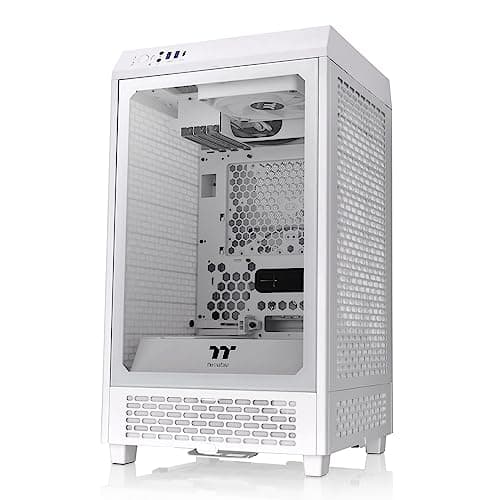
Here's the thing: when a case under £40 genuinely competes with options costing twice as much on airflow, it deserves the top spot. The 1ST PLAYER Trilobite T3 is a Micro-ATX case with a proper mesh front panel that lets fans breathe freely. And that matters more than almost any other single spec when you are trying to keep temperatures down.
The steel construction feels solid for the price. There is no flex or rattle when you handle it, which is not something you can say about every budget case. The mesh front allows front-mounted fans to pull in cool air without fighting a solid plastic barrier, and the ventilated top panel means hot air has a clear exit path. For a mATX build with a mid-range GPU, this case will keep things cool without any fuss.
The limitations are real but predictable. Radiator support tops out at 240mm, so if you are planning a 360mm AIO, look elsewhere. Cable management is functional rather than impressive, and the included fans (if any) are basic. But at this price point, those are entirely fair compromises. You are getting the fundamentals right: mesh, steel, sensible layout. That is what good airflow cases are built on.
For anyone building a compact gaming PC or a budget workstation and wanting the best computer cases for airflow without spending serious money, the Trilobite T3 is the obvious starting point.
Pros
- Mesh front panel for unrestricted intake airflow
- Solid steel build quality for the price
- Compact mATX footprint saves desk space
- Excellent value, genuinely hard to beat under £40
Cons
- 240mm radiator maximum, no 360mm AIO support
- Cable management space is tight
- No USB-C front panel port
Buy on Amazon£39.93
Best for Beginners
Rating: ★★★★½ (4.6)
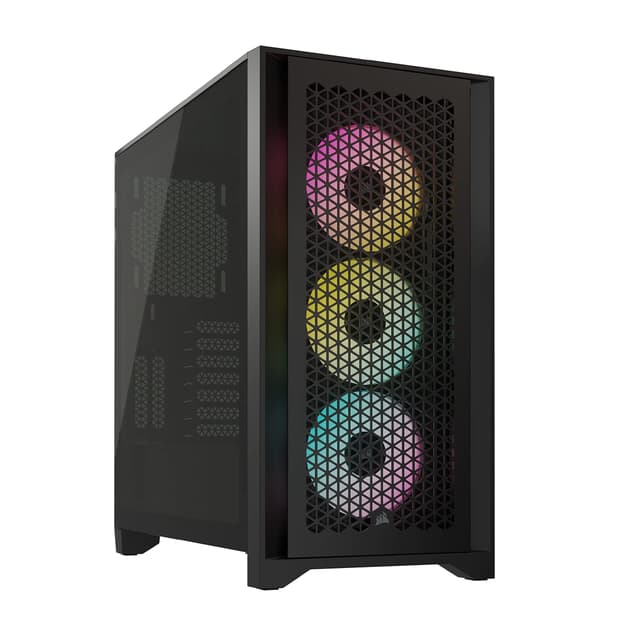
Montech has built a reputation for taking airflow seriously at budget prices, and the AIR 903 MAX is probably their best argument yet. Four fans included in the box. A full mesh front panel. Tempered glass side panel. At £60, this is a proper package for anyone who wants the best computer cases for airflow without a complicated shopping list.
The mesh front is the headline feature and it delivers. Airflow through the front panel is genuinely unrestricted, and with four fans running from the start, you get positive pressure airflow straight out of the box. Temperatures are competitive with cases costing significantly more. The layout is straightforward too, which makes it a great pick for first-time builders who do not want to spend hours figuring out fan placement.
Build quality is good for the price. The steel chassis does not feel cheap, and the tempered glass panel is properly thick. There is decent cable management routing behind the motherboard tray, which helps keep the main chamber clear for airflow. ATX, Micro-ATX, and Mini-ITX boards all fit.
The fans included are not the quietest, and there is no USB-C on the front panel, which is a minor annoyance on a modern build. But for a beginner wanting solid thermals without the research overhead, the AIR 903 MAX is sorted.
Pros
- Four fans included, ready to go out of the box
- Full mesh front panel for excellent intake airflow
- Supports ATX, mATX, and Mini-ITX
- Good cable management routing
Cons
- Included fans are a bit noisy at full speed
- No USB-C front panel port
- ARGB lighting is basic compared to premium rivals
Check availability
Best Build Quality
Rating: ★★★★½ (4.7)
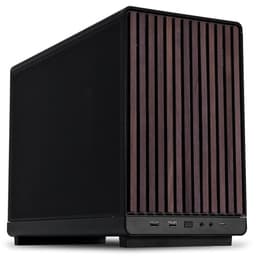
The Fractal Design North is one of those rare cases that looks genuinely beautiful and performs brilliantly for airflow. The wood oak front panel is a proper design statement, and the mesh side panels are not just decorative. They are functional, pulling cool air directly across your GPU and motherboard. This is one of the best computer cases for airflow if you want premium results and do not mind paying for them.
Two 140mm Aspect PWM fans come included, and 140mm fans move more air per revolution than 120mm alternatives, which means quieter operation at equivalent airflow. The mesh sides create a unique airflow path that works particularly well for GPU cooling. Fractal's build quality is, as always, exceptional. Panels fit perfectly, the steel is thick, and every detail feels considered.
USB-C on the front panel is a nice touch that many budget cases skip. Radiator support is generous, and the interior layout gives you plenty of room to work. At around £130, it is not cheap. But for a case you will look at every day and that will keep your components cool for years, it earns the price.
The chalk white finish is striking. Just be aware it shows dust more readily than darker options, so factor in regular cleaning if that matters to you.
Pros
- Mesh side panels for outstanding GPU airflow
- Two 140mm PWM fans included
- Exceptional build quality and premium materials
- USB-C front panel port
- Stunning wood oak aesthetic
Cons
- Premium price, not for tight budgets
- White finish shows dust quickly
- Fewer fans included than some cheaper rivals
Buy on Amazon
Best Under £100
Price: £226.99 | Rating: ★★★★½ (4.7)
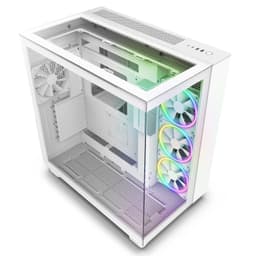
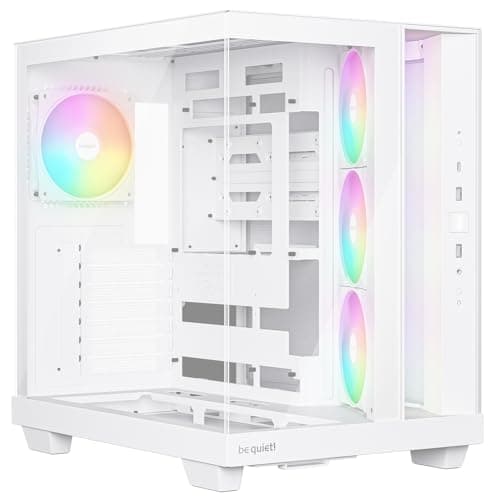
The NZXT H9 Elite is a head-turner. Glass on the front, top, and side means you see everything inside, and the dual-chamber design keeps the PSU and cables hidden away from the main airflow path. Three F120 RGB Duo fans come included with a controller, which is a proper bundle at just under £100.
For airflow, the dual-chamber layout is genuinely useful. By separating the PSU compartment from the motherboard area, hot air from the power supply does not mix with the air cooling your GPU and CPU. The three included fans handle basic airflow well, and the 360mm radiator support at the top means AIO cooling is well catered for.
The honest caveat: the glass front panel is not ideal for pure airflow. Glass restricts intake compared to mesh, so the H9 Elite is not the most thermally efficient case in this roundup. But it is competitive, and the dual-chamber design partially compensates. If you want a case that looks spectacular and performs respectably for airflow, this is the one.
NZXT's build quality is solid throughout. The white finish is clean, and the RGB implementation through NZXT CAM software is well sorted for those who care about lighting control.
Pros
- Dual-chamber design improves internal airflow path
- Three RGB fans with controller included
- 360mm radiator support
- Stunning panoramic glass aesthetic
Cons
- Glass front panel restricts intake airflow vs mesh
- Runs warmer than mesh-front alternatives
- Tight internal space for large GPU builds
Buy on Amazon
Best Under £50
Rating: ★★★★☆ (4.1)
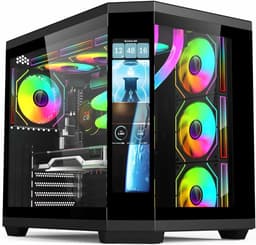
An LCD screen on a case under £50. Four ARGB PWM fans. Dual-chamber layout. The IONZ APEX Vision is packing a lot of features for the money, and for builders who want their rig to look the part without spending big, it is a genuinely interesting option.
From an airflow perspective, the dual-chamber design helps by keeping the PSU and storage away from the main cooling zone. The four included ARGB fans give you reasonable airflow coverage from the start, and PWM control means your motherboard can manage fan speeds automatically based on temperature. That is a proper feature at this price.
The LCD screen is a fun addition for displaying temperatures, system stats, or custom images. It is not going to replace a dedicated monitoring solution, but it adds personality. Build quality is where you feel the budget constraints most. The plastic feels a bit light, and panel fitment is not as precise as pricier options. But for a first build or a secondary machine, it gets the job done.
Airflow is decent rather than exceptional. The front panel design is more aesthetic than purely functional, so if maximum thermal performance is your priority, the Montech or Trilobite T3 will serve you better. But for under £50 with this feature set, the APEX Vision is hard to dismiss.
Pros
- Four ARGB PWM fans included
- LCD screen for system monitoring
- Dual-chamber layout improves airflow path
- Excellent feature count for under £50
Cons
- Build quality reflects the budget price
- Airflow is decent but not class-leading
- LCD software setup can be fiddly
Buy on Amazon
Modular High Airflow
Price: £89.99 | Rating: ★★★★½ (4.7)
Corsair's FRAME 4000D RS is built around a genuinely clever idea: the InfiniRail fan mounting system lets you position fans anywhere along a continuous rail rather than being locked to fixed mounting points. For airflow optimisation, that flexibility is a real advantage. You can dial in your fan positions to suit your specific components rather than working around the case's default layout.
Three RS ARGB fans come pre-installed, and the high-airflow mesh front panel means intake is unrestricted. Corsair has also built in compatibility with ASUS BTF, MSI Project Zero, and Gigabyte Project Stealth hidden-connector motherboards, which keeps cables out of the airflow path entirely on supported boards. That is a forward-thinking feature that will matter more as hidden-connector boards become mainstream.
Build quality is proper Corsair: solid, well-finished, and with good cable management routing. At around £83, it sits in a competitive price bracket, but the InfiniRail system and BTF compatibility justify the premium over basic mesh cases. For builders who want to fine-tune their airflow setup rather than accept a fixed layout, this is the most flexible option in the roundup.
Pros
- InfiniRail system for flexible fan positioning
- High-airflow mesh front panel
- BTF and Project Zero motherboard compatibility
- Three RS ARGB fans pre-installed
Cons
- InfiniRail adds complexity for simple builds
- BTF compatibility only useful with specific motherboards
- Pricier than basic high-airflow alternatives
Buy on Amazon
Showcase Build Airflow
Price: £199.03 | Rating: ★★★★½ (4.7)
The Corsair 3500X ARGB is designed for builders who want their components on display. The panoramic tempered glass wraps around the front and side, giving an almost unobstructed view of the internals. Three RS120 ARGB fans come included, and reverse motherboard connection support means cables are hidden behind the board for a cleaner look through that glass.
Airflow is where you need to be realistic. Panoramic glass looks stunning but it is not mesh. The 3500X relies on top and rear ventilation to compensate, and the three included fans do a reasonable job of moving air through the chassis. Temperatures are acceptable for mid-range builds, but if you are running a high-end GPU at full load, a mesh-front case will serve you better thermally.
That said, for a showcase build where aesthetics are part of the brief, the 3500X delivers. Corsair's build quality is excellent, the ARGB implementation is clean, and the reverse connection support is a genuinely useful feature for cable management. At around £145, it is the priciest option in this roundup, so go in with clear expectations about the airflow trade-off.
Pros
- Panoramic glass for stunning component visibility
- Reverse motherboard connection support
- Three RS120 ARGB fans included
- Excellent Corsair build quality
Cons
- Glass front restricts airflow vs mesh alternatives
- Most expensive case in this roundup
- Not ideal for very high thermal loads
Buy on Amazon£199.03
Compact Dual-Chamber
Price: £75.95 | Rating: ★★★★½ (4.7)
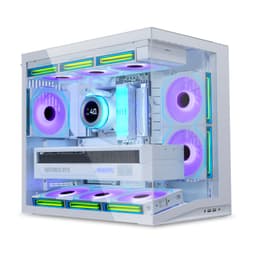
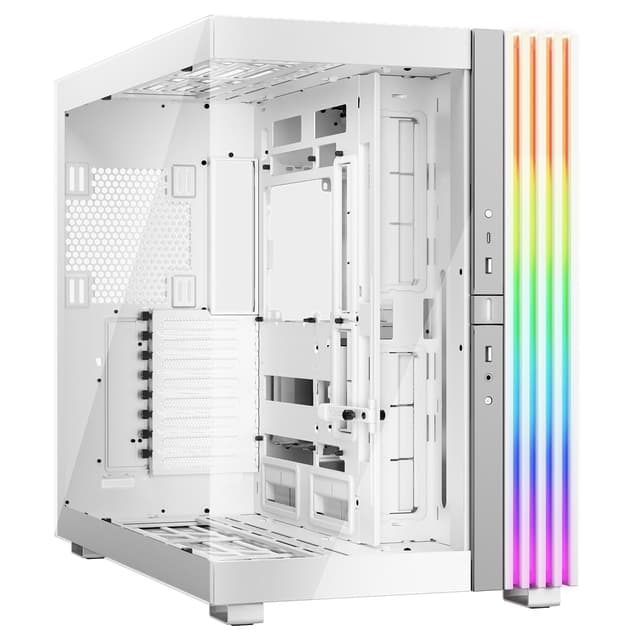
Lian Li's O11 Dynamic series has been a favourite among enthusiast builders for years, and the Mini V2 brings that dual-chamber pedigree to a more compact footprint. The modular layout is the key selling point for airflow: you can configure fan and radiator positions to suit your specific cooling setup rather than being locked into one arrangement.
The dual-chamber design keeps the PSU and cables separated from the main cooling zone, which helps maintain clean airflow across the motherboard and GPU. Tempered glass panels on both sides mean you can show off the build from either angle. The white finish is clean and well-executed.
No fans are included, which is the main practical downside. You will need to budget for fans separately, and with a case this flexible, you will probably want at least four to take full advantage of the mounting options. At around £76, it is not cheap for a case without fans, but the build quality and layout flexibility justify the investment for enthusiast builders who want to optimise their airflow setup properly.
Pros
- Modular layout for flexible fan and radiator placement
- Dual-chamber design for clean airflow path
- Excellent Lian Li build quality
- Dual tempered glass panels
Cons
- No fans included, adds to total cost
- Compact size limits some radiator configurations
- Pricier than similarly sized alternatives
Buy on Amazon
Stylish mATX Airflow
Price: £70.02 | Rating: ★★★★½ (4.7)
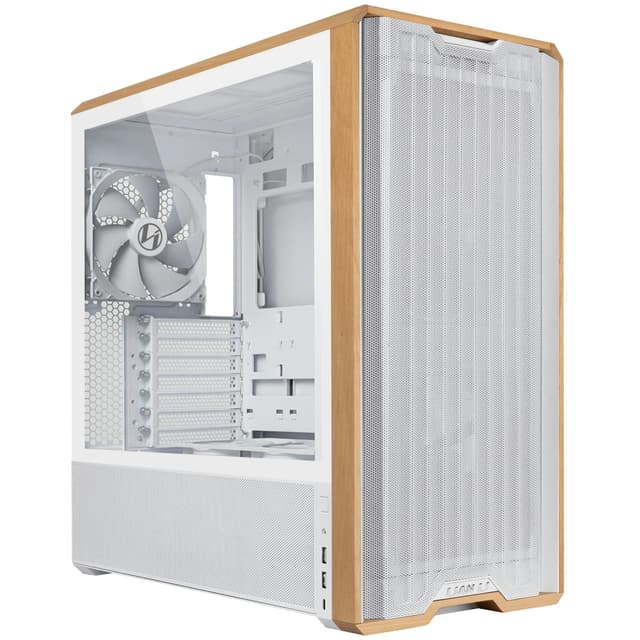
Lian Li keeps finding new ways to make PC cases interesting, and the A3 Wood Edition is a good example. The wood accent panel gives it a warmth that most black steel cases completely lack, and underneath the aesthetic, the airflow fundamentals are solid. Mesh front panel, sensible fan mounting positions, and Lian Li's typically good build quality.
As a Micro-ATX case, it is compact without being cramped. The mesh front allows proper intake airflow, and the layout supports front-mounted radiators up to 240mm. For a small form factor build with a mid-range GPU, temperatures should be well controlled. The aluminium and steel construction feels premium, and the wood detail is genuinely well integrated rather than looking like an afterthought.
No fans included, which is a recurring theme with Lian Li cases. At £70, you are paying for design and build quality rather than a complete out-of-the-box cooling solution. But if you already have fans or are happy to buy separately, the A3 Wood Edition is a distinctive choice that does not compromise on airflow to achieve its looks.
Pros
- Distinctive wood accent design
- Mesh front for good intake airflow
- Premium aluminium and steel construction
- Compact mATX footprint
Cons
- No fans included
- 240mm radiator maximum
- Premium price for a mATX case
Buy on Amazon£70.02
Clean Airflow Mid-Tower
Price: £100.49 | Rating: ★★★★½ (4.7)
The Lian Li V100 is a clean, no-nonsense mid-tower that prioritises good airflow fundamentals over flashy features. Lian Li's design philosophy has always leaned towards function, and the V100 continues that tradition with a layout that makes it easy to set up a proper positive-pressure airflow configuration.
The front panel design allows decent intake airflow, and the interior is spacious enough to accommodate large GPUs and multiple radiator configurations. Lian Li's build quality is, as always, a step above what the price might suggest. Steel and aluminium construction, well-fitted panels, and sensible cable management routing all contribute to a case that is pleasant to build in.
At around £70, it sits in a competitive bracket. It does not include fans, which is a consistent Lian Li pattern, and it is not the most feature-packed option at this price. But for builders who want a reliable, well-built mid-tower with solid airflow potential and Lian Li's quality assurance, the V100 is a dependable choice.
Pros
- Solid Lian Li build quality
- Spacious interior for large components
- Good airflow layout fundamentals
- Clean, understated aesthetic
Cons
- No fans included
- Less distinctive than some rivals at this price
- Front panel airflow could be more open
Buy on Amazon
Budget Mesh ATX
Price: £71.07 | Rating: ★★★★☆ (4.4)
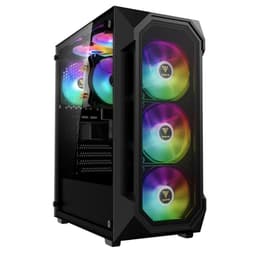
GAMDIAS is not a brand that gets talked about as much as Corsair or Lian Li, but the AURA GC1 ELITE makes a reasonable case for attention. Four 120mm ARGB fans included, a high-airflow mesh front panel, and tool-free tempered glass installation. On paper, that is a strong spec sheet for the price.
The mesh front panel is the key airflow feature, and it works as advertised. Four fans running from the front creates solid positive pressure, and temperatures in a typical mid-range build are well managed. The tool-free glass installation is a genuinely useful quality-of-life feature that makes cleaning and component access less of a chore.
Build quality is the area where GAMDIAS shows its budget roots. The steel is thinner than Corsair or Fractal equivalents, and the ARGB fans, while plentiful, are not the most refined in terms of noise or light diffusion. The case gets the job done for airflow, but it lacks the premium feel of pricier options. For a budget ATX build where thermal performance matters more than aesthetics, it is a reasonable choice.
Pros
- Four ARGB fans included
- High-airflow mesh front panel
- Tool-free tempered glass installation
- Good value for ATX mesh case
Cons
- Thinner steel than premium rivals
- ARGB fans are basic quality
- Brand less established than Corsair or Fractal
Check availability
Compact Budget mATX
Price: £92.99 | Rating: ★★★★½ (4.6)
The Lian Li A3-mATX Tempered Glass Panel variant rounds out this roundup as the compact budget option from Lian Li's mATX line. Steel and aluminium construction gives it a quality feel that punches above its price, and the tempered glass side panel lets you see inside without spending big on a premium case.
For airflow, it is a competent rather than exceptional performer. The mATX form factor limits fan mounting options compared to full ATX cases, and without a full mesh front, intake airflow is more restricted than the top picks in this list. That said, for a compact build with a modest GPU, temperatures will be manageable with a sensible fan setup.
At around £70, it is priced similarly to the Wood Edition variant. The choice between the two comes down to whether you want the distinctive wood aesthetic or a more conventional glass-panel look. Neither includes fans, so budget accordingly. For a clean, compact mATX build where space is the priority and airflow demands are moderate, the A3-mATX does the job.
Pros
- Steel and aluminium construction feels premium
- Tempered glass side panel
- Compact mATX footprint
- Lian Li quality assurance
Cons
- No fans included
- Front panel airflow less open than mesh rivals
- Limited fan mounting positions vs ATX cases
Buy on Amazon£92.99