Box speeds are mostly fiction. The number printed on the front of a router is the theoretical sum of every band running simultaneously at close range in a room with no walls, no interference, and no other devices. Nobody lives like that. What actually matters is whether the signal holds up in the back bedroom, whether it chokes when fifteen people are streaming at once, and whether the firmware still gets security patches two years down the line. That's the stuff that determines whether a mesh system earns its place in your home or ends up gathering dust next to the old ISP router.
The ASUS ZenWiFi AC Whole-Home Tri-Band Mesh System (CT8, two-pack, in charcoal) is ASUS's answer to the dead-zone problem for larger homes. It's a proper tri-band mesh networking system, rated for up to 5,400 square feet across both nodes, with a dedicated 5GHz band reserved purely for backhaul (the node-to-node link), four gigabit ports per node, and lifetime AiProtection security built in. It's been around long enough to have hundreds of owner reviews averaging 4.1 stars, which is a decent signal that real people are getting real results. But it's also priced at the premium end, and the Wi-Fi standard it runs is AC (Wi-Fi 5), not Wi-Fi 6. That matters, and we'll get into why.
Bottom line up front: this is a genuinely good mesh system for large UK homes, particularly older builds with thick walls where a single router just won't cut it. The dedicated backhaul is the headline strength, and owners consistently report solid, stable coverage. But if you're spending this kind of money today, the Wi-Fi 5 standard is a real conversation to have. Read on.
Core Specifications: ASUS ZenWiFi AC Whole-Home Tri-Band Mesh System
The CT8 is a tri-band system, which means it runs three separate radio bands simultaneously. You get a 2.4GHz band for range and older devices, one 5GHz band for client devices (your phones, laptops, tablets), and a second 5GHz band that's dedicated entirely to backhaul. That last bit is the key architectural decision that separates a proper mesh from a glorified range extender, and we'll cover it in detail in the backhaul section. The combined theoretical throughput is AC3000, which breaks down as 400Mbps on 2.4GHz plus 867Mbps and 1,733Mbps on the two 5GHz bands. As always, treat those numbers as a ceiling nobody reaches in practice.
Each node has four gigabit LAN ports and one gigabit WAN port, which is generous for a mesh unit. You can wire devices directly into either node, not just the primary one, which is genuinely useful if you want a wired TV or games console at the far end of the house. The ASUS spec sheet lists support for 802.11ac (Wi-Fi 5), MU-MIMO (multi-user, multiple input, multiple output, which lets the router talk to several devices at once rather than queuing them), and AiMesh compatibility, meaning you can add other ASUS AiMesh-compatible routers to expand the network if needed.
Coverage is rated at up to 5,400 square feet across both nodes combined. ASUS also includes AiProtection Pro security (powered by Trend Micro) and parental controls at no ongoing subscription cost, which is a legitimate differentiator at this price. Three SSIDs (network names) are supported, so you can run a main network, a guest network, and an IoT-only network as separate things. Here's the full spec breakdown:
| Specification | Detail |
|---|---|
| Wi-Fi Standard | 802.11ac (Wi-Fi 5), tri-band |
| Combined Throughput (Theoretical) | AC3000 (400 + 867 + 1,733 Mbps) |
| Bands | 1x 2.4GHz, 2x 5GHz (one dedicated backhaul) |
| Backhaul | Dedicated 5GHz band (wireless); wired backhaul supported via LAN port |
| Coverage Rating | Up to 5,400 sq.ft (both nodes combined) |
| LAN Ports per Node | 4x Gigabit Ethernet |
| WAN Port | 1x Gigabit Ethernet |
| USB | 1x USB 3.0 per node |
| MU-MIMO | Yes (4x4) |
| OFDMA | No (Wi-Fi 5 limitation) |
| SSIDs | 3 (main, guest, IoT) |
| Security | AiProtection Pro (Trend Micro), lifetime free |
| Parental Controls | Yes, lifetime free |
| AiMesh Compatible | Yes |
| Nodes in Pack | 2 |
Real-World Coverage: What the ASUS ZenWiFi AC Actually Delivers
The 5,400 square foot coverage claim is a best-case figure. ASUS generates that number under ideal conditions: open-plan space, minimal interference, line-of-sight between nodes. UK homes are not that. We have Victorian terraces with solid brick walls, 1970s semis with plasterboard over dense block, and modern builds with foil-backed insulation that absolutely murders 5GHz signals. So take the headline figure as a rough guide, not a guarantee. What the two-node layout actually gives you in practice is meaningful coverage across a typical three to four bedroom UK house, provided you place the second node sensibly.
Owner reports across the hundreds of reviews back this up fairly consistently. The recurring theme is that people coming from a single ISP-supplied router notice an immediate and significant improvement in the rooms that used to be dead zones. The upstairs bedrooms, the garden, the garage, the kitchen at the far end of the house: these are the places people mention in positive reviews. A few owners with particularly large or oddly-shaped properties, or with thick stone walls, report that two nodes aren't quite enough and they've added a third via AiMesh. That's a real option with this system.
The node placement guidance from ASUS recommends positioning the second node roughly halfway between the primary router and the furthest point you want to cover, rather than at the edge of the existing signal. That's standard mesh advice and it applies here. What helps the CT8 specifically is the dedicated backhaul band: because the node-to-node link runs on its own separate 5GHz radio, the second node isn't burning half its capacity just talking to the first one. That means the signal it rebroadcasts to your devices is closer to full strength rather than a degraded copy. Owners in two and three-storey homes consistently report this working as intended, with devices roaming between nodes without noticeable drops.
Sustained Speed Under Load
The AC3000 rating is, as mentioned, a marketing sum. Your phone isn't connecting at 1,733Mbps. In the real world, a single device close to the router on the 5GHz client band might see 400 to 600Mbps on a good day with a fast internet connection. Further away, through walls, that drops. This is physics, not a flaw specific to ASUS. What matters is how gracefully throughput degrades with distance and load, and that's where the dedicated backhaul pays off again.
On a shared-backhaul mesh system (the kind that uses the same band for both client traffic and node communication), the second node is essentially a bottleneck. Every megabit your devices get from the far node has to travel through the same pipe the node uses to talk to the primary router. You end up with roughly half the available bandwidth at the far node under load. The CT8 avoids this by keeping backhaul on its own dedicated radio. Owners report that speeds at the far node hold up reasonably well under normal household load, which is the expected outcome of this architecture. It's not magic, but it's the right design choice.
One honest caveat: this is Wi-Fi 5, not Wi-Fi 6. Wi-Fi 6 introduced OFDMA (orthogonal frequency-division multiple access), which is a more efficient way of scheduling multiple devices simultaneously. Without it, the CT8 handles device contention less elegantly under heavy load. If you've got thirty-plus devices all hammering the network at once, a Wi-Fi 6 mesh system will manage that queue more efficiently. For most households with a dozen to twenty active devices, this won't be a visible problem. But it's a real architectural difference about, especially at this price point.
Mesh and Backhaul: The Architecture That Actually Matters
The backhaul is the backbone of any mesh system. It's the link between nodes, and getting it wrong turns a mesh system into an expensive range extender. A dual-band mesh that uses one band for both client devices and node communication is doing two jobs with one radio. Every time the nodes talk to each other, they're eating into the bandwidth available for your actual devices. The result is that the second node delivers noticeably less throughput than the primary, often by 40 to 50 percent under load. This is the dirty secret of a lot of cheaper mesh systems.
The CT8's tri-band design sidesteps this by reserving one entire 5GHz radio purely for the backhaul link between nodes. Your client devices connect on the 2.4GHz band or the other 5GHz band. The nodes talk to each other on the dedicated backhaul band. These don't interfere with each other. The result, according to both the spec and what owners consistently report, is that the far node delivers speeds much closer to what the primary node provides, rather than a throttled fraction of it. This is the single most important architectural decision in a mesh system, and the CT8 gets it right.
There's also wired backhaul support. If you can run an Ethernet cable between the two nodes (or between a switch and the secondary node), you can use that cable as the backhaul link instead of the wireless band. This is the gold standard for mesh performance: the wired connection is faster, lower latency, and completely immune to wireless interference. Not everyone can run cables through their walls, but if you can, the CT8 supports it properly. Owners who've set it up this way report it working cleanly with no fiddling required beyond plugging in the cable and letting the system detect it.
Device Capacity: Coping With a Modern Home
A modern UK household has more connected devices than most people consciously realise. Phones, laptops, tablets, smart TVs, streaming sticks, games consoles, smart speakers, robot hoovers, security cameras, video doorbells, smart plugs, smart bulbs. Add it all up and thirty to fifty connected devices is completely normal, even in a house that doesn't feel particularly tech-heavy. Cheap routers choke on this. They run out of connection table space, they queue devices inefficiently, and the result is intermittent drops and sluggish performance that's hard to diagnose because it looks like a broadband problem.
The CT8 uses 4x4 MU-MIMO, which means it can communicate with up to four devices simultaneously rather than servicing them one at a time in a queue. This is a meaningful improvement over cheaper 2x2 or 3x3 configurations. Combined with the tri-band setup (more radios means more capacity spread across bands), the system handles a busy home considerably better than a single-band or basic dual-band router. Owner reports don't flag capacity as a problem in typical family households, which is a good sign.
The absence of OFDMA is the main limitation here. OFDMA, introduced with Wi-Fi 6, allows a single transmission to carry data for multiple devices simultaneously by subdividing the channel. Without it, the CT8 is still doing MU-MIMO spatial multiplexing, which is good, but it's not as efficient at handling a large number of small, simultaneous requests (think smart home devices all phoning home at once). For a home with mostly streaming and browsing devices, this distinction is largely academic. For a home with fifty-plus IoT devices all chattering constantly, a Wi-Fi 6 system would handle the overhead more cleanly. The CT8 manages fine for most real households; it's not the right answer for a particularly IoT-dense setup.
Wi-Fi Standard and Future-Proofing
This is the section where honesty matters most, because it's where the CT8's age shows. The system runs 802.11ac, which the Wi-Fi Alliance now markets as Wi-Fi 5. Wi-Fi 6 (802.11ax) has been mainstream since around 2019 to 2020, and Wi-Fi 6E (which adds the 6GHz band) and Wi-Fi 7 (802.11be) are now available in newer products. The CT8 predates all of that. It does not support Wi-Fi 6, OFDMA, or the 6GHz band.
Now, does that mean it's useless? No. Wi-Fi 5 is still perfectly capable for the vast majority of UK households. Most people's internet connections are well below what even Wi-Fi 5 can deliver over a short distance, so the bottleneck is almost always the broadband line, not the router standard. And most devices in a typical home, including many current phones and laptops, connect at Wi-Fi 5 speeds anyway. The practical difference between Wi-Fi 5 and Wi-Fi 6 in a typical home is smaller than the marketing suggests.
But here's the problem with buying Wi-Fi 5 at a premium price in 2025 or 2026: you're paying top-tier money for a system that's already one generation behind, and you'll likely want to upgrade again sooner than you would with a Wi-Fi 6 purchase. If you're buying this because it's available at a significantly reduced price, that changes the calculation. If you're paying close to full premium pricing, it's worth seriously comparing it against a Wi-Fi 6 mesh system at a similar or slightly higher price point. The future-proofing argument is real, even if the immediate practical difference is modest.
Features and QoS
ASUS packs a lot into the CT8's firmware, and most of it is genuinely useful rather than checkbox filler. The headline feature is AiProtection Pro, which is ASUS's network security suite powered by Trend Micro. It includes malicious site blocking, intrusion prevention, and infected device detection. Crucially, ASUS offers this at no ongoing subscription cost for the lifetime of the product. A lot of competitors charge monthly for equivalent features. If you've got kids on the network or you're running smart home devices that you'd rather not have phoning home to dodgy servers, this is a meaningful real-world benefit.
Parental controls are also included free, and they're more capable than the basic time-scheduling most routers offer. You can filter content by category, set schedules per device, and pause internet access for specific devices. Owner feedback on the parental controls is generally positive, though some find the category filtering less granular than dedicated parental control software. For most families it's more than adequate, and the fact that it's free and built in rather than a separate app is a genuine plus.
QoS (Quality of Service) is available through the ASUS firmware, letting you prioritise traffic types or specific devices. So if you want to make sure your video calls or gaming traffic gets priority over someone's background downloads, you can set that up. The Adaptive QoS in ASUS routers is generally considered one of the better consumer implementations. There's also a guest network (one of the three SSIDs), VPN server and client support (OpenVPN and PPTP), and USB storage sharing via the USB 3.0 port on each node. Running a good VPN alongside the network adds a privacy and security layer on top of the coverage these nodes build, and it keeps you protected on public Wi-Fi when you're away from home too. The USB sharing works, though it's not a substitute for a proper NAS if you're doing heavy file transfers.
Firmware, App and Security Updates
ASUS has a reasonable track record on firmware updates, though it's not perfect. The CT8 has received updates since launch, and ASUS's AiMesh platform has improved meaningfully over time through firmware rather than hardware changes. That's a positive sign. The ASUS Router app (available on iOS and Android) handles setup and ongoing management, and it's generally considered one of the better router apps in the consumer space. It's not as polished as Eero's or Google's, but it exposes considerably more functionality.
The security update question is more nuanced. ASUS does push security patches, but the cadence isn't always predictable, and the CT8 is now several years old. For a product at this price, you'd want confidence that critical vulnerabilities get patched promptly. Owner reviews don't flag security update abandonment as a concern for this specific product, which is reassuring, but it's worth keeping an eye on the ASUS support page for firmware release history before buying.
On the reboot question: owner reviews are mixed but mostly positive. The majority of owners report running the system for extended periods without needing manual reboots. A minority, particularly those with older firmware versions, mention occasional stability issues that required a reboot to resolve. Keeping the firmware updated appears to be the main mitigation. This is not an unusual situation for consumer mesh systems, and the CT8 doesn't stand out negatively here compared to its competitors. The general consensus from owners is that it's stable once properly set up and kept up to date.
Setup and Management
Setup is handled through the ASUS Router app, and by all accounts it's a reasonably painless process. You plug in the primary node, download the app, follow the prompts, and then add the second node. The app walks you through placement and gives a signal strength indicator to help you position the second node correctly. Owner reviews consistently describe the initial setup as straightforward, even for people who don't consider themselves technically confident. That's not nothing: a mesh system that requires a networking degree to configure is a problem, and this one doesn't.
The ASUS firmware also has a full web interface (accessed via a browser at router.asus.com or the local IP), which gives you access to the complete feature set including the more advanced QoS, VPN, and firewall settings. If you want to get into the weeds, you can. If you just want to set it up and forget it, the app is sufficient for the basics. This dual-interface approach is one of ASUS's strengths: it doesn't dumb down the experience for power users, but it doesn't force novices into a command line either.
Ongoing management is mostly hands-off once configured. The app sends notifications for firmware updates, and applying them is a one-tap process. Device management, parental controls, and QoS adjustments are all accessible from the app without needing to dig into the web interface. The AiMesh integration means that if you add a third node later, it joins the same management interface rather than appearing as a separate system to configure. A few owners mention that the app occasionally struggles to connect to the router remotely (outside the home network), but this seems to be an intermittent issue rather than a consistent failure.
Ports and Connectivity
Four gigabit LAN ports per node is genuinely generous for a mesh system. A lot of mesh competitors give you one or two LAN ports on the secondary node, which limits your wired device options at the far end of the house. The CT8 gives you four on each node, so you can wire in a TV, a games console, a NAS, and a smart hub all at the secondary node without needing an extra switch. That's a practical benefit in a real home setup.
The WAN port is also gigabit, which matches the maximum speed of most UK broadband connections. If you're on a full-fibre connection delivering close to or above 1Gbps, you'd want a 2.5GbE WAN port to avoid a bottleneck. The CT8 doesn't have one. For connections up to around 900Mbps, this isn't an issue in practice. For multi-gigabit connections, it's a ceiling. Most UK broadband packages are well below that threshold, so for the majority of buyers this won't matter. But it matters if you're on or planning to upgrade to a hyperfast full-fibre package.
Each node also has a USB 3.0 port. You can use this for network-attached storage (plug in a USB drive and share it across the network), a USB printer, or a 3G/4G dongle as a WAN failover. The storage sharing works reasonably well for light use: accessing files from other devices on the network, running a basic media server, that sort of thing. It's not going to replace a proper NAS, and transfer speeds over USB-attached storage on a router are never going to be fast, but it's a useful bonus. Wired backhaul between nodes uses one of the LAN ports, so if you're running a cable between nodes you'll lose one port on each node for that purpose.
How It Compares
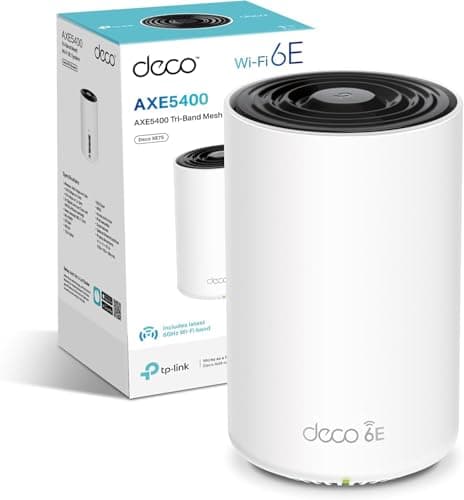
The two most obvious competitors to consider are the TP-Link Deco XE75 Pro (a Wi-Fi 6E tri-band mesh, two-pack) and the ASUS ZenWiFi AX (XT8), which is essentially the Wi-Fi 6 successor to the CT8 in ASUS's own lineup. The XT8 runs the same AiMesh platform, has the same form factor, and adds Wi-Fi 6 with OFDMA. The Deco XE75 Pro goes further with Wi-Fi 6E, adding the 6GHz band for even less congested high-speed connections.
The honest comparison here isn't flattering for the CT8 at full premium pricing. The XT8 is the direct upgrade and, depending on current pricing, may not cost dramatically more. It adds OFDMA, better device capacity management, and a Wi-Fi standard with a longer useful lifespan. The Deco XE75 Pro is a different proposition for larger homes or those with newer Wi-Fi 6E devices, though the 6GHz band has limited range through walls and most client devices don't support it yet. If the CT8 is available at a meaningfully reduced price compared to these alternatives, the dedicated backhaul architecture and ASUS's feature set still make it a solid buy. At full price versus its successors, it's harder to justify.
| Feature | ASUS ZenWiFi AC CT8 (2-pack) | ASUS ZenWiFi AX XT8 (2-pack) | TP-Link Deco XE75 Pro (2-pack) |
|---|---|---|---|
| Wi-Fi Standard | Wi-Fi 5 (AC3000) | Wi-Fi 6 (AX6600) | Wi-Fi 6E (AXE5400) |
| Backhaul | Dedicated 5GHz (wireless or wired) | Dedicated 5GHz (wireless or wired) | Dedicated 5GHz (wireless or wired) |
| OFDMA | No | Yes | Yes |
| 6GHz Band | No | No | Yes |
| LAN Ports per Node | 4x Gigabit | 3x Gigabit | 2x Gigabit |
| 2.5GbE WAN | No | Yes (primary node) | Yes |
| Lifetime Security | Yes (AiProtection Pro) | Yes (AiProtection Pro) | No (HomeCare subscription) |
| Coverage Rating | 5,400 sq.ft | 5,500 sq.ft | 5,400 sq.ft |
Final Verdict
The ASUS ZenWiFi AC Whole-Home Tri-Band Mesh System does the fundamentals right. The dedicated backhaul band is a proper architectural decision, not a marketing claim, and owners consistently report that it delivers stable, usable coverage across large UK homes where a single router or a cheaper shared-backhaul mesh would struggle. The four-port-per-node layout is genuinely practical. The lifetime AiProtection security and parental controls are real money saved compared to competitors that charge monthly. The AiMesh compatibility means you can expand the system if two nodes aren't enough. And hundreds of reviews averaging 4.1 stars suggests that, for the people buying it, it's working.
The honest reservation is the Wi-Fi standard. Paying premium prices for Wi-Fi 5 hardware in 2025 or 2026 is a tough sell when Wi-Fi 6 mesh systems are readily available at comparable prices. The CT8 doesn't support OFDMA, which means it handles large numbers of simultaneous devices less efficiently than a Wi-Fi 6 system would. And without a 2.5GbE WAN port, it's not future-ready for multi-gigabit broadband. These aren't dealbreakers for a typical UK home with a standard fibre connection, but they're real limitations at this price tier.
Who should buy this? Owners of larger UK homes, particularly older builds with thick walls, who need reliable whole-home coverage and want a feature-rich system with proper security built in. If you can get the CT8 at a price that reflects its age relative to Wi-Fi 6 alternatives, it's a strong buy. Who should skip it? Anyone paying full premium pricing who hasn't compared it directly against the ASUS ZenWiFi AX XT8. The XT8 is the smarter buy at similar money: same ASUS platform, same AiMesh ecosystem, same lifetime security, but with Wi-Fi 6, OFDMA, and a 2.5GbE WAN port. If the CT8 is priced meaningfully below the XT8, that changes things. If they're close, the XT8 wins on forward compatibility.
Our rating: 7.5 out of 10. Solid mesh architecture, genuinely useful features, and a track record of happy owners. Marked down for the Wi-Fi 5 standard at a price point where Wi-Fi 6 is available and the missing 2.5GbE WAN port. Get it at the right price and it's a very good system. At full premium pricing, look at the XT8 first.
Frequently asked
5 questions01Will the ASUS ZenWiFi AC Whole-Home Tri-Band Mesh System (CT8 2 Pack Charcoal) cover my whole house?+
ASUS rates the two-node system at up to 5,400 square feet, but that figure assumes ideal open-plan conditions. In a typical UK home with brick walls, multiple floors, and standard building materials, real-world coverage will be less than the headline number. That said, owner reports consistently show the two-node CT8 providing solid coverage across three and four bedroom UK homes, including upstairs bedrooms and gardens. Homes with particularly thick walls or unusual layouts may need a third node, which the AiMesh platform supports. Placement of the second node matters: position it roughly halfway between the primary router and the furthest point you want to cover, not at the edge of the existing signal.
02Does the ASUS ZenWiFi AC CT8 support Wi-Fi 6 or Wi-Fi 6E?+
No. The CT8 runs 802.11ac, which is Wi-Fi 5. It does not support Wi-Fi 6, Wi-Fi 6E, or Wi-Fi 7. This means it lacks OFDMA, which Wi-Fi 6 introduced for more efficient handling of multiple simultaneous devices. For most UK households with standard fibre broadband and a typical mix of streaming and browsing devices, Wi-Fi 5 is still perfectly functional. But if you're buying at premium pricing and want a longer useful lifespan, it's worth comparing the CT8 against the ASUS ZenWiFi AX XT8, which is the Wi-Fi 6 successor on the same AiMesh platform.
03Is the ASUS ZenWiFi AC CT8 mesh worth it over a single router or a range extender?+
For a home where a single router genuinely can't reach all the rooms you need, yes. The key advantage of the CT8 over a cheap range extender is the dedicated backhaul band: the two nodes communicate on their own separate 5GHz radio, so the far node isn't throttled by sharing its radio between client devices and the node-to-node link. A range extender typically halves your available bandwidth because it uses the same radio for both jobs. If your home is small enough that a single router covers it adequately, a mesh system is unnecessary. But for a larger home with dead zones, the CT8's architecture is the right solution.
04Is the ASUS ZenWiFi AC CT8 easy to set up and reliable day to day?+
Setup is handled through the ASUS Router app and owner reports consistently describe it as straightforward, even for non-technical users. The app walks you through the process and includes a signal strength guide for node placement. Day-to-day reliability is generally good: the majority of owners across hundreds of reviews report stable operation without needing frequent reboots. A minority report occasional stability issues with older firmware versions, and the consistent advice from owners is to keep the firmware updated. The ASUS web interface is also available for more advanced configuration if needed.
05What warranty and returns apply to the ASUS ZenWiFi AC CT8?+
Warranty details for this specific product are not confirmed in the verified product listing data. ASUS typically offers a manufacturer's warranty on networking products, but you should check the current terms directly with ASUS or the seller at point of purchase. When buying through Amazon, the standard 30-day return window and Amazon A-to-Z Guarantee apply, which provides a baseline level of buyer protection regardless of the manufacturer warranty.