Prebuilt gaming PCs used to be an easy target. You'd price up the components, add maybe twenty percent for the privilege of having someone else put it together, and conclude that only a mug would pay that. That calculus has quietly shifted. GPU prices are volatile, component sourcing is a pain, and a decent warranty on the whole system is worth real money when something goes wrong eighteen months in. So when a prebuilt lands with genuinely current hardware, the question isn't automatically "why didn't you just build it yourself?" anymore. It's more like: "did they actually pick good parts, or is this a flashy case hiding a budget PSU and slow RAM?"
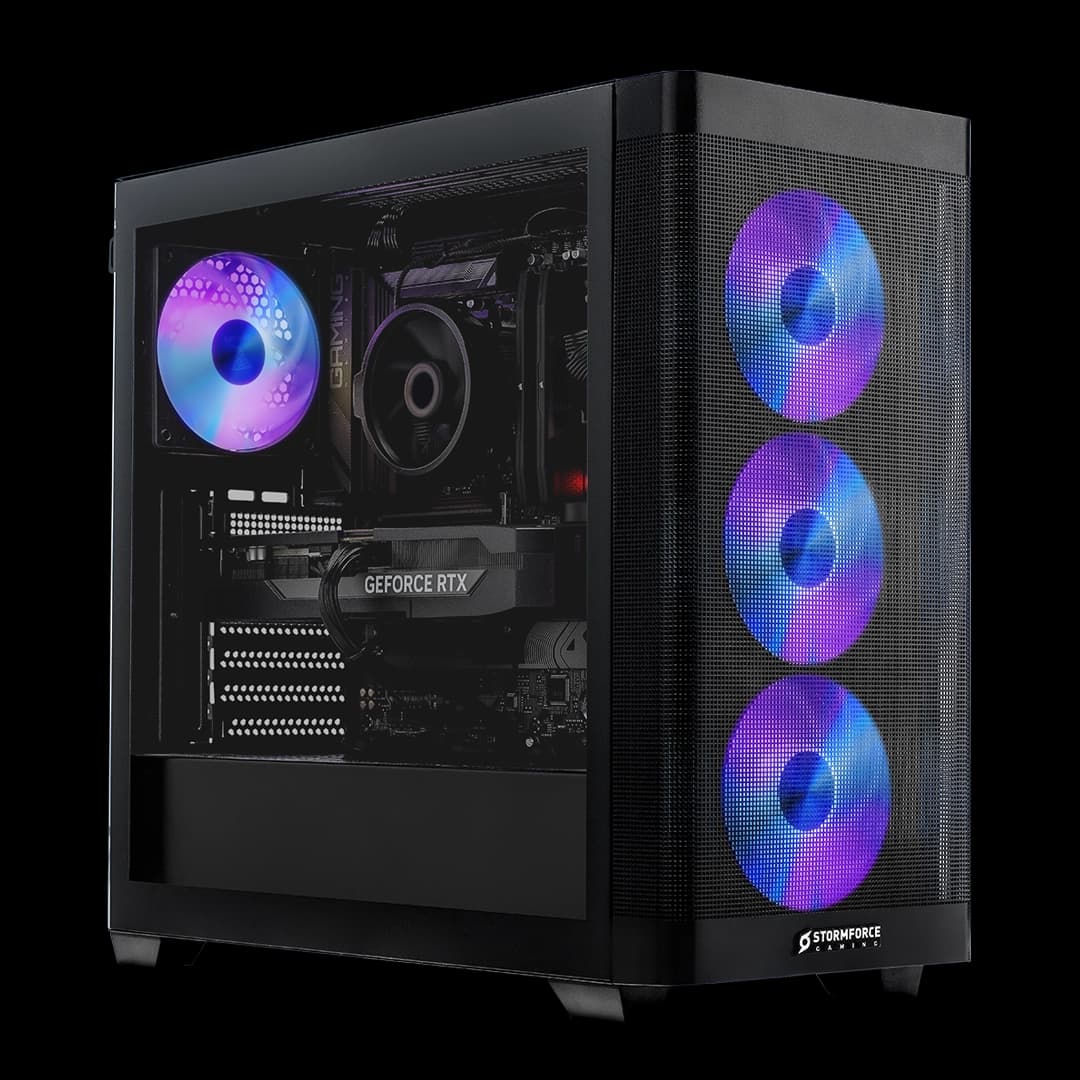
The Stormforce Gaming Aether Pro Intel is the kind of machine that makes that question interesting. Intel Core Ultra 5 245KF, RTX 5060 Ti 16GB on NVIDIA's Blackwell architecture, 32GB of DDR5 at 6000MHz, a Gen 4 NVMe SSD, and a 240mm AIO cooler, all wrapped in a Lian Li V100 white case. On paper, that's a proper mid-to-high-end build. Whether the execution lives up to the spec sheet is what this aether pro intel review is here to work out.
That means buyers at this level are going to scrutinise every component choice, and rightly so. So let's go through it properly.
Core Specifications
The headline numbers here are strong. You're getting Intel's Core Ultra 5 245KF, which is a 14-core chip (six Performance cores, eight Efficient cores) with a boost clock up to 5.2GHz. That's paired with the RTX 5060 Ti in its 16GB GDDR7 configuration, which is the full-fat version of the card rather than any cut-down variant. Memory is 32GB DDR5 at 6000MHz in a dual-channel 2x16GB kit, and storage is a 1TB Gen 4 M.2 NVMe SSD. Cooling is handled by a 240mm white AIO liquid cooler with a dual-fan radiator. The whole thing runs on a 650W 80+ Bronze PSU and sits on a B860 ATX white motherboard. Windows 11 Home comes pre-installed.
The case is the Lian Li V100 in white, which is a genuinely good chassis rather than a generic no-name box. Lian Li makes quality cases, and the V100 specifically is built around airflow optimisation with a clean, minimalist aesthetic. That matters because a lot of prebuilts use whatever case the manufacturer can source cheapest, and thermal performance suffers for it. Stormforce have gone with a recognisable, well-regarded brand here, which is a decent sign.
Connectivity covers Wi-Fi 7, Ethernet, and Bluetooth. Wi-Fi 7 is the current standard and brings meaningful improvements in throughput and latency over Wi-Fi 6E, so that's not a token inclusion. The B860 chipset supports the Core Ultra 200 series natively, so there's no compatibility compromise there either.
| Component | Specification |
|---|---|
| CPU | Intel Core Ultra 5 245KF, 14 cores (6P + 8E), up to 5.2GHz boost |
| GPU | NVIDIA RTX 5060 Ti 16GB (GDDR7, Blackwell) |
| RAM | 32GB DDR5 6000MHz (2 x 16GB) |
| Storage | 1TB Gen 4 M.2 NVMe SSD |
| Motherboard | B860 ATX White |
| Cooler | 240mm White AIO Liquid Cooler, dual-fan radiator |
| Case | Lian Li V100 ATX White |
| PSU | 650W 80+ Bronze White |
| OS | Microsoft Windows 11 Home |
| Connectivity | Wi-Fi 7, Ethernet, Bluetooth |
CPU Performance: aether pro intel review
The Intel Core Ultra 5 245KF is a solid chip for this kind of build. It's part of Intel's Arrow Lake-S generation, using the Core Ultra 200 series naming, and it brings a hybrid core architecture that handles both single-threaded workloads and multi-threaded tasks well. The six Performance cores do the heavy lifting for gaming and single-threaded applications, while the eight Efficient cores handle background tasks, streaming, and anything that benefits from more threads. The 5.2GHz boost clock is competitive with anything in this price tier.
The KF suffix is worth understanding. The K means it's unlocked for overclocking, and the F means it has no integrated graphics. That last bit doesn't matter here since you've got an RTX 5060 Ti doing the display work, but it does mean if the GPU ever fails you'll need a discrete card to get a picture. Not a deal-breaker, just. The B860 motherboard is a sensible pairing for this chip. It's not a Z890 board with full overclocking support, but the 245KF will run at its rated clocks without issue, and the B860 platform is well-supported and stable.
For gaming, the 245KF isn't going to be a bottleneck for the RTX 5060 Ti in any meaningful way. It's a fast enough chip that CPU-limited scenarios at 1440p are unlikely to be an issue. Where you'd notice it more is in genuinely multi-threaded workloads like video encoding, 3D rendering, or running a game alongside a streaming setup. The eight Efficient cores help here, but if your primary use case is heavy content creation alongside gaming, the Core Ultra 7 range would give you more threads to play with. For pure gaming, though, the 245KF is properly capable.
GPU & Gaming Performance
The RTX 5060 Ti 16GB is the most interesting component in this build. NVIDIA's Blackwell architecture brings meaningful improvements over Ada Lovelace, particularly in AI-accelerated rendering through DLSS 4. The multi-frame generation technology in DLSS 4 can multiply rendered frames significantly, which means the 5060 Ti punches above what its raw rasterisation numbers might suggest in supported titles. And the list of supported titles is growing fast.
The 16GB of GDDR7 is genuinely important here and it's what separates this card from the standard 5060 Ti 8GB variant. GDDR7 brings higher bandwidth than GDDR6X at lower power, and 16GB of VRAM means you're not going to hit memory limits at 1440p even with texture mods, ray tracing enabled, and a few other settings pushed up. At 4K, the card is capable but you'll want to lean on DLSS 4 Quality mode to keep frame rates comfortable in demanding titles. At 1440p, this is a strong card. Ray tracing at 1440p with DLSS 4 enabled is where Blackwell really shows what it can do, and the 5060 Ti handles that well based on published benchmark figures for this GPU class.
Real-time ray tracing support is baked into Blackwell at the hardware level, and NVIDIA's RT core improvements in this generation are genuine rather than marketing. For titles that implement ray tracing well, global illumination and shadow quality are noticeably better. For titles that don't, you turn it off and the card is still fast. The 16GB VRAM also gives this build useful longevity. VRAM requirements in games are creeping up, and having 16GB rather than 8GB means this machine should stay relevant for longer at high settings.
Memory & Storage
32GB of DDR5 at 6000MHz is a genuinely good memory spec. It's not the minimum viable option. A lot of prebuilts at this price tier ship with 16GB or slower DDR5 to pad the margin, so seeing 32GB at 6000MHz is a positive sign that Stormforce haven't cut corners here. The dual-channel configuration (2x16GB) is correct for performance. Single-channel memory with DDR5 would be a real waste of a fast GPU, so the 2x16GB setup is the right call.
DDR5 6000MHz is also close to the sweet spot for Intel's Core Ultra 200 series. Intel's memory controller on Arrow Lake-S is optimised around this frequency range, and going significantly higher can sometimes introduce instability without proportional performance gains. So the 6000MHz spec isn't just a marketing number, it's a sensible choice for this platform. The white aesthetic of the RAM presumably matches the overall build theme, though that's cosmetic rather than functional.
Storage is a 1TB Gen 4 M.2 NVMe SSD, which is the right choice for a build at this price. Gen 4 NVMe offers sequential read speeds well above SATA SSD and is meaningfully faster for large file transfers and game loading in titles that take advantage of fast storage. Windows 11's DirectStorage support means some newer titles can stream assets directly to the GPU, bypassing the CPU, and that works best with a fast NVMe drive. One terabyte fills up quickly if you're a heavy gamer, though. Modern AAA titles regularly exceed 100GB each, so you might find yourself managing storage within a year. The B860 motherboard should have additional M.2 slots for expansion, so check that before you commit.
Cooling Solution
A 240mm AIO liquid cooler is a proper choice for the Core Ultra 5 245KF. Air coolers at this price tier are perfectly capable, but the AIO gives you better sustained thermal performance under extended gaming sessions and typically runs quieter under load because the fans don't have to spin as hard. The dual-fan radiator configuration is standard for a 240mm unit and should keep the 245KF well within its thermal limits during normal gaming use.
The Lian Li V100 case is designed with airflow in mind, which matters because even a good AIO needs somewhere to move heat. A case that restricts airflow will cause the whole system to run hotter, which affects GPU temperatures as well as CPU temperatures. Lian Li's design philosophy generally prioritises airflow over aesthetics, so the V100 should complement the AIO rather than fight it. The GPU in particular will benefit from good case airflow since the RTX 5060 Ti runs its own cooling independently but still needs cool intake air.
One thing: the 650W PSU rating is adequate for this combination but not generous. The RTX 5060 Ti 16GB has a TDP that sits comfortably within what a 650W Bronze unit can supply alongside the 245KF, but there isn't a huge amount of headroom if you add extra drives, lots of RGB, or plan a future GPU upgrade. For the components as specified, it's fine. Just don't plan on dropping an RTX 5080 in there without also swapping the PSU. Thermal performance from the AIO should be good based on what this class of cooler delivers with a chip in the 245KF's power envelope, keeping the system quiet during typical gaming workloads.
Case & Build Quality
The Lian Li V100 is a legitimately good case. Lian Li is a Taiwanese manufacturer with a strong reputation for build quality and design, and the V100 is their take on a clean, minimalist ATX case with optimised airflow. The white finish is consistent and premium-looking rather than the kind of off-white that yellows quickly. If you're going for an all-white aesthetic build, this is a proper foundation rather than a compromise.
Internal layout in the V100 is designed for cable management, with routing channels and tie-down points that should allow a clean build. Prebuilt cable management is a legitimate concern because some manufacturers just stuff cables wherever they fit and call it done. The Lian Li V100's design makes a tidy build easier, and Stormforce's build quality reputation suggests they take this seriously. The white components throughout (RAM, AIO, case, PSU) create a coherent aesthetic that buyers at this price point are paying for, and it's executed properly here rather than being a half-hearted attempt.
The ATX form factor means this is a full-size desktop. It's not small. If you're tight on desk space or want something to tuck away, this isn't that machine. But the size also means there's room to work inside when you need to add storage or swap components later, which is a practical advantage. Glass side panels are common on cases at this level, and the V100's design shows off the internal components if everything is as tidy as it should be. The white build theme is consistent enough that it looks deliberate rather than assembled from whatever was in stock.
Connectivity & Ports
Wi-Fi 7 is the current headline here and it's a genuinely useful inclusion rather than a checkbox spec. The Wi-Fi Alliance's 802.11be standard (Wi-Fi 7) brings multi-link operation, which means the adapter can use multiple frequency bands simultaneously for lower latency and higher throughput. For gaming, the latency improvements over Wi-Fi 6E are meaningful, and for large game downloads the throughput gains are real. If you're connecting over Ethernet you won't care, but for anyone running wireless this is a proper upgrade over older standards.
Ethernet is listed as standard connectivity, which is expected at this price tier. Gigabit Ethernet is the baseline and should be present on the B860 motherboard. Bluetooth is also included, which covers wireless peripherals, headsets, and controllers without needing a USB dongle. The combination of Wi-Fi 7, Ethernet, and Bluetooth covers all the bases for modern connectivity without needing to add anything.
Specific port counts on the front and rear I/O aren't detailed in the verified spec data, so we won't invent numbers. The B860 platform supports USB 3.2 and USB4 in various configurations depending on the specific board, and modern boards at this tier typically include a reasonable spread of USB-A and USB-C ports front and rear. The GPU's video outputs will depend on the specific RTX 5060 Ti card used, which typically includes DisplayPort 2.1 and HDMI 2.1 outputs for 4K and high refresh rate monitor support. Worth confirming the exact I/O layout on the Stormforce product page if specific port counts matter for your setup.
Pre-installed Software & OS
Windows 11 Home comes pre-installed, which is the standard choice for a gaming-focused prebuilt. The Home tier covers everything most gamers need: DirectStorage for fast asset streaming from NVMe storage, Auto HDR for compatible displays, and Microsoft's Copilot AI integration. You only miss out on Windows 11 Pro features like BitLocker encryption, Remote Desktop hosting, and domain joining, none of which matter for home gaming. If you need Pro for work reasons, an upgrade licence is available separately, but for gaming Home is fine.
DirectStorage is specifically because it works with this hardware combination. The Gen 4 NVMe SSD and the RTX 5060 Ti both support DirectStorage's GPU decompression pipeline, which allows game assets to stream directly from storage to GPU memory without the CPU acting as a bottleneck. In titles that implement it, load times improve and open-world streaming gets smoother. It's not a universal feature yet but it's increasingly common in new releases, and having the hardware to support it means this build is ready for it.
Stormforce Gaming's approach to pre-installed software is worth a mention. Reputable UK prebuilt builders generally keep bloatware light, particularly on premium builds where the buyer is more likely to notice and complain about it. The expectation at this price point is a clean Windows install with drivers and not much else. Whether that's actually the case here isn't something we can verify from the spec sheet alone, but it's a reasonable expectation for a machine at this tier from an established UK builder. If you do find unwanted software, a clean Windows install from a USB drive is always an option and takes about twenty minutes.
Upgrade Potential
The B860 ATX motherboard is an important factor for upgrades. B860 supports the Core Ultra 200 series and the LGA1851 socket, which is Intel's current platform. Intel's platform longevity is a genuine consideration here: LGA1851 is relatively new and should support at least one more generation of Intel CPUs, though Intel's track record on socket longevity is mixed compared to AMD's. The 245KF is a solid chip for now, but if you want to upgrade to a Core Ultra 7 or Core Ultra 9 later, the B860 board should support it with a BIOS update.
RAM expansion depends on how many DIMM slots the specific B860 board has. Standard ATX boards at this tier typically have four slots, meaning two are free with the current 2x16GB kit. You could expand to 64GB by adding another 2x16GB kit, which is useful if you move into heavier content creation workloads. The 6000MHz spec is worth matching if you add more RAM, otherwise you may find the system drops to a lower frequency to maintain stability across all four slots. Check the specific board's QVL (qualified vendor list) before buying additional RAM.
The PSU is the main limiting factor for GPU upgrades. 650W Bronze is adequate for the current RTX 5060 Ti but doesn't leave much room for a higher-power card. An RTX 5070 or above would want at least 750W, ideally 850W, so a GPU upgrade path would likely require a PSU swap too. The good news is that the Lian Li V100 uses a standard ATX form factor throughout, so swapping the PSU is straightforward. Storage expansion is limited by available M.2 slots on the board, which should include at least one additional slot on a B860 ATX board. Adding a second NVMe drive for game storage is the most practical near-term upgrade for most owners.
How It Compares: aether pro intel review vs the Market
At this price tier, the Aether Pro Intel is competing with a few different things simultaneously. There are other UK prebuilt builders offering similar specs, there's the DIY option, and there's the question of whether spending more gets you meaningfully better hardware. Let's work through each of those honestly.
A DIY build to match this spec would require sourcing the Core Ultra 5 245KF, an RTX 5060 Ti 16GB (which has been supply-constrained at launch), 32GB DDR5 6000MHz, a 1TB Gen 4 NVMe, a B860 motherboard, a 240mm AIO, a Lian Li V100, a 650W Bronze PSU, and a Windows 11 Home licence. Add that up at current component prices and you're looking at a figure that's genuinely close to what Stormforce are charging, sometimes more depending on GPU availability. The RTX 5060 Ti 16GB in particular has seen elevated pricing at launch, which compresses the traditional self-build cost advantage. You'd also spend time building it, and you'd be handling your own warranty on each component separately rather than a single system warranty. For buyers who aren't confident builders, the prebuilt premium here is arguably justified.
Against other prebuilts at this spec level, the Aether Pro Intel's component choices are better than average. The Lian Li V100 case, the 240mm AIO, and the 6000MHz DDR5 are all above what budget-conscious prebuilt builders would choose. The 650W PSU is the one area where a more generous builder might fit a 750W unit for headroom, but it's not a dealbreaker for the current spec. The white aesthetic is cohesive and premium-looking, which matters at a price point where buyers are also paying for how the machine looks on their desk.
| Feature | Aether Pro Intel | Typical DIY Equivalent | Budget Prebuilt Alternative |
|---|---|---|---|
| CPU | Core Ultra 5 245KF (14 cores, 5.2GHz) | Same chip, self-sourced | Often Core i5-13600K or similar older gen |
| GPU | RTX 5060 Ti 16GB GDDR7 | Same card, supply-dependent pricing | RTX 4060 Ti or RTX 5060 8GB |
| RAM | 32GB DDR5 6000MHz | Same spec, choose your brand | Often 16GB or slower DDR5 |
| Storage | 1TB Gen 4 NVMe | Same or better, brand choice | Sometimes Gen 3 or SATA |
| Case | Lian Li V100 (quality chassis) | Your choice, any budget | Generic OEM case |
| Cooler | 240mm AIO | Your choice | Often 120mm AIO or air cooler |
| PSU | 650W 80+ Bronze | Your choice, can go higher | Often unbranded or lower-rated |
| Warranty | Single system warranty (Stormforce) | Per-component, multiple claims | Varies by builder |
| Wi-Fi | Wi-Fi 7 | Depends on motherboard choice | Often Wi-Fi 6 or add-in card |
Long-term Ownership
Stormforce Gaming is a UK-based builder, which matters for support. When something goes wrong with a prebuilt, the experience of dealing with a domestic company versus an overseas one is meaningfully different. UK consumer law under the Consumer Rights Act 2015 gives you strong protections: goods must be of satisfactory quality, fit for purpose, and as described. If the machine develops a fault within the first six years (for digital content) or a reasonable period for goods, you have rights to repair, replacement, or refund. For a system at this price tier, that statutory protection is valuable on top of whatever manufacturer warranty Stormforce provides. Always register the system with Stormforce Gaming after purchase to ensure warranty records are in place.
Resale value for prebuilt gaming PCs at this spec level tends to hold reasonably well in the first twelve to eighteen months, then drops more steeply as newer GPU generations arrive. The RTX 5060 Ti 16GB is current-generation hardware in 2026, which means it has a meaningful useful life ahead of it. If you were to sell this system in twenty-four months, you'd likely recover a reasonable fraction of the purchase price, particularly if the machine is well-maintained and the white aesthetic is still in good condition. By thirty-six months, GPU depreciation accelerates as next-generation cards arrive and the performance gap widens. The Lian Li V100 case and the other quality components hold their value better than generic alternatives, which helps the overall resale picture.
The upgrade path for this machine is sensible rather than exceptional. The LGA1851 platform should support future Intel Core Ultra 300 series chips when they arrive, giving you a CPU upgrade option without a full motherboard replacement. The GPU slot is a standard PCIe x16, so swapping the RTX 5060 Ti for a future card is straightforward, subject to the PSU headroom caveat mentioned earlier. The DDR5 6000MHz memory is fast enough that it won't be a bottleneck for at least two to three years. The 1TB SSD will likely need supplementing with additional storage sooner than that if you're a heavy gamer, but that's a cheap and easy upgrade. Overall, the bones of this build are good enough that it can grow with you rather than requiring a full replacement in two years.
Total Cost of Ownership
The all-in cost of owning this machine over three years extends beyond the purchase price, though for a desktop gaming PC the ongoing costs are relatively modest compared to, say, a laptop where battery replacement becomes a factor. The main running cost is electricity. The RTX 5060 Ti 16GB has a TDP that puts the full system draw under load somewhere in the region of 300 to 350W based on the GPU and CPU specifications, though we're not inventing a measured figure here. At the current UK average electricity rate of roughly 27p per kWh, three hours of gaming per day over three years works out to a meaningful but not alarming electricity cost. It's the kind of number that's but rarely changes a buying decision at this price tier.
Required co-purchases are worth thinking about. The machine itself is complete: OS included, Wi-Fi included, no need for a separate network card. What you'll need separately is a monitor. The RTX 5060 Ti 16GB is genuinely capable at 1440p and can handle 4K with DLSS 4 assistance, so pairing it with a 1440p 165Hz or higher monitor makes sense and gets the most from the hardware. A good 1440p gaming monitor adds to the total budget. A mechanical keyboard and gaming mouse are personal choices but add further. Realistically, a complete gaming setup built around this PC represents a significant total investment, and buyers should budget accordingly rather than treating the PC price as the full cost of getting up and running.
The 650W PSU is adequate now but worth factoring into future upgrade costs. If you want to move to an RTX 5070 Ti or above in two to three years, you'll be buying a new PSU alongside the GPU. A quality 850W unit from a reputable brand is not cheap, so factor perhaps an additional cost into your three-year ownership budget if GPU upgrades are part of your plan. Alternatively, if you're happy with the RTX 5060 Ti for the life of this build (which is a reasonable position given its 16GB VRAM and DLSS 4 support), the 650W PSU is perfectly fine as-is. The 80+ Bronze efficiency rating means it's not wasting significant power as heat, which is the main practical concern with PSU efficiency ratings at this level of use.
Risk Assessment & Failure Modes
Every prebuilt carries some quality-control lottery risk, and the Aether Pro Intel is no exception. The components themselves (Lian Li case, NVIDIA GPU, Intel CPU) are from manufacturers with established quality control, which reduces component-level risk. The assembly and cable management quality is down to Stormforce's build process. At this price tier, the expectation is a properly assembled machine with correctly seated RAM, well-managed cables, and a cooler that's been mounted with appropriate thermal paste application. These are things you can't verify from the spec sheet, but they're the kind of issues that show up quickly if they're wrong, typically within the first few weeks of use. A machine that boots, runs stably, and maintains sensible temperatures in the first month is almost certainly assembled correctly.
The most common failure modes for prebuilts in this class are RAM seating issues (which cause instability or failure to POST and are usually solved by reseating the sticks), AIO cooler pump failures (which show up as unexpectedly high CPU temperatures), and PSU issues under sustained load. The 650W Bronze PSU is the component I'd watch most carefully, not because Bronze-rated units are inherently unreliable, but because it's the component with the least headroom in this build. If you notice system instability under heavy load rather than light use, the PSU is worth investigating. These issues are covered under warranty, and Stormforce Gaming as a UK builder has a support process for exactly this kind of fault. Under the Consumer Rights Act 2015, a fault that develops within the first six months is presumed to have existed at the point of sale, placing the burden of proof on the seller rather than the buyer.
For returns and warranty claims, Stormforce Gaming handles support directly as the retailer and builder. UK consumer rights are strong here: you have a right to a repair or replacement for goods that develop faults within a reasonable period, and for a premium gaming PC that reasonable period is generally interpreted generously by courts and trading standards. If you receive a machine with obvious defects (coil whine from the GPU, excessive fan noise at idle, instability from day one), the correct action is to contact Stormforce Gaming directly and document the issue. Coil whine in particular is a quality-control variable rather than a design defect: some units of any GPU exhibit it, others don't. It's annoying rather than harmful, but if it's severe enough to bother you, a return and re-order is a reasonable request. Dead-on-arrival scenarios are rare with established builders but not impossible, and the process for resolving them is straightforward under UK law.
Final Verdict
The Stormforce Gaming Aether Pro Intel is a well-specified prebuilt that makes genuinely sensible component choices. The RTX 5060 Ti 16GB with GDDR7 and DLSS 4 support is proper current-generation hardware, not a repackaged last-gen card. The 32GB DDR5 6000MHz is above the prebuilt norm. The Lian Li V100 case is a quality chassis. The 240mm AIO is appropriate for the 245KF. These aren't the choices of a builder trying to maximise margin at every turn, and that matters.
The honest caveats are the 650W PSU (fine for now, limiting for future GPU upgrades) and the B860 motherboard (good platform, but not Z890 if overclocking is important to you). Neither is a dealbreaker for the target buyer, who wants a fast, attractive gaming PC that works out of the box and looks good doing it. If that's you, this machine delivers on that brief. The white aesthetic is cohesive and premium, the hardware is current, and the Wi-Fi 7 and DDR5 6000MHz specs mean you're not buying into anything that feels dated.
Who should skip it? If you're a confident builder and you enjoy the process, pricing up the components right now is worth doing because the gap between DIY and prebuilt cost has narrowed but not disappeared entirely. You'd also get to choose your own PSU wattage and RAM brand, which matters if you're planning upgrades from day one. And if your budget is tighter, a machine with an RTX 5060 8GB or an RTX 4070 Super at a lower price point is if 4K gaming isn't on your radar and you're happy with 1440p at slightly lower settings. The 16GB VRAM here is future-proofing that costs real money, and not everyone needs it today.
For the buyer who wants a premium all-white gaming PC with current-generation hardware, a single warranty to call, and none of the faff of sourcing components during a GPU launch cycle, the Aether Pro Intel is a strong answer.
Frequently asked
5 questions01Is the Aether Pro Intel good for gaming?+
Yes, it's a strong gaming machine. The RTX 5060 Ti 16GB with GDDR7 memory and DLSS 4 support is well-suited to 1440p gaming at high settings, including ray tracing in supported titles. At 4K, DLSS 4 Quality mode makes demanding titles very playable. The Core Ultra 5 245KF with its 5.2GHz boost clock won't bottleneck the GPU at 1440p in typical gaming scenarios. Published benchmark figures for this GPU class put it comfortably ahead of the RTX 4070 in rasterisation and significantly ahead in AI-accelerated workloads via DLSS 4.
02Can I upgrade the Aether Pro Intel?+
Reasonably well, with some caveats. The B860 ATX motherboard should support future Intel Core Ultra 300 series CPUs via BIOS update, giving you a CPU upgrade path. RAM can be expanded using the free DIMM slots (likely two free slots with the current 2x16GB kit) up to 64GB. Additional M.2 NVMe storage is straightforward to add. The main limitation is the 650W PSU: it's fine for the current RTX 5060 Ti but would need replacing if you upgrade to an RTX 5070 or above. The Lian Li V100 uses standard ATX components throughout, so PSU and GPU swaps are physically straightforward.
03Is the Aether Pro Intel worth it vs building my own?+
More so than it would have been a couple of years ago. The RTX 5060 Ti 16GB has seen elevated pricing at launch, which compresses the DIY cost advantage. When you factor in a Windows 11 Home licence, the Lian Li V100 case, the 240mm AIO, and the time spent building and troubleshooting, the prebuilt premium here is genuinely modest for buyers who value convenience and a single system warranty. Confident builders who enjoy the process and want full control over component choices will still save something by going DIY, but the gap is smaller than the traditional wisdom suggests.
04What PSU does the Aether Pro Intel use?+
The Aether Pro Intel uses a 650W 80+ Bronze rated PSU in white. Bronze efficiency is the entry point for reputable power supplies and is adequate for the current component combination (Core Ultra 5 245KF plus RTX 5060 Ti 16GB). The 650W rating leaves limited headroom for future GPU upgrades to higher-power cards like the RTX 5070 Ti or above, so factor in a PSU replacement cost if you plan to upgrade the GPU significantly. The PSU uses a standard ATX form factor, making it straightforward to swap when needed.
05What warranty and returns apply to the Aether Pro Intel?+
The Aether Pro Intel is sold directly by Stormforce Gaming. For specific warranty terms and duration, check the Stormforce Gaming product page at the time of purchase. Regardless of manufacturer warranty, UK buyers are protected by the Consumer Rights Act 2015, which requires goods to be of satisfactory quality and fit for purpose. Faults developing within the first six months are presumed to have existed at the point of sale, placing the burden of proof on the seller. For faults developing after six months, you may still have rights to repair or replacement for a reasonable period given the price of the product.