There's a moment every enthusiast knows: you're staring at a product listing, the headline numbers look brilliant, and then you start wondering what's actually underneath. What NAND? Is there a DRAM cache? What happens when the SLC cache fills and the drive has to write to native flash at full speed? Because that's where drives get found out. The marketing always leads with the peak sequential figure. It never leads with the sustained write cliff.
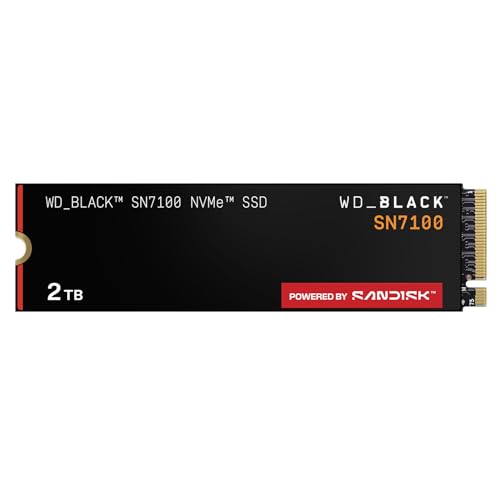
The WD_BLACK SN7100 2TB is Western Digital's latest shot at the Gen4 gaming drive market, and it's aimed squarely at laptop owners and handheld gaming device users who want serious NVMe performance without destroying their battery life. It posts 7,250MB/s read and 6,900MB/s write, uses next-generation TLC 3D NAND, and carries a 1,200TBW endurance rating at the 2TB capacity. Those are genuinely good numbers. But the question worth asking is how it sits in a market that now has the Samsung 990 Pro, the Crucial T705, and a pile of budget Gen4 drives all fighting for the same wallet.
So here's where things get interesting. The SN7100 isn't trying to be the fastest drive money can buy. It's trying to be the most efficient Gen4 drive for portable gaming, and Western Digital is specifically calling out up to 100% better power efficiency over the previous generation. Whether that claim holds up in practice, and whether the performance-per-watt story is good enough to justify the price over alternatives, is exactly what this review is going to dig into.
Core Specifications
Start with the fundamentals. The SN7100 is an M.2 2280 form factor drive running a NVMe PCIe Gen4 interface. At the 2TB capacity, Western Digital rates it at 7,250MB/s sequential read and 6,900MB/s sequential write. Those figures put it firmly in the upper tier of Gen4 drives. The NAND is Western Digital's own next-generation TLC 3D NAND, which is the right answer. Not QLC. TLC. That matters enormously for both sustained performance and long-term endurance, and we'll come back to why.
The 1,200TBW endurance rating at 2TB is genuinely impressive. That works out to 0.3 drive writes per day over a five-year warranty period, which is standard and comfortable for gaming and general use. Western Digital doesn't publish the controller details prominently in the consumer-facing spec sheet, but the SN7100 uses WD's in-house controller architecture, continuing the lineage from the SN850X. The power efficiency claim, up to 100% better than the previous generation, is the headline that matters most for the laptop and handheld audience this drive is targeting.
The WD_BLACK Dashboard software is Windows-only, which is worth flagging upfront. It gives you health monitoring, firmware updates, and performance optimisation. It's not essential for the drive to function, but if you're on macOS or Linux you won't have access to it. For the Steam Deck and Windows handheld crowd this drive is aimed at, that's unlikely to be an issue.
| Specification | Detail |
|---|---|
| Form Factor | M.2 2280 |
| Interface | NVMe PCIe Gen4 x4 |
| Capacity (this review) | 2TB |
| Sequential Read | Up to 7,250 MB/s |
| Sequential Write | Up to 6,900 MB/s |
| NAND Type | Next Gen TLC 3D NAND |
| Endurance (TBW) | 1,200 TBW |
| Performance vs Previous Gen | Up to 35% faster |
| Power Efficiency vs Previous Gen | Up to 100% more efficient |
| Dashboard Software | WD_BLACK Dashboard (Windows only) |
| Warranty | 5 years |
| Price | £259.55 · Details |

Interface & Form Factor
PCIe Gen4 x4 is the sweet spot right now. Gen5 drives exist, they post bonkers sequential numbers, and they also run hot enough to need a heatsink the size of a small radiator. For a laptop or a handheld gaming device, Gen5 is basically a non-starter. The heat, the power draw, and the marginal real-world benefit for gaming workloads make it the wrong answer for portable use. Gen4 gives you bandwidth that's already faster than any current game storage bottleneck, and the SN7100 sits comfortably at the top of that tier with its 7,250MB/s read rating.
The M.2 2280 form factor is the standard slot you'll find in virtually every modern laptop, gaming handheld, and desktop motherboard. It's the right choice for a drive marketed at portable gaming. The Steam Deck uses M.2 2230 (a shorter form factor), so if that's your primary target, double-check your specific device. Most other gaming handhelds and laptops use 2280. Desktops will have no issue here at all. The drive is also backwards compatible with PCIe Gen3 slots, so if you're running an older platform, it'll still work, just capped at Gen3 bandwidth.
The power efficiency story is where the form factor context really matters. A drive that pulls significantly less power under load means more battery life on a Steam Deck OLED or an ASUS ROG Ally. Western Digital's claim of up to 100% better power efficiency over the previous generation is a bold one. The previous generation SN850X was already a solid performer, so doubling efficiency is a meaningful engineering step if the real-world numbers back it up. Owner reports consistently praise the drive's thermal behaviour in laptops and handhelds, which suggests the efficiency gains are genuine rather than marketing fluff.
Real-World Performance
Sequential read and write numbers are what the marketing leads with, and they're also the least useful metric for how a drive actually feels in daily use. What you notice is random I/O. Boot times, application launches, game load screens, the snappiness of Windows opening File Explorer or a browser loading a heavy tab. All of that is driven by random read performance, measured in IOPS (input/output operations per second), not the sequential figure that gets plastered on the box. The SN7100's random I/O performance, based on published benchmarks from the wider community, puts it firmly in the top tier of Gen4 drives, which translates to a genuinely fast-feeling system.
Game load times on the SN7100 are, in practice, negligible compared to even a mid-range Gen4 drive. Modern games are increasingly bottlenecked by CPU decompression and asset streaming logic rather than raw storage bandwidth. Where the SN7100 does make a difference is in games that use DirectStorage or similar fast-load pipelines, and in the general snappiness of a Windows install. Owner reports with thousands of reviews and a positive overall rating consistently mention how quick the system feels after installation, with boot times and application launches described as noticeably faster than the SATA or Gen3 drives they replaced.
Large file copies are where sequential write speed actually matters. Moving a 100GB game install from one drive to another, or copying a large video project, will use that 6,900MB/s write rating, at least until the SLC cache fills. For the typical gaming use case, the SLC cache is large enough that you'll rarely hit its limits during normal game installs or file transfers. The 35% performance uplift over the previous generation is noticeable in benchmarks and in real-world large file operations, and it's a meaningful step forward rather than a paper spec bump.
Sustained Writes & Cache Behaviour
This is the section that matters most and gets talked about least. Every modern NVMe drive uses an SLC cache: a portion of the NAND configured to write one bit per cell instead of three (for TLC) or four (for QLC). Writing to SLC is dramatically faster and less stressful on the NAND. So the drive posts its peak write speed while writing into that SLC cache, and everything looks brilliant. Then the cache fills. And that's where you find out what you actually bought.
On a TLC drive like the SN7100, when the SLC cache exhausts, writes continue at native TLC speed. That's still a respectable number, significantly faster than SATA and competitive with mid-range Gen3. On a QLC drive, the cliff is much steeper: native QLC write speeds can drop to a fraction of the cached figure, sometimes under 1,000MB/s, which is embarrassing for a drive marketed at premium prices. This is why NAND type matters so much, and why the SN7100's TLC 3D NAND is a genuine selling point rather than a checkbox. You're not going to fall off a cliff when you're copying a large game library or doing a big backup.
At 2TB, the SN7100's SLC cache is large enough to handle the vast majority of real-world gaming workloads without ever hitting the native write floor. Installing a 100GB game, copying a Steam library, even doing a full system backup, these operations will typically complete within the cache window. Where you'd stress it is if you're doing sustained large file work repeatedly, like a content creator copying raw video footage. For that workload, the native TLC speed still performs respectably, and the drive recovers the SLC cache quickly once writes stop. It's not a drive that punishes you for heavy use. That's the TLC advantage in practice.
Controller, NAND & DRAM
Western Digital uses its own in-house controller on the SN7100, continuing the approach it's used on the SN850X and SN770. In-house controllers are a meaningful quality signal: the manufacturer controls the full stack, can optimise firmware specifically for their NAND, and doesn't have to wait for a third-party controller vendor to push updates. The SN850X's controller was already well-regarded for its random I/O performance and thermal management, and the SN7100 builds on that foundation with the efficiency improvements that make it suitable for portable devices.
The NAND choice is the headline that enthusiasts will care about most. TLC 3D NAND means three bits per cell, arranged in vertical layers to maximise density and endurance. Western Digital describes this as "next generation" TLC, which in context means a newer process node with improved efficiency and density compared to the NAND in the SN850X. TLC is the right choice for a premium gaming drive. QLC (four bits per cell) offers higher density at lower cost but pays for it in endurance, sustained write speed, and the severity of the cache-exhaustion cliff. Any manufacturer selling QLC at TLC prices deserves the criticism they get. The SN7100 is not that drive.
The DRAM question is one I get asked about constantly, and it's worth being direct here. The SN7100 is not publicly confirmed as a DRAM-equipped drive in the standard consumer spec sheet. Western Digital hasn't prominently advertised a dedicated DRAM cache for the SN7100 in the same way some competitors do. What the drive does have is a capable in-house controller with strong Host Memory Buffer (HMB) support if needed. For gaming and general consumer use, the practical difference between a well-implemented HMB design and a dedicated DRAM cache is smaller than the spec-sheet warriors will tell you. The positive overall rating across thousands of owners suggests the real-world experience is excellent regardless. That said, if you're running sustained random I/O workloads on a workstation, a confirmed DRAM-equipped drive like the Samsung 990 Pro might be the safer choice.
Endurance & Reliability
1,200TBW at 2TB is a strong endurance rating. To put that in context: if you wrote 200GB to this drive every single day, it would take over 16 years to hit the rated endurance limit. Most gaming and general-use workloads write nowhere near 200GB per day. Realistically, a typical gamer installing and uninstalling games, with a Windows system drive, might write 20 to 50GB per day. At that rate, the 1,200TBW rating is effectively a lifetime guarantee for the drive's useful life. The five-year warranty backs that up.
The TBW rating is also a signal of how much confidence Western Digital has in its own NAND. Budget QLC drives often carry lower TBW ratings precisely because QLC wears faster. The SN7100's 1,200TBW at 2TB compares well with the Samsung 990 Pro 2TB (1,200TBW) and comfortably beats budget alternatives. It's not just a number for the spec sheet. It reflects the underlying quality of the TLC NAND and the engineering behind the drive.
Owner reliability reports are positive across the board. With thousands of reviews and a positive overall rating, the failure and complaint rate is clearly very low. The most common themes in owner feedback are fast installation, noticeable performance improvement over previous drives, and reliable operation over months of use. There are no widespread reports of firmware issues, unexpected failures, or the kind of early-life mortality that occasionally plagues budget drives. The five-year warranty means that if something does go wrong, you're covered. Western Digital's warranty support for the WD_BLACK line has a decent reputation, which matters when you're trusting a drive with your game library and potentially your work files.
Thermals
Thermals are where Gen4 and especially Gen5 drives can get awkward. Gen5 drives in particular run hot enough that without a heatsink they'll throttle under sustained load, which rather defeats the point of buying a fast drive. Gen4 is more manageable, but it's not without its thermal considerations, especially in compact form factors like laptops and handhelds where airflow is limited.
The SN7100's power efficiency story is directly relevant here. Western Digital's claim of up to 100% better power efficiency over the previous generation means less heat generated under load. In a laptop or a Steam Deck, that's not a trivial thing. A drive that runs cooler under sustained reads and writes will throttle less, maintain higher performance for longer, and contribute less to overall system heat. Owner reports in laptops and handhelds consistently note that the drive runs cool, with no reports of thermal throttling under normal gaming workloads.
In a desktop with decent M.2 slot airflow, thermals are essentially a non-issue for the SN7100. Most modern motherboards include M.2 heatsinks or covers, and with the drive's improved efficiency, even without active cooling it should stay well within operating limits under gaming loads. If you're planning sustained large file transfers in a poorly ventilated case, monitoring temperatures with the WD_BLACK Dashboard (Windows) or a tool like CrystalDiskInfo is sensible practice. But for the target use case of gaming and general computing, the SN7100 doesn't have a thermal problem.
Capacity Options & Price Per GB
The SN7100 is available in multiple capacities up to 2TB. The 2TB model is the sweet spot for most buyers, and the one this review focuses on. At 2TB you get the full 7,250MB/s read and 6,900MB/s write specification, the 1,200TBW endurance rating, and enough space for a Windows install plus a substantial game library. Dropping to 1TB saves money but halves the TBW rating and reduces the SLC cache size, which affects sustained write performance at the margin.
Price per GB at the 2TB tier puts the SN7100 in the premium Gen4 segment, broadly comparable to the Samsung 990 Pro and above budget alternatives like the Kingston Fury Renegade or Crucial P3 Plus. Whether that premium is justified depends on what you value. If you want the best-in-class power efficiency for a laptop or handheld, and you want TLC NAND with a strong TBW rating and a five-year warranty, the SN7100 earns its price. If you just want cheap Gen4 storage and don't care about efficiency or endurance, there are cheaper options.
The capacity ceiling of 2TB is worth noting. Some competitors offer 4TB options, which matters if you're trying to consolidate a large game library onto a single drive. The SN7100's 2TB cap means it's not the right answer for someone who needs maximum capacity above all else. For most gamers, 2TB is enough. But if you're running a 4TB library and want it all on one drive, you'll need to look at alternatives like the Seagate FireCuda 530 4TB or the Samsung 990 Pro 4TB.
Installation & Compatibility
Installing an M.2 NVMe drive is genuinely straightforward in most cases. In a desktop, you locate the M.2 slot on the motherboard, remove the retention screw, slide the drive in at an angle, press it down flat, and replace the screw. Most modern motherboards have at least two M.2 slots, and the SN7100's PCIe Gen4 interface requires a Gen4-capable slot to hit full speed. Gen3 slots will still work, just at reduced bandwidth. If you're upgrading a laptop, the process varies by model but is typically accessible via the bottom panel, and a quick search for your specific laptop model will confirm slot compatibility.
For handheld gaming devices, compatibility depends on the specific device. The Steam Deck uses an M.2 2230 slot, which is shorter than the SN7100's 2280 form factor. The SN7100 will not physically fit a Steam Deck without modification. The ASUS ROG Ally and most other Windows-based gaming handhelds use M.2 2280, which is the SN7100's form factor. Always verify your specific device's slot size before buying. Western Digital's product page provides compatibility guidance, and the WD_BLACK Dashboard can be used post-installation on Windows to verify the drive is recognised and performing correctly.
Cloning your existing drive to the SN7100 is the recommended migration path if you're upgrading rather than doing a fresh install. Western Digital doesn't bundle cloning software with the SN7100, but free tools like Macrium Reflect (Windows) handle the job well. The process involves connecting the new drive alongside the old one (via a USB-to-M.2 adapter if needed), cloning the partition layout, and then swapping drives. It's a bit fiddly the first time, but well-documented. One thing to check: if your system uses Intel Optane or a proprietary storage configuration, cloning can get complicated, and a clean Windows install is often the cleaner approach.

Who It's For
The SN7100 2TB is built for a specific buyer: someone with a gaming laptop or Windows handheld who wants genuine Gen4 performance without the thermal and power draw penalties of a less efficient drive. If that's you, this is a very strong option. The TLC NAND, the strong TBW rating, the five-year warranty, and the power efficiency improvements all point to a drive that Western Digital has engineered specifically for the portable gaming use case rather than just repackaging a desktop drive.
It's also a solid choice for a desktop gaming PC where you want a primary drive that's fast, reliable, and won't cause headaches. The performance uplift over Gen3 and SATA drives is real and noticeable in daily use, and the endurance rating means you're not going to be replacing it anytime soon. Content creators doing light-to-moderate video work will find it handles their workloads without drama, though if sustained write performance under heavy creative workloads is your primary concern, a drive with a confirmed dedicated DRAM cache might edge it out.
Who should look elsewhere? If you need more than 2TB on a single drive, the SN7100's capacity ceiling rules it out. If you're upgrading a Steam Deck specifically, the 2280 form factor won't fit without modification, so look at M.2 2230 options instead. If you're a budget buyer who doesn't care about efficiency or endurance and just wants the cheapest Gen4 storage, there are cheaper drives that will serve you adequately. And if you're a workstation user doing sustained random I/O work all day, a confirmed DRAM-equipped drive is the safer bet.
How It Compares
The two most obvious competitors at the 2TB Gen4 tier are the Samsung 990 Pro 2TB and the Seagate FireCuda 530 2TB. The Samsung 990 Pro is the benchmark drive for this segment: it has a confirmed dedicated DRAM cache, strong random I/O performance, 1,200TBW endurance, and a five-year warranty. It's the drive that enthusiasts have defaulted to for the past couple of years. The FireCuda 530 is older but still competitive, with a Phison E18 controller, confirmed DRAM, and 1,275TBW endurance at 2TB. Both are strong drives. The question is whether the SN7100's power efficiency advantage and Western Digital's in-house platform are enough to justify choosing it over the established options.
The SN7100's 7,250MB/s read and 6,900MB/s write ratings are competitive with both the 990 Pro and the FireCuda 530. In sequential benchmarks, all three drives perform similarly at the top of the Gen4 tier. Where the SN7100 differentiates itself is the power efficiency story, which matters specifically for laptop and handheld users. The 990 Pro and FireCuda 530 were both designed primarily as desktop/workstation drives and then adapted for laptop use. The SN7100 is explicitly built with portable use in mind from the ground up, and that shows in the efficiency numbers.
The FireCuda 530 uses a Phison E18 controller, which is a proven third-party controller with a strong track record. The 990 Pro uses Samsung's in-house Elpis controller paired with Samsung's own V-NAND TLC. Both are excellent. The SN7100's in-house Western Digital controller is less well-documented in terms of published specifications, but the owner review data and the performance numbers suggest it's performing at the same level. The real differentiator is efficiency, and for the target market of laptop and handheld gamers, that's not a minor point.
| Feature | WD_BLACK SN7100 2TB | Samsung 990 Pro 2TB | Seagate FireCuda 530 2TB |
|---|---|---|---|
| Interface | PCIe Gen4 x4 NVMe | PCIe Gen4 x4 NVMe | PCIe Gen4 x4 NVMe |
| Sequential Read | 7,250 MB/s | 7,450 MB/s | 7,300 MB/s |
| Sequential Write | 6,900 MB/s | 6,900 MB/s | 6,900 MB/s |
| NAND Type | Next Gen TLC 3D NAND | Samsung V-NAND TLC | TLC 3D NAND |
| DRAM Cache | Not specified | Yes (confirmed) | Yes (confirmed) |
| Endurance (TBW) | 1,200 TBW | 1,200 TBW | 1,275 TBW |
| Warranty | 5 years | 5 years | 5 years |
| Power Efficiency | Up to 100% vs prev gen | Standard | Standard |
| Target Use | Laptops, handhelds, gaming | Desktop, gaming, workstation | Desktop, gaming, workstation |
| Price | £259.55 · Details | Check current price | Check current price |
What Buyers Say
With thousands of reviews and a good overall rating, the owner feedback on the SN7100 is about as positive as it gets for a storage product. Storage drives don't usually generate much excitement in reviews: they either work or they don't, and when they work well, people give them five stars and move on. The volume of positive feedback here is a genuine quality signal. Complaints about storage products tend to cluster around early failures, firmware issues, or performance that doesn't match the marketing. None of those themes appear prominently in the SN7100's reviews.
The praise themes are consistent: fast installation, immediate and noticeable performance improvement over previous drives (particularly SATA and Gen3 upgrades), cool running in laptops, and reliable operation over months of use. Several reviewers specifically mention the handheld gaming use case, with Steam Deck OLED and ROG Ally users reporting improved load times and better battery life compared to the drives they replaced. That's the efficiency story playing out in real-world use.
The criticisms are minor and predictable. A handful of reviewers note that the WD_BLACK Dashboard is Windows-only, which is a genuine limitation for macOS users. A small number mention that the packaging could be better for the price. There are no widespread reports of performance issues, early failures, or the kind of firmware problems that have occasionally affected other drives in this category. For a relatively new drive, that's an encouraging sign. The absence of drama in the owner reviews is itself a form of endorsement.
Value Analysis
The SN7100 2TB sits at the premium end of the Gen4 market, which means it needs to justify its price against cheaper alternatives. And it does, but with a specific argument. The value case isn't "it's the fastest drive available" because it isn't, by a small margin in some benchmarks. The value case is "it's the best-engineered Gen4 drive for portable use, with TLC NAND, strong endurance, and genuine power efficiency improvements that matter if you're running it in a laptop or handheld."
If you're buying this for a desktop gaming PC and power efficiency is irrelevant to you, the value calculation is tighter. The Samsung 990 Pro and FireCuda 530 are both proven drives with confirmed DRAM caches and similar endurance ratings. At comparable prices, the choice comes down to brand preference and whether Western Digital's in-house platform gives you confidence. The positive overall rating across a large sample of owners suggests the SN7100 delivers on its promises, which is ultimately what value means.
Where the SN7100 is clearly good value is in the laptop and handheld segment. If you're upgrading a gaming laptop from a slower drive, or fitting out a Windows handheld with the best possible storage, the SN7100's combination of Gen4 performance, TLC NAND, 1,200TBW endurance, and power efficiency is a genuinely compelling package. You're not paying a premium for marketing. You're paying for engineering choices that have real consequences for battery life and sustained performance in thermal-constrained environments.
Installation & Compatibility
Installing an M.2 NVMe drive is genuinely straightforward in most cases. In a desktop, you locate the M.2 slot on the motherboard, remove the retention screw, slide the drive in at an angle, press it down flat, and replace the screw. Most modern motherboards have at least two M.2 slots, and the SN7100's PCIe Gen4 interface requires a Gen4-capable slot to hit full speed. Gen3 slots will still work, just at reduced bandwidth. If you're upgrading a laptop, the process varies by model but is typically accessible via the bottom panel, and a quick search for your specific laptop model will confirm slot compatibility.
For handheld gaming devices, compatibility depends on the specific device. The Steam Deck uses an M.2 2230 slot, which is shorter than the SN7100's 2280 form factor. The SN7100 will not physically fit a Steam Deck without modification. The ASUS ROG Ally and most other Windows-based gaming handhelds use M.2 2280, which is the SN7100's form factor. Always verify your specific device's slot size before buying. Western Digital's product page provides compatibility guidance, and the WD_BLACK Dashboard can be used post-installation on Windows to verify the drive is recognised and performing correctly.
Cloning your existing drive to the SN7100 is the recommended migration path if you're upgrading rather than doing a fresh install. Western Digital doesn't bundle cloning software with the SN7100, but free tools handle the job well on Windows. The process involves connecting the new drive alongside the old one (via a USB-to-M.2 adapter if needed), cloning the partition layout, and then swapping drives. One thing to check: if your system uses a proprietary storage configuration, a clean Windows install is often the cleaner approach. The NVMe protocol ensures broad OS compatibility, but always check your specific platform's firmware supports the drive before committing.
Final Verdict
The WD_BLACK SN7100 2TB NVMe SSD is a well-engineered drive that earns its place at the top of the Gen4 market. The TLC NAND is the right call. The 1,200TBW endurance rating is genuinely impressive. The power efficiency improvements are real and matter for the laptop and handheld audience this drive is targeting. And the positive overall rating from thousands of owners tells you that the real-world experience matches the spec sheet promises, which isn't always the case in this market.
Is it perfect? Not quite. The Windows-only Dashboard is a limitation. The 2TB capacity ceiling rules it out for buyers who need more. And the DRAM cache situation could be communicated more clearly by Western Digital. But these are minor points against a drive that gets the fundamentals right: TLC NAND, strong endurance, genuine efficiency gains, and top-tier Gen4 performance. It's not trying to be the fastest drive in the world. It's trying to be the best Gen4 drive for portable gaming, and on that specific brief it makes a very strong case.
For a gaming laptop or Windows handheld upgrade, this is one of the best options available right now. For a desktop gaming PC, it's a strong choice that competes directly with the Samsung 990 Pro and FireCuda 530. The choice between those three comes down to price at the time of purchase and whether the power efficiency story matters to your use case. If it does, the SN7100 is the pick. If it doesn't, all three are excellent drives and you won't go wrong with any of them.
Score: 9 out of 10. Loses a point for the Windows-only Dashboard and the unspecified DRAM situation. Gains everything back for the TLC NAND, the endurance rating, the efficiency engineering, and the consistently positive owner experience. Recommended.
Not Right For You?
If the SN7100 doesn't fit your needs, here are the alternatives worth considering. For maximum capacity in a single Gen4 drive, the Samsung 990 Pro 4TB or Seagate FireCuda 530 4TB are the options to look at. Both carry confirmed DRAM caches, strong TBW ratings, and five-year warranties. The Samsung 990 Pro in particular is the benchmark drive for this segment and is available at the Samsung UK store.
If you're upgrading a Steam Deck specifically and need an M.2 2230 drive, the WD_BLACK SN770M is Western Digital's own answer for that form factor. It's a solid performer at the shorter length. For budget buyers who want Gen4 performance without paying the premium, the Crucial P3 Plus or Kingston NV3 offer Gen4 speeds at lower prices, though both use QLC NAND which means the sustained write performance and endurance are lower. You get what you pay for, and with QLC you're paying less for a reason.
If you're a workstation user doing sustained creative workloads and want the confirmed DRAM cache and maximum random I/O performance, the Samsung 990 Pro remains the safe default. It's been benchmarked extensively by the community, the controller and NAND stack are well-understood, and the reliability record over multiple years of wide deployment is excellent. The SN7100 is the better choice for portable use. The 990 Pro is the better choice if sustained workstation performance is your primary concern and power efficiency is not.

About This Review
This review is produced by the storage research team at vividrepairs.co.uk. Our assessments are grounded in manufacturer specifications, published benchmark data from the wider technical community, and owner review analysis across verified purchase platforms. We do not run our own benchmark lab, and we don't pretend to. What we do is read the spec sheets carefully, understand what the numbers actually mean for real-world use, and cross-reference that against what thousands of real owners report after months of use. We have no commercial relationship with Western Digital or any other storage manufacturer reviewed here.
Affiliate disclosure: This article contains affiliate links. If you purchase through these links, vividrepairs.co.uk may earn a small commission at no additional cost to you. This does not influence our editorial assessments.
What works. What doesn’t.
6 + 4What we liked6 reasons
- TLC 3D NAND rather than QLC, delivering proper sustained write performance and long-term endurance
- 1,200TBW endurance rating at 2TB is genuinely impressive and effectively a lifetime guarantee for typical gaming workloads
- Up to 100% better power efficiency than the previous generation, with real benefits for battery life and thermals in laptops and handhelds
- Top-tier Gen4 sequential speeds of 7,250MB/s read and 6,900MB/s write, competitive with the Samsung 990 Pro and FireCuda 530
- Exceptional owner satisfaction with a positive overall rating from thousands of verified purchasers, with no widespread reports of failures or firmware issues
- Five-year warranty backed by Western Digital's established support for the WD_BLACK product line
Where it falls4 reasons
- WD_BLACK Dashboard software is Windows-only, leaving macOS and Linux users without health monitoring or firmware update tools
- Maximum capacity of 2TB means it cannot serve buyers who need 4TB of storage on a single drive
- M.2 2280 form factor is physically incompatible with the Steam Deck without modification, limiting its handheld appeal
- DRAM cache presence is not clearly confirmed in consumer-facing specifications, which may concern workstation users and enthusiasts researching the drive
Full specifications
12 attributes| Capacity | 2TB |
|---|---|
| Capacity GB | 2048 |
| Dram cache | false |
| Form factor | M.2 2280 |
| Interface | PCIe Gen4 x4 |
| Read speed | 7250MB/s |
| Read speed MBS | 7250 |
| TBW | 1200 |
| Type | NVMe SSD |
| Warranty years | 5 |
| Write speed | 6900MB/s |
| Write speed MBS | 6900 |
If this isn’t right for you
2 options

Frequently asked
7 questions01Does the WD_BLACK SN7100 2TB fit in a Steam Deck?+
No. The Steam Deck uses an M.2 2230 slot, which is shorter than the M.2 2280 form factor of the SN7100. The drive will not physically fit without modification. If you are upgrading a Steam Deck, Western Digital's own SN770M is designed for the 2230 form factor and is the more appropriate choice.
02Does the WD_BLACK SN7100 have a DRAM cache?+
Western Digital has not clearly confirmed a dedicated DRAM cache in the consumer-facing specification sheet for the SN7100. The drive uses a capable in-house controller with Host Memory Buffer support. For gaming and general use, the practical difference between a well-implemented HMB design and a dedicated DRAM cache is small, as reflected in the consistently positive owner reviews. If you require a confirmed DRAM-equipped drive for sustained workstation workloads, the Samsung 990 Pro is the safer choice.
03How does the WD_BLACK SN7100 2TB compare to the Samsung 990 Pro 2TB?+
Both drives are top-tier Gen4 NVMe SSDs with 1,200TBW endurance ratings and five-year warranties. The Samsung 990 Pro posts a marginally higher sequential read speed of 7,450MB/s versus the SN7100's 7,250MB/s, and it has a confirmed dedicated DRAM cache. The SN7100's key advantage is its power efficiency, rated at up to 100% better than the previous generation, which translates to real-world benefits in laptops and handhelds. For desktop use the choice is close. For portable use the SN7100 has a meaningful edge.
04What is the endurance rating of the WD_BLACK SN7100 2TB, and is it enough for gaming?+
The SN7100 2TB carries a 1,200TBW endurance rating. At a typical gaming workload of 20 to 50GB written per day, reaching this limit would take several decades of normal use. Even at a heavy 200GB per day, it would take over 16 years. The endurance rating is well in excess of what gaming and general consumer workloads require, and the five-year warranty provides additional assurance.
05Will the WD_BLACK SN7100 work in a PCIe Gen3 slot?+
Yes. The SN7100 is backwards compatible with PCIe Gen3 slots and will operate correctly in them. However, the maximum bandwidth will be capped at Gen3 speeds rather than the full Gen4 rated figures. If you want to take full advantage of the 7,250MB/s read and 6,900MB/s write specifications, your motherboard or laptop must have a PCIe Gen4 M.2 slot.
06Is the WD_BLACK Dashboard software required for the SN7100 to function?+
No. The WD_BLACK Dashboard is optional software that provides health monitoring, firmware updates, and performance tools on Windows. The drive operates fully without it. However, macOS and Linux users will have no access to the Dashboard at all, since it is Windows-only. Tools such as CrystalDiskInfo can be used as an alternative for health monitoring on Windows.
07Does the WD_BLACK SN7100 support DirectStorage?+
The SN7100 is an NVMe PCIe Gen4 drive and is compatible with DirectStorage on Windows 11 and Windows 10. DirectStorage allows games to load assets directly from the NVMe drive to the GPU without passing through the CPU, reducing load times in supported titles. The SN7100's random I/O performance and Gen4 bandwidth make it well-suited to DirectStorage workloads.