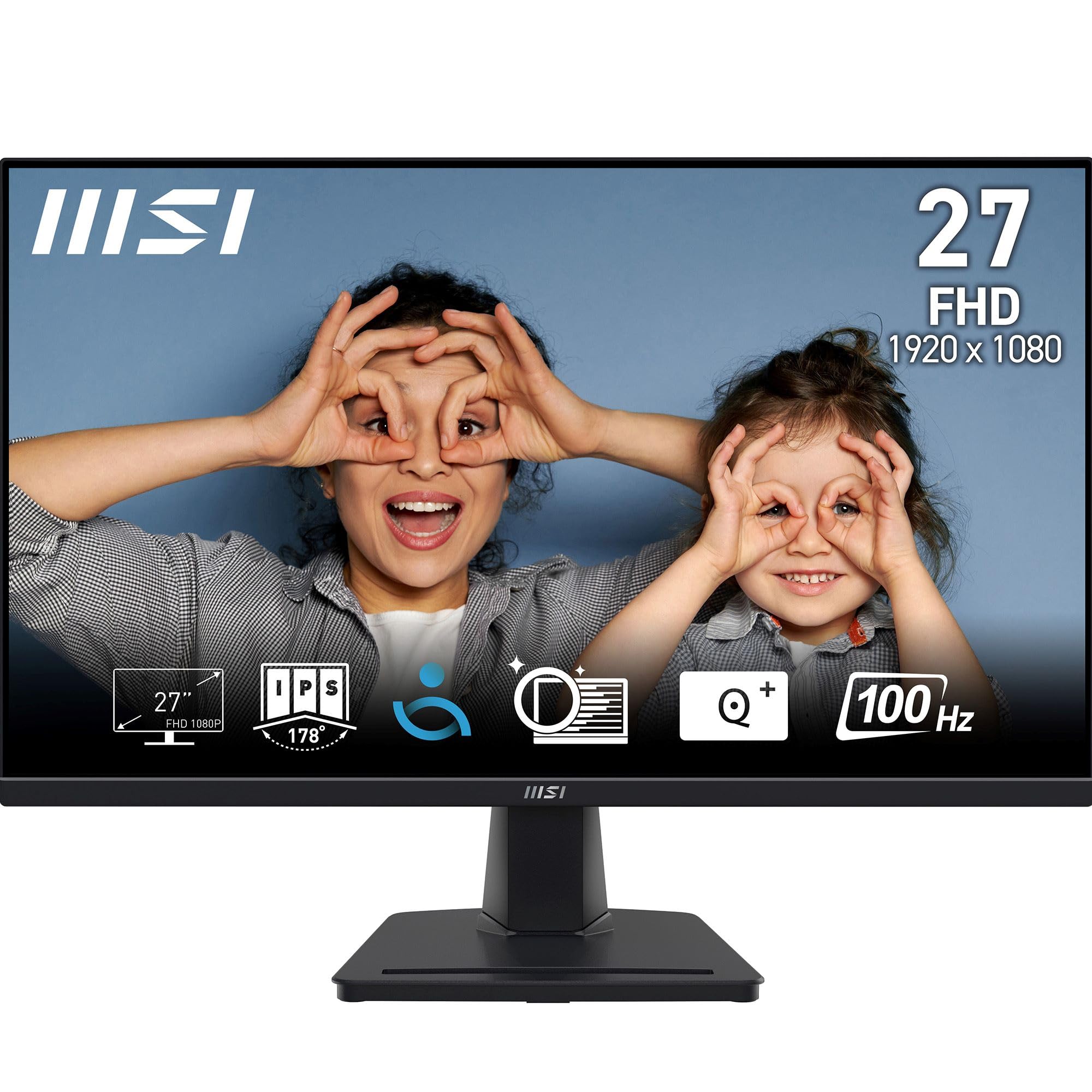
MSI's PRO MP275 is a 27-inch office monitor from the cheap end of the range. It's Full HD (FHD, 1920 x 1080), runs at up to 100Hz on an IPS panel and has speakers built in, but the stand only tilts. The figures in this review come from MSI's PRO MP275 datasheet on msi.com. We haven't measured the monitor ourselves.
Display Specifications
Right, let's address the elephant in the room: 1080p on a 27-inch screen. That gives you 82 pixels per inch, which is noticeably coarse if you're used to higher resolutions. Text isn't razor-sharp. For spreadsheets and documents, it's functional but not luxurious. As a main office display it's usable, but the lack of crispness compared to a 1440p screen is hard to miss.
At 100Hz the screen redraws 100 times a second rather than 60, so scrolling a long spreadsheet looks a little smoother than on an older office panel. You only get 100Hz over HDMI. MSI caps the VGA input at 60Hz.
Panel Technology Analysis
This is a basic IPS panel that delivers the fundamentals: decent viewing angles and acceptable colour reproduction for office work. Don't expect the colour accuracy of a professional display or the response times of a gaming monitor. It's a budget panel through and through.
The IPS panel is probably the best thing about this monitor. Viewing angles are solid, which means you can look at the screen from the side without colours washing out completely. This matters more than you'd think for office use. When colleagues lean over to look at something on your screen, they'll actually be able to see it properly.
Contrast & Brightness
The 300 nits brightness is adequate for typical office lighting but may struggle in bright rooms with lots of natural light. With a 1000:1 contrast ratio, blacks will look more like dark greys, which is standard for IPS at this price point.
The surface is anti-glare, which you'll be glad of under office strip lights, and MSI rates the viewing angle at 178 degrees each way. Colour depth is 6-bit with FRC dithering to reach 8-bit (16.7 million colours). That's normal for an office screen at this price, and you won't notice it in a document.
Refresh Rate & Adaptive Sync
MSI lists Adaptive Sync, so a graphics card that supports variable refresh over HDMI can match the monitor to its frame rate and avoid tearing. G-Sync Compatible certification isn't on MSI's list.
Response Time Analysis
MSI quotes 4ms grey-to-grey and 1ms MPRT. The 1ms is a motion-blur figure. The 4ms is the one that tells you how quickly pixels actually change, and it's ordinary for an office IPS panel.
For games, the 100Hz ceiling matters more than the response time. Slower PC games are fine on it, and MSI lists PS5, PS4 and Xbox among compatible sources. Competitive shooters are another matter; for those you'd want 144Hz or more.
Gaming Performance
It's an office panel that happens to support Adaptive Sync. Strategy games, RPGs and anything where motion clarity doesn't decide the result are fine on it. If games come first, buy a gaming monitor.
Color Performance
93% sRGB is plenty for documents, web pages and video calls.
MSI rates it at 93% of sRGB, which covers most of the colours in web content and office documents. Coverage isn't the same as accuracy, though, and MSI publishes no accuracy figure or calibration claim for this model. If you edit photos or check colours for print, pick a monitor that ships with a calibration report.
HDR Performance
MSI's datasheet doesn't list HDR support for the base MP275, while the E2 and MP275Q sheets say HDR Ready. At 300 nits and 1000:1 there wouldn't be much for HDR to work with anyway, and for office work you won't miss it.
Ergonomics & Build Quality
The stand is the weakest part of the MP275. It tilts from -5° to 20° and that's all. There's no height adjustment, swivel or pivot to portrait.
If you'll sit at it for more than a few hours a day, get a VESA arm. The mount is the standard 100 x 100 mm, MSI puts the net weight at 3.84 kg, and even a cheap arm lets you bring the top of the screen up to eye level. Your neck will notice by the end of the day.
On its stand it measures 612.1 x 456.8 x 207.2 mm. MSI lists an internal power supply, a Kensington slot for shared offices and a 5-way button for the menus.
Connectivity
Connectivity is bare minimum. One HDMI 1.4b, one VGA, and that's your lot. No DisplayPort, no USB-C, no USB hub. HDMI carries the full 100Hz refresh rate at 1080p, while VGA is limited to 60Hz, so use HDMI if your computer has it.
Two 2W speakers are built in, alongside a line-in and a headphone socket, so a video call doesn't need extra kit on the desk. There's no USB-C. A laptop plugs in over HDMI and still needs its own charger, and if you want one cable for both, the MP275QPDG in the table below has it.
How It Compares to Alternatives
In the budget bracket, you're choosing between compromises. The MP275 offers 27 inches and 100Hz, but the panel quality is merely adequate.
The MP275's main selling point is the 27-inch size. If you want a bigger screen and can tolerate the lower pixel density, it makes sense. If sharp text matters more, a 24-inch 1080p monitor or a 27-inch 1440p one will suit you better. By our arithmetic those come out at about 92 and 109 pixels per inch, against the MP275's 82.
The MP275 family: E2, E14L, MP275Q, MP275Q E14, MP275PG, MP275QPG and MP275QPDG
MSI sells a whole series of business monitors under the PRO MP275 name, so check the model code before you pay. This review is about the base MP275 (1080p, 100Hz, HDMI 1.4b and VGA). Figures for the others come from their own MSI datasheets.
| Model | Resolution | Refresh | Video inputs | Stand |
|---|---|---|---|---|
| PRO MP275 (this review) | 1920 x 1080 | 100Hz | 1x HDMI 1.4b, 1x VGA | Tilt only |
| PRO MP275 E2 | 1920 x 1080 | 120Hz | 1x HDMI 2.0, 1x DisplayPort 1.2a, 1x VGA | Tilt only |
| PRO MP275 E14L | 1920 x 1080 | 144Hz | 1x HDMI 2.0, 1x VGA | Tilt only |
| PRO MP275PG | 1920 x 1080 | 100Hz | 1x HDMI 1.4b, 1x DisplayPort 1.2a, 1x VGA | Height (130 mm), swivel, pivot, tilt |
| PRO MP275Q | 2560 x 1440 | 100Hz | 2x HDMI 2.0b, 1x DisplayPort 1.2a | Tilt only |
| PRO MP275Q E14 | 2560 x 1440 | 144Hz | 2x HDMI 2.0b, 1x DisplayPort 1.2a | Tilt only |
| PRO MP275QPG | 2560 x 1440 | 100Hz | 2x HDMI 2.0b, 1x DisplayPort 1.2a | Height (130 mm), swivel, pivot, tilt |
| PRO MP275QPDG | 2560 x 1440 | 100Hz | 2x HDMI 2.0b, DisplayPort 1.2a in and out, USB-C (DP Alt) with 98W charging | Height (130 mm), swivel, pivot, tilt |
For speed, the E2 runs at 120Hz and the E14L at 144Hz. The Q models use a sharper 1440p panel, the PG models add height adjustment, and the QPDG also charges a laptop over USB-C at up to 98W. So if the base model's soft text or fixed stand puts you off, there's probably a sibling that fixes it.
Value Analysis: Does It Deliver?
In the budget bracket, you're getting basic functionality without any premium features. The MP275 delivers a 27-inch IPS panel with acceptable image quality for office work, but nothing beyond that. Step up to the mid-range tier and you'll get proper ergonomic stands, better colour accuracy, higher resolutions, and improved build quality. The budget tier is for people who need a functional display and can't stretch their budget further.
Value is subjective. If you need a cheap second monitor for emails and spreadsheets, the MP275 delivers acceptable performance in the budget bracket. The 27-inch size and 100Hz refresh rate are decent bonuses at this price point. But you're making real compromises on panel quality, build, and ergonomics.
Is it worth spending more? If you're at this screen for more than four hours a day, probably, either on a monitor with a height-adjustable stand and a sharper panel or on an arm to go with the MP275.
As a second screen you glance across to, or for kitting out several desks cheaply, it's fine. You get a big IPS picture, speakers and 100Hz, and not much else.
Final Verdict: A Big, Basic Second Screen
The MP275 gets 27 inches of IPS onto a desk for not much money. Colours are fine for office work, 100Hz makes the desktop a little smoother than an old 60Hz panel, and the speakers save you buying a pair for calls. It's let down by text, which is softer at 1080p over 27 inches than on a 24-inch or 1440p screen, and by a stand that only tilts. Connections stop at HDMI 1.4b and VGA.
It makes most sense as a second screen, on a desk that already has a monitor arm, or across several desks where the budget's tight. For long reading sessions, compare the 1440p MP275Q. If height adjustment matters, it's the MP275PG.
MSI PRO MP275 Specifications
Figures are from MSI's PRO MP275 datasheet, apart from the pixel density, which we've calculated from MSI's 0.311 mm pixel pitch.
| Specification | MSI PRO MP275 |
|---|---|
| Model | MSI PRO MP275 |
| Panel size | 27 inches |
| Resolution | 1920 x 1080 (Full HD) |
| Pixel density | About 82 pixels per inch (pixel pitch 0.311 mm) |
| Panel type | IPS, anti-glare surface |
| Refresh rate | 100Hz (HDMI); 60Hz over VGA |
| Response time | 4ms GtG / 1ms MPRT |
| Variable refresh | Adaptive Sync |
| Brightness | 300 cd/m² |
| Contrast ratio | 1000:1 |
| Colour gamut | 93% sRGB (CIE 1976) |
| Colours | 16.7 million; 8-bit (6-bit + FRC) |
| Viewing angle | 178° horizontal / 178° vertical |
| HDR | Not listed by MSI |
| Video inputs | 1x HDMI 1.4b, 1x D-Sub (VGA) |
| USB | None |
| Audio | 2x 2W speakers, line-in, headphone-out |
| Stand | Tilt -5° to 20°; no height, swivel or pivot |
| VESA mount | 100 x 100 mm |
| Power | Internal power supply, 100-240V |
| Dimensions with stand | 612.1 x 456.8 x 207.2 mm |
| Weight | 3.84 kg net |
| Security | Kensington lock slot |
| Certifications | CB/CE, Energy Star |
| Eye care | Anti-Flicker, Less Blue Light (MSI EyesErgo) |
What works. What doesn’t.
5 + 5What we liked5 reasons
- 27-inch screen size offers more workspace than typical budget 24-inch displays
- 100Hz refresh rate makes desktop use feel smoother than standard 60Hz panels
- IPS panel provides decent viewing angles for collaborative work
- Adaptive Sync support reduces screen tearing in casual gaming
- VESA 100x100 mount allows you to replace the poor stand with a monitor arm
Where it falls5 reasons
- 1080p resolution looks noticeably soft on a 27-inch screen - text lacks sharpness
- Poor stand with tilt only: no height, swivel or pivot adjustment
- 100Hz ceiling makes it a poor pick for fast-paced gaming
- Limited connectivity with only one HDMI 1.4b and one VGA, no DisplayPort
- No USB-C or USB hub for laptop users
Full specifications
11 attributes| Refresh rate | 100 |
|---|---|
| Screen size | 27 |
| Panel type | IPS |
| Aspect ratio | 16:9 |
| Curvature | flat |
| HDR | none |
| Ports | 1x HDMI 1.4b, 1x D-Sub (VGA) |
| Refresh rate HZ | 100 |
| Resolution | 1920x1080 |
| Response time | 4ms GtG / 1ms MPRT |
| Screen size IN | 27 |
If this isn’t right for you
2 options
Frequently asked
5 questions01Is the MSI PRO MP275 worth buying in 2026?+
Yes, as a big, cheap office or second screen, as long as you can live with 1080p text at 27 inches and a stand that only tilts. You get a 100Hz IPS panel, 93% sRGB and built-in speakers for not much money. If you'll read on it all day, the 1440p MP275Q is sharper, and the MP275PG has a full height-adjustable stand.
02What is the biggest downside of the MSI PRO MP275?+
Text sharpness. At 27 inches, 1920 x 1080 works out to about 82 pixels per inch, so characters look softer than on a 24-inch 1080p monitor (about 92, by our arithmetic) or a 27-inch 1440p one (about 109). After that it's the tilt-only stand, which a VESA arm fixes.
03What is the difference between the MSI PRO MP275, MP275 E2, E14L, MP275Q and MP275PG?+
Start with the base MP275: 1080p at 100Hz, HDMI 1.4b and VGA. The E2 adds DisplayPort and goes to 120Hz, while the E14L reaches 144Hz over HDMI 2.0 and keeps VGA. The MP275Q is 1440p at 100Hz and the MP275Q E14 is 1440p at 144Hz. For a height-adjustable stand, look at the MP275PG, and the MP275QPDG adds USB-C with 98W laptop charging. All of this is from MSI's datasheets.
04Does the MSI PRO MP275 have speakers and DisplayPort?+
It has built-in 2 x 2W speakers, a line-in and a headphone-out. It has no DisplayPort or USB-C: the inputs are one HDMI 1.4b, which carries the full 100Hz, and one VGA, which is limited to 60Hz.
05Is the MSI PRO MP275 good for gaming?+
For casual and slower games, yes. The 100Hz ceiling is what holds it back; MSI quotes 4ms GtG and lists Adaptive Sync. For competitive shooters you'd want 144Hz or more, such as the MP275 E14L from the same family.