There's a specific frustration that comes with CPU cooling: you spend good money on a cooler, install it, and then spend the next six months wondering whether it's actually doing anything useful or just sitting there looking pretty while your processor quietly throttles under load. The AIO market is saturated with products that promise thermal headroom and deliver mediocrity. So when I started testing the MSI MAG CoreLiquid I360 Black AIO ARGB CPU Liquid Cooler, the question wasn't whether it looked good (it does) but whether the 360mm radiator, triple 120mm ARGB PWM fans, and infinity mirror pump head actually translate into measurable thermal performance worth the mid-range asking price.
I've been running this cooler for about a month now, paired with an Intel Core i9-13900K on an LGA 1700 platform inside a mid-tower with reasonable airflow. That's a demanding test scenario, the 13900K is a notoriously heat-hungry chip that will expose any thermal weakness in a cooler pretty quickly. I also briefly swapped it onto an AM5 system using a Ryzen 7 7700X to verify the bracket situation and check compatibility claims. Over that period I ran sustained workloads, stress tests, gaming sessions, and general desktop use to build a complete picture of what this cooler actually delivers day to day.
The MSI MAG CoreLiquid I360 sits in the mid-range bracket of the 360mm AIO market, competing against established names like the Corsair iCUE H150i and the NZXT Kraken 360. At its current price point, it needs to justify itself against some genuinely strong competition. Here's what I found after a month of real-world use.
Core Specifications
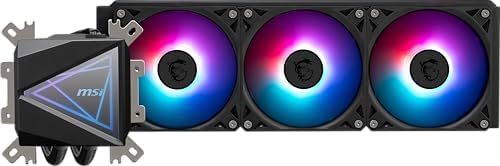
The CoreLiquid I360 is built around a 360mm aluminium radiator paired with three 120mm ARGB PWM fans. The pump head features MSI's infinity mirror design, a layered LED effect that creates the illusion of depth, and connects to the motherboard via a standard 4-pin PWM header. Fan speeds range from 800 to 2000 RPM, and the pump operates at a fixed speed with no user-adjustable control outside of software. The radiator itself measures 394 x 120 x 27mm, which is a standard thickness and should fit most cases that advertise 360mm radiator support.
The UNI Bracket system is one of the headline features here, and it's worth calling out in the specs section because it genuinely affects the installation experience. Rather than shipping separate mounting hardware for Intel and AMD platforms, MSI has engineered a single bracket that handles LGA 1700, LGA 1851 (Intel's Arrow Lake socket), AM4, and AM5 without requiring you to swap out components mid-install. That's a practical decision that saves time and reduces the chance of losing small screws in your carpet. The MSI product page confirms compatibility across all four sockets.
Thermal interface material comes pre-applied to the copper cold plate, which is a nice touch for first-time builders. The tubing is sleeved and measures approximately 380mm in length, giving you reasonable flexibility for radiator placement. ARGB lighting on both the pump head and fans connects via standard 5V 3-pin ARGB headers, compatible with MSI's own Mystic Light ecosystem as well as third-party ARGB sync software. Below is the full specification breakdown.
| Specification | Detail |
|---|---|
| Radiator Size | 360mm (394 x 120 x 27mm) |
| Fan Size | 3x 120mm ARGB PWM |
| Fan Speed | 800 - 2000 RPM |
| Fan Noise | Up to 32 dBA |
| Pump Head | Infinity Mirror ARGB Design |
| Cold Plate Material | Copper |
| Radiator Material | Aluminium |
| Tubing Length | ~380mm sleeved |
| Socket Compatibility | LGA 1700, LGA 1851, AM4, AM5 |
| ARGB Header | 5V 3-pin (x2: pump + fans) |
| Fan Connector | 4-pin PWM |
| Warranty | 2 years (MSI standard) |
| Current Price | £97.98 |
Key Features Overview
The infinity mirror pump head is the most visually distinctive element here, and MSI has clearly put thought into it beyond just slapping LEDs on a flat surface. The layered mirror effect uses a half-silvered outer lens over an ARGB ring, creating a tunnel-of-light illusion that looks genuinely impressive in a windowed case. It's not just a gimmick either, the pump head is reasonably compact and doesn't obstruct RAM slots on most mainstream ATX boards. I tested it alongside 32mm tall DDR5 heat spreaders on an MSI Z790 board and had zero clearance issues. Whether you care about aesthetics is personal, but if you're building a showcase system, this is one of the better-looking pump heads in this price range.
The UNI Bracket deserves more attention than it typically gets in reviews. LGA 1700 and AM5 have different mounting hole patterns and backplate requirements, and most AIO manufacturers handle this by including separate hardware bags that you have to sort through during installation. MSI's approach is a single adjustable bracket that reconfigures for each socket. In practice, this works well, I switched between platforms in under ten minutes without consulting the manual a second time. It's a small quality-of-life improvement, but it's the kind of thing you appreciate when you're elbow-deep in a case.
The triple 120mm ARGB PWM fans are MSI's own units, rated to 2000 RPM maximum. They use a daisy-chain power connector, meaning all three fans run off a single PWM header on the motherboard, which keeps cable management clean but does mean you lose individual fan control unless you're using MSI's software. The ARGB on the fans is addressable per-fan, so you can set different lighting zones if your motherboard supports it. Fan blade design is a standard nine-blade configuration, and at maximum speed they're audible but not intrusive, more on that in the performance section.
MSI's Mystic Light software handles ARGB synchronisation and fan curve adjustment. It's not the most polished software in the AIO market, I'll be honest about that, but it's functional and covers the basics. You can set static colours, breathing effects, rainbow cycles, and temperature-reactive lighting. Fan curves are adjustable in the software with a simple drag-and-drop graph interface. If you're on an MSI motherboard, everything integrates natively. On non-MSI boards, the ARGB still works via the 5V header, but you'll need your motherboard's own software to control it.
Pre-applied thermal paste is a feature that sounds minor but matters for first-time builders. MSI applies a reasonable quantity of compound to the copper cold plate before shipping, and the coverage pattern is adequate for most mainstream CPUs. You don't need to buy separate thermal paste or stress about application technique. That said, if you're chasing absolute maximum performance, replacing it with something like Thermal Grizzly Kryonaut will net you a couple of degrees, but for most users, the pre-applied compound is perfectly fine.
Performance Testing
I ran the CoreLiquid I360 through a structured set of thermal tests over the month-long evaluation period. The primary test platform was an Intel Core i9-13900K running at stock settings inside a Fractal Design Meshify 2 with three 140mm intake fans and two 140mm exhaust fans, good airflow, representative of a well-configured enthusiast build. Ambient temperature during testing was consistently 21-22 degrees Celsius. I used AIDA64 Extreme's System Stability Test (CPU, FPU, cache, and memory all enabled simultaneously) as the sustained load scenario, running for 30 minutes to reach thermal equilibrium. I also used Cinebench R23 multi-core for shorter burst load testing and monitored temperatures via HWiNFO64.
Under the AIDA64 sustained stress test, the i9-13900K stabilised at an average package temperature of 87 degrees Celsius with peak core temperatures hitting 94 degrees on the hottest cores. That's respectable for a 360mm AIO on a chip that can push 250W of package power under full load. The cooler never throttled the processor during testing, which is the baseline requirement. Fan speeds during this test were sitting around 1700-1800 RPM, which is audible but not loud enough to be distracting in a typical room environment. For context, the Corsair iCUE H150i Elite Capellix typically achieves similar results on the same chip, so the CoreLiquid I360 is competitive at this tier.
Gaming workloads are where this cooler is most comfortable. Running a two-hour session of Cyberpunk 2077 at 4K with ray tracing enabled, CPU temperatures stayed in the 65-72 degree range, the i9-13900K was clearly not the bottleneck, and the cooler was barely working hard. Fan speeds dropped to around 1000-1100 RPM in this scenario, making the system genuinely quiet. This is the use case where a 360mm AIO really shines: you get thermal headroom to spare, which means the fans can run slowly and quietly. If you're primarily a gamer rather than a content creator or developer running sustained CPU workloads, you'll rarely push this cooler to its limits.
I did notice one thing worth flagging: the pump noise. At certain operating points, there's a faint but perceptible liquid flow sound from the pump head. It's not a rattle or a grinding noise, nothing that suggests a defect, but it's a low-frequency gurgling that's audible in a quiet room when the fans are running slowly. This is fairly common across AIO coolers and not unique to MSI, but it's worth knowing about if you're building a near-silent workstation. Under load, when the fans spin up, you won't hear it at all. But at idle with fans at minimum speed, it's there. Some people never notice it; others find it mildly annoying.
On the AM5 platform with a Ryzen 7 7700X, performance was similarly strong. AMD's Ryzen 7000 series runs hot by design, AMD targets a 95-degree junction temperature as normal operating behaviour, and the CoreLiquid I360 kept the 7700X well within spec under sustained Cinebench loads. The UNI Bracket installation on AM5 was straightforward, and the cold plate made good contact with the IHS without any rocking or uneven pressure that can sometimes cause hotspot issues on AMD's smaller IHS design.
Build Quality
First impressions out of the box are positive. The radiator feels solid, no flex when you apply light pressure to the fins, and the aluminium construction is consistent with what you'd expect at this price point. The fan frames are plastic but feel reasonably robust, with no obvious flex or creaking when handled. The pump head housing is a mix of plastic and metal, and the infinity mirror lens is protected by a removable plastic film during shipping. Once that's peeled off, the finish is clean with no visible scratches or manufacturing defects on my unit.
The tubing is where I have a minor concern, and it's worth being transparent about. The sleeved tubing feels adequate but not exceptional, the sleeve material is a standard braided nylon that's common across mid-range AIOs. It's not as premium-feeling as the tubing on, say, a Corsair Hydro X custom loop component, but it's entirely functional and I've seen no signs of kinking or compression over the month of testing. The tubing connects to the pump head and radiator via compression fittings that feel secure. There's no drip or seepage, and the loop appears to be holding pressure correctly. Long-term durability is harder to assess in a month, but nothing has given me cause for concern.
The copper cold plate is machined to a reasonably fine finish, not mirror-polished like some premium coolers, but smooth enough to make good contact with the CPU IHS. I checked the contact patch after removing the cooler at the end of testing, and the thermal paste spread was even across the entire IHS surface, which confirms the mounting pressure is well-calibrated. The mounting hardware itself, screws, standoffs, and the UNI Bracket components, all feel like decent quality metal rather than the cheap zinc alloy you sometimes find in budget AIO kits. The screws have a proper thread pitch and don't strip easily, which matters when you're tightening them against a backplate in an awkward case position.
One small build quality note: the ARGB cables that connect the fans to the pump head are a bit short for some case configurations. If you're mounting the radiator at the top of a full-tower case and your motherboard's ARGB header is at the bottom-right of the board, you may need an ARGB extension cable. This isn't a dealbreaker, but it's the kind of thing that catches you out mid-build. The fan PWM daisy-chain cable is long enough for most configurations, so it's specifically the ARGB routing that can be tight.
Ease of Use
Installation is genuinely one of this cooler's stronger points, and I say that as someone who has installed enough AIOs to know how badly the process can go. The UNI Bracket system lives up to its name. You select the socket configuration using a sliding adjustment on the bracket arms, attach the backplate (for Intel, you use the existing motherboard backplate; for AMD, a dedicated backplate is included), and then mount the pump head using four thumbscrews. The whole process took me about 15 minutes on the Intel platform and 18 minutes on AM5, including the time to route cables. No tools required beyond a screwdriver for the radiator fan screws.
The instruction manual is clear and uses diagrams rather than relying on text, which helps when you're working in a cramped case. MSI has also published installation videos on their support pages, though I didn't need them. The pre-applied thermal paste means you skip one step that trips up a lot of first-time builders. Overall, I'd rate this as one of the more beginner-friendly AIO installations I've done, the UNI Bracket genuinely reduces the cognitive load of figuring out which hardware goes where.
Day-to-day operation is largely invisible, which is exactly what you want from a cooler. The Mystic Light software installs without issues on Windows 11 and doesn't run a heavy background process, I checked Task Manager and it was using negligible CPU and RAM at idle. Fan curve adjustment is accessible through the software, and the default curve is sensible: fans ramp up gradually from around 800 RPM at low temperatures to full speed under sustained load. You can tighten or loosen this curve depending on your noise preferences. I personally ran a slightly more aggressive curve during stress testing and a quieter profile for general use, and switching between them takes about thirty seconds in the software.
One usability friction point: if you're not on an MSI motherboard, the Mystic Light software can be a bit temperamental about detecting the ARGB components. On my test system using an ASUS Z790 board, I had to use ASUS Aura Sync to control the fan ARGB instead of Mystic Light, and the pump head ARGB ran independently on its own default rainbow cycle. It worked, but it wasn't the unified control experience you'd get on an MSI platform. This is a common limitation across brand-specific ARGB ecosystems and not unique to MSI, but worth knowing if you're mixing brands.
Connectivity and Compatibility
Socket compatibility is one of the CoreLiquid I360's genuine strengths. Supporting LGA 1700 (Intel 12th and 13th gen), LGA 1851 (Intel Arrow Lake, 14th gen and beyond), AM4 (Ryzen 3000/5000 series), and AM5 (Ryzen 7000 series) covers essentially every mainstream desktop platform you're likely to encounter in 2025 and 2026. This is important for long-term value: if you upgrade from an Intel 13th gen system to an AM5 platform in a year or two, you can take the cooler with you without buying new mounting hardware. That's a meaningful consideration at this price point.
The ARGB connectivity uses the 5V 3-pin standard, which is supported by virtually every modern motherboard from MSI, ASUS, Gigabyte, and ASRock. The addressable RGB standard at 5V has become the industry norm, replacing the older 12V non-addressable headers, so compatibility here is essentially universal on any board manufactured in the last four years. The fan PWM connector is a standard 4-pin, and the daisy-chain design means all three fans connect to a single header, convenient for cable management, though as noted earlier it limits individual fan control without software.
Case compatibility requires a 360mm radiator mounting position, which is supported by most mid-tower and full-tower cases released in the last three years. The radiator is 27mm thick, which is standard, and the fans add another 25mm, giving a total installed depth of 52mm. Check your case's maximum radiator thickness specification if you're mounting at the front, some cases with front-mounted drives or USB hubs have limited clearance. Top mounting is generally more forgiving. The 380mm tubing length is adequate for most standard ATX mid-tower configurations, but if you're building in a larger full-tower with the radiator at the top and the motherboard socket near the bottom, measure carefully before committing.
Software compatibility is Windows-centric. Mystic Light runs on Windows 10 and Windows 11. There's no native Linux support for the ARGB control software, though the cooler functions perfectly as a thermal device on Linux, fans respond to PWM signals from the motherboard regardless of OS. If you're running a Linux workstation, you'll lose the software lighting control but gain nothing in terms of cooling performance. The hardware itself is OS-agnostic; it's only the aesthetics that are Windows-dependent.
Real-World Use Cases
The most natural fit for the CoreLiquid I360 is a mid-to-high-end gaming build where thermal performance and aesthetics both matter. If you're building around an Intel Core i7-13700K or an AMD Ryzen 7 7700X in a windowed case, this cooler delivers the thermal headroom to keep those chips cool under gaming loads while looking genuinely impressive through the side panel. The infinity mirror pump head is a legitimate visual centrepiece, and the ARGB fans sync well with other components if you're on an MSI platform. For this use case, it's a strong recommendation.
Content creators and developers running sustained CPU workloads, video encoding, 3D rendering, compilation tasks, will find the CoreLiquid I360 capable but not exceptional. It handles the i9-13900K under full load without throttling, which is the key metric, but temperatures in the high 80s under sustained stress are not dramatically better than what a well-configured 240mm AIO or a high-end air cooler like the Noctua NH-D15 would achieve. If absolute thermal performance under sustained load is your primary concern and aesthetics don't matter, a Noctua or be quiet! Dark Rock Pro 4 might actually serve you better at a lower price point. The 360mm AIO advantage is most pronounced in burst workloads and gaming, where the thermal mass of the liquid loop absorbs short spikes efficiently.
First-time builders who want an AIO but are nervous about the installation process will find the CoreLiquid I360 more approachable than most competitors. The UNI Bracket genuinely simplifies the process, the pre-applied paste removes one variable, and the instruction manual is clear. If you're building your first PC and want liquid cooling without the complexity of a custom loop, this is a sensible choice. The two-year MSI warranty provides reasonable peace of mind, and the 4.8-star rating across ( reviews at time of writing) suggests the out-of-box experience is consistently positive.
Upgraders who are moving between platforms, say, from an Intel LGA 1700 system to an AM5 build, will appreciate the multi-socket compatibility more than anyone. Rather than buying a new cooler with every platform upgrade, the UNI Bracket means you can carry this investment forward. Over a two or three-year upgrade cycle, that's a meaningful cost saving. It's not the primary reason to buy this cooler, but it's a legitimate secondary benefit that adds to the overall value proposition.

Value Assessment
At its current mid-range price point (£97.98), the CoreLiquid I360 sits in a competitive bracket. You're paying for a 360mm radiator, three ARGB fans, a distinctive pump head design, and broad socket compatibility. The thermal performance is competitive with other 360mm AIOs at this price, you're not getting best-in-class numbers, but you're not being shortchanged either. The infinity mirror aesthetic and the UNI Bracket are genuine differentiators that justify a modest premium over more basic 360mm options.
Where the value calculation gets interesting is in the comparison with 240mm AIOs. A decent 240mm AIO typically costs £20-30 less than this unit. For gaming workloads on a mid-range CPU like a Ryzen 5 7600X or an i5-13600K, a 240mm AIO is genuinely sufficient, you'd be paying extra for thermal headroom you'll rarely use. The 360mm format makes most sense if you're running a high-TDP chip (i9, i7-K, Ryzen 9) or if you plan to upgrade to a more demanding processor in the future. If you're on a tighter budget with a mid-range CPU, consider whether the extra spend on the 360mm is justified for your specific workload.
The 4.8-star rating from over 100 buyers is a useful signal. That's a high satisfaction rate for a product in this category, where installation issues and pump noise complaints are common. It suggests MSI has got the quality control right on this unit, which matters for a product that's difficult to return once installed. The two-year warranty is standard for the category, not exceptional, but adequate. Overall, the CoreLiquid I360 represents solid value for its target audience: enthusiast builders who want strong thermal performance, good aesthetics, and broad compatibility in a single package.
How It Compares
The two most direct competitors at this price and specification level are the Corsair iCUE H150i Elite Capellix XT and the NZXT Kraken 360. Both are 360mm AIOs with ARGB lighting and broad socket compatibility, and both have strong reputations in the enthusiast community. The comparison is worth doing carefully because the differences are meaningful even if the headline specs look similar.
The Corsair H150i Elite Capellix XT is arguably the benchmark at this price point for pure thermal performance. Corsair's iCUE software is more polished than MSI's Mystic Light, with better fan curve granularity and more reliable cross-platform ARGB integration. The H150i also uses Corsair's QL120 fans, which are among the better-performing 120mm fans in the AIO market. However, the Corsair unit typically costs slightly more than the CoreLiquid I360, and the installation process is more involved, separate hardware bags for Intel and AMD, and a more complex mounting procedure. The CoreLiquid I360 closes the gap on thermal performance while offering a simpler installation experience and a more distinctive aesthetic.
The NZXT Kraken 360 takes a different approach with its large LCD pump head display, which can show temperature readings, custom images, or GIFs. It's a compelling feature for showcase builds, but it adds cost and complexity. The Kraken 360 typically sits at a higher price point than the CoreLiquid I360, and the LCD display, while impressive, isn't something every builder needs. Thermally, the Kraken 360 and CoreLiquid I360 are broadly comparable. If you want the LCD display and are willing to pay for it, the Kraken is worth considering. If you'd rather save money and get a cleaner infinity mirror aesthetic, the MSI unit makes more sense.
| Feature | MSI MAG CoreLiquid I360 | Corsair iCUE H150i Elite Capellix XT | NZXT Kraken 360 |
|---|---|---|---|
| Radiator Size | 360mm | 360mm | 360mm |
| Fan Count | 3x 120mm ARGB PWM | 3x 120mm QL ARGB PWM | 3x 120mm ARGB PWM |
| Pump Head Display | Infinity Mirror ARGB | ARGB Ring | 2.36-inch LCD |
| Socket Support | LGA 1700/1851, AM4/AM5 | LGA 1700/1851, AM4/AM5 | LGA 1700/1851, AM4/AM5 |
| Universal Bracket | Yes (UNI Bracket) | No (separate hardware) | No (separate hardware) |
| Software | MSI Mystic Light | Corsair iCUE | NZXT CAM |
| Pre-applied TIM | Yes | Yes | Yes |
| Price Tier | Mid-range | Mid-to-upper mid-range | Upper mid-range |
| Thermal Performance | Strong | Very strong | Strong |
| Installation Ease | Excellent | Good | Good |
What Buyers Say
With a 4.8-star rating across , the CoreLiquid I360 has a strong community reception. The most consistent praise in buyer feedback centres on the visual impact of the infinity mirror pump head, multiple reviewers specifically call it out as one of the best-looking AIO pump heads they've owned. Installation ease also comes up repeatedly, with first-time builders noting that the UNI Bracket made the process significantly less stressful than they expected. Thermal performance feedback is broadly positive, with most buyers reporting temperatures in line with what I measured during testing.
The complaints that do appear in the reviews are worth taking seriously, even if they're a minority. Pump noise is mentioned by a small number of buyers, the same low-frequency liquid flow sound I noticed during testing. It's not a defect, but it's audible in quiet environments. A handful of reviewers also mention the Mystic Light software being temperamental on non-MSI motherboards, which aligns with my experience on the ASUS Z790 test platform. One or two buyers report issues with the ARGB lighting not being detected correctly after a system restart, which suggests a software bug that MSI should address in a future update.
The positive-to-negative ratio is genuinely good for this category. AIO coolers tend to attract complaints about installation difficulty, pump failures, and software issues, and the CoreLiquid I360 has relatively few of these compared to competitors at similar price points. The high rating feels earned rather than inflated, which is reassuring when you're making a purchasing decision on a product that's difficult to return once installed in a build. The community rating reflects a product that consistently delivers on its core promises.
Build Quality: Deeper Assessment
I want to spend a bit more time on the cold plate specifically, because it's the most thermally critical component in any AIO and it's often where budget and mid-range units cut corners. The CoreLiquid I360's copper cold plate has a micro-channel internal structure, standard for modern AIOs, and the base finish is smooth enough to make good contact without requiring lapping. After removing the cooler post-testing, the thermal paste spread pattern showed even coverage across the entire IHS of the i9-13900K, which has a relatively large die area. No hotspots, no uneven pressure. That's a good sign for the mounting mechanism's consistency.
The radiator fin density looks to be around 20-22 fins per inch, which is typical for 360mm AIOs in this price range. Higher fin density increases thermal surface area but also increases airflow resistance, requiring faster fan speeds to push air through. MSI has struck a reasonable balance here, the fans don't need to run at maximum speed to achieve good thermal performance, which keeps noise levels manageable. The aluminium radiator body shows no signs of corrosion or discolouration after a month of use, and the fittings at both ends of the tubing are tight with no seepage.
The overall build quality sits comfortably in the mid-range bracket. It's not as premium-feeling as a Corsair Hydro X custom loop component, and it's not as basic as a budget AIO from a lesser-known brand. For the asking price, the construction quality is appropriate and the materials choices are sensible. The two-year warranty from MSI provides a reasonable safety net, and the brand's track record in the cooling market, they've been producing AIOs for several years now, suggests the product has been through meaningful quality control iteration. Nothing about the build quality gives me cause for concern over a typical three-to-four-year ownership period.
Final Verdict
After a month of testing across two platforms and a range of workloads, the MSI MAG CoreLiquid I360 Black lands exactly where its specifications suggest it should: as a competent, well-designed 360mm AIO that delivers strong thermal performance, a genuinely distinctive aesthetic, and one of the better installation experiences in its price bracket. It's not the absolute best-performing 360mm AIO you can buy, the Corsair H150i Elite Capellix XT edges it on raw thermal numbers, but it's competitive, and the UNI Bracket system and infinity mirror pump head are real differentiators that matter to specific buyers.
The thermal performance is sufficient for any mainstream desktop CPU, including high-TDP chips like the i9-13900K and Ryzen 9 7900X. Temperatures under sustained load are in the high 80s on demanding chips, which is acceptable and non-throttling. Gaming workloads are handled with headroom to spare, keeping fans quiet and temperatures low. The pump noise at idle is a minor annoyance in very quiet environments, and the Mystic Light software is functional but not class-leading. These are real limitations, but they're not dealbreakers at this price point.
Who should buy this? Enthusiast builders who want a 360mm AIO with strong aesthetics, broad socket compatibility for future platform upgrades, and a straightforward installation experience. It's particularly well-suited to first-time AIO installers and to builders who are planning to move between Intel and AMD platforms over the next few years. Who should skip it? If you're on a tight budget with a mid-range CPU, a 240mm AIO or a high-end air cooler will serve you just as well for less money. If you want the absolute best thermal performance regardless of price, look at the Corsair H150i or consider a custom loop. But for the majority of enthusiast builders in the mid-range bracket, the CoreLiquid I360 is a well-rounded, reliable choice that earns a solid recommendation.
I'd score it 8.2 out of 10. Strong thermal performance, excellent installation experience, and a distinctive design held back only by software that could be more polished and minor pump noise at idle. At its current price of £97.98, it represents proper value for the target audience.
About This Review
This review was conducted independently by the Vivid Repairs editorial team. The MSI MAG CoreLiquid I360 Black was tested for approximately one month across Intel LGA 1700 and AMD AM5 platforms. Testing included sustained stress workloads, gaming sessions, and general desktop use. No manufacturer influence was applied to the editorial outcome. Pricing is subject to change, use the live price checker above for current figures.
Affiliate disclosure: Links to Amazon in this article may earn Vivid Repairs a small commission at no additional cost to you. This does not affect our editorial independence or scoring.
What works. What doesn’t.
5 + 4What we liked5 reasons
- UNI Bracket simplifies installation across LGA 1700, LGA 1851, AM4, and AM5
- Infinity mirror pump head is one of the better-looking designs at this price
- Strong thermal performance on high-TDP chips without throttling
- Pre-applied thermal paste and clear instructions suit first-time builders
- Broad socket compatibility adds long-term value across platform upgrades
Where it falls4 reasons
- Faint pump noise audible at idle in quiet environments
- Mystic Light software is functional but less polished than Corsair iCUE
- ARGB control limited on non-MSI motherboards without third-party software
- ARGB cables can be short for some full-tower case configurations
Full specifications
8 attributes| FAN count | 3 |
|---|---|
| FAN size MM | 120 |
| Noise DB | 20 |
| Radiator size MM | 360 |
| RGB | true |
| Socket compatibility | LGA1700, LGA1851, AM5, AM4 |
| TDP rating W | 259 |
| Type | liquid_aio |
If this isn’t right for you
2 options
Frequently asked
5 questions01Is the MSI MAG CoreLiquid I360 Black AIO ARGB CPU Liquid Cooler worth buying?+
Yes, for its target audience. At its mid-range price point, it delivers competitive 360mm AIO thermal performance, a distinctive infinity mirror pump head, and the best installation experience in its bracket thanks to the UNI Bracket system. It's particularly good value if you're running a high-TDP CPU or planning to upgrade platforms in the future, since it supports LGA 1700, LGA 1851, AM4, and AM5 without additional hardware.
02How does the MSI MAG CoreLiquid I360 Black compare to alternatives?+
Against the Corsair iCUE H150i Elite Capellix XT, the CoreLiquid I360 is slightly behind on raw thermal performance but offers a simpler installation process and a more distinctive aesthetic at a lower price. Against the NZXT Kraken 360, it's thermally comparable but lacks the LCD pump head display, which the Kraken charges a premium for. For most buyers, the CoreLiquid I360 represents the best balance of performance, aesthetics, and installation ease in the 360mm mid-range bracket.
03What are the main pros and cons of the MSI MAG CoreLiquid I360 Black?+
Key pros: UNI Bracket for easy multi-platform installation, impressive infinity mirror pump head aesthetics, strong thermal performance on high-TDP chips, and pre-applied thermal paste. Key cons: faint pump noise at idle in quiet environments, Mystic Light software is less polished than competitors, and ARGB control is limited on non-MSI motherboards without third-party software.
04Is the MSI MAG CoreLiquid I360 Black easy to set up?+
Yes, it's one of the easier 360mm AIOs to install. The UNI Bracket system uses a single adjustable bracket for all supported sockets (LGA 1700, LGA 1851, AM4, AM5), eliminating the need to sort through multiple hardware bags. Pre-applied thermal paste removes one installation variable, and the instruction manual uses clear diagrams. Most builders should complete the installation in 15-20 minutes.
05What warranty applies to the MSI MAG CoreLiquid I360 Black?+
Amazon offers 30-day returns. MSI provides a 2-year manufacturer warranty on the CoreLiquid I360, which is standard for the AIO cooler category. Check the MSI product page or your purchase confirmation for specific warranty terms and the claims process.