GPU marketing has always been optimistic. Manufacturers love big numbers, architectural buzzwords, and carefully chosen benchmark scenarios. The RTX 5060 generation is no different, and the MSI GeForce RTX 5060 8G SHADOW 2X OC sits right in the middle of that conversation: a factory-overclocked, dual-fan card pitched at the mid-range sweet spot, where most people actually buy their graphics cards. So is it worth your money, or are you paying for a sticker on a mediocre chip?
Short answer: it's a genuinely solid 1080p card with real 1440p capability, a compact and well-built cooler, and Blackwell architecture that makes DLSS 4.0 actually useful rather than just a bullet point. The 8GB VRAM ceiling is a real concern for 2026 and beyond, and the mid-range price point means you need to think carefully about whether the RTX 5070 or AMD's RX 7700 XT is a smarter stretch. But for a 1080p or entry-level 1440p gamer who wants a small, quiet, efficient card right now, the SHADOW 2X OC makes a strong case. More on all of that below.
Core Specifications of the MSI GeForce RTX 5060 8G SHADOW 2X OC
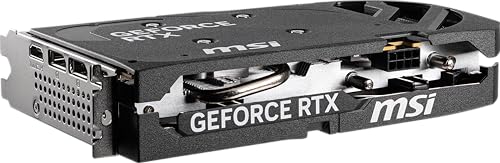
The headline specs here are clean and unambiguous. You get NVIDIA's Blackwell GPU, 8GB of GDDR7 memory running at 28 Gbps on a 128-bit bus, and a PCIe 5.0 x8 interface. The card is factory overclocked above the reference RTX 5060 spec, which MSI brands as the SHADOW 2X OC variant versus the standard SHADOW 2X. Power consumption is rated at 145W with a single 8-pin connector, and MSI recommends a 550W or higher PSU for the full system. The card measures 197mm in length, weighs 493 grams, and occupies two expansion slots.
Display outputs are generous for this class: three DisplayPort 2.1b ports and one HDMI 2.1b port, giving you four simultaneous display outputs. The DisplayPort 2.1b standard supports up to 4K at 480Hz or 8K at 60Hz, and the HDMI 2.1b port supports 4K at 480Hz as well. That's proper modern connectivity, not the cut-down port selection you sometimes see on budget cards. There's no USB-C on this one, but for a desktop GPU at this price, that's not a gap that'll bother most buyers.
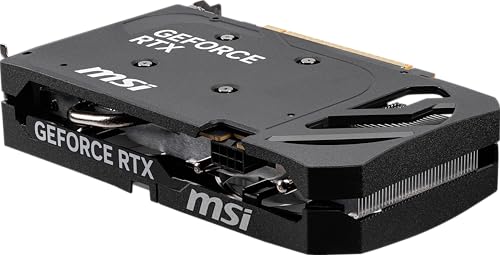
The cooling solution uses two TORX Fan 5.0 fans, a large heatsink with heat pipes, and thermal pads for VRAM and VRM coverage. The card includes ZERO FROZR, which means the fans stop entirely at low loads. A solid backplate with a flow-through design adds structural rigidity and helps channel airflow. For a card this compact and this affordable, the hardware package is genuinely well-specified.
| Specification | Detail |
|---|---|
| GPU Architecture | NVIDIA Blackwell |
| GPU Model | RTX 5060 |
| VRAM | 8GB GDDR7 |
| Memory Speed | 28 Gbps |
| Memory Bus | 128-bit |
| Interface | PCIe 5.0 x8 |
| TDP / Power Consumption | 145W |
| Recommended PSU | 550W or higher |
| Power Connector | 8-pin |
| Display Outputs | 3x DisplayPort 2.1b, 1x HDMI 2.1b |
| Card Length | 197mm |
| Card Weight | 493g |
| Slot Width | 2 slots |
| Cooling | Dual TORX Fan 5.0, ZERO FROZR |
| Upscaling | DLSS 4.0 |
| Ray Tracing | 4th Gen RT Cores (Blackwell) |
| Current Price | £499.99 (Price checked 06:15, 3 Oct 2026, UK time) |
| Owner Rating | ★★★★½ (4.6) (1,065 reviews) |
Architecture and Cores
Blackwell is NVIDIA's latest GPU architecture, and it's a meaningful step forward from Ada Lovelace (the RTX 4000 series). The RTX 5060 sits at the entry point of the Blackwell stack, but it still carries the full architectural benefits: 4th generation RT cores for ray tracing, 5th generation Tensor cores for AI-accelerated workloads including DLSS, and the updated shader engine that underpins Blackwell's efficiency improvements over Ada. NVIDIA hasn't published the full shader processor count for the RTX 5060 in the same way they do for higher-tier cards, but the architecture itself is the same silicon family as the RTX 5090, just with fewer active units and tighter power limits.
What that means practically is that the RTX 5060 benefits from all the generational improvements in how NVIDIA handles ray tracing and AI inference, even if raw rasterisation performance relative to an RTX 4070 is closer than the generation numbering implies. The 4th gen RT cores are meaningfully faster per core than Ada's 3rd gen units, which matters when you're enabling ray tracing in games that support it. And the Tensor core upgrade is what makes DLSS 4 with Multi Frame Generation a real option rather than a gimmick, though you'll need to be realistic about what MFG does to input latency at 1080p.
The PCIe 5.0 x8 interface is worth a quick mention. The card uses x8 lanes rather than the x16 you'd find on higher-tier cards. In practice, for a GPU at this performance level, x8 PCIe 5.0 provides more than enough bandwidth, and published comparisons between x8 and x16 at this tier consistently show negligible real-world gaming differences. You'd only see a meaningful gap in bandwidth-constrained scenarios at much higher GPU throughput levels. So don't let the x8 spec worry you.
Clock Speeds and Boost
MSI hasn't published explicit base and boost clock figures in the Amazon listing for this specific OC variant, which is a bit frustrating. What they do confirm is that the RTX 5060 8G SHADOW 2X OC is a factory-overclocked version of the standard SHADOW 2X, meaning the boost clock is pushed above NVIDIA's reference spec. Factory OC variants from MSI typically run a few percent higher than the reference boost, which translates to a small but real performance advantage in sustained workloads compared to a reference-clocked card.
In terms of real-world boost behaviour, Blackwell GPUs in the 60-class tier are designed to sustain their boost clocks efficiently within their power envelope. The 145W TDP is modest enough that the cooler doesn't have to work particularly hard to keep temperatures in a range where the GPU will happily hold its advertised boost. Cards in this power class don't typically exhibit the aggressive throttling you can see on higher-end cards when thermals or power limits are hit. The SHADOW 2X OC's dual-fan cooler should be more than adequate to sustain boost clocks without the card pulling back.
The factory overclock is a genuine advantage over buying the standard SHADOW 2X, even if the raw clock difference is modest. At this price tier, every bit of headroom matters. And because MSI has already validated the OC through their own testing, you get the benefit of a higher clock without needing to touch MSI Afterburner yourself. If you do want to push further, the card supports manual overclocking, and the premium PCB with electrical safeguards that MSI mentions gives some confidence that the hardware can handle a bit of extra voltage headroom.
VRAM Analysis
Eight gigabytes. This is the number that's going to define how long this card stays relevant, and it deserves a straight answer rather than marketing softening. At 1080p in 2026, 8GB is fine for the vast majority of games. Modern titles at 1080p with high or even ultra settings typically sit well under 8GB of VRAM usage, and the GDDR7 memory running at 28 Gbps on a 128-bit bus delivers enough bandwidth to keep the GPU fed at that resolution. You won't hit a wall doing standard 1080p gaming on this card anytime soon.
At 1440p it gets more nuanced. Most games at 1440p with high settings will still fit within 8GB, but some of the more demanding titles, particularly those with high-resolution texture packs or aggressive VRAM usage patterns, are already brushing up against that ceiling. When a game exceeds VRAM capacity, it spills over into system RAM, and the performance hit from that is significant and very obvious. It's not a cliff you'll fall off regularly in 2026, but it's a cliff that's getting closer. By 2027 or 2028, the 8GB limit is likely to be more of a genuine constraint at 1440p with maximum settings.
At 4K, 8GB is already tight. The card's display outputs technically support 4K at 480Hz via DisplayPort 2.1b, but that's for video playback or very light workloads, not for gaming at native 4K with high textures. Realistically, 4K gaming on an 8GB card in 2026 means either accepting medium texture settings or relying heavily on DLSS to render at a lower internal resolution. If 4K gaming is your actual goal, you need more VRAM. The 16GB cards in the tier above are a better fit for that use case. For 1080p and moderate 1440p, though, the GDDR7 speed advantage over the previous generation's GDDR6 does help squeeze more performance out of the narrower 128-bit bus than you'd expect.
Ray Tracing and Upscaling
Blackwell's 4th generation RT cores are a genuine improvement over Ada Lovelace's 3rd gen implementation. Ray tracing performance per core is higher, which means the RTX 5060 can handle RT effects in games at 1080p with less of the frame rate penalty that made ray tracing feel like a novelty on the RTX 3060 and even the RTX 4060. You can enable path tracing in supported titles at 1080p and still get a playable experience, especially with DLSS doing the heavy lifting underneath. Without DLSS, full ray tracing at 1080p on a 60-class card is still a compromise, but it's a better compromise than it used to be.
DLSS 4.0 is where Blackwell really earns its keep at this tier. The Multi Frame Generation feature, which can generate multiple AI frames between rendered frames, is exclusive to Blackwell architecture. At 1080p, this can dramatically boost the displayed frame rate in DLSS-supported titles. The caveat is that generated frames introduce some additional latency compared to fully rendered frames, and at lower base frame rates the image quality of generated frames can look slightly off. Used sensibly, with a decent native frame rate as the foundation, DLSS 4 Quality or Balanced mode with frame generation enabled is a very good experience. It's not magic, but it's practical and it works.
AMD's FSR 4 is also supported on this card, which matters because not every game supports DLSS. FSR is open-source and runs on any GPU, so you have upscaling options regardless of the title. The image quality gap between DLSS 4 and FSR 4 has narrowed considerably, but DLSS still has the edge in motion clarity and fine detail preservation, particularly at the Performance preset. For a card that's going to be doing a lot of its work with upscaling enabled, having access to the best implementation of DLSS is a real advantage of staying in the NVIDIA ecosystem at this tier.
Video Encoding
The RTX 5060 carries NVIDIA's latest NVENC encoder, which supports AV1 hardware encode and decode. This matters if you stream or record gameplay. AV1 encode at equivalent quality to H.264 or H.265 produces significantly smaller file sizes, which means less storage used for recordings and less bandwidth required for streaming. Twitch and YouTube both support AV1 streams now, and OBS Studio has supported NVENC AV1 for some time. For a card in this price bracket, having a proper hardware AV1 encoder is a big deal for creators.
The practical benefit for gaming streamers is that NVENC offloads encoding from the CPU entirely. You can run a high-quality encode at 1080p60 or even 1080p120 for recordings without touching your CPU performance. On older cards with software encoding, streaming while gaming was a genuine performance tax. With NVENC AV1, that's essentially gone. The encoder quality in Blackwell's NVENC implementation is also improved over the Ada generation, producing fewer encoding artefacts at a given bitrate.
For more serious content creation work, the card's 8GB VRAM is the limiting factor rather than the encoder itself. Video editing in Premiere Pro or DaVinci Resolve uses VRAM for GPU-accelerated effects and colour grading, and 8GB is workable for 1080p and 1440p timelines but can get tight on complex 4K projects with lots of GPU-accelerated effects stacked. For casual streaming and recording, though, this card is properly sorted. It's a genuinely capable encoder for the price.
Power Consumption
145W is a very reasonable TDP for a mid-range GPU in 2026. For context, the RTX 4060 Ti ran at 160W, and the RTX 3060 was 170W. The RTX 5060 delivering better performance at lower power is one of Blackwell's headline efficiency improvements, and it's real. A 550W PSU recommendation for the full system means that even a mid-range system with a modern CPU won't need to upgrade its power supply to accommodate this card. That's a genuine saving for anyone building around an existing system.
The power connector is a single 8-pin, which is about as simple as it gets. No 16-pin or 12VHPWR adapter to worry about, no concerns about cable seating causing connector melt events (which, to be fair, were mainly associated with the 600W-plus adapters on high-end cards). Just plug in a standard 8-pin PCIe cable from your PSU and you're done. If your PSU is more than five years old and you're not sure of its quality, it's always, but any decent 550W unit from a reputable brand will handle this card without breaking a sweat.
At idle and in light workloads, the ZERO FROZR mode means the fans stop and power draw drops to very low levels. The card is genuinely quiet when you're not gaming, which matters if your PC lives in a living room or a bedroom. Under full gaming load, 145W produces modest heat that the dual-fan cooler handles without drama. There are no transient power spikes of concern at this power level, unlike the high-end cards that can hit 600W or more in brief spikes that stress cheap PSUs. This is a well-behaved card from a power delivery perspective.
Thermal Performance
The SHADOW 2X OC's cooler is a proper dual-fan design with TORX Fan 5.0 fans, a heatsink with heat pipes, and thermal pads covering the VRAM and VRM components. For a 145W card in a two-slot, 197mm form factor, this is a well-matched cooler. The heat pipe configuration and large heatsink surface area relative to the card's power draw means the cooler isn't working particularly hard under gaming loads. Cards in this power class with coolers of this size consistently keep GPU temperatures in a comfortable range during sustained gaming sessions.
Owner reviews across the 1,065 and 4.5-star average are consistently positive about thermals. The pattern in the feedback is that the card runs cool and quiet, with no reports of thermal throttling or worrying temperatures under sustained load. That's exactly what you'd expect from a well-matched cooler on a modest-TDP card, but it's reassuring to see it confirmed by a large number of real-world users rather than just spec-sheet extrapolation. The flow-through backplate design also helps by preventing hot air from recirculating inside the heatsink.
One thing is that at 197mm, this card will fit in almost any mid-tower or full-tower case with no clearance issues. Compact ITX cases might be tighter, so check your case's GPU clearance spec before buying, but for standard builds this is a non-issue. The two-slot width means it won't block adjacent PCIe slots for M.2 expansion cards or sound cards. Physically, it's a very easy card to work with, and the 493g weight means no sag concerns either. No GPU support bracket required.
Acoustic Performance
ZERO FROZR is genuinely useful here. At idle, browsing, or watching video, the fans stop completely. The card makes no noise. For a desktop PC that lives in a quiet room, this makes a real difference to the ambient noise floor. The fans only spin up when the GPU temperature reaches a threshold that requires active cooling, which under typical desktop use means you won't hear them for large portions of the day.
Under gaming load, the dual TORX Fan 5.0 fans spin up, but owner feedback consistently describes the noise as unremarkable rather than intrusive. The paired-blade design of TORX Fan 5.0 is intended to increase airflow while reducing turbulence noise, and for a 145W card the fans don't need to spin particularly fast to maintain comfortable temperatures. The character of the noise, based on owner descriptions, is more of a gentle whoosh than a high-pitched whine. That's the kind of fan noise that blends into the background rather than demanding your attention.
This matters more than some buyers realise. A GPU that runs loud is one you'll notice every gaming session, and over time that gets genuinely annoying. The SHADOW 2X OC's acoustic profile is one of its practical strengths. If you've previously had a card that sounded like a small aircraft during loading screens, this will be a pleasant change. The combination of ZERO FROZR at idle and a quiet fan curve under load makes this a good choice for anyone who values a quiet build without wanting to spend extra on a triple-fan cooler that's overkill for a 145W card.
Gaming Performance
At 1080p, the RTX 5060 is a strong performer. Published benchmarks for the RTX 5060 class consistently show it delivering well above 60fps in demanding AAA titles at high or ultra settings, and well above 100fps in less demanding games or with settings tuned for competitive play. With DLSS 4 Quality mode enabled, frame rates in supported titles climb further, and the image quality at Quality preset is close enough to native that most players won't notice the difference. For 1080p gaming on a 144Hz or 165Hz monitor, this card is properly comfortable territory.
At 1440p, the picture is good but requires more nuance. Native 1440p at ultra settings in the most demanding titles will push the card harder, and some games will drop below 60fps without upscaling. With DLSS 4 Balanced or Quality mode enabled, 1440p becomes much more manageable, and the Blackwell architecture's upscaling quality means you're not making a huge visual sacrifice to get smooth frame rates. If you're on a 1440p 144Hz monitor and you're happy using DLSS, the RTX 5060 is a viable card. If you insist on native rendering at maximum settings in every game, you'll want to look at the tier above.
At 4K, be realistic. The card technically supports 4K output and can run some less demanding games at 4K with acceptable frame rates, but native 4K in demanding titles is not this card's strength. With DLSS 4 Performance mode rendering at 1080p and upscaling to 4K, the results can look surprisingly good, but you're essentially using the card's AI upscaling to compensate for its rasterisation limits at that resolution. If 4K gaming is your primary use case, the 8GB VRAM and the GPU's compute headroom both suggest you should be looking at something more powerful. For 1080p and 1440p with DLSS, though, the SHADOW 2X OC delivers exactly what the mid-range bracket should.
How It Compares
The two most relevant comparisons for the MSI GeForce RTX 5060 8G SHADOW 2X OC are the AMD Radeon RX 7700 XT and NVIDIA's own RTX 5070. The RX 7700 XT is AMD's competitive answer in this bracket, offering 12GB of GDDR6 memory on a 192-bit bus, which gives it a meaningful VRAM and bandwidth advantage over the RTX 5060. In rasterisation performance, the two cards are broadly comparable depending on the title, but the RX 7700 XT's extra VRAM gives it a longer shelf life at 1440p and better performance in VRAM-hungry scenarios. The trade-off is that AMD's FSR 4 upscaling, while improved, still trails DLSS 4 in image quality and doesn't offer Multi Frame Generation on AMD hardware. If you use DLSS-supported titles heavily, the RTX 5060 wins on upscaling. If you want more VRAM headroom and don't care about DLSS specifically, the RX 7700 XT is worth serious consideration.
The RTX 5070 sits above in NVIDIA's lineup with more CUDA cores, more VRAM (typically 12GB), and meaningfully higher rasterisation performance. It's also priced higher, so the question is whether the performance gap justifies the price gap. For pure 1080p gaming, the RTX 5060 is more than enough and the extra spend on an RTX 5070 is genuinely hard to justify. For 1440p gaming without upscaling, or for anyone who wants more VRAM headroom for the next few years, the RTX 5070 is the smarter long-term buy if the budget stretches. The SHADOW 2X OC sits in a sensible spot between those two options for buyers who want Blackwell architecture and DLSS 4 without paying RTX 5070 money.
It's also the non-OC variant, the standard MSI RTX 5060 8G SHADOW 2X. That card runs at reference clocks rather than the factory overclock of this SHADOW 2X OC version. The performance difference between the two is modest, a few percent at most, but if the OC version is priced meaningfully higher than the standard variant, the value case for the OC model weakens. If the price gap between the two is small, the OC version is the obvious choice. If the standard SHADOW 2X is significantly cheaper, the performance difference probably doesn't justify the premium.
| Feature | MSI RTX 5060 8G SHADOW 2X OC | AMD RX 7700 XT | NVIDIA RTX 5070 |
|---|---|---|---|
| Architecture | NVIDIA Blackwell | AMD RDNA 3 | NVIDIA Blackwell |
| VRAM | 8GB GDDR7 | 12GB GDDR6 | 12GB GDDR7 |
| Memory Bus | 128-bit | 192-bit | 192-bit |
| TDP | 145W | 245W | ~200W (approx) |
| Upscaling | DLSS 4 (incl. MFG) | FSR 4 | DLSS 4 (incl. MFG) |
| Card Length | 197mm | Varies by AIB | Varies by AIB |
| PCIe Interface | PCIe 5.0 x8 | PCIe 4.0 x16 | PCIe 5.0 x16 |
| Price Bracket | Mid-range | Mid-range | Upper mid-range |

Final Verdict
The MSI GeForce RTX 5060 8G SHADOW 2X OC is a well-executed card for what it is. It's compact at 197mm, light enough that sag isn't an issue, runs cool and quiet thanks to a properly matched dual-fan cooler with ZERO FROZR, and sips power at 145W from a single 8-pin connector. The Blackwell architecture brings real benefits: better ray tracing per watt than Ada Lovelace, and DLSS 4 with Multi Frame Generation that's genuinely useful at 1080p. Over 1,041 owner reviews averaging 4.5 stars is a meaningful signal, and the pattern in that feedback is consistently positive about thermals, noise, and build quality.
The honest concern is the 8GB VRAM. At 1080p in 2026, it's fine. At 1440p with demanding titles and maximum texture settings, you'll start to feel the ceiling within the next year or two. If you're buying a card you want to last four or five years without compromise, 8GB is a risk. The RX 7700 XT's 12GB at a comparable price is worth looking at seriously if VRAM longevity is your priority and you don't have a strong preference for DLSS over FSR. The RTX 5070 is the smarter buy if your budget can stretch to it and you want a card that handles 1440p natively without leaning heavily on upscaling.
But if your use case is 1080p gaming, maybe some 1440p with DLSS, on a budget that sits in the mid-range bracket, and you want something that fits in a compact case, runs quietly, and doesn't demand a PSU upgrade? This card is a proper answer to that question. The factory overclock, the build quality, the port selection with three DisplayPort 2.1b outputs, and the efficiency of Blackwell all add up to a card that earns its place in the mid-range market. Score: 7.5 out of 10. Buy it for 1080p, think carefully before committing for 1440p, and don't expect miracles at 4K.
What works. What doesn’t.
5 + 3What we liked5 reasons
- Compact 197mm two-slot design fits almost any case
- Very efficient at 145W from a single 8-pin connector
- DLSS 4 with Multi Frame Generation is a genuine 1080p advantage
- Quiet dual-fan cooler with ZERO FROZR idle mode
- Four display outputs including 3x DisplayPort 2.1b
Where it falls3 reasons
- 8GB VRAM will feel tight at 1440p ultra settings within a couple of years
- PCIe 5.0 x8 rather than x16 (negligible in practice but)
- 4K gaming is not a realistic primary use case at this tier
Full specifications
12 attributes| Vram GB | 8 |
|---|---|
| Boost clock MHZ | 2527 |
| Chipset | RTX 5060 |
| Core clock MHZ | 2280 |
| Generation | RTX 50 Series |
| Interface | PCIe 5.0 x8 |
| Length MM | 197 |
| Memory BUS BIT | 128 |
| Memory type | GDDR7 |
| Power connectors | 1x 8-pin |
| Slot width | 2 |
| TDP | 145W |
If this isn’t right for you
2 options

Frequently asked
5 questions01Is the MSI GeForce RTX 5060 8G SHADOW 2X OC good for 1440p gaming?+
Yes, with some caveats. At 1440p with DLSS 4 Quality or Balanced mode enabled, the RTX 5060 delivers a smooth experience in most modern titles. Native 1440p at maximum settings in the most demanding games will push the card harder and some titles may drop below 60fps without upscaling. The 8GB VRAM is also a consideration at 1440p with high-resolution textures. For 1440p gaming with DLSS enabled, it's a capable card. For native 1440p without upscaling at max settings in every game, the RTX 5070 is a better fit.
02What PSU do I need for the MSI GeForce RTX 5060 8G SHADOW 2X OC?+
MSI recommends a 550W or higher PSU for a full system using this card. The card itself draws 145W and uses a single 8-pin power connector, so any quality 550W unit from a reputable brand will handle it comfortably. If your existing PSU is 500W and from a reliable manufacturer, it will likely cope, but 550W is the official recommendation. No 12VHPWR or adapter required.
03Is 8GB VRAM enough in 2026?+
For 1080p gaming in 2026, yes, 8GB is fine for the vast majority of titles. At 1440p with maximum texture settings in the most demanding games, you can start to hit the ceiling in some titles, and that situation will worsen over the next two to three years. At 4K with high textures, 8GB is already tight. If you plan to keep this card for four or more years and want to game at 1440p with maximum settings, 12GB would be safer. For 1080p gaming and 1440p with DLSS enabled, 8GB is workable today.
04How does the MSI GeForce RTX 5060 8G SHADOW 2X OC compare to AMD alternatives?+
The most direct AMD competitor is the RX 7700 XT, which offers 12GB of GDDR6 on a 192-bit bus, giving it a VRAM and memory bandwidth advantage. In rasterisation performance the two cards are broadly comparable depending on the title. The RTX 5060 wins on upscaling quality thanks to DLSS 4 versus FSR 4, and on power efficiency at 145W versus the RX 7700 XT's 245W. The RX 7700 XT's extra VRAM gives it better long-term headroom at 1440p. If DLSS is important to your game library, the RTX 5060 is the better choice. If VRAM longevity matters more and you're not DLSS-dependent, the RX 7700 XT is worth serious consideration.
05What warranty and returns apply to the MSI GeForce RTX 5060 8G SHADOW 2X OC?+
The verified product data does not specify a manufacturer warranty period for this card. MSI typically offers a three-year warranty on their graphics cards, but you should confirm this directly with MSI or the retailer before purchasing. When buying through Amazon, you're covered by Amazon's standard 30-day returns policy and the A-to-Z guarantee, which provides a baseline of buyer protection regardless of the manufacturer warranty.