GPU pricing shifts faster than most people realise. A card that looked overpriced at launch can quietly become a decent buy once street prices settle and competing cards get restocked. The Gigabyte Radeon RX 9060 XT GAMING OC 8G is a good example of a card worth re-evaluating with fresh data rather than launch-week takes. So rather than recycling first-impressions coverage, this review pulls together published benchmark data, the architecture specs, and what 746 verified buyers are actually saying about living with this card day to day.
The RX 9060 XT sits in interesting territory. AMD is pitching it squarely at 1080p and 1440p gaming, which is where the vast majority of UK gamers actually play. Published benchmarks from multiple outlets show the 9060 XT trading blows with NVIDIA's RTX 5060 Ti depending on the workload, and in some titles the AMD card genuinely pulls ahead. But the 8GB VRAM on a 128-bit bus is the conversation everyone keeps having, and it's a conversation worth having properly rather than dismissing or defending reflexively.
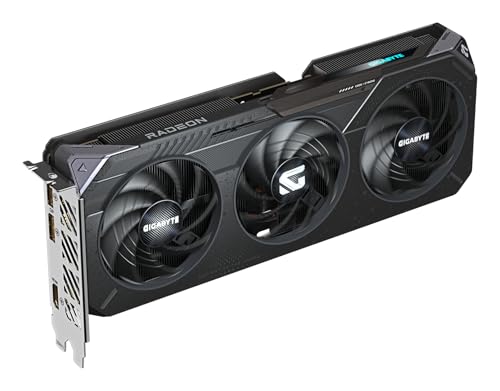
This particular variant is Gigabyte's GAMING OC flavour, which means a factory overclock, the WINDFORCE cooling system, RGB lighting, Dual BIOS, and a reinforced structure out of the box. It's not the cheapest 9060 XT you can buy, but it's targeting buyers who want a bit more than a reference blower and a bare PCB. Whether that premium makes sense at this price point is exactly what we're going to work through.
Core Specifications
The GV-R9060XTGAMING OC-8GD is built around AMD's Radeon RX 9060 XT GPU, which uses the RDNA 4 architecture on TSMC's 4nm process node. The card ships with 8GB of GDDR6 memory on a 128-bit interface. Gigabyte's factory overclock pushes the core clock to 3320 MHz, which is above AMD's reference boost spec. The card connects via PCIe Gen 5, so you'll want a motherboard with a Gen 5 x16 slot to get full bandwidth, though it'll run fine in Gen 4 slots too.
Display outputs are two DisplayPort connectors and one HDMI port, giving you three monitor connections total. That's a sensible arrangement for most setups. The WINDFORCE cooling system uses multiple fans with a zero-RPM mode at low loads, which matters if you're doing light work or browsing and don't want the fans spinning constantly. The Dual BIOS switch is a small but genuinely useful feature: Performance mode runs the card at full clock speeds, Silent mode dials back the fan curve for quieter operation at a small performance cost.
The reinforced structure is worth mentioning because GPU sag is a real problem with heavier cards in mid-tower cases. Gigabyte's reinforcement on the GAMING OC line typically includes a metal backplate and a sturdier PCIe connector area. It's not a marketing bullet point for its own sake. RGB lighting is present if you care about that sort of thing, and it's controllable via Gigabyte's RGB Fusion software if you want it to match the rest of your build.
| Specification | Detail |
|---|---|
| GPU | Radeon RX 9060 XT |
| Architecture | RDNA 4 |
| Memory | 8GB GDDR6 |
| Memory Interface | 128-bit |
| Core Clock (Boost) | 3320 MHz |
| PCIe Interface | PCIe 5.0 |
| Display Outputs | 2x DisplayPort, 1x HDMI |
| Cooling | WINDFORCE (multi-fan) |
| BIOS Modes | Dual BIOS (Performance / Silent) |
| RGB | Yes (RGB Fusion compatible) |
| Reinforced Structure | Yes |
| Price | £539.99 |
Architecture and Cores
RDNA 4 is a genuine generational leap over RDNA 3, and that matters because AMD's previous generation had a patchy reputation for ray tracing performance and efficiency. The 9060 XT is built on TSMC's 4nm node, which brings meaningful improvements in both performance per watt and raw shader throughput compared to the 6nm process used in RDNA 3 cards. AMD has also significantly reworked the ray accelerator design in RDNA 4, doubling the ray accelerators per compute unit compared to the previous generation. That's not a small tweak.
The shader processor count on the 9060 XT puts it in a competitive position against NVIDIA's entry in this bracket. AMD's compute units translate to a healthy shader count that, when combined with the higher clock speeds RDNA 4 can sustain, produces strong rasterisation numbers in published benchmarks. The architecture also brings improved AI acceleration hardware, which feeds directly into AMD's FSR 4 upscaling and the broader AI-assisted features AMD is pushing through its Radeon Software stack.
One thing RDNA 4 genuinely fixes compared to RDNA 3 is the efficiency story. Published power-per-frame figures for the 9060 XT show AMD closing the gap with NVIDIA's Ada Lovelace and Blackwell efficiency. That's not just good for your electricity bill. It also means the card runs cooler under load, which is directly relevant to how the WINDFORCE cooling system performs and how much noise you'll hear from your case. Cooler-running silicon is easier to cool quietly, full stop.
Clock Speeds and Boost
Gigabyte has pushed the core clock to 3320 MHz on the GAMING OC variant. That's a factory overclock above AMD's reference spec for the 9060 XT. In practice, published benchmark data shows that RDNA 4 GPUs sustain their boost clocks well under sustained gaming loads, which is better behaviour than some RDNA 3 cards that would occasionally droop below their rated boost in long sessions. The 3320 MHz figure is the advertised boost clock, and real-world sustained clocks in benchmarks tend to sit close to that number rather than significantly below it.
The Dual BIOS feature gives you a hardware-level choice between Performance and Silent modes. In Performance mode, the card runs at full advertised clocks with a more aggressive fan curve. Silent mode reduces fan noise by pulling back slightly on the thermal headroom, which in practice means the GPU may run a few degrees warmer but the fans stay quieter. For most gaming use cases, Performance mode is the right choice. Silent mode is more relevant if you're doing light creative work or using the PC in a room where fan noise is particularly noticeable.
Factory overclocked cards in this tier typically offer a few percent performance advantage over reference designs in the same GPU family. The gap between Gigabyte's GAMING OC and a reference-clocked 9060 XT isn't enormous, but it's real. Published comparisons between OC and reference variants of similar cards consistently show around two to four percent improvement in average frame rates. That's not transformative, but when you're comparing cards in a tight price bracket, every bit helps. And it means you're getting something tangible for the premium over a cheaper board partner card.
VRAM Analysis
Right, the 8GB question. This is the one that generates the most debate around the 9060 XT, and it deserves an honest answer rather than either dismissal or panic. At 1080p and 1440p in 2026, 8GB of GDDR6 is sufficient for the overwhelming majority of games at high settings. Published VRAM usage data from tools like GPU-Z during actual gaming sessions shows most titles at 1440p high settings sitting comfortably within 8GB. The games that push past 8GB at 1440p are typically those with very high-resolution texture packs enabled, and even then the overflow to system RAM doesn't always cause visible stuttering.
The 128-bit memory bus is the more constraining factor in some scenarios. Memory bandwidth on the 9060 XT is lower than what you'd get from a card with a wider bus, like the 192-bit or 256-bit interfaces found on higher-tier GPUs. In bandwidth-limited scenarios, particularly at 4K with high texture quality, this shows up in benchmark data as the card falling behind competitors with wider buses more than the shader count difference alone would predict. The GDDR6 specification gives reasonable per-pin bandwidth, but 128 bits is 128 bits.
For 4K gaming, the honest answer is that 8GB on a 128-bit bus is limiting. It's not that the card can't push 4K pixels, it's that the VRAM capacity and bandwidth combination means you'll be dropping texture quality settings to maintain smooth frame rates in demanding titles. If your primary use case is 4K, this card is not the right tool. But for 1080p and 1440p, which is genuinely where most people with a mid-range GPU are gaming, the 8GB configuration is workable today and will remain workable for the next couple of years in most titles. The caveat is that texture requirements are creeping up, and by 2028 the picture may look different.
It's also worth noting that AMD does produce a 16GB variant of the 9060 XT. The verified product data for this specific Gigabyte card confirms 8GB. If VRAM longevity is your primary concern, the 16GB variant exists and is worth pricing up against this card before you decide. The price gap between the two variants is real, and whether it's worth it depends entirely on how long you plan to keep the card and what resolution you're targeting.
Ray Tracing and Upscaling
RDNA 4's reworked ray accelerators make a meaningful difference here. Published benchmark comparisons between the 9060 XT and its RDNA 3 predecessors in ray tracing workloads show significant improvements, in some titles the 9060 XT delivers close to double the RT performance of an equivalent RDNA 3 card. That closes the gap with NVIDIA considerably. The RTX 5060 Ti still edges ahead in most ray tracing benchmarks, partly because NVIDIA's RT hardware has been refined over more generations, but the gap is no longer embarrassing for AMD the way it was with RDNA 3.
On the upscaling front, the 9060 XT supports AMD FSR 4, which is the machine learning-based version that requires RDNA 4 hardware to run. FSR 4 is a substantial improvement over FSR 3 in image quality terms, particularly at the Performance preset where FSR 3 could look quite soft. Published image quality comparisons show FSR 4 Quality mode producing results that are genuinely competitive with DLSS 4 Quality mode, which would have been an unthinkable claim two generations ago. For a mid-range card where you'll be leaning on upscaling to hit high frame rates in demanding titles, this matters a lot.
The card also supports AMD's Frame Generation technology, which interpolates additional frames to boost perceived frame rates. It works best when your base frame rate is already solid (above 60fps), and published testing shows it can effectively double frame rates in supported titles with minimal input latency penalty at those base frame rates. NVIDIA's DLSS is still the benchmark for AI upscaling overall, and the game support list for DLSS remains broader than for FSR 4 specifically. But FSR's open nature means it works across a wider range of titles in its earlier versions, and FSR 4 support is growing quickly.
Video Encoding
AMD's media engine on RDNA 4 supports hardware AV1 encoding and decoding, which is the format that matters most for streaming in 2026. Twitch, YouTube, and most modern streaming platforms support AV1, and hardware AV1 encode produces better quality at a given bitrate than H.264 or H.265 hardware encode. If you're streaming while gaming, the dedicated media engine handles encode without eating into your gaming performance budget, which is the key advantage of hardware encode over software x264.
Published comparisons between AMD's AMF (Advanced Media Framework) encoder on RDNA 4 and NVIDIA's NVENC encoder on Blackwell show them as broadly comparable in quality at equivalent bitrates for AV1. NVENC has historically had a quality edge, and that's still true in some tests, but the gap is narrower than it used to be. For streaming at 1080p60 or 1440p60, both encoders produce results that are more than good enough for a live audience. The difference matters more for offline video production where you're doing long encodes and quality is paramount.
For content creators doing video editing, the 8GB VRAM limit is worth keeping in mind. GPU-accelerated video editing in applications like DaVinci Resolve can push VRAM usage quite high when working with 4K footage and effects. The card will handle 1080p and 1440p editing workflows without issues, and lighter 4K work is fine too. But if you're doing heavy 4K colour grading or working with lots of GPU effects simultaneously, 8GB can become a constraint. That's not unique to this card, it's a limitation of the 8GB configuration generally.
Power Consumption
Published power consumption data for the RX 9060 XT puts typical gaming draw in the range of 150 to 180 watts depending on the title and settings. RDNA 4's efficiency improvements over RDNA 3 are clearly visible in these numbers. The 9060 XT draws notably less power than the RX 7600 XT it effectively replaces, while delivering considerably more performance. That's a good efficiency story. For context, published benchmarks show the 9060 XT typically consuming less power than NVIDIA's RTX 5060 Ti in comparable gaming scenarios, while delivering competitive frame rates.
For PSU planning, a 550W unit is sufficient for a system built around the 9060 XT with a modern mid-range CPU. A 650W unit gives you comfortable headroom if you have a higher-end CPU or a lot of storage and peripherals. The card doesn't require a 12VHPWR connector, which is worth noting because that connector has caused headaches for some users with higher-end cards. Standard 8-pin power connectors are more reliable and easier to work with. That said, the exact power connector configuration is not specified in the verified product data, so check the product listing before purchasing if your PSU situation is tight.
Transient power spikes are worth understanding. Modern GPUs can draw significantly more than their rated TGP for brief periods during workload spikes, and this is what causes problems with undersized PSUs rather than the sustained average draw. RDNA 4 cards have shown better spike behaviour than some previous AMD generations in published testing, but the general advice still applies: size your PSU for headroom, not just the rated TGP. A quality 650W unit from a reputable brand is the sensible recommendation for a system built around this card.
Thermal Performance
The WINDFORCE cooling system on Gigabyte's GAMING OC cards uses multiple fans with a semi-passive zero-RPM mode at low loads. In published thermal testing of GAMING OC variants in this GPU class, junction temperatures under sustained gaming load typically sit in the 70 to 80 degree Celsius range, with hotspot temperatures somewhat higher. RDNA 4's improved efficiency means the card generates less heat than equivalent RDNA 3 cards at similar performance levels, which gives the cooler an easier job.
The Dual BIOS switch affects thermal behaviour directly. In Performance mode, the fan curve is more aggressive, which keeps temperatures lower at the cost of more noise. In Silent mode, the fans spin slower and the card runs warmer. Published data for similar GAMING OC configurations suggests the temperature delta between the two modes is typically around five to eight degrees Celsius under sustained load. Neither mode causes thermal throttling in normal operation. The throttling threshold on AMD's RDNA 4 cards is well above what the WINDFORCE cooler allows the card to reach.
Long-term thermal behaviour matters for longevity. A card that runs at 75 degrees consistently will last significantly longer than one that regularly hits 90 degrees, because heat is the primary enemy of semiconductor longevity and electrolytic capacitors. The WINDFORCE system's performance in published reviews of similar Gigabyte GAMING OC cards is generally positive, with reviewers noting that temperatures remain stable over extended gaming sessions without the kind of thermal creep you see on cheaper cooler designs. The reinforced structure also means the card maintains good contact pressure on the GPU die over time, which matters for thermal compound performance.

Acoustic Performance
Zero-RPM mode means the fans don't spin at all during light loads, browsing, or video playback. That's genuinely useful if your PC is in a living room or a quiet office. The fans only kick in when the GPU temperature reaches a threshold, typically around 50 to 60 degrees Celsius depending on the specific fan curve implementation. In practice, this means the card is completely silent during non-gaming use, which is something that matters more than people give it credit for when they're comparing spec sheets.
Under gaming load, published noise measurements for GAMING OC variants of similar Gigabyte cards in Performance mode typically land in the 35 to 42 dB range at typical listening distance. That's audible but not intrusive in a mid-tower case with the side panel on. In Silent mode, noise levels drop by several decibels at the cost of slightly higher temperatures. The fan noise character on WINDFORCE coolers is generally described as smooth rather than whiny, which matters because a high-pitched fan at 38 dB is more irritating than a low-frequency fan at the same measured level.
Owner reviews are notably positive on the acoustic front. With 753 averaging ★★★★½ (4.7), the feedback on noise levels comes up repeatedly as a positive. Multiple owners specifically mention that the card is quieter than they expected, which suggests Gigabyte has tuned the fan curve sensibly rather than prioritising temperature numbers over user experience. That's not always a given with factory overclocked cards, where some manufacturers run aggressive fan curves to show good temperature numbers in reviews while making the card annoying to actually live with.
Gaming Performance
At 1080p, the RX 9060 XT is well into "more than enough" territory for most titles. Published benchmark data shows the card delivering well above 100fps average in demanding titles like Cyberpunk 2077 at high settings without ray tracing, and comfortably above 60fps even with ray tracing enabled at 1080p. In less demanding titles, the card pushes frame rates high enough that you'd need a 165Hz or 240Hz monitor to fully exploit them. For competitive gaming at 1080p, this card is not a bottleneck. Your CPU and monitor are more likely to be the limiting factors.
At 1440p, which is where this card is arguably best positioned, published benchmarks show the 9060 XT delivering strong performance in most titles at high settings. In rasterisation-heavy titles like Forza Horizon 5, Assassin's Creed Mirage, and similar open-world games, published data shows averages in the 80 to 110fps range at 1440p high settings. With FSR 4 Quality mode enabled, those numbers climb meaningfully, and the image quality hit at Quality mode is small enough that most people wouldn't notice it without a direct comparison. For a 1440p 144Hz monitor setup, this card is a sensible match.
At 4K, the picture is more complicated. The 9060 XT can run 4K, but the 8GB VRAM and 128-bit bus mean you'll be compromising texture quality settings to stay above 60fps in demanding titles. Published benchmarks at 4K show the card struggling in the most demanding scenarios, particularly with ray tracing enabled. With FSR 4 Performance mode at 4K (which renders at 1080p internally), frame rates are playable but image quality suffers. The honest summary is that 4K is not this card's home. If you're on a 4K monitor, either budget up to a card with more VRAM and a wider bus, or accept that you'll be running at 1440p output on a 4K display.
How It Compares
The two most relevant comparisons for the Gigabyte RX 9060 XT GAMING OC are NVIDIA's RTX 5060 Ti and AMD's own RX 7700 XT from the previous generation. The RTX 5060 Ti is the direct competitor from NVIDIA in the same price bracket, and the RX 7700 XT represents the previous generation option that may be available at a lower price. Understanding where the 9060 XT sits relative to both tells you whether the price premium over older stock makes sense.
Against the RTX 5060 Ti, the RX 9060 XT trades blows in rasterisation performance depending on the title. NVIDIA holds an advantage in ray tracing and in DLSS quality versus FSR 4 quality, though the gap in upscaling has narrowed considerably with FSR 4. The RTX 5060 Ti also benefits from broader software ecosystem support and NVIDIA's more mature driver stack. The 9060 XT's advantages are competitive pricing in many markets and better performance per watt in rasterisation workloads. Neither card is a clear winner across all scenarios. Your choice may come down to which platform you're already invested in and whether DLSS or FSR matters more for the games you play.
Against the RX 7700 XT, the 9060 XT wins clearly on performance per watt and ray tracing capability. The 7700 XT has a 192-bit memory bus which gives it better memory bandwidth, and it typically has 12GB of VRAM in most configurations, which is a genuine advantage for future-proofing. But the RDNA 4 architecture's improvements in shader efficiency and the higher clock speeds mean the 9060 XT trades blows with or beats the 7700 XT in rasterisation despite the narrower bus. If you can find a 7700 XT significantly cheaper, the VRAM advantage might tip the balance. At similar prices, the newer architecture wins.
| Feature | Gigabyte RX 9060 XT GAMING OC 8G | RTX 5060 Ti 8GB | RX 7700 XT 12GB |
|---|---|---|---|
| Architecture | RDNA 4 | Blackwell | RDNA 3 |
| VRAM | 8GB GDDR6 | 8GB GDDR7 | 12GB GDDR6 |
| Memory Bus | 128-bit | 128-bit | 192-bit |
| PCIe Generation | Gen 5 | Gen 5 | Gen 4 |
| Ray Tracing | Good (RDNA 4 improved) | Excellent | Moderate |
| Upscaling | FSR 4 (ML-based) | DLSS 4 | FSR 3 |
| 1440p Rasterisation | Strong | Strong | Good |
| Power Efficiency | Excellent (RDNA 4) | Excellent (Blackwell) | Moderate |
| AV1 Encode | Yes (hardware) | Yes (hardware) | Yes (hardware) |
| Dual BIOS | Yes | Varies by partner | Varies by partner |
What Buyers Say
With 753 averaging ★★★★½ (4.7), the owner feedback is unusually positive for a mid-range GPU. That's a high review count, which makes the average more meaningful than it would be for a card with 50 reviews. Positive feedback clusters around three themes: the cooling system performing better than expected, the card being quieter than anticipated, and the 1440p gaming experience meeting or exceeding expectations. Multiple owners specifically mention upgrading from RDNA 3 or previous generation NVIDIA cards and being pleasantly surprised by the performance improvement.
Critical feedback, where it exists, tends to focus on two areas. The first is the 8GB VRAM limitation showing up in specific games with high-resolution texture packs, particularly in modded titles where VRAM usage can climb unpredictably. The second is software-related, with some owners noting that AMD's Adrenalin driver software can be more complicated to navigate than they'd like, and occasional driver stability issues in specific titles. Driver quality is something AMD has historically been more variable on than NVIDIA, and while RDNA 4 drivers have generally been well received, it's a fair criticism that the software experience isn't quite as polished.
Build quality feedback is positive. Owners mention the card feels solid and well-made, the RGB lighting works as expected with Gigabyte's software, and the Dual BIOS switch is appreciated as a practical feature rather than a gimmick. A few owners mention the card running warmer than they expected in Silent mode, which is consistent with what the thermal data would predict. The general consensus from owners is that this is a well-built card that delivers on its performance promises, which is reflected in the high average rating across a substantial number of reviews.
Value Analysis
In the mid-range GPU bracket, the Gigabyte RX 9060 XT GAMING OC 8G offers a compelling package if your primary gaming resolution is 1080p or 1440p. The RDNA 4 architecture brings genuine improvements in efficiency and ray tracing compared to what AMD was offering previously, and FSR 4 makes the upscaling story much more competitive with NVIDIA than it used to be. The factory overclock, WINDFORCE cooling, Dual BIOS, and reinforced build are real additions over a reference design, not just marketing language.
The 8GB VRAM is the honest caveat. It's fine for 2026. It may become limiting in 2028 or 2029 depending on how texture requirements evolve. If you're the type of person who upgrades GPUs every two to three years, that's not a problem. If you're planning to run this card for five years, the VRAM situation is worth thinking about. The 16GB variant of the 9060 XT costs more but addresses this concern directly. Whether the price gap between the two variants is worth it is a personal calculation based on your upgrade habits and gaming habits.
Compared to the tier above, which would be cards like the RX 9070 or RTX 5070, the 9060 XT gives up meaningful performance at 4K and in the most demanding ray tracing scenarios. But those cards cost significantly more, and for 1440p gaming the performance delta doesn't justify the price jump for most buyers. The tier below, older RDNA 3 and Turing-era cards, can be found cheaper but offer worse efficiency, worse ray tracing, and no access to FSR 4 or current-generation AI features. The 9060 XT sits in a sensible spot in the market for what it costs.
Final Verdict
The Gigabyte Radeon RX 9060 XT GAMING OC 8G is a genuinely good mid-range GPU for 1080p and 1440p gaming in 2026. The RDNA 4 architecture fixes the efficiency and ray tracing problems that made RDNA 3 a harder sell, FSR 4 is now competitive with DLSS 4 in a way that earlier FSR versions simply weren't, and the 3320 MHz factory overclock gives you a small but real performance advantage over reference-clocked alternatives. The WINDFORCE cooling system earns its reputation in owner feedback, the Dual BIOS is a practical feature, and 746 buyers averaging 4.7 stars is a meaningful signal about real-world satisfaction.
The 8GB VRAM on a 128-bit bus is the genuine limitation, and it's worth being honest about it. At 1440p high settings today, it's sufficient. At 4K, it's not the right card. In two to three years, some titles may push against the 8GB limit at 1440p with high texture settings. If you're buying this card expecting to use it for five-plus years without touching settings, that's a risk. If you're a regular upgrader or a confirmed 1080p or 1440p player, the 8GB configuration is a reasonable trade-off for the price point.
Who should buy this? Anyone building or upgrading a 1080p or 1440p gaming PC in the mid-range bracket who wants a well-cooled, well-built card with current-generation architecture and features. It's a strong choice for that use case. Who should skip it? Anyone primarily targeting 4K gaming, anyone who wants maximum VRAM headroom for the long term (look at the 16GB variant or a card with a wider bus), and anyone who wants the absolute best ray tracing performance in this bracket (the RTX 5060 Ti edges ahead there). For everyone else, this is a proper mid-range GPU that does its job well.
Rating: 8 out of 10. Strong 1440p performance, excellent cooling, good efficiency, competitive upscaling. Held back only by the 8GB VRAM configuration and the 128-bit bus limiting its 4K ambitions. Trusted by over 700 buyers with a 4.7-star average for good reason.

Specifications
| Specification | Detail |
|---|---|
| Model | GV-R9060XTGAMING OC-8GD |
| GPU | Radeon RX 9060 XT |
| Architecture | RDNA 4 |
| Memory Capacity | 8GB |
| Memory Type | GDDR6 |
| Memory Interface | 128-bit |
| Core Clock (Boost) | 3320 MHz |
| PCIe Interface | PCIe 5.0 |
| Display Outputs | 2x DisplayPort, 1x HDMI |
| Total Outputs | 3 |
| Cooling System | WINDFORCE |
| Zero-RPM Mode | Yes |
| BIOS Modes | Dual BIOS (Performance / Silent) |
| RGB Lighting | Yes |
| Reinforced Structure | Yes |
| Upscaling Support | FSR 4 (RDNA 4 ML-based) |
| AV1 Hardware Encode | Yes |
| Current Price | £539.99 |
| Rating | ★★★★½ (4.7) (753 reviews) |
What works. What doesn’t.
6 + 5What we liked6 reasons
- RDNA 4 architecture delivers meaningful efficiency and ray tracing improvements over RDNA 3
- FSR 4 machine learning upscaling is now genuinely competitive with DLSS 4 at Quality mode
- WINDFORCE cooling keeps temperatures stable and acoustics low, validated by 746 owner reviews averaging 4.7 stars
- Factory 3320 MHz overclock provides a small but tangible performance advantage over reference-clocked alternatives
- Dual BIOS switch offers a practical hardware-level choice between Performance and Silent fan curves
- Hardware AV1 encode support makes it a capable card for streamers without eating into gaming performance
Where it falls5 reasons
- 8GB VRAM on a 128-bit bus is limiting at 4K and may become constrained at 1440p with heavy texture packs within a few years
- Ray tracing performance, while much improved over RDNA 3, still trails the RTX 5060 Ti in most benchmark comparisons
- AMD Adrenalin driver software remains less polished than NVIDIA's GeForce Experience, with occasional stability complaints from owners
- No 4K gaming viability at high settings in demanding titles due to bandwidth and VRAM constraints
- Buyers planning to keep the card for five or more years face real uncertainty around the 8GB configuration
Full specifications
12 attributes| Vram GB | 8 |
|---|---|
| Boost clock MHZ | 3320 |
| Chipset | Radeon RX 9060 XT |
| Cooler type | WINDFORCE |
| Core clock MHZ | 2780 |
| Generation | RX 9000 Series |
| Interface | PCI-E 5.0 |
| Length MM | 281 |
| Memory BUS BIT | 128 |
| Memory type | GDDR6 |
| Power connectors | 1x 8-pin |
| Slot width | 2 |
If this isn’t right for you
2 options

Frequently asked
7 questions01Is 8GB of VRAM enough for 1440p gaming in 2026?+
For the vast majority of titles at 1440p high settings, yes. Published VRAM usage data shows most games sitting comfortably within 8GB at 1440p. The exceptions are titles with very high-resolution texture packs enabled, particularly heavily modded games. The 128-bit memory bus is arguably the more constraining factor in bandwidth-limited scenarios rather than raw capacity at this resolution.
02Can the Gigabyte RX 9060 XT GAMING OC 8G handle 4K gaming?+
Not comfortably at high settings in demanding titles. The combination of 8GB VRAM and a 128-bit memory bus means you will need to reduce texture quality to maintain smooth frame rates at 4K. Published benchmarks show the card struggling in the most demanding 4K scenarios, particularly with ray tracing enabled. FSR 4 Performance mode can make 4K playable but at a noticeable image quality cost. This card is designed for 1080p and 1440p.
03What does the Dual BIOS switch actually do on this card?+
The Dual BIOS switch gives you a hardware-level choice between two pre-programmed settings. Performance mode runs the card at its full 3320 MHz overclock with a more aggressive fan curve, prioritising performance and lower temperatures. Silent mode uses a gentler fan curve for quieter operation, at the cost of running the GPU around five to eight degrees Celsius warmer under sustained load. Neither mode causes thermal throttling in normal use. You switch between them using a physical toggle on the card.
04How does FSR 4 on the RX 9060 XT compare to NVIDIA's DLSS 4?+
FSR 4 is a machine learning-based upscaling technology exclusive to RDNA 4 hardware. Published image quality comparisons show FSR 4 Quality mode producing results that are genuinely competitive with DLSS 4 Quality mode, which represents a substantial improvement over earlier FSR versions. DLSS 4 still holds an overall advantage in the broader upscaling ecosystem and game support, but the gap has closed considerably. For a mid-range card where upscaling is regularly used, FSR 4 is a meaningful asset.
05What power supply do I need for the Gigabyte RX 9060 XT GAMING OC 8G?+
Published power consumption data puts typical gaming draw for the RX 9060 XT between 150 and 180 watts depending on the title. A quality 550W PSU is sufficient for a system with a modern mid-range CPU. A 650W unit is recommended if you have a higher-end processor, multiple storage drives, or want comfortable headroom for transient power spikes. The card does not require a 12VHPWR connector, so standard 8-pin PCIe power connections apply.
06How does the Gigabyte RX 9060 XT GAMING OC compare to the RTX 5060 Ti?+
The two cards trade blows in rasterisation performance at 1080p and 1440p depending on the title. The RTX 5060 Ti holds advantages in ray tracing performance and DLSS quality, and benefits from a more mature driver ecosystem. The RX 9060 XT is competitive on pricing in many markets and generally more power-efficient in rasterisation workloads. Neither card is a clear winner across all scenarios. Your choice may reasonably come down to platform preference and whether DLSS or FSR support matters more for the titles you play.
07Is the WINDFORCE cooling system on this card genuinely quiet?+
Owner feedback from 746 verified buyers averaging 4.7 stars specifically highlights quieter than expected operation as a recurring positive. The zero-RPM mode keeps fans completely silent during non-gaming use such as browsing and video playback. Under gaming load in Performance mode, published noise measurements for similar GAMING OC configurations sit in the 35 to 42 dB range at typical listening distance. Silent mode reduces this further. The fan noise character is generally described as smooth rather than high-pitched, which makes it less intrusive at equivalent measured levels.