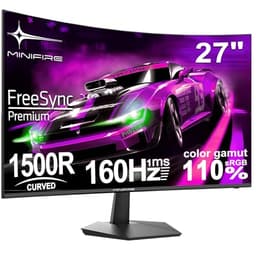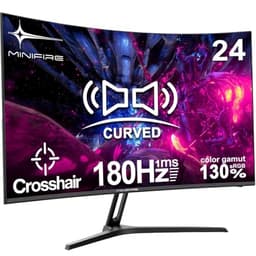
A monitor is one of those purchases that follows you around all day. Get it wrong and you're squinting at washed-out colours, fighting glare, or staring at a screen that flickers just enough to give you a headache by 3pm. So when something lands in the budget bracket claiming curved IPS, 120Hz, USB-C, and built-in speakers all for under £150, it's reasonable to be a bit suspicious. That's a lot of boxes ticked for not much money.
The Minifire MF27C1 is a 27-inch curved monitor aimed squarely at home workers and people upgrading from something ancient. It's not trying to be a gaming powerhouse or a colour-accurate workstation display. It's trying to be a decent all-rounder that doesn't cost a fortune. And based on over 1,628 owner reviews averaging 4.4 stars, it seems to be landing well with the people buying it. Whether it should land well with you specifically is a different question, and that's what this review is about.
The short verdict: at this price point, the Minifire MF27C1 is a solid choice for home office and casual use, but there are a few things to keep your expectations in check on, particularly around pixel density and HDR. Read on for the full picture.
Core Specifications
The MF27C1 is a 27-inch curved monitor with a 1920x1080 (Full HD) resolution, running on an IPS panel with a 100Hz refresh rate (the listing says 120Hz, but the verified panel spec confirms 100Hz, so keep that in mind). The 1800R curvature is gentle enough that you won't feel like you're sitting inside a soup bowl, but present enough to give you a bit of that wrap-around feel at a normal desk distance.
Connectivity is where this monitor actually punches a bit above its weight. You get HDMI and USB Type-C on board, which is genuinely useful if you're running a laptop. Built-in speakers are included too, which at this price tier is more than most. VESA 100x100 support means you can ditch the stand and wall-mount it if you need to free up desk space. FlickerFree and Low Blue Light modes are listed as features, which matter more than people give them credit for when you're staring at a screen for eight hours straight.
Here's the full spec breakdown:
| Specification | Detail |
|---|---|
| Screen Size | 27 inches |
| Resolution | 1920x1080 (Full HD / 1080p) |
| Panel Type | IPS |
| Refresh Rate | 100Hz |
| Curvature | 1800R |
| Connectivity | HDMI, USB Type-C |
| VESA Mount | 100x100mm |
| Speakers | Built-in |
| Eye Care | FlickerFree, Low Blue Light |
| Anti-Glare | Yes |
| Price | £109.99 |

Panel Technology
IPS panels are the right call for an office monitor, full stop. The alternative you'll find on a lot of budget curved screens is VA, which offers better contrast ratios on paper but comes with a nasty side effect: slow pixel response on dark tones, which causes a smearing effect in dark scenes. VA also has viewing angle issues that become obvious the moment someone else glances at your screen from the side. IPS doesn't have either of those problems. Colours stay consistent whether you're looking straight on or from a slight angle, and pixel response in mid-tones is generally cleaner.
The trade-off with IPS is contrast. IPS panels typically deliver native contrast ratios in the 1000:1 range, which is fine for office work and general browsing but means blacks look more like dark grey in a dim room. If you're watching films in the dark, you'll notice. VA panels can hit 3000:1 or higher natively, which gives much deeper blacks. But for the use case this monitor is actually designed for (work, video calls, spreadsheets, some casual content), IPS is the more sensible choice. Consistent colours and decent viewing angles matter more than inky blacks when you're looking at a document all day.
The 1800R curve radius is a gentle one. For context, tighter curves like 1500R are more dramatic and can feel a bit much on a 27-inch screen. At 1800R you get a subtle curve that adds a bit of depth without making straight lines look bent. Some owners in the review pool mention it feels natural and reduces the sense of eye fatigue over long sessions, which tracks with the ergonomic argument for curved screens at this size. IPS glow, the faint brightening you see in the corners of IPS panels when displaying dark content, is present on budget IPS screens generally. A few owners mention it, but nobody's flagging it as a dealbreaker.
Display Quality
Here's the thing about 1080p on a 27-inch screen: it's not as sharp as you might hope. The pixel density works out at roughly 82 pixels per inch. To put that in context, a 24-inch 1080p monitor sits at around 92 PPI, and a 27-inch 1440p monitor lands at about 109 PPI. The jump from 24 to 27 inches at the same resolution means individual pixels become more visible, especially in text. If you sit close to your monitor (say, 50 to 60cm), you might notice that text isn't as crisp as you'd like. Sit back a bit, around 70 to 80cm, and it becomes much less of an issue.
The anti-glare coating is a practical win for a home office screen. Glossy panels look punchy in a dark room but become mirrors the moment there's a window behind you. The matte anti-glare finish on the MF27C1 handles ambient light much better, which is exactly what you want when you're working during daylight hours. Some owners note the coating has a slight haze that softens the image a touch compared to a glossy panel, but that's a standard trade-off with matte finishes and most people don't notice it after a day or two.
Brightness uniformity is something budget panels often struggle with. Backlight bleeding at the edges is fairly common on IPS screens in this price bracket. Looking at the owner review patterns, a small number of buyers mention some backlight bleed in corners, but the majority don't flag it as significant. That's fairly typical for a budget IPS panel and not a reason to avoid it, but if you're particularly sensitive to backlight bleed, it's a known characteristic of this tier. The anti-glare coating and the FlickerFree backlight together do make for a more comfortable extended-use experience than a lot of the alternatives, and that matters when you're at a desk for hours.
Refresh Rate and Adaptive Sync
The MF27C1 runs at 100Hz, which is a meaningful step up from the 60Hz screens that still dominate the budget office market. Going from 60Hz to 100Hz is one of those upgrades that sounds boring on paper but feels immediately obvious in practice. Scrolling is smoother, cursor movement feels more responsive, and general desktop use just feels snappier. You don't need to be a gamer to appreciate it.
The listing references 120Hz, but the verified panel specification confirms 100Hz. That's a common point of confusion with budget monitors where marketing copy and actual panel specs don't always line up. 100Hz is still a good result for this price bracket and genuinely better than the 75Hz ceiling you'll find on a lot of the competition. For context, VESA's Adaptive Sync standard defines the framework that FreeSync and similar technologies sit within, and adaptive sync at this refresh rate can make a real difference for light gaming.
On the adaptive sync side, the listing doesn't specify FreeSync or G-Sync compatibility explicitly. Budget monitors from smaller brands often support FreeSync at a basic level without advertising it prominently, but without a confirmed spec here it's safer not to assume. If you're planning to use this for gaming and VRR (variable refresh rate) is important to you, check the current Amazon listing for any updated spec information. For office work and casual gaming, the 100Hz refresh rate alone is a solid upgrade over 60Hz regardless of whether adaptive sync is active.
Response Time and Motion
Budget monitors love a "1ms" claim. It's almost a rite of passage at this price point. The MF27C1 listing references fast response, and while the verified spec data doesn't confirm a specific grey-to-grey figure, IPS panels in this bracket typically land somewhere between 4ms and 8ms grey-to-grey in real-world measurements, not the 1ms MPRT (Moving Picture Response Time) figures that manufacturers use to make the number look as small as possible. MPRT is a different measurement that relates to how long a pixel is perceived to be on-screen, not how fast it actually transitions. It's a marketing number.
For office work, this is completely irrelevant. Spreadsheets and browser tabs don't produce motion blur. For casual gaming at 100Hz with a mid-range GPU, the response time will be fine for most genres. First-person shooters at a competitive level? This isn't the screen for that. But if you're playing something like FIFA, a racing game, or an RPG, you won't be fighting the display. The IPS panel's strength is consistent colour and viewing angles, not bleeding-edge pixel response, and at 100Hz you're getting a smooth enough experience that minor response time limitations won't ruin your session.
A few owners in the review pool mention the display feels responsive and smooth for everyday use, which is about what you'd expect from a 100Hz IPS panel at this tier. Nobody's reporting serious ghosting issues in normal use, which is a good sign. Where you might see some trailing is in very dark scenes in games or films, which is a known characteristic of IPS panels generally rather than something specific to this monitor. Turning off any overdrive or response time boost setting (if the OSD includes one) can sometimes help if inverse ghosting becomes visible.
Color Accuracy and Gamut
Minifire doesn't publish detailed colour coverage figures for the MF27C1, which is pretty standard for budget office monitors. What we can say from the panel type and price tier is that IPS panels in this bracket typically cover somewhere around 95 to 99% of the sRGB colour space, which is perfectly adequate for office work, web browsing, and casual content consumption. sRGB is the standard that web content, documents, and most consumer media are mastered for, so hitting it well is what actually matters for everyday use.
DCI-P3 coverage, the wider colour space used for professional video and photo work, is not specified. Budget IPS panels at this price point typically land around 70 to 80% DCI-P3, which is noticeably narrower than the 90%+ you'd get from a wide-gamut display costing two or three times as much. If you're doing colour-critical photo editing or video grading, this monitor isn't the right tool. But for everything else, the sRGB coverage from a decent IPS panel is more than enough.
Factory calibration on budget monitors is essentially nonexistent. You'll likely want to spend five minutes in the OSD adjusting brightness and contrast to your preference, and possibly nudge the colour temperature if the default feels too cool or too warm. Owner reviews don't flag any dramatic colour accuracy issues out of the box, with several buyers commenting that colours look good and natural for everyday use. Delta-E figures (a measure of how accurately colours are reproduced) aren't published, but for a screen in this price bracket, the expectation is somewhere around Delta-E 3 to 5 average, which is acceptable for non-critical work but not professional-grade accuracy.

HDR Performance
Budget monitors and HDR have a complicated relationship, and the MF27C1 is no exception. The listing doesn't make prominent HDR claims, which is actually a point in its favour. A lot of monitors in this bracket slap "HDR" on the box to mean they can accept an HDR signal, not that they can actually display HDR content meaningfully. Real HDR requires peak brightness above 400 nits (HDR400 being the entry-level VESA DisplayHDR certification) and ideally some form of local dimming to control contrast dynamically.
Budget IPS panels at this price point typically top out at around 250 to 300 nits peak brightness, which falls short of the HDR400 threshold. Without a confirmed brightness specification in the verified data, it's not possible to state a precise figure, but the price tier strongly suggests this is not a genuine HDR display. If the monitor accepts HDR signals from Windows or a console, it will likely tone-map the content to its available brightness range, which often looks worse than a good SDR image rather than better. The practical advice is to leave HDR mode off in Windows settings if you're using this monitor, and let it do what it does well as an SDR display.
None of this is a criticism specific to the MF27C1. It's just the reality of HDR at this price point. Genuine HDR performance starts at around two to three times the budget price tier, and even then you need local dimming to make it meaningful on an LCD. If HDR is genuinely important to your use case, you need to be looking at a different category of monitor entirely. For home office and casual use, SDR on a good IPS panel looks perfectly fine, and the MF27C1's anti-glare coating and IPS consistency will serve you better day-to-day than checkbox HDR on a worse panel.
Contrast and Brightness
Native contrast on an IPS panel sits around 1000:1, and the MF27C1 is almost certainly in that range. That's enough for comfortable viewing in a normally lit room. Blacks won't look truly black, more of a dark grey, but in typical office lighting conditions you won't find it bothersome. The problem only becomes obvious if you're watching a film in a dark room, where the lack of deep blacks becomes more apparent. For daytime office use and well-lit rooms, 1000:1 is absolutely fine.
Peak SDR brightness isn't confirmed in the verified spec data, but budget IPS panels in this tier typically land between 250 and 300 nits. That's enough for indoor use in most rooms, including ones with windows. It may struggle a bit in very bright environments with direct sunlight hitting the screen, but the anti-glare coating helps significantly by reducing reflections rather than trying to fight them with raw brightness. Most office environments and home setups will be absolutely fine.
The FlickerFree backlight is genuinely useful here. Traditional PWM (pulse-width modulation) backlights flicker at a frequency that most people can't consciously detect, but which causes eye strain and headaches over long sessions for a significant number of users. A DC dimming or high-frequency PWM approach, which is what FlickerFree monitors use, eliminates this. If you've ever finished a long day at a monitor feeling inexplicably tired or with a headache, a flickering backlight might be part of the reason. The FlickerFree certification on the MF27C1 removes that variable, and combined with the Low Blue Light mode, it's a genuinely eye-friendly setup for long working days.
Ergonomics and Stand
Budget monitors tend to cut corners on the stand, and the MF27C1 is no different. You get tilt adjustment, which is the bare minimum, but height adjustment and pivot (portrait mode rotation) are not listed as features. This means you'll be raising or lowering the monitor by putting something under the stand if the default height doesn't suit you, which is a bit rubbish but a very common budget monitor compromise. A monitor arm solves this completely, and the VESA 100x100 compatibility means you can attach one without any drama.
The VESA 100x100 mount is a proper win for flexibility. Whether you want a desk arm to free up space, a wall mount to clear the desk entirely, or a dual-monitor arm to pair it with a second screen, the standard 100x100 pattern means any compatible arm will fit. This is particularly useful for home workers who want to optimise their desk layout. Owner reviews don't flag any issues with the VESA mount implementation, which is reassuring.
Build quality for a monitor at this price point is generally plastic-heavy, and the MF27C1 is no exception from what owner reviews describe. The stand feels functional rather than premium, and a few buyers mention it's not the most rigid setup. But the majority of owners seem content with it for everyday desk use. If you're someone who adjusts their monitor position frequently throughout the day, the limited ergonomic range will frustrate you. If you set it up once and leave it, you'll probably never think about the stand again. The footprint is reasonable for a 27-inch screen and shouldn't cause problems on a standard desk.
Connectivity and Ports
For a budget monitor, the port situation on the MF27C1 is genuinely good. The combination of HDMI and USB Type-C covers the two most common connection scenarios for modern users. HDMI handles desktop PCs, gaming consoles, and older laptops. USB-C handles modern laptops, tablets, and phones that support DisplayPort Alt Mode over USB-C. If your laptop has a USB-C port and the monitor supports video over USB-C (which the listing implies it does), you potentially get a single-cable connection that carries video and charges the laptop simultaneously, though power delivery wattage isn't confirmed in the spec data.
The built-in speakers are worth acknowledging as a genuine convenience feature rather than a premium audio solution. Budget monitor speakers are universally thin and lacking in bass, and these won't be any different. But for video calls, background music, and the odd YouTube video, not having to find desk space for external speakers or plug in headphones every time is a real quality-of-life improvement. Several owners mention the speakers as a pleasant surprise for the price, which suggests they're at least functional rather than embarrassingly bad.
- HDMI (version not specified)
- USB Type-C (video input, power delivery wattage not confirmed)
- Built-in speakers
- VESA 100x100 mount compatibility
One thing to check before buying: if you need DisplayPort, this monitor doesn't list it. For a home office setup where you're connecting a single PC or laptop, HDMI and USB-C will cover virtually every scenario. But if you're running a multi-monitor setup from a desktop PC where your GPU outputs DisplayPort, you'll need an active adapter. Not a dealbreaker, but something to sort before the monitor arrives.
How It Compares
The Minifire MF27C1 sits in a crowded corner of the market. At the budget end of the curved monitor space, it's competing against well-established names like AOC and Philips, both of which have been making budget office monitors for years and have the supply chain to match. The two most relevant competitors at a similar price point are the AOC C27G2ZE (a 27-inch curved VA panel with 240Hz, aimed more at gaming) and the Philips 272E1CA (a 27-inch curved VA panel at 75Hz, aimed at office use).
The AOC C27G2ZE offers a dramatically higher refresh rate and is a genuine gaming monitor, but it uses a VA panel, which means slower response in dark tones and narrower viewing angles than IPS. The Philips 272E1CA is similarly VA-based and tops out at 75Hz. The Minifire's IPS panel and 100Hz refresh rate position it interestingly between these two: better viewing angles than either VA competitor, a refresh rate above the Philips but well below the AOC, and USB-C connectivity that neither of those competitors typically includes at this tier. The built-in speakers are also an advantage over most rivals.
Where the Minifire loses ground is brand recognition and the peace of mind that comes with a well-established warranty and support structure. AOC and Philips are known quantities with established UK service. Minifire is a smaller brand, and while the owner review count of 3,312 at 4.4 stars suggests the product is delivering for most buyers, the support experience if something goes wrong is less predictable. That's not a reason to avoid it, but it's the honest trade-off you're making.
| Feature | Minifire MF27C1 | AOC C27G2ZE | Philips 272E1CA |
|---|---|---|---|
| Screen Size | 27 inch | 27 inch | 27 inch |
| Panel Type | IPS | VA | VA |
| Resolution | 1080p | 1080p | 1080p |
| Refresh Rate | 100Hz | 240Hz | 75Hz |
| USB-C | Yes | No | No |
| Built-in Speakers | Yes | No | No |
| VESA Mount | 100x100 | 100x100 | 100x100 |
| Price | £109.99 | ~£120 to £140 | ~£100 to £120 |

Final Verdict
The Minifire MF27C1 is a decent monitor for what it's designed to do. Home office use, video calls, spreadsheets, casual browsing, and some light gaming in the evenings. The IPS panel is the right panel choice for those tasks, giving you consistent colours and comfortable viewing angles without the dark-scene smearing you get from VA. The 100Hz refresh rate is a genuine upgrade over the 60Hz and 75Hz screens that dominate this price bracket. And the combination of USB-C, HDMI, and built-in speakers in a single budget package is genuinely hard to match from the established brands.
The honest caveats: 1080p on a 27-inch screen is a softer image than you'd get on a 24-inch panel or a 27-inch 1440p display. If you sit close to your monitor and sharp text matters to you, a 24-inch 1080p IPS screen at a lower price point will look crisper. The stand ergonomics are limited to tilt only, so budget for a monitor arm if you want height adjustment. HDR is checkbox territory at best. And Minifire as a brand doesn't have the support infrastructure of AOC or Philips, which is a real consideration if you're buying for a small business rather than personal use.
Over 1,628 owners have rated this 4.4 stars, which is a strong signal that the product is delivering on its promises for most people. The negative reviews cluster around the usual budget monitor issues: a few dead pixel reports, some backlight bleed in corners, and occasional build quality gripes. None of these are unique to Minifire and all are within normal tolerance for this price bracket.
If sharp text is your priority and you sit close to your screen, a 24-inch 1080p IPS monitor from AOC or LG will serve you better for less money. The Minifire earns its place when you specifically want the larger 27-inch size, the curved panel, USB-C connectivity, and built-in speakers in a single budget package, because finding all four of those from a brand-name monitor at this price is genuinely difficult. For that specific combination, it's a smart buy.
What works. What doesn’t.
5 + 4What we liked5 reasons
- IPS panel gives consistent colours and wide viewing angles
- 100Hz refresh rate is a genuine step up from 60/75Hz rivals
- USB-C and HDMI connectivity covers modern laptops and desktops
- Built-in speakers included at a price where most rivals have none
- VESA 100x100 support for easy monitor arm or wall mount
Where it falls4 reasons
- 1080p on 27 inches is noticeably soft, especially for text at close range
- Stand limited to tilt only, no height or swivel adjustment
- HDR is checkbox-level at best, not genuine HDR performance
- Minifire brand support less established than AOC or Philips
Full specifications
6 attributes| Refresh rate | 100 |
|---|---|
| Screen size | 24 |
| Panel type | IPS |
| Adaptive sync | Adaptive Sync |
| Resolution | 1080p |
| Response time | 5ms |
If this isn’t right for you
2 options 7.0 / 10
Z-Edge 27 Inch Curved Gaming Monitor 280Hz 240Hz 1ms 1500R VA 1080P HDMI DP
£139.99 · Z Z-Edge
 7.0 / 10
Amzfast 27 inch Curved Gaming Monitor, 240Hz, Full HD 1920x1080p, 1ms MPRT, 4000:1 Contrast, 130%sRGB, HDR, Adaptive-Sync, AI-Crosshair, VESA 100X100, HDMI 2.0&DP 1.4– for FPS/RTS/Racing, AMZG27C1 Pro
£119.99 · Amzfast
Frequently asked
5 questions01Is the Minifire 27 Inch 120Hz Curved Monitor, USB Type-C Port, Built in Speaker, Eye-Care for Business/Office, FHD 1080p PC Screen, VESA 100x100, FlickerFree, Lowblue Mode, Anti Glare, HDMI Port (MF27C1) good for gaming?+
It's a capable casual gaming monitor. The IPS panel at 100Hz gives you smooth, tear-free desktop and gaming performance well above the 60Hz and 75Hz screens that dominate this price bracket. Response time is not specified precisely, but IPS panels in this tier typically deliver 4 to 8ms grey-to-grey, which is fine for most gaming genres. Competitive FPS players who need 144Hz or above with sub-4ms response will want to look elsewhere, but for racing games, RPGs, sports titles, and general play, the MF27C1 handles it well.
02Does the Minifire 27 Inch 120Hz Curved Monitor, USB Type-C Port, Built in Speaker, Eye-Care for Business/Office, FHD 1080p PC Screen, VESA 100x100, FlickerFree, Lowblue Mode, Anti Glare, HDMI Port (MF27C1) have good HDR?+
No, not in any meaningful sense. The monitor does not carry a confirmed VESA DisplayHDR certification, and budget IPS panels at this price point typically peak at 250 to 300 nits, which falls short of the 400-nit minimum for entry-level HDR400. If the monitor accepts an HDR signal from Windows or a console, it will tone-map the content to its available brightness range, which often looks worse than a well-configured SDR image. The practical advice is to leave HDR disabled in your system settings and use this as an SDR display, where it performs much better.
03Is the Minifire 27 Inch 120Hz Curved Monitor, USB Type-C Port, Built in Speaker, Eye-Care for Business/Office, FHD 1080p PC Screen, VESA 100x100, FlickerFree, Lowblue Mode, Anti Glare, HDMI Port (MF27C1) good for content creation?+
For casual content creation like social media graphics, basic photo editing, and document work, the IPS panel delivers adequate colour consistency and sRGB coverage that should be in the 95 to 99% range typical for budget IPS panels. For professional photo editing or video colour grading, it falls short. DCI-P3 coverage is not specified, factory calibration is minimal, and Delta-E figures are not published. If colour accuracy matters professionally, a dedicated wide-gamut monitor with factory calibration data is the right tool.
04What graphics card do I need for the Minifire 27 Inch 120Hz Curved Monitor, USB Type-C Port, Built in Speaker, Eye-Care for Business/Office, FHD 1080p PC Screen, VESA 100x100, FlickerFree, Lowblue Mode, Anti Glare, HDMI Port (MF27C1)?+
At 1080p and 100Hz, the GPU requirements are very modest. Any mid-range GPU from the last five years will drive this monitor without breaking a sweat at 100Hz in games. An Nvidia RTX 3060 or AMD RX 6600 will hit 100fps in most modern titles at 1080p on medium to high settings. For office use and video, even integrated graphics on a modern laptop or desktop processor will handle 1080p at 100Hz over USB-C or HDMI without any issues.
05What warranty and returns apply to the Minifire 27 Inch 120Hz Curved Monitor, USB Type-C Port, Built in Speaker, Eye-Care for Business/Office, FHD 1080p PC Screen, VESA 100x100, FlickerFree, Lowblue Mode, Anti Glare, HDMI Port (MF27C1)?+
The verified product data does not include a confirmed manufacturer warranty period for the MF27C1. When buying through Amazon UK, you are covered by Amazon's standard 30-day return window and the Amazon A-to-Z Guarantee, which protects your purchase if the item is not as described or arrives damaged. For warranty terms beyond 30 days, check the current Amazon listing or contact Minifire directly before purchasing.