Choosing a monitor for Photoshop is a very different exercise from picking a gaming screen or a general office display. Colour accuracy matters more than refresh rate, wide colour gamut coverage is essential for print and web work, and resolution determines how much canvas you can see without scrolling. Since last year, QD-OLED panels have become genuinely affordable, 4K VA screens have improved their factory calibration, and ultrawide IPS monitors now ship with USB-C docking built in, making them far more practical for laptop-based creatives. This guide is aimed at photographers, graphic designers, digital illustrators, and anyone who spends serious time retouching images or building layouts in Adobe Photoshop. Whether you are working on a tight budget or can stretch to a premium panel, the five picks below cover the full range of real-world needs, from entry-level colour work to professional print preparation.
Quick Verdict
Best Overall: LG UltraWide Monitor 34BA75QE. Its IPS panel, ultrawide 3440x1440 canvas, USB-C docking, and built-in speakers make it the most well-rounded choice for Photoshop work at a sensible price point.
Best Value: MSI MAG 272QP QD-OLED X50. The QD-OLED panel delivers exceptional contrast and colour vibrancy that rivals monitors costing twice as much, making it outstanding value for colour-critical creative work.
The LG 34BA75QE is the monitor that most Photoshop users will find hardest to argue against. It combines an IPS panel, which is the traditional gold standard for colour accuracy in creative work, with a 34-inch ultrawide 3440x1440 resolution that gives you a genuinely expansive canvas. Working in Photoshop at this resolution means you can have your image open at a comfortable zoom level, keep the layers panel and tool options bar visible without overlapping, and still have room to reference a second document side by side. That workflow benefit alone makes ultrawide a compelling choice for retouchers and compositors.
The IPS panel technology here ensures wide viewing angles, so colours do not shift when you tilt your head or move slightly off-axis. This matters when you are making fine tonal adjustments or checking skin tones in portrait work. The panel covers HDR10 content and the 5ms response time is perfectly adequate for creative use. At 60Hz, this is clearly not a gaming monitor, but Photoshop does not need high refresh rates. What it does need is consistent, accurate colour rendering, and IPS delivers that reliably.
The connectivity package is genuinely impressive for the price. USB-C input means laptop users can connect with a single cable that carries both video signal and power delivery, which keeps desk clutter to a minimum. The RJ45 Ethernet port is a thoughtful addition for anyone who wants a wired network connection without a separate adapter. A full USB hub, DisplayPort 1.4, and HDMI round out the rear panel, and built-in speakers mean you are not forced to buy external audio immediately.
The 34-inch IPS ultrawide format suits photographers who shoot in landscape orientation, designers working on wide-format layouts, and anyone who values a tidy, single-cable desk setup. The 60Hz refresh rate will feel limiting if you also game, but for pure creative work it is entirely sufficient. This is the monitor we would recommend to most Photoshop users as a first serious upgrade from a basic office screen.
Verdict: The best all-round monitor for Photoshop in this selection. IPS colour accuracy, ultrawide canvas, and USB-C docking combine to make it a genuinely practical creative workstation display.
Pros
- IPS panel delivers accurate, consistent colour across wide viewing angles
- USB-C single-cable connection with Ethernet docking built in
- 34-inch 3440x1440 canvas gives ample room for Photoshop panels and documents
Cons
- 60Hz refresh rate rules it out as a gaming monitor if you want dual use
- VA panels on competing ultrawides offer deeper blacks for dark-room editing
The Alienware AW2725DM might carry gaming branding, but its Fast IPS panel and QHD resolution make it a genuinely capable Photoshop display. Alienware monitors have historically been associated with premium build quality and strong factory calibration, and the AW2725DM continues that tradition. The Fast IPS panel technology delivers the wide colour gamut and accurate colour rendering that IPS is known for, while the faster pixel response of the Fast IPS variant ensures there is no ghosting or smearing even during rapid on-screen movements.
The 2560x1440 resolution at 27 inches gives a comfortable working environment in Photoshop. The pixel density is high enough that image detail is rendered crisply, and the 27-inch size means you can see a reasonable portion of a full-resolution image at comfortable zoom levels without excessive scrolling. The 180Hz refresh rate is overkill for Photoshop but makes this monitor a strong dual-purpose choice for users who also play games or work with video.
Connectivity covers the essentials with two HDMI ports, a DisplayPort connection, and three USB ports. The USB hub functionality is particularly useful for Photoshop users who connect drawing tablets, card readers, and other peripherals regularly. The Alienware aesthetic, with its distinctive angular design language, will appeal to some users and feel excessive to others. It is worth noting that the build quality is genuinely solid, with a stable stand that allows height adjustment, tilt, and swivel.
The Fast IPS panel's colour accuracy is well suited to Photoshop work. Skin tones render naturally, gradients reproduce smoothly, and the wide viewing angles mean colour consistency is maintained even when you lean back or view the screen from a slight angle. For users who want a monitor that handles Photoshop professionally during the day and gaming in the evening, the AW2725DM is a strong choice. It suits graphic designers, photographers, and digital artists who value build quality and connectivity alongside colour performance.
Verdict: A well-built, colour-accurate Fast IPS monitor that handles Photoshop professionally and doubles as a capable gaming display. The USB hub and solid stand ergonomics add practical value for a busy creative desk.
Pros
- Fast IPS panel delivers accurate colour with wide viewing angles suitable for Photoshop
- Three USB ports provide a useful hub for tablets, card readers, and other peripherals
- 180Hz refresh rate enables dual use as a gaming and creative monitor
Cons
- Gaming-focused design aesthetic may not suit all studio environments
- No USB-C input limits single-cable connectivity for laptop users
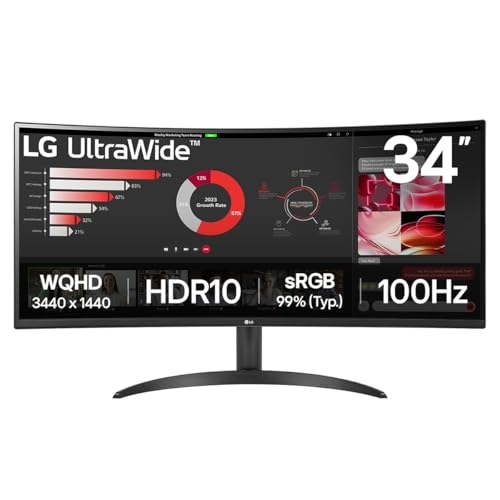
The LG 34WR50QK offers an entry point into 34-inch ultrawide Photoshop territory at a more accessible price than the 34BA75QE. The 3440x1440 resolution gives you the same expansive canvas advantage as the higher-end LG model, and the 100Hz refresh rate adds a little more smoothness to everyday use compared to a standard 60Hz panel. The curved screen design, with a gentle curve radius, helps reduce the sense of the edges being further from your eyes than the centre, which can reduce fatigue during long editing sessions.
The VA panel technology used in the 34WR50QK offers a contrast ratio advantage over IPS. Deeper blacks mean that shadow areas in photographs are rendered with more separation and detail, which is particularly valuable for landscape photographers, night photography specialists, and anyone who works with images that have significant dark regions. The trade-off is that VA panels can show some colour shift at very wide viewing angles, though at a normal working distance from a 34-inch screen this is rarely a significant issue.
The 5ms response time is entirely adequate for creative work, and the 100Hz refresh rate means the display feels responsive when scrolling through large images or moving between documents. The connectivity package includes two HDMI 2.0 ports and a single DisplayPort 1.4, which covers the most common connection scenarios. HDR10 support is included, which is increasingly relevant as more photographers incorporate HDR workflows into their Photoshop process.
This monitor suits photographers and designers who want the canvas benefits of ultrawide at a price that does not stretch the budget as far as the premium IPS ultrawide options. The curved panel and VA contrast performance make it particularly well suited to dark studio environments where deep blacks are an advantage. It is also a good choice for users who are new to ultrawide monitors and want to experience the format without committing to a top-tier price point. The 34-inch size works well for split-screen workflows where you keep a reference image open alongside your working document.
Verdict: A solid, accessible ultrawide for Photoshop that delivers the canvas advantages of the 34-inch format with VA contrast performance, making it a practical choice for budget-conscious creative users.
Pros
- 3440x1440 ultrawide canvas provides ample room for Photoshop panels and multi-document workflows
- VA panel delivers deeper blacks than IPS, beneficial for shadow-heavy image editing
- 100Hz refresh rate adds everyday smoothness beyond a standard 60Hz office display
Cons
- VA panel shows some colour shift at extreme viewing angles compared to IPS alternatives
- No USB-C connectivity limits docking options for laptop users
Buying Guide
Panel Type: Why It Matters for Photoshop
The single most important specification for a Photoshop monitor is the panel technology. IPS panels have been the standard recommendation for creative work for many years because they offer wide colour gamut coverage, consistent colour rendering across a wide range of viewing angles, and good factory calibration. When you tilt your head or move slightly off-centre, the colours on an IPS screen remain accurate, which matters when you are making fine adjustments to skin tones or checking colour balance across an image.
VA panels offer a contrast ratio advantage over IPS, typically achieving deeper blacks. This makes them attractive for photographers who work with dark images or who edit in dimly lit environments. The trade-off is some colour shift at wide viewing angles, though at a normal working distance from a monitor this is rarely a serious problem in practice.
QD-OLED is the newest technology in this comparison. It combines per-pixel illumination for true blacks with a quantum dot colour filter that enables a significantly wider colour gamut than standard IPS. For users who need to see the full range of colours in their images, particularly when working in DCI-P3 or wide colour spaces, QD-OLED offers a genuine advantage. The main consideration is the potential for image retention or burn-in with static interface elements over very long sessions, though modern QD-OLED panels have improved significantly in this regard.
Resolution and Screen Size
Resolution determines how much of your image you can see at full zoom and how much screen space remains for Photoshop's interface panels. For serious Photoshop work, 1080p on anything larger than 24 inches begins to feel limiting. QHD at 2560x1440 on a 27-inch screen is a well-balanced starting point. 4K on a 32-inch screen delivers exceptional pixel density that makes fine image detail visible during retouching. Ultrawide resolutions at 3440x1440 add horizontal canvas space that is particularly useful for multi-document workflows.
Colour Space Coverage
Look for monitors that specify sRGB coverage of at least 99% for web and screen work. If you work on images destined for print, DCI-P3 coverage becomes relevant. The QD-OLED panel in the MSI pick and the IPS panels in the LG and Alienware options all offer strong colour space coverage. Always check whether the manufacturer's colour space claims refer to coverage or volume, as these are different measurements.
Connectivity for Creative Workflows
USB-C with power delivery is increasingly valuable for laptop-based creatives, as it allows a single cable to carry video, data, and power simultaneously. A USB hub built into the monitor simplifies connecting drawing tablets, card readers, and external drives. Multiple video inputs allow you to connect a laptop and a desktop simultaneously and switch between them without unplugging cables.
Ergonomics and Eye Comfort
Long Photoshop sessions demand a monitor with good ergonomic adjustment. Height adjustment, tilt, and swivel allow you to position the screen to reduce neck and eye strain. Flicker-free backlighting and low blue light modes reduce fatigue during extended editing sessions. A matte screen coating reduces glare from room lighting, which is important when assessing subtle colour differences in your images.
The LG UltraWide Monitor 34BA75QE is the overall winner for most Photoshop users. Its IPS panel delivers the colour accuracy and wide viewing angles that creative work demands, the 34-inch 3440x1440 ultrawide canvas transforms the Photoshop workflow by giving you room for your image, your panels, and a reference document simultaneously, and the USB-C docking with Ethernet makes it a genuinely practical single-cable workstation for laptop users. The built-in speakers and comprehensive port selection mean it works as a complete desk hub rather than just a display. For users who can stretch the budget and want the most impressive colour performance available, the MSI MAG 272QP QD-OLED X50 is the best value upgrade, delivering contrast and colour gamut coverage that rivals panels costing significantly more. The Samsung 4K Smart Monitor suits resolution-focused photographers, the Alienware AW2725DM rewards users who want premium build quality and dual creative and gaming use, and the LG 34WR50QK provides an accessible entry point into ultrawide Photoshop working. Whatever your budget or working style, there is a strong option in this selection.