Finding the right monitor for an older or less technically confident user is a very different task from picking a gaming or creative display. What matters here is clarity, comfort, ease of setup and a screen large enough to read text without straining. In 2025, the market has shifted noticeably: 4K panels have dropped in price to the point where a sharp, easy-to-read 32-inch display is genuinely affordable, and built-in speakers are more common than ever, removing the need for a separate audio setup. Smart monitor features, meanwhile, mean some screens can function without a PC at all, which is a real bonus for users who mostly browse, video call or stream. This guide focuses on monitors that offer large, bright, easy-to-read images, simple connectivity, and minimal fuss, cutting through the gaming-focused noise to find the five picks that best suit everyday, relaxed use.
Quick Verdict
Best Overall: Samsung 32-inch 4K Smart Monitor (B0FJ2Q7841). A large, sharp, easy-to-navigate screen with smart TV functionality built in, making it ideal for users who want one device that does everything without a complicated setup.
Best Value: Amazon Basics 23.8-inch Computer Monitor (B0DZCG3G8X). At its price point it is hard to fault for basic everyday use: a clean IPS panel, multiple ports and a no-nonsense design that anyone can plug in and use straight away.
Spec Comparison
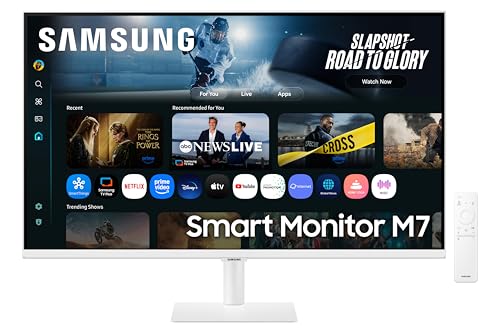
The Samsung LS32FM703UUXXU is the premium sibling of the entry-level 32-inch Samsung smart monitor, and for older or less technical users it offers one very significant extra: built-in speakers. For anyone setting up a monitor in a bedroom, study or living space where they do not want a tangle of external audio equipment, having decent sound built directly into the display is a meaningful quality-of-life improvement.
Like its more affordable sibling, this is a 32-inch 4K VA panel, which means the same excellent sharpness and strong contrast. At 4K, text is pin-sharp even when scaled up for easier reading, and the large screen size means there is plenty of room to have multiple windows open side by side, or simply to use larger fonts without losing screen space. The white finish is also worth noting: it gives the monitor a clean, living-room-friendly aesthetic that blends into home environments far better than the aggressive black designs common in gaming monitors.
The smart monitor platform on this model is the same as on the entry-level version, giving access to streaming services, web browsing and video calling without a PC. The addition of built-in speakers means that for many users, this is genuinely the only device they need: plug it in, connect to Wi-Fi, and they are ready to watch, browse and communicate. This is a powerful proposition for users who find managing multiple devices confusing or frustrating.
The HDR10 support adds a degree of extra visual quality when watching supported streaming content, with brighter highlights and more vivid colours. While older users may not be specifically seeking HDR, the practical effect is that films and TV programmes simply look better and more natural, which is a benefit anyone can appreciate without needing to understand the technical details.
The price is higher than the entry-level model, reflecting the built-in speakers and the white premium finish. For users who would otherwise need to purchase external speakers, the total cost difference narrows considerably, and the simplicity of a single-device setup has its own value.
Verdict: The best choice for users who want a complete, self-contained display with built-in audio and smart functionality, and who are willing to pay a premium for the convenience.
Pros
- Built-in speakers eliminate the need for separate audio equipment
- 32-inch 4K screen with HDR10 delivers a genuinely excellent picture for everyday viewing
- White finish suits home and bedroom environments far better than typical monitor designs
Cons
- Significantly more expensive than the entry-level Samsung smart monitor
- VA panel viewing angles are not as wide as IPS alternatives
The Amazon Basics 23.8-inch monitor is the most straightforward, no-nonsense option on this list, and for many older or less technical users, that simplicity is exactly what is needed. There are no smart features to configure, no gaming modes to accidentally activate, and no complicated menus. It is a monitor that you plug in and use, and it does its job reliably and clearly.
The IPS panel is the key technical advantage here. IPS technology delivers wide viewing angles and accurate, consistent colours across the screen, which means the image looks the same whether you are sitting directly in front or slightly to one side. For users who share a screen with a partner or family member, or who simply do not always sit in exactly the same position, this is a practical benefit that VA panels cannot match.
At 1920x1080 Full HD resolution on a 23.8-inch screen, the pixel density is comfortable for everyday tasks. Text is clear and sharp, and the 120 Hz refresh rate, while primarily a gaming specification, also means that scrolling through web pages and documents feels smooth rather than choppy, which can reduce eye strain during extended use.
The port selection is generous for the price: HDMI, DisplayPort and VGA inputs mean this monitor can connect to virtually any computer, laptop or even older devices that use VGA. VESA mounting compatibility means it can be wall-mounted or used with an aftermarket arm if desk space is limited or if a particular viewing height is more comfortable. These are practical considerations that matter for users who may have specific ergonomic needs.
The design is clean and unobtrusive. There are no RGB lights, no aggressive angular styling, and no branding that looks out of place in a home office or study. The stand offers basic tilt adjustment, which is sufficient for most users to find a comfortable viewing angle.
For users on a tight budget, or those who simply need a reliable, easy-to-use screen for web browsing, email, video calls and document work, this is the most sensible purchase on the list. It does not try to do too much, and it does what it does well.
Verdict: The best value pick for users who want a simple, reliable, easy-to-use monitor without any unnecessary complexity or cost.
Pros
- IPS panel provides wide viewing angles and consistent colour for shared or off-axis viewing
- VGA, HDMI and DisplayPort inputs ensure compatibility with older and newer devices alike
- Exceptionally affordable, making it accessible for users on a fixed budget
Cons
- 23.8-inch screen is smaller than ideal for users with visual impairments or those who prefer larger text
- No built-in speakers, so a separate audio solution is needed for sound
The LG 34WR50QK is an interesting choice for older users who find themselves switching between multiple windows, applications or browser tabs regularly. The 34-inch ultrawide format, with its 3440x1440 resolution, provides an exceptionally wide canvas that makes it easy to have two or three applications open side by side at full size, without the clutter of a multi-monitor setup. For users who video call while also browsing the web, or who like to have a document open alongside an email client, the extra width is genuinely useful rather than just a novelty.
The gentle curve of the panel, at a radius suited to desktop viewing distances, helps the edges of the screen feel closer and reduces the need to move your head or eyes as far to take in the full width. For users who find themselves straining to look at the corners of a flat ultrawide, the curve is a practical ergonomic benefit rather than a purely aesthetic one.
The VA panel delivers good contrast, which helps text stand out cleanly and makes darker content look rich. At 100 Hz, scrolling and general use feel smooth, and the 5ms response time is more than adequate for everyday tasks. LG's on-screen display menus are generally considered among the more user-friendly in the industry, with clear labelling and logical navigation that does not require consulting a manual.
Connectivity is sensible: two HDMI 2.0 ports and one DisplayPort 1.4 input mean users can connect a laptop and a desktop simultaneously and switch between them easily, which is useful for households where the monitor is shared or where someone uses both a work laptop and a personal computer.
The ultrawide format does require some adjustment. Not all applications handle the wider aspect ratio gracefully, and some older software may display black bars at the sides. For users who primarily use modern web browsers and office applications, this is rarely a problem, but it is worth being aware of. The screen is also quite wide physically, so desk space needs to be considered.
Verdict: An excellent choice for users who want to multitask comfortably with multiple windows open, and who have the desk space to accommodate a wider display.
Pros
- 34-inch ultrawide format makes multitasking with multiple windows significantly easier
- Gentle curve reduces eye and head movement when viewing the full width of the screen
- Two HDMI inputs allow easy switching between two connected devices
Cons
- Wide physical footprint requires a larger desk than standard monitors
- Some older software and applications do not handle the ultrawide aspect ratio well
- No built-in speakers, requiring a separate audio solution
The ASUS TUF Gaming VG249Q3R may carry gaming branding, but beneath the slightly angular chassis is a monitor that offers genuine practical value for everyday users, including those who are older or less technically confident. At 23.8 inches with a Full HD IPS panel, it delivers the wide viewing angles and accurate colour reproduction that make everyday tasks like reading, browsing and video calling comfortable and clear.
The IPS panel is the standout feature for this audience. Colours are consistent and accurate across the screen, and viewing angles are wide enough that the image does not shift or wash out when viewed from slightly off-centre. For users who share a desk, or who tend to move around while working, this consistency is more useful than it might initially seem.
The 180 Hz refresh rate is far beyond what is needed for everyday computing tasks, but it does mean that scrolling through long web pages, documents and social media feeds is exceptionally smooth. Smooth scrolling reduces the visual fatigue that can come from choppy or stuttering motion on lower-refresh displays, which is a subtle but real benefit for users who spend extended periods reading on screen.
Connectivity is practical: two HDMI 2.0 ports, one DisplayPort 1.2 input and a 3.5mm audio output for headphones or external speakers. The dual HDMI inputs are particularly useful for users who want to connect both a laptop and a desktop, or a computer and a streaming device such as a Fire Stick or Chromecast. The 3.5mm output means headphones or external speakers or a simple speaker pair can be connected directly to the monitor, which simplifies the audio setup.
The gaming aesthetic, with its angular stand and subtle TUF branding, is the main drawback for this audience. It looks more at home in a gaming setup than in a home office or study. However, the functionality underneath is sound, and for users who are primarily concerned with clarity, comfort and ease of use rather than aesthetics, it represents good value at its price point.
Setup is straightforward, with clearly labelled ports and a simple on-screen display. The stand offers tilt adjustment, and the monitor is VESA compatible for wall mounting or arm use.
Verdict: A practical, well-connected IPS monitor that delivers smooth, clear everyday performance at a competitive price, despite its gaming-focused appearance.
Pros
- IPS panel provides wide viewing angles and consistent colour for comfortable extended use
- Dual HDMI inputs allow easy connection of two devices simultaneously
- 3.5mm audio output simplifies connection of headphones or external speakers
Cons
- Gaming aesthetic with angular design looks out of place in a home office or study setting
- No built-in speakers, so a separate audio solution is required
Buying Guide
Screen Size
For older users or those with any degree of visual impairment, screen size is arguably the most important specification. A 32-inch display allows text to be read comfortably at a normal desk distance without needing to scale everything up to unusable proportions. A 24-inch screen is workable and more compact, but users who find themselves regularly increasing browser zoom levels or system font sizes will benefit from stepping up to 27 or 32 inches. Ultrawide 34-inch screens offer a different kind of space: more width rather than more height, which suits multitasking but requires a larger desk.
Resolution
Resolution determines how sharp and detailed the image is. For a 24-inch screen, Full HD (1920x1080) is perfectly adequate and keeps costs down. For a 32-inch screen, 4K (3840x2160) is strongly recommended, as it keeps text and images sharp even when the display scaling is increased for easier reading. Choosing a 32-inch monitor with only Full HD resolution can result in noticeably soft or slightly blurry-looking text, which is counterproductive for users who are already finding smaller text difficult.
Panel Type
IPS panels offer wide viewing angles and accurate colours, making them the better choice for users who do not always sit directly in front of the screen, or who share the display with others. VA panels offer higher contrast ratios, which means deeper blacks and more vivid-looking images, particularly in darker rooms. For most everyday users, either panel type is suitable, but IPS is the safer recommendation for those who prioritise reading clarity and consistent colour.
Built-in Speakers
For less technical users, built-in speakers remove one layer of complexity from the setup. Rather than needing to connect and configure separate speakers or a soundbar, the monitor handles audio directly. The sound quality from built-in monitor speakers is rarely exceptional, but for video calls, streaming and casual listening it is generally more than adequate. If audio quality is important, external speakers remain the better option, but for simplicity, built-in speakers are a meaningful convenience.
Smart Features
Smart monitors that can run streaming apps and browse the web independently of a PC are a relatively new development, but they are particularly well-suited to older users who primarily want to watch content, video call family members or browse the internet. A smart monitor can replace both a computer monitor and a small television, reducing the number of devices in a room and simplifying the overall setup. Look for models with familiar, TV-style interfaces that can be navigated with a remote control rather than requiring mouse and keyboard input.
Connectivity
Check that the monitor has the ports needed to connect to existing devices. HDMI is the most common connection for modern laptops and desktop computers. VGA is an older standard but is still found on some older laptops and desktop towers, so a monitor with VGA input can be a useful safety net. Multiple HDMI inputs allow two devices to be connected simultaneously, which is convenient for households where the monitor is shared or where a laptop and a streaming device are both in use.
Ergonomics and Setup
A monitor that can be tilted to a comfortable angle reduces neck and eye strain during extended use. VESA compatibility means the monitor can be used with a wall mount or adjustable arm if the fixed stand height is not suitable. For users with specific physical requirements, an arm that allows the screen to be raised, lowered or pulled closer can make a significant difference to comfort.
For older or less technical users, the Samsung 32-inch 4K Smart Monitor (B0FJ2Q7841) is the clear overall winner. It combines a large, sharp, easy-to-read 4K screen with smart functionality that allows it to operate without a PC, a clean interface that borrows from familiar television software, and a straightforward setup that does not require technical knowledge. For users who want built-in speakers and a premium finish, the Samsung LS32FM703UUXXU steps up with those additions at a higher price. For those on a tight budget who simply need a reliable, clear screen for everyday computing, the Amazon Basics 23.8-inch monitor delivers honest, no-nonsense performance at the lowest price on this list. The LG UltraWide and ASUS TUF models serve more specific needs: the LG for users who multitask heavily across multiple windows, and the ASUS for those who want a well-connected IPS panel at a mid-range price. Whatever the budget or specific requirement, each of these five monitors offers something genuinely useful for users who prioritise ease of use, clarity and comfort over gaming performance or technical complexity.