Engineering students need monitors that can handle dense CAD drawings, multi-window coding sessions, simulation dashboards and the occasional late-night gaming break, all without destroying a student budget. Since last year, QD-OLED panels have dropped noticeably in price, ultrawide curved screens have become more accessible, and even entry-level IPS monitors now ship with 180 Hz refresh rates that make scrolling through complex schematics far more comfortable. Whether you are running AutoCAD, MATLAB, SolidWorks or Python IDEs on a student laptop or a desktop workstation, the right monitor will reduce eye strain during long library sessions and give you enough screen real estate to keep reference material and your working window open side by side. This guide covers five carefully chosen picks spanning budget 1080p panels, mid-range 1440p IPS displays, ultrawide curved screens and a high-end QD-OLED option, so there is something here regardless of whether you are on a tight maintenance loan or have a little more flexibility.
Quick Verdict
Best Overall: MSI MAG 272QP QD-OLED X50. The QD-OLED panel delivers exceptional colour accuracy and contrast that benefits CAD colour coding and data visualisation, while the 27-inch 1440p canvas is the sweet spot for desk space and pixel density. Best Value: ASUS TUF Gaming VG249Q3R. At its price point it offers a bright, accurate IPS panel with 180 Hz smoothness that comfortably handles engineering software and light gaming without asking much of your bank account.
The Alienware AW2725DM sits in a particularly useful middle ground for engineering students: it uses a Fast IPS panel at 2560x1440 resolution on a 27-inch screen, which gives noticeably sharper text and finer detail in technical drawings compared with a 1080p display of the same size, without the premium price of QD-OLED. Fast IPS panels respond more quickly than standard IPS, reducing the ghosting that can appear when panning around large CAD assemblies or scrolling rapidly through simulation output logs.
The 180 Hz refresh rate is genuinely useful beyond gaming. Engineering students who spend hours reading documentation, scrolling through lengthy data sheets or navigating large spreadsheets of experimental results will notice that higher refresh rates make on-screen motion feel more natural and less fatiguing over a long session. The 1440p resolution means you can comfortably run a CAD window alongside a reference PDF without either being uncomfortably small.
Connectivity is practical and well thought out for a student setup. The three USB ports on the monitor act as a built-in hub, so you can plug in a USB drive with project files, a mouse and a keyboard without needing a separate dock. Two HDMI ports and one DisplayPort cover the most common laptop and desktop GPU outputs. The Fast IPS panel type also tends to offer better viewing angles than VA alternatives, which matters if you are working in a group and need a colleague to review your screen from the side.
Colour accuracy is solid for an IPS panel at this price, covering a respectable portion of the sRGB colour space. While it does not match the QD-OLED above for colour volume or contrast depth, it is more than adequate for the vast majority of engineering applications. The Alienware branding adds a premium feel to the stand and build quality, with good ergonomic adjustment including height, tilt and swivel, which is important for maintaining a healthy posture during long study sessions.
The main limitation is that 1080p users upgrading to this display will notice the jump in sharpness immediately, but those already used to 4K may find 1440p a step down. For most engineering students, however, 1440p at 27 inches is the practical sweet spot.
Verdict: A well-rounded 1440p Fast IPS monitor with useful USB hub functionality and good ergonomics, making it an excellent choice for engineering students who want a noticeable upgrade from 1080p without committing to OLED pricing.
Pros
- Fast IPS 1440p panel provides sharp, accurate colours with wide viewing angles suited to group review sessions
- Three USB ports on the monitor body eliminate the need for a separate hub on a cluttered student desk
- Full ergonomic adjustment including height and swivel supports long CAD and coding sessions
Cons
- VA-level contrast is not matched, so dark-mode IDEs look less impressive than on OLED or VA panels
- No USB-C input, which limits single-cable connectivity for modern thin-and-light laptops
The AOC Gaming CU34G2XPD is the ultrawide pick in this list, and for engineering students it represents a genuinely transformative change in how you work. A 34-inch 3440x1440 curved screen gives you enough horizontal real estate to run a full-width SolidWorks or AutoCAD window on the left, a reference document in the centre and a terminal or browser on the right, all without any window overlap. This kind of multi-pane workflow is something that students who switch to ultrawide rarely want to give up.
The VA panel delivers strong contrast ratios that make dark-mode coding environments look particularly good, with blacks that appear genuinely dark rather than grey. The 180 Hz refresh rate is high for an ultrawide at this price, and the 1ms response time specification means there is minimal ghosting when panning around large assembly files or scrolling through lengthy simulation logs. The 1500R curvature wraps the screen gently around your field of view, reducing the need to move your head to see content at the edges.
The port selection on this monitor is unusually generous for its price bracket: two HDMI 2.0, two DisplayPort 1.4, a USB-B upstream port, four USB-A downstream ports and a 3.5mm audio output. That USB hub functionality is particularly useful for engineering students who regularly connect USB drives with project files, lab equipment dongles or external keyboards. The four USB-A ports mean you are unlikely to run out of connections even with a busy desk setup.
FreeSync Premium adaptive sync is included, which eliminates screen tearing during gaming sessions without requiring a specific GPU brand. For engineering use, adaptive sync has no direct benefit, but it does mean the display is versatile enough to double as a capable gaming monitor when coursework allows.
The main trade-off with an ultrawide is that not all engineering software handles the aspect ratio gracefully. Some older simulation tools and legacy CAD packages default to 16:9 window sizes and require manual adjustment. Most modern software handles ultrawide well, but it is worth checking your specific tools before committing. The curved VA panel also has slightly narrower viewing angles than IPS alternatives.
Verdict: The best ultrawide option for engineering students who want a genuine multi-window workflow upgrade, with an unusually comprehensive port selection and a 180 Hz refresh rate that keeps the display versatile beyond academic use.
Pros
- 34-inch 3440x1440 ultrawide canvas enables genuine three-pane workflows without window overlap, ideal for CAD plus reference plus terminal
- Four USB-A downstream ports and USB-B upstream provide a comprehensive built-in hub for lab equipment and peripherals
- 180 Hz refresh rate is high for an ultrawide at this price, keeping scrolling and panning smooth
Cons
- Some older engineering and simulation software does not handle ultrawide aspect ratios without manual window adjustment
- VA panel has narrower viewing angles than IPS, which can be a limitation during group project reviews
The ASUS TUF Gaming VG249Q3R is the best value pick in this list and the most sensible starting point for first-year engineering students who are setting up a study space on a tight budget. At under £200, it delivers a 23.8-inch IPS panel at 1920x1080 with a 180 Hz refresh rate, which is a significantly better specification than the monitors that shipped at this price point just two years ago. The IPS panel type means colours are accurate and consistent across a wide viewing angle, which matters when you are working with colour-coded circuit diagrams, heat maps or material property charts.
The 180 Hz refresh rate might seem like a gaming specification, but it has real practical benefits for engineering students. Scrolling through long Python scripts, panning around AutoCAD drawings and navigating large spreadsheets all feel noticeably smoother at higher refresh rates, reducing the visual fatigue that builds up over a four-hour study session. The 1ms response time specification keeps motion clear when panning across complex drawings.
Connectivity covers the essentials: two HDMI 2.0 ports, one DisplayPort 1.2 and a 3.5mm audio output. This is enough to connect a laptop and a desktop simultaneously, switching between them as needed. The lack of USB hub functionality is a minor limitation compared with pricier options, but at this price it is an expected trade-off. The 3.5mm output lets you connect headphones or speakers directly to the monitor rather than routing audio through the PC.
The 23.8-inch screen size is compact enough to fit comfortably on a small student desk or in a shared bedroom without dominating the space, yet large enough to run a reasonable two-window layout with a CAD view and a reference document side by side. The 1080p resolution is adequate for most engineering software at this screen size, though students who work extensively with dense technical drawings may eventually feel the limitation compared with a 1440p display.
Build quality is solid for the price, with a stable stand that offers tilt adjustment. The ASUS TUF branding reflects a focus on reliability and longevity rather than flashy aesthetics, which suits a study environment well. This is a monitor you can buy in your first year and still be happy with in your final year.
Verdict: The most sensible budget purchase for engineering students who need a reliable, accurate IPS display without overspending, with a 180 Hz refresh rate that keeps the experience comfortable during long study sessions.
Pros
- IPS panel provides accurate, consistent colours at a wide viewing angle, useful for colour-coded engineering diagrams
- 180 Hz refresh rate at this price point makes scrolling and panning noticeably smoother than budget 60 Hz alternatives
- Compact 23.8-inch footprint fits small student desks and shared bedroom setups without crowding the space
Cons
- 1080p resolution at 23.8 inches limits how much detail is visible in dense technical drawings compared with 1440p options
- No USB hub on the monitor body, requiring a separate hub if you regularly connect multiple USB peripherals
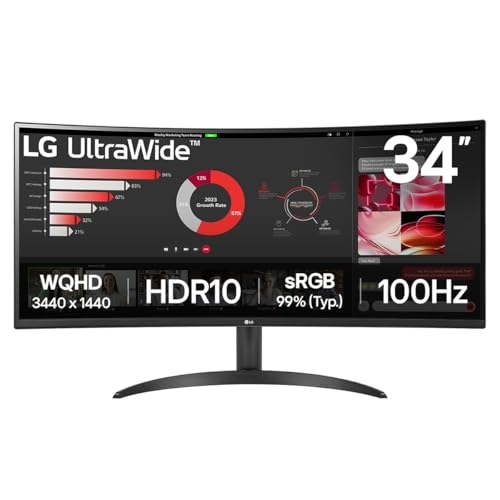
The LG UltraWide 34WR50QK offers a 34-inch 3440x1440 curved VA panel at a price that sits between the budget 1080p options and the premium QD-OLED pick, making it an attractive choice for engineering students who want the productivity benefits of an ultrawide screen without paying the premium associated with higher refresh rates or more exotic panel technologies. The 100 Hz refresh rate is a step down from the AOC ultrawide above, but it is a significant improvement over the 60 Hz that most non-gaming monitors offer, and it is more than adequate for the scrolling and panning demands of engineering software.
The 3440x1440 resolution across 34 inches gives you a pixel density that keeps technical drawings sharp and text legible even when zoomed out to see a full assembly or a complete page of code. The curved VA panel wraps the image around your field of view, reducing the need to move your head to read content at the screen edges, which is a genuine comfort benefit during long study sessions. VA panels also offer better contrast than IPS alternatives, making dark-mode coding environments look particularly good.
LG's ultrawide monitors have a strong reputation for colour accuracy out of the box, and the 34WR50QK continues that tradition. Coverage of the sRGB colour space is solid, which means colour-coded CAD layers, simulation result maps and data visualisation charts are rendered faithfully without needing manual calibration. The screen is also well suited to watching lecture recordings and technical video content in widescreen format during revision periods.
Port selection is functional rather than generous: two HDMI 2.0 ports and one DisplayPort 1.4. This is enough to connect a laptop and a desktop simultaneously, but there is no USB hub or USB-C connectivity, which is a limitation compared with the AOC ultrawide at a similar or lower price. Students who rely heavily on USB peripherals will need a separate hub.
The stand offers reasonable ergonomic adjustment, and the overall build quality feels appropriate for the price. LG's software suite includes a picture-in-picture mode that lets you display a laptop feed in a corner of the screen while your main machine occupies the rest, which is useful for monitoring a running simulation on one machine while working on another.
Verdict: A reliable and well-calibrated ultrawide for engineering students who want the multi-window productivity benefits of a 34-inch 3440x1440 screen at a more accessible price, accepting a 100 Hz refresh rate and limited port selection as the trade-offs.
Pros
- 34-inch 3440x1440 ultrawide enables genuine multi-window engineering workflows at a more accessible price than premium ultrawides
- VA panel delivers better contrast than IPS alternatives, making dark-mode IDEs and simulation dashboards look more defined
- LG's picture-in-picture mode allows simultaneous display of two machine outputs, useful for monitoring running simulations
Cons
- 100 Hz refresh rate is lower than competing ultrawides at similar prices, though still adequate for engineering software use
- No USB-C port or USB hub, requiring a separate dock or hub for students with multiple USB peripherals
Buying Guide
Resolution: why 1440p is the sweet spot for most engineering students
Resolution is arguably the most important specification for engineering students, because the detail visible in a CAD drawing, circuit schematic or finite element mesh is directly limited by how many pixels your monitor can display. At 1080p on a 24-inch screen, most engineering software is perfectly usable, but zooming in to check fine detail in a complex assembly becomes necessary more often. At 1440p on a 27-inch screen, the pixel density increases enough that you can keep more of a drawing visible at a comfortable zoom level, reducing the need to pan and scroll constantly. For ultrawide monitors, 3440x1440 is the standard resolution and provides a similar pixel density to 1440p on a 27-inch screen while adding significant horizontal space.
Panel type: IPS, VA or QD-OLED?
IPS panels offer the best viewing angles and generally the most accurate colours out of the box, making them the safest choice for engineering students who work in groups or need reliable colour representation. VA panels offer better contrast ratios, which benefits dark-mode coding environments and makes black backgrounds look genuinely dark rather than grey. QD-OLED combines the best of both worlds, with per-pixel contrast, wide colour gamut and fast response times, but at a higher price. For most students, IPS or VA at 1440p represents the best value, with QD-OLED reserved for those who can justify the investment.
Screen size and ultrawide: is bigger always better?
A 27-inch monitor is the most versatile choice for a student desk, offering enough space for two windows side by side without being so large that it dominates a small room. Ultrawide monitors at 34 inches are genuinely transformative for multi-window engineering workflows, allowing you to keep a CAD window, a reference document and a terminal open simultaneously without any overlap. However, they require a wider desk and some older engineering software may not handle the ultrawide aspect ratio without manual adjustment. If your desk is 120 cm or wider and you regularly juggle multiple applications, an ultrawide is worth serious consideration.
Connectivity: USB-C and hub functionality matter more than you might expect
Modern engineering students often work from thin-and-light laptops that have limited port selection. A monitor with USB-C input and power delivery can replace a separate dock, charging your laptop and connecting it to the display with a single cable. USB hub functionality on the monitor body is similarly useful, letting you connect USB drives, lab equipment dongles and input devices without a separate hub cluttering your desk. If you are buying a monitor that lacks these features, budget for a USB-C hub or dock alongside it.
Refresh rate: beyond gaming
High refresh rates are marketed primarily for gaming, but they have genuine benefits for engineering students. Scrolling through long code files, panning across large assembly drawings and navigating dense spreadsheets all feel noticeably smoother at 120 Hz or above compared with 60 Hz. Eye fatigue over a four-hour study session is measurably reduced at higher refresh rates. Any monitor at 100 Hz or above is adequate for engineering use; 180 Hz and above is a bonus rather than a necessity.
Ergonomics: do not overlook the stand
Engineering students spend long hours at their monitors, and a display that cannot be adjusted to the correct height will cause neck and shoulder strain over time. Look for monitors with at least height adjustment and tilt. Swivel adjustment is a bonus for group review sessions. If a monitor only offers tilt, consider a VESA-compatible monitor arm as an affordable upgrade that also frees up desk space.
The MSI MAG 272QP QD-OLED X50 is the overall winner for engineering students who can stretch their budget. The QD-OLED panel's combination of accurate colour, near-infinite contrast, 1440p sharpness and USB-C connectivity makes it the most capable and future-proof display in this list. It will serve you well through your degree and into your graduate career, handling colour-critical engineering work, dark-mode coding and late-night gaming with equal competence. For students on a tighter budget, the ASUS TUF Gaming VG249Q3R delivers genuine IPS quality and a smooth 180 Hz experience at a price that leaves room in the budget for other essentials. For those who want to transform their workflow with a multi-window ultrawide setup, the AOC Gaming CU34G2XPD offers the best combination of screen real estate, refresh rate and port selection at its price point.