Choosing the right monitor for DaVinci Resolve is more nuanced than picking the brightest screen or the highest refresh rate. Colour graders, video editors and motion graphics artists need accurate colour reproduction, sufficient resolution to judge fine detail in footage, and enough screen real estate to keep Resolve's busy interface manageable without constant panel switching. Since last year, QD-OLED panels have dropped significantly in price, ultrawide 1440p displays have become the go-to choice for editors who want a wide timeline without a dual-monitor setup, and 4K Smart Monitors have started to blur the line between professional display and all-in-one workstation. This guide is aimed at independent filmmakers, YouTube creators, and professional colourists working on a range of budgets, from those just starting out who need an honest 1080p IPS panel, right through to seasoned pros who want a QD-OLED with near-perfect black levels for HDR grading work. Every pick below has been chosen from a verified catalogue of currently available UK products.
Quick Verdict
Best Overall: MSI MAG 272QP QD-OLED X50. Its QD-OLED panel delivers outstanding contrast, wide colour gamut coverage, and true per-pixel dimming that makes HDR grading in DaVinci Resolve genuinely meaningful rather than approximated.
Best Value: LG UltraWide Monitor 34BA75QE. A 34-inch IPS ultrawide at 3440x1440 with USB-C, RJ45, built-in speakers, and DisplayPort 1.4 gives editors a genuinely professional feature set at a price that undercuts most rivals.
The Samsung LS32FM703UUXXU occupies an interesting niche in this roundup. It is a 32-inch 4K VA panel with HDR10 support, built-in speakers, and Samsung's Smart Monitor platform, which adds streaming apps, wireless connectivity, and the ability to use the display as a standalone smart TV without a connected PC. For a DaVinci Resolve editor, the headline attraction is the 4K resolution: at 32 inches, 3840x2160 gives a pixel density of approximately 138 PPI, which is meaningfully sharper than any of the 1440p or ultrawide panels in this roundup and allows you to judge fine detail in 4K source footage at or near native resolution.
Colour graders working on 4K productions will find the native resolution genuinely useful. When assessing skin tones, checking for compression artefacts, or evaluating sharpness from a lens, seeing the footage at its native pixel count on the monitor removes one layer of interpolation from the viewing chain. The HDR10 support, combined with the VA panel's stronger native contrast compared to IPS, means the display can render a reasonable approximation of HDR content, though it is not a mastering-grade HDR reference monitor.
The Smart Monitor platform adds value for editors who want to use the display as a secondary screen for reference viewing of finished content on streaming platforms, or who want to mirror their phone or tablet wirelessly. The built-in speakers are more capable than typical monitor speakers, making them useful for rough audio reference work during an edit. The white colourway is distinctive and will suit some home studio setups better than the black finish that dominates the monitor market.
The main limitation for colour-critical work is the VA panel technology. VA panels can exhibit colour shift when viewed from angles other than directly ahead, and the gamma behaviour can vary across the screen in ways that make consistent colour grading more challenging than on a well-calibrated IPS panel. For editors who primarily grade in sRGB and deliver to web platforms, this is a manageable limitation. For broadcast or cinema colourists, a dedicated reference monitor would be a better long-term investment.
Verdict: A strong choice for 4K editors who want native resolution monitoring and a versatile Smart Monitor platform, with the caveat that VA panel characteristics require careful calibration for colour-critical work.
Pros
- 4K resolution at 32 inches allows 4K footage to be viewed at or near native pixel count, revealing detail that 1440p panels cannot show
- Smart Monitor platform with built-in streaming apps and wireless connectivity adds genuine versatility beyond a standard PC monitor
- HDR10 support combined with VA panel contrast makes HDR content more convincing than on most IPS panels at this size
Cons
- VA panel technology can exhibit colour shift at off-axis viewing angles, which complicates consistent colour grading compared to IPS
- Premium price point is harder to justify for editors who do not need the Smart Monitor features and would be better served by a dedicated professional display
The AOC CU34G2XPD is a 34-inch curved VA ultrawide running at 3440x1440 with a 180 Hz refresh rate and a 1ms response time. On paper, those gaming-oriented specifications might seem misaligned with DaVinci Resolve's needs, but the underlying panel and connectivity make this a genuinely useful editing display, particularly for editors who also use their workstation for gaming and want a single screen that serves both purposes without compromise.
The 3440x1440 resolution is the same as the LG 34BA75QE reviewed above, giving the same benefit of a wide timeline and a spacious Resolve interface. The curved 1500R panel wraps gently around the field of view, which some editors find reduces eye strain during long sessions, though others prefer a flat panel for colour work because curvature can introduce subtle reflections at the edges of the screen. The VA panel offers stronger native contrast than IPS, which is a genuine advantage when assessing shadow detail in darker scenes, though it comes with the same caveat about colour shift at extreme viewing angles.
Where the AOC CU34G2XPD genuinely stands out is its connectivity. Two HDMI 2.0 ports, two DisplayPort 1.4 outputs, a USB-B upstream port, four USB-A downstream ports, and a 3.5mm audio output give this monitor one of the most generous port arrays in the roundup. Editors who connect multiple devices, such as a desktop workstation, a laptop for secondary tasks, and external drives or input devices via USB, will find the hub functionality genuinely useful. The four USB-A ports effectively turn the monitor into a USB hub, reducing the number of cables running directly to the PC.
The 180 Hz refresh rate adds no direct benefit to video editing work, but it does mean the panel is manufactured to tight tolerances for pixel response, which keeps the display looking clean and sharp during fast timeline scrubbing. The 1ms response time similarly translates to a crisp, clear image during playback. At its price point, the AOC CU34G2XPD represents strong value for an editor who wants a large ultrawide with excellent connectivity and does not want to pay a premium for features they will not use.
Verdict: A well-connected 34-inch ultrawide that suits editors who also game, offering the best port selection in this roundup at a competitive price.
Pros
- Four USB-A downstream ports plus USB-B upstream effectively turn the monitor into a USB hub, reducing cable clutter on a busy editing desk
- Dual DisplayPort 1.4 outputs allow two separate PC sources to be connected simultaneously without adapters
- 3440x1440 VA panel offers stronger native contrast than IPS rivals at the same resolution, benefiting shadow detail assessment
Cons
- Curved VA panel can exhibit colour shift at off-axis viewing angles, which is a meaningful limitation for colour-critical grading work
- 180 Hz gaming focus means the display carries a slight price premium over comparable editing-focused ultrawides that omit high refresh rate features
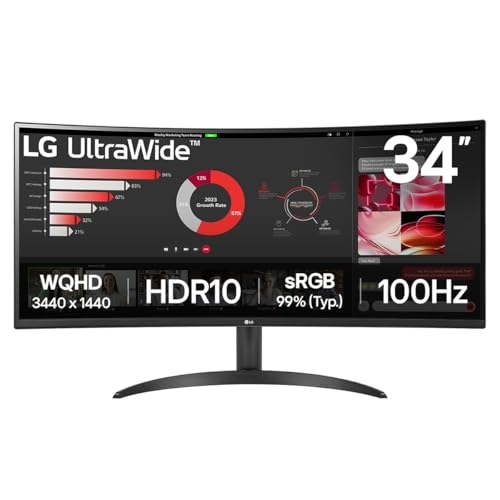
The LG UltraWide Curved 34WR50QK is the entry point to serious ultrawide editing in this roundup. It shares the 3440x1440 resolution of the AOC and the LG 34BA75QE, but arrives at a lower price point by trimming the feature set to the essentials: two HDMI 2.0 ports, one DisplayPort 1.4, and a 100 Hz refresh rate on a curved VA panel. For editors who are stepping up from a 1080p or 1440p flat monitor for the first time and want the ultrawide experience without spending heavily, the 34WR50QK is a logical starting point.
The 34-inch curved VA panel at 3440x1440 gives the same fundamental editing advantages as the other ultrawides in this list: a timeline long enough to see a meaningful chunk of a project without scrolling, enough horizontal space to keep the colour panels and the viewer open simultaneously, and a large enough canvas to make the investment in a wide-format display worthwhile. The 100 Hz refresh rate is a step up from the 60 Hz of the LG 34BA75QE and is sufficient for smooth timeline scrubbing and playback preview in Resolve.
The VA panel's stronger native contrast compared to IPS is a recurring theme in this roundup, and it applies here too. Shadow detail in darker scenes will appear more defined than on an equivalent IPS panel, which is useful when lifting shadows in Resolve's colour wheels and trying to assess how much noise or detail is present in the darker parts of a frame. The 5ms response time is entirely adequate for editing work, and the curved 1500R form factor wraps comfortably around the natural field of view at a typical desk distance.
The connectivity is more limited than the AOC CU34G2XPD above: there is no USB hub, no audio output listed in the verified specifications, and only one DisplayPort rather than two. Editors who need to connect multiple sources or use the monitor as a USB hub will need to look elsewhere. However, for a single-PC setup where the priority is the largest possible ultrawide canvas at the lowest possible price, the 34WR50QK delivers the core editing experience without unnecessary extras inflating the cost.
Verdict: The most accessible entry point to 34-inch ultrawide editing in this roundup, suited to editors on a tighter budget who want the wide canvas without premium connectivity features.
Pros
- 3440x1440 at 34 inches gives the full ultrawide editing experience at a lower price than most rivals, making it accessible for budget-conscious editors
- VA panel delivers stronger native contrast than IPS at this resolution, helping shadow detail assessment in dark scenes
Cons
- No USB hub functionality limits the display's usefulness as a desk centrepiece for editors with multiple connected devices
- VA panel colour shift at off-axis angles is a limitation for colour-critical grading, particularly when multiple people need to view the screen simultaneously
- Single DisplayPort 1.4 limits multi-source flexibility compared to the AOC CU34G2XPD's dual DisplayPort setup
Buying Guide
Panel Type: Why It Matters for Colour Grading
The single most important specification for a DaVinci Resolve monitor is panel type, because it determines how accurately the display renders colour, contrast, and shadow detail. IPS panels offer wide viewing angles and consistent colour reproduction, making them the traditional choice for colour-critical work. VA panels offer stronger native contrast, which helps in dark scene assessment, but can exhibit colour shift when viewed from angles other than directly ahead. QD-OLED panels, as seen in the MSI MAG 272QP, offer the best of both worlds: per-pixel dimming for true black levels, wide colour gamut coverage, and excellent viewing angles, though they carry a theoretical burn-in risk from static UI elements.
Resolution and Screen Size
For DaVinci Resolve, resolution matters in two ways: the resolution of the display itself, and whether it matches the resolution of your source footage. A 4K display allows you to view 4K footage at native resolution, which is the most accurate way to assess sharpness and detail. However, a 1440p or ultrawide 1440p display is often more practical for the Resolve interface itself, because the software's panels and colour wheels benefit from horizontal screen real estate rather than raw pixel count. A 34-inch ultrawide at 3440x1440 gives you a longer timeline and more visible panels than a 27-inch 4K display, even though the 4K display has more total pixels.
Aspect Ratio: Ultrawide vs Standard
DaVinci Resolve's interface is designed to be used across a wide horizontal space. The media pool, timeline, viewer, colour panels, and inspector all compete for screen width. On a standard 16:9 display, you will typically need to switch between workspaces or hide panels to work comfortably. On a 21:9 ultrawide at 3440x1440, you can often keep the full interface visible simultaneously, which significantly speeds up the editing and grading workflow. If you have space for a dual-monitor setup, a standard 27-inch 4K display paired with a secondary 1080p screen can be equally effective, but for a single-monitor setup, ultrawide is strongly recommended.
Connectivity for Editing Workflows
Modern editing workstations often involve a mix of devices: a desktop or laptop as the primary machine, external drives for footage, audio interfaces, and sometimes a second source such as a camera or capture card for live monitoring. A monitor with a built-in USB hub, USB-C with video passthrough, and multiple HDMI or DisplayPort inputs simplifies the desk setup considerably. USB-C is particularly valuable for laptop-based editors, as a single cable can carry video, data, and power simultaneously, reducing the number of cables running between the laptop and the desk.
Calibration and Colour Space Coverage
For professional colour grading, a monitor should ideally cover at least 99 per cent of the sRGB colour space for web and streaming delivery, and ideally a meaningful portion of DCI-P3 for cinema or HDR deliverables. Factory calibration reports, if included, provide a useful baseline, but most serious colourists will invest in a hardware colorimeter such as an X-Rite i1Display or Datacolor Spyder to profile the display themselves. A monitor that supports hardware calibration via software is a significant advantage for professional use, though none of the displays in this roundup are dedicated reference monitors with full hardware LUT support.
HDR Support
HDR10 support is increasingly common on monitors at all price points, but there is a meaningful difference between a display that accepts an HDR signal and one that can actually render HDR content convincingly. True HDR rendering requires either a very high peak brightness with local dimming zones, or per-pixel dimming as found on OLED and QD-OLED panels. Most LCD panels with HDR10 badges are better described as HDR-compatible rather than HDR-capable. For editors delivering HDR content, the MSI QD-OLED in this roundup is the only display that can give a genuinely meaningful preview of HDR grading decisions.
The overall winner in this roundup is the MSI MAG 272QP QD-OLED X50. Its QD-OLED panel technology is simply in a different class from the VA and IPS displays it competes against when it comes to the qualities that matter most for DaVinci Resolve: contrast accuracy, colour volume, and the ability to render HDR content in a way that reflects how it will look on a capable consumer display. The HDMI 2.1 ports, DisplayPort 1.4a, and USB-C connectivity give it a flexible and future-proof connection setup. For editors who work primarily in SDR and want the best practical value, the LG UltraWide 34BA75QE remains the strongest recommendation: its 34-inch IPS ultrawide panel, USB-C single-cable workflow, built-in Ethernet, and USB hub make it the most practically complete editing display in the roundup at its price point. The Samsung 4K Smart Monitor suits editors who need native 4K monitoring and value the Smart platform's versatility. The AOC CU34G2XPD is the pick for editors who also game and want the best connectivity in an ultrawide form factor. The LG 34WR50QK is the most accessible entry point to the ultrawide editing experience for those on a tighter budget.