Data scientists and machine learning engineers have fundamentally different priorities from gamers when choosing a graphics card. VRAM capacity is the single most important specification: running large language models, training transformers, or fine-tuning diffusion models on a card with insufficient memory means constant out-of-memory errors, gradient checkpointing workarounds, or being forced to reduce batch sizes to the point where training becomes impractically slow. Since last year, the landscape has shifted meaningfully. AMD's RDNA 4 cards now offer competitive ROCm support, Nvidia's Blackwell generation has arrived with GDDR7 memory, and the used and graded market has made high-VRAM Ampere and RDNA 2 cards far more accessible. This guide is aimed at professionals running PyTorch or TensorFlow workloads, fine-tuning open-source models locally, or doing computer vision inference at scale. Every pick here carries at least 16 GB of VRAM, with one standout option reaching 20 GB, because anything below that threshold is simply not worth recommending for serious ML work in 2025.
Quick Verdict
Best Overall: Asus TUF Radeon RX 7900 XT 20G OC (Graded)20 GB of GDDR6 at 800 GB/s bandwidth is the most VRAM you can get at anywhere near this price point, making it the top pick for local model training and large-batch inference. Best Value: XFX Mercury Radeon RX 9070 XT OC16 GB of GDDR6 with AMD's latest RDNA 4 architecture delivers strong compute performance and solid ROCm 6 support at a price that leaves budget for the rest of your workstation build.
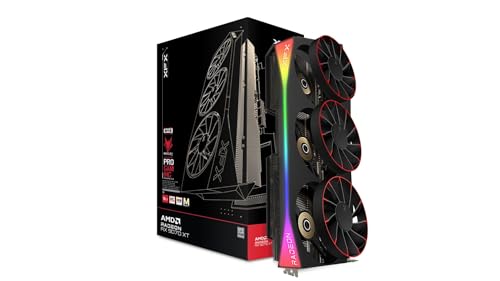
The XFX Mercury Radeon RX 9070 XT represents AMD's RDNA 4 generation and is the Best Value pick in this guide for ML engineers who want a brand-new card with a full warranty, solid driver support, and 16 GB of GDDR6 memory. RDNA 4 brings meaningful improvements to compute throughput over RDNA 3, with the RX 9070 XT delivering approximately 49.4 TFLOPS of FP32 performance. Crucially, AMD has invested heavily in ROCm 6 compatibility for RDNA 4, and early adopter reports from the ML community confirm that PyTorch 2.4+ runs well on this architecture with HIP compilation.
The 16 GB of GDDR6 sits on a 256-bit bus with 640 GB/s of bandwidth, which is a step up from the non-XT 9070 and competitive with the RTX 4080 Super in memory throughput terms. For fine-tuning 7B models in 4-bit quantisation, running computer vision pipelines, or doing batch inference on text embeddings, 16 GB is sufficient for the majority of practical ML tasks. The XFX Mercury cooler uses a magnetic air-bearing fan design that reduces noise and extends fan lifespan, which matters when the GPU is running at sustained load for hours during a training run.
PCIe 5.0 x16 connectivity future-proofs the card for next-generation platforms, and the 304W TBP is manageable on a 750W PSU. The RGB implementation is tasteful and can be disabled entirely through AMD's software if you prefer a clean workstation aesthetic. One consideration for ML engineers is that AMD's software ecosystem, while improving rapidly, still requires more manual configuration than Nvidia's CUDA stack. Tools like Flash Attention and some CUDA-specific kernels need HIP ports or workarounds, so if your workflow depends heavily on CUDA-exclusive libraries, factor that into your decision.
Verdict: The best combination of price, VRAM, bandwidth, and up-to-date RDNA 4 architecture for engineers who want a new card with full warranty coverage.
Pros
- 16 GB GDDR6 with 640 GB/s bandwidth handles most 7B, 13B fine-tuning tasks comfortably
- RDNA 4 architecture brings improved ROCm 6 support and better FP8 compute paths
- Magnetic air-bearing fans extend longevity under sustained compute loads
Cons
- CUDA-exclusive libraries such as some Flash Attention kernels require HIP porting or workarounds
- 256-bit bus width is narrower than the RX 7900 XT's 320-bit bus, limiting peak bandwidth
- RDNA 4 ROCm ecosystem is newer and less battle-tested than RDNA 3 or Nvidia Ampere/Ada
The PowerColor Hellhound RX 9070 is the most affordable route to 16 GB of VRAM on a brand-new card with full warranty coverage, and for ML engineers working with quantised models, embedding generation, or inference rather than full-precision training, it deserves serious consideration. The non-XT RX 9070 uses the same Navi 48 die as its XT sibling but with some compute units disabled, resulting in approximately 38.9 TFLOPS of FP32 performance and 576 GB/s of memory bandwidth. That bandwidth figure is lower than the other cards in this guide, which will show up in workloads that move large amounts of data between VRAM and compute units rapidly.
Where the RX 9070 earns its place is in the combination of 16 GB GDDR6 capacity, RDNA 4's improved ROCm 6 support, and a 220W TBP that makes it the most power-efficient card in this selection. For a workstation that runs training jobs overnight or inference servers that need to stay cool in a rack environment, lower power draw translates directly to lower electricity costs and reduced thermal management complexity. The PowerColor Hellhound cooler is a dual-fan design that keeps temperatures reasonable under sustained load, though it runs slightly warmer than triple-fan alternatives at peak compute.
PyTorch 2.4+ with HIP backend runs on RDNA 4, and Hugging Face Transformers inference works well for 7B models in 4-bit quantisation. The same CUDA ecosystem caveats that apply to the XFX 9070 XT apply here: CUDA-exclusive kernels need HIP ports, and some cutting-edge training optimisations may not yet have AMD equivalents. However, for inference-focused workflows, data preprocessing pipelines, or anyone running open-source models through Ollama or llama.cpp with GPU offloading, the RX 9070 16 GB is a practical and affordable choice.
Verdict: The most power-efficient 16 GB card in this guide and the best entry point for engineers prioritising VRAM capacity over raw compute throughput, particularly for inference and quantised model serving.
Pros
- 16 GB GDDR6 VRAM on a new card with full warranty at the lowest price in this guide
- 220W TBP is the lowest power draw here, reducing electricity costs during long training runs
- RDNA 4 architecture provides improved ROCm 6 support over previous AMD generations
Cons
- 576 GB/s bandwidth is the lowest in this selection and will bottleneck bandwidth-sensitive training workloads
- Reduced compute units versus the XT variant mean slower training times for full-precision models
- Dual-fan cooler runs warmer than triple-fan alternatives during sustained compute loads
Buying Guide
VRAM: the non-negotiable starting point
For machine learning work in 2025, 16 GB of VRAM should be considered the minimum viable specification. The reason is straightforward: a 7B-parameter model in FP16 requires approximately 14 GB of VRAM just to store the weights, before accounting for activations, gradients, and optimiser states. In FP32, that figure doubles. Even with 4-bit quantisation (which reduces model weight memory by roughly 75%), you still need headroom for the KV cache during inference and for intermediate computations. Cards with 20 GB, like the RX 7900 XT in this guide, give you meaningful extra room to work with larger models or larger batch sizes without resorting to gradient checkpointing or model parallelism workarounds.
Memory bandwidth matters as much as capacity
VRAM capacity tells you whether a model fits in memory. Bandwidth tells you how quickly the GPU can read and write those weights during computation. Transformer attention mechanisms, in particular, are highly bandwidth-bound: the GPU spends a large proportion of its time moving data rather than performing arithmetic. This is why a card with 896 GB/s of GDDR7 bandwidth (like the RTX 5070 Ti) can outperform a card with more VRAM but lower bandwidth on certain workloads. When comparing cards, look at both figures together: capacity for model fit, bandwidth for training speed.
CUDA versus ROCm: an honest assessment
Nvidia's CUDA ecosystem is still the default for ML research and production. If your team uses CUDA-specific kernels, custom extensions compiled with nvcc, or libraries that have not yet been ported to HIP (AMD's CUDA equivalent), choosing an AMD card will require additional engineering effort. That said, ROCm 6 has closed the gap significantly, and for standard PyTorch workflows using pre-built wheels, AMD RDNA 3 and RDNA 4 cards are genuinely usable. If you are starting a new project with flexibility in your stack, AMD's VRAM-per-pound advantage at the high end is worth the ecosystem trade-off. If you are joining an existing CUDA-heavy team, stick with Nvidia.
Power supply and cooling considerations
ML training runs the GPU at sustained 100% load for hours or days. This is fundamentally different from gaming, where load is intermittent. A card rated at 300W TBP will draw close to that figure continuously during training, so your PSU needs adequate headroom: a 750W unit is the minimum for any card in this guide, and 850W is more comfortable. Thermal management is equally important. Ensure your case has adequate airflow, and consider that triple-fan coolers generally sustain lower temperatures than dual-fan designs under continuous load, which affects both performance (thermal throttling) and long-term reliability.
New versus graded
Graded cards can represent exceptional value for ML engineers, particularly for high-VRAM options like the RX 7900 XT 20G. The key questions to ask are: what warranty does the retailer offer, what does the grading standard actually mean in terms of testing, and what is the returns policy? A graded card with a 90-day warranty from a reputable retailer is a reasonable risk for a home lab or research workstation. For a production inference server where downtime has a cost, a new card with a full manufacturer warranty is the safer choice.
For data scientists and ML engineers, the Asus TUF Radeon RX 7900 XT 20G OC (Graded) is the overall winner. No other card in this guide offers 20 GB of VRAM at anywhere near this price point, and for the workloads that matter most in ML, including fine-tuning large language models, training vision transformers, and running multi-modal inference pipelines, that extra memory headroom is worth more than any other single specification. The 800 GB/s bandwidth is competitive, ROCm 6 support is mature enough for standard PyTorch workflows, and the TUF cooler handles sustained compute loads without complaint. If your workflow is exclusively CUDA-dependent, the Gigabyte RTX 5070 Ti GAMING OC 16G is the best Nvidia option here, with GDDR7 bandwidth and Blackwell Tensor Cores justifying its premium. For those who want a new AMD card with full warranty and strong RDNA 4 compute, the XFX Mercury RX 9070 XT is the Best Value pick. But for the majority of ML engineers who want the most model-loading headroom for their money, the 20 GB RX 7900 XT is the card to buy.