4K video editing places demands on a graphics card that are quite different from gaming. You need substantial VRAM to hold large frame buffers and proxy caches, dedicated hardware encode and decode engines for codecs like H.264, H.265, AV1 and ProRes, and enough compute throughput to keep your timeline scrubbing smoothly in DaVinci Resolve, Premiere Pro or Final Cut Pro on a Hackintosh. The market has shifted noticeably since 2024: AMD's RDNA 4 cards now include AV1 encode support that was previously absent from the red camp, Nvidia's RTX 50-series brings GDDR7 memory and improved NVENC engines, and graded (refurbished) cards offer serious VRAM headroom at reduced prices. Whether you are a freelance colourist on a tight budget or a studio editor processing raw 4K footage all day, this guide covers five cards that represent the best choices available right now, ranked by their suitability for 4K editing workloads.
Quick Verdict
Best Overall: Asus TUF Radeon RX 7900 XT 20G OC (Graded)20 GB of GDDR6 VRAM, full AV1 decode and strong H.265 hardware encode make it the most capable card for 4K editing at a realistic price point. Best Value: Powercolor Hellhound RX 9070 16GB16 GB GDDR6, RDNA 4's new AV1 encode engine and a competitive price make it the smartest spend for editors who do not need the extra VRAM headroom of the 7900 XT.
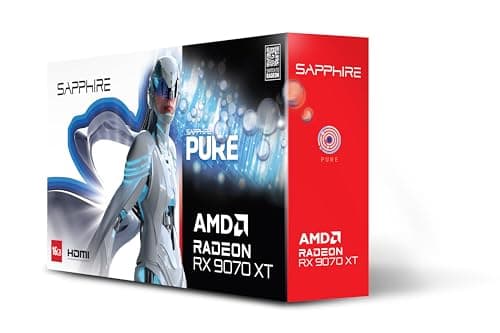
The Powercolor Hellhound RX 9070 is the Best Value pick in this selection, and it earns that designation through a combination of 16 GB GDDR6 VRAM, full RDNA 4 AV1 encode support, and a price that undercuts both the RX 9070 XT and the RTX 5070 Ti by a meaningful margin. For editors on a budget who still need a capable 4K editing card, the RX 9070 represents the sweet spot in the current market.
The RX 9070 uses the same RDNA 4 architecture as the 9070 XT, with the same media engine and codec support. The difference lies in the number of active Compute Units and the clock speeds: the RX 9070 has fewer CUs and a lower boost clock than the XT variant. In practical editing terms, this means slightly slower performance on GPU-intensive effects and longer export times on complex timelines, but for straightforward 4K colour grading and H.265 or AV1 encode, the performance difference is modest.
Powercolor's Hellhound cooler is a dual-fan design on a compact 310 mm PCB, which makes it one of the shorter cards in this selection. That is a genuine advantage for smaller cases or builds where airflow is constrained. The lower TDP of around 220 W also means it runs cooler and quieter than the larger cards, and a 750 W PSU is sufficient. For a home editing suite or a small studio workstation where noise matters, the Hellhound's quieter operation is a practical benefit.
The 16 GB GDDR6 on a 256-bit bus provides adequate bandwidth for 4K editing. DaVinci Resolve's GPU memory manager handles the 16 GB well, and for single-camera 4K workflows with moderate node complexity, you are unlikely to hit VRAM limits. Where you might notice the constraint is in very complex Resolve projects with many fusion effects or when running Resolve's AI noise reduction at high quality settings alongside other GPU-accelerated nodes.
One area where the RX 9070 genuinely impresses is power efficiency. AMD's RDNA 4 architecture delivers a significant performance-per-watt improvement over RDNA 3, and the RX 9070 at 220 W delivers editing performance that would have required a 300 W card a generation ago. For a card that will run sustained export loads, lower power consumption means lower electricity costs and less heat in your workspace.
Software support is the same as the 9070 XT: full DaVinci Resolve OpenCL optimisation, Premiere Pro GPU acceleration, and AMD's Radeon Software suite. The Hellhound also ships with a three-year warranty from Powercolor, which is reassuring for a professional tool.
Verdict: The best value 4K editing card in this selection. Full AV1 encode, 16 GB VRAM, and a compact, quiet design make it an excellent choice for budget-conscious editors who do not need the extra VRAM of the 7900 XT.
Pros
- Full AV1 hardware encode via RDNA 4 media engine at the lowest price in this selection
- Compact 310 mm length and 220 W TDP suit smaller cases and quieter workstation builds
- 16 GB GDDR6 is sufficient for most single-camera 4K editing workflows
Cons
- Lower CU count and clock speeds than the RX 9070 XT mean slower performance on GPU-heavy effects and long exports
- Dual-fan cooler may run louder than triple-fan alternatives under sustained export loads
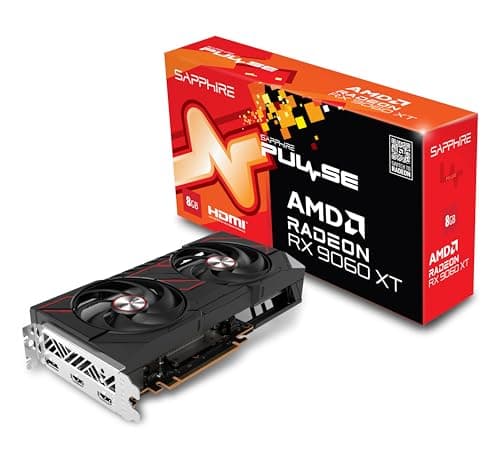
The Sapphire Pulse RX 9060 XT is the entry point of this selection, and its inclusion is justified by one specification that is genuinely surprising for its price tier: 16 GB of GDDR6 VRAM. At a time when competing Nvidia cards at similar prices ship with 8 GB, the RX 9060 XT's 16 GB gives it a meaningful advantage for 4K video editing, where VRAM capacity directly affects how complex a timeline you can handle without performance degradation.
Like all RDNA 4 cards, the RX 9060 XT includes AV1 hardware encode and decode, H.264 and H.265 hardware encode and decode, and the full RDNA 4 media engine. For editors who primarily need hardware-accelerated transcode and smooth 4K playback rather than heavy GPU compute for effects, the 9060 XT's media engine is identical to the more expensive RDNA 4 cards. The practical difference is in GPU compute throughput: the 9060 XT has fewer Compute Units and a narrower 128-bit memory bus, which limits its performance on GPU-intensive tasks like Resolve's noise reduction or complex fusion compositions.
Sapphire's Pulse cooler is a well-regarded dual-fan design that keeps temperatures in check without excessive noise. The card draws only around 150 W, making it suitable for workstations with modest PSUs (a 550 W unit is sufficient) and cases with limited airflow. At 270 mm, it is also the shortest card in this selection, fitting in virtually any case.
The 128-bit memory bus is the RX 9060 XT's most significant limitation for editing workloads. While the 16 GB VRAM capacity is impressive, the bandwidth of approximately 288 GB/s is substantially lower than the wider-bus cards in this list. This means that while the card can hold large frame buffers in VRAM, it cannot move data in and out of the GPU as quickly, which can create bottlenecks during high-bitrate 4K playback or when processing multiple streams simultaneously.
For a part-time editor, a content creator who edits 4K footage as part of a broader workflow, or a professional who needs a secondary editing workstation on a tight budget, the RX 9060 XT is a sensible choice. It handles 4K H.265 and AV1 footage in DaVinci Resolve and Premiere Pro with hardware acceleration, and the 16 GB VRAM means you will not be forced to reduce cache sizes or simplify timelines as frequently as you would with an 8 GB card.
It is not a card for heavy professional use with complex node trees or AI-intensive workflows, but as an affordable entry into GPU-accelerated 4K editing with full codec support, it punches well above its price class.
Verdict: The most affordable route to 16 GB VRAM and full AV1 hardware encode. Bandwidth limitations mean it is best suited to lighter 4K editing workloads, but it is a remarkable specification for the price.
Pros
- 16 GB GDDR6 VRAM at an entry-level price, far more than competing Nvidia cards at this tier
- Full RDNA 4 AV1 hardware encode and decode engine, identical to more expensive RDNA 4 cards
- 150 W TDP and 270 mm length suit compact workstations and low-power builds
Cons
- 128-bit memory bus limits bandwidth to around 288 GB/s, creating bottlenecks on high-bitrate or multi-stream 4K workflows
- Lower CU count means GPU-intensive effects like Resolve AI noise reduction run significantly slower than on mid-range and high-end cards
Buying Guide
VRAM: How Much Do You Actually Need?
For 4K video editing, VRAM is the single most important specification. DaVinci Resolve uses VRAM to store frame buffers, cache decoded frames, and hold the working data for GPU-accelerated nodes. A basic 4K timeline with colour grading and a few effects will use 6 to 8 GB of VRAM. Add noise reduction, fusion effects, or multiple camera angles, and you can easily exceed 12 GB. For professional workflows, 16 GB is the practical minimum, and 20 GB provides genuine headroom for complex projects. Cards with 8 GB will work for simple 4K timelines but will bottleneck on anything more demanding.
Codec Support: Why It Matters
Hardware codec engines on modern GPUs handle the decode and encode of compressed video formats far more efficiently than software. H.264 and H.265 hardware decode is standard on all modern GPUs. AV1 hardware decode is available on RDNA 3, RDNA 4, and Nvidia RTX 30-series and newer. AV1 hardware encode, which matters for delivery to YouTube and streaming platforms, is available on RDNA 4 (RX 9000 series) and Nvidia RTX 40-series and newer, but not on RDNA 3 (RX 7000 series). If you deliver in AV1, this distinction is important.
CUDA vs OpenCL: Does It Matter for Editing?
DaVinci Resolve supports both CUDA (Nvidia) and OpenCL/Vulkan (AMD), and Blackmagic Design optimises for both. For standard colour grading and effects, the performance difference between CUDA and OpenCL on equivalent hardware is modest. Where CUDA pulls ahead is in AI-assisted tools: Resolve's AI noise reduction, magic mask, and speed warp features run significantly faster on Nvidia hardware because they use Tensor cores. Third-party tools like Topaz Video AI are CUDA-only. If AI tools are central to your workflow, Nvidia is the stronger choice. If you work primarily in DaVinci Resolve without heavy AI tool use, AMD offers competitive performance and often better VRAM value.
Memory Bandwidth and Bus Width
VRAM capacity tells you how much data the GPU can hold, but memory bandwidth tells you how fast it can access that data. A wide memory bus (256-bit or 320-bit) with fast GDDR6 or GDDR7 memory delivers high bandwidth that prevents bottlenecks when processing high-bitrate 4K footage. Narrower buses (128-bit) can limit performance even when VRAM capacity is adequate, as seen with the RX 9060 XT. For demanding 4K workflows, prioritise cards with 256-bit or wider memory buses.
Power and Thermal Considerations
Video editing is a sustained workload. Exports and renders can run for hours, keeping the GPU at high utilisation throughout. Cards with robust cooling solutions and adequate thermal headroom are essential. Check that your PSU has sufficient headroom above the card's TDP, and ensure your case has adequate airflow for sustained loads. A card that throttles thermally during a long export will deliver inconsistent performance and slower completion times.
Graded Cards: Are They Worth It?
Graded (refurbished) cards are tested to full specification and typically carry a warranty, though shorter than new retail. For a professional tool used in a controlled office environment, the cosmetic marks of a graded card are irrelevant. The VRAM and compute performance are identical to new units. Graded cards can offer significantly better specifications per pound than new retail alternatives, as demonstrated by the RX 7900 XT's 20 GB VRAM at a price that new retail 16 GB cards cannot match.
For 4K video editing, the Asus TUF Radeon RX 7900 XT 20G OC (Graded) is the overall winner. No other card in this selection offers 20 GB of GDDR6 VRAM at a comparable price, and VRAM capacity is the metric that most directly determines how complex a 4K timeline you can handle without compromising performance. The 320-bit memory bus, full hardware H.265 encode and decode, AV1 decode, and the TUF cooler's sustained-load thermal performance all make it the most capable card for professional 4K editing in this selection. The graded status is a minor compromise that professional buyers should have no hesitation accepting for a card of this specification at this price. If your workflow is CUDA-dependent or AI-tool-heavy, the Gigabyte RTX 5070 Ti GAMING OC is the alternative to consider, but for the majority of DaVinci Resolve and Premiere Pro users, the 7900 XT's VRAM advantage is the more practically useful attribute.