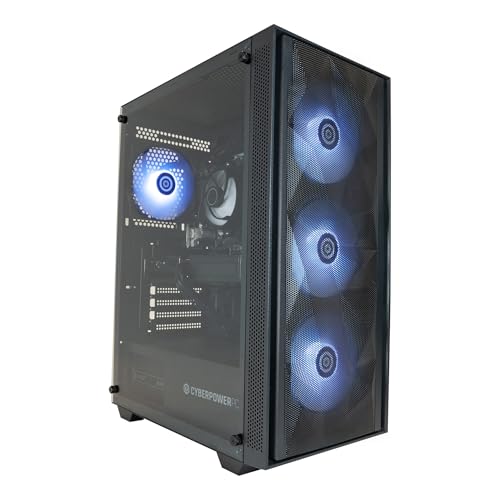
The CyberPowerPC Luxe with AMD's Ryzen 7 9800X3D and an RTX 5070 is the best gaming PC on this list for competitive play. No processor here has more cache, and the graphics card has plenty in hand for fast shooters at 1080p and 1440p. The other three share most of its parts. One swaps in an Intel Core i7-12700KF to bring the price down, one moves up to an RTX 5070 Ti for high-refresh 1440p, and one uses AMD's Radeon RX 9070 XT instead. All four were new, in stock on Amazon UK and sold by CyberPowerPC UK itself when we checked. If mid-range to upper mid-range money is more than you planned to spend, our guide to the best gaming desktops under £1,000 covers cheaper machines.
Quick Verdict
Best overall: CyberPowerPC Luxe (Ryzen 7 9800X3D, RTX 5070). AMD's 9800X3D carries 96MB of L3 cache, and the RTX 5070 brings 12GB of GDDR7 with NVIDIA Reflex. If you play ranked shooters and want one machine to cover everything else too, start here.
Best value: CyberPowerPC Luxe (Core i7-12700KF, RTX 5070). The same graphics card for the lowest price on this list, on an older Intel platform with less room to upgrade the processor.
Step up for 1440p: CyberPowerPC Luxe (Ryzen 7 9800X3D, RTX 5070 Ti). More graphics cores and 16GB of video memory, for players running higher resolutions or heavier games alongside their ranked ones.
AMD graphics alternative: CyberPowerPC Luxe (Ryzen 7 9800X3D, RX 9070 XT). A 16GB Radeon card, with AMD's Anti-Lag in place of Reflex.
Spec Comparison Table
Processor and graphics specs are from AMD, Intel and NVIDIA. The rest of each build is as CyberPowerPC lists it on Amazon, since its own site has no page for these configurations.
| Product | Price | Processor | Graphics | RAM / Storage | Power supply / Cooling |
|---|---|---|---|---|---|
| Luxe 9800X3D + RTX 5070 | Check price | Ryzen 7 9800X3D, 8 cores / 16 threads, 96MB L3, AM5 | RTX 5070, 12GB GDDR7 | 32GB DDR5 / 1TB NVMe SSD | 650W / liquid cooler |
| Luxe i7-12700KF + RTX 5070 | Check price | Core i7-12700KF, 12 cores / 20 threads, 25MB cache, LGA1700 | RTX 5070, 12GB GDDR7 | 32GB DDR5 / 1TB NVMe SSD | 650W / liquid cooler |
| Luxe 9800X3D + RTX 5070 Ti | Check price | Ryzen 7 9800X3D, 8 cores / 16 threads, 96MB L3, AM5 | RTX 5070 Ti, 16GB GDDR7 | 32GB DDR5 / 1TB NVMe SSD | 750W / liquid cooler |
| Luxe 9800X3D + RX 9070 XT | Check price | Ryzen 7 9800X3D, 8 cores / 16 threads, 96MB L3, AM5 | Radeon RX 9070 XT, 16GB GDDR6 | 32GB DDR5 / 1TB NVMe SSD | 750W / liquid cooler |
All four run Windows 11 Home and come with Wi-Fi and Ethernet. None includes a monitor.
1. CyberPowerPC Luxe (Ryzen 7 9800X3D, RTX 5070)
★★★★½ (4.5)
The processor is why this one leads. The Ryzen 7 9800X3D is an eight-core, 16-thread Zen 5 chip with AMD's second-generation 3D V-Cache, which stacks extra cache onto the processor for 96MB of L3 in total. Games that keep going back to the same data run better with a big cache close to the cores, and that's the whole pitch of AMD's X3D chips. The buying guide below explains why it counts for more in esports than in slower games.
NVIDIA's RTX 5070 has 6,144 CUDA cores and 12GB of GDDR7. For CS2, Valorant or Overwatch at 1080p or 1440p that's a lot of card, and it leaves room for heavier games too. You also get Reflex and DLSS 4. Multi Frame Generation can raise the frame counter in games that support it, but generated frames don't respond to your mouse, so it won't help you in a ranked shooter.
CyberPowerPC lists 32GB of DDR5, a 1TB NVMe SSD, a B650M motherboard, a liquid cooler and a 650W power supply in its V100R case with six RGB fans. The memory is down as 4800MHz, while AMD rates the 9800X3D for DDR5 up to 5600MHz with two sticks, so there may be a little left on the table. AM5 is AMD's current socket, which keeps a processor upgrade open.
Look at the power supply before you plan upgrades. 650W is exactly the system power NVIDIA asks for with an RTX 5070, so a hungrier card later would mean changing the supply as well. CyberPowerPC doesn't name the board, cooler or PSU models.
CyberPowerPC UK states a 5-year limited warranty: two years on parts and five on labour, with collect and return from the UK mainland in the first 12 months. The same terms apply to all four picks.
Verdict: the one we'd buy for ranked play. The 9800X3D is the right chip for CPU-bound shooters, and the RTX 5070 has enough in reserve for everything else.
Buy the CyberPowerPC Luxe Ryzen 7 9800X3D RTX 5070 on Amazon
2. CyberPowerPC Luxe (Core i7-12700KF, RTX 5070)
★★★★☆ (4.1)
Same RTX 5070, cheaper processor and platform. For a lot of players that's a fair trade, because the card is the same 12GB GDDR7 part with Reflex and DLSS 4 that sits in pick 1.
Intel's Core i7-12700KF has 12 cores (eight performance and four efficient) and 20 threads, with a turbo of up to 5.0GHz and 25MB of cache. It has more cores than the 9800X3D but far less cache, and it's a 2021 design. The F means it has no graphics of its own, so every screen runs from the RTX 5070. The K means it's unlocked, but CyberPowerPC lists a B760 board, which doesn't allow processor overclocking, so that part of the chip goes unused.
The bigger catch is the socket. Intel's newer Core Ultra desktop chips use a different one, so LGA1700 is the older platform with less road ahead. A faster 13th or 14th-generation chip may fit after a BIOS update, but CyberPowerPC doesn't name the board, so check before you count on it. If you like the idea of a faster CPU in a few years, the AM5 builds here are the better place to start.
Otherwise it's specified much like pick 1: 32GB of DDR5, a 1TB NVMe SSD, liquid cooling and the V100R case, again with a 650W supply that leaves nothing spare for the RTX 5070.
Verdict: buy this one if the price gap to pick 1 matters more than the processor and the upgrade path. The graphics card is identical; what you lose is the cache and the newer socket.
Buy the CyberPowerPC Luxe Core i7-12700KF RTX 5070 on Amazon
3. CyberPowerPC Luxe (Ryzen 7 9800X3D, RTX 5070 Ti)
★★★★☆ (4.2)
This is pick 1 with a bigger graphics card, and it's the most expensive machine here. The RTX 5070 Ti has 8,960 CUDA cores to the RTX 5070's 6,144, and 16GB of GDDR7 on a wider 256-bit bus where the 5070 has 12GB on 192-bit.
Whether you need that depends on your monitor and your other games. At 1080p in esports titles the processor tends to set the pace, and the extra card won't change much. Where it shows is at 1440p on a 240Hz or faster panel, in heavier shooters and battle royales, and in single-player games with the settings turned up. The extra video memory also gives more room as texture packs grow.
Apart from the power supply, the rest matches pick 1: the same processor, 32GB of DDR5, 1TB NVMe SSD, B650M board and liquid cooling. The supply goes up to 750W, which is the figure NVIDIA gives for an RTX 5070 Ti.
Its Amazon record is the weakest of the four. On 2 October about one rating in six was a single star, a bigger share than for any other pick here, so read the recent low-star reviews before you buy.
Verdict: worth the extra for 1440p high refresh or if you play demanding games as well as competitive ones. For 1080p esports alone, pick 1 gets you almost all of the way there.
Buy the CyberPowerPC Luxe Ryzen 7 9800X3D RTX 5070 Ti on Amazon
4. CyberPowerPC Luxe (Ryzen 7 9800X3D, RX 9070 XT)
★★★★☆ (4.3)
The only AMD graphics card on the list, paired once more with the 9800X3D. The Radeon RX 9070 XT has 64 compute units and 16GB of GDDR6 on a 256-bit bus, so it has more video memory than the RTX 5070 in picks 1 and 2.
The software around it is AMD's. Radeon Anti-Lag does the job Reflex does on the GeForce cards, cutting the delay between your input and the frame on screen, and FSR is AMD's upscaling. They work differently, though. Reflex has to be built into each game, while Radeon Anti-Lag is switched on in AMD's driver software and works in many games without that; AMD's newer in-game version needs the game's support, as Reflex does. If your main competitive title has Reflex in its settings, that's a point in favour of the NVIDIA builds. Check the game before you pick a side.
Memory, storage, board, cooling and case are as in pick 1, and the power supply is 750W, which is AMD's own minimum for the RX 9070 XT.
Amazon has other 9800X3D and RX 9070 XT Luxe listings that differ in storage, case or both. The link here goes to the 1TB V100R version.
Verdict: a strong choice if you prefer Radeon or want 16GB of video memory without paying for the 5070 Ti. Pick 1 is the safer bet if your games lean on Reflex.
Buy the CyberPowerPC Luxe Ryzen 7 9800X3D RX 9070 XT on Amazon
How We Picked
Every machine here was new and in stock on Amazon UK on 2 October 2026, sold by CyberPowerPC UK rather than a reseller, and had a dedicated graphics card of RTX 5070 or RX 9070 XT class. Each listing also had to hold at least 4.0 stars from 20 or more ratings belonging to that build, not to older machines sold under the same listing. Processor and graphics specs come from AMD, Intel and NVIDIA. The rest of each build is CyberPowerPC's own listing, because its website has no page for these configurations. We haven't tested these PCs ourselves.
All four picks come from one builder, which wasn't the plan. Gaming towers from other brands that we looked at were out of stock, sold only through third-party resellers (most with long lead times), short of ratings, or sharing their rating with other versions of the same listing. We'll look again as newer listings build up a record.
Buying Guide
The processor matters more than you'd think
In a slow single-player game the graphics card is usually the limit. Competitive shooters are different. Played at low or medium settings to push the frame rate as high as the monitor can show, they can leave the card waiting on the processor, especially at 1080p. That's why the cache-heavy 9800X3D leads this list, and why a faster graphics card alone won't always raise your frame rate in CS2 or Valorant.
Graphics card: match it to your monitor
A 144Hz or 165Hz screen at 1080p doesn't need the top card here. The RTX 5070 has plenty for esports at that resolution. At 1440p, and especially at 240Hz or above, the RTX 5070 Ti or RX 9070 XT gives you more room in heavier games. Buy for the monitor you'll actually use, and check its refresh rate on the spec sheet before you decide. Our refresh rate explainer covers the basics.
Latency: Reflex and Anti-Lag
NVIDIA Reflex and AMD Anti-Lag both shorten the chain between a mouse click and the result on screen. Reflex is turned on in each game's own settings, where the game supports it. Anti-Lag lives in AMD Software and covers many games from there. Use a wired mouse or a good low-latency wireless one, and play over Ethernet rather than Wi-Fi if you can.
RAM and storage
Every pick has 32GB of DDR5, which is comfortable for a game, Discord and a browser running together. The 1TB SSDs will fill faster than you expect once a couple of big games are installed, so consider storage capacity before buying. CyberPowerPC doesn't say how many spare M.2 sockets its boards have, so ask before buying a second drive.
Power and upgrades
Each power supply here is sized to its graphics card's official requirement, with little to spare. That's fine as delivered, but a later graphics upgrade will probably mean a new supply too. On the processor side, the AM5 builds leave the most room to upgrade, and the Intel build's older socket leaves less.
Final Verdict
For most competitive players, the CyberPowerPC Luxe with the Ryzen 7 9800X3D and RTX 5070 is the one to buy, with a card that has headroom well beyond esports. If price comes first, the i7-12700KF build keeps the same RTX 5070 and narrows the upgrade path. Go for the RTX 5070 Ti version if you play at 1440p on a very fast monitor, and the RX 9070 XT version if you prefer Radeon.
Frequently Asked Questions
Less than you might think. Esports games such as CS2, Valorant and Overwatch are light on the graphics card at 1080p, and at that resolution the processor often sets the limit. The RTX 5070 in our top two picks has more than enough for a 144Hz screen. Spend more on the card if you play at 1440p, on a 240Hz or faster monitor, or play heavier games as well.
16GB still runs most esports games, but it gets tight with Discord, a browser and recording or streaming software open at the same time. Every pick on this page has 32GB of DDR5, so you won't need to think about it for a while.
Reflex is NVIDIA's setting for cutting system latency, the delay between your click and the result on screen. Games have to build it in, so look for it in the settings menu of the ones you play. AMD's answer is Radeon Anti-Lag, which you enable once in the Radeon driver rather than game by game, and which then works in many games. The three GeForce builds here support Reflex; the RX 9070 XT build supports Anti-Lag.
On this list, AMD. The Ryzen 7 9800X3D's 96MB of L3 cache is aimed squarely at games, and AM5 is AMD's current socket, so a faster chip can go in later. The Core i7-12700KF build is cheaper and has more cores, but LGA1700 is Intel's older socket with fewer upgrades ahead of it than AM5.
We don't rank brands. What matters is the parts list, who sells it and the warranty. All four picks here are CyberPowerPC builds sold by CyberPowerPC UK on Amazon, with a 5-year limited warranty (2 years parts, 5 years labour). Other brands' gaming towers we checked were out of stock, sold only through third-party resellers, short of ratings, or shared their rating with other versions of the same listing.
A prebuilt saves you the assembly and gives you one company to deal with if something goes wrong. Building your own lets you choose every part, including the power supply and motherboard that builders often leave unnamed. Compare the full cost, Windows included, before deciding, and check what each warranty covers.
It will do everything a home PC does, but you'd be paying for a graphics card you don't need if you only browse, stream and work on documents. For that, see our guide to the best desktops for home use.
Possibly, but do not assume a free slot. CyberPowerPC doesn't name the motherboards, so ask it how many memory slots and M.2 sockets are free before you buy anything. A new graphics card is the harder upgrade, so check its power requirement against the supply first.