Adobe Premiere Pro demands serious hardware, and if you want a machine that doubles as a tablet or sketch pad, the options narrow considerably. This guide is aimed at video editors, content creators and freelancers who need a laptop capable of handling 4K timelines, colour grading and multi-track audio, while also offering the flexibility of a touchscreen or convertible form factor. Since last year, Intel's Core Ultra generation has matured significantly, Thunderbolt 4 has become more common at mid-range price points, and Adobe has improved its ARM-native support, making Snapdragon-based machines more viable than they were in 2024. The five picks below span a wide price range, from capable mid-range workhorses to high-end powerhouses, and each has been assessed against Premiere Pro's minimum and recommended specifications. Whether you edit short-form social content or full-length documentary footage, there is a machine here to match your workflow and budget.
Quick Verdict
Best Overall: Samsung Galaxy Book4 Pro 360, which combines a stunning Dynamic AMOLED 2X display, Intel Core Ultra 7 processing, Thunderbolt 4 connectivity and a genuine 360-degree hinge in one premium package. Best Value: ASUS Vivobook 14 (2025), which offers a generous 24GB of RAM and a 2TB SSD at a price that undercuts many rivals, making it an excellent editing machine for those on a tighter budget.
The Samsung Galaxy Book4 Pro 360 is the standout 2-in-1 choice for Premiere Pro editors who want a machine that genuinely earns the convertible label. Its 360-degree hinge allows it to function as a laptop, a tent, a stand or a full tablet, and the included S Pen stylus adds a layer of creative control that is genuinely useful when scrubbing timelines or annotating project notes. This is the machine for the professional or serious enthusiast who edits on the go and cannot afford to compromise on display quality or connectivity.
The 16-inch Dynamic AMOLED 2X panel runs at 2880x1800 resolution and covers the P3 colour gamut with exceptional accuracy, which matters enormously when colour grading footage in Premiere Pro. Skin tones, gradients and saturated colours all render faithfully, reducing the risk of unpleasant surprises when your work is viewed on a calibrated monitor. The display also supports touch input with low latency, so using the S Pen to adjust colour wheels or trim clips feels responsive rather than frustrating.
Under the hood, the Intel Core Ultra 7 155H is a strong performer for Premiere Pro tasks. It handles 4K H.264 and H.265 playback smoothly, and Intel Arc Graphics provides hardware acceleration for AV1, HEVC and AVC encoding, which noticeably reduces export times compared to software-only rendering. The two Thunderbolt 4 ports are a significant asset: they support external GPU enclosures if you need more GPU grunt at your desk, as well as fast NVMe docks and 4K displays. The single USB-A port and microSD slot round out a connectivity package that is genuinely practical for a travelling editor.
The 16GB of LPDDR5 RAM is soldered and non-upgradeable, which is worth noting if you plan to keep this machine for several years and your projects grow in complexity. The 512GB SSD is also on the smaller side for video work, so an external drive or NVMe dock will likely be necessary. Battery life is respectable for a machine of this calibre, though intensive Premiere Pro sessions will drain it faster than light office tasks.
At its price point, the Galaxy Book4 Pro 360 is a premium investment, but it delivers a premium experience. The combination of a world-class display, genuine 2-in-1 versatility, Thunderbolt 4 and a capable Intel Core Ultra 7 processor makes it the best all-round choice for Premiere Pro editors who need a convertible laptop.
Verdict: The finest 2-in-1 for Premiere Pro in this pool, with an exceptional display and professional-grade connectivity.
Pros
- Dynamic AMOLED 2X display with P3 colour coverage is outstanding for colour grading
- Two Thunderbolt 4 ports enable external GPU and fast storage expansion
- Genuine 360-degree hinge with S Pen stylus included
Cons
- 16GB RAM is soldered and cannot be upgraded, limiting long-term headroom
- 512GB SSD fills up quickly with raw video footage
The Alienware 16x Aurora is not a 2-in-1 in the traditional sense, but it is the most powerful machine in this catalogue pool and deserves serious consideration from Premiere Pro editors who prioritise raw performance above all else. If your workflow involves 6K or 8K RAW footage, heavy use of After Effects alongside Premiere Pro, or complex visual effects rendering, the RTX 5070 GPU and Intel Core Ultra 9 275HX processor will handle tasks that would bring lighter machines to their knees. This is the machine for the studio-based editor or the creator who runs demanding projects and needs desktop-class performance in a portable form.
The NVIDIA GeForce RTX 5070 with 8GB of VRAM is a transformative asset in Premiere Pro. Adobe's Mercury Playback Engine leverages CUDA acceleration heavily, meaning GPU-accelerated effects, lumetri colour grading, and hardware-accelerated export all run significantly faster than on integrated or entry-level discrete graphics. The 32GB of DDR5 RAM is the largest in this selection and provides ample headroom for multi-camera sequences, nested timelines and simultaneous use of Premiere Pro alongside other Adobe Creative Cloud applications.
The 16-inch IPS display at 2560x1600 resolution with a 240Hz refresh rate is crisp and detailed. While it does not match the Samsung's AMOLED for colour vibrancy, the higher resolution and fast refresh rate make it a pleasure to work on for extended editing sessions. The 1TB NVMe SSD provides reasonable storage for a working drive, though you will still want external storage for archiving completed projects.
The Intel Core Ultra 9 275HX is a high-performance H-class processor with strong multi-core performance, which benefits Premiere Pro's rendering pipeline and background transcoding tasks. The combination of this CPU and the RTX 5070 means export times for complex 4K timelines are genuinely impressive. However, this performance comes at a cost: the machine is heavy, runs warm under sustained load, and its battery life during intensive editing sessions is limited. It is best thought of as a desktop replacement rather than a truly portable device.
The price is the highest in this selection, and the lack of a touchscreen or convertible hinge means it does not fulfil the 2-in-1 brief directly. However, for editors who need maximum Premiere Pro performance and are willing to accept a conventional clamshell form factor, nothing else in this pool comes close.
Verdict: The most powerful Premiere Pro machine in the pool, best suited to editors who prioritise performance over portability and convertibility.
Pros
- RTX 5070 GPU delivers exceptional CUDA-accelerated performance in Premiere Pro
- 32GB DDR5 RAM handles the most demanding multi-camera and effects-heavy timelines
- 2560x1600 IPS display at 240Hz is sharp and comfortable for long editing sessions
Cons
- No touchscreen or convertible hinge, so it does not meet the 2-in-1 brief
- High price and significant weight make it a desktop replacement rather than a portable tool
- Battery life under Premiere Pro load is short, requiring mains power for sustained work
The Lenovo LOQ 15 occupies an interesting middle ground in this selection. Primarily marketed as a gaming laptop, it carries an NVIDIA GeForce RTX 3050 6GB discrete GPU and 24GB of DDR5 RAM, which translates directly into meaningful Premiere Pro acceleration at a price that is considerably lower than the Alienware above. This machine suits the semi-professional editor or content creator who wants discrete GPU acceleration for Premiere Pro without spending over two thousand pounds, and who is comfortable with a conventional clamshell design.
The RTX 3050 6GB is a meaningful upgrade over integrated graphics for Premiere Pro work. CUDA-accelerated effects, hardware-accelerated H.264 and HEVC encoding, and GPU-assisted lumetri colour processing all run noticeably faster than on an Intel Iris Xe or Adreno-based machine. The 24GB of RAM is generous and ensures that Premiere Pro has plenty of memory for cache, previews and background rendering, even when other applications are open simultaneously.
The 15.6-inch IPS display at 1920x1080 is adequate for editing work, though the Full HD resolution means you will see less of your timeline and panels compared to a higher-resolution screen. Colour accuracy is reasonable for a panel at this price point, but professional colour grading work would benefit from an external calibrated monitor connected via the HDMI port. The 1TB NVMe SSD provides a solid working drive with enough space for a few ongoing projects before external storage becomes necessary.
Connectivity is practical: a USB-C port, two USB-A ports, HDMI, Ethernet and a 3.5mm audio jack cover most editing scenarios. The inclusion of Ethernet is a useful touch for editors who transfer large files over a local network. The Intel Core i5-12450HX is a capable H-class processor that handles Premiere Pro's CPU-intensive tasks well, including background transcoding and audio mixing.
The LOQ 15 is heavier and bulkier than the other machines in this selection, and it lacks any touchscreen or convertible functionality. However, for editors who primarily work at a desk and want discrete GPU acceleration at a reasonable price, it represents solid value. It is not the most elegant choice, but it is a pragmatic one.
Verdict: A pragmatic choice for editors who want discrete GPU acceleration and generous RAM without paying premium prices, though it lacks any 2-in-1 features.
Pros
- RTX 3050 6GB provides CUDA acceleration for Premiere Pro effects and exports
- 24GB RAM offers excellent headroom for complex timelines and multi-app workflows
- Ethernet port is useful for fast local network file transfers
Cons
- No touchscreen or convertible hinge, so it does not fulfil the 2-in-1 specification
- 1920x1080 display is limiting for detailed editing work without an external monitor
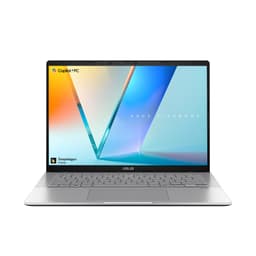
The ASUS Vivobook S 14 S3407QA is a Copilot+ PC built around Qualcomm's Snapdragon X Plus processor, and it represents one of the more nuanced choices in this selection for Premiere Pro users. ARM-based Windows laptops have historically struggled with Adobe applications due to compatibility issues, but Adobe has made significant progress with native ARM support in Premiere Pro since late 2024, and the current version runs natively on Snapdragon X Series hardware with reasonable performance. This machine suits the editor who values battery life, fanless or near-silent operation and a high-resolution display, and who primarily works with H.264 or H.265 footage rather than demanding RAW formats.
The 14-inch IPS display at 2560x1600 resolution is sharp and detailed, making it comfortable to work on for extended editing sessions. The 2.8K resolution means more of your Premiere Pro interface is visible at once, reducing the need to scroll or zoom panels. Colour accuracy is good for an IPS panel, and the display is bright enough for use in well-lit environments.
The two USB 4 Type-C ports are a highlight of this machine's connectivity. USB 4 supports Thunderbolt-compatible devices, fast external NVMe storage and external displays, which is important for editors who need to expand their storage or connect to a larger monitor. The two USB 3.2 Type-A ports and HDMI 2.1 output round out a connectivity package that is well suited to a portable editing setup.
The 16GB of LPDDR5X RAM and 1TB PCIe Gen4 SSD are solid specifications for Premiere Pro work. The large SSD means you can keep more project files locally, reducing the need to constantly manage storage. The Snapdragon X Plus's integrated Adreno GPU does not support CUDA, so GPU-accelerated effects in Premiere Pro will rely on OpenCL rather than CUDA, which is less efficient. Export times for complex timelines will be longer than on a machine with a discrete NVIDIA GPU.
Battery life is one of the Snapdragon X Plus's strongest suits, and the Vivobook S 14 should provide significantly longer runtime than the Intel and AMD alternatives in this selection during light to moderate editing tasks. For editors who work away from mains power frequently, this is a meaningful advantage.
Verdict: A strong portable editing machine with excellent connectivity and display quality, though ARM compatibility with Premiere Pro warrants checking your specific workflow before purchasing.
Pros
- 2560x1600 IPS display is sharp and comfortable for detailed editing work
- USB 4 ports support fast external storage and display expansion
- 1TB PCIe Gen4 SSD provides ample local project storage
Cons
- Snapdragon X Plus ARM architecture means no CUDA acceleration, slowing GPU-heavy exports
- Some Premiere Pro plugins and third-party codecs may still have ARM compatibility issues
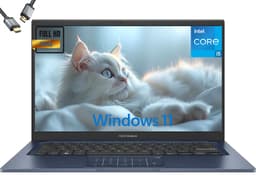
The ASUS Vivobook 14 (2025) is the best value proposition in this selection for Premiere Pro editors who are working within a tighter budget but refuse to compromise on RAM or storage. With 24GB of DDR4 RAM and a 2TB SSD, it outspecifies several more expensive machines in terms of raw memory and storage capacity, making it an appealing choice for editors who juggle multiple large projects simultaneously or who prefer to keep extensive media libraries on their internal drive.
The Intel Core i5-1334U is a 13th-generation U-series processor, which means it is optimised for efficiency rather than peak performance. It handles 1080p and straightforward 4K H.264 timelines in Premiere Pro without excessive difficulty, but complex sequences with many GPU-accelerated effects, heavy colour grading or high-bitrate RAW footage will tax it more than an H-class or HX-class processor would. The Intel UHD Graphics integrated GPU does not support CUDA, so GPU-accelerated effects rely on Intel's Quick Sync and OpenCL, which are functional but less powerful than a discrete NVIDIA GPU.
The 14-inch FHD IPS display is clear and comfortable for editing work. At 1920x1080, it does not offer the extra screen real estate of the Samsung or ASUS Vivobook S 14, but it is a perfectly serviceable panel for editing tasks. The slim form factor and relatively light build make it a genuinely portable machine, which is important for editors who work across multiple locations.
The 24GB of RAM is the standout specification here. Premiere Pro benefits enormously from ample memory, as it uses RAM for media cache, preview files and background rendering. Having 24GB means you are unlikely to encounter memory bottlenecks even when running Premiere Pro alongside After Effects, Audition or a browser with multiple tabs open. The 2TB SSD is equally impressive at this price point, providing enough space for several ongoing projects with their associated media without immediately reaching for an external drive.
For editors who primarily work with H.264 or H.265 footage from mirrorless cameras, action cameras or smartphones, the Vivobook 14 (2025) provides a capable and cost-effective editing platform. It is not the fastest machine in this selection, but its memory and storage advantages make it a practical daily driver for many editing workflows.
Verdict: The best value pick for Premiere Pro editors who prioritise RAM and storage capacity over raw CPU or GPU performance.
Pros
- 24GB RAM provides excellent headroom for Premiere Pro alongside other Adobe applications
- 2TB SSD is exceptionally generous at this price point for storing project media
Cons
- Intel Core i5-1334U U-series processor struggles with complex 4K timelines and heavy effects
- Intel UHD integrated graphics lacks CUDA, making GPU-accelerated exports slower than discrete GPU alternatives
- No touchscreen or convertible functionality despite being listed in a 2-in-1 category
Buying Guide
RAM: How Much Do You Actually Need?
Adobe recommends a minimum of 8GB of RAM for Premiere Pro, but in practice, 16GB is the realistic minimum for comfortable 4K editing. If you work with multiple open applications, use After Effects or Audition alongside Premiere Pro, or edit high-bitrate footage such as BRAW or ARRIRAW, 24GB or 32GB will make a tangible difference to your workflow. RAM that is soldered to the motherboard, as is common in thin laptops, cannot be upgraded later, so it is worth buying as much as you can afford at the outset. All five machines in this selection offer at least 16GB, with two offering 24GB and one offering 32GB.
GPU: Integrated vs Discrete
Premiere Pro's Mercury Playback Engine uses GPU acceleration to render effects, handle colour grading and accelerate exports. NVIDIA GPUs benefit from CUDA acceleration, which is the most efficient path for Premiere Pro. AMD GPUs use OpenCL, and Intel Arc GPUs support both AV1 hardware encoding and Quick Sync. Integrated graphics, whether Intel UHD, Intel Iris Xe or Qualcomm Adreno, can handle Premiere Pro but will be slower for GPU-heavy timelines and exports. If your budget allows, choosing a machine with a discrete NVIDIA GPU will noticeably improve your editing experience, particularly for effects-heavy work.
Display Quality and Resolution
Colour accuracy is critical for video editing. An IPS panel with good P3 or sRGB coverage is the minimum requirement for reliable colour work. OLED or AMOLED displays offer deeper blacks and more vibrant colours but can exhibit slight colour shifts at certain brightness levels. Resolution matters too: a 2560x1600 or higher display gives you more screen real estate for Premiere Pro's panels and timeline, reducing the need to scroll or collapse panels. If you plan to do professional colour grading, connecting to a calibrated external monitor via HDMI or Thunderbolt is always advisable, regardless of your laptop's internal display quality.
Storage: Speed and Capacity
Video files are large. A single minute of 4K H.264 footage can occupy 300MB to 1GB depending on bitrate, and RAW formats are considerably larger. A fast NVMe SSD, ideally PCIe Gen4, ensures that Premiere Pro can read and write media cache files quickly, which directly affects playback smoothness and export speed. Aim for at least 512GB of internal storage, though 1TB or more is preferable if you want to keep project media on your internal drive. An external SSD connected via Thunderbolt 4 or USB 4 is a practical supplement for archiving completed projects.
Connectivity: What Ports Do You Need?
Thunderbolt 4 or USB 4 ports are the most versatile connections for a Premiere Pro editor. They support fast external NVMe drives, external GPU enclosures, 4K displays and docking stations through a single cable. HDMI is useful for connecting to a larger monitor or projector. A card reader, whether SD or microSD, saves time when ingesting footage from cameras. USB-A ports remain practical for legacy peripherals. If you plan to work at a desk with multiple peripherals, a docking station connected via Thunderbolt will simplify your setup considerably.
2-in-1 Functionality: Is It Worth It for Editing?
A genuine 2-in-1 with a 360-degree hinge and touchscreen adds versatility that can be genuinely useful for Premiere Pro editors. Touching the timeline to scrub footage, using a stylus to annotate projects or adjust colour wheels, and folding the machine into tent mode for client review sessions are all practical benefits. However, 2-in-1 machines sometimes sacrifice performance or connectivity compared to equivalent clamshell laptops at the same price. The Samsung Galaxy Book4 Pro 360 is the only true 2-in-1 in this selection, and it manages to combine convertible functionality with professional-grade connectivity and display quality.
For Premiere Pro editors who specifically want a 2-in-1 laptop, the Samsung Galaxy Book4 Pro 360 is the clear overall winner. Its Dynamic AMOLED 2X display is the finest in this selection for colour-critical work, its Intel Core Ultra 7 155H handles 4K editing comfortably, and its two Thunderbolt 4 ports provide the connectivity that professional video work demands. The 360-degree hinge and S Pen stylus add genuine value for editors who work across different environments. If budget is the primary concern and you are willing to accept a conventional clamshell design, the ASUS Vivobook 14 (2025) offers an impressive 24GB of RAM and a 2TB SSD at a price that makes it the most practical value pick for editors working with standard camera footage. For those who need maximum raw performance and can justify the investment, the Alienware 16x Aurora with its RTX 5070 and 32GB of RAM will handle the most demanding Premiere Pro workflows without compromise.