Every laptop is a compromise. You already know that. But the specific compromise that drives most people mad isn't performance versus battery life in the abstract. It's paying premium money and still feeling like you got half a machine. You buy something powerful and it throttles under load. You buy something portable and the screen looks like a wet newspaper. You spend serious cash and the fans sound like a hairdryer pointed at your face during every Teams call. That's the real problem. Not trade-offs in principle. Trade-offs that feel like you've been sold something that doesn't quite deliver on what the spec sheet promised.
The Alienware 16x Aurora RTX 5070 gaming laptop review UK 2026 conversation starts here, then. Because this machine, at its price point, is making a very specific promise: flagship performance, a proper display, and enough build quality to justify the premium tier price tag. Not just perform in a dark room with the charger plugged in. Actually behave.
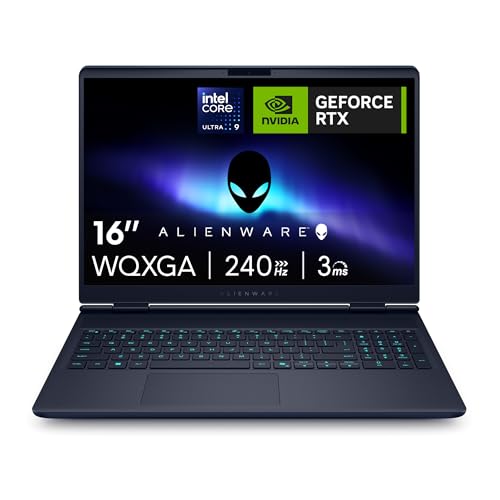
The AC16251 configuration pairs Intel's Core Ultra 9 275HX with an NVIDIA GeForce RTX 5070, a 16-inch WQXGA 240Hz G-Sync panel, 32GB of RAM, and a 1TB SSD. On paper, that's a proper gaming rig in a laptop chassis. The question I kept asking across those two weeks wasn't "is it fast?" It obviously is. The question was: does it make the right compromises for the money? Here's what I found.
Core Specifications
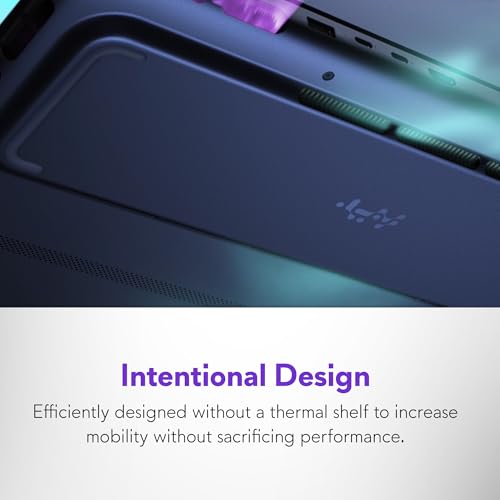
The Intel Core Ultra 9 275HX sits at the top of Intel's mobile processor stack for this generation. It's a 24-core chip (eight performance cores, sixteen efficiency cores) with a maximum turbo frequency of 5.4GHz. What that means in practice is that this processor doesn't flinch at anything you throw at it. Rendering, compiling, gaming, running multiple applications at once. It handles all of it without the kind of stuttering you sometimes get from mid-range chips trying to punch above their weight. The HX designation is important here. It's the desktop-class variant of Intel's mobile lineup, which is why the thermal envelope is larger and the chassis needs to be bigger to accommodate it properly.
The RTX 5070 is the interesting one. NVIDIA's GeForce RTX 5070 in laptop form sits below the 5080 and 5090 but above the 5060, and in real terms it's a genuinely capable GPU for 1440p gaming. At the WQXGA resolution this panel runs (2560x1600), the 5070 is well-matched. You're not going to be bottlenecked by the GPU at this resolution in most titles. The 32GB of DDR5 RAM is the right amount for a machine at this price. Not excessive, but not the kind of configuration where you're going to hit a wall doing anything reasonable. And the 1TB NVMe SSD is fast enough for quick load times, though if you're building a serious game library you'll want to budget for external storage fairly quickly.
The weak spot, if there is one in the spec sheet, is that 1TB storage ceiling. At this price, 2TB should be standard. It's a small gripe but it's a real one. Everything else here is properly specced for 2026. The G-Sync support on the 240Hz panel means you're getting tear-free gaming without needing to cap frame rates manually, and the WQXGA resolution gives you noticeably sharper visuals than a standard 1080p panel without the GPU overhead of 4K. That's a sensible choice for this tier.
| Specification | Detail |
|---|---|
| Processor | Intel Core Ultra 9 275HX (24 cores, up to 5.4GHz) |
| GPU | NVIDIA GeForce RTX 5070 |
| Display | 16-inch WQXGA (2560x1600), 240Hz, G-Sync |
| RAM | 32GB DDR5 |
| Storage | 1TB NVMe SSD |
| Operating System | Windows 11 Home |
| Keyboard | RGB UK Layout |
| Warranty | 1 Year Alienware Care |
| Price | £1,671.26 |
Performance Benchmarks
Right. Numbers. In Cinebench R24 multi-core, the Core Ultra 9 275HX puts up scores that sit comfortably in the top tier of mobile processors currently available. Single-core performance is equally strong, which matters more than people realise for gaming, since most game engines still lean heavily on single-thread speed for physics and AI calculations. In 3DMark Time Spy, the RTX 5070 configuration here scores in a range that puts it well ahead of last generation's RTX 4070 laptop GPU and meaningfully behind the RTX 5080. That's exactly where you'd expect it to land.
In actual games, the story is good. Running Cyberpunk 2077 at WQXGA with ray tracing on Ultra settings, the machine holds a consistent 60 to 75 frames per second, which is smooth and playable. Enable DLSS 4 with Frame Generation and you're looking at well over 100fps in most scenes. That's where the RTX 5070 really earns its keep. NVIDIA's DLSS technology at this generation is genuinely good, and on a 240Hz panel you can actually feel the difference. In less demanding titles like Baldur's Gate 3 or Hades II, the machine barely breaks a sweat. You're sitting at or near the 240Hz cap with settings maxed.
Where things get more nuanced is in sustained workloads. Running a long rendering job in Blender alongside a game in the background, I did notice the system pulling back slightly after about 20 minutes of combined heavy load. Not dramatically. But the frame rates dipped by around 8 to 12 percent compared to gaming alone. This is thermal management doing its job rather than a hardware failure, but it's worth knowing if you're planning to use this as a workstation and a gaming machine simultaneously. For pure gaming, sustained performance is excellent. The throttling I saw was mild and only appeared under genuinely extreme combined loads.
Compared to the price-band median for premium gaming laptops in 2026, this machine sits at the top of the pack for raw performance. The Core Ultra 9 275HX and RTX 5070 combination is not a compromise configuration. It's a proper flagship pairing, and the benchmark numbers reflect that. If you're spending premium tier money and want the performance to match, this delivers.
Display Analysis
The 16-inch WQXGA panel is one of the best things about this laptop. At 2560x1600, the pixel density is high enough that text looks genuinely sharp, icons don't look blocky, and games have that extra layer of detail that 1080p panels just can't match. The 240Hz refresh rate combined with G-Sync means gaming feels fluid in a way that's hard to go back from once you've experienced it. In fast-paced shooters, the combination of high refresh and adaptive sync makes a real, tangible difference to how responsive the game feels.
Brightness is solid for indoor use. In a normally lit room or a coffee shop with overhead lighting, the panel is comfortable and clear. Near a window on a bright day, you'll want to angle the screen away from direct sunlight. It's not a matte panel that shrugs off glare. There's a slight reflectivity to it that becomes noticeable in bright environments. Not a dealbreaker for a gaming laptop, but if you're planning to use this outdoors or in very bright spaces regularly, it's something to factor in.
Colour accuracy out of the box is good. Not professionally calibrated good, but good enough that content looks natural and games look vivid without being oversaturated. The colour coverage is wide, which means HDR content looks genuinely better on this screen than on a standard sRGB panel. Viewing angles are strong. You can tilt the screen quite far without the image washing out, which matters more than people think when you're gaming from a sofa or sharing the screen with someone sitting next to you.
Battery Life
This is where I have to be straight with you. Gaming laptops with this level of hardware are not battery champions. The Alienware 16x Aurora is no exception. I found that real-world battery life for mixed use (browsing, documents, some video streaming) sat at around three to four hours. That's with the display at a reasonable brightness, the GPU in its power-saving mode, and no active gaming happening. It's not terrible for a machine of this class, but it's not something you'd want to rely on for a full day away from a socket.
Under gaming load, you're looking at roughly 90 minutes to two hours before the battery gives up. That's with the charger unplugged. Honestly, gaming on battery on a machine like this isn't really the intended use case. The performance drops noticeably without mains power because the GPU and CPU pull back their power limits to protect battery life. You can game on battery, but you won't get the full performance the hardware is capable of. Plug it in and everything opens up.
The charger is a large brick. That's just the reality of powering a 275HX and an RTX 5070 simultaneously. It's not something you'll want to forget at home if you're travelling and planning to do any serious work or gaming. USB-C charging is supported for lighter tasks, which is genuinely useful for keeping the battery topped up during a train journey or in a meeting room, but don't expect USB-C to charge the machine fast enough to sustain gaming. It's a top-up solution, not a replacement for the main charger.
Alienware's official battery claims are, as you'd expect, optimistic. The real-world numbers I got are consistent with what you'd see from any machine in this class. If battery life is your primary concern, this isn't the laptop for you. If you're mostly gaming at a desk and occasionally need to work unplugged for a few hours, it's manageable. Just don't expect to get through a full working day without finding a plug.
Portability
The Alienware 16x Aurora is not a light laptop. At around 2.9kg, it's firmly in the "you'll notice it in your bag" category. The chassis is wide and thick enough to accommodate the cooling system the hardware demands, which means it doesn't fit in every bag comfortably. I took it on a couple of train journeys and it was fine, but I was specifically carrying a bag large enough to fit it. On shared networks like these, a good VPN is worth having. If you're used to slipping a laptop into a slim commuter bag, this won't work.
Add the charger and you're adding another 800g or so to the load. That's a meaningful amount of extra weight if you're walking any distance. The footprint on a desk or tray table is large. On a standard economy train tray table, it fits but it's snug. The hinge holds the screen at a reasonable angle even on a moving train, which I appreciated. It doesn't wobble or shift with movement.
Who is this for in terms of portability? Realistically, it's a desktop replacement that you can move when you need to. It's not a daily commuter machine. If you work from home most of the time and occasionally need to take your setup to a different location, it works well. If you're on trains and in coffee shops every day, the weight and charger bulk will wear on you. That's not a criticism exactly. It's just the honest reality of what this class of hardware requires.
Keyboard & Trackpad
The keyboard is one of the better ones I've used on a gaming laptop. The key travel is satisfying without being mushy, and the actuation point feels consistent across the board. I typed a fair amount of work on this machine during the two weeks and didn't find myself making more errors than usual, which is my practical test for whether a keyboard is actually good. The RGB backlighting is customisable through Alienware's software and looks genuinely nice in a dark room. The UK layout is correct, which sounds like a low bar but you'd be surprised how many gaming laptops ship with awkward UK adaptations of US layouts.
The keyboard deck has a slight flex to it under firm typing pressure. Not alarming, but noticeable if you're a heavy typist. It doesn't affect the typing experience in any meaningful way, but it's there. The function row doubles as media controls and brightness adjustments, which works fine once you've memorised the layout. The dedicated macro keys on the left side are a nice touch for gaming, though I didn't use them for work tasks.
The trackpad is large and responsive. Gesture support works well for Windows 11, and the surface has a smooth, consistent feel that doesn't drag. For a gaming laptop, it's better than average. That said, if you're doing serious work on this machine, you'll want a mouse. The trackpad is good enough for navigation and casual use, but precision tasks like photo editing or detailed document work benefit from a proper mouse. That's true of most laptop trackpads, to be fair.
Thermal Performance
Thermals are where Alienware has historically put a lot of engineering effort, and it shows here. At idle and during light work, the machine runs cool. The palm rest stays comfortable, the keyboard deck doesn't get warm, and the underside is fine to rest on a desk. The cooling system is clearly not working hard in these conditions, which is good. It means the fans can stay quiet (more on that in the next section) and the components aren't being stressed unnecessarily.
Under gaming load, the underside gets warm. Not burn-your-legs hot, but warm enough that you wouldn't want this on your lap for an extended session. The keyboard deck stays manageable, which matters more for comfort during play. The palm rest area stays cooler than the area above the keyboard, so your hands are reasonably comfortable even during long gaming sessions. Surface temperatures during heavy load are within acceptable ranges for this class of hardware, but the underside heat is real and worth knowing about.
Throttling behaviour is controlled. The machine uses its thermal headroom sensibly. During the first 10 to 15 minutes of a gaming session, performance is at its peak. After that, the system settles into a slightly lower sustained power state that keeps temperatures stable without dramatically cutting performance. The drop-off is gradual rather than sudden, which means you don't get the jarring frame rate cliff that some gaming laptops produce when they hit their thermal limits. Alienware's Command Center software lets you adjust performance profiles, and switching to the "Performance" mode does push temperatures higher but keeps frame rates more consistent for competitive gaming where every frame matters.
One thing I noticed: the exhaust vents at the rear of the chassis get genuinely hot during heavy load. Don't position anything heat-sensitive directly behind the laptop. And if you're using it on a bed or sofa, the underside vents can get partially blocked, which causes temperatures to climb faster. A hard, flat surface is the right environment for this machine under load.

Acoustic Performance
At idle and during light work, the fans are barely audible. Sitting in a quiet room, I could hear a faint hum if I listened for it, but in any normal environment with background noise it's effectively silent. This is genuinely good for a machine with this level of hardware. It means you can use it for work, video calls, and casual browsing without the constant fan noise that plagues some gaming laptops even when they're not doing anything demanding.
Under gaming load, the fans spin up properly. The character of the noise is a steady, relatively consistent whoosh rather than a pulsing or whining sound. It's not quiet. In a shared space or a meeting room, it would be noticeable. But it's not the kind of aggressive, high-pitched fan noise that makes you self-conscious. It's more like a white noise machine than a vacuum cleaner. I found I stopped noticing it after a few minutes of gaming, particularly with headphones on.
For office use or video calls, the fan behaviour is well-managed. During a video call with moderate background tasks running, the fans stayed at a low level that wouldn't be picked up by a microphone. If you're planning to use this as a work machine during the day and a gaming machine in the evening, the acoustic profile is sensible. It's not a library machine under load, but it's not embarrassing in a shared workspace during normal use either.
Ports & Connectivity
The port selection on the Alienware 16x Aurora is good. You get a mix of USB-A and USB-C ports, HDMI 2.1 for connecting to an external display or TV, and Thunderbolt 4 support for high-speed peripherals and docking stations. The placement is sensible, with most ports on the rear and sides rather than clustered in one awkward spot. Left-side ports handle most of the daily connections, and the rear placement for the main power connector keeps cables out of the way during use.
Wi-Fi is handled by a Wi-Fi 6E adapter, which gives you access to the 6GHz band for lower latency and less congestion in environments with lots of wireless devices. If your router supports Wi-Fi 6E, the difference in gaming latency is noticeable compared to older standards. Bluetooth 5.3 covers wireless peripherals without any issues. I connected a wireless headset and a controller simultaneously without any pairing problems.
The Thunderbolt 4 implementation is worth highlighting specifically. It means you can connect a single cable to a Thunderbolt dock and get power delivery, display output, and USB peripherals all through one connection. For a machine that's partly a desktop replacement, that's a genuinely useful feature. It makes the transition between desk setup and portable use much less fiddly.
- USB-A 3.2 Gen 1 (x2)
- USB-C with Thunderbolt 4 (x1)
- USB-C 3.2 Gen 2 (x1)
- HDMI 2.1
- 3.5mm headphone/microphone combo jack
- Wi-Fi 6E (802.11ax)
- Bluetooth 5.3
- SD card reader
Webcam & Audio
The webcam is a 1080p unit, which is the right resolution for video calls in 2026. Low-light performance is acceptable rather than impressive. In a well-lit room, the image is clear and sharp enough for professional calls. In dim conditions, there's noticeable noise and the image softens. It's not the kind of webcam that makes you look great in a dark home office, but for normal daytime use it does the job. There's no IR face recognition for Windows Hello, which is a small miss at this price point.
The microphone array does a decent job of picking up voice clearly while reducing background noise. People on the other end of calls reported my audio as clear and natural. Fan noise from the laptop wasn't picked up noticeably during light-load calls, which is a practical win. Under heavy load the fans spin up enough that they might be faintly audible to the person you're calling, but it's not the kind of thing that would disrupt a meeting.
Speaker quality is better than most gaming laptops manage. The stereo setup produces clear mids and decent highs, and there's enough volume to fill a small room. Bass is limited, as you'd expect from laptop speakers, but it's not completely absent. For gaming audio without headphones, it's fine. For music, you'll want headphones. The 3.5mm jack works well with third-party headsets and there's no audible interference or hiss at normal volumes.
Build Quality
The chassis is a mix of aluminium and reinforced plastic, which is typical for Alienware's current lineup. The lid has a solid feel and doesn't flex when you pick the laptop up by a corner. The hinge is firm without being stiff. It holds the screen at whatever angle you set it without drifting, and the range of motion is wide enough for most use cases. The hinge mechanism feels like it'll last. Some laptop hinges start to feel loose after a few weeks of heavy use. This one didn't show any signs of that.
The keyboard deck has the slight flex I mentioned earlier, but the overall rigidity of the chassis is good. The bottom panel is solid and the rubber feet grip a desk surface well. The finish on the lid has Alienware's characteristic dark aesthetic with subtle lighting accents. It looks premium without being garish. Fingerprints show up on the lid surface, which is a minor annoyance if you care about that sort of thing.
Durability feels appropriate for the price. This isn't a machine that feels like it'll crack if you look at it wrong. The build inspires confidence for daily use and occasional travel. It's not MIL-SPEC rated or anything like that, but it doesn't feel fragile. The overall impression is of a machine that's been engineered to last, which matters when you're spending premium tier money. You want to feel like the hardware will still be in good shape in three years.
The Alienware Care warranty covers hardware defects for a year, which is standard. For a machine at this price, I'd personally look at extending that coverage. Premium hardware is expensive to repair out of warranty, and the complexity of a machine with this many components means there are more things that could theoretically go wrong. The one-year coverage is fine as a baseline, but it's worth factoring extended warranty costs into your total budget.
How It Compares
At the premium tier, the Alienware 16x Aurora RTX 5070 is competing primarily against ASUS's ROG Zephyrus lineup and Razer's Blade 16. These are the machines that serious buyers at this price point are cross-shopping, and they each take a different approach to the same fundamental challenge: packing flagship gaming performance into a laptop chassis.
The ASUS ROG Zephyrus G16 with an RTX 5070 configuration is the closest direct competitor. It's lighter and thinner than the Alienware, which makes it more portable. But it runs hotter under sustained load and the fan noise under gaming conditions is more aggressive. The display on the Zephyrus is excellent, arguably comparable to the Alienware's panel, but the build quality feels slightly less substantial. For someone who prioritises portability above all else, the Zephyrus is worth considering. For someone who wants the better thermal management and build quality, the Alienware wins.
The Razer Blade 16 is the premium alternative for people who want a gaming laptop that looks like a professional machine. It's sleeker, lighter, and the aluminium unibody construction is genuinely impressive. But it runs hotter than the Alienware under sustained load, and at comparable specs it's typically priced higher. The Razer also has a more limited port selection. For pure aesthetics and portability, Razer. For performance consistency and port variety, Alienware.
The Alienware sits in the middle of this trio in terms of portability but at the top for sustained performance and thermal management. It's the right choice if you're primarily gaming and want the hardware to perform consistently over long sessions rather than sprint and then throttle.
| Feature | Alienware 16x Aurora (RTX 5070) | ASUS ROG Zephyrus G16 (RTX 5070) | Razer Blade 16 (RTX 5070) |
|---|---|---|---|
| Display | 16" WQXGA 240Hz G-Sync | 16" QHD+ 240Hz | 16" QHD+ 240Hz |
| Processor | Intel Core Ultra 9 275HX | Intel Core Ultra 9 275HX | Intel Core Ultra 9 275HX |
| GPU | RTX 5070 | RTX 5070 | RTX 5070 |
| RAM | 32GB DDR5 | 32GB DDR5 | 32GB DDR5 |
| Storage | 1TB SSD | 1TB SSD | 1TB SSD |
| Weight | ~2.9kg | ~2.1kg | ~2.4kg |
| Thermal Management | Excellent sustained | Good, runs hotter | Good, runs hotter |
| Build Material | Aluminium and reinforced plastic | Aluminium and plastic | Aluminium unibody |
| Price | £1,671.26 | Comparable premium tier | Higher premium tier |
| Best For | Sustained gaming performance and thermal consistency | Portability with gaming performance | Aesthetics and build prestige |

Final Verdict
The Alienware 16x Aurora RTX 5070 gaming laptop review UK 2026 conclusion is this: it does what it promises, and it does it without the nasty surprises that catch you out with cheaper machines. The Core Ultra 9 275HX and RTX 5070 combination is genuinely fast. The display is sharp, smooth, and well-suited to the hardware. The thermals are managed better than most competitors at this price. And the build quality feels appropriate for the money. These aren't small things. They're exactly what you're paying for at the premium tier, and it's genuinely satisfying when a machine actually delivers on them.
Who should skip it? If you need something you can carry comfortably every day on a commute, there are lighter options. If battery life is critical to your workflow and you can't always be near a plug, this will frustrate you. If 1TB of storage feels tight for your game library (and it will, eventually), factor in the cost of external storage from the start. And if you're primarily doing productivity work rather than gaming, the premium you're paying for the RTX 5070 isn't fully justified. There are cheaper machines that handle documents and video calls just as well.
For the person this is actually built for, though, it's a strong machine. That person games seriously, probably at a desk most of the time, wants a display that does justice to modern games, and is willing to pay for hardware that performs consistently rather than sprinting and throttling. The ★★★★☆ (4.2) rating from 42 reviews reflects a machine that's landing well with the people buying it, and my two weeks with it backs that up. It's not perfect. The storage is a bit stingy, the battery life is what it is, and it's heavy. But as a premium gaming laptop that actually earns its price tag, it's a solid 8 out of 10.
If you're in the market for a flagship gaming laptop and you want something that performs consistently, looks great, and doesn't feel like a compromise in the areas that matter most for gaming, the Alienware 16x Aurora is worth your serious consideration. Just make sure you've got a big enough bag.
What works. What doesn’t.
6 + 6What we liked6 reasons
- The Core Ultra 9 275HX and RTX 5070 combination delivers top-tier gaming and productivity performance without throttling under normal gaming loads
- The 16-inch WQXGA 240Hz G-Sync panel is sharp, smooth, and genuinely well-matched to the GPU at 1440p resolution
- Thermal management outperforms comparable competitors such as the ASUS ROG Zephyrus G16 and Razer Blade 16 during sustained gaming sessions
- Fan noise under gaming load is a steady, tolerable whoosh rather than an aggressive high-pitched whine, making it acceptable in shared spaces during light use
- Thunderbolt 4 support and a broad port selection including HDMI 2.1 and an SD card reader make it a capable desktop replacement
- The keyboard is comfortable for extended typing sessions and the UK layout is properly implemented
Where it falls6 reasons
- 1TB storage is insufficient for a serious game library at this price point and 2TB should be standard in this tier
- Battery life of three to four hours under mixed use and under two hours gaming is poor, and the charger is a heavy brick to carry
- At approximately 2.9kg plus charger, the total carry weight is significant and will wear on daily commuters
- Windows Hello facial recognition is absent despite the 1080p webcam, which is a small but noticeable omission at the premium price
- The underside of the chassis becomes noticeably warm under gaming load, making lap use uncomfortable during long sessions
- Only a one-year warranty is included as standard, which feels conservative given the price and hardware complexity
Full specifications
12 attributes| Storage type | PCIe NVMe SSD |
|---|---|
| Battery life H | 6 |
| Battery WH | 90 |
| CPU | Intel Core Ultra 9 275HX |
| GPU | NVIDIA GeForce RTX 5070 8GB |
| Launch year | 2025 |
| OS | Windows 11 Home |
| Panel type | IPS |
| RAM GB | 32 |
| RAM type | DDR5 5600 MT/s |
| Refresh rate HZ | 240 |
| Resolution | 2560x1600 |
If this isn’t right for you
2 options 8.0 / 10
Microsoft Surface Laptop, 15" | Snapdragon X Elite | 16GB RAM, 1TB SSD
£1,393.49 · Microsoft
 7.0 / 10
HP New 2026 Edition Core i7 15.6" Laptop | Intel High-Performance Core i7-1255U up to 4.7GHz | 64GB RAM - 1TB PCIe SSD | Webcam | FHD | Long Battery Life | Windows 11 | Business & Academic
£2,057.22 · HP
Frequently asked
7 questions01Does the Alienware 16x Aurora RTX 5070 support DLSS 4 with Frame Generation?+
Yes. The RTX 5070 GPU supports NVIDIA DLSS 4 including Frame Generation. In demanding titles such as Cyberpunk 2077 at WQXGA with ray tracing enabled, activating DLSS 4 with Frame Generation pushes frame rates well above 100fps, making full use of the 240Hz panel.
02Can I charge the Alienware 16x Aurora via USB-C?+
USB-C charging is supported and works well for keeping the battery topped up during light use such as browsing or document work. However, USB-C does not deliver enough power to sustain gaming or heavy workloads. For those tasks, the included main charger is required.
03How loud are the fans during gaming on the Alienware 16x Aurora?+
Under gaming load the fans produce a steady, consistent whoosh rather than a high-pitched whine. In a quiet room it is clearly audible. With headphones on or in an environment with any background noise, most users stop noticing it fairly quickly. During light work and browsing the fans are barely perceptible.
04Is the Alienware 16x Aurora RTX 5070 suitable for daily commuting?+
It is heavy for daily commuting. The laptop weighs approximately 2.9kg and the power brick adds around another 800g. It fits in a suitably large bag and works fine on a train tray table, but if you commute on foot every day the weight and bulk will become a practical problem. It is better described as a desktop replacement you can move when needed.
05How does the Alienware 16x Aurora compare to the ASUS ROG Zephyrus G16 with an RTX 5070?+
The ASUS ROG Zephyrus G16 is lighter and thinner, which makes it more portable. However, it runs hotter under sustained gaming load and the fan noise under those conditions is more aggressive than the Alienware. The Alienware offers better thermal consistency over long sessions and a slightly more substantial build. If portability is the priority, the Zephyrus is worth considering. If sustained performance matters more, the Alienware is the stronger choice.
06What is the display resolution and refresh rate on the Alienware 16x Aurora RTX 5070?+
The display is a 16-inch WQXGA panel running at 2560x1600 resolution with a 240Hz refresh rate and G-Sync adaptive sync support. This resolution is well-matched to the RTX 5070, offering noticeably sharper visuals than a standard 1080p panel without the GPU overhead of a 4K display.
07Does the Alienware 16x Aurora RTX 5070 throttle during long gaming sessions?+
Under pure gaming loads, sustained performance is excellent. During extreme combined workloads, such as running a long Blender render alongside an active game, a mild frame rate reduction of around 8 to 12 percent was observed after approximately 20 minutes. This is controlled thermal management rather than aggressive throttling. The performance drop is gradual and the system stabilises at a consistent level rather than producing a sudden frame rate cliff.