Twitch streaming from a 2-in-1 laptop demands more than most everyday computing tasks. You need a processor capable of encoding video in real time, enough RAM to run OBS or Streamlabs alongside your game or creative software, and a display sharp enough to monitor your feed accurately. The 2-in-1 form factor adds genuine value here: a 360-degree hinge or detachable screen lets you reposition the display as a second monitor reference, use touch controls on your stream deck overlays, or fold into tent mode at a desk without a stand. Since last year, the arrival of Intel Core Ultra and Qualcomm Snapdragon X processors has shifted the efficiency story considerably, with several mid-range machines now delivering sustained encoding performance without throttling after twenty minutes. This guide covers five machines from the current UK catalogue, ranging from a budget touchscreen option to a premium AMOLED powerhouse, all assessed specifically for the demands of live Twitch broadcasting.
Quick Verdict
Best Overall: Samsung Galaxy Book4 Pro 360. The Dynamic AMOLED 2X display, Thunderbolt 4 ports, and Intel Core Ultra 7 155H make it the most capable all-round streaming 2-in-1 in this list. Best Value: Lenovo IdeaPad Slim 3 14-inch. The Core i5-12450H delivers genuine H-series encoding grunt at a price that leaves budget for a capture card or microphone upgrade.
The Samsung Galaxy Book4 Pro 360 is the standout choice for streamers who want a single device that handles everything without compromise. Powered by the Intel Core Ultra 7 155H, a 16-core processor built on Intel's latest architecture, it brings dedicated neural processing alongside strong multi-threaded performance. In practical streaming terms, that means OBS Studio running x264 or NVENC-equivalent software encoding at 1080p60 without the frame drops that plague older dual-core ultrabooks. The 16-inch Dynamic AMOLED 2X panel at 2880×1800 resolution is genuinely exceptional for monitoring your stream output: colours are vivid, contrast is deep, and the high pixel density means you can see exactly what your audience sees when you scale the preview down in OBS.
The 360-degree hinge is the feature that justifies the 2-in-1 classification for streamers. Fold it into tent mode and prop it behind your keyboard as a secondary reference display, or rotate fully into tablet mode to use touch-based stream management apps. The Intel Arc Graphics integrated GPU is capable enough for casual gaming streams at moderate settings, though dedicated GPU users will find it limiting for AAA titles. For creative streamers, podcasters, or those streaming productivity content, it is more than adequate.
Connectivity is excellent for a thin machine. Two Thunderbolt 4 ports allow connection to a Thunderbolt dock, external capture card, and 4K monitor simultaneously. The HDMI output means you can drive a second display directly without an adapter. The microSD slot is a small but useful touch for content creators who shoot supplementary footage on a camera. At 16 GB of RAM and 512 GB of SSD storage, the baseline configuration handles OBS, a browser with chat open, Discord, and Spotify without complaint, though heavy streamers may want to consider cloud storage for VOD archives.
Battery life is respectable for the class, and the build quality feels premium without being excessively heavy for a 16-inch machine. The keyboard is comfortable for extended sessions. The main drawback is price: this is a significant investment, and the integrated GPU means it is not suited to streaming graphically demanding games at high settings. For everything else, it is the most complete streaming 2-in-1 in this roundup.
Verdict: The best all-round 2-in-1 for Twitch streaming in this list. The AMOLED display, Core Ultra 7 CPU, and Thunderbolt 4 ports make it a genuinely professional-grade streaming machine.
Pros
- Intel Core Ultra 7 155H delivers sustained encoding performance without significant throttling
- Dynamic AMOLED 2X display is exceptional for monitoring stream output accurately
- Two Thunderbolt 4 ports enable docking, capture cards, and external displays simultaneously
Cons
- Integrated Intel Arc GPU limits streaming of graphically demanding AAA games at high settings
- Premium price point is a significant outlay compared to other options in this list
The ASUS Vivobook S 14 S3407QA runs on the Qualcomm Snapdragon X Plus processor, part of the Copilot+ PC wave that arrived in 2024. This ARM-based chip brings a fundamentally different approach to performance: exceptional power efficiency and a dedicated NPU for AI-accelerated tasks, paired with multi-core performance that competes with Intel's mid-range H-series in lightly threaded workloads. For Twitch streamers, the Snapdragon X Plus is capable of running OBS with software encoding at 1080p60, though it is worth noting that some OBS plugins and third-party streaming tools may require Rosetta-style x86 emulation under Windows on ARM, which can introduce minor compatibility considerations.
The 14-inch 2560×1600 IPS display is sharp and well-suited to monitoring stream previews. The 2.8K resolution gives you more screen real estate than a standard 1080p panel, which is useful when running OBS's multi-scene layout alongside a browser for chat. Colour accuracy is good for an IPS panel at this price, and the 16:10 aspect ratio adds vertical space that streamers who use tall chat overlays will appreciate.
Storage is a highlight: 1 TB of PCIe Gen4 SSD means you have ample space for local VOD recording, game installs, and stream assets without immediately needing external drives. The port selection is strong for a thin 14-inch machine: two USB 4 Type-C ports, two USB 3.2 Type-A ports, and HDMI 2.1. The USB 4 ports support DisplayPort Alt Mode and Power Delivery, so you can connect a 4K external monitor and charge simultaneously. HDMI 2.1 is a welcome upgrade over the 1.4b found on cheaper machines, supporting 4K at 120 Hz for external displays.
Battery life is one of the Snapdragon X Plus's strongest arguments: the efficiency of the ARM architecture means you can stream for longer on battery than Intel equivalents, which matters for streamers at events or without a convenient power socket. The Qualcomm Adreno integrated GPU is capable for light gaming and creative work, though like the Samsung, it will struggle with demanding 3D titles at high settings. The 16 GB of RAM is sufficient for most streaming setups.
Verdict: An excellent mid-range streaming 2-in-1 with outstanding battery life, a sharp 2.8K display, and generous 1 TB storage. ARM compatibility is worth checking for your specific streaming software stack.
Pros
- 1 TB PCIe Gen4 SSD provides ample local VOD recording and game storage
- Snapdragon X Plus delivers strong battery life for streaming away from a power socket
- HDMI 2.1 and USB 4 ports support high-bandwidth external displays without adapters
Cons
- Windows on ARM may require emulation for some OBS plugins and third-party streaming tools
- Qualcomm Adreno GPU is not suitable for streaming graphically intensive AAA titles
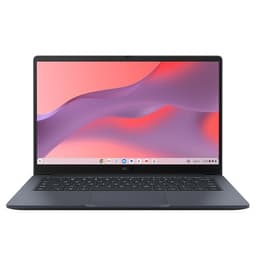
The ASUS Chromebook 14 CX1405CTA is the most affordable machine in this list, and it is important to be honest about what that means for Twitch streaming. ChromeOS does not natively support OBS Studio, the dominant streaming application on Windows. Streamers who want to use this machine for Twitch will need to rely on browser-based streaming tools such as Twitch's own Studio mode, Streamyard, or Restream, all of which run in the Chrome browser and do not require a native application install. For streamers whose content is screen-based, such as casual gaming via browser, creative tutorials, or talk shows, this approach is entirely workable.
The Intel Core 3 N355 processor is a modest chip designed for efficiency rather than sustained multi-threaded performance. It will handle browser-based streaming at 720p without significant issues, but 1080p60 encoding will push it. The 4 GB of RAM is the most significant limitation: browser-based streaming tools, a game tab, and a chat tab will consume this allocation quickly, and users may experience slowdown during active streams. The 64 GB of eMMC storage is tight for any local file work, though ChromeOS's cloud-first design mitigates this to some extent.
The 14-inch 1920×1080 IPS display is clear and comfortable, and the port selection is reasonable: two USB-C 3.2 Gen 1 ports, one USB-A, HDMI 1.4b, and a 3.5mm audio jack. The Kensington lock slot is a practical addition for streamers who use this machine in public spaces. The convertible ChromeOS form factor, if the CX1405CTA supports 360-degree rotation, adds the tablet and tent modes that make it a true 2-in-1.
Battery life is a strong point for ChromeOS devices: the efficient processor and lightweight operating system typically deliver all-day battery performance, which matters for streamers at events or on the move. The three-year warranty included with ASUS Chromebook products adds peace of mind at the budget end of the market.
This machine is best suited to casual streamers who are just starting out on Twitch, stream non-gaming content via browser tools, or need a secondary device for stream management rather than a primary encoding machine. It is not recommended for anyone who needs OBS, NDI, or plugin-heavy streaming setups.
Verdict: A budget entry point for casual Twitch streaming via browser tools. The 4 GB RAM and ChromeOS limitations mean it is not suitable for OBS-based or game-streaming setups, but it works for simple browser streams.
Pros
- Lowest price in the list makes it accessible for first-time streamers testing the waters on Twitch
- ChromeOS efficiency delivers strong battery life for streaming away from a power socket
- Three-year ASUS warranty provides reassurance at the budget end of the market
Cons
- 4 GB RAM is insufficient for running OBS alongside a game and chat without performance degradation
- ChromeOS does not support OBS Studio natively, restricting users to browser-based streaming tools only
- 64 GB eMMC storage leaves very little room for local content, game files, or stream asset libraries
Buying Guide
Processor: the most important specification for streaming
The CPU is the single most important component for Twitch streaming from a laptop. Live encoding is a sustained, multi-threaded workload: OBS Studio running x264 encoding at 1080p60 will use multiple cores continuously for the entire duration of your stream. Intel H-series processors, such as the Core i5-12450H in the Lenovo IdeaPad Slim 3, are designed for sustained performance with higher TDP allowances than U-series chips. Intel Core Ultra processors, like the Ultra 7 155H in the Samsung Galaxy Book4 Pro 360, add dedicated neural processing that accelerates AI-based encoding options. Qualcomm Snapdragon X Plus chips are efficient and capable but require checking software compatibility for Windows on ARM before committing.
As a practical minimum for OBS-based 1080p60 streaming, look for a processor with at least six cores and a base clock above 2.0 GHz. Avoid Celeron and Pentium chips for streaming: they lack the multi-threaded headroom needed for sustained encoding.
RAM: 16 GB is the practical minimum
Running OBS, a game, a browser with chat open, and Discord simultaneously will consume 10 to 14 GB of RAM on a typical streaming setup. Machines with 8 GB will experience page file usage, which introduces latency and frame drops. 16 GB is the minimum we recommend for any serious streaming setup. 24 GB or 32 GB gives you headroom for future software updates and more complex scene setups.
Storage: SSD speed matters for VOD recording
If you record local VODs alongside streaming, storage write speed becomes relevant. A PCIe NVMe SSD can sustain the write speeds needed for simultaneous streaming and recording at 1080p60 without dropped frames. eMMC storage, found in budget Chromebooks, is not suitable for local recording. Aim for at least 512 GB of NVMe SSD storage, with 1 TB preferred if you plan to keep game installs and a VOD archive locally.
Display: resolution and panel type for stream monitoring
A higher resolution display lets you run OBS's preview window at a larger size without it dominating the screen. AMOLED panels offer deeper contrast and more accurate colour, which helps when checking how your stream looks to viewers. IPS panels are a solid second choice. Avoid TN panels for streaming work: their limited viewing angles and colour accuracy make stream monitoring less reliable.
Ports: connectivity for streaming peripherals
Most streamers will want at least one USB-A port for a microphone or audio interface, one USB-C or Thunderbolt port for a capture card or dock, and HDMI for a secondary display. Thunderbolt 4 is the gold standard for bandwidth-hungry setups. Check that the USB-C port on your chosen machine supports data transfer, not just charging, as some budget machines include data-only or charge-only USB-C ports.
The 2-in-1 advantage for streamers
The 360-degree hinge is not just a gimmick for streaming use. Tent mode lets you prop the screen up as a reference display behind your keyboard, freeing desk space. Tablet mode with a touchscreen allows you to use touch-based stream management apps or draw overlays directly. If the 2-in-1 functionality is important to your workflow, confirm that the machine supports full 360-degree rotation rather than just a touchscreen on a standard clamshell design.
For the majority of Twitch streamers looking for a 2-in-1 laptop, the Samsung Galaxy Book4 Pro 360 is the clear overall winner. The Intel Core Ultra 7 155H delivers the sustained multi-threaded performance that live encoding demands, the Dynamic AMOLED 2X display is the best in this roundup for monitoring your stream output accurately, and the dual Thunderbolt 4 ports provide the connectivity headroom for docks, capture cards, and external displays. The 360-degree hinge adds genuine practical value for desk streaming setups. Yes, the price is high, but for a machine you will use for hours every day as a primary streaming workstation, the investment is justified.
For streamers who cannot stretch to the Samsung's price, the Lenovo IdeaPad Slim 3 14-inch is the best-value alternative. The Core i5-12450H H-series chip is a genuine performer for encoding workloads, the 16 GB RAM configuration handles multi-app streaming without complaint, and the practical port selection covers most streaming peripheral needs. The ASUS Vivobook S 14 sits between the two in price, offering excellent battery life and a sharp 2.8K display, with the caveat that Windows on ARM compatibility should be verified for your specific software stack before purchasing. The Morostron is a portable wildcard worth considering if you stream on the move and prioritise display quality at a budget price. The ASUS Chromebook 14 is honest value for casual browser-based streaming, but should not be considered by anyone who needs OBS or game streaming capability.