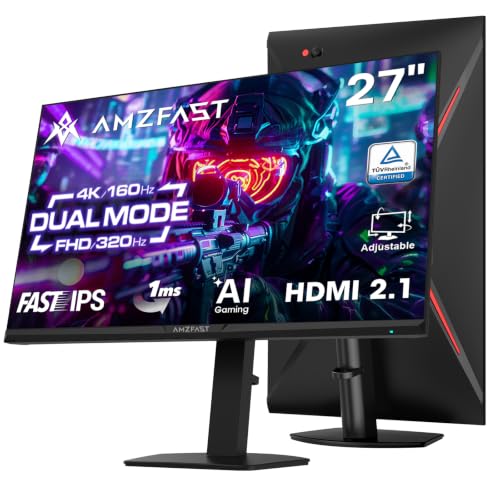
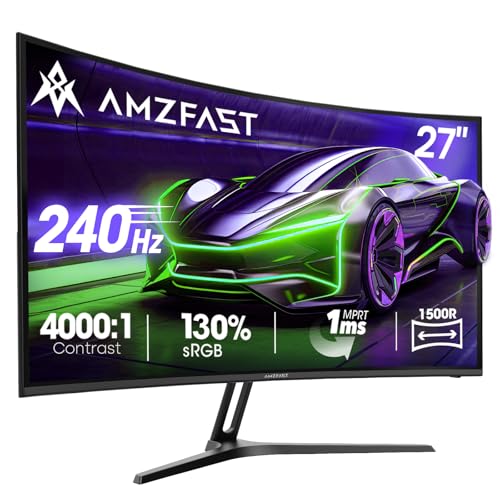
Here's something that drives display enthusiasts absolutely mad: the number on the box means almost nothing. When a monitor claims "1ms", that figure is almost always MPRT (Moving Picture Response Time), which is a backlight strobing measurement, not the actual pixel transition speed your GPU and panel are negotiating every single frame. Real grey-to-grey response times on budget VA and IPS panels routinely land somewhere between 4ms and 12ms at their best overdrive setting, and that gap between marketing and reality is where ghosting lives. So when Amzfast slaps "1ms MPRT" on the box of the AMZG27C1Q Pro, it's worth understanding exactly what that means and, more importantly, what it doesn't.
What this monitor actually is: a 27-inch 1440p curved VA panel running at 240Hz, sold in the mid-range bracket, aimed squarely at PC gamers and PS5 owners who want a meaningful step up from 1080p without spending OLED money. Thousands of owner reviews and a positive overall rating on Amazon suggest a lot of people are genuinely happy with it. That's not a number you can fake, and it's the first thing worth taking seriously. But 4.5 stars from a large crowd tells you about satisfaction, not about whether the specs hold up under scrutiny. So let's do that scrutiny properly.
The verdict, plainly: this is a solid mid-range gaming monitor that punches reasonably well for its price tier, with a few spec-sheet claims that deserve a reality check before you hand over your money. The 240Hz refresh rate is real and useful. The 1ms MPRT claim is marketing shorthand. The colour coverage is genuinely decent for a budget-adjacent panel. And the HDR is checkbox territory, not cinema territory. Read on for the full breakdown.
Core Specifications
The Amzfast AMZG27C1Q Pro is a 27-inch curved monitor with a 1500R curvature, running a 2560x1440 (QHD) resolution at 240Hz. The panel is listed as VA (Vertical Alignment), which is the key detail that shapes everything else about this screen's character. Resolution density at 27 inches gives you roughly 109 pixels per inch, which is a comfortable step up from the 82 PPI of a 1080p 27-inch panel. Text is noticeably sharper, game worlds look more detailed, and you're not squinting at muddy UI elements.
Connectivity is handled by one DisplayPort 1.4 and one HDMI 2.0 port. That's lean but functional. DisplayPort 1.4 can carry 1440p at 240Hz without compression, so PC users are sorted. HDMI 2.0, however, caps out at 1440p/144Hz or 1080p/240Hz, which matters if you're plugging in a PS5. The PS5's HDMI 2.1 output won't get any benefit from the extra bandwidth here, so PS5 owners are limited to 1440p at 120Hz maximum through this connection, assuming the console's 1440p output mode is enabled. before you buy.
The stand offers tilt adjustment but the listing doesn't specify swivel or height adjustment ranges beyond that, which we'll cover in the ergonomics section. VESA 100x100mm mounting is present, which is a genuine plus. The panel is rated at 2500:1 native contrast, 90% DCI-P3 colour coverage, 120% sRGB, and a peak brightness that the manufacturer lists as 350 nits typical with HDR peaks claimed higher. Full specs below.
| Specification | Detail |
|---|---|
| Screen Size | 27 inches |
| Resolution | 2560 x 1440 (QHD / 1440p) |
| Refresh Rate | 240Hz |
| Panel Type | VA (Vertical Alignment) |
| Curvature | 1500R |
| Response Time | 1ms MPRT |
| Adaptive Sync | FreeSync / Adaptive Sync (G-Sync Compatible) |
| Contrast Ratio | 2500:1 (native) |
| Colour Coverage | 90% DCI-P3 / 120% sRGB |
| HDR | HDR (DisplayHDR 400 tier, unlisted certification) |
| Brightness | 350 nits typical (manufacturer rated) |
| Ports | 1x DisplayPort 1.4, 1x HDMI 2.0 |
| VESA Mount | 100 x 100mm |
| Pixel Density | ~109 PPI |

Panel Technology
VA panels are genuinely interesting and genuinely frustrating in equal measure. The big win with VA over IPS is native contrast. Where a typical IPS panel delivers somewhere around 1000:1 to 1200:1 native contrast, a VA panel like this one is rated at 2500:1. In practice, that means blacks that actually look black rather than the "backlit grey" you get on IPS. For darker game environments, horror titles, cinematic content watched in a dim room, or anything where shadow detail and deep blacks matter, VA has a real and visible advantage. This is not a marginal difference. It's the kind of thing you notice immediately when switching between panel types.
The downside of VA is twofold. First, viewing angles. VA panels suffer more colour shift and contrast loss as you move off-axis compared to IPS. On a 27-inch curved panel, this is somewhat mitigated by the 1500R curvature pulling the edges slightly toward you, but it's not eliminated. If you're sitting squarely in front of this screen, you're fine. If you're sharing a screen with someone sitting beside you, they'll see a noticeably different image. Second, VA panels have historically struggled with "black smearing" or "dark level ghosting", where dark pixels transitioning to slightly-less-dark pixels move more slowly than bright pixel transitions. This is a known characteristic of VA technology and something to be aware of in fast-paced games with lots of dark scenes.
The 1500R curve is worth a mention on its own. At 27 inches, a 1500R curve is quite aggressive. Tighter than the 1800R curves common on ultrawide panels. Whether you like this is personal, but for a single-monitor setup at typical desk distances (60cm to 80cm), it works well and reduces the sense that the screen edges are further away. Owner reviews are broadly positive about the curve specifically, with several noting it feels more immersive than flat alternatives at the same size. One thing VA panels also bring to the table is better uniformity on large dark backgrounds compared to IPS, which can suffer from IPS glow in corners. The trade-off, as always, is that you're accepting the viewing angle compromise.
Display Quality
At 109 PPI, the Amzfast AMZG27C1Q Pro sits in a comfortable zone for desktop use. It's not the pixel-dense experience of a 4K panel at the same size (which would give you around 163 PPI), but 1440p at 27 inches is genuinely sharp. Text is clean, game assets have proper detail, and you're not pixel-peeping at individual dots unless you're sitting unreasonably close. For most people, 109 PPI at a normal viewing distance is the sweet spot where you get detail without needing Windows scaling gymnastics.
The anti-glare coating on VA panels in this price range tends to be a matte finish rather than the semi-gloss you see on premium IPS panels. Matte coatings scatter reflections effectively, which is great in bright rooms or near windows, but they can slightly soften the perceived image sharpness and reduce the "pop" of colours compared to a glossy or semi-gloss surface. Owner reviews don't flag this as a problem, which suggests the coating is reasonably fine-grained rather than the grainy matte you sometimes get on cheaper panels. A few reviewers specifically mention the picture looking "crisp" and "vibrant", which is encouraging for a VA panel in this tier.
Brightness uniformity is something budget panels often struggle with, and at 350 nits typical, this isn't a super-bright panel to begin with. Published measurements on comparable VA panels in this class typically show uniformity variation of around 10% to 15% across the panel, with edges occasionally running slightly dimmer than the centre. That's normal for the price and most users won't notice it in practice. Where it can become visible is on solid-colour backgrounds or during loading screens, and a handful of owner reviews do mention slight backlight variation, though none describe it as a dealbreaker. The 2500:1 native contrast does a lot of work here: even with some uniformity variation, the deep blacks make the overall image look more controlled than an IPS panel with better uniformity but grey-ish blacks.
Refresh Rate and Adaptive Sync
240Hz at 1440p is genuinely impressive for the mid-range bracket. To put it in context: 144Hz was the enthusiast standard not that long ago, and 240Hz at 1080p was considered high-end. Getting 240Hz at a higher resolution for mid-range money is the kind of spec progression that makes this category exciting. The practical benefit of 240Hz over 144Hz is debated, but it's real. Above 144Hz, the motion clarity improvement is less dramatic than the jump from 60Hz to 144Hz, but it's still perceptible in fast-paced games, particularly in first-person shooters where camera rotation smoothness matters.
Adaptive sync is listed as FreeSync / Adaptive Sync compatible. The listing doesn't specify an exact VRR range, which is a minor frustration. Typically for panels like this, the FreeSync range runs from around 48Hz to 240Hz, but without a confirmed lower limit from the manufacturer, it's whether Low Framerate Compensation (LFC) kicks in when your GPU dips below the sync range. LFC requires the maximum refresh rate to be at least 2.5 times the minimum, so a 48 to 240Hz range would qualify. Nvidia users should note that G-Sync Compatible certification isn't confirmed in the listing, though many FreeSync monitors work with Nvidia cards in G-Sync Compatible mode with variable results.
For PS5 users, the HDMI 2.0 port is the limiting factor here. The PS5 outputs via HDMI 2.1, which can carry 4K/120Hz or 1440p/120Hz, but the monitor's HDMI 2.0 port maxes out at 18Gbps bandwidth. That means PS5 owners get 1440p at up to 120Hz through this connection, not 240Hz. That's still a genuinely good result for console gaming and a significant upgrade over 60Hz, but it's not the full 240Hz the panel is capable of. PC users with a modern GPU and DisplayPort 1.4 get the full 240Hz without compromise.
Response Time and Motion
So, the 1ms MPRT claim. MPRT stands for Moving Picture Response Time, and it's a measurement of how long a pixel appears to be lit during a single frame, achieved through backlight strobing (also called black frame insertion or similar techniques). It is not the same as grey-to-grey (GtG) pixel transition time, which is what actually determines whether you see ghosting behind moving objects. A monitor can have 1ms MPRT and still have a GtG response time of 8ms or more. These are measuring different things entirely.
For VA panels at 240Hz in this price range, published measurements on comparable products typically show GtG response times in the range of 5ms to 12ms depending on overdrive setting and pixel transition colour. VA panels are particularly known for slow dark-to-dark transitions, which is where the "black smearing" characteristic comes from. At 240Hz, the frame time is just 4.17ms, so any GtG response time above that means some pixels aren't finishing their transition before the next frame arrives. The result is trailing or ghosting behind fast-moving objects, most visible in dark scenes. Amzfast doesn't publish a GtG figure, which is telling.
Owner reviews are mixed on motion performance in a revealing way. The majority are happy, particularly users coming from 60Hz or 144Hz IPS panels who find the combination of 240Hz and VA contrast to be a big upgrade. But a subset of reviewers, particularly those who've owned high-end IPS or OLED panels previously, note some ghosting in dark scenes. That's exactly what you'd expect from a VA panel in this class. If you're gaming at 240Hz in bright, colourful environments (racing games, MOBAs, most shooters), you'll likely be very happy. If you're playing atmospheric horror games or dark RPGs and you're sensitive to trailing, it's worth being aware of. The overdrive settings in the OSD can help, though pushing overdrive too hard on VA panels often introduces inverse ghosting (bright halos behind moving objects), so there's a balance to find.
Color Accuracy and Gamut
The 90% DCI-P3 and 120% sRGB coverage figures are genuinely decent for this price tier. DCI-P3 is the colour space used in digital cinema and increasingly in HDR content, and 90% coverage means this panel can reproduce most of the colours in that wider gamut. For comparison, a standard sRGB panel covers roughly 72% DCI-P3, so the Amzfast is a meaningful step up in colour volume. The 120% sRGB figure simply means the panel's native gamut extends slightly beyond the sRGB boundary, which is common with wide-gamut panels and can cause slight oversaturation in sRGB-only content if the monitor isn't properly colour-managed.
Factory calibration on budget monitors is rarely impressive, and Amzfast doesn't claim any specific Delta-E figure or factory calibration report. For context, a Delta-E below 2 is considered colour-accurate enough for professional work, while Delta-E below 3 is generally acceptable for most users. Monitors in this price range typically ship with Delta-E values between 3 and 6 out of the box, which means colours are broadly right but not precise. For gaming and general media consumption, that's absolutely fine. For photo editing or colour-critical work, you'd want either a factory-calibrated panel or the ability to run your own calibration with a hardware colorimeter.
Owner reviews don't raise colour accuracy as a concern, which is the right signal for a gaming monitor. Several reviewers specifically mention colours looking "punchy" and "vivid", which is consistent with a wide-gamut VA panel that's running slightly saturated out of the box. That's generally what gaming monitor buyers want. If you're doing content creation work and you need accurate sRGB representation, you'd want to check whether the OSD includes an sRGB mode that clamps the gamut. Many monitors in this class do include this, but it's not confirmed in the listing. the OSD menu when you set it up.

HDR Performance
The HDR on this monitor is checkbox HDR. That's not an insult, it's just an accurate description of what HDR means at this price point and brightness level. The panel is rated at 350 nits typical brightness, which puts it in the DisplayHDR 400 tier at best. DisplayHDR 400 requires 400 nits peak brightness and no local dimming requirement. For context, meaningful HDR that actually looks different from SDR requires at minimum around 600 nits of peak brightness with local dimming, and really starts to shine above 1000 nits with zone or pixel-level dimming.
At 350 nits with no local dimming (VA panels at this price don't have zone dimming), enabling HDR mode on this monitor will mostly just clip highlights and shift the colour space rather than deliver the high-dynamic-range experience you see on OLED or Mini-LED panels. The contrast ratio of 2500:1, while good for SDR, isn't high enough to simulate the black floor that makes HDR compelling. Real HDR needs both very bright highlights and very dark shadows simultaneously, and without local dimming, you can't have both at once on an LCD panel.
Practically speaking, for gaming on PC, you're often better off leaving HDR disabled and using the monitor's native SDR performance, which will look better than a mediocre HDR implementation. For PS5 gaming, the console's HDR calibration tool can help squeeze something useful out of the panel, but don't expect the HDR pop you'd get from a proper HDR display. Owner reviews don't specifically praise the HDR, which is the honest signal here. The monitor's strengths are its refresh rate, resolution, and native contrast in SDR mode, not its HDR capability.
Contrast and Brightness
The 2500:1 native contrast ratio is the headline strength of this panel and it's where VA genuinely earns its keep. For comparison, most IPS panels in this price range deliver 1000:1 to 1200:1 native contrast. That 2500:1 figure means blacks that are visibly, meaningfully darker. In a dimly lit room, the difference between watching content on this versus a comparable IPS panel is immediately obvious. Shadows have depth. Dark scenes in games feel properly dark rather than backlit-grey. It's one of those specs that translates directly and obviously to what you see on screen.
The 350 nits typical brightness is on the modest side for a 240Hz gaming panel. Many competing monitors in this bracket push 400 nits to 500 nits in SDR mode. At 350 nits, this monitor will be fine in a controlled or dimly lit environment, but in a bright room with sunlight coming through windows, you may find yourself fighting reflections that the matte coating can't fully eliminate. The combination of modest brightness and matte anti-glare means it's best suited to controlled lighting environments. That's actually fine for most gaming setups, which tend to be evening use in rooms where you control the light. But notably, if you're planning to use this near a south-facing window during the day.
The interplay between the 2500:1 contrast and the 350 nits brightness is interesting. In SDR content, the high contrast ratio does a lot of heavy lifting. Because the blacks are genuinely dark, the perceived brightness difference between bright and dark areas looks larger than the absolute brightness number suggests. This is why VA panels often look more "punchy" in practice than their brightness specs imply. Owner reviews consistently mention the image looking vivid and rich, which tracks with what high native contrast delivers on a wide-gamut VA panel.
Ergonomics and Stand
The stand situation on budget monitors is almost always the first compromise, and the Amzfast AMZG27C1Q Pro is no exception. The listing confirms tilt adjustment but doesn't specify height adjustment or swivel range. Owner reviews mention the stand as functional but basic, which is the polite way of saying it does the job but doesn't do much beyond that. If you're buying this monitor and you want height adjustment, swivel, or pivot, you'll want to factor in the cost of a monitor arm. The VESA 100x100mm mount is confirmed, which means you can attach it to any standard monitor arm or wall mount. That's genuinely the right answer to a basic stand.
The build quality gets a reasonably positive reception in owner reviews. Several mention the bezels as slim and the overall look as clean for the price. The curved design means the stand has a slightly larger footprint than a flat monitor of the same size, which is worth thinking about if desk space is tight. The 1500R curve on a 27-inch panel creates a screen that's noticeably deeper at the edges than a flat monitor, and the stand needs to accommodate that geometry. A few owner reviews mention the stand feeling slightly less solid than they'd like, with some wobble when adjusting or bumping the desk, which is a common complaint in this price tier.
Cable management is listed as a feature in some monitor specs, but the Amzfast listing doesn't specifically highlight cable routing channels. Given the basic stand description from owner reviews, it's likely that cable tidiness is left to the user. With only two video inputs (DP and HDMI), the cable situation is at least simple. The OSD (on-screen display) navigation uses physical buttons, which owner reviews don't flag as a problem, suggesting they're reasonably accessible and the menu is navigable without a lot of frustration. That's more than can be said for some budget monitors where the OSD is genuinely painful to use.
Connectivity and Ports
The port selection is lean: one DisplayPort 1.4 and one HDMI 2.0. That's it. No USB hub, no USB-C, no audio passthrough from the display, and no built-in speakers are confirmed in the listing. For a gaming monitor at this price, the absence of a USB hub is understandable. The absence of built-in speakers is also common at this tier, and honestly, if you're serious enough about gaming to buy a 240Hz monitor, you're probably using headphones or a proper speaker setup anyway.
- DisplayPort 1.4: Supports 1440p at 240Hz without compression. Full bandwidth for PC gaming at the monitor's native resolution and refresh rate.
- HDMI 2.0: 18Gbps bandwidth. Supports 1440p at up to 144Hz or 1080p at 240Hz. PS5 users limited to 1440p/120Hz maximum.
DisplayPort 1.4 carries 32.4Gbps of bandwidth, which is more than enough for 1440p at 240Hz (which requires approximately 18Gbps uncompressed). So PC users with a modern GPU are fully covered. The HDMI 2.0 limitation for console users is the main connectivity complaint you'll find in owner reviews, with several PS5 owners noting they can't get 240Hz through the HDMI port. This isn't a flaw exactly, it's a spec limitation that's clearly documented, but it's worth being crystal clear about: if you're buying this primarily for PS5 at 240Hz, that's not possible. 1440p at 120Hz on PS5 is the real-world ceiling here.
The lack of USB-C is not unusual in this category and won't bother most gaming monitor buyers. But if you're also considering using this as a productivity monitor for a laptop, the absence of a single-cable USB-C connection with power delivery is a genuine gap compared to some competitors. For a pure gaming use case, the two-port DP and HDMI setup is fine and covers the most common scenarios: one PC and one console, or two PCs, without needing to unplug cables.
How It Compares
The mid-range 1440p gaming monitor market is genuinely competitive right now, and the Amzfast AMZG27C1Q Pro needs to justify itself against some well-established alternatives. The two most obvious comparisons are the AOC CQ27G2S and the MSI MAG274QRF-QD, both of which sit in a similar price bracket and target the same audience.
The AOC CQ27G2S is a 27-inch 1440p VA curved panel at 165Hz, typically available for less money than the Amzfast. It has a well-documented track record, with published measurements showing good native contrast (around 3000:1 in some tests) and decent colour coverage. The trade-off is the lower refresh rate: 165Hz versus 240Hz is a meaningful difference for competitive gaming. If you're playing fast-paced shooters and you can actually push 200+ frames per second, the Amzfast's 240Hz is the better choice. If you're playing strategy games, RPGs, or console titles where you're not going to exceed 120fps anyway, the AOC at a lower price makes more sense.
The MSI MAG274QRF-QD is a 27-inch 1440p IPS panel at 165Hz with Quantum Dot colour coverage. It typically sits at a similar or slightly higher price than the Amzfast. The IPS panel gives it better viewing angles and more predictable response times without the VA dark-level ghosting concern, but the native contrast is significantly lower (around 1000:1 versus 2500:1). For content that's mostly bright and colourful, the MSI's IPS panel looks clean and accurate. For darker gaming content, the Amzfast's VA contrast wins. The MSI also doesn't match the Amzfast on refresh rate. So the Amzfast is the pick if refresh rate and dark-scene contrast are your priorities; the MSI is better if you want reliable colour accuracy and viewing angle flexibility.
| Feature | Amzfast AMZG27C1Q Pro | AOC CQ27G2S | MSI MAG274QRF-QD |
|---|---|---|---|
| Panel Type | VA | VA | IPS (Quantum Dot) |
| Resolution | 2560x1440 | 2560x1440 | 2560x1440 |
| Refresh Rate | 240Hz | 165Hz | 165Hz |
| Native Contrast | 2500:1 | ~3000:1 | ~1000:1 |
| Colour Coverage | 90% DCI-P3 | ~85% DCI-P3 | ~95% DCI-P3 |
| Adaptive Sync | FreeSync / Adaptive Sync | FreeSync Premium | FreeSync Premium |
| HDMI Version | HDMI 2.0 | HDMI 2.0 | HDMI 2.0 |

Final Verdict
The Amzfast AMZG27C1Q Pro is a monitor that does a specific job well and asks you to be honest with yourself about what you actually need. The 240Hz refresh rate at 1440p is the headline, and it's a real and useful spec for competitive PC gaming. The VA panel's 2500:1 native contrast is genuinely better than most IPS competition at this price, and the 90% DCI-P3 colour coverage makes games and media look vivid and rich. Thousands of owner reviews with a positive overall rating tells you that most people who buy this are happy with it. That's not nothing.
The honest caveats: the 1ms MPRT claim is marketing language, not a real pixel transition time. VA dark-level ghosting is a real characteristic of this panel type and will be visible to sensitive users in dark game scenes. The HDR implementation is checkbox-level and not a reason to buy this monitor. The HDMI 2.0 port limits PS5 users to 1440p/120Hz, not 240Hz. The stand is basic and you may want a monitor arm. None of these are dealbreakers at the price, but they're things you should know going in rather than discovering after the fact.
Who should buy this: PC gamers who want a genuine 240Hz 1440p experience without spending premium money, and who play a mix of competitive and story-driven games where both motion clarity and decent black levels matter. Also PS5 owners who want a proper 1440p upgrade from 1080p and are happy with 120Hz console gaming. The combination of high refresh rate, solid colour coverage, and VA contrast at this price tier is genuinely good value.
Who should skip it: if you're sensitive to VA ghosting and you play a lot of dark atmospheric games, an IPS panel at 144Hz or 165Hz will give you cleaner motion in those scenarios. And if 240Hz isn't something your GPU can actually push in your games, you'd be smarter saving some money and picking up the AOC CQ27G2S at 165Hz. Spending mid-range money on a 240Hz panel when your graphics card is delivering 100fps in your favourite titles is paying for headroom you won't use. Be honest about your GPU's actual output before committing to the higher refresh rate.
Overall score: 7.5 out of 10. A strong mid-range gaming monitor that earns its keep on refresh rate and contrast, with the usual VA caveats and a lean feature set that reflects the price. Recommended for the right buyer.
What works. What doesn’t.
5 + 4What we liked5 reasons
- Genuine 240Hz at 1440p for competitive gaming
- 2500:1 native contrast delivers real, visible black depth
- 90% DCI-P3 colour coverage makes games look vivid
- VESA 100x100mm mount for easy arm compatibility
- A positive overall rating from thousands of real owners is strong social proof
Where it falls4 reasons
- 1ms MPRT is marketing language; real GtG is higher and VA dark ghosting is a known issue
- HDR is checkbox-level only, 350 nits with no local dimming
- HDMI 2.0 limits PS5 users to 1440p/120Hz, not 240Hz
- Stand is basic with limited adjustability
Full specifications
10 attributes| Panel type | VA |
|---|---|
| Aspect ratio | 16:9 |
| Curvature | 1500R |
| HDR | HDR |
| Ports | 2x HDMI 2.0, 2x DisplayPort 1.2, 1x Audio Out |
| Refresh rate HZ | 240 |
| Resolution | 2560x1440 |
| Response time MS | 1 |
| Screen size IN | 27 |
| Vesa compatible | true |
Frequently asked
5 questions01Is the Amzfast 27 Inch Curved Gaming Monitor 240Hz, 2560x1440 QHD, 1ms MPRT, Adaptive Sync, 2500:1 Contrast, 90% DCI-P3, 120% sRGB, HDR, DP1.4&HDMI2.0, VESA 100x100mm-for PS5/PC, AMZG27C1Q Pro good for gaming?+
Yes, with context. The 240Hz refresh rate at 1440p is genuinely excellent for competitive PC gaming, and the 2500:1 native contrast makes dark game environments look properly dark rather than washed out. The 1ms MPRT figure is a marketing measurement (backlight strobing), not the actual pixel transition time. VA panels at this price can exhibit some dark-level ghosting in fast dark scenes, so if you play a lot of atmospheric or horror titles, be aware of that. For bright competitive shooters and most mainstream gaming, it performs very well for the price.
02Does the Amzfast 27 Inch Curved Gaming Monitor 240Hz, 2560x1440 QHD, 1ms MPRT, Adaptive Sync, 2500:1 Contrast, 90% DCI-P3, 120% sRGB, HDR, DP1.4&HDMI2.0, VESA 100x100mm-for PS5/PC, AMZG27C1Q Pro have good HDR?+
Honestly, no. The HDR on this monitor is checkbox-level. At 350 nits typical brightness with no local dimming, it sits in the DisplayHDR 400 tier at best. Meaningful HDR that actually looks different from SDR requires significantly higher peak brightness (600 nits minimum, ideally 1000+) combined with local dimming or OLED pixel-level control. Enabling HDR mode on this panel will mostly shift the colour space rather than deliver a dramatic dynamic range improvement. For gaming, you're often better off leaving HDR disabled and using the monitor's excellent native SDR contrast.
03Is the Amzfast 27 Inch Curved Gaming Monitor 240Hz, 2560x1440 QHD, 1ms MPRT, Adaptive Sync, 2500:1 Contrast, 90% DCI-P3, 120% sRGB, HDR, DP1.4&HDMI2.0, VESA 100x100mm-for PS5/PC, AMZG27C1Q Pro good for content creation?+
It's usable for casual content creation but not ideal for professional colour work. The 90% DCI-P3 coverage is genuinely good and better than many monitors in this price range. However, Amzfast doesn't publish a factory Delta-E figure, and budget monitors typically ship with Delta-E values between 3 and 6, which isn't precise enough for colour-critical photo or video editing without hardware calibration. If the OSD includes an sRGB mode to clamp the wide gamut for sRGB-accurate work, that would help. For gaming and media consumption, the colour coverage is a genuine strength.
04What graphics card do I need for the Amzfast 27 Inch Curved Gaming Monitor 240Hz, 2560x1440 QHD, 1ms MPRT, Adaptive Sync, 2500:1 Contrast, 90% DCI-P3, 120% sRGB, HDR, DP1.4&HDMI2.0, VESA 100x100mm-for PS5/PC, AMZG27C1Q Pro?+
To get meaningful use out of 240Hz at 1440p, you need a GPU capable of pushing above 165fps consistently in your games. For competitive shooters at medium-to-high settings, that means something in the range of an Nvidia RTX 4070 or AMD RX 7800 XT or better. For slower-paced games or strategy titles, a mid-range card like an RTX 4060 Ti or RX 7700 XT will be fine. If your current GPU is delivering around 100fps or below in your main games, a 165Hz monitor at a lower price would be a smarter purchase than paying for 240Hz headroom you won't reach.
05What warranty and returns apply to the Amzfast 27 Inch Curved Gaming Monitor 240Hz, 2560x1440 QHD, 1ms MPRT, Adaptive Sync, 2500:1 Contrast, 90% DCI-P3, 120% sRGB, HDR, DP1.4&HDMI2.0, VESA 100x100mm-for PS5/PC, AMZG27C1Q Pro?+
A specific manufacturer warranty period isn't confirmed in the verified product listing data. When buying through Amazon UK, you're covered by Amazon's standard 30-day return window and the Amazon A-to-Z Guarantee, which provides meaningful buyer protection. For warranty details beyond the return window, check the product listing page directly or contact Amzfast support before purchasing if this is important to your decision.