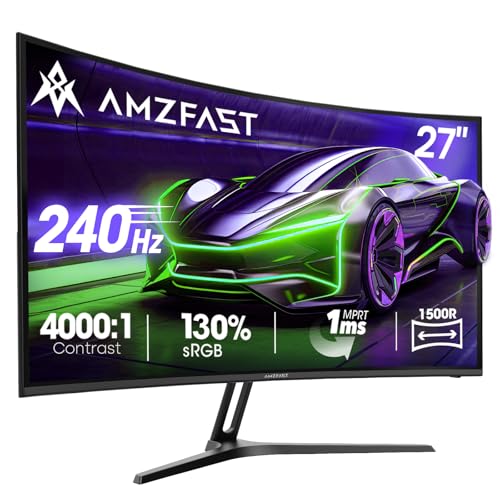
Your GPU's frame output is only as good as the panel that receives it. A 240Hz refresh rate sitting behind a slow pixel transition or a washed-out VA panel is a waste of silicon. So when a budget monitor claims 240Hz, 1ms MPRT, 4000:1 contrast, and 130% sRGB coverage all for under £150, the obvious question is: which of those numbers actually holds up, and which ones are marketing wallpaper?
The Amzfast AMZG27C1 Pro is a 27-inch, 1080p, 240Hz curved gaming monitor sitting firmly in the budget bracket. Thousands of owners have rated it an average of 4.5 stars on Amazon UK, which is a genuinely impressive number at this price tier. But owner ratings skew positive because people who bought a budget monitor and got a budget monitor tend to be satisfied. The real question is whether the specs stack up under scrutiny, and whether the compromises are ones you can live with. The verdict: for competitive FPS and racing games on a tight budget, this is a solid pick. For anything else, read carefully before committing.
Amzfast is a relatively new brand in the UK market, and we'll address the brand question properly in the FAQs. For now, what matters is the spec sheet and what owners are actually reporting.
Core Specifications
The AMZG27C1 Pro is a 27-inch curved panel (1800R curvature) running at 1920x1080 resolution with a 240Hz maximum refresh rate. The panel type isn't explicitly stated as IPS or VA in the Amazon listing, which is a red flag immediately. Amzfast quotes a 4000:1 static contrast ratio, which points firmly toward VA panel technology rather than IPS. IPS panels typically land around 1000:1 to 1200:1 native contrast, while VA panels routinely hit 3000:1 to 5000:1. That 4000:1 figure is consistent with VA, and the curved form factor reinforces that assumption since most budget curved gaming monitors use VA panels.
The quoted response time is 1ms MPRT. MPRT stands for Moving Picture Response Time, which is a different measurement from the Grey-to-Grey (GtG) pixel transition time that most serious display reviewers care about. MPRT is achieved through backlight strobing rather than actual pixel speed, so the "1ms" here does not mean pixels are transitioning in 1 millisecond. Real GtG figures for VA panels at this price point typically land somewhere between 4ms and 8ms, and that distinction matters for how motion looks in fast-paced games. We'll dig into this properly in the response time section.
Connectivity is covered by HDMI 2.0 and DisplayPort 1.4, which is the right combination for 240Hz at 1080p. There's no USB-C, no USB hub, and no built-in speakers, which is par for the course at this price. VESA 100x100 mounting is supported, and the monitor includes an AI-Crosshair overlay function, which is a software crosshair that displays on-screen regardless of what game you're running. Adaptive-Sync support is listed, covering both AMD FreeSync and NVIDIA G-Sync Compatible scenarios.
| Specification | Detail |
|---|---|
| Screen Size | 27 inches |
| Resolution | 1920x1080 (Full HD) |
| Refresh Rate | 240Hz |
| Panel Type | VA (inferred from 4000:1 contrast spec) |
| Curvature | 1800R |
| Response Time | 1ms MPRT |
| Contrast Ratio | 4000:1 (static) |
| Colour Gamut | 130% sRGB |
| HDR | HDR supported (tier unspecified) |
| Adaptive Sync | Adaptive-Sync (FreeSync / G-Sync Compatible) |
| Ports | HDMI 2.0, DisplayPort 1.4 |
| VESA Mount | 100x100mm |
| Special Features | AI-Crosshair overlay |
| Model | AMZG27C1 Pro |
| Price | £118.74 · Details |

Panel Technology
The unconfirmed panel type here is the single biggest unknown in this review, and it's worth being direct about that. Amzfast doesn't publish the panel manufacturer or the specific panel model number, which is frustrating but common among budget-tier brands. Based on the 4000:1 contrast specification and the 1800R curved form factor, the evidence points to a VA (Vertical Alignment) panel. VA is the dominant technology in budget curved monitors for a reason: it delivers genuinely impressive contrast ratios that IPS simply cannot match at any price, and curved VA panels look particularly good in dark gaming environments.
The trade-off with VA is well-documented. Viewing angles are noticeably narrower than IPS. Colours shift and contrast drops as you move off-axis, which matters less on a curved panel (the curve naturally directs the screen toward your eyes) but is still a real limitation if you're sharing the screen with someone sitting beside you. Black smearing is the other VA-specific issue: in fast motion sequences, particularly in dark scenes, VA pixels can be slow to transition from black to a slightly lighter shade, creating a visible smearing or ghosting artefact. This is a known characteristic of VA technology, not specific to Amzfast, and it's something to factor in if you play a lot of dark-environment games like horror titles or space sims.
On the positive side, a 4000:1 contrast ratio is genuinely useful. IPS monitors at similar prices are pushing 1000:1 to 1200:1, which means blacks look noticeably grey in dark rooms. VA's deeper blacks make a real difference in immersive gaming, particularly with the lights off. The 1800R curvature is fairly aggressive for a 27-inch panel (some prefer 1500R or even flat at this size), but owner reviews don't flag it as a problem. Most people find 1800R comfortable at typical desk distances of 60cm to 80cm. If you sit further back, the curve becomes less noticeable and more of a cosmetic choice than a functional one.
Display Quality
At 1920x1080 on a 27-inch panel, the pixel density works out to approximately 82 pixels per inch. That's on the lower end of comfortable for a 27-inch display. For context, the same 1080p resolution on a 24-inch panel gives you around 92 PPI, which is noticeably sharper. At 27 inches, individual pixels become visible at normal viewing distances if you're looking for them, particularly in text-heavy applications and fine UI elements. For gaming, it's less of an issue because you're typically focused on the action rather than scrutinising pixel-level detail. But if you're planning to use this for general desktop work, spreadsheets, or reading long documents, the lower sharpness is something to be aware of.
The anti-glare coating on the panel is a matte finish, which is standard for gaming monitors and the right call for a product aimed at varied lighting environments. Matte coatings scatter ambient light rather than reflecting it as a sharp image, which reduces eye strain in bright rooms. The trade-off is a slight reduction in perceived contrast and colour vibrancy compared to glossy panels, but for a gaming monitor used in a typical living room or bedroom, matte is the sensible choice. Owner reviews don't report any unusual graininess from the coating, which suggests it's a reasonably fine-grained matte rather than a coarse one.
Brightness uniformity at this price point is always a question mark. Budget panels, particularly large curved ones, often show some degree of backlight bleed or clouding near the edges and corners. Owner reviews are mixed on this: the majority don't mention it, which suggests it's not severe enough to be immediately obvious, but a handful of reviewers note some backlight bleed in the corners during dark scenes. This is expected behaviour for a budget VA panel and not unique to Amzfast. The quoted peak brightness isn't specified in the listing, which is unusual and slightly concerning. Budget VA panels typically land around 250 to 300 nits in SDR mode, which is adequate for a dim room but can feel a bit dim in a bright, sunny environment.
Refresh Rate and Adaptive Sync
240Hz is the headline number and it's a legitimate specification for this monitor. To use it, you'll need a GPU capable of pushing over 240 frames per second at 1080p in your chosen game, which is achievable with mid-range hardware in less demanding titles. In something like CS2, Valorant, or Rocket League, a mid-range GPU can routinely hit 200 to 300fps at 1080p, so you'll actually see the benefit of the high refresh rate. In more demanding titles like Cyberpunk 2077 or Alan Wake 2, even a high-end GPU will struggle to maintain 240fps at 1080p with quality settings enabled, so the effective refresh rate will be lower in those scenarios.
The Adaptive-Sync implementation covers both AMD FreeSync and NVIDIA G-Sync Compatible operation. The VRR (Variable Refresh Rate) range isn't explicitly stated in the listing, which matters because a wider VRR range (say 48 to 240Hz) is more useful than a narrow one (say 144 to 240Hz). Low Framerate Compensation (LFC) kicks in when the frame rate drops below the minimum VRR threshold, doubling or tripling frames to keep the sync active. If the minimum VRR threshold is 48Hz or lower, LFC will activate before the frame rate drops to a visually problematic level. Without the confirmed VRR range from the manufacturer, this is an area of uncertainty. Owner reviews don't flag tearing or sync issues as a widespread complaint, which suggests the implementation is at least functional.
The DisplayPort 1.4 connection supports 240Hz at 1080p without any bandwidth issues. HDMI 2.0 also supports 240Hz at 1080p, though it's worth confirming your specific GPU and cable combination supports this. Some older HDMI 2.0 implementations cap out at 144Hz at 1080p depending on the cable quality and GPU driver. If you're using a console rather than a PC, note that current-generation consoles output at 120Hz maximum, so the 240Hz capability is effectively unused in that scenario. The monitor will still work fine with consoles, but you're paying for a refresh rate you can't use.
Response Time and Motion
The 1ms MPRT claim needs unpacking because it's doing a lot of marketing work here. MPRT (Moving Picture Response Time) is not the same as GtG (Grey-to-Grey) pixel transition time. MPRT is achieved through backlight strobing: the backlight flashes briefly for each frame, which reduces motion blur by limiting how long each frame is displayed. A 1ms MPRT means the backlight is on for 1ms per frame, not that pixels are transitioning in 1ms. The actual GtG pixel transition time for a VA panel at this price point is realistically in the 4ms to 8ms range for typical transitions, with darker transitions (near-black to dark grey) being the slowest.
In practice, what does this mean for gaming? For competitive FPS titles at 240Hz, the combination of high refresh rate and backlight strobing (if MPRT mode is enabled) does produce a sharper, cleaner motion image than a 60Hz or 75Hz panel. The improvement is real and perceptible. But VA-specific black smearing will still be present in dark scenes regardless of MPRT mode, because that's a characteristic of how VA pixels transition, not something backlight strobing fixes. Some owners specifically mention that dark scenes in games like Call of Duty can show some ghosting on fast camera movements. This is consistent with VA panel behaviour and is not a defect; it's a known trade-off of the technology.
The AI-Crosshair feature is worth a mention here because it's an overlay function that works independently of the game engine. It's useful in games that don't provide a crosshair option, or in titles where you want a consistent crosshair style regardless of weapon. It won't give you a competitive advantage in games with anti-cheat systems that detect overlay software, but for casual play it's a handy addition. Owner reviews are positive about it as a bonus feature, though it's clearly not the reason anyone is buying this monitor. The OSD (on-screen display) for adjusting settings is described by owners as reasonably straightforward, which is since some budget monitors have confusing menu systems.
Colour Accuracy and Gamut
The 130% sRGB coverage claim is the colour specification that needs the most context. sRGB is the standard colour space for web content, games, and most consumer media. 100% sRGB coverage means the panel can display every colour in the sRGB standard. 130% sRGB means the panel's colour gamut extends beyond sRGB, covering colours that are more saturated than the sRGB boundary. This sounds impressive but comes with a catch: if the monitor is displaying sRGB content (which most games and web content is) without proper colour management, those extended colours will appear oversaturated. Reds will look too red, greens too green.
Budget monitors at this price point rarely ship with factory calibration data or accurate colour profiles. The out-of-box accuracy is typically measured by independent reviewers in terms of Delta-E (dE), where dE below 2 is considered accurate and dE below 1 is essentially indistinguishable from a reference display. Budget VA panels without factory calibration often show dE values of 3 to 6 out of the box, which means visible colour inaccuracy compared to a reference. For gaming, this is mostly irrelevant because games aren't colour-managed applications. For photo editing or video colour grading, it's a genuine problem and this monitor isn't the right tool for that work.
The 130% sRGB figure likely corresponds to roughly 85% to 90% DCI-P3 coverage, which is the wider colour space used in cinema and HDR content. That's a reasonable figure for a budget panel and not unusual. What's missing from the spec sheet is any mention of Delta-E, factory calibration, or a colour profile included in the box. Owner reviews don't mention colour accuracy as a concern, which suggests the out-of-box colours are at least pleasing to look at even if they're not reference-accurate. Vivid, punchy colours are generally what gaming monitor buyers want, and VA panels with extended gamuts tend to deliver that.
HDR Performance
HDR support is listed as a feature, but the specific HDR certification tier is not mentioned anywhere in the Amzfast listing. This matters enormously. The VESA DisplayHDR certification programme defines minimum standards for HDR monitors, starting at DisplayHDR 400 (400 nits peak brightness, no local dimming requirement) and going up through DisplayHDR 600, 1000, and beyond. A monitor without a stated HDR tier is almost certainly operating at or below DisplayHDR 400 levels, meaning it has a single-zone backlight with no local dimming and a peak brightness that probably doesn't exceed 300 to 400 nits.
At those brightness levels, HDR content will look marginally better than SDR in some scenarios, but you won't see the dramatic highlights and deep shadow detail that HDR is supposed to deliver. True HDR requires either a very high peak brightness (1000 nits or more) or granular local dimming to control brightness zone by zone. Neither is achievable at this price point. The HDR checkbox on this monitor is best understood as "HDR signal pass-through" rather than "genuine HDR rendering". The monitor will accept an HDR signal from your PC or console without rejecting it, but the visual improvement over SDR will be modest at best.
This isn't a criticism unique to Amzfast. Virtually every monitor under £200 has the same limitation. DisplayHDR 400 is the entry-level certification and even that is widely considered to be below the threshold for meaningful HDR. If HDR performance is important to you, the budget bracket is simply not where you'll find it. You're looking at DisplayHDR 600 minimum for a noticeable difference, and that starts at £250 to £300 for a 27-inch panel. For the competitive gaming use case this monitor is aimed at, HDR is largely irrelevant anyway. Most competitive players run SDR with high brightness and vibrant colours rather than HDR, which can introduce input lag through tone mapping processing.
Contrast and Brightness
The 4000:1 static contrast ratio is one of the genuinely strong specifications on this monitor. To put that in perspective, a typical IPS panel at this price delivers around 1000:1 contrast, meaning blacks on an IPS monitor appear four times brighter (and therefore greyer) than on this VA panel under identical conditions. In a dark room, that difference is immediately visible. Dark scenes in games look more immersive, space environments look properly black rather than dark grey, and the overall image has more perceived depth. This is the primary reason to choose a VA panel over IPS at the budget tier.
The peak SDR brightness isn't explicitly quoted in the spec sheet, which is an unusual omission. Based on typical VA panels in this category and the budget price point, a reasonable estimate is 250 to 300 nits in standard mode. That's adequate for a dim or moderately lit room but can feel washed out in a very bright environment, particularly near a window with direct sunlight. If you game in a bright room, an IPS panel with 350 to 400 nits peak brightness might actually serve you better despite the lower contrast ratio, because the higher brightness compensates for ambient light more effectively.
Owner reviews don't flag brightness as a major complaint, which suggests the panel is bright enough for typical indoor gaming conditions. The combination of high contrast and reasonable brightness means the image is punchy and engaging in the kinds of environments most people actually use gaming monitors in. The 1800R curve also helps by reducing the amount of ambient light that hits the panel surface at an angle, which subtly improves perceived contrast in real-world conditions. It's a minor effect but a real one, and it's part of why curved monitors became popular in the gaming market in the first place.
Ergonomics and Stand
The stand on the AMZG27C1 Pro is a budget stand, and owner reviews are honest about this. Tilt adjustment is present, which lets you angle the screen up or down to suit your viewing position. Height adjustment and pivot (portrait rotation) are not mentioned in the spec sheet, which strongly suggests they're not included. This is typical for monitors at this price point. If you need height adjustment, you'll either need to use a monitor arm (the VESA 100x100 mount makes this straightforward) or resort to the classic book-under-the-stand approach.
The VESA 100x100 compatibility is genuinely useful here. A decent monitor arm costs £20 to £40 and transforms the ergonomics completely, giving you full height, tilt, and swivel adjustment while also freeing up desk space. If you're buying a budget monitor and care about ergonomics, budgeting for a monitor arm alongside it is a sensible approach. The VESA 100x100 standard is universal, so any arm that supports this pattern (which is almost all of them) will work with this monitor.
Build quality for a budget monitor is always a question of expectations. The chassis is plastic, which is standard at this price. Owner reviews describe the build as solid enough for everyday use without wobble or flex issues during normal operation. The stand base footprint is moderate for a 27-inch curved panel. A handful of owners mention the cable management options are minimal, which is a minor annoyance but not a dealbreaker. No built-in speakers means one less thing to complain about, honestly. Budget monitor speakers are universally terrible and you're better off using headphones or a proper audio setup anyway.

Connectivity and Ports
The port selection on the AMZG27C1 Pro is minimal but covers the essentials for a gaming monitor. HDMI 2.0 and DisplayPort 1.4 are both present, which is the correct combination for 240Hz at 1080p. HDMI 2.0 has a maximum bandwidth of 18Gbps, which is sufficient for 1080p at 240Hz. DisplayPort 1.4 offers 32.4Gbps bandwidth, which is more headroom than you need at 1080p but means there's no compression required for the signal. Both connections should deliver identical visual results at this resolution and refresh rate.
- HDMI 2.0 (x1) - suitable for PC and console connections at up to 240Hz at 1080p
- DisplayPort 1.4 (x1) - preferred connection for PC gaming at 240Hz
- No USB-C
- No USB hub
- No built-in speakers or audio out
- 3.5mm headphone jack - not confirmed in spec sheet; check current listing
The absence of USB-C is expected at this price point and not a concern for a gaming monitor. USB-C with DisplayPort Alt Mode and Power Delivery is a feature of mid-range and premium monitors. The lack of a USB hub means you won't be able to connect peripherals through the monitor, but again, that's a premium feature. What you get here is exactly what a competitive gaming monitor needs: two video inputs, both capable of 240Hz at 1080p, and nothing else to get in the way.
One thing before purchase is whether a DisplayPort cable is included in the box. Owner reviews suggest the included accessories are basic, and some buyers report needing to purchase a DisplayPort cable separately if their GPU outputs via DisplayPort rather than HDMI. This is a minor inconvenience but in advance. A quality DisplayPort 1.4 cable costs a few pounds and is widely available, so it's not a significant additional expense, just an unexpected one if you're not prepared for it.
How It Compares
The budget 240Hz curved monitor market is busier than it's ever been, and the Amzfast AMZG27C1 Pro has real competition. The two most relevant alternatives at a similar price are the AOC C27G2ZE and the MSI G274F. The AOC C27G2ZE is a 27-inch curved VA panel running at 240Hz, with similar 1080p resolution and a well-established track record in owner reviews. AOC is a known brand with a longer history in the UK market, which gives buyers more confidence in after-sales support. The MSI G274F is a flat 27-inch IPS panel at 170Hz, which trades the high refresh rate and contrast ratio for better colour accuracy and viewing angles.
The comparison is instructive. Against the AOC C27G2ZE, the Amzfast is competitive on paper but the AOC benefits from brand recognition and more available independent measurements. If you can find the AOC at a similar price, it's a toss-up that comes down to brand confidence versus specification matching. Against the MSI G274F, the choice is more philosophical: 240Hz VA with high contrast versus 170Hz IPS with better colour accuracy. For pure competitive gaming, 240Hz wins. For a more general-purpose monitor that also does some content work, the IPS panel is the better choice.
What the Amzfast does well in this comparison is the value proposition at its current price point. The combination of 240Hz, VA contrast, and Adaptive-Sync at under £150 is genuinely competitive. The brand uncertainty is a real factor, and we'll address it directly in the verdict. But on specification alone, the AMZG27C1 Pro holds its own against established competitors. The positive overall rating across thousands of reviews suggests that buyers are getting what they expected, which is the most honest endorsement a budget monitor can get.
| Feature | Amzfast AMZG27C1 Pro | AOC C27G2ZE | MSI G274F |
|---|---|---|---|
| Size | 27 inch | 27 inch | 27 inch |
| Resolution | 1080p | 1080p | 1080p |
| Refresh Rate | 240Hz | 240Hz | 170Hz |
| Panel Type | VA (inferred) | VA | IPS |
| Contrast Ratio | 4000:1 | 3000:1 | 1000:1 |
| Curvature | 1800R | 1500R | Flat |
| Adaptive Sync | Yes (FreeSync/G-Sync Compatible) | Yes (FreeSync Premium) | Yes (FreeSync Premium) |
| VESA Mount | 100x100 | 100x100 | 100x100 |
| Price | £118.74 · Details | ~£130 to £150 | ~£140 to £160 |
Final Verdict
The Amzfast AMZG27C1 Pro makes a coherent case for itself in a crowded budget market. The 240Hz refresh rate is real and usable. The 4000:1 contrast ratio is a genuine strength that separates VA panels from IPS at this price tier. The Adaptive-Sync implementation covers both major GPU ecosystems. And thousands of owners have given it a positive overall rating, which is not the rating of a monitor that's failing to deliver on its promises. For competitive FPS gaming on a tight budget, this monitor does what it says on the tin.
The caveats are real, though. The panel type isn't confirmed, which means you're trusting the spec sheet inference rather than a stated specification. The 1ms MPRT claim is marketing language rather than a GtG measurement, and VA black smearing in dark scenes is a known limitation that no backlight strobing trick fully eliminates. The HDR implementation is almost certainly checkbox-level rather than meaningful. And Amzfast as a brand is relatively new in the UK, which means the long-term reliability data and after-sales support track record are thinner than you'd get from AOC, LG, or Samsung. These are real risks, not imaginary ones.
Who should buy this? If you play competitive games like CS2, Valorant, Apex Legends, or racing titles, you're running a mid-range GPU that can push 200fps-plus at 1080p, and your budget is firmly under £150, this is a strong option. The high contrast and 240Hz combination genuinely suits that use case. Who should skip it? If you play dark, atmospheric games where black smearing will be distracting, if you need accurate colours for any kind of creative work, or if brand reliability and warranty support are important to you, look at the AOC C27G2ZE or save a bit more for an established mid-range option. And honestly, if you're only pushing 144fps or below with your current GPU, a 144Hz monitor at this price point will save you money without costing you any real-world performance. The 240Hz advantage only materialises when you're actually hitting those frame rates.
Editorial score: 7 out of 10. Good specifications, impressive owner satisfaction, honest limitations. A budget monitor that earns its rating rather than just marketing its way to one.
Who makes Amzfast monitors?
Amzfast is a relatively new consumer electronics brand that sells primarily through Amazon. The brand doesn't have a long-established track record in the UK market in the way that AOC, LG, or Samsung do. The AMZG27C1 Pro is manufactured to Amzfast's specifications, but the panel supplier and manufacturing facility aren't publicly disclosed. This is common among newer budget brands. The 4.5-star average across thousands of reviews suggests the product quality is consistent enough to satisfy buyers, but the brand's long-term reliability and after-sales support are less proven than established competitors.
Is Amzfast a good brand?
Based on available owner feedback, Amzfast appears to be a competent budget brand rather than a great one. The AMZG27C1 Pro's review volume and rating are genuinely impressive for a newer brand, which suggests the monitors are arriving in good condition and performing as advertised for most buyers. The risk with newer brands is always the after-sales experience: what happens if you have a dead pixel issue, a backlight problem after six months, or need warranty support? That's harder to assess for Amzfast than for a brand with a decade of UK market presence. If brand confidence matters to you, AOC or LG at a similar price point offer more established support infrastructure.
What is the best gaming monitor overall?
There's no single answer because the best monitor depends entirely on your budget, GPU, and use case. For competitive gaming at the budget tier, a 240Hz 1080p VA or IPS panel like this one makes sense. For immersive single-player gaming, a 1440p IPS or OLED panel at a higher price point delivers better image quality. For the absolute best motion clarity and colour, OLED gaming monitors from LG and Samsung are the current peak of the technology, but they cost significantly more. The AMZG27C1 Pro is a strong option within its specific budget bracket, not a contender for the overall title.
Is 144Hz or 240Hz better for gaming?
240Hz is objectively higher and produces smoother motion, but the practical difference depends on whether your GPU can actually reach those frame rates. At 1080p in competitive titles like CS2 or Valorant, a mid-range GPU can push 200fps-plus, making 240Hz worthwhile. In more demanding games, even a high-end GPU may struggle to exceed 144fps consistently, making the extra 96Hz largely theoretical. If your current GPU typically runs between 100fps and 144fps in your games, a 144Hz monitor is the smarter buy and will save you money. If you're specifically building for competitive play and know you'll hit high frame rates, 240Hz has a real edge in motion clarity and input responsiveness.

Which brand is best for monitors?
In the UK market, LG, Samsung, and ASUS ROG consistently top independent reviewer rankings across different price tiers. For budget monitors specifically, AOC and MSI offer good value with more established support networks. Dell's UltraSharp range is the reference point for colour accuracy in professional monitors. For OLED gaming monitors, LG's C-series and Samsung's Odyssey OLED panels are the current benchmarks. Amzfast sits in the budget tier alongside other newer brands and competes on price rather than brand heritage. The right brand depends on your priorities: established reliability points toward LG or AOC; pure price-to-spec ratio is where newer brands like Amzfast compete.
What works. What doesn’t.
5 + 4What we liked5 reasons
- Genuine 240Hz refresh rate useful for competitive FPS and racing games
- 4000:1 contrast ratio delivers deep blacks that IPS panels at this price cannot match
- Adaptive-Sync covers both AMD FreeSync and NVIDIA G-Sync Compatible
- VESA 100x100 mount enables affordable monitor arm upgrades
- A positive overall rating across thousands of owner reviews is strong for a budget brand
Where it falls4 reasons
- Panel type not confirmed by manufacturer; VA inferred from contrast spec
- 1ms MPRT is a marketing figure, not a GtG pixel transition measurement
- HDR tier unstated; almost certainly checkbox-level rather than meaningful
- Amzfast brand has limited UK after-sales track record compared to AOC or LG
Full specifications
11 attributes| Panel type | VA |
|---|---|
| Aspect ratio | 16:9 |
| Curvature | 1500R |
| HDR | HDR |
| Launch year | 2025 |
| Ports | 1x HDMI 2.0, 1x DisplayPort 1.4 |
| Refresh rate HZ | 240 |
| Resolution | 1920x1080 |
| Response time MS | 1 |
| Screen size IN | 27 |
| Vesa compatible | true |
If this isn’t right for you
2 options 7.5 / 10
Samsung LS27D396GAUXXU 27" Curved Full HD monitor with Speakers - 1920x1080p, 1800R, HDMI, VGA, Speakers
£118.97 · Samsung · Details
 7.5 / 10
Z-Edge 27 Inch Curved Gaming Monitor 180Hz 1ms 1500R VA 1080P HDMI DP Black
£129.99 · Z Z-Edge · Details
Frequently asked
5 questions01Is the Amzfast 27 inch Curved Gaming Monitor (AMZG27C1 Pro) good for gaming?+
Yes, specifically for competitive gaming genres. The 240Hz refresh rate is genuine and makes a real difference in fast-paced titles like CS2, Valorant, and Apex Legends when your GPU can push the frame rates to use it. The 4000:1 contrast ratio (consistent with a VA panel) adds depth to dark scenes. Adaptive-Sync covers both AMD and NVIDIA GPUs. The limitation is VA-specific black smearing in fast dark-scene transitions, which is a known trade-off of the panel technology rather than a defect. For immersive single-player or horror games, the smearing can be distracting. For competitive multiplayer, it's largely a non-issue.
02Does the Amzfast AMZG27C1 Pro have good HDR?+
No, not in any meaningful sense. The monitor lists HDR support but does not state a VESA DisplayHDR certification tier. At this price point, HDR capability almost certainly means the monitor accepts an HDR signal without rejecting it, but the peak brightness and lack of local dimming mean it cannot render HDR content with the contrast and highlight detail that HDR is designed to deliver. True HDR requires either 600 nits-plus peak brightness with local dimming, or OLED technology. Neither is available at this price. For gaming, this is largely irrelevant since most competitive players run SDR anyway. For HDR film or content consumption, you need a higher-tier monitor.
03Is the Amzfast AMZG27C1 Pro good for content creation?+
Not recommended for serious content creation. The 130% sRGB gamut sounds impressive but without factory calibration data or a stated Delta-E figure, out-of-box colour accuracy is likely in the dE 3 to 6 range, which is visible inaccuracy compared to a reference display. The unconfirmed panel type and lack of a colour profile mean you cannot rely on the monitor for accurate colour grading, photo editing, or print work. The extended gamut will also cause oversaturation of sRGB content without proper colour management. For gaming and general use, the vivid colours look great. For professional colour work, look at a calibrated IPS monitor from a brand that publishes Delta-E specifications.
04What graphics card do I need for the Amzfast AMZG27C1 Pro?+
To actually use the 240Hz refresh rate, you need a GPU capable of pushing 240 frames per second at 1080p in your target games. In competitive titles like CS2, Valorant, or Rocket League, a mid-range card such as an NVIDIA RTX 4060 or AMD RX 7600 can reach these frame rates with settings adjusted. In demanding AAA titles, even high-end GPUs may not sustain 240fps at 1080p with quality settings enabled. The monitor works at any frame rate below 240Hz, and Adaptive-Sync will smooth out variable frame rates within its VRR range. If you're currently running a GPU that typically delivers 100 to 144fps in your games, a 144Hz monitor would save you money without sacrificing real-world performance.
05What warranty and returns apply to the Amzfast AMZG27C1 Pro?+
Amzfast does not publish a specific warranty duration in the Amazon listing for the AMZG27C1 Pro. All purchases through Amazon UK are covered by Amazon's standard 30-day return window and the Amazon A-to-Z Guarantee, which provides recourse if the item is not as described or arrives damaged. For warranty claims beyond 30 days, you would need to contact Amzfast directly through the seller contact options on Amazon. Given that Amzfast is a newer brand with less established UK support infrastructure than AOC or LG, it is the current listing for any stated warranty before purchasing, and keeping your order confirmation as documentation.