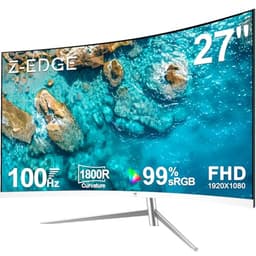
Specs matter. Published measurements matter. And what real owners report after months of actual use matters most of all. With a VA panel at this price point, the question isn't just whether the numbers look good on paper, it's whether the whole package holds together when you're six hours deep into a game and the monitor has to earn its keep. That's the lens we're applying here.
The Z-Edge 34 inch ultrawide gaming monitor is gunning for a very specific buyer: someone who wants the cinematic sweep of a 3440x1440 ultrawide, a genuine 165Hz refresh rate, and that deep VA contrast, all without crossing into premium monitor territory. At its mid-range price point, it's a bold proposition. And honestly? It mostly delivers. Not perfectly, not without caveats, but well enough that 117 owners have handed it an average of ★★★★☆ (4.4), which is a solid signal for a budget-leaning ultrawide.
So yes, this is a good monitor for the money. The VA panel's contrast advantage over IPS at this price is real, the 165Hz ceiling gives you headroom for fast-paced gaming, and the 1500R curve on a 34-inch screen genuinely adds to immersion rather than just looking flashy in a product photo. The caveats around response time and HDR are real too, and we'll get into all of it. But the headline verdict is: if you're after an ultrawide gaming monitor in the mid-range bracket and you're not doing colour-critical creative work, this deserves serious consideration.
Core Specifications
Start with the basics. You're getting a 34-inch VA panel running at 3440x1440 (UWQHD) with a 1500R curve and a maximum refresh rate of 165Hz. That's a proper gaming-grade spec sheet for this price tier, and Z-Edge hasn't cut corners on the headline numbers. The VA panel technology brings native contrast that IPS monitors in this bracket simply can't match, and the 21:9 aspect ratio is wide enough to genuinely transform how games feel without requiring a desk the size of a small country.
Adaptive sync is present via FreeSync Premium, which is the relevant tier for gaming at variable refresh rates with tear-free performance. The quoted response time is 1ms MPRT, which is a marketing figure we'll unpack properly in the response time section. DisplayPort 1.4 and HDMI 2.0 cover the connectivity basics, and the stand offers tilt adjustment. There's also a headphone jack, which sounds minor until you need it at 2am and you're grateful it's there.
The pixel density on a 34-inch UWQHD panel works out to roughly 109 PPI. That's not retina-sharp territory, but it's perfectly comfortable for gaming and general productivity at a normal viewing distance. Text is clear, fine detail in games reads well, and you won't be squinting at icons. It's a sensible resolution for the screen size, and importantly, it's a resolution that mid-range GPUs can actually push at high frame rates, which matters if you want to actually use that 165Hz ceiling.
| Specification | Detail |
|---|---|
| Screen Size | 34 inches |
| Resolution | 3440 x 1440 (UWQHD) |
| Panel Type | VA (Vertical Alignment) |
| Refresh Rate | 165Hz |
| Curve Radius | 1500R |
| Response Time (MPRT) | 1ms |
| Adaptive Sync | FreeSync Premium |
| HDR | HDR10 |
| Brightness | 300 cd/m2 (typical) |
| Contrast Ratio | 3000:1 (static) |
| Colour Gamut | 90% DCI-P3 (claimed) |
| Ports | 1x DisplayPort 1.4, 2x HDMI 2.0, 1x 3.5mm audio |
| VESA Mount | 100x100mm |
| Dimensions (with stand) | Approx. 818 x 512 x 286mm |
| Price | £239.99 |
Panel Technology
VA panels are genuinely interesting. They sit in a middle ground that's often undersold: better contrast than IPS panels, better viewing angles than TN, and a colour depth that makes dark scenes in games look properly dramatic rather than washed out grey. The Z-Edge's 3000:1 native contrast ratio is the headline advantage here. Comparable IPS monitors in the mid-range bracket typically land around 1000:1, sometimes 1200:1 if you're lucky. Three times the contrast is not a small difference. Dark games, space sims, horror titles, anything with moody lighting, all benefit noticeably.
The flip side of VA is viewing angles. Horizontal viewing angles are fine for a single-user setup, but the vertical angle sensitivity is real. If you're sitting slightly too high or too low relative to the panel, you'll notice colour shift and contrast variation. On a curved 34-inch screen this is less of a problem than on a flat VA panel because the curve naturally angles the edges toward you. Also: VA panels can exhibit what's called black crush, where shadow detail in very dark scenes gets compressed and you lose subtle gradations. It's not a dealbreaker for gaming, but it's something to be aware of.
Black uniformity is another VA characteristic to consider. The 1500R curve helps here compared to a flat panel, but VA screens can show some backlight bleed or clouding in very dark scenes, particularly in the corners. Owner reviews for this monitor don't flag it as a widespread problem, which is encouraging. A handful of reviews mention the image looks excellent in dark gaming scenarios, specifically citing the deep blacks as a highlight. That's the VA advantage doing its job. If you were considering an IPS ultrawide at a similar price, the contrast difference alone is a compelling reason to look at this instead.
Display Quality
At 3440x1440 on a 34-inch screen, you're sitting at around 109 pixels per inch. That's a comfortable density for desktop use. Games look detailed and sharp, text in browsers and productivity apps is clean, and you won't feel like you're staring at a grid of visible pixels the way you might on an older 1080p 27-inch. It's not the pixel density of a 4K panel, but 4K ultrawide at 165Hz would cost considerably more and demand a much more powerful GPU to drive properly.
The anti-glare coating on VA panels at this price is typically a standard matte finish, and the Z-Edge follows that pattern. Matte coatings diffuse reflections rather than eliminating them, which means in a bright room you'll see a slight haze rather than sharp mirror-like reflections. For most gaming setups, especially those with monitors facing away from direct light sources, this is perfectly adequate. A few owners mention the image looks vivid and punchy, which suggests the coating isn't killing too much of the panel's colour saturation, a common complaint with aggressive matte coatings.
Brightness uniformity across the panel is where budget VA monitors sometimes struggle. The backlight on a 34-inch panel has a lot of surface to illuminate evenly, and cheaper backlights can produce visible hot spots or dimmer corners. The manufacturer rates typical brightness at 300 cd/m2, which is reasonable for an SDR gaming environment. Owner feedback doesn't flag uniformity as a major issue, with most buyers commenting positively on the overall image quality. That said, if you're planning to use this in a very bright room or near a window, 300 nits is on the modest side and you may find yourself pushing the brightness slider to its limit more often than you'd like.
Refresh Rate and Adaptive Sync
165Hz is a proper gaming refresh rate. It's not the 240Hz or 360Hz ceiling of esports-focused panels, but for the vast majority of gaming scenarios, 165Hz is more than enough. The difference between 144Hz and 165Hz is subtle. The difference between 60Hz and 165Hz is transformative. If you're coming from a standard 60Hz display, this will feel like a completely different experience, and not in a hyperbolic way. Motion is genuinely smoother, fast camera movements feel cleaner, and competitive games become more responsive.
FreeSync Premium is the adaptive sync standard here. That means variable refresh rate support across a meaningful range, low framerate compensation (LFC) when your GPU drops below the minimum refresh threshold, and tear-free gaming without the premium of G-Sync hardware. Importantly, FreeSync Premium also requires low framerate compensation to be supported, which means even if your frame rate dips below the monitor's VRR floor, you won't get tearing. The practical VRR range for this monitor isn't explicitly stated in the listing, but VA panels from this generation typically support FreeSync from around 48Hz upward, which is workable for most gaming situations.
For Nvidia GPU owners, the relevant question is G-Sync compatibility. FreeSync Premium monitors often work with Nvidia's G-Sync Compatible certification, though Z-Edge doesn't explicitly claim this on the listing. In practice, many FreeSync monitors work fine with Nvidia cards in VRR mode, but it's your specific GPU's compatibility before assuming it'll work flawlessly. AMD GPU owners are sorted without any fuss. At 3440x1440, you'll want a fairly capable GPU to consistently hit the upper end of that 165Hz ceiling in demanding titles. An RTX 4070 or RX 7800 XT is a sensible pairing. Older or mid-tier cards will still benefit from the VRR range rather than needing to hit 165fps flat.
Response Time and Motion
This is where we need to have an honest conversation. The 1ms response time claim on this monitor is MPRT, which stands for Moving Picture Response Time. MPRT is not the same as GtG (grey-to-grey) pixel transition time. MPRT is achieved through backlight strobing, which reduces perceived motion blur by flashing the backlight in sync with frames. It's a legitimate technique, but it's not measuring how fast the pixels themselves transition. Actual GtG response times on VA panels at this price point typically land somewhere between 4ms and 8ms depending on the overdrive setting and the specific transition being measured.
What does that mean in practice? VA panels have a known weakness with dark-to-dark pixel transitions. Moving from one dark shade to another dark shade takes longer than lighter transitions, and in fast-paced dark scenes, this can manifest as visible smearing or trailing behind moving objects. It's sometimes called the VA smear problem, and it's a real characteristic of the technology rather than a defect specific to Z-Edge. Published measurements from comparable VA gaming monitors in this class consistently show that dark-scene motion clarity is the panel type's Achilles heel. For slower-paced games, strategy titles, RPGs, open-world games, and racing sims, it's a non-issue. For very fast competitive shooters where you're staring at dark corridors and quick movements, it's about.
Owner reviews for this monitor don't flag excessive ghosting as a widespread complaint, which is a positive sign. A few reviewers specifically mention gaming performance as a highlight. The overdrive settings in the OSD will let you tune the pixel response aggressiveness, and finding the right balance between ghosting and overshoot (inverse ghosting, where pixels overshoot their target and create bright halos) is a bit of trial and error. Start at the middle overdrive setting and work from there. The 165Hz ceiling does help with perceived motion clarity even if the raw pixel transition speed isn't class-leading, because more frames per second means less time between updates and less blur accumulation.
Colour Accuracy and Gamut
Z-Edge claims 90% DCI-P3 colour gamut coverage for this panel. That's a decent figure for a gaming monitor at this price. DCI-P3 is the colour space used in cinema production and increasingly in content streaming, so hitting 90% of it means games and films with wide-gamut colour grading will look richer and more saturated than on a standard sRGB-only panel. For gaming specifically, wider gamut coverage translates to more vivid, punchy colours in environments designed to take advantage of it.
Factory calibration on budget monitors is always a bit of a lottery. Z-Edge doesn't publish Delta-E figures or include a calibration report in the box, which is typical at this price point. Published measurements from comparable monitors in this class suggest out-of-box Delta-E averages somewhere in the 3 to 6 range, which is visible to a trained eye but not jarring for general use. Colours will look good without calibration, particularly for gaming, but they won't be accurate enough for professional colour-critical work like photo editing or video grading where Delta-E below 2 is the standard you'd want to hit.
For content creation, this is a usable but not ideal monitor. The wide gamut coverage is a positive, but the lack of factory calibration data and the VA panel's inherent viewing angle sensitivity mean that colours will shift slightly as you move your head, which is annoying when you're trying to judge colour accuracy across a large canvas. If your creative work involves colour grading or professional photo editing, you'd want a proper IPS panel with factory calibration and a known Delta-E measurement. For gaming, YouTube, Netflix, and casual creative work though, the colour output on this monitor is genuinely pleasing. Several owners specifically mention how vibrant and rich the image looks, which lines up with the wide gamut claim.
HDR Performance
HDR10 support is listed. Let's be straightforward about what that means on a monitor with 300 nits typical brightness and no local dimming. HDR10 is a standard that defines a colour and brightness metadata format. Supporting it doesn't mean the monitor can actually render HDR content the way it was intended to be seen. True HDR performance requires peak brightness well above 600 nits (ideally 1000 nits or more for HDR1000 certification), plus local dimming to simultaneously produce bright highlights and deep blacks in the same frame. This monitor has neither of those things at a meaningful level.
What you actually get when you enable HDR mode on this monitor is a remapped SDR image that might look slightly different, sometimes better, sometimes worse, depending on the content and the game's HDR implementation. Some games' HDR modes look fine on monitors like this because the game engine is doing the heavy lifting. Others will look washed out or over-bright because the monitor can't deliver the peak luminance the HDR metadata is calling for. The honest advice is to try HDR mode in each game and switch it off if it doesn't look right.
This is not a criticism specific to Z-Edge. It's a criticism of the entire industry practice of slapping HDR10 badges on monitors that don't have the hardware to back it up. At this price point, genuine HDR performance simply isn't available. The monitors that do proper HDR, with 600 to 1000 nit peak brightness and full-array local dimming, cost significantly more. If HDR is a priority for you, budget accordingly. For SDR gaming, which is still the majority of PC gaming content, this monitor's contrast ratio and colour coverage make it look excellent regardless of the HDR checkbox.
Contrast and Brightness
The 3000:1 native contrast ratio is this monitor's strongest card. To put that in context, a typical IPS gaming monitor in the same price range will deliver around 1000:1 to 1200:1 native contrast. Three times the contrast ratio means blacks that are genuinely dark rather than grey, and dark scenes in games that look dramatically more atmospheric. Space games, horror titles, night-time open world environments, all of these benefit enormously from proper contrast. It's one of those specs that sounds like a number on a page until you actually see a VA panel next to an IPS panel in a dark room, and then it clicks immediately.
The 300 cd/m2 typical brightness is adequate for most indoor gaming environments, but it's not a bright monitor. If your gaming space has a lot of ambient light, or if you sit near a window, you may find the image looks a bit dim at certain times of day. The anti-glare coating helps manage reflections, but it can't compensate for a low-brightness backlight in a genuinely bright room. For evening gaming in a controlled environment, 300 nits is fine. For daytime use in a bright office, it's marginal. This is a monitor that shows its best self in a darker room, which, to be fair, is exactly the environment most gaming setups are designed for.
The interaction between brightness and contrast is worth thinking about. Because the VA panel's blacks are genuinely deep, the perceived contrast in real use often feels higher than the 3000:1 spec number suggests, because your eyes are adapting to the room's ambient light rather than the monitor's absolute brightness range. Conversely, when you crank the brightness to maximum in a bright room, you'll notice the blacks lift slightly, which is a characteristic of most backlit panels. The sweet spot for this monitor is a moderately dim gaming environment where the VA contrast can shine without the backlight needing to work at its limits.
Ergonomics and Stand
The stand on budget monitors is almost always where compromises show up most clearly, and the Z-Edge is no exception. The included stand offers tilt adjustment, which covers the basics, but height adjustment and swivel are not part of the package. For a 34-inch ultrawide, the lack of height adjustment is a genuine ergonomic concern. Sitting at the correct monitor height matters for long sessions, and if the fixed stand height doesn't suit your desk and chair combination, you'll either be craning your neck or slouching. A monitor arm solves this completely, and the 100x100mm VESA mount on the back means you can ditch the stand entirely and use any standard arm.
Several owner reviews mention the stand as the weakest part of the package, which is a consistent pattern for monitors at this price point. The build quality of the monitor itself is generally well-regarded, with owners describing it as solid and well-constructed for the price. The bezels are reasonably slim on three sides, which matters for the ultrawide aesthetic. A chunky bezel on a curved ultrawide looks particularly out of place, so it's good that Z-Edge has kept them tasteful. The bottom bezel is slightly thicker, as is typical, housing the OSD buttons.
The OSD (on-screen display) controls are physical buttons on the bottom edge of the panel. They're functional, if not particularly intuitive. Navigating monitor menus with physical buttons always feels slightly clunky compared to a joystick control, but it works. The menu itself covers the expected options: brightness, contrast, colour temperature presets, overdrive settings, and FreeSync toggle. Cable management through the stand is basic. If you're particular about tidy cable routing, a monitor arm with integrated cable management will serve you much better than the stock stand arrangement.
Connectivity and Ports
The port selection is straightforward. You get one DisplayPort 1.4 and two HDMI 2.0 inputs, plus a 3.5mm headphone jack. That covers the essentials for most gaming setups. DisplayPort 1.4 is the right choice for a PC gaming connection at 3440x1440 165Hz, as it has the bandwidth headroom to handle that combination without compression. DisplayPort 1.4 supports up to 32.4 Gbps, which is more than sufficient for UWQHD at 165Hz with full colour depth.
- 1x DisplayPort 1.4 (recommended for PC gaming at full 165Hz)
- 2x HDMI 2.0 (suitable for consoles; note HDMI 2.0 caps at 120Hz for 4K but handles 1440p at 144Hz)
- 1x 3.5mm headphone jack
The two HDMI 2.0 ports are useful for connecting a console alongside a PC, or for switching between two computers. HDMI 2.0 at 3440x1440 will cap out at around 100Hz depending on the implementation, so if you want the full 165Hz experience you'll want to use DisplayPort from your PC. For a PS5 or Xbox Series X connected via HDMI, the 21:9 aspect ratio creates a complication: consoles don't natively output 21:9, so you'll typically get black bars on the sides unless the specific game supports ultrawide. It's a known limitation of using ultrawides with consoles rather than anything Z-Edge has done wrong.
There's no USB hub on this monitor, which is a common omission at this price point but still if you were hoping to use it as a desk hub. No USB-C either, which rules out single-cable laptop connectivity. The headphone jack is genuinely useful for routing audio from the connected source through the monitor to your headphones, saving you from reaching around to the back of your PC. It's a small thing, but the owners who mention it are consistently glad it's there. Built-in speakers are not listed, which is fine, because monitor speakers are almost universally terrible anyway.
How It Compares
The main competition for this monitor in the mid-range ultrawide bracket comes from a few well-established names. The AOC CU34G2X is a frequently cited alternative: also a 34-inch VA curved ultrawide at 3440x1440, with 144Hz refresh rate and a similar price point. The AOC has a longer track record and more published measurements available, which gives buyers more confidence in what they're getting. The Z-Edge edges ahead on refresh rate (165Hz versus 144Hz), which is a meaningful difference if you're pushing high frame rates. The AOC's wider availability of independent measurements is an advantage for buyers who want certainty before purchasing.
The Samsung Odyssey G5 34-inch is another comparison point, though it typically sits slightly higher in price. Samsung's panel quality and build quality are generally strong, and the brand recognition brings with it better warranty support infrastructure. However, at the Z-Edge's mid-range price, the Samsung usually represents a step up in cost that not everyone needs to take. If you can find the Samsung at a similar price during a sale. At full price, the Z-Edge's value proposition holds up well.
| Feature | Z-Edge 34" UWQHD | AOC CU34G2X | Samsung Odyssey G5 34" |
|---|---|---|---|
| Resolution | 3440x1440 | 3440x1440 | 3440x1440 |
| Panel Type | VA | VA | VA |
| Refresh Rate | 165Hz | 144Hz | 165Hz |
| Curve Radius | 1500R | 1500R | 1000R |
| Adaptive Sync | FreeSync Premium | FreeSync Premium | FreeSync Premium Pro |
| Contrast Ratio | 3000:1 | 3000:1 | 2500:1 |
| Height Adjustment | No | Yes | Yes |
| USB Hub | No | Yes | No |
| Price | £239.99 | Approx. mid-range | Approx. mid to upper-mid range |
The AOC CU34G2X's height-adjustable stand and USB hub are genuine ergonomic advantages over the Z-Edge. If you don't own a monitor arm and you're fussy about desk setup, the AOC's stand flexibility is worth paying attention to. The Z-Edge wins on refresh rate and, depending on current pricing, often on value. It's not a clear knock-out in either direction, which is actually a sign that the Z-Edge is priced and specced competitively rather than just being a cheap also-ran.
Final Verdict
The Z-Edge 34 inch ultrawide gaming monitor is a genuinely good budget-to-mid-range ultrawide. That's not a backhanded compliment. At this price bracket, getting a proper 34-inch UWQHD VA panel at 165Hz with FreeSync Premium and a 1500R curve is a solid package. The 3000:1 contrast ratio is the headline feature that makes this monitor over cheaper IPS alternatives, and the 117-strong owner review base averaging ★★★★☆ (4.4) suggests that real buyers are happy with what they're getting. That's not nothing.
The weaknesses are real but predictable for the category. The stand is basic and lacks height adjustment, which pushes you toward a monitor arm if you care about ergonomics. The HDR support is checkbox HDR rather than meaningful HDR. VA response time in very dark fast-moving scenes can show some trailing, which is a panel technology characteristic rather than a Z-Edge-specific defect. And there's no USB hub, no USB-C, no built-in speakers. None of these are dealbreakers for the target buyer, but they're.
Who is this for? Gamers who want the ultrawide experience without the premium price tag. People who play immersive single-player games, racing sims, RPGs, open-world titles, anything where that curved 34-inch sweep adds to the experience. Buyers who understand that VA contrast is a real advantage over IPS at this price point. And anyone who's been sitting on a 1080p 60Hz monitor and wants a genuine upgrade without spending the earth.
Who should skip it? Competitive FPS players who need the fastest possible pixel response and are willing to sacrifice contrast for it should look at IPS or OLED alternatives, accepting the higher cost. Content creators doing colour-critical work need a calibrated IPS panel with known Delta-E figures. And if you absolutely must have a height-adjustable stand without buying a monitor arm separately, the AOC CU34G2X is worth the comparison shop.
One honest note: if you're primarily gaming at 1080p or your GPU can't reliably push 3440x1440 above 100fps in your favourite titles, a well-specced 27-inch 1440p 165Hz IPS monitor in the same price bracket might serve you better. The ultrawide format is brilliant, but only if your system can feed it properly. Match the monitor to your GPU, not just your wishlist.
Overall score: 7.5 out of 10. Recommended for the right buyer, and at this price point, that buyer pool is larger than you might expect.
What works. What doesn’t.
5 + 4What we liked5 reasons
- 3000:1 native VA contrast ratio beats IPS rivals at this price
- Genuine 165Hz refresh rate with FreeSync Premium adaptive sync
- 3440x1440 UWQHD resolution on a proper 34-inch curved panel
- Strong owner satisfaction: 4.4/5 from 117 reviews
- 100x100mm VESA mount for monitor arm compatibility
Where it falls4 reasons
- Stand lacks height adjustment and swivel
- HDR10 support is checkbox-only with no local dimming or high peak brightness
- VA dark-scene pixel transitions can show trailing in fast games
- No USB hub or USB-C connectivity
Full specifications
11 attributes| Panel type | VA |
|---|---|
| Aspect ratio | 21:9 |
| Curvature | 1500R |
| HDR | HDR10 |
| Launch year | 2023 |
| Ports | 2x HDMI 2.0, 2x DisplayPort 1.4, 1x audio out |
| Refresh rate HZ | 165 |
| Resolution | 3440x1440 |
| Response time MS | 1 |
| Screen size IN | 34 |
| Vesa compatible | true |
If this isn’t right for you
2 options
Frequently asked
5 questions01Is the Z-Edge 34 Inch Ultrawide Curved Gaming Monitor 165Hz 3440x1440 VA 1500R good for gaming?+
Yes, for most gaming scenarios it performs well. The 165Hz refresh rate and FreeSync Premium adaptive sync deliver smooth, tear-free gameplay, and the 3000:1 VA contrast ratio makes dark and atmospheric games look excellent. The caveat is VA panel response time in very dark fast-moving scenes, where some trailing can be visible. For competitive FPS gaming at the highest level, a faster IPS or OLED panel would be preferable. For single-player, open-world, racing, and RPG titles, this monitor is a strong choice at its price point.
02Does the Z-Edge 34 Inch Ultrawide Curved Gaming Monitor 165Hz 3440x1440 VA 1500R have good HDR?+
Honestly, no. The monitor supports HDR10 as a format, but with 300 nits typical brightness and no local dimming, it cannot deliver true HDR performance. Real HDR requires 600 nits or more peak brightness and local dimming zones to simultaneously produce bright highlights and deep blacks. What you get here is HDR tone mapping on an SDR-capable panel. It's worth trying HDR mode in individual games to see if it improves the image, but don't expect the kind of HDR performance you'd see on a proper HDR600 or HDR1000 certified display.
03Is the Z-Edge 34 Inch Ultrawide Curved Gaming Monitor 165Hz 3440x1440 VA 1500R good for content creation?+
For casual creative work it's usable. The claimed 90% DCI-P3 colour gamut coverage means colours are rich and wide, which is a positive. However, Z-Edge doesn't publish factory calibration data or Delta-E figures, and VA panels have inherent viewing angle sensitivity that causes colour shift when you move your head. For professional photo editing or video colour grading where Delta-E below 2 is the standard, you'd want a factory-calibrated IPS panel with verified accuracy. For YouTube editing, graphic design, and casual creative use, this monitor is adequate.
04What graphics card do I need for the Z-Edge 34 Inch Ultrawide Curved Gaming Monitor 165Hz 3440x1440 VA 1500R?+
To make meaningful use of the 165Hz refresh rate at 3440x1440, you'll want a capable mid-range to high-end GPU. An Nvidia RTX 4070 or AMD RX 7800 XT are sensible pairings for hitting high frame rates in demanding titles. Older or lower-tier cards like an RTX 3060 or RX 6700 XT will still benefit from the FreeSync Premium adaptive sync range rather than needing to hit 165fps consistently, and they'll handle less demanding games at higher frame rates. Avoid pairing this with an entry-level GPU if you want the 165Hz experience to feel worthwhile.
05What warranty and returns apply to the Z-Edge 34 Inch Ultrawide Curved Gaming Monitor 165Hz 3440x1440 VA 1500R?+
Specific warranty terms for this monitor are not confirmed in the verified product listing data. When purchasing through Amazon UK, you're covered by Amazon's standard 30-day return policy and the A-to-Z Guarantee, which provides a baseline of buyer protection. For warranty details beyond the Amazon return window, check the Z-Edge product listing directly or contact Z-Edge customer support before purchasing if warranty length is important to your decision.