
● UK tech experts · info@vividrepairs.co.uk
Vivid Repairs

USB-C monitors that charge your laptop

One cable for the picture, the power and the monitor's USB ports. Five picks, each confirmed on the maker's own spec page.

5 picks on sale new · specs read on the makers’ pages 25 October 2026

  1. 01BenQ GW2486TCA 24-inch screen for a small desk
  2. 02Dell 27 Plus USB-C (S2725DC)If you game after work
  3. 03BenQ MA270U4K for a MacBook
  4. 04AOC CU34G4CAThe ultrawide
  5. 05Dell UltraSharp U2725QEFor laptops that want more than 100W

Start with your laptop's charger

Turn your laptop's power brick over and find its rating in watts. That's your target. A monitor that supplies the same or more will run the laptop and charge it at its normal pace. One that supplies less will usually still charge it, only more slowly, and a laptop working hard can lose charge while it's plugged in.

Thin-and-light laptops often come with 45W to 65W chargers, so 65W covers most of them. Bigger laptops with dedicated graphics may want 100W or more, and many gaming laptops use a separate barrel charger that no monitor can stand in for.

Make sure the laptop's port carries video

A USB-C socket on a laptop doesn't promise video. You need one that carries DisplayPort Alt Mode or Thunderbolt; look for a small DisplayPort or lightning-bolt symbol beside it, or check the laptop maker's spec sheet. Use the cable that came with the monitor if there is one, since a cheap phone cable may charge without carrying a picture.

Above 100W, both ends need USB-C's newer extended power range. A 140W monitor gives 140W only to a laptop built to take it; anything else draws what it can use.

Then choose the screen

After power, it's an ordinary monitor decision. A 27-inch 1440p screen is the easy middle ground for work. 4K at 27 inches makes text noticeably crisper, which Macs in particular show off, and an ultrawide gives you two documents side by side without a second screen.

Five monitors that charge a laptop

A 24-inch screen for a small desk

BenQ GW2486TC

65W · 23.8in · 1920 x 1080 · 100Hz

Why it’s here. BenQ rates its USB-C port at 65W, enough for most ultrabooks, and pairs it with a 23.8-inch 1080p IPS panel at up to 100Hz. It also has an HDMI port and a DisplayPort input, so a desktop PC can share it.

What it gives up. 1080p across 24 inches is less sharp than the 1440p and 4K screens below, and 65W will lag behind a laptop that came with a bigger charger.
£177.65 at Amazon · DetailsOur review score 8.0/10

If you game after work

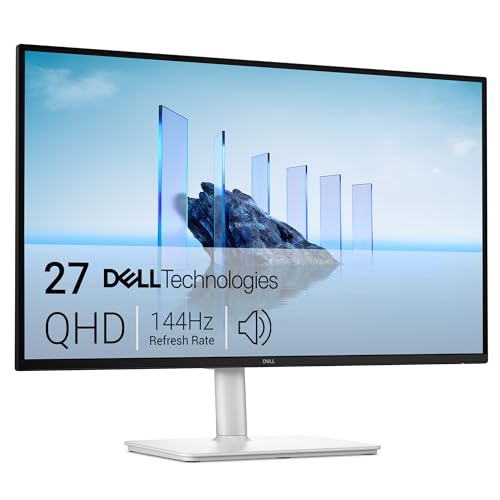
Dell 27 Plus USB-C (S2725DC)

65W · 27in · 2560 x 1440 · 144Hz

Why it’s here. Also 65W, but on a 27-inch 1440p IPS panel that runs at up to 144Hz, with HDMI and DisplayPort inputs alongside the USB-C. It covers office hours and an evening of games on one screen.

What it gives up. The same 65W ceiling as the BenQ, so it's for ultrabooks rather than power-hungry laptops.

£241.98 at Amazon · DetailsOur review score 8.0/10

4K for a MacBook

BenQ MA270U

90W · 27in · 3840 x 2160 · 60Hz

Why it’s here. Sold as a monitor for MacBook Pro and Air, it puts a 27-inch 4K IPS panel behind a USB-C port rated at 90W that also carries the picture and data. 90W covers a wider spread of laptops than 65W.

What it gives up. It runs at 60Hz, so it's a work screen first. There's no DisplayPort socket either; the video inputs are two HDMI 2.0 ports and the USB-C.

£448.97 at Amazon · DetailsOur review score 8.5/10

The ultrawide

AOC CU34G4CA

90W · 34in · 3440 x 1440 · 180Hz

Why it’s here. A 34-inch 3440 x 1440 VA panel at up to 180Hz, with 90W USB-C. More width for timelines and side-by-side windows, and enough refresh for games in the evening.

What it gives up. AOC's own figures put the 180Hz on DisplayPort; over HDMI it tops out at 100Hz. VA panels can also smear a little in dark, fast scenes compared with IPS.

£228.97 at Amazon · DetailsOur review score 8.0/10

For laptops that want more than 100W

Dell UltraSharp U2725QE

140W · 27in · 3840 x 2160 · 120Hz

Why it’s here. Its Thunderbolt 4 upstream port can supply up to 140W, the most of the five, and the panel is 27-inch 4K at up to 120Hz. A DisplayPort output lets you run a second screen from it.

What it gives up. That 140W only reaches laptops built to take USB-C power above 100W. If yours tops out at 65W or 90W, you're paying for headroom you won't use.

£506.92 at Amazon · DetailsOur review score 8.5/10

Side by side, with sources

Every value comes from the source its number points to, read on the date shown there. Sizes are the maker’s figure, so a “27-inch” screen may be listed at 26.5 inches viewable.

ModelUSB-C powerScreenResolutionMax refreshPanelHDMIDisplayPort
BenQ GW2486TC65W123.8in11920 x 10801100Hz1IPS11x HDMI 1.411x DP 1.21
Dell 27 Plus USB-C (S2725DC)65W227in22560 x 14402144Hz2IPS21x HDMI 2.1 (TMDS)21x DP 1.42
BenQ MA270U90W327in33840 x 2160360Hz3IPS32x HDMI 2.03none3
AOC CU34G4CA90W434in43440 x 14404180Hz4Fast VA42x HDMI 2.041x DP 1.44
Dell UltraSharp U2725QE140W527in53840 x 21605120Hz5IPS51x HDMI 2.151x DP 1.4 in (+1x DP 1.4 out)5

Sources

  1. 1

    GW2486TC: Maker's spec page, benq.eu, read 25 October 2026. Open the source

    “USB C(PowerDelivery 65W, DisplayPort Alt Mode, Data) 1 / Power Delivery(USB C / Thunderbolt ) 65” · “Screen Size 23.8 inch” · “Resolution (max.) 1920x1080” · “Refresh Rate (Hz) 100” · “Panel Type IPS” · “HDMI (v1.4) 1” · “DisplayPort (v1.2) 1”

  2. 2

    Dell S2725DC: Maker's spec page, dell.com, read 25 October 2026. Open the source

    “1 USB-C 5Gbps upstream port (DisplayPort1.4 Alt. Mode, Power Delivery up to 65W) / USB Type-C (Power Delivery) Upstream | 65 W” · “Viewable Screen Size | 68.6 cm (27")” · “Maximum Preset Resolution | 2560 x 1440 at 144Hz” · “Standard Refresh Rate | 144 Hz” · “Panel Technology | In-plane Switching (IPS) Technology” · “1 HDMI (HDCP1.4) (Support up to 2560 x 1440 144Hz, VRR as per specified in HDMI2.1(TMDS)) / Number of HDMI 2.1 (HDCP 1.4) | 1” · “1 DisplayPort 1.4 (HDCP1.4) / Number of DisplayPort 1.4 (HDCP 1.4) | 1”

  3. 3

    MA270U: Maker's spec page, benq.eu, read 25 October 2026. Open the source

    “USB C(PowerDelivery 90W, DisplayPort Alt Mode, Data) 1 / Power Delivery(USB C / Thunderbolt ) 90” · “Screen Size 27 inch” · “Resolution (max.) 3840x2160” · “Refresh Rate (Hz) 60” · “Panel Type IPS” · “HDMI (v2.0) 2” · “Connectivity HDMI (v2.0) 2 USB C(PowerDelivery 90W, DisplayPort Alt Mode, Data) 1”

  4. 4

    CU34G4CA: Maker's spec page, aoc.com, read 25 October 2026. Open the source

    “USB-C connectivity USB-C 3.2 x 1 (DP alt mode, upstream, power delivery up to 90 W)” · “Screen size (inch) 34.0” · “Panel resolution 3440x1440” · “Max Refresh rate 180 Hz / Digital Signal Frequency Vertical 48-100Hz(HDMI) / 48-180Hz (DisplayPort)” · “Panel type Fast VA” · “HDMI HDMI 2.0 x 2” · “DisplayPort DisplayPort 1.4 x 1”

  5. 5

    Dell U2725QE: Maker's spec page, dell.com, read 25 October 2026. Open the source

    “1 Thunderbolt 4 upstream port (DP1.4 (HDCP 2.2) with DSC support, PD: Up to 140W EPR , 2/4 Lanes switching) / USB Type-C (Power Delivery) Extended Power Range (EPR) | 140 W” · “Viewable Screen Size | 68.6 cm (27")” · “Maximum Resolution | 3840 x 2160” · “Standard Refresh Rate | 120 Hz / 1 HDMI port (Supports up to UHD 3840 x 2160 120Hz FRL, VRR as per specified in HDMI2.1)” · “Panel Technology | In-plane Switching (IPS) Black Technology” · “1 HDMI port (Supports up to UHD 3840 x 2160 120Hz FRL, VRR as per specified in HDMI2.1) / Number of HDMI 2.1 Ports | 1” · “1 DisplayPort 1.4 port with DSC support (DRR for Microsoft Windows) / 1 DisplayPort 1.4 port out”

Questions people ask

Will a 65W monitor charge a laptop that came with a 100W charger?

Usually, yes, just more slowly. Under a heavy load such as gaming or a video export, the battery may still go down while it's plugged in. If that matters to you, choose a monitor that matches your charger's rating.

Do I need a special cable?

Use the one that came with the monitor if it has one. For more than 60W the cable has to be rated for 5A (100W), and for 140W it needs to be a 240W extended-power cable. Plenty of cheap USB-C cables are charge-only or stop at 60W.

How we chose: the picks come from our published reviews of products that are on sale new today, and they drop off this page if that changes. Specs come from each maker’s own page, never from a product feed. Prices are Amazon’s, shown with the time we last checked them.

As an Amazon Associate, we earn from qualifying purchases.
